Get more from every core: Announcing CPU overcommit for Compute Engine

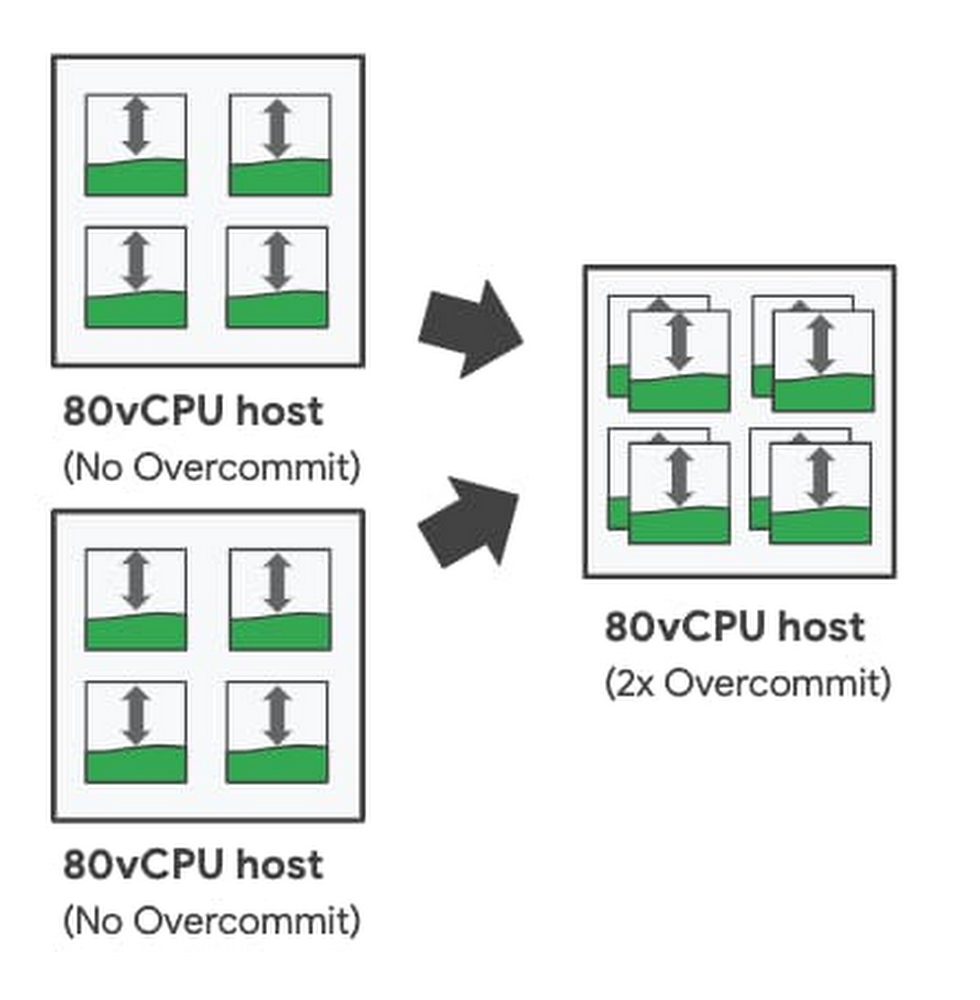
As part of our commitment to provide the most enterprise-friendly, intelligent, and cost effective options for running workloads in the cloud, we are excited to announce CPU overcommit for sole-tenant nodes is now generally available. With CPU overcommit for sole-tenant nodes, you can over-provision your dedicated host virtual CPU resources by up to 2X. CPU overcommit automatically reallocates virtual CPUs across your sole-tenant nodes from idle VM instances to VM instances that need additional resources. This allows you to intelligently pool CPU cycles to reduce compute requirements when running enterprise workloads on dedicated hardware.CPU overcommit for sole-tenant nodes addresses common enterprise challenges such as:Running cost-efficient virtual desktops in the cloud- CPU overcommit for  sole-tenant nodes enables building cost-efficient virtual desktop solutions by intelligently sharing resources across VMs based on usage when dedicated hardware requirements from licensing requirements exist. Improving host utilization and helping to reduce infrastructure costs – CPU overcommit allows you to further increase the available host CPUs on each sole-tenant node. Coupled with custom machine types, CPU overcommit helps optimize memory usage and supports higher utilization for workloads with lower memory footprints.Reducing license costs – For licenses based on host physical-cores — such as bring-your-own-license for Windows Server or Microsoft SQL Server — CPU overcommit for sole-tenant nodes allows you to place more VMs on each licensed server. This allows you to persist on-prem licensing constructs and can help greatly reduce your licensing cost burden when running on Google Cloud.Flexible controlCPU overcommit for sole-tenant nodes is controlled at the VM instance-level by setting the minimum number of guaranteed virtual CPUs per VM along with the maximum burstable virtual CPUs per VM. This gives you flexible per-VM control to mix-and-match VM sizes and overcommit levels on a single sole-tenant node, so you can meet your specific workload needs. For example, when running a traditional virtual desktop workload, you can choose to uniformly overcommit all instances on a sole-tenant node; while for custom application deployments, you can choose tailored CPU overcommit levels (or no overcommit) for workloads with greater performance sensitivity.  With up to a 2X overcommit setting per instance, you can oversubscribe each sole-tenant node by up to twice the number of base virtual CPUs. This means that for an n2-node-80-640 with 80 virtual CPUs, CPU overcommit allows you to treat the node as if there were up to 160 virtual CPUs.Configuring Instance-level CPU OvercommitIntelligent monitoringCPU overcommit for sole-tenant nodes offers detailed metrics to monitor your VM instancesto help you better tune your instance overcommit settings. Using the built-in Scheduler Wait Time metric available in Cloud Monitoring, you can view instance-level wait-time statistics to see the impact of oversubscription on your workload. The scheduler wait-time metric allows you to measure the amount of time your instance is waiting for CPU cycles so that you can appropriately adjust overcommit levels based on workload needs. To help you take action quickly, you can set up Cloud Monitoring to trigger alerts for instance wait-time thresholds.Pricing and availabilitySole-tenant nodes configured for CPU overcommit incur a fixed 25% premium charge. CPU overcommit configured sole-tenant nodes are available on N1 and N2 nodes in regions and zones with sole-tenant node availability. Click here to learn more about Compute Engine and sole-tenant nodes.
Quelle: Google Cloud Platform

The best of Google Cloud Next ‘20: OnAir: Data Management Week for technical practitioners

It’s Week 6 of Google Cloud Next ‘20: OnAir, and this week we’re covering all things databases, from running your favorite open source database with Cloud SQL to building new enterprise solutions using Cloud Spanner. We have a lot of great content to share with you this week, so let’s dig in.Whatever database questions you have—Should I use SQL or NoSQL? Is it horizontally scalable and disaster recovery-ready?—you can get help answering them during this week’s sessions at Next OnAir and through some cool demos showing how to choose your database and how a high availability setup works (I am very proud of our team’s creativity!).After checking out some must-see sessions below, if you have questions, I’ll be hosting a live developer- and operator-focused recap and Q&A session this Friday, August 21 at 9 AM PST. Or, join our APAC team for a recap Friday at 11 AM SGT. Hope to see you then.Personally, I am looking forward to sharing all the amazing things the Cloud SQL team did in the past year with the session: What’s New With Cloud SQL: So much good material, and the highly anticipated PITR (point in time recovery) for PostgreSQL.Another session we couldn’t miss is this one, super useful for those using Kubernetes and maybe need a little help with the connectivity between the products: Connecting to Cloud SQL from Kubernetes: Your application is scaling with all those nodes; how about adding your persistent data storage into Cloud SQL and taking advantage of our high-availability setup?Speaking of Kubernetes, we couldn’t let the cloud-native databases be forgotten:Simplify complex application development using Cloud Firestore: Get a look at how the Firestore database service makes it easy for developers to scale new and existing applications while adding real-time client data synchronization and offline mode capabilitiesModernizing HBase workloads with Cloud Bigtable: See how to move from your preferred NoSQL database to Bigtable using HBase.And if you’re still not sure which is the right tool for you, check out these sessions:How to Choose the Right Database For Your Workloads:Where you’ll see the advantages of each technology according to your needs.Optimally Deploy an Application Cache with Memorystore: Caching everywhere, folks!Also, this week’s Cloud Study Jam will give you an opportunity to participate in hands-on labs on how to use BigQuery tables across different locations and create data transformation pipelines, so you can get real-world data management experience. You’ll get a chance to learn more about how to prepare for Google Cloud’s Professional Data Engineer Certification as well.One thing to remember about databases is that there’s so much you can solve with just one database, and Google Cloud has a broad set of tools to help you solve your data problems. You may have your single source of truth on a Cloud SQL instance, but want to improve your login and product catalog by adding a caching layer with Cloud Memorystore. Being able to use these products together leads to better management and productivity—essential in a modern, fast-moving world.Next OnAir is running now until Sep. 8. You can check out the full session catalog and register at g.co/cloudnext.
Quelle: Google Cloud Platform

Bringing AI supercomputing to customers

The trend toward the use of massive AI models to power a large number of tasks is changing how AI is built. At Microsoft Build 2020, we shared our vision for AI at Scale utilizing state-of-the-art AI supercomputing in Azure and a new class of large-scale AI models enabling next-generation AI. The advantage of large scale models is that they only need to be trained once with massive amounts of data using AI supercomputing, enabling them to then be “fine-tuned” for different tasks and domains with much smaller datasets and resources. The more parameters that a model has, the better it can capture the difficult nuances of the data, as demonstrated by our 17-billion-parameter Turing Natural Language Generation (T-NLG) model and its ability to understand language to answer questions from or summarize documents seen for the first time. Natural language models like this, significantly larger than the state-of-the-art models a year ago, and many orders of magnitude the size of earlier image-centric models, are now powering a variety of tasks throughout Bing, Word, Outlook, and Dynamics.

Training models at this scale requires large clusters of hundreds of machines with specialized AI accelerators interconnected by high-bandwidth networks inside and across the machines. We have been building such clusters in Azure to enable new natural language generation and understanding capabilities across Microsoft products, and to power OpenAI on their mission to build safe artificial general intelligence. Our latest clusters provide so much aggregated compute power that they are referred to as AI supercomputers, with the one built for OpenAI reaching the top-five publicly disclosed supercomputers in the world. Using this supercomputer, OpenAI unveiled in May their 175-billion-parameter GPT-3 model and its ability to support a wide range of tasks it wasn’t specifically trained for, including writing poetry or translation.

The work that we have done on large-scale compute clusters, leading network design, and the software stack, including Azure Machine Learning, ONNX Runtime, and other Azure AI services, to manage it is directly aligned with our AI at Scale strategy. The innovation generated through this process is ultimately making Azure better at supporting the AI needs of all our customers, irrespective of their scale. For example, with the NDv2 VM series, Azure was the first and only public cloud offering clusters of VMs with NVIDIA’s V100 Tensor Core GPUs, connected by high-bandwidth low-latency NVIDIA Mellanox InfiniBand networking. A good analogy is how automotive technology is pioneered in the high-end racing industry and then makes its way into the cars that we drive every day.

New frontiers with unprecedented scale

“Advancing AI toward general intelligence requires, in part, powerful systems that can train increasingly more capable models. The computing capability required was just not possible until recently. Azure AI and its supercomputing capabilities provide us with leading systems that help accelerate our progress”  – Sam Altman, OpenAI CEO

In our continuum of Azure innovation, we’re excited to announce the new ND A100 v4 VM series, our most powerful and massively scalable AI VM, available on-demand from eight, to thousands of interconnected NVIDIA GPUs across hundreds of VMs.

The ND A100 v4 VM series starts with a single virtual machine (VM) and eight NVIDIA Ampere A100 Tensor Core GPUs, but just like the human brain is composed of interconnected neurons, our ND A100 v4-based clusters can scale up to thousands of GPUs with an unprecedented 1.6 Tb/s of interconnect bandwidth per VM. Each GPU is provided with its own dedicated topology-agnostic 200 Gb/s NVIDIA Mellanox HDR InfiniBand connection. Tens, hundreds, or thousands of GPUs can then work together as part of a Mellanox InfiniBand HDR cluster to achieve any level of AI ambition. Any AI goal (training a model from scratch, continuing its training with your own data, or fine-tuning it for your desired tasks) will be achieved much faster with dedicated GPU-to-GPU bandwidth 16x higher than any other public cloud offering.

The ND A100 v4 VM series is backed by an all-new Azure-engineered AMD Rome-powered platform with the latest hardware standards like PCIe Gen4 built into all major system components. PCIe Gen 4 and NVIDIA’s third-generation NVLINK architecture for the fastest GPU-to-GPU interconnection within each VM keeps data moving through the system more than 2x faster than before. 

Most customers will see an immediate boost of 2x to 3x compute performance over the previous generation of systems based on NVIDIA V100 GPUs with no engineering work. Customers leveraging new A100 features like multi-precision Tensor Cores with sparsity acceleration and Multi-Instance GPU (MIG) can achieve a boost of up to 20x.

“Leveraging NVIDIA’s most advanced compute and networking capabilities, Azure has architected an incredible platform for AI at scale in the cloud. Through an elastic architecture that can scale from a single partition of an NVIDIA A100 GPU to thousands of A100 GPUs with NVIDIA Mellanox Infiniband interconnects, Azure customers will be able to run the world’s most demanding AI workloads.” – Ian Buck, General Manager and Vice President of Accelerated Computing at NVIDIA

The ND A100 v4 VM series leverages Azure core scalability blocks like VM Scale Sets to transparently configure clusters of any size automatically and dynamically. This will allow anyone, anywhere, to achieve AI at any scale, instantiating even AI supercomputer on-demand in minutes. You can then access VMs independently or launch and manage training jobs across the cluster using the Azure Machine Learning service.

The ND A100 v4 VM series and clusters are now in preview and will become a standard offering in the Azure portfolio, allowing anyone to unlock the potential of AI at Scale in the cloud. Please reach out to your local Microsoft account team for more information.
Quelle: Azure

Share big data at scale with Azure Data Share in-place sharing for Azure Data Explorer

This post was co-authored by Jie Feng Principal Program Manager, and Sumi Venkitaraman Senior Product Manager, Microsoft Azure.

Microsoft Azure Data Share is an open, easy, and secure way to share data at scale by enabling organizations to share data in-place or as a data snapshot. Microsoft Azure Data Explorer is a fast and highly scalable data analytics service for telemetry, time-series, and log data.

Fueled by digital transformation, modern organizations want to increasingly enable fluid data sharing to drive business decisions. Seamlessly sharing data for inter-departmental and inter-organizational collaboration can unlock tremendous competitive advantage. Maintaining control and visibility, however, remains an elusive goal. Even today, data is shared using File Transfer Protocols (FTPs), application programming interfaces (APIs), USB devices, and email attachments. These methods are simply not secure, cannot be governed, and are inefficient at best.

Azure Data Share in-place Sharing for Azure Data Explorer, now generally available, enables you to share big data easily and securely between internal departments and with external partners, vendors, or customers for near real-time collaboration.

Once data providers share data, recipients (data consumers) always have the latest data without needing any additional intervention. Additionally, data providers maintain control over the sharing and can revoke access at will. By being able to centrally manage all shared relationships, data providers gain full control of what data is shared and with whom. Operating within a fully managed environment that can scale on-demand, data providers can focus on the logic while Data Share manages the infrastructure.

Here is what our customers are saying:

“Our clients love that ability to easily, seamlessly, and securely connect to their data and then build their own custom reports and analytics. And near real-time sharing with Azure Data Explorer and Azure Data Share permits cross-organizational data collaboration without compromising data security.” —Paul Stirpe, CTO, Financial Fabric

“We’re excited by the prospect of leveraging in-place sharing with Azure Data Explorer and Azure Data Share. The ability to give stakeholders near real-time access will allow them to prioritize product development and improve customer uptime. With a focus on data privacy, we have also been able to ensure secure and easy analysis of telemetry data, with no performance impact to our core infrastructure.” —Saajan Patel, IT Product Manager, Daimler Trucks North America

How in-place data sharing works

Data providers can initiate sharing by specifying the Azure Data Explorer cluster or database they want to share, who to share with, and terms of use. Next, the Data Share service sends an email invitation to the data consumer who can accept the sharing.

After the sharing relationship is established, Data Share creates a symbolic link between the provider and consumer's Azure Data Explorer cluster. This enables the data consumer to read and query the data in near real-time. Access to the data uses compute resources from the consumer's Azure Data Explorer cluster.

With Azure Data Explorer, data is cached, indexed, and distributed on the compute nodes within the cluster and persisted on Azure storage. Since the compute and storage are decoupled, multiple consuming clusters can be attached to the same source storage with different set of caching policies without impacting the performance and security of the source cluster.

The in-place sharing capability is a game changer for organizations looking for near real-time big data collaboration between internal departments or with external partners and customers.

Get started

To learn more and get started today using Azure Data Share in-place sharing for Azure Data Explorer see these resources:

Watch the Azure Friday video, How to share data in place from Azure Data Explorer.
Read the QuickStart guide, Create Azure Data Explorer cluster and database.
Read Use Azure Data Share to share data with Azure Data Explorer.
See the Financial Fabric case study.
Read the Share IoT and Log data in real-time using Azure Data Share and Azure Data Explorer blog.

Quelle: Azure





