Bucket list: Better log storage and management for Cloud Logging

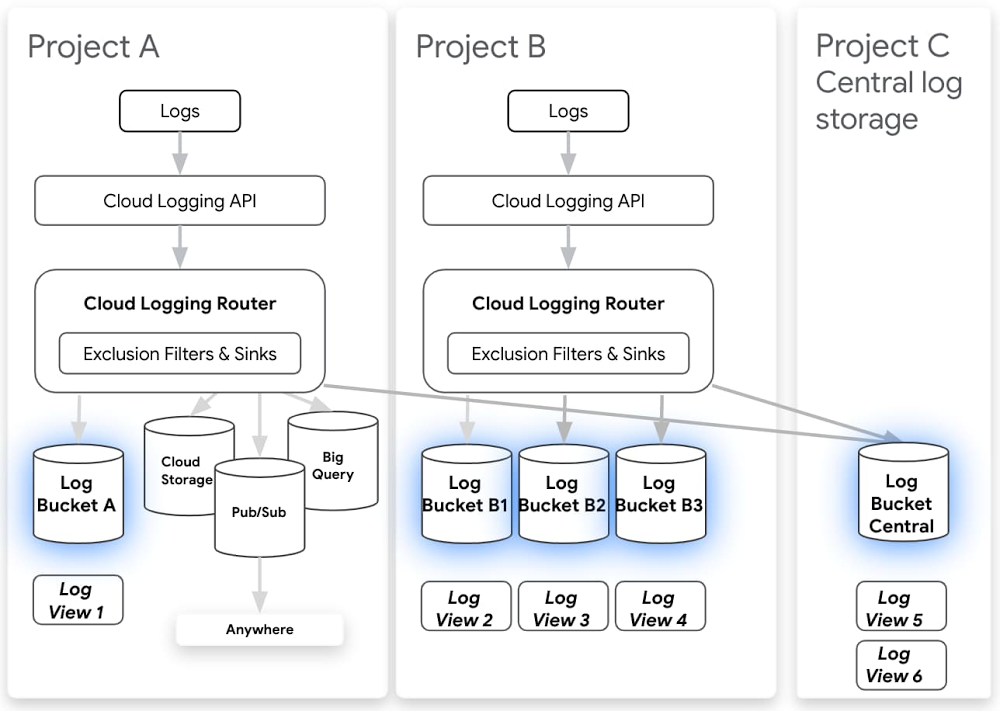
As more organizations move to the cloud, the volume of machine generated data has grown exponentially and is increasingly important for many teams. Software engineers and SREs rely on logs to develop new applications and troubleshoot existing apps to meet reliability targets. Security operators depend on logs to find and address threats and meet compliance needs. And well structured logs provide invaluable insight that can fuel business growth. But first logs must be collected, stored and analyzed with the right tools, and many organizations have found they can be expensive to store and difficult to manage at scale.Our goal for Google Cloud Logging has always been to make logging simpler, faster, and more useful for our customers. That means making it easy to search and analyze logs as well as providing a secure, compliant, and scalable log storage solution. Today we’re announcing a number of improvements to log storage and management, building on several recent improvements for exploring and analyzing logs. Here’s a selection of what’s new:Logs buckets (beta) Logs views (alpha) Regionalized log storage (alpha) Customizable retention (generally available)Cloud Logging Router (generally available – new functionality in beta)Exploring and analyzing logs (generally available)New logs viewerHistogramsField explorer Regular expression support Logging DashboardCloud Logging has been deeply integrated in Google Cloud Platform from the beginning. We automatically collect logs from dozens of Google Cloud services including audit logs, which play a key role in security and compliance. These logs are available right in context from places like Compute Engine, Cloud Functions, App Engine and more to improve development velocity and troubleshooting. Our challenge was to build a logging storage solution that was flexible enough to meet many different organizational needs while preserving the in-context experience and enterprise-class security around logs.We do this by introducing “logs buckets” as a first-class logs storage solution in Cloud Logging. Using logs buckets, you can centralize or subdivide your logs based on your needs. From the name, logs buckets may sound like Cloud Storage buckets, but logs buckets are built on the same logging tech stack we’ve been using to deliver your logs in real time with advanced indexing and optimizations for timestamps so that you can keep benefiting from our logs analytics features. In order to support logs buckets, we’ve also augmented the Cloud Logging router to give you more control over where your logs go. Previously, there were different models to manage which logs went to Cloud Logging vs. other destinations including BigQuery, Cloud Storage and Pub/Sub. Now, you can manage all destinations consistently using log sinks, and all log sinks can also support exclusions, making it easier to configure the logs you want to the right destination. You can also now route logs from one project to another or even use aggregated log sinks from across folders or organization level for security and ease of maintenance.Here are some examples of solutions our alpha customers have built using logs buckets:Log centralization – Centralize all logs from across an organization to a single Cloud Logging project. This solution was so popular among security teams that we’ve put together a dedicated user guide for centralizing audit logs, but you can centralize any or all logs in your org. This allows you to identify patterns and comparisons across projects.Splitting up logs from a single project for GKE multi-tenancy – Send logs from one shared project to other projects owned by individual development teams. One of our alpha customers’ favorite things about logs buckets is that we do magic behind the scenes to look up where your logs are stored. That way, you can, for example, still view those logs for your Kubernetes cluster in the GKE console in project A, even if they’re stored centrally in project B. Get started with this user guide.Compliance-related retention – Logs buckets also allow you to take advantage of advanced management capabilities such as setting custom retention limits or locking a logs bucket so that the retention cannot be modified. We’ve recently launched custom retention to GA and are excited to announce that you can use custom retention through the end of March 2021 for no additional cost. This gives you a chance to try out log management for your long-term compliance and analytics needs for logs without a commitment.Regionalized log storage – You can now keep your logs data in a specific region for compliance purposes. When you create a logs bucket, you can set the region in which you want to store your logs data. Setting the location to global means that it is not specified where the logs are physically stored. The logs bucket beta only supports the global location, but more regions are available in the regionalized logs storage alpha. Sign up for the alpha or to be notified when more regions are publicly available.Another piece of feedback we hear is that you’d like to be able to configure who has access to logs based on the source project, resource type or log name. We’ve also introduced log views so that you can specify which logs a user should have access to, all using standard IAM controls. Logs views can help you build a system using the principle of least privilege, limiting sensitive logs to only users who need this information. While we’ve created logs views automatically for you to preserve limited access to sensitive logs, you’ll soon be able to create your own logs views based on the source project, resource type or log name. If you’d like to try it out in alpha, sign up here.Getting started Having the right logs, and being able to access them easily, is essential for development and operations teams alike. We hope these new Cloud Logging features make it easier for you to find and examine the logs you need. To learn more about managing logs in Google Cloud, check out these resources: OPS100 – Designing for Observability on Google CloudMulti-tenant logging on GKEStoring your organization’s logs in a centralized Logs Bucket
Quelle: Google Cloud Platform
Multi-language Dataflow pipelines enabled by new, faster architecture

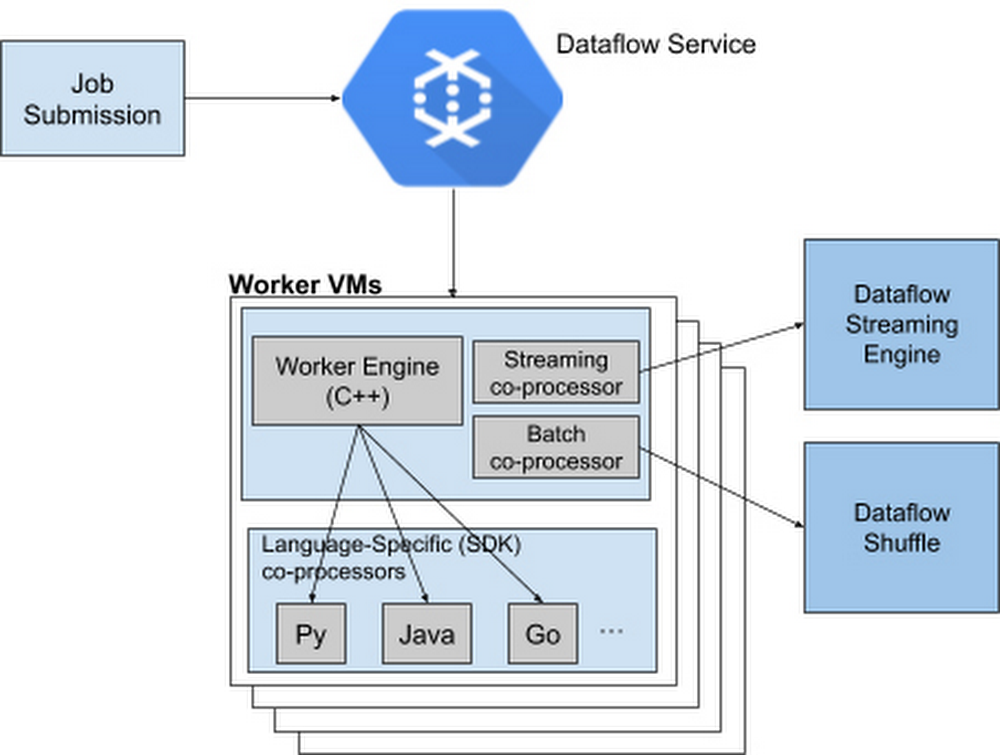
What do you do when your development and data science teams work in different language SDKs or if there are features available in one programming language, but not available in your preferred language? Traditionally, you’d either need to create workarounds that bridge the various languages, or else your team would have to go back and recode. Not only does this cost time and money, it puts real strain on your team’s ability to collaborate.  Introducing Dataflow Runner v2To overcome this, Google Cloud has added a new, more services-based architecture called Runner v2 (available to anyone building a pipeline) to Dataflow that includes multi-language support for all of its language SDKs. This addition of what the Apache Beam community calls “multi-language pipelines” lets development teams within your organization share components written in their prefered language and weave them into a single, high-performance, distributed processing pipeline.This architecture solves the current problem where language-specific worker VMs (called Workers) are required to run entire customer pipelines. If features or transforms are missing for a given language, they must be duplicated across various SDKs to ensure parity; otherwise, there will be gaps in feature coverage and newer SDKs like Apache Beam Go SDK will support fewer features and exhibit inferior performance characteristics for some scenarios.Runner v2 includes a more efficient and portable worker architecture rewritten in C++, which is based on Apache Beam’s new portability framework, packaged together with Dataflow Shuffle for batch jobs and Streaming Engine for streaming jobs. This allows us to provide a common feature set going forward across all language-specific SDKs, as well as share bug fixes and performance improvements.Dataflow Runner v2 is available today with Python streaming pipelines. We encourage you to test out Dataflow Runner v2 with your current (non-production) workloads before it is enabled by default on all new pipelines. You do not have to make any changes to your pipeline code to take advantage of this new architecture.Dataflow Runner v2 comes with support for many new features that are not available in the previous Dataflow runner. In addition to support for multi-language pipelines, Dataflow Runner v2 also provides full native support for Apache Beam’s powerful data source framework named Splittable DoFn, and support for using custom containers for Dataflow jobs. Also, Dataflow Runner v2 enables new capabilities for Python streaming pipelines, including Timers, State, and expanded support for Windowing and Triggers. Using Java implementations in PythonApache Beam’s multi-language capabilities are unique among modern-day data processing frameworks, letting Runner v2 make it easy to provide new features simultaneously in multiple Beam SDKs by writing a single language-specific implementation. For example, we have made the Apache Kafka connector and SQL transform from the Apache Beam Java SDK available for use in Python streaming pipelines starting with Apache Beam 2.23. To see it for yourself, check out the Python Kafka connector and the Python SQL transform that utilizes corresponding Java implementations. To use newly supported Python transforms with Dataflow Runner v2, simply install the latest Java Development Kit (JDK) supported by Apache Beam on your computer and use Python transforms in your Dataflow Python streaming pipeline. For example:For more details regarding pipeline setup and usage of the newly supported transforms, see the Apache Beam Python examples for Kafka and SQL transform.How cross-language transforms workUnder the hood, to make Java transforms available to a Dataflow Python pipeline, the Apache Beam Python SDK starts up a local Java service on your computer to create and inject the appropriate Java pipeline fragments into your Python pipeline. The SDK then downloads and stages the necessary Java dependencies needed to execute these transforms.At runtime, the Dataflow Workers will execute the Python and Java code side by side to run your pipeline. And we’re working on making more Java transforms available to Beam Python through the multi-language pipelines framework.Next stepsEnable Runner v2 to realize the benefits of multi-language pipelines and performance improvements in Python pipelinesTry accessing Kafka topics from Dataflow Python pipelines by following this tutorialTry embedding SQL statements in your Dataflow Python pipelines by using this example
Quelle: Google Cloud Platform

Docker Desktop & WSL 2 – Backport Update

While we have continued to make improvements to our Windows experience on Docker Desktop for users of HyperV, we are excited to see that Microsoft has announced the backport of WSL 2 to Windows version 1903 and 1909. This means that as of today, Docker Desktop Edge users will be able to use Docker Desktop with WSL 2 rather than our legacy HyperV based backend. This is available not only for Windows Pro and Windows Enterprise, but also for Windows Home users. This is the first time that Docker has been available on Windows Home versions 1903 and 1909!

This means that these developers will be able to take advantage of WSL 2 and Docker’s integration, allowing developers to store their code within their WSL 2 distro and run the Docker CLI from within this distro. This removes the need to access files stored on the Windows host and provides significant performance improvements for users.

To find out more about using Docker Desktop with WSL 2, check out Simon’s full tips and tricks article. If you want to learn more about how Docker developed the WSL 2 backend you can have a look through our history of the integration or learn more about the implementation details of the backend check out one of Simon’s other blog posts. 

If you are enjoying Docker Desktop but have ideas of what we could do to make it better then please give us feedback. You can let us know what features you want to see next via our roadmap, including voting up GPU support for WSL 2. Or if you are new to Docker, download Docker Desktop and get started with WSL 2 today.
The post Docker Desktop & WSL 2 – Backport Update appeared first on Docker Blog.
Quelle: https://blog.docker.com/feed/





