EFK stack on Kubernetes (Part 1)

appfleet.com – This is the first post of the 2 part series where we will set-up production grade Kubernetes logging for applications deployed in the cluster and the cluster itself. We will be using Elasticsearch as…
Quelle: news.kubernauts.io

Google Cloud Application Modernization Program: Get to the future faster

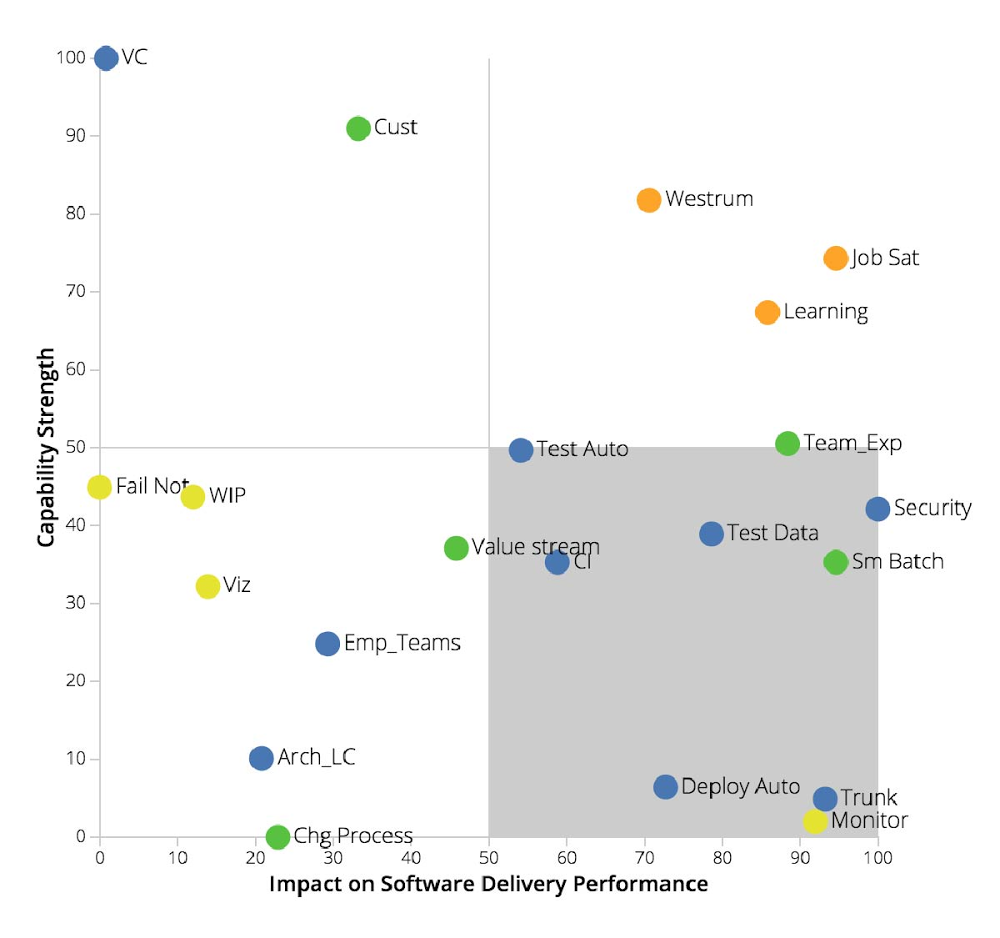
It’s been almost 10 years since Marc Andreessen coined the phrase ‘software is eating the world.’ In that time, organizations have come to realize the fundamental truth of this idea, and have started their own journeys into becoming software companies. As large enterprises embrace the journey, they are looking for advice and a proven set of practices to guide their progress. They don’t have 10 more years to figure it out.Which is why today, we’re introducing Google Cloud App Modernization Program (Google CAMP). Google CAMP is based on our experience of driving application delivery at speed and scale. Examples of this scale include deploying 12M builds and running 650M test cases daily, along with processing 2.5 exabytes of logs every month and parsing over 14 quadrillion monitoring metrics. Google CAMP also reflects learnings gained via six years of research by DevOps Research and Assessment(DORA) into practices that drive high performance. Google CAMP allows large enterprises to modernize application development and delivery and drive improvements in speed, which directly drives a business’s bottom line. DORA’s research with over 31,000 IT professionals highlights that “Elite” teams that ship code numerous times per day are 1.53 times more likely to achieve or exceed their commercial goals, including profitability, and market share.Google CAMP drives improved business results via three main components: 1) tailored modernization advice gained through a data-driven assessment; 2) concrete solutions, recommendations, and best practices for application modernization; 3) a modern, yet extensible platform for everything from writing code, to running, operating, and securing your applications.The Google CAMP approach While the need for application modernization is evident, forging a path forward can be challenging for large organizations. Common hurdles revolve around maintaining visibility and control across disparate on-prem, hybrid, and cloud environments, often resulting in a disjointed developer experience. Additionally, navigating the modernization path necessitates an understanding of how to drive continuous progress, while leveraging the right metrics to guide business and IT decisions. Finally, while changing culture is critical, it’s hard—common pitfalls include treating transformation as a one-time project or driving app modernization as a top-down effort.Google CAMP addresses these challenges in the following ways, thereby helping large enterprises successfully modernize their applications:1. Data-driven assessment and benchmarking: First and foremost, Google CAMP provides a data-driven baseline assessment. Whether you’re building a Kubernetes, serverless, or mainframe application, the Google CAMP assessment shows you where to start your application modernization journey, identify your priorities, and how to maximize your ROI. Unlike a one-size-fits-all maturity model, the Google CAMP assessment is tailored to your organization, your processes, and your teams. You can benchmark yourself against other lines of business in your company, the overall IT industry, or elite performers within your industry. Next, the Google CAMP assessment shows you where your bottlenecks are and how to make the biggest and most impactful investments. Here’s an example of a final assessment report. Below, trunk-based development and monitoring are the highest impact and lowest current capability, making them ideal targets for the organization to prioritize as part of its application modernization initiative.Before your teams take the full Google CAMP assessment and Google Cloud experts start to help you set your priorities, it is worthwhile to try our quick check assessment tool. Within a couple of minutes, you’ll get a good sense of how your organization is performing and identify some quick wins you can implement. 2. A modern, yet extensible platform: Google CAMP leverages existing GCP product offerings to help you to build, run, secure, and manage both legacy and net-new applications. Google Cloud has end-to-end tooling developed from the ground up to support modern cloud-native principles. Examples of these principles include building on a strong security foundation, providing fast feedback on changes, gradual rollouts, rapid elasticity, etc. Tools available include Cloud Code, Cloud Build, Container Registry, and Cloud Ops. For compute, customers have the choice of using Google Kubernetes Engine (GKE), Cloud Run, and Anthos. In Q2 of 2020 alone, more than 100,000 companies used these products to modernize their application development and delivery.Adopters of tools available via Google CAMP have achieved both speed and reliability, while delivering higher-quality products and services at lower cost. MediaMarktSaturn Retail Group, a German holding company and the leading consumer electronics retailer in Europe with headquarters in Ingolstadt, Germany, partnered with Google Cloud to modernize its applications. “In April and June with COVID-19 on the rise, we saw a 145% traffic increase across our digital channels. We responded to this shift by modernizing our apps and web shop using Google Cloud. This strong growth for our online business, built on top of Google Cloud, in turn made us the third largest e-commerce player in Germany,” said Johannes Wechsler, Managing Director at MediaMarktSaturn Technology. “Thanks to Cloud Run, Google Cloud’s fully managed compute platform, we are able to bring applications in the hands of our customers 8x faster than before and with a 40% cost reduction.”3. Proven practices, solutions, and recommendations: Last but not least, Google CAMP brings together a tailored set of technical, process, measurement, and cultural practices along with app modernization solutions and recommendations based on years of DORA’s scientific research along with Google’s own internal experience. These cover the entire gamut of the application lifecycle, from writing code, to running, operating, and securing applications. Examples of these practices include driving alignment between developers and operators, lean product development, and technical practices such as implementing loosely coupled architectures, continuous testing, and more. Learn more about Google CAMPModernizing applications and software development processes is one of the hardest challenges facing today’s enterprises. With Google CAMP, large organizations across all industries can modernize to generate powerful business outcomes. Here are some ways you can learn more about Google CAMP:Watch the Google Cloud Next ‘20: OnAir keynote introducing Google CAMPBefore engaging in a full Google CAMP assessment, do a quick check assessment to compare your performance with the rest of industry. With just five questions, it takes less than 2 minutes.Read more about how you can accelerate application development and delivery with Google CAMP tooling Consider how Anthos can augment your application acceleration plans.
Quelle: Google Cloud Platform

Accelerate your application development and delivery

Delivering software quickly, reliably, and safely is at the heart of every digital transformation and application modernization journey. After all, an increase in speed generates powerful business outcomes. As showcased by research from DevOps Research and Assessment (DORA),software speed, stability, and availability contribute directly to organizational performance (including profitability, productivity, and customer satisfaction). Today, we are announcing new additions to our application development and delivery platform to help developers, operators, and security professionals deliver better quality software to production, faster. These new capabilities embed best practices we’ve learned at Google over the years while building applications at scale. They’re also consistent with research performed by DORA over the past six years with over 31,000 IT professionals. Let’s take a closer look at the new features and services that can help you accelerate application development and delivery today. Driving developer productivityFirst, we’ve added support for Cloud Run, our fully managed container platform, into our Cloud Code IDE plugins. Now you can write, deploy, and debug containerized applications directly from your IDEs such as VS Code and IntelliJ onto our fully managed serverless runtime. The integration comes with starter templates in various languages including Java, Node.js, Python, and Go—making it easy to get started and observe best practices. This in turn helps you rapidly explore the core benefits of Cloud Run such as automated day 2 operations, and cost-effective, automatically scaled containerized applications. Second, we built in extensive support for fast feedback as part of the local development loop. To achieve this, Cloud Code includes a new Cloud Run emulator for VS Codeand IntellIJ that runs on your local machine to let you quickly validate changes, thereby taking away the toil of iterating on and redeploying changes. Once you’ve vetted the changes locally, you can push the changes directly as an update/revision to Cloud Run right from within the IDE. With the ability to rapidly iterate on your code locally as well in the cloud, you can catch issues early and resolve any issues discovered in the live application.Third, to further enable you to start building applications quickly we’ve added built-in support for Google Cloud Buildpacks in Cloud Code. Developers should focus their effort on translating business requirements into code—not working out how to containerize that code. Today, developers spend a lot of time writing Dockerfiles and defining how a container should be built. This process is error-prone and requires skills and time that are better spent developing new functionality. Google Cloud Buildpacks pull together all the dependencies and frameworks required to run your application without a Dockerfile. These buildpacks also provide a great way for security teams to validate what runs on the platform, ensuring compliance and an enhanced security posture. Cloud Buildpacks are fully supported by Google Kubernetes Engine (GKE), Cloud Run and Anthos. The above enhancements in Cloud Code and Cloud Run streamline application development and delivery. As you build larger applications and automate increasingly complex business processes, you may need to integrate Google Cloud APIs, External APIs, and our serverless runtimes. We are announcing two new products to assist with this process. Events for Cloud Run is now available in beta. Events for Cloud Run allows you to connect Cloud Run services with events from a variety of sources, including GCP services, your own software, GitHub, etc. We are also excited to introduce Workflows in beta, to help you integrate custom actions, Google APIs and third-party APIs. This includes support for advanced features such as passing values between steps, parsing JSON responses to objects, iterating arrays, error handling and retries, and more. Workflows are serverless, so there is no infrastructure to manage and the product takes care of rapid scaling, following your business demand. Events and Workflows allow you to automate even the most complex business requirements.Securing the software supply chain  Accelerated software delivery goes hand in hand with “shifting left” on security. And in an era of ubiquitous threats, securing the software supply chain is vitally important. However, you don’t want security reviews to slow you down. DORA’s research highlights how the highest performing “Elite” teams are able to conduct security reviews in days, by building security throughout the software development process. The same process can take weeks for low performers. To help you improve your security posture and employ practices implemented by Elite performers, Artifact Registry is now available in beta. With Artifact Registry, you can now  manage and secure artifacts like maven and npm language packages, along with Docker images. Artifact Registry also provides greater visibility and control over the different types of artifacts that go through your software supply chain, and now supports regional repositories and creating multiple repositories per project. Enterprises can also now use VPC-SC to restrict access to the repository to callers within a security perimeter, and leverage customer-managed encryption keys to encrypt the contents of the repositories.Built-in deployment best practices When it comes time to push your code to production, automating your deployments is a game changer. That’s reflected in DORA’s research: 69% of Elite teams automate their deployments, in comparison to 17% of low performers. Automating deployments also reduces the stress of pushing changes and frees teams up for important refactoring, design, and documentation work. To help you more easily automate your deployments, Cloud Run now supports traffic splitting and gradual rollouts. Before, changes were pushed to all users in production, but now you collect feedback from a small percentage of users. This way, you can limit the “blast radius” of a problematic code change and perform a rollback if need be. We follow a similar process internally to roll out changes to google.com, Gmail, and many other services.To further drive deployment automation, we have also made it easy to set up Continuous Deployment directly from the Cloud Run user interface. Simply connect a git repository, specify the branch to watch for changes, and your code will be automatically deployed to Cloud Run when new changes are pushed.  Enterprise additions to serverless servicesRecently we announced Serverless VPC access that allows serverless services to access resources in a VPC network, and now we are excited to announce that it supports Shared VPC, enabling enterprises to connect their serverless services to Shared VPC networks and any on-prem resources connected by VPN or Cloud Interconnect.Deliver better software, fasterOur goal with these releases is to give you the speed, security, and stability you need to implement application development and deliver practices employed by Elite DevOps teams. You can see all of these new features in action here. We have also incorporated the best practices as a part of our Google Cloud App Modernization Program (CAMP). To learn more about CAMP along with more about these new features, join us at the following Next OnAir sessions:Develop for Cloud Run in the IDE with Cloud CodeCloud Run: What’s New? Serverless Workflows in Google CloudEvent-driven Microservices with Cloud RunBuildpacks on Google Cloud
Quelle: Google Cloud Platform

Anthos rising—now easier to use, for more workloads

Today more than ever, customers ask for help addressing two critical business needs: reimagining their application portfolios and driving cost savings. Earlier today, we announced Google Cloud App Modernization Program, or Google CAMP. We built this program to help you innovate faster, so you can reach your customers with world-class, secure, reliable applications, all while saving on costs. Google CAMP does this with a consistent development and operations experience, tools, best practices and industry leading-guidance on how to develop, run, operate and secure applications. A key component of Google CAMP is Anthos, our hybrid and multi-cloud cloud modernization platform. In fact, we recently announced BigQuery Omni, a multi-cloud analytics solution, powered by Anthos. And today, building on that momentum, we’re excited to share several new Anthos capabilities with you. Bring AI to hybrid environmentsWhether it’s image recognition, pattern detection, conversational chatbots, or any number of other emerging use cases for artificial intelligence (AI), organizations are eager to incorporate AI functionality into their offerings. AI models require a lot of data, which more often than not resides in an organization’s data center—not in the cloud. Further, many organizations’ data is sensitive and must stay on-prem. As a result, you’re often forced to rely on fragmented solutions across on-prem and cloud deployments, or to minimize your use of AI entirely. With Anthos, you don’t have to make those types of compromises. Today we’re pleased to announce hybrid AI capabilities for Anthos, designed to let you use our differentiated AI technologies wherever your workloads reside. By bringing AI on-prem, you can now run your AI workloads near your data, all while keeping them safe. In addition, hybrid AI simplifies the development process by providing easy access to best-in-class AI technology on-prem. The first of our hybrid AI offerings, Speech-to-Text On-Prem, is now generally available on Anthos through the Google Cloud Marketplace. Speech-to-Text On-Prem gives you full control over speech data that is protected by data residency and compliance requirements, from within your own data center. At the same time, Speech-to-Text On-Prem leverages state-of-the-art speech recognition models developed by Google’s research teams that are more accurate, smaller, and require less computing resources to run than existing solutions.We collaborated with organizations across many industries to design Anthos’ hybrid AI capabilities. One customer in particular is Iron Mountain, a global leader for storage and information management services. “Iron Mountain built its InSight product on Google Cloud’s AI technology because it was by far the best AI service available. Now with Anthos hybrid AI, we can bring Google’s AI technology on site,” said Adam Williams, Director, Software Engineering at Iron Mountain. “Anthos is hybrid done right, allowing us to build software quickly in the cloud, and seamlessly deploy it on-premises for applications that have data residency and compliance requirements. Thanks to Anthos we have been able to meet our customers where they are and open up millions of dollars of new opportunities.” You can get started today with Speech-to-Text On Prem with five supported languages, with more coming soon. Think services-first for more workloadsMany of our customers choose Anthos because of its service-first approach (versus infrastructure-first). Anthos lets you automate those services, allowing you to proactively monitor and catch issues early. It does so with declarative policies that treat “configuration as data,” so you can minimize manual errors while maintaining your desired configuration state.These are some of the reasons that leading global financial-services provider Macquarie Bank chose Anthos as its application modernization platform. “Embracing Anthos enables us to move at the speed of now, by absorbing the complexity of building secure and efficient distributed systems,” said Richard Heeley, CIO, Banking and Financial Services, Macquarie Bank. “This means we can focus on driving innovation and delivering leading banking experiences for our customers, now and into the future.” We’ve also been doing more to bring the benefits of this services-first approach to a wider range of workloads. Today we are introducing Anthos attached clusters, which let you manage any Kubernetes cluster with the Anthos control plane—including centralized management for configuration and service mesh capabilities.We are also excited to share that Anthos for bare metal is now in beta, which lets Anthos run on-prem and at edge locations without a hypervisor. Anthos for bare metal provides a lightweight, cost-effective platform that minimizes unnecessary overhead and opens up new cloud and edge use cases. In fact, Google is itself an early adopter for Anthos for bare metal, working towards using it as a platform to run containers internally for our production workloads.Faster development cyclesWriting and managing production workloads can be labor-intensive. There are many ways Anthos can help your developers, security teams and operators be more productive. Let’s take a look at the newest capabilities. First, we’ve united our Cloud Code Integrated Development Environment (IDE) plugins with Cloud Run for Anthos. This allows you to build serverless applications directly from IDEs like VS Codeand Intellij. Supported languages include Java, Node.js, Python and Go. Once you’ve written your code, the new Cloud Code-Cloud Run emulator lets you quickly validate local changes on your own machine, with automated re-deploys on every saved code change. You can even use this emulator to locally debug your Cloud Run apps. When your code is ready, you can push changes directly to a remote dev environment in the cloud, right from the IDE.Additionally, Cloud Code now lets you create Kubernetes clusters with Cloud Run for Anthos enabled, right from within your IDE, pre-populating key details like project ID, zone/region, number of nodes, etc.Expand your security optionsWe built Anthos with a security-first approach from day one, following principles of least-privilege and extending defense-in-depth to your deployments. This simplifies everything from release management, to updating and patching. In particular, identity and authentication play a key role in securing your deployments—all the more so in Anthos environments that can span a variety of cloud and on-prem environments. Today, we’re announcing Anthos Identity Service, which extends your existing identity solutions to seamlessly work with Anthos workloads. With support for OpenID Connect, (generally available on-prem and in beta for Anthos on AWS), you can leverage your existing identity investments and enable consistency across environments. We will be adding support for additional protocols in the coming months.Then, with the new Anthos security blueprints you get best practices in a templated format, making it easy for you to quickly adopt best practices like auditing and monitoring, policy enforcement and enforcing locality restrictions. Anthos security blueprints also give you purpose-built solutions to automate governance, compliance and data residency for regulated industries such as financial services, retail and public sector. Finally, through Google Cloud Marketplace, we’ve made containerized applications for various use cases such as security, analytics, developer tools, etc. easier to access than ever before. Because of this, sales of partner SaaS offerings through the Google Cloud Marketplace have increased 3x since the beginning of 2020. Take the first step with easier migration As you look to modernize, the first step is often to migrate specific workloads before you can build on top of them. But moving VM-based workloads to containers can be very complex. You may not even have access to the source code, especially for third-party software, making manual containerization impossible.Today we’re also announcing new capabilities to make migrating your workloads to Anthos easier—even ones for which you don’t have the source code.Migrate for Anthos, widely used today as a low-friction path for migrating workloads to GKE, now provides build migration automation using the new CRD-based API to integrate with your custom processes and tooling. This enables several new features:Support for Anthos deployed on-prem so that you can convert VMs running on-prem—and keep them there—if you need that flexibility. Support for Windows containers, now in beta, for anyone looking to start converting their Windows workloads. Integration into the Google Cloud Console web admin UI, making it easier to monitor ongoing migrations or perform multiple migrations at once.One of our customers, the national British newspaper The Telegraph, uses Migrate for Anthos to accelerate its modernization. “The Telegraph was running a legacy content management system (CMS) in another public cloud on several instances. Upgrading the actual system or migrating the content to our main Website CMS was problematic, but we wanted to migrate it from the public cloud it was on,” said Lucian Craciun, Head of Technology, Platforms, The Telegraph. “We found out about Migrate for Anthos and gave it a try, and in about one month we were able to containerize and migrate all of those CMS workloads to GKE. We are already seeing significant savings on infrastructure and reduced day-to-day operational costs.”In addition, we’re making it easier for you to migrate workloads from Cloud Foundry, a first-generation cloud application platform. This new migration feature uses Kf on Anthos, which presents developers with a Cloud Foundry-like interface on top of Anthos. With this approach, you can benefit from Anthos’ operational benefits (e.g., declarative operations, service mesh, etc.), while minimizing disruption for your developers.More workloads from more places, with more ease No matter where you run your workloads—in Google Cloud, on-prem, in other clouds or at the edge—Anthos provides a consistent platform on which your teams can quickly build great applications that adapt to an ever-changing world. Over the coming weeks, we will publish deep dives into each of these areas with more detailed information; in the meanwhile, to learn more about these launches, as well as how to get the most out of Anthos, check out these great sessions that are going live at Google Cloud Next ‘20: OnAir this week:Anthos deep dive: part oneAnthos deep dive: part two
Quelle: Google Cloud Platform

From the ballpark to the cloud: How MLB is using Anthos

Whether it’s calculating batting averages or hot dog sales, data is at the heart of baseball. For Major League Baseball (MLB), the governing body of the sport known as America’s National Pastime, processing, analyzing, and ultimately making decisions based on that data is key to running a successful organization, and they’ve increasingly turned to Google Cloud to help them do it.MLB supports 30 teams spread across the US and Canada, running workloads in the cloud as well as at the edge with on-premises data centers at each of their ballparks. By using Anthos, they can containerize those workloads and run them in the location that makes the most sense for the application. We sat down with Kris Amy, VP of Technology Infrastructure at Major League Baseball, to learn more.Eyal Manor: Can you tell us a little bit about MLB and why you chose Google Cloud?Kris Amy: Major League Baseball is America’s pastime. We have millions of fans around the world, and we process and analyze extreme amounts of data. We know Google Cloud has tremendous expertise in containerization, AI and big data. Anthos enables us to take advantage of that expertise whether we’re running in Google Cloud, or running on-prem in our stadiums. Eyal: Why did you choose Anthos, and how is it helping you?Kris: Anthos is the vehicle we’re using to run our applications anywhere—whether that’s in a ballpark or in the cloud. We have situations where we have to do computing in the park for latency reasons, such as delivering stats in the stadium, to fans, or to broadcast, or to the scoreboard. Anthos helps us process all that data and get it back to whomever is consuming it. Uniformity across this deployment environment is especially key for our developers. They don’t want to know the differences between whether they’re running in the cloud, or running on-prem in a datacenter or in one of our stadiums.To give you an example, if something were to happen during a broadcast at Yankee Stadium, we could run our code across the city at Citi Field where the Mets play and continue broadcasting without interruption. And if we had any issue in any stadium, we can shoot that data up to Google Cloud and process it there.Eyal: That is really amazing. Can you tell us what this journey looked like for you?Kris: We started our journey of modernizing our application stack 18 months ago. We previously had various siloed applications, and we were now eager to move down this path of containerizing everything and using that as our path forward for deploying applications. From there, we had uniformity across all of our environments, whether that’s a miniature datacenter that we have running in the stadium, or a true datacenter, or in Google Cloud. So we had chosen containers, and we were well down the path, and then we were coming to the problem of “what do we do once we want to run this in the stadium?”We saw Google and noticed that Anthos was coming. We got excited because it seemed like the simplest and easiest solution for managing these applications and deploying them regardless of whether they’re in the stadium or in the cloud. That journey took us about 12 months and we’re happy to say that as of opening day this year, we’ve been running applications in our stadiums on Anthos.Learn more about how MLB is using Google CloudThere’s more to learn from how MLB is using Google Cloud. Check out their Next OnAir sessions on running Anthos on bare metal and at the edge and their data warehouse modernization journey, read their recent Google Cloud blog post, or see a live demo of how they’re using BigQuery to share subsets of fan data with MLB Clubs.
Quelle: Google Cloud Platform

Empowering remote learning with Azure Cognitive Services

This blog post was co-authored by Anny Dow, Product Marketing Manager, Azure Cognitive Services.

As schools and organizations around the world prepare for a new school year, remote learning tools have never been more critical. Educational technology, and especially AI, has a huge opportunity to facilitate new ways for educators and students to connect and learn.

Today, we are excited to announce the general availability of Immersive Reader, and shine a light on how new improvements to Azure Cognitive Services can help developers build AI apps for remote education that empower everyone.

Make content more accessible with Immersive Reader, now generally available

Immersive Reader is an Azure Cognitive Service within the Azure AI platform that helps readers read and comprehend text. Through today’s general availability, developers and partners can add Immersive Reader right into their products, enabling students of all abilities to translate in over 70 languages, read text aloud, focus attention through highlighting, other design elements, and more. 

Immersive Reader has become a critical resource for distance learning, with more than 23 million people every month using the tool to improve their reading and writing comprehension. Between February and May 2020, when many schools moved to a distance learning model, we saw a 560 percent increase in Immersive Reader usage. As the education community embarks on a new school year in the Fall, we expect to see continued momentum for Immersive Reader as a tool for educators, parents, and students.

With the general availability of Immersive Reader, we are also rolling out the following enhancements:

Immersive Reader SDK 1.1: Updates include support to have a page read aloud automatically, pre-translating content, and more. Learn about SDK updates.
New Neural Text-to-Speech (TTS) languages: Immersive Reader is adding 15 new Neural Text to Speech voices, enabling students to have content read aloud in even more languages. Learn about the new Neural Text to Speech languages.
New Translator languages: Translator is adding five new languages that will also be available in Immersive Reader—Odia, Kurdish (Northern), Kurdish (Central), Pashto, and Dari. Learn about the latest Translator languages.

Today, we’re adding new partners who are integrating Immersive Reader to make content more accessible, Code.org and SAFARI Montage. 

Code.org is a nonprofit dedicated to expanding access to computer science in schools. To ensure that students of all backgrounds and abilities can access their resources and course content, Code.org is integrating Immersive Reader into their platform.

“We’re thrilled to partner with Microsoft to bring Immersive Reader to the Code.org community. The inclusive capabilities of Immersive Reader to improve reading fluency and comprehension in learners of varied backgrounds, abilities, and learning styles directly aligns with our mission to ensure every student in every school has the opportunity to learn computer science.” – Hadi Partovi, Founder and CEO of Code.org

SAFARI Montage, a leading learning object repository, is integrating Immersive Reader to make it possible for students of any language background or accessibility needs to engage with content, and enable families who don’t speak the language of instruction to be more involved in their students’ learning journeys.  

"Immersive Reader is a crucial support for CPS students and families. During remote learning, particularly for our younger learners, student learning is often supported by parents, guardians, or other caregivers. Since Immersive Reader can be used to translate the student-facing instructions in our digital curriculum, families can support student learning in over 80 languages, making digital learning far more equitable and accessible than ever before! In addition, read-aloud and readability supports are game-changers for diverse learners" – Giovanni Benincasa, UX Manager, Department of Curriculum, Instruction, and Digital Learning, Chicago Public Schools  

With Immersive Reader, all it takes is a single API call to help users boost literacy. To start exploring how to integrate Immersive Reader into your app or service, check out these resources: 

Software Development Kit (SDK): Immersive Reader SDK. 
Documentation: Immersive Reader documentation. 
Getting started videos: Immersive Reader videos .

To see the growing list of Immersive Reader partners and learn more, check out our partners page and Immersive Reader education blog.

Bring online courses to life with speech-enabled apps

With the shift to remote learning, another challenge that educators may face is continuing to drive student engagement.

Text to Speech, a Speech service feature that allows users to convert text to lifelike audio can facilitate new ways for students to interact with content. In addition to powering features like Read Aloud in Immersive Reader and the Microsoft Edge browser, Text to Speech enables developers to build apps that speak naturally in over 110 voices with more than 45 languages and variants.

With the Audio Content Creation tool, users can more easily bring audiobooks to life and finetune audio characteristics like voice style, rate, pitch, and pronunciation to fit their scenarios—no code required. Voices can even be customized for specific characters or personas; the Custom Neural Voice capability makes it possible to build one-of-a-kind voices, starting with 30 minutes of audio. Duolingo, for example, is using the Custom Neural Voice capability to create unique voices to represent different characters in its language courses.

To learn more about how to start creating speech-enabled apps for remote learning, check out the technical Text to Speech blog and other resources:

Demos: Text to Speech. 
Documentation: Text to Speech.
Software Development Kit (SDK): Speech SDK.

Improve productivity and accessibility with transcription and voice commands 

AI can also be a useful tool for more seamless note-taking, making it possible for students and teachers to type with their voice. Transcribe in Word uses Speech to Text in Azure Cognitive Services to automatically transcribe your conversations. Now with speaker diarization, you can get a transcript that identifies who said what, when. 

In addition, adding voice enables more seamless experiences in Microsoft 365. For students who have difficulties writing things down, they can use AI-powered tools in Office not just for dictation but also for controls such as adding, formatting, editing, and organizing text. Word uses Language Understanding, an Azure Cognitive Service that enables you to add custom natural language understanding to your apps, to make it possible to capture ideas easily. To learn more about Language Understanding and how it is powering voice commands, check out our Language Understanding blog.

For more details on how AI is powering experiences in Microsoft 365, read the Microsoft 365 blog.

Get started today

We can’t wait to see what you’ll build. Get started today with Azure Cognitive Services and an Azure free account.
Quelle: Azure