Build powerful and responsible AI solutions with Azure

As organizations assess safely reopening and continue navigating unexpected shifts in the world, getting insights to respond in an agile and conscientious manner is vital. Developers and data scientists of all skill levels are inventing with Microsoft Azure AI's powerful and responsible tools to meet these challenges.

Operating safely

To help organizations operate safely in today’s environment, we are introducing a new spatial analysis capability in the Computer Vision Azure Cognitive Service. Its advanced AI models aggregate insights from multiple cameras to count the number of people in the room, measure the distance between individuals, and monitor wait and dwell times. Organizations can now apply this technology to use their space in a safe, optimal way. For instance, RXR, one of New York City’s largest real estate companies, has embedded spatial analysis in their RxWell app to ensure occupants' safety and wellness.

“When it came to developing RxWell, there was simply no other company that had the capability and the infrastructure to meet our comprehensive data, analytics, and security needs than Microsoft. With our partnership, the RxWell program provides our customers the tools they need to safely navigate the ‘new abnormal’ of COVID-19 and beyond.” – Scott Rechler, Chairman and CEO, RXR Realty

Read more about the RXR customer story here.

Achieving agility and resiliency

To get timely insights into their business, organizations need to monitor metrics proactively and quickly diagnose issues as they arise. Metrics Advisor, a new Azure Cognitive Service, helps customers to do this through a powerful combination of real-time monitoring, auto-tuning AI models, alerting, and root cause analysis. It allows organizations to fix issues before they become significant problems. No machine learning expertise is required. Customers such as NOS telecommunications have been able to increase agility and improve customer service using Metrics Advisor. 

“Metrics Advisor helps capture potential network device failures in time so that we can react instantly. It reduces incoming customer call bottlenecks and improves customer satisfaction. “ – João Ferreira, Director of Product Development, NOS telecommunications company (Portugal)

To help customers build custom machine learning models without data science expertise, Azure Machine Learning’s no-code automated machine learning and drag and drop designer are now generally available. These capabilities empower citizen data scientists and developers to build machine learning solutions.

“By using Azure Machine Learning designer, we were able to quickly release a valuable tool built on machine learning insights, that predicted occupancy in trains, promoting social distancing in the fight against Covid-19. ” – Steffen Pedersen, Head of AI and advanced analytics, DSB 

We are also making machine learning more accessible by providing additional value at a lower cost. Azure Machine Learning customers will now get the all the Enterprise edition capabilities in the Basic edition at no extra charge, helping them adopt and scale machine learning more cost effectively. Learn more about updates to Azure Machine Learning.

Applying AI responsibly

Safe and responsible use of AI is essential as organizations, and the world, depend on technology more than ever before. Responsible AI practices and guidelines for safe use are infused into Azure AI’s services, such as spatial analysis, to ensure personal privacy, transparency, and trust. We’ve also seen the rapid adoption of Azure Machine Learning’s responsible ML capabilities and toolkits.

A recent example is Philips, a leading health technology company, who’s using the Azure and Fairlearn toolkit to build unbiased machine learning models. Healthcare models can be biased depending on how different hospitals document symptoms and tasks. Using the Fairlearn toolkit, Philips was able to assess key fairness metrics to uncover model inaccuracies for different patient groups. By improving their models’ overall fairness and mitigating biases, they were able to deliver valuable insights to their hospitals on patient wellbeing and care.

With these innovations, all developers and data scientists can harness the power of Azure AI responsibly to help their organizations move forward. For more on the latest, check out these resources:

Learn more about Azure AI.
Learn more about Metrics Advisor and spatial analysis, part of Azure Cognitive Services.
Learn more about Azure Machine Learning. 

Azure. Invent with purpose.

Quelle: Azure

Build rich communication experiences at scale with Azure Communication Services

The global situation today has truly transformed how we communicate with each other. While we woke up one day and the world was different, business hasn’t stopped. Customers are still needing to connect with businesses. Whether it’s providing real-time virtual assistance or enabling curb side pickup we’ve had to rethink how we engage without physical interactions.

In this remote-first world, businesses are looking to quickly adapt to customers’ needs and connect with them through engaging communication experiences. Building new communication solutions or integrating them into existing applications can be complex and time-consuming. Often requiring considerable investment and specialized expertise. That’s why we’re excited to announce, Azure Communication Services, the first fully managed communication platform offering from a major cloud provider.

Azure Communication Services is built natively on top a global, reliable cloud—Azure. Businesses can confidently build and deploy on the same low latency global communication network used by Microsoft Teams to support over 5 billion meeting minutes in a single day. It also enables developers to easily tap into other Azure services, such as Azure Cognitive Services for translation, sentiment analysis and more. Additionally, companies benefit from all communications being encrypted to meet privacy and compliance needs, such as HIPAA and GDPR.

"One of our customers in the construction industry was looking for a solution that would give project managers more visibility and communication with people on site. Using Azure Communication Services we were able to get a proof of concept deployed in days vs. weeks, easily integrating voice, video and messaging for our customers in a secure way." -Erik Lagerway, Founder Snapsonic

Azure Communication Services makes it easy to add voice and video calling, chat, and SMS text message capabilities to mobile apps, desktop applications, and websites with just a few lines of code. While developer friendly APIs and SDKs make it easy to create personalized communication experiences quickly, without having to worry about complex integrations. These capabilities can be used on virtually any platform and device.

Azure Communication Services capabilities

One example of how we see Azure Communication Services come to life in this remote-first world is customer service. Imagine a maintenance or installation call right now. There’s a problem but a technician is unable to go to the customers’ home. While some problems can be addressed remotely, troubleshooting over the phone can be a challenge. There aren’t many tools, that are easy to use and deploy, which connect a service rep and end user over video especially built right into a company’s app or home page. With Azure Communication Services, integrating voice and video calling into a multichannel communication experience is simple.

Every day, we find a new challenge that changes customer, developer, and business needs. Our goal is to meet businesses where they are and provide solutions to help them be resilient and move their business forward in today’s market. We see rich communication experiences—enabled by voice, video, chat, and SMS—continuing to be an integral part in how businesses connect with their customers across devices and platforms. Azure Communication Services brings together the best of communication technology, development efficiency, cloud scale, and enterprise-grade security. So, businesses can start creating more meaningful customer interactions on a secure, global platform in days, not months.

Get started today:

Visit the Azure Communication Services website
Attend the Microsoft Ignite session on Azure Communication Services
See how it works in my Mechanics show with Jeremy Chapman
Try the APIs on GitHub

Azure. Invent with purpose.

Quelle: Azure
Docker Github Actions

In our first post in our series on CI/CD we went over some of the high level best practices for using Docker. Today we are going to go a bit deeper and look at Github actions. 

We have just released a V2 of our GitHub Action to make using the Cache easier as well! We also want to call out a huge THANK YOU to @crazy-max (Kevin :D) for the of work he put into the V2 of the action, we could not have done this without him! 

Right now let’s have a look at what we can do! 

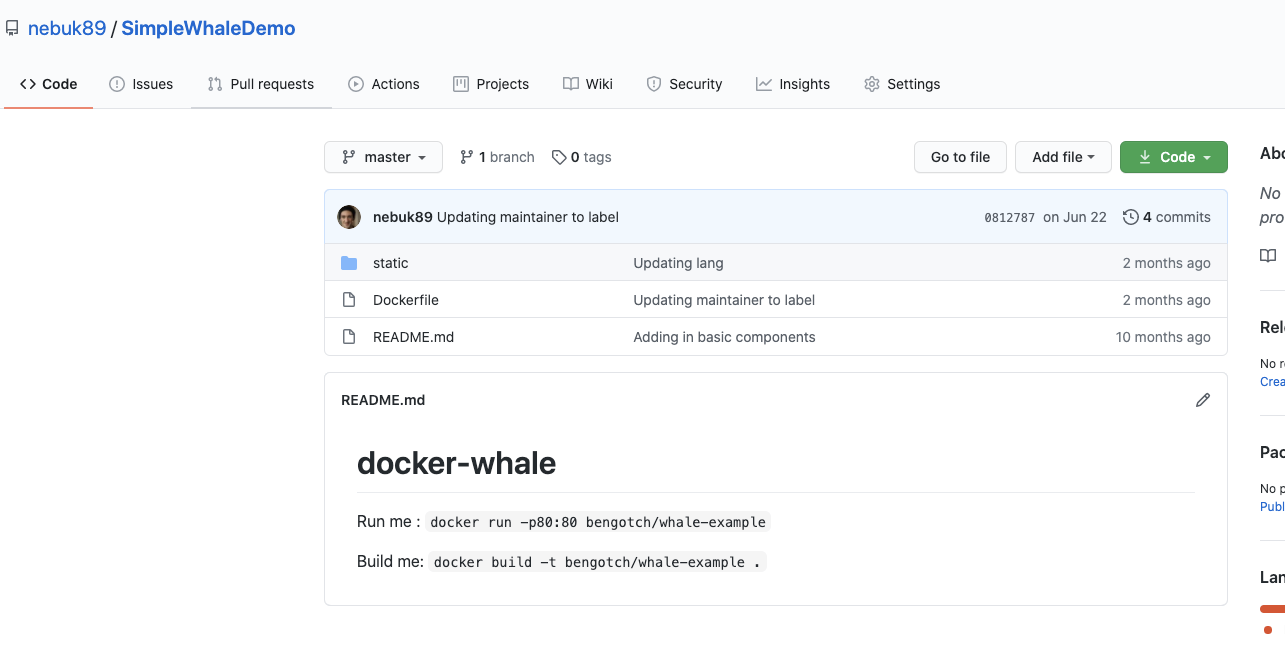
To start we will need to get a project setup, I am going to use one of my existing simple Docker projects to test this out:

The first thing I need to do is to ensure that I will be able to access Docker Hub from any workflow I create, to do this I will need to add my DockerID and a Personal Access Token (PAT) as secrets into GitHub. I can get a PAT by going to https://hub.docker.com/settings/security and clicking ‘new access token’, in this instance I will call my token ‘whaleCI’

I can then add this and my username as secrets into the GitHub secrets UI:

Great we can now start to set up our action workflow to build and store our images in Hub. In this CI flow I am using two Docker actions, the first allows me to log in to Docker Hub using my secrets store in my GitHub Repository. The second is the build and push action, in this I am setting the push flag to true (as I want to push!) and adding in my tag simply to always go to latest. Lastly in this I am also going to echo my image digest to see what was pushed. 

name: CI to Docker hub

on:

push:

branches: [ master ]

steps:

name: Login to DockerHub

uses: docker/login-action@v1

with:

username: ${{ secrets.DOCKER_HUB_USERNAME }}

password: ${{ secrets.DOCKER_HUB_ACCESS_TOKEN }}

name: Build and push

id: docker_build

uses: docker/build-push-action@v2

with:

context: ./

file: ./Dockerfile

push: true

tags: bengotch/simplewhale:latest

name: Image digest

run: echo ${{ steps.docker_build.outputs.digest }}

Great, now I will just let that run for the first time and then tweak my Dockerfile to make sure the CI is running and pushing the new image changes:

Next we can look at how we can optimize this; the first thing I want to do is look at using my build cache. This has two advantages, first this will reduce my build time as it will not have to re-download all of my images and second it will reduce the number of pulls I complete against Docker Hub. To do this we are going to leverage the GitHub cache, to do this I need to set up my builder with a build cache.

The first thing I want to do is actually set up a Builder, this is using Buildkit under the hood, this is done very simply using the Buildx action.

steps:

name: Set up Docker Buildx
id: buildx
uses: docker/setup-buildx-action@master

Next I need to set up my cache for my builder, here I am adding the path and keys to store this under using the github cache for this. 


name: Cache Docker layers
uses: actions/cache@v2
with:
path: /tmp/.buildx-cache
key: ${{ runner.os }}-buildx-${{ github.sha }}
restore-keys: |
${{ runner.os }}-buildx-

And lastly having added these two bits to the top of my Action file I need to add in the extra attributes to my build and push step. Here I am setting the builder to use the output of the buildx step and then using the cache I set up for this to store to and retrieve from.


name: Login to Docker Hub
uses: docker/login-action@v1
with:
username: ${{ secrets.DOCKER_HUB_USERNAME }}
password: ${{ secrets.DOCKER_HUB_ACCESS_TOKEN }}

name: Build and push
id: docker_build
uses: docker/build-push-action@v2
with:
context: ./
file: ./Dockerfile
builder: ${{ steps.buildx.outputs.name }}
push: true
tags: bengotch/simplewhale:latest
cache-from: type=local,src=/tmp/.buildx-cache
cache-to: type=local,dest=/tmp/.buildx-cache

name: Image digest
run: echo ${{ steps.docker_build.outputs.digest }}

Great, now we can run it again and I can see that I am using the cache!

Now we can look at how we can improve this more functionally by adding in the ability to have our tagged versions we want to be released to Docker Hub behave differently to my commits to master (rather than everything updating latest on Docker Hub!). You might want to do something like this to have your commits go to a local registry to then use in nightly tests so you can always test what is latest while reserving your tagged versions for release to Hub. 

To start we will need to modify our previous GitHub workflow to only push to Hub if we get a particular tag:

on:
push:
tags:
– “v*.*.*”

This now means our main CI will only fire if we tag our commit with V.n.n.n, let’s have a quick go and test this:

And when I check my GitHub action: 

Great!

Now we need to set up a second GitHub action file to store our latest commit as an image in the GitHub registry, you may want to do this to run your nightly tests or recurring tests against or to share work in progress images with colleagues. To start I am going to clone my previous GitHub action and add back in our previous logic for all pushes. 

Next I am going to change out our Docker Hub login to a GitHub container registry login

if: github.event_name != ‘pull_request’
uses: docker/login-action@v1
with:
registry: ghcr.io
username: ${{ github.repository_owner }}
password: ${{ secrets.ghcr_TOKEN }}

And I will also need to remember to change how my image is tagged, I have opted to just keep latest as my only tag but you could always add in logic for this:

  tags: ghcr.io/nebuk89/simplewhale:latest

Now we will have two different flows, one for our changes to master and one for our pull requests. Next we will need to modify what we had before so we are pushing our PRs to the GitHub registry rather than to Hub. 

We could now look at how we set up either nightly tests against our latest tag, how we want to test each PR or if we want to do something more elegant with the tags we are using and make use of the Git tag for the same tag in our image. If you would like to look at how you can do one of these or get a full example of how to setup what we have gone through today please check out Chad’s repo which runs you through this and more details on our latest GitHub action: https://github.com/metcalfc/docker-action-examples 

And keep an eye on our blog for new posts coming in the next couple of weeks looking at how we can get this setup on other CIs, if there are some in particular you would like to see reach out to us on Twitter on @docker.To get started setting up your GitHub CI with Docker Hub today sign up for a Docker account and have a go with Docker’s official GitHub actions.
The post Docker Github Actions appeared first on Docker Blog.
Quelle: https://blog.docker.com/feed/

Toward zero: Reducing and offsetting our data center power emissions

Following the massive Australian bushfires earlier this year, I was motivated to act within my role as a data scientist at Automattic to help fight anthropogenic climate change. Together with colleagues from across the company, we formed an employee resource group focused on sustainability. We are pleased to announce that as a result of our efforts, Automattic now offsets data center power emissions produced from non-renewable sources. This means that the servers running WordPress.com, WordPress VIP, Tumblr, and other Automattic services contribute net zero carbon emissions to our shared atmosphere.

Measuring and offsetting emissions is not a trivial task. In the interest of transparency, this post provides more details on the decisions we made and answers questions that readers may have on the topic. We hope that this will benefit other organizations that are in a similar position to Automattic. We welcome feedback and are happy to answer any other questions you may have.

The decision: For 2020, we decided to purchase offsets from Simoshi via the United Nations’ offset platform. These offsets are produced by improving the efficiency of cooking stoves in Ugandan schools. Emission reductions are achieved by using less wood to cook the same amount of food. This project also has third-party certification from the Gold Standard, and it contributes to nine of the United Nations’ Sustainable Development Goals, including No Poverty, Quality Education, and Gender Equality. See the project page and the following video for more details:

Why did we choose this project? Anyone who’s tried to purchase offsets knows that it can be complicated. We don’t have in-house sustainability experts, so we relied on publicly-available information to better understand the topic. Resources we found useful include: Carbon Offset Guide, atmosfair, and Greenhouse Gas Protocol. As the price of offsets varies widely, we chose to follow Microsoft’s approach and set our own internal price of $15 per metric tonne of CO2e. Simoshi’s project stood out because it matches our budget, has a clear emission reduction mechanism, is certified by the United Nations and the Gold Standard, and has many benefits beyond emission reductions, which align with our company’s values.

What emissions do our offsets cover? Automattic has servers in many data centers around the world, operated by different providers. As we don’t control the data center providers’ choice of energy utilities, we treat the emissions from data center power use as being in Scope 3, i.e., as indirect emissions from our value chain. For each data center, we used publicly-available information from our providers to determine whether they’re powered by renewable resources. This led us to conclude that approximately half of our data center energy use is covered by renewables paid for by the data center providers. For the other data centers, we used our servers’ power consumption logs to get the estimated power used over a period of one year. We then multiplied these figures by 1.5 to obtain a conservative estimate that accounts for power usage effectiveness. Using a variety of resources on grid carbon intensity, such as those published by the American Environmental Protection Agency and the European Environment Agency, we converted these power use estimates to emission estimates. This gave us an overall figure of 1,850 tonnes of CO2e for 2020.

Why offset rather than reduce emissions? We are aware that offsetting is an imperfect solution. Ideally, we would source all our energy from renewables. In a perfect world, it wouldn’t even be possible to buy energy generated by burning fossil fuels. However, given the current reality, setting our own price on carbon and offsetting non-renewable data center emissions is a good temporary solution. This also gives us a financial incentive to work with providers and shift toward greener data centers. In fact, this sort of shift happened last year when we changed our main European data center to a provider that operates on 100% renewables. We hope to continue making such changes in coming years, i.e., reducing emissions where feasible and offsetting the rest.

Why aren’t we doing more? From watching the climate action space, it seems like every announcement is greeted with demands to do more. This is a positive thing — society should hold companies accountable for their actions. As a company, we believe that we can always do better: The opening sentence of our creed is “I will never stop learning”, and we know that we are “in a marathon, not a sprint.” It is our hope that as we learn more about the space and our impact, we will be able to take stronger climate action.

What are we planning to do next? Automattic is a fully-distributed company. This means that our employees aren’t required to commute to central offices, which leads to significant savings in carbon emissions. However, we historically relied on flying to in-person meetups a few times a year to foster collaboration and bonding. Since March 2020, all business travel has been suspended, and it is still unclear what travel will look like in the post-pandemic world. In any case, as an employee resource group, we are planning on quantifying our travel emissions, and advocating for reducing avoidable trips and offsetting emissions from trips that are deemed essential. One change that is already taking place is aligning more teams around fewer time zones. In addition to helping with synchronous collaboration and decreasing isolation, this will reduce the distance traveled per person once meetups resume. We will share more on other actions we take in the future — watch this space! We also welcome feedback from our customers, so please comment on this post or contact us to share your thoughts.
Quelle: RedHat Stack






