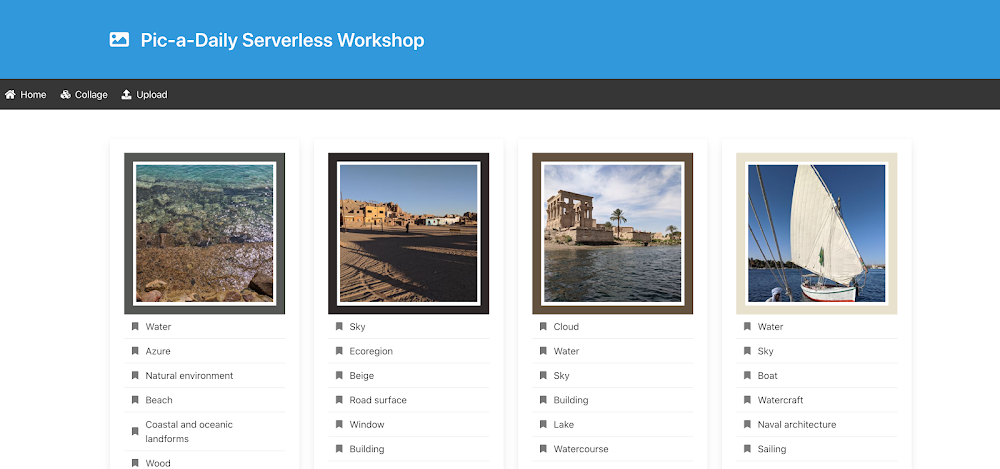
Over the past year, we (Mete and Guillaume) have developed a picture sharing application, named Pic-a-Daily, to showcase Google Cloud serverless technologies such as Cloud Functions, App Engine, and Cloud Run. Into the mix, we’ve thrown a pinch of Pub/Sub for interservice communication, a zest of Firestore for storing picture metadata, and a touch of machine learning for a little bit of magic.We also created a hands-on workshop to build the application, and slides with explanations of the technologies used. The workshop consists of codelabs that you can complete at your own pace. All the code is open source and available in a GitHub repository. Initial event-driven architectureThe Pic-a-Daily application evolved progressively. As new services were added over time, a loosely-coupled, event-driven architecture naturally emerged, as shown in this architecture diagram:To recap the event-driven flow:Users upload pictures on an App Engine web frontend. Those pictures are stored in a Google Cloud Storage bucket, which triggers file creation and deletion events, propagated through mechanisms such as Pub/Sub and Eventarc. A Cloud Function (Image analysis) reacts to file creation events. It calls the Vision API to assign labels to the picture, identify the dominant colors, and check if it’s a picture safe to show publicly. All this picture metadata is stored in Cloud Firestore. A Cloud Run service (Thumbnail service) also responds to file creation events. It generates thumbnails of the high-resolution images and stores them in another bucket. On a regular schedule triggered by Cloud Scheduler, another Cloud Run service (Collage services) creates a collage from thumbnails of the four most recent pictures. Last but not least, a third Cloud Run service (Image garbage collector) responds to file deletion events received through (recently generally available) Eventarc. When a high-resolution image is deleted from the pictures bucket, this service deletes the thumbnail and the Firestore metadata of the image.These services are loosely coupled and take care of their own logic, in a smooth choreography of events. They can be scaled independently. There’s no single point of failure, since services can continue to operate even if others have failed. Event-based systems can be extended beyond the current domain at play by plugging in other events and services to respond to them.However, monitoring such a system in its entirety usually becomes complicated, as there’s no centralized place to see where we’re at in the current business process that spans all the services. Speaking of business processes, it’s harder to capture and make sense of the flow of events and the interplay between services. Since there’s no global vision of the processes, how do we know if a particular process or transaction is successful or not? And when failures occur, how do we deal properly and explicitly with errors, retries, or timeouts?As we kept adding more services, we started losing sight of the underlying “business flow”. It became harder to isolate and debug problems when something failed in the system. That’s why we decided to investigate an orchestrated approach.Orchestration with WorkflowsWorkflows recently became generally available. It offered us a great opportunity to re-architect our application and use an orchestration approach, instead of a completely event-driven one. In orchestration, instead of microservices responding to events, there is an external service, such as Workflows, calling microservices in a predefined order. After some restructuring, the following architecture emerged with Workflows:Let’s recap the orchestrated approach:App Engine is still the same web frontend that accepts pictures from our users and stores them in the Cloud Storage bucket. The file storage events trigger two functions, one for the creation of new pictures and one for the deletion of existing pictures. Both functions create a workflow execution. For file creation, the workflow directly makes the call to the Vision API (declaratively instead of via Cloud Function code) and stores picture metadata in Firestore via its REST API. In between, there’s a function to transform the useful information of the Vision API into a document to be stored in Firestore. Our initial image analysis function has been simplified: The workflow makes the REST API calls and only the data transformation part remains. If the picture is safe to display, the workflow saves the information in Firestore, otherwise, that’s the end of the workflow. This branch of the workflow ends with calls to Thumbnail and Collage Cloud Run services. This is similar to before, but with no Pub/Sub or Cloud Scheduler to set up. The other branch of the workflow is for the picture garbage collection. The service itself was completely removed, as it mainly contained API calls without any business logic. Instead, the workflow makes these calls. There is now a central workflows.yaml file capturing the business flow. You can also see a visualization of the flow in Cloud Console:The Workflows UI shows which executions failed, at which step, so we can see which one had an issue without having to dive through heaps of logs to correlate each service invocation. Workflows also ensures that each service call completes properly, and it can apply global error and retry policies.With orchestration, the business flows are captured more centrally and explicitly, and can even be version controlled. Each step of a workflow can be monitored, and errors, retries, and timeouts can be laid out clearly in the workflow definition. When using Cloud Workflows in particular, services can be called directly via REST, instead of relying on events on Pub/Sub topics. Furthermore, all the services involved in those processes can remain independent, without knowledge of what other services are doing.Of course, there are downsides as well. If you add an orchestrator into the picture, you have one more component to worry about, and it could become the single point of failure of your architecture (fortunately, Google Cloud products come with SLAs!). Last, we should mention that relying on REST endpoints might potentially increase coupling, with a heavier reliance on strong payload schemas vs lighter events formats.Lessons learnedWorking with Workflows was refreshing in a number of ways and offered us some lessons that are worth sharing. Better visibilityIt is great to have a high-level overview of the underlying business logic, clearly laid out in the form of a YAML declaration. Having visibility into each workflow execution was useful, as it enabled us to clearly understand what worked in each execution, without having to dive into the logs to correlate the various individual service executions.Simpler codeIn the original event-driven architecture, we had to deal with three types of events:Cloud Functions’ direct integration with Cloud Storage eventsHTTP wrapped Pub/Sub messages with Cloud Storage events for Cloud RunEventarc’s CloudEvents based Cloud Storage events for Cloud RunAs a result, the code had to cater to each flavor of events:In the orchestrated version, there’s only a simple REST call and HTTP POST body to parse:Less codeMoving REST calls into the workflow definition as a declaration (with straightforward authentication) enabled us to eliminate quite a bit of code in our services; one service was trimmed down into a simple data transformation function, and another service completely disappeared! Two functions for triggering two paths in the workflow were needed though, but with a future integration with Eventarc, they may not be required anymore. Less setupIn the original event-driven architecture, we had to create Pub/Sub topics, and set up Cloud Scheduler and Eventarc to wire-up services. With Workflows, all of this setup is gone. Workflows.yaml is the single source of setup needed for the business flow. Error handlingError handling was also simplified in a couple of ways. First, the whole flow stops when an error occurs, so we were no longer in the dark about exactly which services succeeded and which failed in our chain of calls. Second, we now have the option of applying global error and retry policies. Learning curveNow, everything is not always perfect! We had to learn a new service, with its quirks and limited documentation — it’s still early, of course, and the documentation will improve over time with feedback from our customers.Code vs. YAML As we were redesigning the architecture, an interesting question came up over and over: “Should we do this in code in a service or should we let Workflows make this call from the YAML definition?”In Workflows, more of the logic lands in the workflow definition file in YAML, rather than code in a service. Code is usually easier to write, test, and debug than YAML, but it also requires more setup and maintenance than a step definition in Workflows. If it’s boilerplate code that simply makes a call to some API, that should be turned into YAML declarations. However, if the code also has extra logic, then it’s probably better to leave it in code, as YAML is less testable. Although there is some level of error reporting in the Workflows UI, it’s not a full-fledged IDE that helps you along the way. Even when working in your IDE on your development machine, you’ll have limited help from the IDE, as it only checks for valid YAML syntax.Loss of flexibilityThe last aspect we’d like to mention is perhaps a loss of flexibility. Working with a loosely-coupled set of microservices that communicate via events is fairly extensible, compared to a more rigid solution that mandates a strict definition of the business process descriptions.Choreography or orchestration?Both approaches are totally valid, and each has its pros and cons. We mentioned this topic when introducing Workflows. When should you choose one approach over the other? Choreography can be a better fit if services are not closely related, or if they can exist in different bounded contexts. Whereas orchestration might be best if you can describe the business logic of your application as a clear flow chart, which can then directly be described in a workflow definition. Next stepsTo go further, we invite you to have a closer look at Workflows, and its supported features, by looking at the documentation, particularly the reference documentation and the examples. We also have a series of short articles that cover Workflows, with various tips and tricks, as well as introductions to Workflows, with a first look at Workflows and some thoughts on choreography vs orchestration.If you want to study a concrete use case, with an event-based architecture and an equivalent orchestrated approach, feel free to look into our Serverless Workshop. It offers codelabs spanning Cloud Functions, Cloud Run, App Engine, Eventarc, and Workflows. In particular, lab 6 is the one in which we converted the event-based model into an orchestration with Workflows. All the code is also available as open source on GitHub.We look forward to hearing from you about your workflow experiments and needs. Feel free to reach out to us on Twitter at @glaforge and @meteatamel.Related ArticleGet to know Workflows, Google Cloud’s serverless orchestration engineGoogle Cloud’s purpose-built Workflows tool lets you orchestrate complex, multi-step processes more effectively than general-purpose tools.Read Article
Quelle: Google Cloud Platform