To the cloud and beyond! Planning a multi-year data center migration
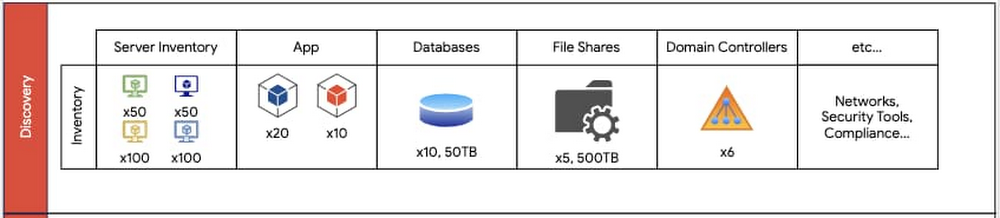
A data center migration into the cloud is often a daunting business initiative that can take years as you transition your existing hardware, software, networking, and operations into a brand new environment. In our roles with Google Cloud’s Professional Services organization, we work side by side with customers to collaboratively architect and enable data center migrations into Google Cloud. Over the years, we’ve participated in multiple migration journeys, and devised a general approach. Along the way, we’ve stumbled across a lot of complexities and learned a lot of lessons. In this blog post, we provide a high level overview of our recommended data center migration process. Then, in future blog posts, we’ll provide a more detailed view into the engineering and program management migration aspects of a migration. The migration journeyEvery data center migration has a reason behind it—something like the desire for cost savings or to become more cloud native. This results in a business objective such as “migrate n data centers to Google Cloud by this date.” Regardless of your motivation, the common challenge is how to enable a successful data center migration while effectively managing risk. To help, we’ve developed a repeatable migration approach that consists of four phases: Discovery, Planning, Execution and Optimization. For most data center migrations, leveraging this repeatable framework can help identify assets, minimize risk using a multi-phased migration approach, enable deployment and configuration, and finally, optimize the end state. Phase 1: DiscoveryThe first step of our migration approach is the Discovery phase. Here we partner with an organization’s data center team to understand and document the entire data center footprint. This includes understanding the existing hardware mapping, software applications, storage layers (databases, file shares), operating systems, networking configurations, security requirements, models of operation (release cadence, how to deploy, escalation management, system maintenance, patching, virtualization, etc.), licensing and compliance requirements, as well as other relevant assets. In this phase, our objective is to obtain a detailed view of all relevant assets and resources of the current data center footprint. These resources should also include a resource grouping classification, which will be leveraged in the following phases for dependency mapping and migration wave planning. For example, while inventorying a data center, you should identify the various operating environments (non-production vs. production), dependencies (third-party software, domain controllers, etc.) and the business impact of all applications, including third-party systems that are in the migration scope. The key milestones in the Discovery phase are:Creating a “shared” data center inventory footprint – All teams that are part of the cloud migration should be aware of the assets and resources that will go live.Completing an initial GCP foundations design – This involves identifying centralized concepts of the GCP organization such as folder structure, Identity and Access Management model, network administration model, and more.An example set of data center inventory components that should be documented during the discovery phase.Additionally, during the Discovery phase, we recommend you engage in cross-functional discussions with other internal business units, ranging from IT to Finance to Program Management, to align on changes to support future cloud processes. In migrating your physical data centers to Google Cloud, it’s important to consider whether your data center staff is trained to support managing systems and infrastructure in Google Cloud. Also, you may need to reevaluate and adjust the Service Level Agreements (SLAs) for services that you intend to use in Google Cloud. Phase 2: PlanningThe second phase is Planning. Planning leverages the assets and deliverables gathered in the Discovery phase to create migration waves—logical groupings of resources—to be sequentially deployed into production and non-production environments. As a rule of thumb, it’s best to target non-production migration waves first, identifying the sequence of waves to migrate first. Here, consider:Mapping of today’s server inventory to Google Cloud machine types – Each workload today will generally run on a machine type with similar compute power, memory and disk.Timelines – When are my targets for migrating what?Workloads in each grouping – What are my migration waves grouped by? Is it by non-production vs. production applications? Is it by function (databases vs. file shares vs. applications)?The cadence of your code releases – Factor in any upcoming code releases as this may impact the decision of whether to migrate sooner or later.Time for infrastructure deployment and testing – Factor in adequate time for testing your infrastructure before fully cutting over to Google Cloud.Number of application dependencies – The applications with the fewest dependencies are generally good candidates for migration first. In contrast, you may want to wait to migrate an application that depends on multiple databases.Migration complexity and risk – Migrations are generally more successful when you tackle the simpler aspects of the migration first.For the migration waves, we recommend you gain confidence by starting with more predictable and simple workloads. For example, here, we recommend migrating file shares first, then databases and domain controllers and finally apps.This diagram displays an example of mapping inventory content found in the Discovery phase translated into migration waves. Non-prod migration waves should occur first. Prod waves should follow a successful non-prod migration.The Planning phase is also when you begin to design a future state of your IT organization and discuss how to transform existing roles to support key workloads in Google Cloud. Customers often ask us “what’s the best way to map existing staff models to support Google Cloud after the migration?” In many cases, we discuss how to train existing staff and where we may require adjustments based on the future state of the organization after the migration. The perfect time to begin making adjustments to your operations is when you begin to deploy your migration waves. One additional area of consideration during the Planning phase is whether or not to implement DevOps and SRE practices. Many customers find cloud migrations to be the perfect time to establish Infrastructure as Code practices, integrate code build and release with continuous integration/continuous delivery (CI/CD) pipelines, and perhaps even define internal service level indicators (SLIs). Additionally, customers often update their incident management and application support processes, including processes that involve Google Cloud Support, which can help address issues and respond to incidents. Phase 3: ExecutionThe third phase is Execution: taking the plans you’ve developed and bringing them to fruition. During the Execution phase, you need to be careful about the exact set of steps you take and configurations you develop, as you’ll usually repeat them during the non-production and production migration waves. The Execution phase is when you put in place your infrastructure components—IAM, networking, firewall rules, and Service Accounts—and ensure they are configured appropriately. This is also when you test the applications on the infrastructure configurations, ensuring that they have access to their databases, file shares, web servers, load balancers, Active Directory servers and more. Execution also includes using logging and monitoring to ensure your application continues to function with the necessary performance.An overview of executing different migration waves. As an example, an organization may opt to migrate file shares first, then domain controllers; each of these processes require migrating infrastructure, then testing and verifying a successful migration.The key to a successful Execution phase is agile application debugging and testing. Additionally, be sure to have both a short and long term plan for resolving blockers that may come up during the migration. The Execution phase is iterative and the goal should be to ensure that applications are fully tested on the new infrastructure.Phase 4: OptimizeThe last stage of a large data center migration project is Optimization. Once you’ve migrated your workloads to Google Cloud, we recommend periodic review and planning to optimize them. During this time, you may want to consider a range of optimization activities:Resize your machine types and disks – Whether to save costs or improve performance, Active Assist can help you do this automatically.Leverage Terraform for more agile and predictable deploymentsImprove automation to reduce operational overhead Improve integration with logging, monitoring, and alerting toolsAdopt managed services to reduce operational overheadEnterprises have a number of common migration considerations. Topics such as cost optimization, replatforming, automation, logging and monitoring, and more should all be part of any migration plan.When you migrate from a traditional data center environment to the cloud, you obtain visibility into your resource consumption and spend. Taking Compute Engine as an example, Google Cloud provides you improved cost observability, displaying the overall cost for CPU cores vs. RAM, so that you can more easily identify the compute resources that you are paying for. You can also identify virtual machines that you no longer need or that you can rightsize them with the Recommender API to best fit the needed performance. Preemptible VMs are another option for saving on compute operations.Or with Cloud Storage, you can take advantage of storage classes (i.e., standard, nearline, coldline, and archival) based on your use cases and apply lifecycle and retention policies. Taking the first stepPerforming a full data center migration is a big but worthwhile undertaking. With this migration framework, you can break down the process into stages that will have you decommissioning your last data center in no time! Let’s wrap up with some key lessons learned that we have learned along the way. Focus on being agile – A data center migration has many moving parts. If important individuals are blocked, data center migration timelines will be put at risk. Tackle the easy parts first – Build by confidence by migrating a simple application, where it’s easier to iron out the misconfigurations or identify missing infrastructure. Trying to migrate the largest and most complex application is not recommended. Communicate early to your stakeholders – Many data centers have “external users”—these could be other users within your company, or even outside the organization. Notify them of the migration early and check for potential compliance issues, which could delay the migration.Help teams learn about Google Cloud – This involves establishing a process for learning GCP, through provisioning of sandbox spaces for testing and enrolling in training opportunities. When you’re ready to take the first step, we’re here to help with a free discovery and assessment, which will help you estimate and understand your potential migration costs and options. In addition, stay tuned for upcoming blog posts, where we’ll discuss more engineering principles to help you along an accelerated migration path, as well as how to establish a program management practice to manage a large migration program.Related ArticleCloud migration: What you need to know (and where to find it)Google Cloud offers a rich set of solutions and documentation to help guide your cloud migration. Here’s where to find what you need.Read Article
Quelle: Google Cloud Platform








