Traffic Director takes application networking beyond Google Cloud

Whether you run services in Google Cloud, on-premises, in other clouds, or all of the above, the fundamental challenges of application networking remain the same: How do you get traffic to these services? And how do these services talk to each other?Traffic Director is a fully managed control plane for service mesh and load balancing. We built Traffic Director with the vision that it could solve these challenges, no matter where your services live. Today, we’re delivering on another part of that vision so that we can better support your multi-environment needs.With Traffic Director, you can now send traffic to services and gateways that are hosted outside of Google Cloud. Traffic is routed privately, over Cloud Interconnect or Cloud VPN, according to the rules that you configure in Traffic Director.This capability enables services in your VPC network to interoperate more seamlessly with services in other environments. It also enables you to build advanced solutions based on Google Cloud’s portfolio of networking products, such as Cloud Armor protection for your private on-prem services. Whether you’re only running workloads in Google Cloud, or have advanced multi-environment needs, Traffic Director is a versatile tool in your networking toolkit.Introducing Hybrid Connectivity NEGsThis is all made possible through support for Hybrid Connectivity Network Endpoint Groups (NEGs). Now generally available, think of a Hybrid Connectivity NEG as a collection of IP addresses and ports (“endpoints”) that clients can use to reach your application.You probably already use NEGs when configuring Traffic Director with GKE-based services. Hybrid Connectivity NEGs are special because they don’t need to resolve to a destination within Google Cloud. Instead, they can resolve to a destination outside of your VPC network (like a gateway in an on-prem data center or an application on another public cloud).If you’re sending traffic from Google Cloud to another environment, that traffic travels over hybrid connectivity (for example, Cloud Interconnect or Cloud VPN). This allows you to have workloads in another environment and reach them securely from Google Cloud, without having to make those workloads accessible via the public internet.Here’s a simple example of how you might use Hybrid Connectivity NEGs with Traffic Director:Imagine you have a virtual machine (VM) running on-prem and that VM can be reached from your VPC network via Cloud VPN interconnect at 10.0.0.1 on port 80. In Traffic Director, you create a service called `on-prem-service` and add a Hybrid Connectivity NEG with an endpoint with IP address 10.0.0.1 and port 80. Traffic Director then sends that information to its clients (for example, Envoy sidecar proxies running alongside your applications). Thus, when your application sends a request to `on-prem-service`, the Traffic Director client inspects the request and directs it to `10.0.0.1:80`.What can I do with it?With this feature, you can now build powerful solutions that involve existing Traffic Director capabilities as well as Cloud Load Balancing’s global network edge services. Here are a few examples:Route mesh traffic to on-prem or another cloudThe simplest use case for this feature is plain old traffic routing. For example:You want to get traffic from one environment to another. In the above example, when your application sends a request to the `on-prem` service, the Traffic Director client inspects the outbound request and updates its destination. The destination gets set to an endpoint associated with the `on-prem` service (in this case, `10.2.0.1`). The request then travels over VPN or Interconnect to its intended destination.If you need to add more endpoints, you just add them to your service by updating Traffic Director. You don’t need to make any changes to your application code.Migrate a service between environmentsBeing able to send traffic privately to an endpoint outside of Google Cloud is powerful. But things get even more interesting when you combine this with Traffic Director capabilities like weight-based traffic splitting.The above example extends the previous pattern, but instead of configuring Traffic Director to send all traffic to the `on-prem` service, you configure Traffic Director to split traffic across two services using weight-based traffic splitting.Traffic splitting allows you to start by sending 0% of traffic to the `cloud` service and 100% to the `on-prem` service. You can then gradually increase the proportion of traffic sent to the `cloud` service. Eventually, you send 100% of traffic to the `cloud` service and you can retire the `on-prem` service.Use Google Cloud’s edge services with workloads in other environmentsFinally, you can combine this functionality with Cloud Load Balancing to bring global edge capabilities to workloads that are outside of your VPC network. Cloud Load Balancing offers a wide range of network edge services, such as globally distributed ingress, Cloud Armor for DDoS protection, and Cloud CDN.You can now use these with Traffic Director to support workloads that are not exposed to the public internet: if you have Cloud VPN or Cloud Interconnect between Google Cloud and another environment, your traffic will travel via that private route. We previously posted about how you can use Cloud Armor with on-prem and cloud workloads that can be reached via the public internet. In the approach described below, workloads in other environments don’t need to be publicly reachable.In this example, traffic from clients travels over the public internet and enters Google Cloud’s network via a Cloud Load Balancer such as our global external HTTP(S) load balancer. You can use network edge services, for example, Cloud Armor DDoS protection or Identity-Aware Proxy user authentication when traffic reaches the load balancer.After you’ve secured your ingress path, the traffic makes a brief stop in Google Cloud, where an application or standalone proxy (configured by Traffic Director) forwards it across Cloud VPN or Cloud Interconnect to your on-prem service.Get started todayWith Traffic Director, we’ve been focused on enterprise needs since day one, and we’re excited about the class of problems that Hybrid Connectivity NEGs solve for enterprises that operate beyond GCP.Get started today with Traffic Director, Google Cloud Load Balancing and Cloud Armor to set up a secure global ingress solution for private multi-environment workloads. This is just a first step on our journey to delivering on Traffic Director’s mission of being a truly universal application networking solution. More to come!Related ArticleGoogle Cloud networking in depth: How Traffic Director provides global load balancing for open service meshGoogle Cloud’s new Traffic Director control-plane management tool brings load balancing a resiliency to environments running on a service…Read Article
Quelle: Google Cloud Platform

Launching code you didn't write: Shipping Next 2020 demos at scale

Our biggest conference of the year couldn’t happen in person. We’ve pushed everything online. That’s fine, we’re Google, we know how to do websites. And demos. And apps. We got this!Turns out there were some hiccups along the way. Settle down with your favorite beverage, I’d like to tell you a story.Back in the spring, as we were gearing up for Cloud Next 2020, Terry Ryan (@tpryan) and the Cloud Marketing team put their heads together to figure out what a fully online Next conference would be like. Demos are always a big part of Next, giving Google’s product teams a chance to show off new products and features to a large audience, in person. These demos are often interactive, frequently eye-catching, and meant to both excite and educate. They include  staffers available to walk attendees through a demo and to explain the complicated bits. A lot to accomplish in person; now even harder to move them entirely online!Terry took the lead on making this all happen, working across 27 demos to oversee building, testing and deploying these projects to the NextOnAir site in time for the summer launch. Below we’ll talk through some lessons learned from that process, and some of what he built to accomplish this feat.Each demo had a different Google team (or an agency) behind it, doing the coding and visual development. Each one their own application, using whatever frontend framework that team is most comfortable with, or best fits the use case. The teams had a lot of flexibility in making their choice: in the end they just needed to deliver a web app that we would host. All demos were served by  App Engine, which we chose because it is easy to use, scales up and down quickly, and provides built-in security.Next we head to implementation, where the developer team works to create what the designers envisioned. Here’s our first challenge, on the Google side:1. How do we get code from the agencies?In the past all demos focused on delivering a working demo for the event show floor. Formatting and communication could take any form imaginable: an emailed .zip file, a Github repo, a Drive folder, a carrier pigeon. We knew that wouldn’t scale. So Terry set up an individual  Github repo for each demo for the agencies to push code to, allowing a single control plane (and logging system) to manage all the demo code. Already a major improvement, and much simpler to manage.Additionally, now that every demo is going through Github, we can use some existing Continuous Integration / Continuous Deployment (CICD) tools to automate. Without automation every step of the way Terry would have to manually push each build or each demo to get them published. Not a fun manual chore.. Okay, next up, making changes:2. How do we update these demos in production when code changes?Lucky for us we have strong integrations between Cloud Build and Github, so we can trigger a new build each time the master branch is updated in Github (by the team making that demo). We can even automate deploying that new build to App Engine to speed things up.All code hosted by Google is required to pass through rigorous security and privacy reviews. This is true in all cases but even more important when the code is created by a third party. However these projects frequently require multiple last minute, urgent updates in response to stakeholder requests. 3. How do we control deployment so only reviewed code is pushed?In most cases, third party code has to be pushed to Google hosted sites by a Google employee,  so Terry had to be a bottleneck there. With Github tools, he could prevent unapproved merging of pull requests, set himself up as the required reviewer, then approve the code to trigger a push to the production version  of the App Engine apps, so nothing would get into production without his express authorization. With this system in place Terry was able to manage a rapid flurry of updates as the deadlines approached, even if all he had was his phone! But with so much happening simultaneously, there’s still another challenge:4. How do we keep these systems moving forward consistently?For that Terry made scripts. So many scripts! He used scripts to activate individual services and service accounts. To bind Cloud Build as an App Engine admin for each project. To perform initial git commits before sharing to Github. To add functionality to Cloud Build pipelines so they could report on whether or not the builds succeeded.What about securing all these projects and apps?A script to set up Identity-Aware Proxy for each project, to restrict access to the applications. On the Github side, adding people to each repo and locking down the master branch – Scripts!We’ll use this to set up the default project and get Cloud Build going.[Set the gcloud default project and to kick off a Cloud Build session. ]And here we establish some essential APIs we need to use, add some access policy for security, and start the GitHub project with an initial commit.[Spin up the APIs we need to run these demos, and initialize the  GitHub  project]Next we need to get our email tool so Terry can find out when a build completes, or has an error.[Deploy our mail-sending tool in a Cloud Function, to notify on build completion or problems]And we’re going to add Identity-Aware Proxy for controlling web-app access to only the right people, since we don’t want a publicly available IP just yet.[Set up and tear down  IAP so only our organization’s logged in people can look at these apps]Finally we get the directories established, with our template to save time on manual file creation.[Script to set up project directories, and copy a template in]And then once it’s all flowing:5. How do I keep track of all this work?Guess what? It’s more scripts. And notifications. Terry made scripts to collect stats on the whole thing, so we know there were 281 commits, 312 code reviews, and 27 demos launched. Setting up the right set of notifications allowed a rapid response time when new code got pushed, and allowed Terry to keep the turnaround tight. When rapidly collaborating with these outside partners that speed becomes critical. These projects averaged 5 minutes from code approval to application pushed out to production. And if the new code push fails, a notification from Cloud Build tells Terry and the development team what went wrong.This project brought together many moving parts, many access and authorization challenges, and a tricky form of remote collaboration, but with some clever process design (and a ton of scripting) Terry got it all launched in time for our big show. Congratulations!Related ArticleCloud Build brings advanced CI/CD capabilities to GitHubTighter integration between Cloud Build and GitHub opens up advanced CI/CD workflows for DevOps shops.Read Article
Quelle: Google Cloud Platform

Cloud Run is now one year old: a look back

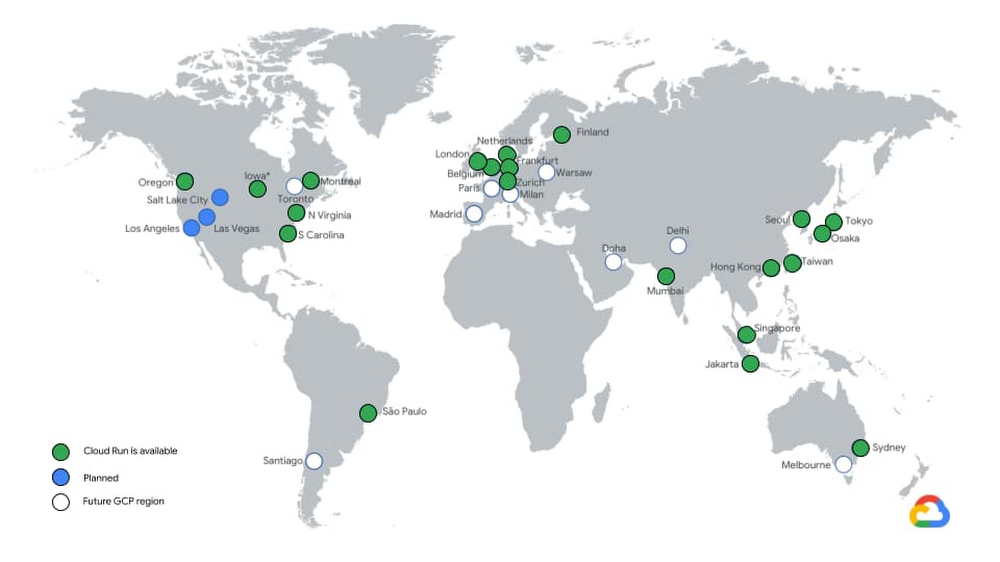
Cloud Run is built on a simple premise: combine the flexibility of containers with the simplicity, scalability, and productivity of serverless. In a few clicks, you can use Cloud Run to continuously deploy your Git repository to a fully managed environment that autoscales your containers behind a secure HTTPS endpoint. And because Cloud Run is fully managed, there’s no infrastructure management, so you can focus on delivering your applications quickly. Cloud Run has been generally available (GA) for a full year now! Here’s a recap of how Cloud Run has evolved in that time.Enterprise readyWe’ve been hard at work expanding Cloud Run to 21 regions and are on track to be available in all the remaining Google Cloud regions by the end of the year.Cloud Run services can now connect to resources with private IPs or use Cloud Memorystore Redis and Memcached by using Serverless VPC connectors, which support shared VPCs so you can connect to resources on-premises or in different projects. By routing all egress through the VPC, you benefit from a static outbound IP address for traffic originating from Cloud Run, which can be useful for making calls to external services that only allow certain IP ranges.You can now also harness the power of Cloud Load Balancing with Cloud Run: bring your own TLS certificates, specify which versions of SSL you accept, or configure custom URL-based routing on your load balancer to serve content from different backends.Global Load Balancing also enables you to run globally-distributed applications by serving traffic from multiple regions, serve static content cached on the edge via Cloud CDN, or protect your endpoints with the Cloud Armor web application firewall.With API Gateway support, you can build APIs for your customers and run them on Cloud Run without having to implement authentication and other common concerns around hosting APIs.With gradual rollouts and rollbacks, you can now safely release new revisions of your Cloud Run services by controlling the percentage of traffic sent to each revision, and testing specific revisions behind dedicated URLs.Developer friendlyAs developers ourselves, we are proud to work on a product that is so well received by the developer community.Novice users are able to build and deploy an app on their first try in less than 5 minutes. It’s so fast and easy that anyone can deploy multiple times a day. We love hearing your stories about how Cloud Run makes you more productive, so you can ship code faster. The Cloud Run user interface displays the build history and links to the git repositoryIn the past year, we added a number of features to improve developer productivity:We added an easy user interface to set up Continuous Deployment from Git repositories. Every time you push a commit to a particular branch or tag a new release, it’s automatically built and deployed to Cloud Run using Cloud Build.We also made it easier to develop applications. You can now deploy and run Cloud Run applications locally using Cloud Code. If you’re just getting started, Cloud Code can create a new application template for you, and you can run or debug your code locally in the emulator.Hate writing Dockerfiles? With Google Cloud Buildpacks, you can now turn your application code directly into a container image for supported languages. This is great if you’re bringing an existing application to Cloud Run. Similarly, buildpacks let you convert your Cloud Functions to container images, thanks to the Functions Framework.Then, to help you monitor the performance of your services and easily identify latency issues, requests sent to Cloud Run services are now captured out-of-the-box in Cloud Trace. If you want to do distributed tracing between your services, all you need to do is to pass on the trace header that you get to the outgoing requests and the trace spans will automatically correlate.While Cloud Run is able to respond to requests, and to privately and securely process messages pushed by Pub/Sub, we also added the ability to trigger Cloud Run services from 60+ Google Cloud sources. And for more powerful orchestration, you can leverage Workflows to automate and orchestrate processing using Cloud Run.FlexibilityWe’re constantly pushing the limits of Cloud Run, so you can run more workloads in a fully managed environment. You can now allocate up to 4GB of memory and 4 CPUs to your container!We also heard you want to minimize “cold starts,” notably when scaling from zero. To help, we added the ability to keep a minimum number of warm container instances to handle requests without hitting the cold starts. These idle instances are priced cheaper than active instances when they’re not handling requests. If cold starts are bothering you, give this a try.gRPC and server-side streaming let you reduce the time-to-first-byte of services by letting you send partial responses as they are computed, and write applications that stream data from the server side. With this capability, you are no longer limited to 32MB responses and you can implement HTTP/2 server push and server-sent events (SSE).With one-hour request timeouts, a single request can now run up to an hour. Combined with server-side streaming, you can now stream large responses (such as documents or videos) or handle long-running tasks from Cloud Run.Finally, graceful instance termination sends your process a termination signal (SIGTERM) before Cloud Run scales down your container instance. This gives you the opportunity to flush out any telemetry data that was kept local, and clean up the open connections, release locks, and so on.What’s next for Cloud Run?It was a great first year for Cloud Run, but this is just the beginning. We’re working hard to improve Cloud Run so you can use it for more and more diverse workloads. At the same time, we’re still laser-focused on providing you with a delightful developer experience and addressing key enterprise requirements. Stay tuned for more exciting releases, like mounting secrets from Cloud Secret Manager, integration with Identity-Aware Proxy, bidirectional streaming and WebSockets.To follow past and future Cloud Run features, take a spin through the release notes. And to learn more about these new features, check out this video.Related ArticleCloud Run, a managed Knative service, is GACloud Run, based on Knative, is available on GCP and for AnthosRead Article
Quelle: Google Cloud Platform

Join Docker’s Community All-Hands

Openness and transparency are key pillars of a healthy open source community. We’re constantly exploring ways to better engage the Docker community, to better incorporate feedback and to better foster participation.

To this end, we’re very excited to host our first Community All-Hands on Thursday December 10th at 8am PST / 5pm CET. This one-hour event will be a unique opportunity for Docker staff and the broader Docker community to come together for company and product updates, live demos, community shout-outs and a Q&A. 

The All-Hands will include updates from:

Scott Johnston (CEO, Docker) who will go over Docker’s strategic vision and where the company is heading in 2021 and beyondDonnie Berkholz (VP of Products, Docker) who will walk us through our product roadmap  Jean-Laurent de Morlhon (VP of Engineering, Docker) who will provide an inside peek on engineering.

We’ll then dive into specific product updates around Docker Desktop, Hub and Developer Tooling, followed by two awesome live demos where we’ll show cool new features and integrations. 

A Community All-Hands is not complete without a community update. We will announce new community initiatives and recognize outstanding contributors who have gone above and beyond to help push Docker forward.

Do you have a question for Docker? Ask away!

We know many in the community have lots of questions but don’t always know where to ask them. Worry not, now’s your opportunity to submit any question you have and up-vote your favorite ones from the community. You can submit your questions anonymously (if you prefer) and we’ll make a selection of the most up-voted ones to be answered during the live Q&A. 

We’re really excited about this All-Hands and we hope to bring together as many people from the community from as many parts of the world as possible. Of course, finding the perfect time for this is impossible and a large chunk of the community won’t be able to dial-in so we’ll make sure to share the recording shortly after the event. As mentioned, this is experimental territory for us and we’ll be trying out different formats and time zones for future All-Hands, incorporating feedback from the community along the way.

See you next week!

Click here to register for the event.

Submit your questions here for the live Q & A 
The post Join Docker’s Community All-Hands appeared first on Docker Blog.
Quelle: https://blog.docker.com/feed/

How computing has evolved, and why you need a multi-cloud strategy

Information technology has been moving fast for several years, bringing more powerful and agile computation in the cloud, richer software, better analytics, mobility, and sensors. If only most enterprise technology vendors were keeping up. The incumbents were schooled in the old world of proprietary systems, higher switching costs, and vendor lock-in, and it shows in how they see the world.There is no better example of this than in the trend to hybrid- and multi-cloud computing. In both cases, cloud-era technologies provide customers the ability to better use existing assets and take advantage of newer ways to compute, store, and analyze data. This is not theory, but reality. According to Gartner, 81% of organizations are working with two or more public cloud providers. A multi-cloud strategy gives companies the freedom to use the best possible cloud for each workload. In contrast, single-cloud stacks impose a significant cost. Where there could be greater power drawn from the unique capabilities of every cloud, there is higher complexity and the limitation of proprietary systems. Where there could be more insight, there is siloed data. Where there could be resilience of entirely different systems, there is concentrated risk. Where there could be more innovation and efficiency, there are impediments. Where there could be a single view of assets, there is a lack of control, haphazard security, and opaque costs.At Google Cloud, we’re committed to meeting the needs of customers by providing choice, flexibility and openness. This commitment is reflected in our contributions to projects like Kubernetes, TensorFlow, and many more.Google Cloud is the birthplace and home of the Kubernetes project. Created by the same engineers that built Kubernetes,Google Kubernetes Engine (GKE) is an easy-to-use cloud-based Kubernetes service for running containerized applications—everywhere, not just on GCP. Anthos builds on the firm foundations of GKE, so you can build out hybrid and multi-cloud deployments with better cloud software production, release, and management—the way you want, not how a vendor dictates. That is key to how a healthy cloud ecosystem works. The flexibility to run applications where you need them without added complexity has been a key factor in choosing Anthos—many customers want to continue to use their existing investments both on-premises as well as in other clouds, and having a common management layer helps their teams deliver quality services with low overhead.Today, just two years after launch, Anthos now supports more kinds of workloads, in more kinds of environments, in many more locations. According to Forrester, Anthos brings a 40% to 55% improvement in platform operating efficiency. Taking multi-cloud even further, recently we announced Anthos on bare metal, so customers could have high performance computing with minimal latency in even remote locations. And the leading API management platform, Apigee, works on every cloud or on-premises, just as it should.Anthos is but one part of our commitment to maximize customer power, choice, and control wherever possible. In July we announced BigQuery Omni, a multi-cloud version of our popular analytics services. For the first time, an enterprise can seamlessly connect directly to their data across Google Cloud, Amazon Web Services (AWS), and (soon) Microsoft Azure, managing large-scale data analysis fast, without having to move or copy data sets, on a single user interface.Earlier this year Google Cloud announced the acquisition of Looker, a multi-cloud data analysis platform that supports multiple data sources and deployment methods. Naturally, Looker as part of Google Cloud still supports hosting on public clouds like AWS, and connects with data sources like Redshift, Snowflake, BigQuery and more than 50 other supported SQL dialects, so you can link to multiple databases, avoid database lock-in, and maintain multi-cloud data environments.From open source to multi-cloud to what might be called “analytics anywhere,” our strategy is not based on our predetermined need, or some sense of “how it’s always been” in enterprise computing, but rather on Google’s experience and vision of how computing has evolved, and where it’s likely headed. Computing wants to be everywhere, you might say, with the right machine crunching the right data for the right purpose. Done right, that’s the future: Enabling businesses to innovate and compete wherever they want, using the data they own to best serve their customers with better products and services.We’re confident that history is on the side of open-source based multi-cloud APIs. Years ago, open source was condemned, and sometimes forked, to preserve a provider’s power over customers. Eventually it was allowed, and today it’s welcomed. Now it’s multi-cloud’s turn to move from rejection to acceptance and eventually, ubiquity. There’s a good chance that soon your cloud will do even more of what it should have done in the first place. Watch this space.Related ArticleYou do you: How to succeed in a distributed, multi-cloud worldHow a CIO should prepare developers for a multi-cloud feature.Read Article
Quelle: Google Cloud Platform






