Get to know Workflows, Google Cloud’s serverless orchestration engine

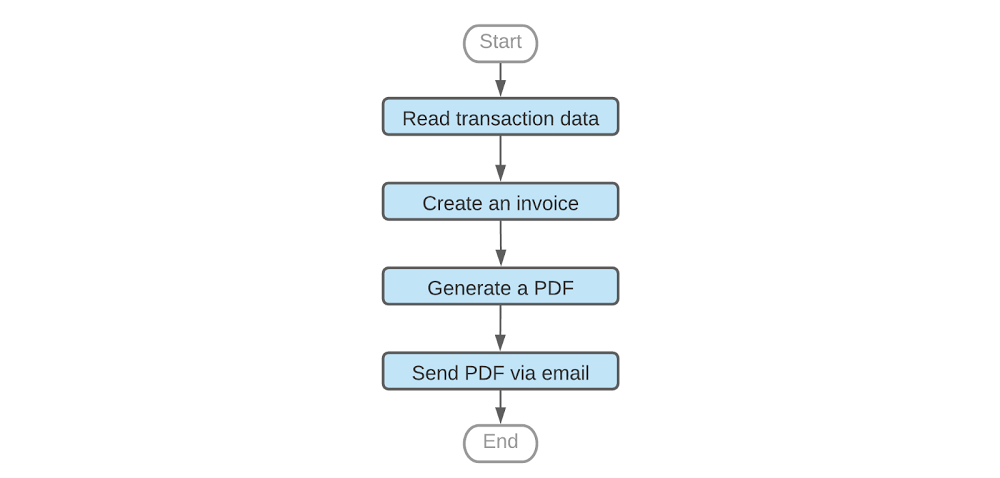
Whether your company is processing e-commerce transactions, producing goods or delivering IT services, you need to manage the flow of work across a variety of systems. And while it’s possible to manage those workflows manually or with general-purpose tools, doing so is much easier with a purpose-built product. Google Cloud has two workflow tools in its portfolio: Cloud Composer and the new Workflows. Introduced in August, Workflows is a fully managed workflow orchestration product running as part of Google Cloud. It’s fully serverless and requires no infrastructure management.In this article we’ll discuss some of the use cases that Workflows enables, its features, and tips on using it effectively.A sample workflowFirst, consider the following workflow for generating an invoice:A common way to orchestrate these steps is to call API services based on Cloud Functions, Cloud Run or a public SaaS API, e.g. SendGrid, which sends an e-mail with our PDF attachment. But real-life scenarios are typically much more complex than the example above and require continuous tracking of all workflow executions, error handling, decision points and conditional jumps, iterating arrays of entries, data conversions and many other advanced features. Which is to say, while technically you can use general-purpose tools to manage this process, it’s not ideal. For example, let’s consider some of the challenges you’d face processing this flow with an event-based compute platform like Cloud Functions. First, the max duration of a Cloud Function run is nine minutes, but workflows—especially those involving human interactions—can run for days; your workflow may need more time to complete, or you may need to pause in between steps when polling for a response status. Attempting to chain multiple Cloud Functions together with for instance, Pub/Sub also works, but there’s no simple way to develop or operate such a workflow. First, in this model it’s very hard to associate step failures with workflow executions, making troubleshooting very difficult. Also, understanding the state of all workflow executions requires a custom-built tracking model, further increasing the complexity of this architecture. In contrast, workflow products provide support for exception handling and give visibility on executions and the state of individual steps, including successes and failures. Because the state of each step is individually managed, the workflow engine can seamlessly recover from errors, significantly improving reliability of the applications that use the workflows. Lastly, workflow products often come with built-in connectors to popular APIs and cloud products, saving time and letting you plug into existing API interfaces. Workflow products on Google CloudGoogle Cloud’s first general purpose workflow orchestration tool was Cloud Composer.Based on Apache Airflow, Cloud Composer is great for data engineering pipelines like ETL orchestration, big data processing or machine learning workflows, and integrates well with data products like BigQuery or Dataflow . For example, Cloud Composer is a natural choice if your workflow needs to run a series of jobs in a data warehouse or big data cluster, and save results to a storage bucket.However, if you want to process events or chain APIs in a serverless way—or have workloads that are bursty or latency-sensitive—we recommend Workflows. Workflows scales to zero when you’re not using it, incurring no costs when it’s idle. Pricing is based on the number of steps in the workflow, so you only pay if your workflow runs. And because Workflows doesn’t charge based on execution time, if a workflow pauses for a few hours in between tasks, you don’t pay for this either. Workflows scale up automatically with very low startup time and no “cold start” effect. Also, it transitions quickly between steps, supporting latency-sensitive applications. Workflows use casesWhen it comes to the number of processes and flows that Workflows can orchestrate, the sky’s the limit. Let’s take a look at some of the more popular use cases. Processing customer transactionsImagine you need to process customer orders and, in the case that an item is out of stock, trigger an inventory refill from an external supplier. During order processing you also want to notify your sales reps about large customer orders. Sales reps are more likely to react quickly if they get such notifications using Slack. Here is an example workflow diagram.The workflow above orchestrates calls to Google Cloud’s Firestore as well as external APIs including Slack, SendGrid or the inventory supplier’s custom API. It passes the data between the steps and implements decision points that execute steps conditionally, depending on other APIs’ outputs. Each workflow execution—handling one transaction at a time—is logged so you can trace it back or troubleshoot it if needed. The workflow handles necessary retries or exceptions thrown by APIs, thus improving the reliability of the entire application. Processing uploaded filesAnother case you may consider is a workflow that tags files that users have uploaded based on file contents. Because users can upload text files, images or videos, the workflow needs to use different APIs to analyze the content of these files. In this scenario, a Cloud function is triggered by a Cloud Storage trigger. Then, the function starts a workflow using the Workflows client library, and passes the file path to the workflow as an argument. In this example, a workflow decides which API to use depending on the file extension, and saves a corresponding tag to a Firestore database.Workflows under the hoodYou can implement all of these use cases out of the box with Workflows. Let’s take a deeper look at some key features you’ll find in Workflows. StepsWorkflows handles sequencing of activities delivered as ‘steps’. If needed, a workflow can also be configured to pause between steps without generating time-related charges.In particular, you can orchestrate practically any API that is network-reachable and follows HTTP as a workflow step. You can make a call to any internet-based API, including SaaS APIs or your private endpoints, without having to wrap such calls in Cloud Functions or Cloud Run.AuthenticationWhen making calls to Google Cloud APIs, e.g., to invoke a Cloud function or read data from Firestore, Workflows uses built-in IAM authentication. As long as your workflow has been granted IAM permission to use a particular Google Cloud API, you don’t need to worry about authentication protocols.Communication between workflow stepsMost real-life workflows require that steps communicate with one another. Workflows supports built-in variables that steps can use to pass the result of their work to a subsequent step. Automatic JSON conversionAs JSON is very common in API integrations, Workflows automatically converts API JSON responses to dictionaries, making it easy for the following steps to access this information. Rich expression languageWorkflows also comes with a rich expression language supporting arithmetic and logical operators, arrays, dictionaries and many other features. The ability to perform basic data manipulations directly in the workflow further simplifies API integrations. Because Workflows accepts runtime arguments, you can use a single workflow to react to different events or input data.Decision pointsWith variables and expressions, we can implement another critical component of most workflows: decision points. Workflows can use custom expressions to decide whether to jump to another part of the workflow or conditionally execute a step. Conditional step executionFrequently used parts of the logic can be coded as a sub-workflow and then called as a regular step, working similarly to routines in many programming languages.Sometimes, a step in a workflow fails, e.g., due to a network issue or because a particular API is down. This, however, shouldn’t immediately make the entire workflow execution fail. Workflows avoids that problem with a combination of configurable retries and exception handling that together allow a workflow to react appropriately to an error returned by the API call.All features above are configurable as part of the Workflows source code. You can see practical examples of these configurationshere. Get started with Workflows todayWorkflows is a powerful new addition to Google Cloud’s application development and management toolset, and you can try it out immediately on all your projects. Have a look at theWorkflows site or go right ahead to theCloud Console to build your first workflow. Workflows comes with a free tier so you can give it a try at no cost. Also, watch out for exciting Workflows announcements coming soon!Happy orchestrating! :)
Quelle: Google Cloud Platform

Getting higher MPI performance for HPC applications on Google Cloud

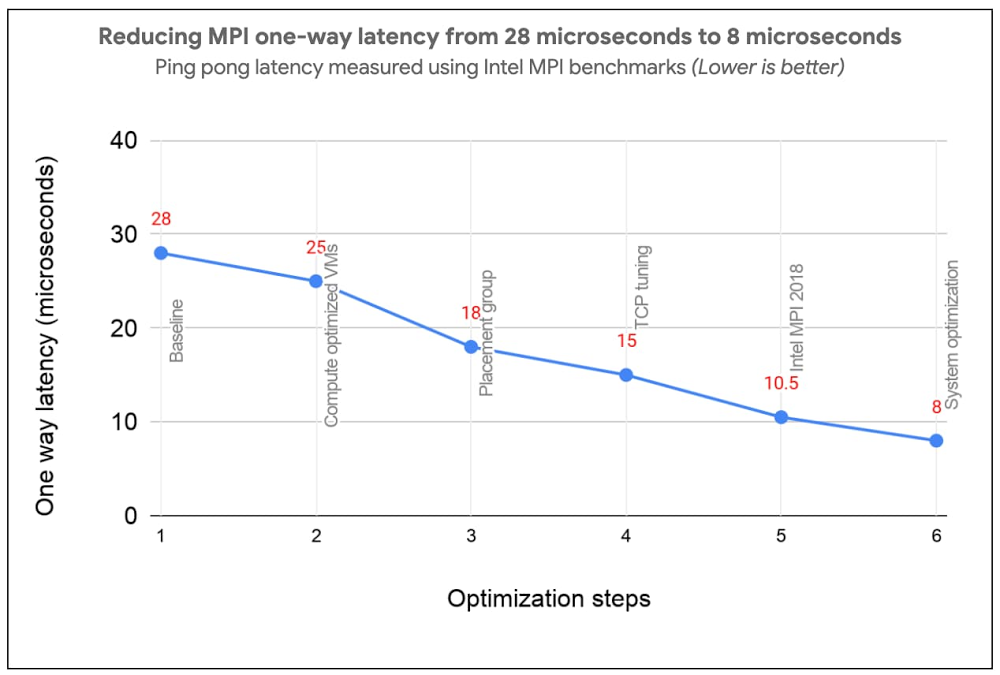
Most High Performance Computing (HPC) applications such as large-scale engineering simulations, molecular dynamics, and genomics, run on supercomputers or HPC clusters on-premises. Cloud is emerging as a great option for these workloads due to its elasticity, pay per use, and the lower associated maintenance cost.Reducing Message Passing Interface (MPI) latency is one critical element of delivering HPC application performance and scalability. We recently introduced several features and tunings that make it easy to run MPI workloads and achieve optimal performance on Google Cloud. These best practices reduce MPI latency, especially for applications that depend on small messages and collective operations. These best practices help optimize Google Cloud systems and networking infrastructure to improve MPI communication over TCP without requiring major software changes or new hardware support. With these best practices, MPI ping-pong latency falls into single-digits of microseconds (μs), and small MPI messages are delivered in 10μs or less. In the figure below, we show how progressive optimizations lowered one-way latency from 28 to 8μs with a test setup on Google Cloud.Improved MPI performance translates directly to improved application scaling, expanding the set of workloads that run efficiently on Google Cloud. If you plan to run MPI workloads on Google Cloud, use these practices to get the best possible performance. Soon, you will be able to use the upcoming HPC VM Image to easily apply these best practices and get the best out-of-the-box performance for your MPI workloads on Google Cloud.1. Use Compute-optimized VMsCompute-optimized (C2) instances have a fixed virtual-to-physical core mapping and expose NUMA architecture to the guest OS. These features are critical for performance of MPI workloads. They also leverage second Generation Intel Xeon Scalable Processors (Cascade Lake), which can provide up to a 40% improvement in performance compared to previous generation instance types due to their support for a higher clock speed of 3.8 GHz, and higher memory bandwidth. C2 VMs also support vector instructions (AVX2, AVX512). We have noticed significant performance improvement for many HPC applications when they are compiled with AVX instructions. 2. Use compact placement policy A placement policy gives you more control over the placement of your virtual machines within a data center. A compact placement policy ensures instances are hosted in nodes nearby on the network, providing lower latency topologies for virtual machines within a single availability zone. Placement policy APIs currently allow creation of up to 22 C2 VMs.3. Use Intel MPI and collective communication tuningsFor the best MPI application performance on Google Cloud, we recommend the use of Intel MPI 2018. The choice of MPI collective algorithms can have a significant impact on MPI application performance and Intel MPI allows you to manually specify the algorithms and configuration parameters for collective communication. This tuning is done using mpitune and needs to be done for each combination of the number of VMs and the number of processes per VM on C2-Standard-60 VMs with compact placement policies. Since this takes a considerable amount of time, we provide the recommended Intel MPI collective algorithms to use in the most common MPI job configurations.For better performance of scientific computations, we also recommend use of Intel Math Kernel Library (MKL).4. Adjust Linux TCP settingsMPI networking performance is critical for tightly coupled applications in which MPI processes on different nodes communicate frequently or with large data volume. You can tune these network settings for optimal MPI performance.Increase tcp_mem settings for better network performanceUse network-latency profile on CentOS to enable busy polling5. System optimizationsDisable Hyper-ThreadingFor compute-bound jobs in which both virtual cores are compute bound, Intel Hyper-Threading can hinder overall application performance and can add nondeterministic variance to jobs. Turning off Hyper-Threading allows more predictable performance and can decrease job times. Review security settingsYou can further improve MPI performance by disabling some built-in Linux security features. If you are confident that your systems are well protected, you can evaluate disabling the following security features as described in Security settings section of the best practices guide:Disable Linux firewallsDisable SELinuxTurn off Spectre and Meltdown MitigationNow let’s measure the impact  In this section we demonstrate the impact of applying these best practices through application-level benchmarks by comparing the runtime with select customers’ on-prem setups: (i) National Oceanic and Atmospheric Administration (NOAA) FV3GFS benchmarksWe measured the impact of the best practices by running the NOAA FV3GFS benchmarks with the C768 model and 104 C2-Standard-60 Instances (3,120 physical cores). The expected runtime target, based on on-premise supercomputers, was 600 seconds. Applying these best practices provided a 57% improvement compared to baseline measurements—we were able to run the benchmark in 569 seconds on Google Cloud (faster than the on-prem supercomputer).(ii) ANSYS LS-DYNA engineering simulation softwareWe ran the LS-DYNA 3 cars benchmark using C2-Standard-60 instances, AVX512 instructions and a compact placement policy. We measured scaling from 30 to 120 MPI ranks (1-4 VMs) . By implementing these best practices, we achieved on-par or better runtime performance on Google Cloud in many cases when compared with the customer’s on-prem setup with specialized hardware.There is more: easy and efficient application of best practices To simplify deployment of these best practices, we created an HPC VM Image based on CentOS 7 and that makes it easy to apply these best practices and get the best out-of-the-box performance for your MPI workloads on Google Cloud. You can also apply the tunings to your own image, using the bash and Ansible scripts published in the Google HPC-Tools Github repository or by following the best practice guide.To request access to HPC VM Image, please sign up via this form. We recommend benchmarking your applications to find the most efficient or cost-effective configuration.Applying these best practices can improve application performance and reduce cost. To further reduce and manage costs, we also offer automatic sustained use discounts, transparent pricing with per-second billing, and preemptible VMs that are discounted up to 80% versus regular instance types.Visit our website to get started with HPC on Google Cloud today.
Quelle: Google Cloud Platform

A new Terraform module for serverless load balancing

Today we are announcing a new Terraform module for provisioning load balancers optimized for serverless applications. With this Terraform module, you can complete your load balancing task with a single module, instead of configuring many underlying network resources yourself in Terraform.In an earlier article, we showed you how to build a Cloud HTTPS Load Balancer for your serverless applications from the ground up using Terraform. It was cumbersome, requiring you to know many networking APIs and wire them up. This new Terraform module solves this problem by abstracting away the details of building a load balancer and gives you a single Terraform resource to interact with.You can now easily place your serverless applications (Cloud Run, App Engine, or Cloud Functions) behind a Cloud Load Balancer that has an automatic TLS certificate, and lets you set up features like Cloud CDN, Cloud IAP, or custom certificates with only a few lines of configuration.A quick exampleFor illustration purposes, let’s say you have a serverless network endpoint group (NEG) for your Cloud Run application. Provisioning a global HTTPS load balancer for this application on your custom domain with this new Terraform module looks like this:As you can see from the code snippet above, it takes just a few lines of configuration to set up a managed TLS certificate, deploy your own TLS certificate(s), enable CDN, and define Identity-Aware Proxy or Cloud Armor security policies.Harnessing the power of TerraformWith this new Terraform module, you can take deployment automation to the next level by taking advantage of HCL syntax and Terraform features.For example, a common use case for using global load balancers is to serve traffic from multiple regions. However, automating deployment of your app to 20+ regions and keeping your load balancer configuration up-to-date may require a nontrivial amount of bash scripting. This is where Terraform shines!In this next example, we deploy a Cloud Run app to all available regions and add them behind a global load balancer. To do that, we simply create a variable named regions that holds the list of deployment locations.Then, we create a Cloud Run service (and its network endpoint group), using the for_each syntax:Then, we add all the network endpoint groups with a simple for loop syntax:By implementing this technique, we create 60+ API resources for 20+ regions with a couple lines of simple modifications to our Terraform configuration, a task that would otherwise require a lot of bash scripting.If you’re interested in the full implementation of this example, check out my Cloud Run multi-region deployment with Terraform repository.ConclusionWith the serverless network endpoint groups launch, we allow you to create an HTTP or HTTPS load balancer in front of your serverless applications on Google Cloud. And with this new Terraform module, we’re making this interaction even easier.To get started, make sure to check out the module GitHub repository or module registry for the detailed and up-to-date documentation and take a look at the Cloud Run example of the module to get started. We welcome your feedback; please report issues in our GitHub repository.Related ArticleServerless load balancing with Terraform: The hard wayWhat Cloud Load Balancer integration means for Cloud Run, and how to build a load balancer from scratch using Terraform resources.Read Article
Quelle: Google Cloud Platform