Google Cloud’s no-code year in review

At the start of 2020, Google Cloud set out to reimagine the application development space by acquiring AppSheet, an intelligent no-code application development platform that equips both IT and line-of-business users with the tools they need to quickly build apps and automation without writing any code. In the months that followed, we’ve experienced change, growth and a few surprises along the way. Let’s take a look back at 2020 and examine how AppSheet has helped organizations and individuals across the globe create new ways to work.Responding to the COVID-19 pandemicIn retrospect, the timing of the AppSheet acquisition—which happened right as the pandemic’s impact was becoming better understood—placed Google Cloud in a unique position to support individuals and organizations responding to the crisis. People all around the world, many of whom had no experience writing code, built powerful applications on the AppSheet platform that helped their organizations and communities respond in these uncertain times:USMEDIC, a provider of comprehensive equipment maintenance solutions to healthcare and medical research communities, built a medical equipment tracking and management solution to support various healthcare organizations, including overrun  hospitals struggling to locate equipment.The Mthunzi Network, a not-for-profit organization that distributes aid to vulnerable populations, built an easy-to-use app to automate the distribution and redemption of digital food vouchers.The AppSheet Community at large rallied around a particular app that was created for local communities to organize their efforts to support those in need. This single app was built in a matter of days and translated into over 100 languages to make support accessible for anyone who needed it. It has been humbling and inspiring to witness how no-code app creators have risen to this year’s many challenges. As the issues surrounding the pandemic continue, we areextending  AppSheet’s COVID-19 support through June 2021.Reimagining workHistory has demonstrated that innovation is born from necessity. The Guttenberg press, for example, found its notoriety during the plague of the 14th century due to both social and cultural demands. So too has 2020 provided the ultimate forcing function to accelerate digital innovation. It’s forced organizations to reimagine collaboration, productivity, and success, demanding that everyone, not just IT, find new ways to get things done.For example, Globe Telecom, a leading mobile network provider in the Philippines, adopted AppSheet to accelerate application development. In June, the company announced a no-code hackathon open to all teams, originally planned in 2019 as an in-person event but changed in the wake of the pandemic to an online-only event. Despite the change, organizers were surprised when over 100 teams entered the hackathon, a signal that employees across the organization had an appetite to contribute to the company’s culture of innovation.The winning team created an app that reports illegal signal boosting. The app captures field data and, if the data shows malfeasance, it triggers automated reports that alert the correct employees to handle the problem, reducing the reporting time from two days to two hours and enabling faster resolution for reported incidents.We also saw app creators at small businesses and universities build useful no-code solutions with AppSheet. A fifth-generation family business operatorcreated a customer retention app and inventory management app for his jewelry store. An event coordinator built multiple apps tomanage registration and logistics for his company’s world-class athletic racing events. A medical studentbuilt a flashcard app with a little extra customization and functionality he couldn’t find elsewhere.Preparing for the futureOn our end, we’ve worked tirelessly to improve the platform with nearly 200 releases this year. We’ve made great strides in making AppSheet easier to use for even more users:The platform’s integrations with Google Workspace, as well as AppSheet’s inclusion in Google Workspace enterprise SKUs, allow people to redefine tasks and processes—and they also add more governance control, boosting AppSheet’s ability to accelerate innovation while avoiding the risks of shadow ITEasy-to-use app templates help people get started faster and incorporate Google Workspace functionality into their AppSheet-powered appsCustomization features such as Color Picker give app builders more control over their appsWith new connectors, like the Apigee API connector, app creators can link AppSheet to new data sources, opening up a new realm of possibilitiesFinally, we would be remiss if we didn’t mention AppSheet capabilities that weannounced in September at Google Cloud Next ‘20 OnAir, such as Apigee datasource for AppSheet, which lets AppSheet users harness Apigee APIs, andAppSheet Automation, which offers a natural language interface and contextual recommendations that let users automate business processes. These efforts, combined with the ongoing integration of Google technologies into AppSheet, give the platform an even better understanding of an app creator’s intent, through a more human-centric approach that makes it easier than ever to build apps without writing any code. While 2020 has been a challenging year for everyone, we’re proud of what we’ve accomplished. At Google Cloud, we will continue to support the transformative solutions created by citizen developers—people who, because they don’t have traditional coding abilities, may have otherwise not been able to build apps. We look forward to seeing what you build in 2021!
Quelle: Google Cloud Platform
Application rationalization: Why you need to take this first step in your migration journey

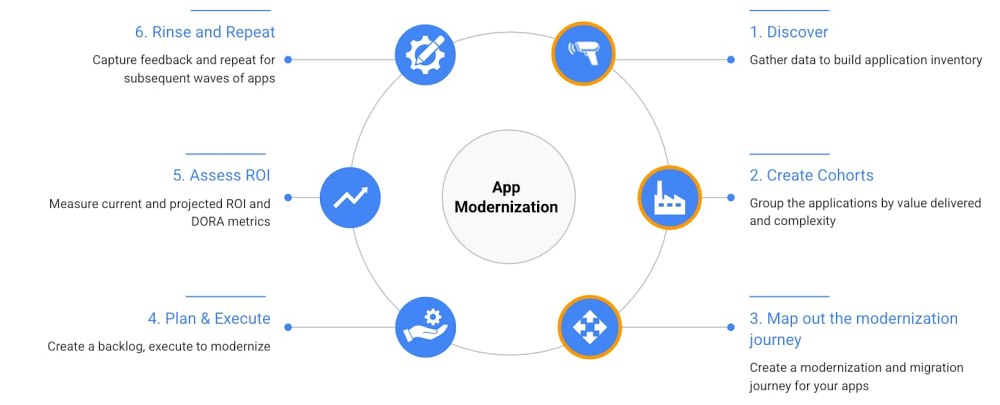
Application rationalization is a process of going over the application inventory to determine which applications should be retired, retained, reposted, replatformed, refactored or reimagined. This is an important process for every enterprise in making investment or divestment decisions. Application rationalization is critical for maintaining the overall hygiene of the app portfolio irrespective of where you are running your applications i.e. in cloud or not. However, if you are looking to migrate to the cloud, it serves as a first step towards a cloud adoption or migration journey. In this blog we will explore drivers and challenges while providing a step-by-step process to rationalize and modernize your application portfolio. This is also the first blog post in a series of posts that we will publish on the app rationalization and modernization topic.There are several drivers for application rationalization for organizations, mostly centered around reducing redundancies, paying down technical debt, and getting a handle on growing costs. Some specific examples include: Enterprises going through M&A (mergers and acquisitions), which introduces the applications and services of a newly acquired business, many of which may duplicate those already in place.Siloed lines of businesses independently purchasing software that exists outside the scrutiny and control of the IT organization.Embarking on a digital transformation and revisiting existing investments with an eye towards operational improvements and lower maintenance costs. See the CIO guide for app modernization to maximize business value and minimize risk.What are the challenges associated with application rationalization? We see a few:Sheer complexity and sprawl can limit visibility, making it difficult to see where duplication is happening across a vast application portfolio.Zombie applications exist! There are often applications running simply because retirement plans were never fully executed or completed successfully. Unavailability of up to date application inventory. Are newer applications and cloud services accounted for?Even if you know where all your applications are, and what they do, you may be missing a formal decisioning model or heuristics in place to decide the best approach for a given application.Without proper upfront planning and goal setting, it can be tough to measure ROI and TCO of the whole effort leading to multiple initiatives getting abandoned mid way through the transformation process.Taking an application inventoryBefore we go any further on app rationalization, let’s define application inventory. Application inventory is defined as a catalog for all applications that exist in the organization. It has all relevant information about the applications such as business capabilities, application owners, workload categories (e.g. business critical, internal etc.), technology stacks, dependencies, MTTR (mean time to recovery), contacts, and more. Having an authoritative application inventory is critical for IT leaders to make informed decisions and rationalize the application portfolio. If you don’t have an inventory of your apps, please don’t despair, start with a discovery process and catalogue all the app inventory and assets and repos in one place. The key for successful application rationalization and modernization is approaching it like an engineering problem—crawl, walk, run; iterative process with a feedback loop for continuous improvement. Create a blueprintA key concept in application rationalization/modernization is figuring out the right blueprint for each application. Retain—Keep the application as is, i.e. host it in the current environmentRetire—Decommission the application and compute at source Rehost—Migrate it similar compute elsewhereReplatform—Upgrade the application and re-install on the target Refactor—Make changes to the application to move towards cloud native traitsReimagine—Re-architect and rewrite6 steps to application modernizationThe six step process outlined below is a structured, iterative approach to application modernization. Step 1-3 depicts the application rationalization aspects of the modernization journey.Fig. Application modernization process including steps 1-3 for app rationalizationStep 1: Discover—Gather the dataData is the foundation of the app rationalization process. Gather app inventory data for all your apps in a consistent way across the board. If you have multiple formats of data across lines of businesses, you may need to normalize the data. Typically some form of albeit outdated app inventory can be found in CMDB databases or IT spreadsheets. If you do not have an application inventory in your organization then you need to build one either in an automated way or manually. For automated app discovery there are tools that you can use such as Stratozone, M4A Linux and Windows assessment tools, APM tools such as Splunk, dynatrace, newrelic, and appdynamics and others may also be helpful to get you started. App assessment tools specific to workloads like WebSphere Application Migration Toolkit, Redhat Migration Toolkit for Applications, VMWare cloud suitability analyzer and .NET Portability Analyzer can help paint a picture of technical quality across the infrastructure and application layers. As a bonus, similar rationalization can be done at the data, infrastructure and mainframe tiers too. Watch this space.Fig. Discovery ProcessAt Google, we think of problems as software first and automate across the board (SRE thinking). If you can build an automated discovery process for your infrastructure, applications and data it helps track and assess the state of the app modernization program systematically over the long run. Instrumenting the app rationalization program with DORA metrics enables organizations to measure engineering efficiency and optimize the velocity of software development by focusing on performance.Step 2: Create cohorts—Group applications Once you have the application inventory, categorize applications based on value and effort. Low effort e.g. stateless applications,microservices or applications with simple dependencies etc. and high business value will give you the first wave candidates to modernize or migrate.Fig. Creating and mapping cohortsStep 3: Map out the modernization journeyFor each application, understand its current state to map it to the right destination on its cloud journey. For each application type, we outline the set of possible modernization paths. Watch out for more content in this section in upcoming blogs.Not cloud ready (Retain, Rehost ,Reimagine)—These are typically monolithic, legacy applications which run on the VM, take a long time to restart, not horizontally scalable. These applications sometimes depend on the host configuration and also require elevated privileges. Container ready (Rehost, Refactor and Replatform)—These applications can restart, have readiness and liveliness probes, logs to stdout. These applications can be easily containerized. Cloud compatible (Replatform)—In addition to container ready, typically these applications have externalized configurations, secret management, good observability baked in. The apps can also scale horizontally. Cloud friendly—These apps are stateless, can be disposed of, have no session affinity, and have metrics that are exposed using an exporter.Cloud Native—These are API first, easy to integrate cloud authentication and authorization apps. They can scale to zero and run in serverless runtimes. The picture below shows where each of this category lands on the modernization journey and a recommended way to start modernization. This will drive your cloud migration journey, e.g. lift and shift, move and improve etc.Fig. Application migration/modernization MapOnce you have reached this stage, you have established a migration or change path for your applications. It is useful to think of this transition to cloud as a journey, i.e. an application can go through multiple rounds of migration and modernization or vice-versa as different layers of abstractions become available after every migration of modernization activity. Step 4: Plan and ExecuteAt this stage you have gathered enough data about the first wave of applications. You are ready to put together an execution plan, along with the engineering, DevOps and operations/SRE teams. Google Cloud offers solutions for modernizing applications, one such example for Java is here.At the end of this phase, you will have the following (not an exhaustive list):An experienced team who can run and maintain the production workloads in cloud Recipes for app transformation and repeatable CI/CD patternsA security blueprint and data (in transit and at rest) guidelinesApplication telemetry (logging, metrics, alerts etc.) and monitoringApps running in the cloud, plus old apps turned off realizing infrastructure and license savingsRunbook for day 2 operationsRunbook for incident managementStep 5: Assess ROIROI calculations include a combination of: Direct costs: hardware, software, operations, and administrationIndirect costs: end-user operations and downtimeIt is best to capture the current/as is ROI and projected ROI after the modernization effort. Ideally this is in a dashboard and tracked with metrics that are collected continuously as applications flow across environments to prod and savings are realized. The Google CAMP program puts in place a data-driven assessment and benchmarking, and brings together a tailored set of technical, process, measurement, and cultural practices along with solutions and recommendations to measure and realize the desired savings. Step 6: Rinse and RepeatCapture the feedback from going over the app rationalization steps and repeat for the rest of your applications to modernize your application portfolio. With each subsequent iteration it is critical to measure key results and set goals to create a self propelling, self improving fly wheel of app rationalization. SummaryApp rationalization is not a complicated process. It is a data driven, agile, continuous process that can be implemented and communicated within the organization with the executive support. Stay tuned: As a next step, we will be publishing a series of blog posts detailing each step in the application rationalization and modernization journey and how Google Cloud can help.Related ArticleGoogle Cloud Application Modernization Program: Get to the future fasterThe Google Cloud App Modernization Program (CAMP) can help you accelerate your modernization process and adopt DevOps best practicesRead Article
Quelle: Google Cloud Platform

Closing Out 2020 with More Innovation for Developers

Recently our CEO Scott Johnston took a look back on all that Docker had achieved one year after selling the Enterprise business to Mirantis and refocusing solely on developers. We made significant investments to deliver value-enhancing features for developers, completed strategic collaborations with key ecosystem partners and doubled down on engaging its user community, resulting in a 70% year-over-year increase in Docker usage.  

Even though we are winding down the calendar year, you wouldn’t know it based on the pace at which our engineering and product teams have been cranking out new features and tools for cloud-native development. In this post, I’ll add some context around all the goodness that we’ve released recently.  

Recall that our strategy is to deliver simplicity, velocity and choice for dev teams going from code to cloud with Docker’s collaborative application development platform. Our latest releases, including Docker Desktop 3.0 and Docker Engine 20.10, accelerate the build, share, and run process for developers and teams. 

Higher Velocity Docker Desktop Releases 

With the release of Docker Desktop 3.0.0, we are totally changing the way we distribute Docker Desktop to developers. These changes allow for smaller, faster Docker Desktop releases for increased simplicity and velocity. Specifically:  

Docker Desktop will move to a single release stream for all users. Now developers don’t have to choose between stability versus getting fixes and features quickly.All Docker Desktop updates will be provided as deltas from the previous version. This will reduce the size of a typical update, speeding up your workflow and removing distractions from your day.Updates will be downloaded in the background for a more simple experience. All a developer needs to do is restart Docker Desktop. A preview of Docker Desktop on Apple M1 silicon, the most in-demand request on our public roadmap. 

These updates build upon what was a banner year for Docker Desktop. The team has been super hard at work having also collaborated with Snyk on image scanning and collaborating with AWS and Microsoft to deploy from Desktop straight to AWS and Azure, respectively. We also invested in performance improvements to the local development experience, such as CPU improvements on Mac and the WSL2 backend on Windows.   

Docker Engine 20.10

Docker Engine is the industry’s de facto container runtime. It powers millions of applications worldwide, providing a standardized packaging format for diverse applications. This major release of Docker Engine 20.10 continues our investment in the community Engine adding multiple new features including support for cgroups V2, moving multiple features out of experimental into GA including `RUN –mount=type=(cache|secret|ssh|…)`and rootless mode, along with a ton of other improvements to the API, client and build experience. These updates enhance security and increase trust and confidence so that developers can move faster than before.

More 2020 Milestones

In addition to these latest product innovations, we continued to execute on our developer strategy. Other highlights from the year that was 2020 include: 

11.3 million monthly active users sharing apps from 7.9 million Docker Hub repositories at a rate of 13.6 billion pulls per month – up 70% year-over-year. Collaborated with Microsoft, AWS, Snyk and Canonical to enhance the developer experience and grow the ecosystem. Docker ranked as the #1 most wanted, the #2 most loved, and the #3 most popular platform according to the 2020 Stack Overflow Survey. Hosted DockerCon Live with more than 80,000 registrants. All of the DockerCon Live 2020 content is on-demand if you missed it.Over 80 projects accepted to our open source program.  

Keep an eye out in the new year for the latest and greatest from Docker. You can expect to see us release features and tools that enhance the developer experience for app dev environments, container image management, pipeline automation, collaboration and content. Happy holidays and merry everything! We will “see” you in 2021, Docker fam. 
The post Closing Out 2020 with More Innovation for Developers appeared first on Docker Blog.
Quelle: https://blog.docker.com/feed/





