5 cheat sheets to help you get started on your Google Cloud journey

Sometimes a picture is worth a thousand words, and that’s where these cheat sheets come in handy. Cloud Developer Advocate Priyanka Vergadia has built a number of guides that help developers visually navigate critical decisions, whether it’s determining the best way to move to the cloud, or deciding on the best storage options. Below are five of her top cheat sheets in one handy location.Google Cloud migration made easyMigration to cloud is the first step to digital transformation because it offers a quick, simple path to cost savings and enhanced flexibility. Read the blog to learn about migrating on-premises or public cloud hosted infrastructure into Google Cloud, or click the image below.Click to enlargeMigrating Apache Hadoop to Dataproc: A decision treeAre you using the Apache Hadoop and Spark ecosystem and looking to simplify resource management? You may want to consider Dataproc. Read the blog post to learn four scenarios for migrating Apache Hadoop clusters to Google Cloud, or click the image below.Click to enlargeGoogle Cloud VMware Engine cheat sheetIf you’ve got VMware workloads and are considering modernizing in the cloud for increased agility and reduced total cost of ownership, VMware Engine may be the service for you. Read the blog post, or expand the image below to learn the benefits, features, and use cases for VMware Engine.Click to enlargeGoogle Cloud block storage optionsGoogle Cloud offers two options for block storage: Persistent Disks and Local SSD. This cheat sheet helps you choose the right one for your app. Read the blog, or click the image below.Click to enlargeGoogle Cloud products in 4 words or lessGoogle Cloud offers lots of products to support a wide variety of use cases. But how do you even know where to start? This list—originally kicked off by Google Cloud’s head of DevRel Greg Wilson—makes it easy to familiarize yourself with the Google Cloud ecosystem so you can quickly get up to speed, choosing the ones you want to dive in deep with documentation or other available resources. To get started, read the blog, visit the GitHub page, or click the image below.Click to enlargeLearn moreWe hope these cheat sheets help make navigating the cloud easier than ever. For more Google Cloud tips and best practices, check out our Tech blog.Related Article13 sample architectures to kickstart your Google Cloud journeyThe 13 most popular application architectures on Google Cloud, and how to get started.Read Article
Quelle: Google Cloud Platform

In case you missed it: All our free Google Cloud training opportunities from Q1

No-cost training opportunities remain a core part of how we help you build your cloud knowledge and showcase your cloud competencies. Since January, we’ve introduced a number of opportunities for you to grow your skills, and we wanted to bring them together into one handy resource so you don’t miss out.Join the Google Cloud 30-day challenge 2021We kicked off the new year with our new skills challenge, offering four initial cloud skills tracks: Getting Started, Data Analytics, Kubernetes (previously titled Hybrid and Multicloud), and Machine Learning (ML) and Artificial Intelligence (AI). Learn more in our blog post, or register for the skills challenge today to get 30 days free access to Google Cloud labs.Don’t know where to start with Google Cloud? We can help.Our Google Cloud OnBoard events are a great way to get an introduction from experts on the core components of Google Cloud, as well as an overview of how our tools impact the entire cloud computing landscape. Read more details or watch the training on demand.Learn how to accelerate data science workflows with LookerLooker, the modern business intelligence (BI) and analytics platform that is now a part of Google Cloud, is more than a BI reporting tool. It’s a full-fledged data application and visualization platform that allows users to curate and publish data. And it integrates with a wide range of endpoints in many different formats, ranging from CSV, JSON, and Excel files to SaaS and in-house built custom applications. Our recent blog post dives into how data analysts and data scientists can use Looker to help with data governance. And for a demonstration of real-life examples of how to use Looker to automate and productionalize data science workflows, watch this on-demand training.Earn the new ‘Optimize Costs for Google Kubernetes Engine’ Skills BadgeWe introduced a new skills badge that tests your ability to run a GKE cluster, ensuring it’s optimized to run an application with all its many microservices and that it can autoscale appropriately to handle both traffic spikes and traffic lulls (where you’ll want to save on your infrastructure costs). Learn more in this blog post or watch this on-demand training to take your first step towards learning how to optimize GKE costs and earning your skill badge.Looking aheadThis year is only getting started when it comes to learning opportunities. April alone included free AI and machine learning training for fraud detection, chatbots, and more. Check back regularly for the latest updates.Related ArticleFree AI and machine learning training for fraud detection, chatbots, and moreThese no-cost training opportunities can help you gain the latest AI and machine learning skills from Google Cloud.Read Article
Quelle: Google Cloud Platform

Friday Five — April 16, 2021

The Friday Five is a weekly Red Hat® blog post with 5 of the week’s top news items and ideas from or about Red Hat and the technology industry. Consider it your weekly digest of things that caught our eye.

Quelle: CloudForms

What’s New in the Block Editor: New Page Layout Picker, Better Block Transformation Options, and More

Here’s a peek at the latest changes in the block editor — subtle-yet-practical enhancements that help you create beautiful posts and pages more efficiently:

New page layout picker experience.Convert text and images into Columns block.Improved spacing options for social links and buttons.Streamlined behavior of the writing prompt.

Let’s dive in!

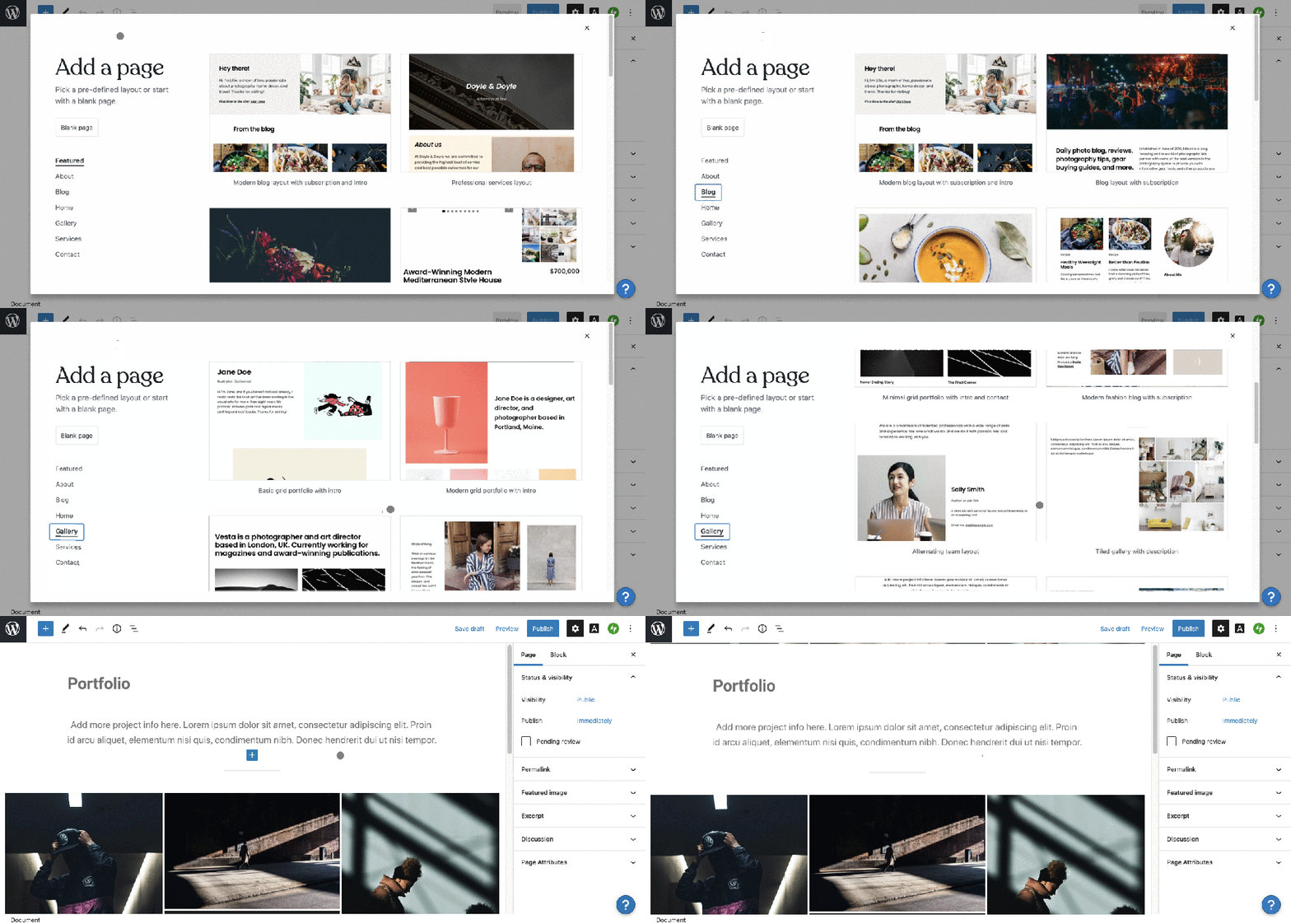
New Page Layout Picker

Page layouts are pre-designed templates that make creating beautiful pages a breeze. In this update we focused on improving the layout picker, making it easier to quickly browse different categories and select your layout.

Convert text and images into Columns Block

Transforming one block into another is a nifty trick that can greatly improve the editing experience. With the latest update, text (and images too!) can be automatically converted to a Columns block with the click of a button.

Select two or more blocks (these could be Paragraph, Heading, Image, etc.), click on the grouped block icon, and select “Columns” from the list of transformation options. The number of blocks selected will correspond to the number of columns.

Improved spacing options for Social Links and Buttons

Get creative with new ways to arrange your social links and buttons. This update brings you greater control over spacing and unlocks some neat layout ideas.

The correct alignment will be visible once you finish editing the Social Icons block.

Streamlined behavior of the writing prompt

You’re probably familiar with the writing prompt that greets you every time you start a new post or  page. Until now you’d also see it on every new line in your document. We’re happy to report that’s no longer the case! To streamline the writing process the prompt will now only appear once. There will be no subsequent prompts with every new line — just space for you to write your thoughts without distractions.

You keep building, we’ll keep improving

We can’t wait to see what you build with the improved block editor. In the meantime, we’ll keep new updates coming your way.

Happy editing!
Quelle: RedHat Stack

Predictable serverless deployments with Terraform

As a software developer, you want your code to reliably work. If your code is deployed in any sort of complex architecture, your code may be correct, but a misconfigured deployment could mean the entire system doesn’t work. The ability to reliably deploy complex infrastructure is essential. Having detailed documentation is useful, but just one misconfiguration can cause many issues. In these cases, consider Infrastructure as Code as a way to achieve reliably, repeatable deployments. One tool that’s widely used right now is Terraform, which supports many major cloud platforms, including Google Cloud. Here’s a short example of how Terraform can help: consider the following gcloud command: $ gsutil mb gs://my-new-bucketThis command will create a new storage bucket for you, but if you run it again, you get an error message that the bucket already exists! You could add manual checks around this command to ask if the bucket already exists, and create it if it doesn’t, but when you start adding these checks around all your scripts, it gets complex and unmaintainable.Replacing fallible shell with reliable TerraformWith Terraform, you describe your desired state—in this case, a bucket exists in your project—and Terraform will take the steps required to make sure that state is met. If the bucket already exists, Terraform will take no action. But if the bucket doesn’t exist, Terraform will take the steps required to create it.You write Terraform manifests in HCL—Hashicorp Configuration Language—which allows for such complexity like variables and calculated fields. Terraform will also work out the dependency graph itself, when working with multiple resources. Some resources have to be created before others. And some resources create data that will be used by other resources. For example, if you have a Cloud Run service that relies on that cloud storage bucket, the bucket has to exist first; and Terraform will work that out. If you have, say, a deployment of 5 cloud functions that are independent of each other, terraform will run those creations in parallel; which will be much faster than creating each one of those one by one. This technology also isn’t limited to just serverless products. With the Google Terraform provider you can deploy virtual machines, networking, and other complex infrastructure that would be downright annoying and frustrating to have to manually deploy over and over again.If you want to use Terraform to provision a development environment, consider what should be different compared to your production setup. You may want to add some variables to say, create a smaller Cloud SQL instance rather than a production-spec one, but with Terraform you can easily create duplicate setups. Be aware of the limitationsInfrastructure as Code is good for infrastructure and deploying existing assets, like containers and compiled code. There are other tools that you use to build your containers, and Terraform is not one of those tools. Terraform can be the replacement for the manual deployment after your containers are built, in that existing setup. Alternatively,  it can be integrated into your existing automation, for example as a step in your Cloud Build configuration.  This works well if you are doing in-house development with continuous deployments. Check out “Managing infrastructure as code with Terraform, Cloud Build, and GitOps” for an example of how to implement this configuration. For complex deployments, consider using Terraform. Not only will your deployments get more reliable, you can store your live infrastructure configuration settings along with your code in source control.Terraform in practiceFor an example deployment, follow Katie and Martin as they deploy a sample cat identification service, with Terraform: The application demonstrated in this video and post is available on GitHub in the Serverless-Expeditions repo under the terraform-serverless folder. In this video, we deploy a Cloud Function and Cloud Run service, together with a Cloud Storage bucket, and various IAM configurations, to get the project up and running swiftly. We then look around the Google Cloud project to see what was created, and try making some changes that are then re-asserted by Terraform. Finally, we destroy all the Terraform created resources, and re-create them again, restoring the application. Learn more: https://cloud.google.com/solutions/managing-infrastructure-as-codehttps://registry.terraform.io/providers/hashicorp/google/latest/docs Check out more Serverless Expeditions Serverless Expeditions is a fun and cheeky video series that looks at what serverless means and how to build serverless apps with Google Cloud. Follow these hosts on Twitter at @glasnt and @martinomander.Related ArticleA new Terraform module for serverless load balancingWith the new optimized Terraform load balancing module, you can now set up load balancing for serverless applications on Cloud Run, App E…Read Article
Quelle: Google Cloud Platform