Deliver zero trust on unmanaged devices with new BeyondCorp Enterprise protected profiles

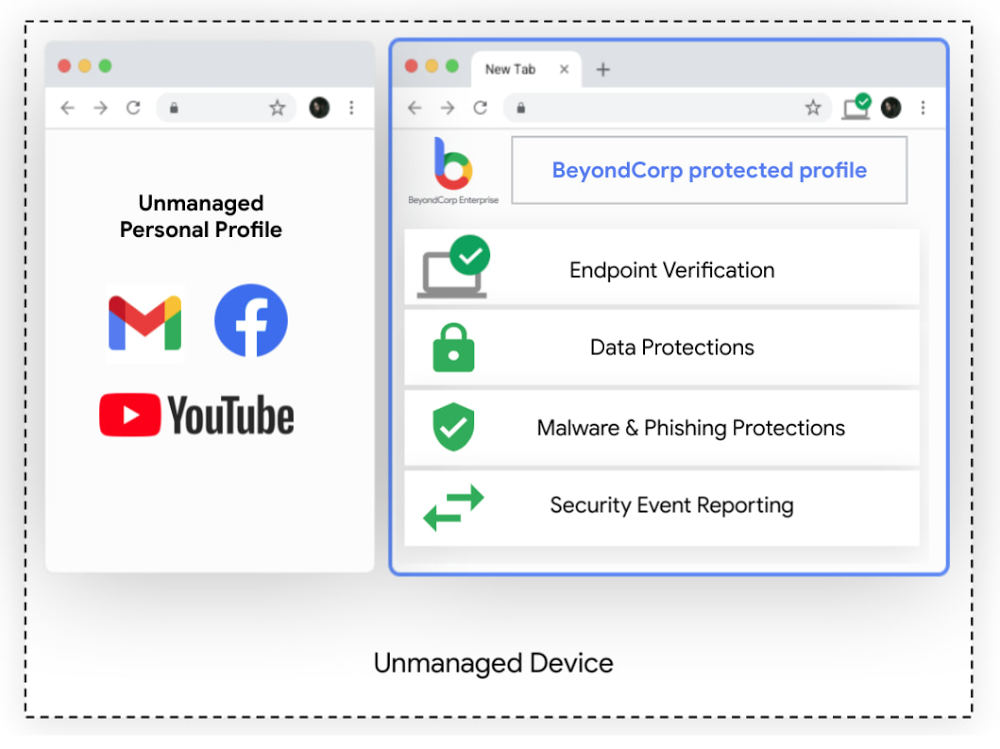
Modern enterprises rely on vast and complex networks of technologies and skillsets to accomplish their goals. Markets are global, workers are remote, and information needs to be accessible anywhere, while remaining secure. This increasing complexity has led many enterprises to adopt a zero trust approach to security and deploy Google’s BeyondCorp Enterprise, which provides customers with simple and secure access to applications and cloud resources with integrated threat and data protection. To help BeyondCorp Enterprise customers account for the global, mobile nature of work, we’re excited to unveil a new feature, the protected profile. Protected profiles enable users to securely access corporate resources from an unmanaged device with the same threat and data protections available in BeyondCorp Enterprise–all from the Chrome Browser. Building the Trusted CloudSome of your employees may not actually be employed directly by your organization, but instead are part of your extended workforce, contracted to serve in roles such as project support, advisory services, specialty freelance jobs, or temporary and seasonal help. You still need to know that these workers have secure and appropriate access to the applications and resources they need to do their work. This can be a challenging task. IT administrators often lack the ability to install security software or agents, let alone manage devices for an extended workforce. Similarly, VPNs for these groups can be costly, cumbersome, and unnecessary when users may only need access to a handful of apps. Worse, granting non-employees broad access to the corporate network presents significant security risks. Still, the job remains to ensure these workers can be productive.At Google, our trusted cloud vision means security technologies are engineered into our platforms and products for all who use them, whether they are your own employees, your extended workforce, or your partners. With zero trust as a central pillar of this vision, customers can operate with confidence that threats from ransomware, account takeovers, phishing, and even more advanced attacks are minimized, detectable, and recoverable.Enable BeyondCorp Enterprise on unmanaged devices with protected profilesProtected profiles utilize Chrome to deploy policies and protections to users, delivering access, threat and data protection to an unmanaged device, as if it were corporate-managed. Profiles are already an existing feature in Chrome, used across enterprises and personal devices for keeping things like bookmarks, history, passwords, and other settings separate from other users. Now, corporate access policies and protection from malicious websites, phishing, and data loss can be applied to profiles through BeyondCorp Enterprise so organizations can protect data and users against threats, and provide information to inform access decisions directly from the browser, while keeping work and personal profiles separate.Click to enlargeProtected profiles are great for the extended workforce and contractors using unmanaged devices, but they are also ideal for frontline workers sharing devices. In healthcare, for instance, doctors and nurses doing rounds may share a common computer in each wing. In retail, store clerks frequently share tablets and will sign in and out at shift change. In these cases, logging in from protected profiles ensures access to permitted applications based on user profiles, and prohibits access to resources that are considered out of scope. Data leakage policies can be used to detect, monitor and prevent loss of customer information.The simplicity of this solution and our agentless approach with Chrome is ideal for all end users, as they can securely and productively work and access resources as they normally would on a managed device. Admins can easily create granular policies and deploy them for specific user groups or activities without disrupting operations. BeyondCorp Enterprise can also generate reports that provide visibility into security events, helping to surface and address potential security risks.Click to enlargeInterested in learning more?If you’d like to learn more about BeyondCorp Enterprise or to speak with someone on our team, please visit our product page. To learn more about the new protected profiles feature, be sure to check out the BeyondCorp Enterprise session featured in the May 2021 Google Cloud Security Talks and read our white paper. Related ArticleBeyondCorp Enterprise: Introducing a safer era of computingThe GA of Google’s comprehensive zero trust product offering, BeyondCorp Enterprise, brings this modern, proven technology to organizatio…Read Article
Quelle: Google Cloud Platform

Deploying multi-YAML Workflows definitions with Terraform

I’m a big fan of using Workflows to orchestrate and automate services running on Google Cloud and beyond. In Workflows, you can define a workflow in a YAML or JSON file and deploy it using gcloud or using Google Cloud Console. These approaches work but a more declarative and arguably better approach is to use Terraform. Let’s see how to use Terraform to define and deploy workflows and explore options for keeping Terraform configuration files more manageable. Single Terraform fileTerraform has a google_workflows_workflow resource to define and deploy workflows. For step-by-step instructions, see our basic Terraform sample, which shows how to define a workflow in main.tf and how to deploy it using Terraform.Let’s take a closer look at how the Workflows resource is defined in Terraform:You can see that everything about the workflow, such as name, region, service account, and even the workflow definition itself are defined in this single file. While this is workable for simple workflow definitions, it’s hardly maintainable for larger workflows. Importing a Workflow definition fileA better approach is to keep the workflow definition in a separate YAML file and import that into Terraform. The templatefile function of Terraform makes this possible — and in fact very easy to do. In the Terraform with imported YAML sample, you can see how to import an external workflows.yaml file into your Terraform definition:Importing multiple Workflow definition filesImporting the workflow YAML file is a step in the right direction, but in large workflow definitions, you often have a main workflow calling multiple subworkflows. Workflows doesn’t currently support importing or merging workflow and subworkflow definitions. You end up with a single workflow definition file for the main workflow and all the subworkflows. This is not maintainable. Ideally, you’d have each subworkflow in its own file and have the main workflow simply refer to them. Thankfully, this is easy to do in Terraform. In the Workflows Terraform with multiple external YAMLs sample, you can see how to import an external workflows.yaml file for the main workflow and a subworkflow.yaml file for the subworkflow into your Terraform definition:This is more maintainable for sure! One minor issue is that all YAMLs do end up getting merged and deployed as a single YAM to Workflows. When you debug your workflows and subworkflows, you might get confused with line numbers of your subworkflows. This wraps up our discussion of Workflows and Terraform. You can check out our workflows-demos repo for all the source code for Terraform samples and more. Thanks to Jamie Thomson for the template file idea on Terraform. Please reach out to me on Twitter @meteatamel for any questions or feedback.Related ArticleBetter service orchestration with WorkflowsWorkflows is a service to orchestrate not only Google Cloud services such as Cloud Functions and Cloud Run, but also external services.Read Article
Quelle: Google Cloud Platform

Video: Docker Build – Working with Docker and VSCode

Tune in as host Peter McKee turns over the controls to Brandon Waterloo for a show-and-tell of how to work with Docker and Visual Studio Code (VSCode). A senior software engineer at Microsoft, Waterloo is the lead developer of the Docker extension and works mainly on the Docker extension for VSCode.

VSCode is a streamlined source-code editor made by Microsoft for Windows, Linux and macOS that’s fine-tuned for building and debugging modern web and cloud applications. The Docker extension makes it easier to build apps that leverage Docker containers, helps scaffold needed files, build Docker images, debug your app inside a container and more.

Follow along as Waterloo builds a basic Python FastAPI app with a Redis backend and a simple hit counter, adding Docker files in order to containerize it. Along the way, he and McKee talk scaffolding, running, debugging, syntax highlighting, intelligent code completion, snippets and the climate benefits of living in Texas (McKee) versus Michigan (Waterloo).

Watch the video here:

 Join Us for DockerCon LIVE 2021  

Join us for DockerCon LIVE 2021 on Thursday, May 27. DockerCon LIVE is a free, one day virtual event that is a unique experience for developers and development teams who are building the next generation of modern applications. If you want to learn about how to go from code to cloud fast and how to solve your development challenges, DockerCon LIVE 2021 offers engaging live content to help you build, share and run your applications. Register today at https://dockr.ly/2PSJ7vn
The post Video: Docker Build – Working with Docker and VSCode appeared first on Docker Blog.
Quelle: https://blog.docker.com/feed/

Amazon Redshift kündigt Unterstützung für hierarchische Datenabfragen mit rekursiver CTE an

Amazon Redshift, ein vollständig verwaltetes Cloud-Data-Warehouse, bietet jetzt Unterstützung für rekursive Common Table Expression (CTE). Ab heute können Sie eine rekursive CTE auf Ihrem Redshift-Cluster verwenden, um hierarchische Daten abzufragen, z. B. Organigramme, in denen Mitarbeiter an andere Mitarbeiter (Manager) berichten, oder mehrstufige Produktbestellungen, bei denen ein Produkt aus vielen Komponenten besteht, die wiederum aus anderen Komponenten bestehen.
Quelle: aws.amazon.com

Ungenutzte Ressourcen in Amazon Forecast durch hierarchisches Löschen einfach bereinigen

Wir freuen uns, Ihnen mitteilen zu können, dass Sie jetzt Ressourcen in Amazon Forecast hierarchisch auf einer übergeordneten Ebene löschen können, ohne die untergeordneten Ressourcen suchen zu müssen. Sie können sich auf den Aufbau von wertschöpfenden Prognosesystemen konzentrieren und müssen sich nicht um die Verwaltung einzelner Ressourcen kümmern, die in Ihrem Workflow erstellt werden. Amazon Forecast verwendet Machine Learning (ML), um genaue Bedarfsprognosen zu generieren, ohne dass vorherige ML-Erfahrung erforderlich ist. Amazon Forecast stellt Entwicklern dieselbe Technologie, die bei Amazon.com verwendet wird, als vollständig verwalteten Service zur Verfügung, so dass Sie keine Ressourcen verwalten oder Ihre Systeme neu aufbauen müssen.
Quelle: aws.amazon.com

Einführung von Amazon FinSpace, einem vollständig verwalteten Service zum Speichern, Aufbereiten und Analysieren von Daten für die Finanzdienstleistungsbranche (FSI)

Amazon FinSpace ist ein neuer, vollständig verwalteter Datenmanagement- und Analyseservice, der die Speicherung, Katalogisierung und Aufbereitung von Daten aus der Finanzbranche im großen Maßstab vereinfacht und die Zeit, die Kunden aus der Finanzdienstleistungsbranche (FSI) benötigen, um alle Arten von Finanzdaten zu finden und für Analysen abzurufen, von Monaten auf Minuten reduziert.  
Quelle: aws.amazon.com

Amazon CloudFront kündigt CloudFront Functions an, eine leichtgewichtige Edge-Computing-Funktion

Amazon CloudFront kündigt die allgemeine Verfügbarkeit von CloudFront Functions an, einer neuen serverlosen Edge-Berechnungsfunktion. Sie können diese neue CloudFront-Funktion verwenden, um JavaScript-Funktionen über 225+ CloudFront-Edge-Standorte in 90 Städten in 47 Ländern auszuführen. CloudFront Functions wurde für benutzerfreundliche HTTP(S)-Transformationen und -Manipulationen entwickelt, mit denen Sie Ihren Kunden reichhaltigere, personalisierte Inhalte mit geringer Latenz zur Verfügung stellen können.
Quelle: aws.amazon.com