Iskur X: Razer bringt günstigere Version des Gaming-Stuhls
Der Razer Iskur X verzichtet auf einige Funktionen, etwa die einstellbare Rückenstütze, kostet dafür jedoch 100 Euro weniger. (Razer, Ergonomie)
Quelle: Golem

Der Razer Iskur X verzichtet auf einige Funktionen, etwa die einstellbare Rückenstütze, kostet dafür jedoch 100 Euro weniger. (Razer, Ergonomie)
Quelle: Golem

Wer ein defektes Elektrogerät reparieren lässt, kann zukünftig einen Teil der Kosten erstattet bekommen. (Nachhaltigkeit, Smartphone)
Quelle: Golem

Tesla will die Probleme für die Batteriezellproduktion in Grünheide gelöst haben. Über den Antrag muss nun noch entschieden werden. (Gigafactory Berlin, GreenIT)
Quelle: Golem

Nach fast vierjähriger Entwicklung und immer wieder verschobenen Starts soll die Retrokonsole Atari VCS endlich auf den Markt kommen. (Atari, Games)
Quelle: Golem

Apples Airtags piepsen früher, wenn sie einem Nicht-iPhone-Nutzer untergeschoben werden. Außerdem wird es eine Erkennungs-App für Android geben. (Apple, Bluetooth)
Quelle: Golem
particule.io – Deploy federated Kubernetes Clusters on AWS using their Federated EKS Clusters solution
Quelle: news.kubernauts.io
Hybrid cloud has come to mean different things over time. One early canonical document from the National Institute of Standards and Technology (NIST) focused on quickly and transparently moving workloads between a private cloud and a public one. This turned out to be both too narrow a definition and often not feasible because of the difficulty and cost of moving around large volumes of data.
Quelle: CloudForms
Throughout the last year, digital transformation has come even more into focus as the center of business growth for companies both small and large. These efforts, such as those enabled by hybrid or multi-cloud strategies, can help businesses to more flexibly pivot products or offerings in times of rapid change. This focus has highlighted the need for expertise in digital transformation.
Quelle: CloudForms
We recently launched Vertex AI to help you move machine learning (ML) from experimentation into production faster and manage your models with confidence—speeding up your ability to improve outcomes at your organization.But we know many of you are just getting started with ML and there’s a lot to learn! In tandem with building the Vertex AI platform, our teams are dropping as much best practices content as we can to help you come up to speed. Plus, we have a dedicated event on June 10th, Applied ML Summit, with sessions on how to apply ML technology in your projects, as well as grow your skills in this field. In the meantime, we couldn’t resist a quick lesson on hyperparameter tuning, because (a) it’s incredibly cool (b) you will impress your coworkers (c) Google Cloud has some unique battle tested tech in this area and (d) you will save time by getting better ML models into production faster. Vertex Vizier, on average, finds optimal parameters for complex functions in over 80% fewer trials than traditional methods. So it’s incredibly cool, but what is it?While machine learning models automatically learn from data, they still require user-defined knobs which guide the learning process. These knobs, commonly known as hyperparameters, control, for example, the tradeoff between training accuracy and generalizability. Examples of hyperparameters are the optimizer being used, its learning rate, regularization parameters, the number of hidden layers in a DNN, and their sizes.Setting hyperparameters to their optimal values for a given dataset can make a huge difference in model quality. Typically, optimal hyperparameter values are found via grid searching a small number of combinations, or tedious manual experimentation. Hyperparameter tuning automates this work for you by searching for the best configuration of hyperparameters for optimal model performance. Vertex Vizier enables automated hyperparameter tuning in several ways:”Traditional” hyperparameter tuning: by this we mean finding the optimal value of hyperparameters by measuring a single objective metric which is the output of an ML model. For example, Vizier selects the number of hidden layers and their sizes, an optimizer and its learning rate, with the goal of maximizing model accuracy.When hyperparameters are evaluated, models are trained and evaluated on splits of the data set. If evaluation metrics are streamed to Vizier (e.g. as a function of epoch) as the model is trained, Vizier’s early stopping algorithms can predict the final objective value, and recommend which unpromising trials should be early stopped. This conserves compute resources and speeds up convergence.Oftentimes, models are tuned sequentially on different data sets. Vizier’s built in transfer learning learns priors from previous hyperparameter tuning studies, and leverages them to converge faster on subsequent hyperparameter tuning studies.AutoML is a variant of #1, where Vertex Vizier performs both model selection, and also tunes architectures/non-architecture modifying hyperparameters. AutoML usually requires more code on top of Vertex Vizier (to ingest data etc), but Vizier is in most cases the “engine” behind the process. AutoML is implemented by defining a tree like (DAG) search space, rather than a “flat” search space (like in #1). Note that you can use DAG search spaces for any other purpose where searching over a hierarchical space makes sense.There are times when you may wish to optimize more than one metric. For example, we would like to optimize model accuracy, while minimizing model latency. Vizier can find thePareto frontier, which presents tradeoffs for multiple metrics, allowing users to choose the appropriate tradeoff. Simple example: I want to make a more accurate model, but would like to minimize serving latency. I do not know ahead of time what’s the tradeoff between the two metrics. Vizier can be used to explore and plot a tradeoff curve, so users can select on the most appropriate one. For example, “a latency decrease of 200ms will only decrease accuracy by 0.5%”Google Vizier is all yours with Vertex AIGoogle published the Vizier research paper in 2017, sharing our work and use cases for black-box optimization—i.e. The process of finding the best settings for a bunch of parameters or knobs when you can’t peer inside a system to see how well the knobs are working. The paper discusses our requirements, infrastructure design, underlying algorithms, and advanced features such as transfer learning that the service provides. Vizier has been essential to our progress with machine learning at Google, which is why we are so excited to make it available to you on Vertex AI.Vizier has already tuned millions of ML models at Google, and its algorithms are continuously improved for faster convergence and handling of real-life edge cases. Vertex Vizier’s models are very well calibrated and are self-tuning (they adapt to user data), and offer unique power features, such as hierarchical search spaces and multi-objective optimization. We believe Vertex Vizier’s set of features is a unique capability to Google Cloud, and look forward to optimizing the quality of your models by automatically tuning hyperparameters for you.To learn more about Vertex Vizier, check out these docs and if you are interested in what’s coming in machine learning over the next five years, tune in to our Applied ML Summit on June 10th, or watch the sessions on demand in your own time.Related ArticleGoogle Cloud unveils Vertex AI, one platform, every ML tool you needGoogle Cloud launches Vertex AI, a managed platform for experimentation, versioning and deploying ML models into production.Read Article
Quelle: Google Cloud Platform
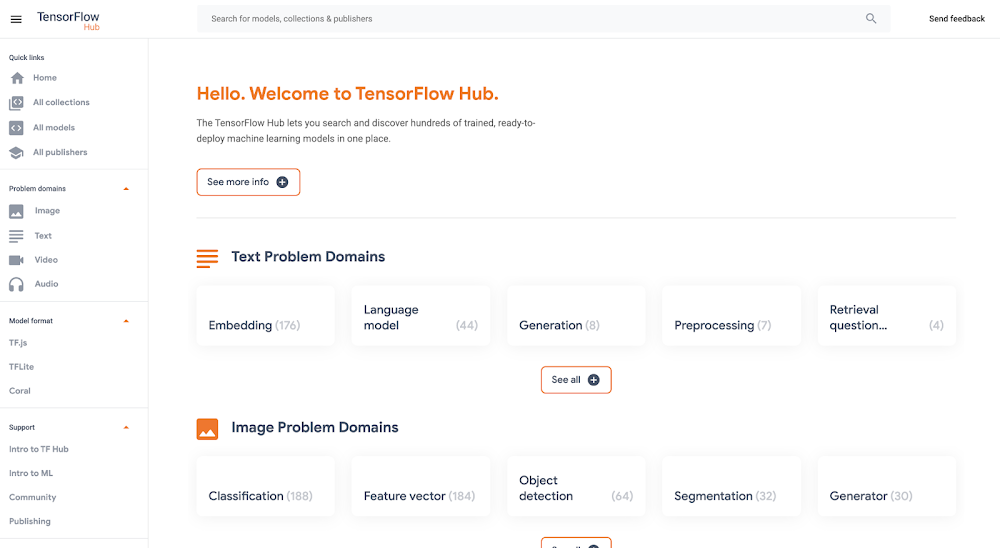
Good artists copy, great artists steal, and smart software developers use other people’s machine learning models.If you’ve trained ML models before, you know that one of the most time-consuming and cumbersome parts of the process is collecting and curating data to train those models. But for lots of problems, you can skip that step by instead using somebody else’s model that’s already been trained to do what you want–like detect spam, convert speech to text, or label objects in images. All the better if that model is built and maintained by folks with access to big datasets, powerful training rigs, and machine learning expertise.One great place to find these types of “pre-trained” models is TensorFlow Hub, which hosts tons of state-of-the-art models built by Google Research that you can download and use for free. Here you’ll find models for doing tasks like image segmentation, super resolution, question answering, text embedding, and a whole lot more. You don’t need a training data set to use these models, which is good news, since some of them are huge and trained on massive datasets. But if you want to use one of these big models in your app, the challenge then becomes where to host them (in the cloud, most likely) so they’re fast, reliable, and scalable. For this, Google’s new Vertex AI platform is just the ticket. In this post, we’ll download a model from TensorFlow Hub and upload it to Vertex’s prediction service, which will host our model in the cloud and let us make predictions with it through a REST endpoint. It’s a serverless way to serve machine learning models. Not only does this make app development easier, but it also lets us take advantage of hardware like GPUs and model monitoring features built into Vertex. Let’s get to it.Prefer doing everything in code from a Jupyter notebook? Check out this colab.Download a model from TensorFlow HubOn https://tfhub.dev/, you’ll find lots of free models that process audio, text, video, and images. In this post, we’ll grab one of the most popular Hub models, the Universal Sentence Encoder. This model takes as input a sentence or paragraph and returns a vector or “embedding” that maps the text to points in space. These embeddings can then be used for everything from sentence similarity to smart search to building chatbots (read more about them here).On the Universal Sentence Encoder page, click “Download” to grab the model in TensorFlow’s SavedModel format. You’ll download a zipped file that contains a directory formatted like so:-universal-sentence-encoder_4 -assets -saved_model.pb -variables – variables.data-00000-of-00001 – variables.indexHere, the saved_model.pb file describes the structure of the saved neural network, and the data in the variables folder contains the network’s learned weights.On the model’s hub page, you can see it’s example usage:You feed the model an array of sentences and it spits out an array of vectors.Without this example, we can still learn about what input and output the model supports by using TensorFlow’s SavedModel CLI. If you’ve got TensorFlow installed on your computer, in the directory of the Hub model you downloaded, run:For this model, that command outputs:From this, we know that our model expects as input a one-dimensional array of Strings. We’ll use this in a second.Getting started with Vertex AIVertex AI is a new platform for training, deploying, and monitoring machine learning models launched this year at Google I/O.For this project, we’ll just use the prediction service, which will wrap our model in a convenient REST endpoint.To get started, you’ll need a Google Cloud account with a GCP project set up. Next, you’ll need to create a Cloud Storage bucket, which is where you’ll upload the TensorFlow Hub model. You can do this from the command line using gsutil:If this model is big, this could take a while!In the side menu, enable the Vertex AI API. Once your Hub model is uploaded to Cloud Storage, it’s straightforward to import it into Vertex AI following the docs or this quick summary:On the Vertex AI “Models” tab, click import:2. Choose any name for your model:3. Choose a compatible version of TensorFlow to use with your model (for newer models, >= 2.0 should work). Select “GPU” if you want to pay for GPUs to speed up prediction time:4. Point “Model artifact location” to the model folder you uploaded to Cloud Storage:5. Click “Import.” 6. Once your model is imported, you’ll be able to try it out straight from the models tab. Click on the name of your model:7. Here in the model page, you can test your model right from the UI. Remember how we inspected our model with the saved_model_cli earlier and learned it accepted as input an array of strings? Here’s how we can call the model with that input:8. Once you’ve verified your model works in the UI, you’ll want to deploy it to an endpoint so you can call it from your app. In the “Endpoint” tab, click “Create Endpoint” and select the model you just imported:9. Voila! Your TensorFlow Hub model is deployed and ready to be used. You can call it via POST request from any web client or using the Python client library:Now that we’ve set our TensorFlow Hub model on Vertex, we can use it in our app without having to think about (most of) the performance and ops challenges of using big machine learning models in production. It’s a nice serverless way to get building with AI fast. Happy hacking!Related ArticleWhat is Vertex AI? Developer advocates share moreDeveloper Advocates Priyanka Vergadia and Sara Robinson explain how Vertex AI supports your entire ML workflow—from data management all t…Read Article
Quelle: Google Cloud Platform