Creating custom financial indices with Dataflow and Apache Beam

Financial institutions across the globe rely on real-time indices to inform real-time portfolio valuations, to provide benchmarks for other investments, and as a basis for passive investment instruments including exchange-traded products (ETPs). This reliance is growing—the index industry dramatically expanded in 2020, reaching revenues of $4.08 billion.Today, indices are calculated and distributed by index providers with proximity and access to underlying asset data, and with differentiating real-time data processing capabilities. These providers offer subscriptions to real-time feeds of index prices and publish the constituents, calculation methodology, and update frequency for each index.But as new assets, markets, and data sources have proliferated, financial institutions have developed new requirements. Financial institutions will need to quickly create bespoke and frequently updating indices that represent a specific actual or theoretical portfolio, with its unique constituents and weightings.In other words, existing index providers and other financial institutions alike will need mechanisms for rapid creation of real-time indices. This blog post’s focus—an index publication pipeline collaboratively developed by CME Group and Google Cloud—is an example of such a mechanism. The pipeline closely approximates a particular CME Group index benchmark, but with far greater frequency (in near real time vs. daily) than its official counterpart. It does so by leveraging open-source models such as Apache Beam and cloud-based technologies such as Dataflow, which automatically scales pipelines based on inbound data volume.Machine learning’s production problemIn the past decade, advances in AI toolchains have enabled faster ML model training—and yet a majority of ML models are still not making it into production. As organizations endeavor to develop their ML capabilities, they soon realize that a real-world ML system is comprised of a small amount of ML code embedded in a network of complex and large ancillary components. Each component brings its own development and operational challenges, which are met by bringing a DevOps methodology to the ML system, commonly referred to as MLOps (Machine Learning Operations). To apply ML to business problems, a firm must develop continuous delivery and automation pipelines for ML.This index publication collaboration is instructive because it demonstrates MLOps best practices for just such a pipeline. One Apache Beam pipeline, suited for operating on both batch and streaming data, extracts insights and packages them for downstream consumers. These consumers may include ML pipelines that, thanks to Apache Beam, require only one code path for inference across batch and real-time data sources. The pipeline is run inside Google Cloud’s Dataflow execution engine, greatly simplifying management of underlying compute resources. But the collaboration’s value is not constrained to the ML and data science realm. The project shows that consumers of the Apache Beam pipeline’s insights may also include traditional business intelligence dashboards and reporting tools. It also demonstrates the simplicity and economy of cloud-based time series data such as CME Smart Stream, which is metered by the hour, quickly and automatically provisioned, and consumable at a per-product-code (not per-feed) level.A focus on real-time processing for financial servicesTo illustrate the above points, the collaboration applies data engineering and MLOps best practices to a financial services problem. We chose the financial services domain because many financial institutions do not yet have real-time market data processing or MLOps capabilities today, owing to a significant gap on either side of their ML/AI objectives.Upstream from ML/AI models, financial institutions often experience a data engineering gap. For many financial institutions, batch processes have sufficiently addressed business requirements. As a result, the temporal nature of the time series data underlying these processes is deemphasized. For example, the original purpose of most trade booking systems was to capture a trade and ensure that it found its way to the middle and back office for settlement. It was not built with ML/AI in mind, and its underlying data therefore has not been packaged for consumption by ML/AI processes. And downstream from ML/AI models, financial institutions often encounter the aforementioned “ML production problem.”As ML/AI becomes ever more strategic, these two gaps have left many financial institutions in a conundrum—unable to train ML models for lack of properly packaged time series data, and unmotivated to package time series data for lack of ML models. By recreating a key energy market index using open-source libraries and cloud-based tools, this collaboration demonstrates that for the financial services domain a solution to this conundrum is more accessible today than ever. Creating a new indexWe modeled our new index after one of CME Group’s many index benchmarks. The particular index expresses the value of a basket of three New York Mercantile Exchange—listed energy futures as a single price. Today, CME Group publishes the index at the end of the day by calculating the settlement price of each underlying futures contract, and then weighing and summing these values. While CME Group does not currently publish this index in real time, this collaboration aims to create a near real-time solution leveraging Google Cloud capabilities and CME Group market data delivered via CME Smart Stream. However, in order to publish the value so frequently—every five seconds, with 40-second publish latency—this collaboration’s pipeline has to solve a number of challenges in near-real time.First, the pipeline must process sparse data from three separate trades feeds in memory to create open-high-low-close (OHLC) bars. More specifically, for five-second windows for each of the three front-month (and sometimes second-month) energy contracts, a bar must be produced. This is solved by using the Apache Beam library to implement functions which, when executed on Dataflow, automatically scale out as input load increases. The bars must be time-aligned across the underlying feeds, which is greatly simplified by Beam’s watermark feature. And for intervals in which no tick data is observed, the Beam library is used to pull forward the last value received, yielding perfect gap-free bars for downstream processors.Second, the pipeline must calculate volume-weighted average price (VWAP) in near real-time for each front-month contract. The VWAP calculations are also written using the Beam API and executed on Dataflow. Each of these functions requires visibility of each element in the time window, so the functions cannot be arbitrarily scaled out. Nonetheless, this is tractable because their input—OHLC bars—is manageably small.Third, the pipeline must replicate CME Group’s specific settlement price methodology for each contract. The rules specify whether to use VWAP or another source as price, depending on certain conditions. They also specify how to weigh combinations of monthly contracts during a roll period. The pipeline again encapsulates these requirements as an Apache Beam class, and joins the separate price streams at the correct time boundary.The end result is a new stream publishing bespoke index data to a Google Cloud Pub/Sub topic thousands of times daily, enabling AI models as well as traditional industry index usage, dashboards, and other tools to assist real-time decision making. The stream’s pipeline uses open source libraries that solve common time series problems out-of-the box, and cloud-based services to reduce the user’s operational and scaling burden.Click to enlargeThe importance of cloud-based dataThe promise of cloud-based pipeline execution services cannot be realized using legacy data access patterns, which often require market data users to colocate and configure servers and network gear. Such patterns inject expense and scaling complexity into the pipeline’s overall operation, diverting resources from the adoption of MLOps best practices. Instead, a newer, cloud-based access pattern—in which resources subscribe to data streams inexpensively, rapidly and programatically—is necessary.In 2018, CME Group identified the customer need for accessible futures and options market data. CME Group collaborated with Google Cloud to launch CME Smart Stream, which distributes CME Group’s real-time market data across Google Cloud’s global infrastructure with sub-second latency. Any customer with a CME Group data usage license and a Google Cloud project can consume this data for an hourly usage fee, without purchasing and configuring servers and network gear.CME Smart Stream met this index pipeline’s requirements for cost-effective, cloud-based streaming data, but this is just one use case. Since the launch of a CME Smart Stream offering on Google Cloud, globally dispersed firms have adopted the solution. For example, Coin Metrics has been using the offering to better inform its customers in the crypto markets. According to CME Group, Smart Stream has become popular with new customers as the fastest, simplest way to access CME Group’s market data from anywhere in the world. Adapt the design pattern to your needsBy combining cloud-based data, open-source libraries, and cloud-based pipeline execution services, we created a real-time index using the same constituents as its end-of-day counterpart. Additionally, financial institutions will find this approach addresses many other challenges—real-time valuation of a large set of portfolios; benchmark creation for new ETPs; or external publication of new indices.Give it a tryThis approach is available to help you meet your organization’s needs. We’ll be discussing this topic in CME Group’s webinar End-to-End Market Data Solutions in the Cloud at 10:30 am ET on June 16th.
Quelle: Google Cloud Platform
Cloud Run: A story of serverless containers

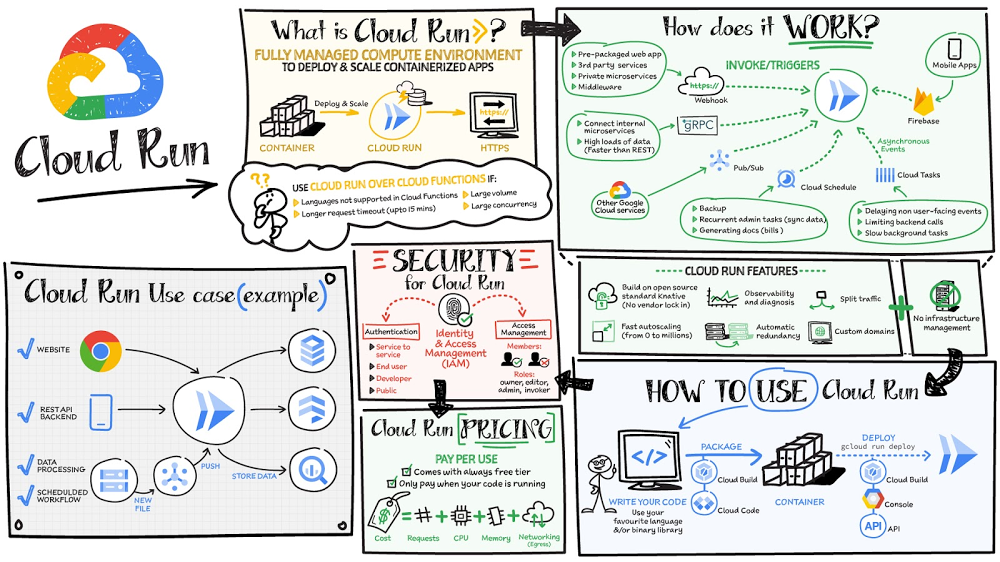
Mindful Containers is a fictitious company that is creating containerized microservice applications. They need a fully managed compute environment for deploying and scaling serverless containerized microservices. So, they are considering Cloud Run. They are excited about Cloud Run because it abstracts away the cluster configuration, monitoring, and management so they can focus on building the features for their apps. Cloud Run is a fully-managed compute environment for deploying and scaling serverless containerized microservices.Click to enlargeWhat is Cloud Run?Cloud Run is a fully-managed compute environment for deploying and scaling serverless HTTP containers without worrying about provisioning machines, configuring clusters, or autoscaling.No vendor lock-in – Because Cloud Run takes standard OCI containers and implements the standard Knative Serving API, you can easily port over your applications to on-premises or any other cloud environment. Fast autoscaling – Microservices deployed in Cloud Run scale automatically based on the number of incoming requests, without you having to configure or manage a full-fledged Kubernetes cluster. Cloud Run scales to zero— that is, uses no resources—if there are no requests.Split traffic – Cloud Run enables you to split traffic between multiple revisions, so you can perform gradual rollouts such as canary deployments or blue/green deployments.Custom domains – You can set up custom domain mapping in Cloud Run and it will provision a TLS certificate for your domain. Automatic redundancy – Cloud Run offers automatic redundancy so you don’t have to worry about creating multiple instances for high availabilityHow to use Cloud RunWith Cloud Run, you write your code in your favorite language and/or use a binary library of your choice. Then push it to Cloud Build to create a container build. With a single command—“gcloud run deploy”—you go from a container image to a fully managed web application that runs on a domain with a TLS certificate and auto-scales with requests.How does Cloud Run work?Cloud Run service can be invoked in the following ways:HTTPS: You can sendHTTPS requests to trigger a Cloud Run-hosted service. Note that all Cloud Run services have a stable HTTPS URL. Some use cases include: Custom RESTful web APIPrivate microserviceHTTP middleware or reverse proxy for your web applicationsPrepackaged web applicationgRPC: You can usegRPC to connect Cloud Runservices with other services—for example, to provide simple, high-performance communication between internal microservices. gRPC is a good option when you: Want to communicate between internal microservicesSupport high data loads (gRPC uses protocol buffers, which are up to seven times faster than REST calls)Need only a simple service definition you don’t want to write a full client libraryUse streaming gRPCs in your gRPC server to build more responsive applications and APIsWebSockets: WebSockets applications are supported on Cloud Run with no additional configuration required. Potential use cases include any application that requires a streaming service, such as a chat application.Trigger from Pub/Sub:You can use Pub/Sub to push messages to the endpoint of your Cloud Run service, where the messages are subsequently delivered to containers as HTTP requests. Possible use cases include:Transforming data after receiving an event upon a file upload to a Cloud Storage bucketProcessing your Google Cloud operations suite logs with Cloud Run by exporting them to Pub/SubPublishing and processing your own custom events from your Cloud Run servicesRunning services on a schedule: You can use Cloud Scheduler to securely trigger a Cloud Run service on a schedule. This is similar to using cron jobs. Possible use cases include:Performing backups on a regular basisPerforming recurrent administration tasks, such as regenerating a sitemap or deleting old data, content, configurations, synchronizations, or revisionsGenerating bills or other documentsExecuting asynchronous tasks: You can use Cloud Tasks to securely enqueue a task to be asynchronously processed by a Cloud Run service. Typical use cases include:Handling requests through unexpected production incidentsSmoothing traffic spikes by delaying work that is not user-facingReducing user response time by delegating slow background operations, such as database updates or batch processing, to be handled by another service, Limiting the call rate to backend services like databases and third-party APIsEvents from Eventrac: You can trigger Cloud Run with events from more than 60 Google Cloud sources. For example:Use a Cloud Storage event (via Cloud Audit Logs) to trigger a data processing pipeline Use a BigQuery event (via Cloud Audit Logs) to initiate downstream processing in Cloud Run each time a job is completedHow is Cloud Run different from Cloud Functions?Cloud Run and Cloud Functions are both fully managed services that run on Google Cloud’s serverless infrastructure, auto-scale, and handle HTTP requests or events. They do, however, have some important differences:Cloud Functions lets you deploy snippets of code (functions) written in a limited set of programming languages, while Cloud Run lets you deploy container images using the programming language of your choice. Cloud Run also supports the use ofany tool or system library from your application; Cloud Functions does not let you use custom executables. Cloud Run offers a longer request timeout duration of up to 60 minutes, while with Cloud Functions the requests timeout can be set as high as 9 mins. Cloud Functions only sends one request at a time to each function instance, while by default Cloud Run is configured to send multiple concurrent requests on each container instance. This is helpful to improve latency and reduce costs if you’re expecting large volumes. PricingCloud Run comes with a generous free tier and is pay per use, which means you only pay while a request is being handled on your container instance. If it is idle with no traffic, then you don’t pay anything.ConclusionAfter learning about the ease of set up, scalability, and management capabilities of Cloud Run the Mindful Containers team is using it to deploy stateless microservices. If you are interested in learning more, check out the documentation.For more #GCPSketchnote, follow the GitHub repo. For similar cloud content follow me on Twitter @pvergadia and keep an eye out on thecloudgirl.devRelated Article3 cool Cloud Run features that developers loveCloud Run developers enjoy pay-per-use pricing, multiple concurrency and secure event processing.Read Article
Quelle: Google Cloud Platform

Streamline your application migration journey with Migrate for Anthos and GKE

Most customers I talk to today are excited about the opportunities modernizing their workloads in the cloud affords them. In particular, they are very interested in how they can leverage Kubernetes to speed up application deployment while increasing security. Additionally, they are happy to turn over some cluster management responsibilities to Google Cloud’s SREs so they can focus on solving core business challenges. However, moving VM-based applications to containers can present its own unique set of challenges: Assessing which applications are best suited for migrationFiguring out what is actually running inside a given virtual machine Setting up ingress and egress for migrated applicationsReconfiguring service discovery Adapting day 2 processes for patching and upgrading applicationsWhile those challenges may seem daunting, Google Cloud has a tool that can help you easily solve them in a few clicks. Migrate for Anthos helps automate the process of moving your applications – whether they are Linux or Windows – from various virtual machine environments to containers on either Google Kubernetes Engine (GKE) or Anthos. There is even a specialized capability to migrate Websphere applications. Your source VMs can be running in GCP, AWS, Azure or VMware. Once the workload has been containerized, it can then be easily deployed to Kubernetes running in either a GKE or an Anthos cluster on GCP, AWS or VMware. Let’s walk through the migration process together and I will show you how Migrate for Anthos can help you efficiently migrate virtual machines to containers The first step in any application migration journey is todetermine which applications are suitable for migration. I always recommend picking a few low risk applications with a high probability of success. This allows your team to build knowledge and define processes while simultaneously establishing credibility with key stakeholders. Migrate for Anthos has an application assessment component that will inspect the applications running inside your VM and provide guidance on the likelihood of success. There are different tools for Windows and Linux, and for Websphere applications we leverage tooling directly from IBM. After you’ve chosen a good migration candidate the next step is to perform the actual migration. Migrate for Anthos breaks this down into a couple of discrete steps. First, Migrate for Anthos will do a dry run where it inspects the virtual machine and determines what is actually running in the virtual machine. The artifact from this step is a migration plan in the form of a YAML file. Next, review the YAML file and adjust any settings you want to change. For instance, if you were migrating a database you would want to update the YAML file with the point in the file system to mount the persistent volume to hold the database’s data. After you’ve reviewed and adjusted the migration YAML, you can perform the actual migration. This process will create a couple of key artifacts. The first is a Docker container image. The second is the matching Dockerfile, and a Kubernetes deployment YAML that includes definitions for all the relevant primitives (services, pods, stateful sets, etc). The Docker image that is created is actually built using a multi-stage build leverating two different images. The first is the Migrate for Anthos runtime, the second includes the workload extracted from the source VM. This is important to understand as you plan Day 2 operations. This Dockerfile can be edited to update not only the underlying Migrate for Anthos runtime layer, but also the application components. And while not mandatory, you can easily manage all that through a CI/CD pipeline. If you want to ease complexity and accelerate your cloud migration journey, I highly recommend you check out Migrate for Anthos. Watch the videos I linked up above, and then get your hands on the keyboard and try out our  Quiklab.Related ArticleModernize your apps with Migrate for AnthosMigrate for Anthos can help modernize existing applications into containers.Read Article
Quelle: Google Cloud Platform

AWS Managed Microsoft Active Directory (AD) und AD Connector unterstützen jetzt die AD-Authentifizierung mit AWS Transfer Family

AWS Directory Service for Microsoft Active Directory, auch bekannt als AWS Managed Microsoft AD, und AD Connector ermöglichen Ihnen jetzt die Verwendung der AD-Authentifizierung mit AWS Transfer Family, einem vollständig verwalteten Service für die Übertragung von Dateien über Secure File Transfer Protocol (SFTP), File Transfer Protocol über SSL (FTPS) und File Transfer Protocol (FTP) für Amazon Simple Storage Service (S3) und Amazon Elastic File System (EFS). Auf diese Weise können Sie Benutzern in Ihren AD-Gruppen auf sichere Weise Berechtigungen für Dateiübertragungen erteilen.
Quelle: aws.amazon.com

Lesen Sie mehrere Datensätze gleichzeitig aus dem Amazon SageMaker Feature Store mit der neuen BatchGetRecord-API

Amazon SageMaker Feature Store ist ein speziell entwickeltes vollständig verwaltetes Repository zum Speichern, Aktualisieren, Abrufen und gemeinsamen Nutzen von Machine-Learning(ML)-Funktionen. Kunden können mithilfe der GetRecord-API-Funktionen aus dem SageMaker Feature Store mit niedrigen Millisekunden-Latenzen für Echtzeit-Anwendungsfälle abrufen. Diese API ermöglicht es Kunden, Funktionen aus einer einzelnen Funktionsgruppe abzurufen und auf einen Datensatz pro API-Aufruf zuzugreifen. Um mehrere Akten gleichzeitig aus dem SageMaker Feature Store zu lesen, mussten Kunden die GetRecord-API mehrmals aufrufen und die Parallelisierung der API-Aufrufe verwalten, um eine geringere Latenz zu erreichen, was die Betriebskomplexität erhöhte.
Quelle: aws.amazon.com