Docker Security Roundup: News, Articles, Sessions

With the eyes of the security world converging on Black Hat USA next week, now is a good time to remember that building secure applications is paramount.

In the latest chapter in Docker’s security story, Docker CTO Justin Cormack last month provided an important update on software supply chain security. He blogged about the publication of a white paper, “Software Supply Chain Best Practices,” by the security technical advisory group of the Cloud Native Computing Foundation (CNCF).

The long-awaited document is important because the software supply chain — that stage of the software development journey in which software is written, assembled, built or tested before production — has become a favored target of cyber criminals. Justin was one of the prime movers of the project and one of the CNCF reviewers who helped steer the 50-page document through multiple iterations to completion.

The paper aims to make secure supply chains easier and more widely adopted through four key principles, which Justin summarizes:

“In simpler language, this means that you need to be able to securely trace all the code you are using, which exact versions you are using, where they came from, and in an automated way so that there are no errors. Your build environments should be minimal, secure and well defined, i.e. containerized. And you should be making sure everything is authenticated securely.”

Contributing writer Robert Lemos quoted Justin’s blog in a Dark Reading article last week. The article, titled “What Does It Take to Secure Containers,” quotes Justin on why creating a trusted pipeline is so critical:

“Every time you use software that you didn’t write yourself, often open source software that you use in your applications, you are trusting both that the software you added is what you thought it is, and that it is trustworthy not hostile. Usually both these things are true, but when they go wrong, like when hundreds of people installed updates from SolarWinds that turned out to contain code to attack their infrastructure, the consequences are serious.”

Security at DockerCon

Several other facets of our security story were on the menu at DockerCon in May.

Alvaro Muro, an integrations engineer at Sysdig, led a webinar on Top Dockerfile Security Best Practices showing how these practices for image builds help you prevent security issues and optimize containerized applications. And he shared ways to avoid unnecessary privileges, reduce the attack surface with multistage builds, prevent confidential data leaks, detect bad practices and more.

In their talk, An Ounce of Prevention: Curing Insecure Container Images, Red Ventures’ Seyfat Khamidov and Eric Smalling of Snyk shared keys to catching vulnerabilities in your Docker containers before they go to production, such as scanning individual containers and incorporating container security scanning into your continuous integration build jobs. They also covered what Red Ventures is doing to scan container images at scale, and the new integration between Docker and Snyk for scanning container images for security vulnerabilities.

You know that feeling of panic when you scan a container and find a long list of vulnerabilities? Yeah, that one. In his DockerCon presentation, My Container Image Has 500 Vulnerabilities, Now What?, Snyk’s Matt Jarvis talks you off the ledge. How do you assess and prioritize security risk? How do you start to remediate? He lays out what you need to consider and how to get started.

Speaking of the SolarWinds breach, GitLab’s Brendan O’Leary dissected that and a number of other supply chain attacks in his talk, As Strong as the Weakest Link: Securing the Software Supply Chain. He delved into the simple, practical security measures that were missed, allowing the attacks to get a foothold in the first place.

Finally, in a session titled Secure Container Workloads for K8s in Containerd, Om Moolchandani, CISO and CTO at Accurics, spells out how security can be easily embedded into Docker development workflows and Kubernetes deployments to increase resiliency while practically eliminating the effort required to “be secure.” He also highlights open source tools that enable you to establish security guardrails, ensuring you build in security from the start, with programmatic enforcement in development pipelines, and stay secure with automated enforcement in the K8s runtime.

At Docker, security is more than a watchword — it’s an obsession. To learn more, read Justin’s blog and watch the recorded sessions listed above. They’re still available and still free.

Join the Next Community All Hands on September 16th!

We’re excited to announce that our next Community All Hands will be in exactly 2 months,  on Thursday September 16th 2021 @ 8am PST/5pm CET. The event is a unique opportunity for Docker staff, Captains, Community Leaders and the broader Docker community to come together for live company updates, product updates, demos, community updates, contributor shout-outs and of course, a live Q&A. Make sure to register for the event here!
The post Docker Security Roundup: News, Articles, Sessions appeared first on Docker Blog.
Quelle: https://blog.docker.com/feed/

Introduction to heredocs in Dockerfiles

Guest post by Docker Community Member Justin Chadell. This post originally appeared here.

As of a couple weeks ago, Docker’s BuildKit tool for building Dockerfiles now supports heredoc syntax! With these new improvements, we can do all sorts of things that were difficult before, like multiline RUNs without needing all those pesky backslashes at the end of each line, or the creation of small inline configuration files.

In this post, I’ll cover the basics of what these heredocs are, and more importantly what you can use them for, and how to get started with them!

BuildKit (a quick refresher)

From BuildKit’s own github:

BuildKit is a toolkit for converting source code to build artifacts in an efficient, expressive and repeatable manner.

Essentially, it’s the next generation builder for docker images, neatly separate from the rest of the main docker runtime; you can use it for building docker images, or images for other OCI runtimes.

It comes with a lot of useful (and pretty) features beyond what the basic builder supports, including neater build log output, faster and more cache-efficient builds, concurrent builds, as well as a very flexible architecture to allow easy extensibility (I’m definitely not doing it justice).

You’re either most likely using it already, or you probably want to be! You can enable it locally by setting the environment variable DOCKER_BUILDKIT=1 when performing your docker build, or switch to using the new(ish) docker buildx command.

At a slightly more technical level, buildkit allows easy switching between multiple different “builders”, which can be local or remote, in the docker daemon itself, in docker containers or even in a Kubernetes pod. The builder itself is split up into two main pieces, a frontend and a backend: the frontend produces intermediate Low Level Builder (LLB) code, which is then constructed into an image by the backend.

You can think of LLB to BuildKit as the LLVM IR is to Clang.

Part of what makes buildkit so fantastic is it’s flexibility – these components are completely detached from each other, so you can use any frontend in any image. For example, you could use the default Dockerfile frontend, or compile your own self-contained buildpacks, or even develop your own alternative file format like Mockerfile.

Getting setup

To get started with using heredocs, first make sure you’re setup with buildkit. Switching to buildkit gives you a ton of out-of-the-box improvements to your build setup, and should have complete compatibility with the old builder (and you can always switch back if you don’t like it).

With buildkit properly setup, you can create a new Dockerfile: at the top of this file, we need to include a #syntax= directive. This directive informs the parser to use a specific frontend – in this case, the one located at docker/dockerfile:1.3-labs on Docker Hub.

# syntax=docker/dockerfile:1.3-labs

With this line (which has to be the very first line), buildkit will find and download the right image, and then use it to build the image.

We then specify the base image to build from (just like we normally would):

FROM ubuntu:20.04

With all that out the way, we can use a heredoc, executing two commands in the same RUN!

RUN <<EOF

echo “Hello” >> /hello

echo “World!” >> /hello

EOF

Why?

Now that heredocs are working, you might be wondering – why all the fuss? Well, this feature has kind of, until now, been missing from Dockerfiles.

See moby/moby#34423 for the original issue that proposed heredocs in 2017.

Let’s suppose you want to build an image that requires a lot of commands to setup. For example, a fairly common pattern in Dockerfiles involves wanting to update the system, and then to install some additional dependencies, i.e. apt update, upgrade and install all at once.

Naively, we might put all of these as separate RUNs:

RUN apt-get update

RUN apt-get upgrade -y

RUN apt-get install -y …

But, sadly like too many intuitive solutions, this doesn’t quite do what we want. It certainly works – but we create a new layer for each RUN, making our image much larger than it needs to be (and making builds take much longer).

So, we can squish this into a single RUN command:

RUN apt-get update &&

    apt-get upgrade -y &&

    apt-get install -y …

And that’s what most Dockerfiles do today, from the official docker images down to the messy ones I’ve written for myself. It works fine, images are small and fast to build… but it does look a bit ugly. And if you accidentally forget the line continuation symbol , well, you’ll get a syntax error!

Heredocs are the next step to improve this! Now, we can just write:

RUN <<EOF

apt-get update

apt-get upgrade -y

apt-get install -y …

EOF

We use the <<EOF to introduce the heredoc (just like in sh/bash/zsh/your shell of choice), and EOF at the end to close it. In between those, we put all our commands as the content of our script to be run by the shell!

More ways to run…

So far, we’ve seen some basic syntax. However, the new heredoc support doesn’t just allow simple examples, there’s lots of other fun things you can do.

For completeness, the hello world example using the same syntax we’ve already seen:

RUN <<EOF

echo “Hello” >> /hello

echo “World!” >> /hello

EOF

But let’s say your setup scripts are getting more complicated, and you want to use another language – say, like Python. Well, no problem, you can connect heredocs to other programs!

RUN python3 <<EOF

with open(“/hello”, “w”) as f:

    print(“Hello”, file=f)

    print(“World”, file=f)

EOF

In fact, you can use as complex commands as you like with heredocs, simplifying the above to:

RUN python3 <<EOF > /hello

print(“Hello”)

print(“World”)

EOF

If that feels like it’s getting a bit fiddly or complicated, you can also always just use a shebang:

RUN <<EOF

#!/usr/bin/env python3

with open(“/hello”, “w”) as f:

    print(“Hello”, file=f)

    print(“World”, file=f)

EOF

There’s lots of different ways to connect heredocs to RUN, and hopefully some more ways and improvements to come in the future!

…and some file fun!

Heredocs in Dockerfiles also let us mess around with inline files! Let’s suppose you’re building an nginx site, and want to create a custom index page:

FROM nginx

COPY index.html /usr/share/nginx/html

And then in a separate file index.html, you put your content. But if your index page is just really simple, it feels frustrating to have to separate everything out: heredocs let you keep everything in the same place if you want!

FROM nginx

COPY <<EOF /usr/share/nginx/html/index.html

(your index page goes here)

EOF

You can even copy multiple files at once, in a single layer:

COPY <<robots.txt <<humans.txt /usr/share/nginx/html/

(robots content)

robots.txt

(humans content)

humans.txt

Finishing up

Hopefully, I’ve managed to convince you to give heredocs a try when you can! For now, they’re still only available in the staging frontend, but they should be making their way into a release very soon – so make sure to take a look and give your feedback!If you’re interested, you can find out more from the official buildkit Dockerfile syntax guide.
The post Introduction to heredocs in Dockerfiles appeared first on Docker Blog.
Quelle: https://blog.docker.com/feed/

Friday Five — July 30, 2021

The Friday Five is a weekly Red Hat® blog post with 5 of the week’s top news items and ideas from or about Red Hat and the technology industry. Consider it your weekly digest of things that caught our eye.

Quelle: CloudForms

Building with Looker made easier with the Extension Framework

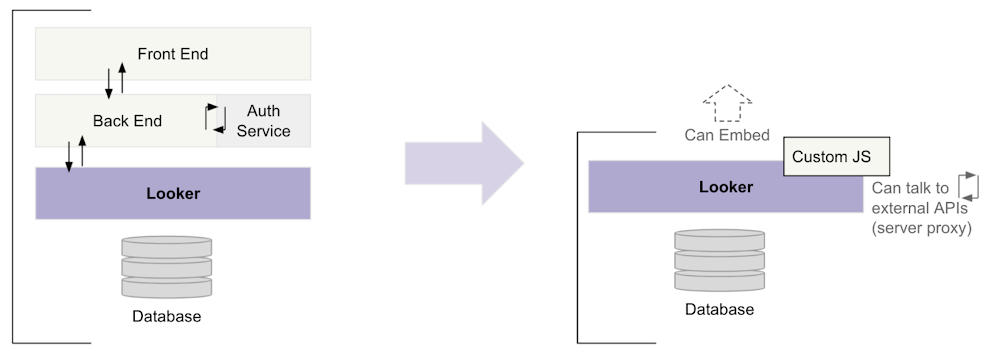
Our goal is to continue to improve our platform functionalities, and find new ways to empower Looker developers to build data experiences much faster and at a lower upfront cost.We’ve heard the developer community feedback and we’re excited to have announced the general availability of the Looker Extension Framework.The Extension Framework is a fully hosted development platform that enables developers to build any data-powered application, workflow or tool right in Looker. By eliminating the need to spin up and host infrastructure, the Extension Framework lets developers focus on building great experiences for their users. Traditionally, customers and partners who build custom applications with Looker, have to assemble an entire development infrastructure before they can proceed with implementation. For instance, they might need to stand up both a back end and front end and then implement services for hosting and authorization. This leads to additional time and cost spent.The Extension Framework eliminates all development inefficiency and helps significantly reduce friction in the setup and  development process, so developers can focus on starting development right away. Looker developers would no longer need DevOps or infrastructure to host their data applications and these applications (when built on the Extension Framework), can take full advantage of the power of Looker. To enable these efficiencies, the Looker Extension Framework includes a streamlined way to leverage the Looker APIs and SDKs, UI components for building the visual experience, as well as authentication, permission management and application access control. Streamlining the development process with the Extension FrameworkContent created via the Extension Framework can be built as a full-screen experience or embedded into an external website or application. We will soon be adding functionality to allow  for the embedding of extensions inside Looker (as a custom tile you plug into your dashboard, for example). Through our Public Preview period we have already seen over 150+ extensions deployed to production users, with an additional 200+ extensions currently in development. These extensions include solutions like: enhanced navigation tools, customized navigation and modified reporting applications, to name a few.Extension Framework Feature BreakdownThe Looker Extension Framework includes the following features:The Looker Extension SDK, which provides functions for Looker public API access and for interacting within the Looker environment.Looker components, a library of pre-built React UI components you can use in your extensions.The Embed SDK, a library you can use to embed dashboards, Looks, and Explores in your extension. The create-looker-extension utility, an extension starter kit that includes all the necessary extension files and dependencies.Our Looker extension framework examples repo, with templates and sample extensions to assist you in getting started quickly.The ability to access third-party API endpoints and add third-party data to your extension in building enhanced data experiences (e.g. Google Maps API).The ability to create full-screen extensions within Looker. Full-screen extensions can be used for internal or external platform applications.The ability to configure an access key for your extension so that users must enter a key to run the extension. Next StepsIf you haven’t yet tried the Looker Extension Framework, we think you’ll find it to be a major upgrade to your data app development experience. Over the next few months, we will continue to make enhancements to the Extension Framework with the goal of significantly reducing the amount of code required, and eventually empowering our developers with a low-code, no-code framework.Comprehensive details and examples that help you get started in developing with the Extension Framework are now available here. We hope that these new capabilities inspire your creativity and we’re super excited to see what you build with the Extension Framework!
Quelle: Google Cloud Platform