How Veolia’s API-first approach is powering sustainable resource management

When you think of water, waste, and energy management, you may think of pipes, wires, cables, and waste recycling – but as Veolia Group is demonstrating, more sophisticated cloud technologies are becoming increasingly vital too. APIs and API management, in particular, have emerged as a cornerstone of Veolia’s technology strategy, with Apigee, Google Cloud’s API management platform, serving as a “central nervous system for our data,” said Pascal Dalla-Torre, Group CTO at Veoilia. APIs and API management form the foundation for use cases across the company that range from modernizing management of those pipes and waste recycling, to unlocking new revenue opportunities, to enabling more efficient ways of partnering both across business units and externally. And they’re driving results: Dalla-Torre says that in the first half of 2021, APIs helped his team double the number of partners it works with, to more than 40. APIs aren’t new for Veolia, which serves businesses and municipalities in 52 countries. The company has been using APIs for years for tasks such as IT modernization, with APIs allowing different legacy systems to interoperate, even if they were never designed to do so. But these integration projects are often bespoke one-offs, and Veolia wanted to go beyond simply connecting systems. By building and managing standardized APIs that are shared across internal clients, Dalla-Torre’s team helps these business units to better serve municipalities and other customers. Without a centralized API effort, different internal developers could easily duplicate and muddy one another’s efforts. Different business units might redundantly create new APIs instead of reusing existing ones, or they might build APIs atop systems using different data structures and approaches, each competing with the others to be the “source of truth” for various projects. A managed API platform eliminates these problems, providing internal developers with consistent access to data and functionality that they can granularly combine for new apps or customer services. “Development has been a lot faster” since the company invested in Apigee, says Pascal Dalla-Torre. He added that projects that once took years now take months, weeks or even days. These more agile approaches to APIs, as well as data analytics technologies in the cloud, are helping Veolia to improve facilities maintenance, for example. “Turning off a fleet of incinerators is expensive,” notes Dalla-Torre. “But by connecting data sources to analytics services via APIs, maintenance needs can be projected more precisely. Rather than turning off an entire system and manually inspecting physical infrastructure, we can focus on areas most likely to need servicing while leaving the rest of the system up and running.” Another example, and one of the first significant projects built under this API-first approach, was a water management developer portal that lets large municipalities and other customers access Veolia APIs that connect to crucial data on water consumption, leaks, water quality, and other variables. Equipped with these digital assets, customers can then build new digital experiences for their own projects, such as an app to help consumers understand their water usage or services to monitor water quality or potential leaks. Armed with best practices derived from the water management portal, Veolia has adopted an API-first approach throughout the company and in just the first five months of 2021, traffic to these APIs quadrupled.In this model, APIs are essentially products for developers, and like any digital product, they need to be managed so that Dalla-Torre’s team can secure them, learn from their usage, iterate on them, and establish best practices. “It arms us with the necessary tools to scale, secure, and measure our APIs to deliver the best experience to our customers and partners,” he said. “Apigee helps us quickly and easily deliver great customer experiences. It abstracts away the backend IT complexity, and helps us provide information and data to our customers quickly, consistently and securely,” says Pascal Dalla-Torre.What’s more, the same API platform that Veolia uses internally is available to customers, partners, and other third parties, creating multiple tracks of innovation around the firm’s digital assets, both inside and outside of the company. By letting third parties combine Veolia data and functionality with their own APIs, the companies are  unlocking opportunities to increase the variety of ways their digital assets are leveraged for revenue-driving services, whether through their own projects or those of partners. “APIs allow Veolia to access new ecosystems and partners that will bring new innovation opportunities for us,” says Dalla-Torre.By creating an API ecosystem that enables internal and external developers to securely access the data and services they need to build new applications, Veolia demonstrates the differences between merely using technology and becoming a technology-first organization.To learn more about how APIs and Apigee API management are used by many other companies like Veolia, read The State of the API Economy 2021 report.Related ArticleRead Article
Quelle: Google Cloud Platform
Run code samples directly in the Google Cloud documentation

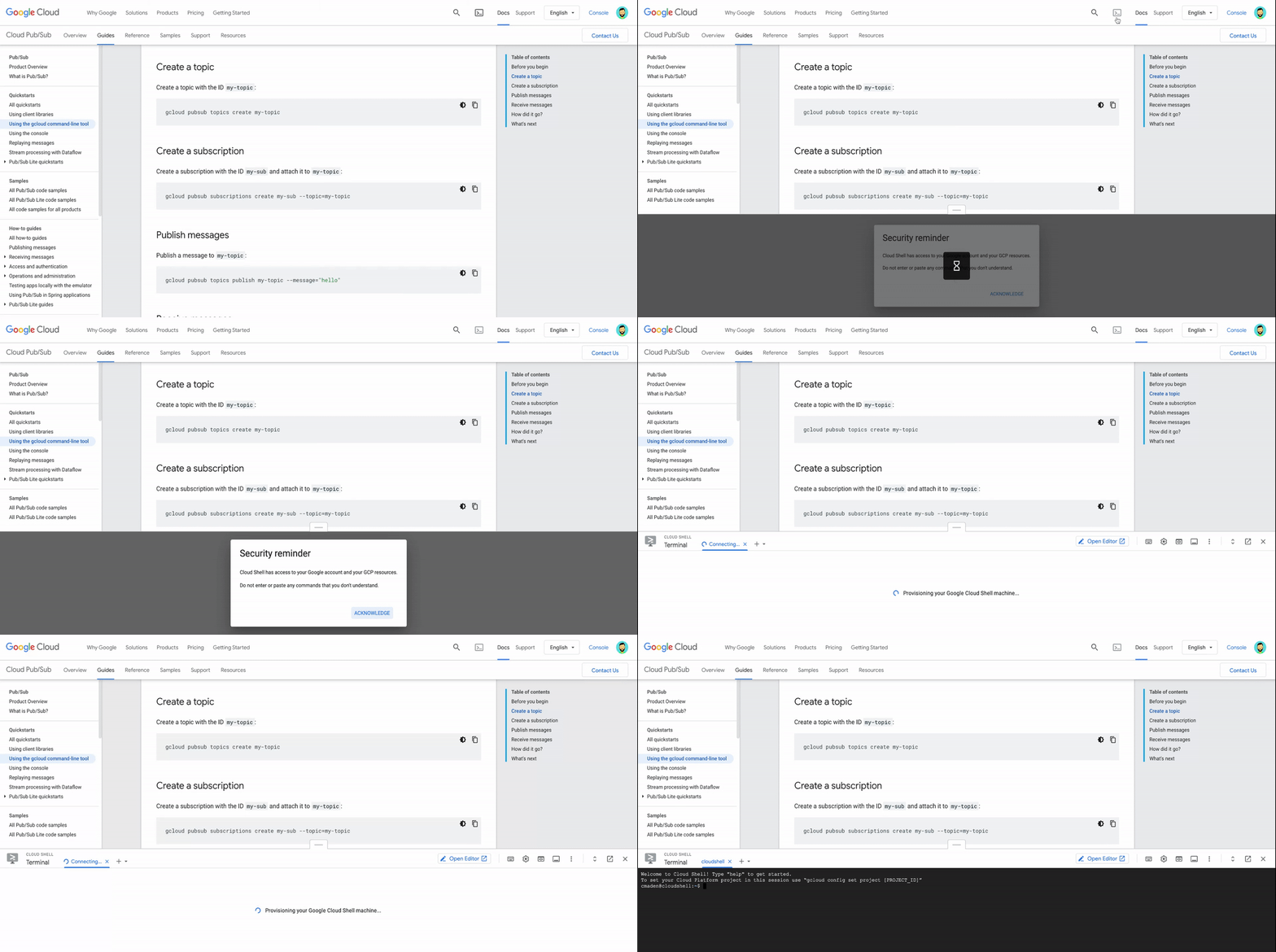
We’re excited to announce a new documentation feature that lets you run code samples in Cloud Shell, without leaving the page. Sign in to your Google account, open Cloud Shell’s online terminal in the documentation, and run code as you’re reading about it:This new feature makes it easier to explore Google Cloud by putting Cloud Shell at your fingertips. Now you don’t need to switch between the documentation and a terminal window to run the commands in a tutorial. The documentation has everything you need to try new products and services.Cloud Shell even has common command-line tools and programming languages already installed, so you don’t need to track down libraries or deal with dependencies. Your development environment is always ready to use and up to date—just activate Cloud Shell and get started.Activate Cloud ShellCloud Shell is available throughout our documentation set on Chrome desktop browsers (Version 74 or higher). To use Cloud Shell in the documentation, sign in and click the Activate Cloud Shell button at the top of the page.When Cloud Shell is activated, you see a terminal at the bottom of the page. Select a Google Cloud project to use Cloud APIs and access your resources:Get started fastCloud Shell has the Cloud SDK already installed, so you can get started right away—no setup required. After you activate Cloud Shell and set a Cloud project, you can use tools like gcloud to try new services as you read about them.For example, you can use the terminal in the documentation to complete a Pub/Sub quickstart in seconds:The terminal stays open when you go to a new page, so it’s easy to learn more and build solutions. When you’re done with the Pub/Sub quickstart, use your resources to create an app that authenticates mobile clients:Manage resourcesLet’s say that you deployed a web app and now you’re onboarding a team member to manage it. You want to grant access to your resources, so you’re looking for commands that update the project’s permissions.The terminal in the documentation makes this easy. List your Pub/Sub topics as you search for commands in the gcloud reference, and then set an IAM policy on a Pub/Sub topic as you read a guide about granting access to resources.Keep developingIf you’re using Cloud Client Libraries, you can customize and run sample code in the Cloud Shell Editor. To use it, activate Cloud Shell and click Open Editor:The button opens the Cloud Shell Editor in a new tab. The online code editor has rich language support, local emulators, and more features that make it easy to build solutions with your favorite client library.Try it outWe hope that the terminal in the documentation makes it easier to learn about Google Cloud and manage your resources. Not sure where to start? Activate Cloud Shell on these pages:Getting started with Cloud StorageGetting started with our BigQueryDeploying a containerized web applicationRelated ArticleTry a tutorial in the Google Cloud ConsoleYou can follow tutorials and walkthroughs in the Google Cloud Console, allowing you to view the instructions and the console at the same …Read Article
Quelle: Google Cloud Platform

Just released: The Google Cloud Next session catalog is live. Build your custom playlists.

There’s less than one month to go until Google Cloud Next, October 12–14, 2021, and we can’t wait for you to join our free flagship event. The full event catalog is now live, so you can discover the content that’s best for you. Explore live, expert-led Q&As, join breakout sessions, immersive demos, and hear real-world use cases for Google Cloud. This year, you can also personalize your experience by building custom playlists, and set reminders and calendar notifications to make sure you don’t miss out.Join us at Next ’21 to hear about the present – and future – of the cloud. From industry-leading data and analytics to optimization and modernization to security and sustainability, learn how we’re expanding the world’s largest private network to make Google Cloud even more open, fast, flexible, and reliable. You can choose from more than 130 sessions across 11 tracks and filter it all by track, session category, and more – and bookmark your favorites for future viewing. Each day, you can watch a live broadcast and keynote with industry leaders like Google Cloud CEO Thomas Kurian and Google Cloud SVP of Technical Infrastructure Urs Hölzle. Speaking of sessions, check out a sneak preview of what’s in store:Data cloud: Simply transform with a universal data platformIs your enterprise data spread across databases, data lakes, data warehouses, or multiple clouds? Bring it all together to innovate faster and improve the customer experience. Explore best practices for unifying your company’s data with help from BigQuery, Cloud Spanner, Looker, and Vertex AI.Developer platform state of the union: Google WorkspaceJoin the developers behind Google Workspace as they reveal the latest technical features available in our suite of productivity and collaboration tools, including add-ons, Google Chat apps, APIs, and Google Meet integration.Data analytics strategy and roadmap: Turn data into differentiating featuresLooking to use data to offer more value to your customers? Learn how to apply decision intelligence to your business processes, and hear how other organizations transform data into action with Google Cloud data analytics solutions.What’s new and what’s next with infrastructure for AI and MLDiscover this year’s developments in artificial intelligence (AI) and machine learning (ML), and explore how to supercharge your workloads using the latest innovations in hardware accelerators like Cloud GPUs and our purpose-built Cloud TPUs.Transform your business operations with no-code appsAnyone can build an app. Don’t believe us? Learn how Product Manager Paula Bell, self-described as someone with “absolutely zero coding experience,” used AppSheet to build mission-critical apps that revolutionized how electric utility company Kentucky Power runs their field operations – and how you can use it to add AI and ML to your apps.Be sure to monitor our Twitter feed for personal playlists from cloud experts and executives, and build and share your own with friends and colleagues with the playlist builder.Get informed, be inspired, and expand your expertise. Register today and build your personal Next ’21 experience.Related ArticleNext OnAir as it happens: All the announcements in one placeWe’ll be sharing lots of news, updates, and learning opportunities throughout Next OnAir. Check back here to see a running list of what’s…Read Article
Quelle: Google Cloud Platform