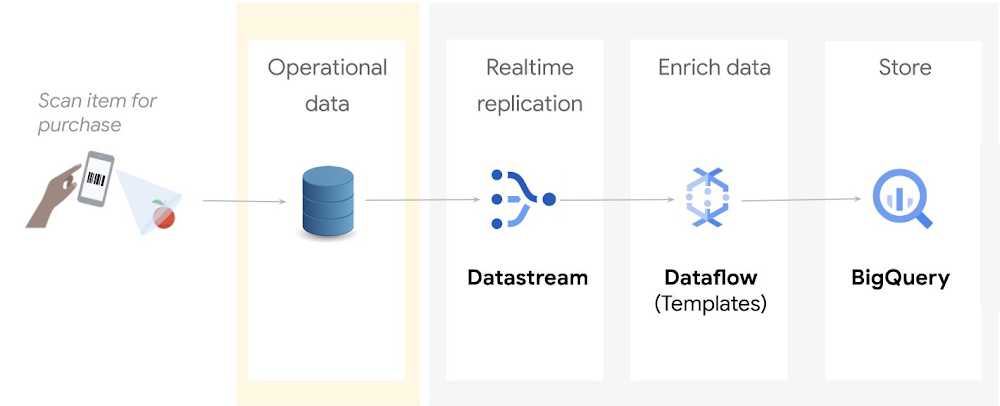
Relational databases are great at processing transactions, but they’re not designed to run analytics at scale. If you’re a data engineer or a data analyst, you may want to continuously replicate your operational data into a data warehouse in real time, so you can make timely, data driven business decisions.In this blog, we will show you a step by step tutorial on how to replicate and process operational data from an Oracle database into Google Cloud’s BigQuery so that you can keep multiple systems in sync – minus the need for bulk load updating and inconvenient batch windows.The operational flow shown in the preceding diagram is as follows:Incoming data from an Oracle source is captured and replicated into Cloud Storage through Datastream.This data is processed and enriched by Dataflow templates, and is then sent to BigQuery for analytics and visualizationGoogle does not provide licenses for Oracle workloads. You are responsible for procuring licenses for the Oracle workloads that you choose to run on Google Cloud, and you are responsible for complying with the terms of these licenses. CostsThis tutorial uses the following billable components of Google Cloud:DatastreamCloud StoragePub/SubDataflowBigQueryCompute EngineTo generate a cost estimate based on your projected usage, use the pricing calculator.When you finish this tutorial, you can avoid continued billing by deleting the resources you created. For more information, see Clean up.Before you begin1. In the Google Cloud Console, on the project selector page, select or create a Google Cloud project.Note: If you don’t plan to keep the resources that you create in this procedure, create a project instead of selecting an existing project. After you finish these steps, you can delete the project, removing all resources associated with the project.2. Make sure that billing is enabled for your Cloud project. Learn how to check if billing is enabled on a project.3. Enable the Compute Engine, Datastream, Dataflow, and Pub/Sub APIs. 4. You must also have the role of Project owner or Editor.Step 1: Prepare your environment1. In Cloud Shell, define the following environment variables:code_block[StructValue([(u’code’, u’export PROJECT_NAME=”YOUR_PROJECT_NAME”rnexport PROJECT_ID=”YOUR_PROJECT_ID”rnexport PROJECT_NUMBER=”YOUR_PROJECT_NUMBER”rnexport BUCKET_NAME=”${PROJECT_ID}-oracle_retail”‘), (u’language’, u”)])]Replace the following:YOUR_PROJECT_NAME: The name of your projectYOUR_PROJECT_ID: The ID of your projectYOUR_PROJECT_NUMBER: The number of your project2. Enter the following:code_block[StructValue([(u’code’, u’gcloud config set project ${PROJECT_ID}’), (u’language’, u”)])]3. Clone the GitHub tutorial repository which contains the scripts and utilities that you use in this tutorial:code_block[StructValue([(u’code’, u’git clone \rnhttps://github.com/caugusto/datastream-bqml-looker-tutorial.git’), (u’language’, u”)])]4. Extract the comma-delimited file containing sample transactions to be loaded into Oracle:code_block[StructValue([(u’code’, u’bunzip2 \rndatastream-bqml-looker-tutorial/sample_data/oracle_data.csv.bz2′), (u’language’, u”)])]5. Create a sample Oracle XE 11g docker instance on Compute Engine by doing the following:a. In Cloud Shell, change the directory to build_docker:code_block[StructValue([(u’code’, u’cd datastream-bqml-looker-tutorial/build_docker’), (u’language’, u”)])]b. Run the following build_orcl.sh script:code_block[StructValue([(u’code’, u’./build_orcl.sh \rn-p <YOUR_PROJECT_ID> \rn-z <GCP_ZONE> \rn-n <GCP_NETWORK_NAME> \rn-s <GCP_SUBNET_NAME> \rn-f Y \rn-d Y’), (u’language’, u”)])]Replace the following:YOUR_PROJECT_ID: Your Cloud project IDGCP_ZONE: The zone where the compute instance will be createdGCP_NETWORK_NAME= The network name where VM and firewall entries will be createdGCP_SUBNET_NAME= The network subnet where VM and firewall entries will be createdY or N= A choice to create the FastFresh schema and ORDERS table (Y or N). Use Y for this tutorial.Y or N= A choice to configure the Oracle database for Datastream usage (Y or N). Use Y for this tutorial.The script does the following:Creates a new Google Cloud Compute instance.Configures an Oracle 11g XE docker container.Pre-loads the FastFresh schema and the Datastream prerequisites.After the script executes, the build_orcl.sh script gives you a summary of the connection details and credentials (DB Host, DB Port, and SID). Make a copy of these details because you use them later in this tutorial.After the script executes, the build_orcl.sh script gives you a summary of the connection details and credentials (DB Host, DB Port, and SID). Make a copy of these details because you use them later in this tutorial. 6. Create a Cloud Storage bucket to store your replicated data:code_block[StructValue([(u’code’, u’gsutil mb gs://${BUCKET_NAME}’), (u’language’, u”)])]Make a copy of the bucket name because you use it in a later step.7. Configure your bucket to send notifications about object changes to a Pub/Sub topic. This configuration is required by the Dataflow template. Do the following:a. Create a new topic called oracle_retail:code_block[StructValue([(u’code’, u’gsutil notification create -t projects/${PROJECT_ID}/topics/oracle_retail -f \rnjson gs://${BUCKET_NAME}’), (u’language’, u”)])]b. Create a Pub/Sub subscription to receive messages which are sent to the oracle_retail topic:code_block[StructValue([(u’code’, u’gcloud pubsub subscriptions create oracle_retail_sub \rn–topic=projects/${PROJECT_ID}/topics/oracle_retail’), (u’language’, u”)])]8. Create a BigQuery dataset named retail:code_block[StructValue([(u’code’, u’bq mk –dataset ${PROJECT_ID}:retail’), (u’language’, u”)])]9. Assign the BigQuery Admin role to your Compute Engine service account:code_block[StructValue([(u’code’, u”gcloud projects add-iam-policy-binding ${PROJECT_ID} \rn–member=serviceAccount:${PROJECT_NUMBER}-compute@developer.gserviceaccount.com \rn–role=’roles/bigquery.admin'”), (u’language’, u”)])]Step 2: Replicate Oracle data to Google Cloud with DatastreamDatastream supports the synchronization of data to Google Cloud databases and storage solutions from sources such as MySQL and Oracle.In this section, you use Datastream to backfill the Oracle FastFresh schema and to replicate updates from the Oracle database to Cloud Storage in real time.Create a stream1. In Cloud Console, navigate to Datastream and click Create Stream. A form appears. Fill in the form as follows, and then click Continue:Stream name: oracle-cdcStream ID: oracle-cdcSource type: OracleDestination type: Cloud StorageAll other fields: Retain the default value2. In the Define & Test Sourcesection, select Create new connection profile. A form appears. Fill in the form as follows, and then click Continue:Connection profile name: orcl-retail-sourceConnection profile ID: orcl-retail-sourceHostname: <db_host>Port: 1521Username: datastreamPassword: tutorial_datastreamSystem Identifier (SID): XEConnectivity method: Select IP allowlisting3. Click Run Test to verify that the source database and Datastream can communicate with each other, and then click Create & Continue.You see the Select Objects to Include page, which defines the objects to replicate, specific schemas, tables, and columns and be included or excluded.If the test fails, make the necessary changes to the form parameters and then retest.4. Select the following: FastFresh > Orders, as shown in the following image:5. To load existing records, set the Backfill mode to Automatic, and then click Continue. 6. In the Define Destination section, select Create new connection profile. A form appears. Fill in the form as follows, and then click Create & Continue:Connection Profile Name: oracle-retail-gcsConnection Profile ID: oracle-retail-gcsBucket Name: The name of the bucket that you created in the Prepare your environment section.7. Keep the Stream path prefix blank, and for Output format, select JSON. Click Continue.8. On the Create new connection profile page, click Run Validation, and then click Create.The output is similar to the following:Step 3: Create a Dataflow job using the Datastream to BigQuery templateIn this section, you deploy Dataflow’s Datastream to BigQuery streaming template to replicate the changes captured by Datastream into BigQuery.You also extend the functionality of this template by creating and using UDFs.Create a UDF for processing incoming dataYou create a UDF to perform the following operations on both the backfilled data and all new incoming data:Redact sensitive information such as the customer payment method.Add the Oracle source table to BigQuery for data lineage and discovery purposes.This logic is captured in a JavaScript file that takes the JSON files generated by Datastream as an input parameter.1. In the Cloud Shell session, copy and save the following code to a file named retail_transform.js:code_block[StructValue([(u’code’, u’function process(inJson) {rnrn var obj = JSON.parse(inJson),rn includePubsubMessage = obj.data && obj.attributes,rn data = includePubsubMessage ? obj.data : obj;rnrn data.PAYMENT_METHOD = data.PAYMENT_METHOD.split(‘:’)[0].concat(“XXX”);rnrn data.ORACLE_SOURCE = data._metadata_schema.concat(‘.’, data._metadata_table);rnrn return JSON.stringify(obj);rn}’), (u’language’, u”)])]2. Create a Cloud Storage bucket to store the retail_transform.js file and then upload the JavaScript file to the newly created bucket:code_block[StructValue([(u’code’, u’gsutil mb gs://js-${BUCKET_NAME}rnrngsutil cp retail_transform.js \rngs://js-${BUCKET_NAME}/utils/retail_transform.js’), (u’language’, u”)])]Create a Dataflow job1. In Cloud Shell, create a dead-letter queue (DLQ) bucket to be used by Dataflow:code_block[StructValue([(u’code’, u’gsutil mb gs://dlq-${BUCKET_NAME}’), (u’language’, u”)])]2. Create a service account for the Dataflow execution and assign the account the following roles: Dataflow Worker, Dataflow Admin, Pub/Sub Admin, BigQuery Data Editor,BigQuery Job User, Datastream Admin and Storage Admin.code_block[StructValue([(u’code’, u’gcloud iam service-accounts create df-tutorial’), (u’language’, u”)])]code_block[StructValue([(u’code’, u’gcloud projects add-iam-policy-binding ${PROJECT_ID} \rn–member=”serviceAccount:df-tutorial@${PROJECT_ID}.iam.gserviceaccount.com” \rn–role=”roles/dataflow.admin”rnrngcloud projects add-iam-policy-binding ${PROJECT_ID} \rn–member=”serviceAccount:df-tutorial@${PROJECT_ID}.iam.gserviceaccount.com” \rn–role=”roles/dataflow.worker”rnrngcloud projects add-iam-policy-binding ${PROJECT_ID} \rn–member=”serviceAccount:df-tutorial@${PROJECT_ID}.iam.gserviceaccount.com” \rn–role=”roles/pubsub.admin”rnrngcloud projects add-iam-policy-binding ${PROJECT_ID} \rn–member=”serviceAccount:df-tutorial@${PROJECT_ID}.iam.gserviceaccount.com” \rn–role=”roles/bigquery.dataEditor”rnrngcloud projects add-iam-policy-binding ${PROJECT_ID} \rn–member=”serviceAccount:df-tutorial@${PROJECT_ID}.iam.gserviceaccount.com” \rn–role=”roles/bigquery.jobUser”rnrngcloud projects add-iam-policy-binding ${PROJECT_ID} \rn–member=”serviceAccount:df-tutorial@${PROJECT_ID}.iam.gserviceaccount.com” \rn–role=”roles/datastream.admin”rnrnrngcloud projects add-iam-policy-binding ${PROJECT_ID} \rn–member=”serviceAccount:df-tutorial@${PROJECT_ID}.iam.gserviceaccount.com” \rn–role=”roles/storage.admin”‘), (u’language’, u”)])]3. Create a firewall egress rule to let Dataflow VMs communicate, send, and receive network traffic on TCP ports 12345 and 12346 when auto scaling is enabled:code_block[StructValue([(u’code’, u’gcloud compute firewall-rules create fw-allow-inter-dataflow-comm \rn–action=allow \rn–direction=ingress \rn–network=GCP_NETWORK_NAME \rn–target-tags=dataflow \rn–source-tags=dataflow \rn–priority=0 \rn–rules tcp:12345-12346′), (u’language’, u”)])]4. Create and run a Dataflow job:code_block[StructValue([(u’code’, u’export REGION=us-central1rnrngcloud dataflow flex-template run orders-cdc-template –region ${REGION} \rn–template-file-gcs-location “gs://dataflow-templates/latest/flex/Cloud_Datastream_to_BigQuery” \rn–service-account-email “df-tutorial@${PROJECT_ID}.iam.gserviceaccount.com” \rn–parameters \rninputFilePattern=”gs://${BUCKET_NAME}/”,\rngcsPubSubSubscription=”projects/${PROJECT_ID}/subscriptions/oracle_retail_sub”,\rninputFileFormat=”json”,\rnoutputStagingDatasetTemplate=”retail”,\rnoutputDatasetTemplate=”retail”,\rndeadLetterQueueDirectory=”gs://dlq-${BUCKET_NAME}”,\rnautoscalingAlgorithm=”THROUGHPUT_BASED”,\rnmergeFrequencyMinutes=1,\rnjavascriptTextTransformGcsPath=”gs://js-${BUCKET_NAME}/utils/retail_transform.js”,\rnjavascriptTextTransformFunctionName=”process”‘), (u’language’, u”)])]Check the Dataflow console to verify that a new streaming job has started.5. In Cloud Shell, run the following command to start your Datastream stream:code_block[StructValue([(u’code’, u’gcloud datastream streams update oracle-cdc \rn–location=us-central1 –state=RUNNING –update-mask=state’), (u’language’, u”)])]6. Check the Datastream stream status:code_block[StructValue([(u’code’, u’gcloud datastream streams list –location=us-central1′), (u’language’, u”)])]Validate that the state shows as Running. It may take a few seconds for the new state value to be reflected.Check the Datastream console to validate the progress of the ORDERS table backfill.The output is similar to the following:Because this task is an initial load, Datastream reads from the ORDERS object. It writes all records to the JSON files located in the Cloud Storage bucket that you specified during the stream creation. It will take about 10 minutes for the backfill task to complete.Final step: Analyze your data in BigQueryAfter a few minutes, your backfilled data replicates into BigQuery. Any new incoming data is streamed into your datasets in (near) real time. Each record is processed by the UDF logic that you defined as part of the Dataflow template.The following two new tables in the datasets are created by the Dataflow job:ORDERS: This output table is a replica of the Oracle table and includes the transformations applied to the data as part of the Dataflow template.ORDERS_log: This staging table records all the changes from your Oracle source. The table is partitioned, and stores the updated record alongside some metadata change information, such as whether the change is an update, insert, or delete.BigQuery lets you see a real-time view of the operational data. You can also run queries such as a comparison of the sales of a particular product across stores in real time, or combining sales and customer data to analyze the spending habits of customers in particular stores.Run queries against your operational data1. In BigQuery, run the following SQL to query the top three selling products:code_block[StructValue([(u’code’, u’SELECT product_name, SUM(quantity) as total_salesrnFROM `retail.ORDERS`rnGROUP BY product_namernORDER BY total_sales descrnLIMIT 3;’), (u’language’, u”)])]The output is similar to the following:2. In BigQuery, run the following SQL statements to query the number of rows on both the ORDERS and ORDERS_log tables:code_block[StructValue([(u’code’, u’SELECT count(*) FROM `hackfast.retail.ORDERS_log`;rnSELECT count(*) FROM `hackfast.retail.ORDERS`;’), (u’language’, u”)])]With the backfill completed, the last statement should return the number 520217.Congratulations! Now you just completed the change data capture of Oracle data in BigQuery, real-time!Clean upTo avoid incurring charges to your Google Cloud account for the resources used in this tutorial, either delete the project that contains the resources, or keep the project and delete the individual resources. To remove the project:In the Cloud console, go to the Manage resources page.In the project list, select the project that you want to delete, and then click Delete.In the dialog, type the project ID, and then click Shut down to delete the project.What’s next?If you’re looking to further build on this foundation, wonder how to forecast future demand, and how to visualize this forecast data as it arrives, explore this tutorial: Build and visualize demand forecast predictions using Datastream, Dataflow, BigQuery ML, and Looker.Related ArticleSecurely exchange data and analytics assets at scale with Analytics Hub, now available in previewEfficiently and securely exchange valuable data and analytics assets across organizational boundaries with Analytics Hub. Start your free…Read Article
Quelle: Google Cloud Platform