Track adversaries and improve posture with Microsoft threat intelligence solutions

Today, we’re thrilled to announce two new security products driven by our acquisition of RiskIQ just over one year ago that deliver on our vision to provide deeper context into threat actors and help customers lock down their infrastructure.

Track threat actor activity and patterns with Microsoft Defender Threat Intelligence

This new product helps security operations teams uncover attacker infrastructure and accelerate investigation and remediation with more context, insights, and analysis than ever before. While threat intelligence is already built into the real time detections of our platform and security products like Microsoft Sentinel, customers also need direct access to real-time data and Microsoft’s unmatched signal to proactively hunt for threats across their environments.

For example, adversaries often run their attacks from many machines, with unique IP addresses. Tracing the actor behind an attack and tracking down their entire toolkit is challenging and time-consuming. Using built-in AI and machine learning, Defender Threat Intelligence uncovers the attacker or threat family and the elements of their malicious infrastructure. Armed with this information, security teams can then find and remove adversary tools within their organization and block their future use in tools like Microsoft Sentinel, helping to prevent future attacks.

See your business the way an attacker can with Microsoft Defender External Attack Surface Management

The new Defender External Attack Surface Management gives security teams the ability to discover unknown and unmanaged resources that are visible and accessible from the internet—essentially the same view an attacker has when selecting their target. Defender External Attack Surface Management helps customers discover unmanaged resources that could be potential entry points for an attacker.

Microsoft Defender External Attack Surface Management scans the internet and its connections every day. This builds a complete catalogue of a customer’s environment, discovering internet-facing resources, even the agentless and unmanaged assets. Continuous monitoring, without the need for agents or credentials, prioritizes new vulnerabilities. With this complete view of the organization, customers can take recommended steps to mitigate risk by bringing these resources under secure management within tools like Microsoft Defender for Cloud.

Read the full threat intelligence announcement and to learn more about how Microsoft Defender Threat Intelligence and Microsoft Sentinel work together, read the Tech Communities blog.

Additionally, in the spirit of continuous innovation and bringing as much of the digital environment under secure management as possible, we are proud to announce the new Microsoft Sentinel solution for SAP. Security teams can now monitor, detect, and respond to SAP alerts all from our cloud-native SIEM, Microsoft SIEM.

To learn more about these products and to see live demos, visit us at Black Hat USA, Microsoft Booth 2340. You can also register now for the Stop Ransomware with Microsoft Security digital event on September 15, 2022, to watch in-depth demos of the latest threat intelligence technology.
Quelle: Azure

Microsoft Cost Management updates – July 2022

Whether you're a new student, a thriving startup, or the largest enterprise, you have financial constraints, and you need to know what you're spending, where, and how to plan for the future. Nobody wants a surprise when it comes to the bill, and this is where Microsoft Cost Management comes in.

We're always looking for ways to learn more about your challenges and how Microsoft Cost Management can help you better understand where you're accruing costs in the cloud, identify and prevent bad spending patterns, and optimize costs to empower you to do more with less. Here are a few of the latest improvements and updates based on your feedback:

Introducing the Cost Details API
Filter cost recommendations by tag
How to choose the right Azure services for your applications—It’s not A or B
What's new in Cost Management Labs
New ways to save money with Microsoft Cloud
New videos and learning opportunities
Documentation updates
Join the Microsoft Cost Management team

Let's dig into the details.

Introducing the Cost Details API

You already know you can dig into your cost and usage data from the Azure portal or Microsoft 365 admin center. You may even know that you can export cost data to storage on a recurring schedule. While many organizations use both, some have more ad-hoc requirements where they need an on-demand solution. Traditionally, these organizations would use the Consumption UsageDetails API or the older Enterprise Agreement (EA) consumption.azure.com APIs. This month, we introduced a new on-demand solution for downloading granular cost details with the new Cost Details API – now generally available for Enterprise Agreement and Microsoft Customer Agreement accounts.

The Cost Details API comes with improved security, stability, and scalability over the UsageDetails API and aligns with the schema already being used by Cost Management exports. If you’re still using the older EA key-based APIs, then you’ll also get additional benefits like a single dataset for all cost data, including Marketplace and reservation purchases, an option to amortize reservation purchases, as well as support for splitting shared costs with cost allocation.

With the general availability of Cost Details this month, the UsageDetails and consumption.azure.com APIs are in maintenance and will not receive updates. Please migrate to scheduled exports for large accounts with a lot of cost data or to streamline recurring data dumps. If you have requirements that necessitate a more on-demand solution, please migrate to the Cost Details API.

To learn more about the Cost Details API, see Get cost details for a pay-as-you-go subscription. For additional information about when to select Exports or Cost Details, see Choose a cost details solution.

Filter cost recommendations by tag

Nearly every conversation we have with organizations starts with cost optimization and ensuring their workloads are running efficiently. And when it comes to cost optimization, we always tell people to start in Azure Advisor, which gives a great picture of high-confidence recommendations to reduce cost. At the same time, this can be daunting for large teams with resources spread across many resource groups and subscriptions. To help facilitate this, you can now filter your recommendations by tag in Azure Advisor.

With the power of tag filters, you can now get recommendations scoped to a business unit, project, or application to filter recommendations and calculate scores using tags you have already assigned to Azure resources, resource groups, and subscriptions.

To learn more, visit how to filter Advisor recommendations using tags.

How to choose the right Azure services for your applications—It’s not A or B

If you’ve been working with Azure for any period, you might have grappled with the question—which Azure service is best to run my apps on? This is an important decision because the services you choose will dictate your resource planning, budget, timelines, and, ultimately, the time to market for your business. It impacts the cost of not only the initial delivery, but also the ongoing maintenance of your applications.

Read on as Asir Selvasingh and Ajai Peddapanga summarize your options on the Azure blog to get you started on the right foot. They’ll also share details about their new e-book on the subject.

What's new in Cost Management Labs

With Cost Management Labs, you get a sneak peek at what's coming in Microsoft Cost Management and can engage directly with us to share feedback and help us better understand how you use the service, so we can deliver more tuned and optimized experiences. Here are a few features you can see in Cost Management Labs:

New: What’s new in Cost Management– Now enabled by default in Labs
Learn about new announcements from the Cost Management overview. You can opt in using Try Preview.
New: Cost savings insights in the cost analysis preview
Identify potential savings available from Azure Advisor cost recommendations for your Azure subscription. You can opt in using Try preview.
New: Forecast in the cost analysis preview
Show your forecast cost for the period at the top of the cost analysis preview. You can opt in using Try preview.
Product column experiment in the cost analysis preview
We’re testing new columns in the Resources and Services views in the cost analysis preview for Microsoft Customer Agreement. You may see a single Product column instead of the Service, Tier, and Meter columns. Please leave feedback to let us know which you prefer.
Group related resources in the cost analysis preview
Group related resources, like disks under VMs or web apps under App Service plans, by adding a “cm-resource-parent” tag to the child resources with a value of the parent resource ID.
Charts in the cost analysis preview
View your daily or monthly cost over time in the cost analysis preview. You can opt in using Try Preview.
View cost for your resources
The cost for your resources is one click away from the resource overview in the preview portal. Just click View cost to quickly jump to the cost of that particular resource.
Change scope from the menu
Change scope from the menu for quicker navigation. You can opt-in using Try Preview.

Of course, that's not all. Every change in Microsoft Cost Management is available in Cost Management Labs a week before it's in the full Azure portal or Microsoft 365 admin center. We're eager to hear your thoughts and understand what you'd like to see next. What are you waiting for? Try Cost Management Labs today. 

New ways to save money in the Microsoft Cloud

Here are new and updated offers you might be interested in:

Generally available: NVads A10 v5 GPU-accelerated virtual machines.
Generally available: Improved Try Azure Cosmos DB for free experience.
Generally available: Azure SQL Database Hyperscale Named replicas.
Preview: Create an additional 5000 Azure Storage accounts within your subscription.

New videos and learning opportunities

One new video this month for those automating reporting and optimization:

Creating context for your Advisor recommendations (eight minutes).

Follow the Microsoft Cost Management YouTube channel to stay in the loop with new videos as they’re released and let us know what you'd like to see next.

Want a more guided experience? Start with Control Azure spending and manage bills with Microsoft Cost Management.

Documentation updates

Here are a few documentation updates you might be interested in:

Added Create an Azure budget with Bicep.
Added Enable preview features in Cost Management Labs.
Updated the effective date for Reserve Bank of India directive updates in Pay your Microsoft Customer Agreement or Microsoft Online Subscription Program Azure bill.
Added details about Warned subscriptions to Azure subscription states.
Noted cost analysis date range limit of 13 months in Understand Cost Management data.
15 updates based on your feedback.

Want to keep an eye on all documentation updates? Check out the Cost Management and Billing documentation change history in the azure-docs repository on GitHub. If you see something missing, select Edit at the top of the document and submit a quick pull request. You can also submit a GitHub issue. We welcome and appreciate all contributions!

Join the Microsoft Cost Management team

Are you excited about helping customers and partners better manage and optimize costs? We're looking for passionate, dedicated, and exceptional people to help build best in class cloud platforms and experiences to enable exactly that. If you have experience with big data infrastructure, reliable and scalable APIs, or rich and engaging user experiences, you'll find no better challenge than serving every Microsoft customer and partner in one of the most critical areas for driving cloud success.

Watch the video below to learn more about the Microsoft Cost Management team:

Join our team.

What's next?

These are just a few of the big updates from last month. Don't forget to check out the previous Microsoft Cost Management updates. We're always listening and making constant improvements based on your feedback, so please keep the feedback coming.

Follow @MSCostMgmt on Twitter and subscribe to the YouTube channel for updates, tips, and tricks. You can also share ideas and vote up others in the Cost Management feedback forum and help shape the future of Microsoft Cost Management.

We know these are trying times for everyone. Best wishes from the Microsoft Cost Management team. Stay safe and stay healthy.
Quelle: Azure

Virtual Desktop Support, Mac Permission Changes, & New Extensions in Docker Desktop 4.11

Docker Desktop 4.11 is now live! With this release, we added some highly-requested features designed to help make developers’ lives easier and help security-minded organizations breathe easier.
Run Docker Desktop for Windows in Virtual Desktop Environments
Docker Desktop for Windows is officially supported on VMware ESXi and Azure Windows VMs for our Docker Business subscribers. Now you can use Docker Desktop on your virtual environments and get the same experience as running it natively on Windows, Mac, or Linux machines.
Currently, we support virtual environments where the host hypervisors are VMware ESXi or Windows Hyper-V — both on-premises and in the cloud. Citrix Hypervisor support is also coming soon. As a Docker Business subscriber, you’ll receive dedicated support for running Docker Desktop in your virtual environments.
To learn more about running Docker Desktop for Windows in a virtual environment, please visit our documentation.
Changes to permission requirements on Docker Desktop for Mac
The first time you run Docker Desktop for Mac, you have to authenticate as root in order to install a privileged helper process. This process is needed to perform a limited set of privileged operations and runs in the background on the host machine while Docker Desktop is running.
In Docker Desktop v4.11, you don’t have to run this privilege helper service at all. Use the —user flag in the install command to set everything up in advance. Docker Desktop will then run without needing root on the Mac.
For more details on Docker Desktop for Mac’s permission requirements, check out our documentation.
New Extensions in the Marketplace
We’re excited to announce the addition of two new extensions to the Extensions Marketplace:

vcluster  – Create and manage virtual Kubernetes clusters using vcluster. Learn more about vcluster here.
PGAdmin4 – Quickly admin and monitor PostgreSQL databases with PGAdmin4 tools. Learn more about PGAdmin here.

Customize your Docker Desktop Theme
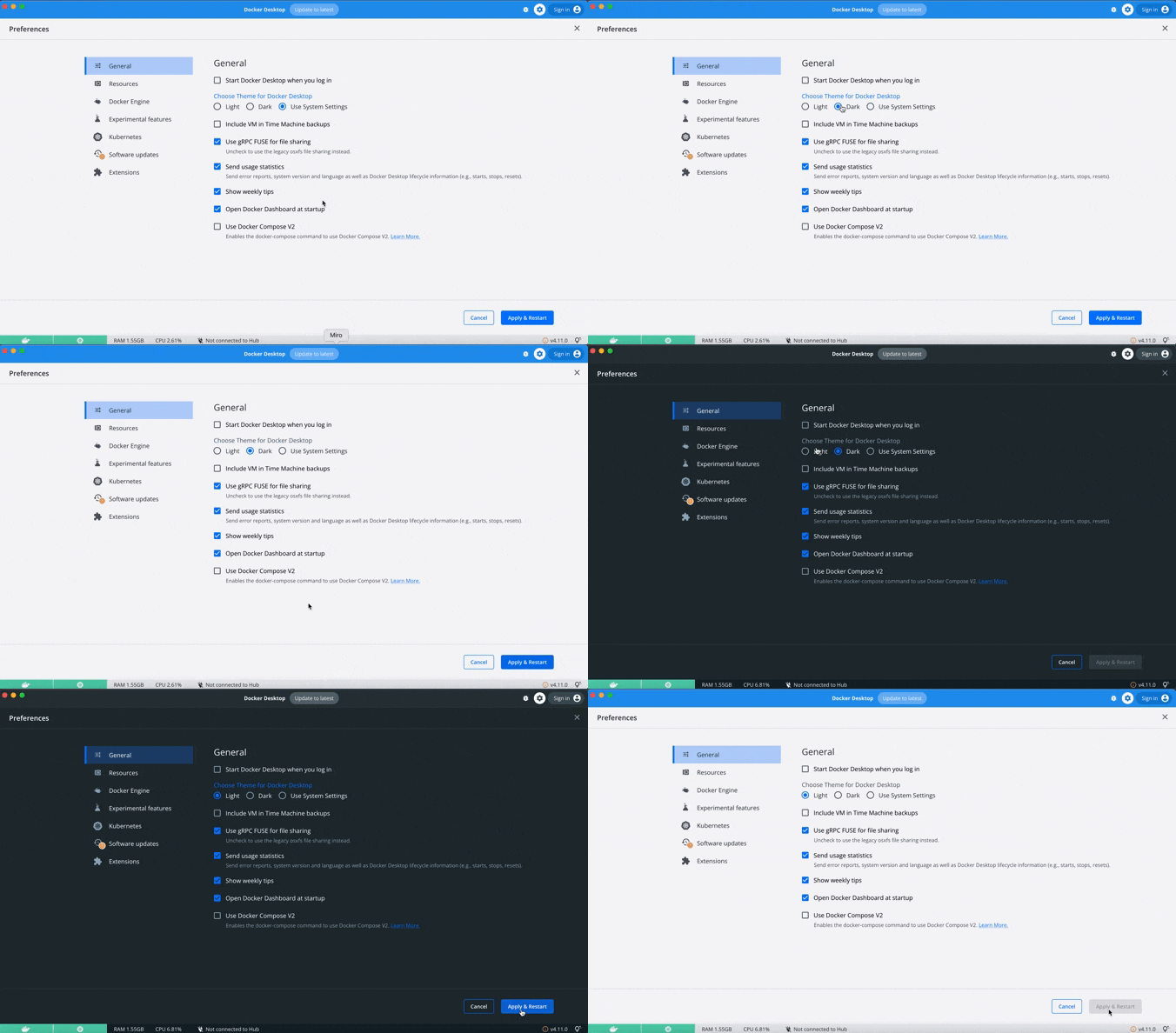
Prefer dark mode on the Docker Dashboard? With 4.11 you can now customize your preference or have it respect your system settings. Go to settings in the upper right corner to try it for yourself.

Fixing the Frequency of Docker Desktop Feedback Prompts
Thanks to all your feedback, we identified a bug that was asking some users for feedback too frequently. Docker Desktop should now only request your feedback twice a year.
As we outlined here, you’ll be asked for feedback 30 days after the product is installed. You can choose to give feedback or decline. You then won’t be asked for a rating again for 180 days.
These scores help us understand user experience trends so we can keep improving Docker Desktop — and your comments have helped us make changes like this. Thanks for helping us fix this for everyone!
Have any feedback for us?
Upvote, comment, or submit new ideas via either our in-product links or our public roadmap. Check out our release notes to learn more about Docker Desktop 4.11.
Looking to become a new Docker Desktop user? Visit our Get Started page to jumpstart your development journey.
Quelle: https://blog.docker.com/feed/

AWS gibt AWS Wickr bekannt (Vorschauversion)

AWS Wickr ist ein verschlüsselter End-to-End-Unternehmenskommunikationsservice, der eine sichere Zusammenarbeit über Messaging, Sprach- und Videoanrufe, Dateifreigabe und Bildschirmfreigabe ermöglicht. Der Service ist jetzt als Vorschauversion verfügbar. AWS Wickr hilft Unternehmen dabei, die sich entwickelnden Bedrohungen und Vorschriften anzugehen, indem es sicherheitsrelevante und administrative Funktionen kombiniert, um sensible Kommunikationen zu schützen, Information-Governance-Richtlinien durchzusetzen und Informationen bei Bedarf zu speichern. Die Verschlüsselung erfolgt lokal am Endpunkt. Jeder Anruf, jede Nachricht und jede Datei wird mit einem neuen zufälligen Schlüssel verschlüsselt, und außer den vorgesehenen Empfängern kann niemand, nicht einmal AWS, sie entschlüsseln.
Quelle: aws.amazon.com

AWS Single Sign-On (AWS SSO) ist jetzt AWS IAM Identity Center

AWS Single Sign-On (AWS SSO) ist jetzt AWS IAM Identity Center. Hier erstellen oder verbinden Sie die Benutzer Ihrer Belegschaft einmalig und verwalten deren Zugriff auf mehrere AWS-Konten und -Anwendungen zentral. Auch Nutzeridentitäten können Sie direkt in IAM Identity Center erstellen bzw. Ihre vorhandene Identitätsquelle verbinden, einschließlich Microsoft Active Directory und standardbasierte Identitätsanbieter wie Okta Universal Directory oder Azure AD. Sie können den Zugriff auf AWS-Konten oder Cloud-Anwendungen oder beide verwalten. Ihre Benutzer können mit nur einem Klick mit ihren bestehenden Anmeldeinformationen Zugriff auf die ihnen zugewiesenen AWS-Konten, AWS-Anwendungen (wie Amazon SageMaker Studio) und andere standardbasierte Cloud-Anwendungen, wie Salesforce, Box und Microsoft 365, erhalten.
Quelle: aws.amazon.com

Bekanntgabe der AWS-Transfer-Family-Unterstützung für Applicability Statement 2 (AS2)

AWS Transfer Family unterstützt jetzt das AS2 (Applicability Statement 2)-Protokoll und ergänzt damit den bestehenden Protokollsupport für SFTP, FTPS und FTP. Kunden in Branchen wie Gesundheitswesen und Biowissenschaften, Einzelhandel, Finanzdienstleistungen und Versicherungen, die AS2 für den Austausch geschäftskritischer Daten nutzen, können jetzt die hochverfügbaren, skalierbaren und global verfügbaren AS2-Endpunkte von AWS Transfer Family verwenden, um günstiger und sicherer Transaktionsdaten mit Ihren Handelspartnern auszutauschen. Die ausgetauschten Daten sind in AWS nativ für Verarbeitung, Analyse und Machine Learning verfügbar sowie für die Integration in Geschäftsanwendungen, die in AWS ausgeführt werden.
Quelle: aws.amazon.com

Bekanntgabe der Amazon WorkSpaces-API zum Erstellen eines WorkSpace-Image

Amazon WorkSpaces bietet jetzt eine API zur Erstellung eines neuen WorkSpace-Image aus einer WorkSpace-Instance. Bisher war diese Funktion nur über die Amazon WorkSpaces-Konsole verfügbar. Nach diesem Launch kannst du alle Anwendungen und Betriebssystem-Updates auf einen WorkSpace anwenden und mit dieser API ein neues Image erstellen. Nachdem das neue Image erstellt wurde, kannst du es testen, bevor du deine Produktionsbündel aktualisierst oder das Image für andere AWS-Konten freigibst. Mit diesem Launch kannst du deine WorkSpaces-CI/CD-Pipelines vollständig automatisieren und deine WorkSpaces-Images gemäß deinen gesetzlichen Vorgaben auf dem neuesten Stand halten.
Quelle: aws.amazon.com

AWS AppSync führt neuen API-Befehl zum Testen von GraphQL-Resolvern ein

AWS AppSync ist ein vollständig verwalteter Service, der die Erstellung und Verwaltung von GraphQL- und Pub/Sub-APIs erleichtert und Entwicklern den sicheren Zugriff, die Bearbeitung und die Kombination von Daten aus einer oder mehreren Datenquellen über einen einzigen API-Endpunkt ermöglicht. Mit GraphQL schreiben Entwickler Resolver, die Daten aus Backend-Datenquellen wie Amazon DynamoDB, AWS Lambda, HTTP-APIs und anderen abrufen. Zur „Auflösung“ einer GraphQL-Abfrage zur Laufzeit wertet AppSync den Resolver-Code mit den Kontextinformationen zur Abfrage (z. B. der Kontext) aus. AppSync-Resolver werden in der Velocity Template Language (VTL) geschrieben und unterstützen flexible, integrierte Hilfsprogramme, mit denen Entwickler Daten parsen (z.B.: $util.parseJson), umwandeln (z.B.: $util.toJson), generieren (z.B.: $util.autoId und $util.autoUlid) und protokollieren (z.B.: $util.log) können.
Quelle: aws.amazon.com






