Analyzing satellite images in Google Earth Engine with BigQuery SQL

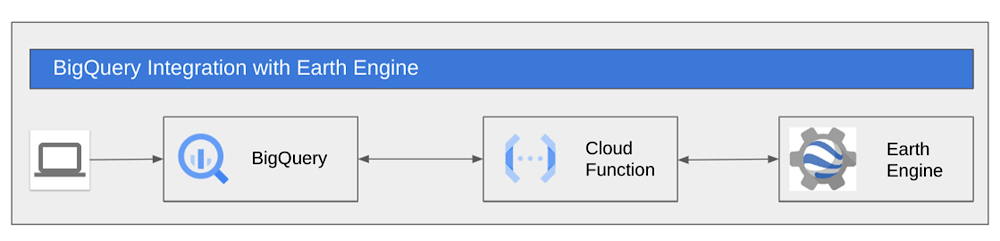
Google Earth Engine (GEE)  is a groundbreaking product that has been available for research and government use for more than a decade. Google Cloud recently launched GEE to General Availability for commercial use. This blog post describes a method to utilize GEE from within BigQuery’s SQL allowing SQL speakers to get access to and value from the vast troves of data available within Earth Engine.We will use Cloud Functions to allow SQL users at your organization to make use of the computation and data catalog superpowers of Google Earth Engine.  So, if you are a SQL speaker and you want to understand how to leverage a massive library of earth observation data in your analysis then buckle up and read on.Before we get started let’s spend thirty seconds on setting geospatial context for our use-case.  BigQuery excels at doing operations on vector data.  Vector data are things like points, polygons, things that you can fit into a table.  We use the PostGIS syntax so users that have used spatial SQL before will feel right at home in BigQuery.  BigQuery has more than 175+ public datasets available within Analytics Hub.  After doing analysis in BigQuery users can use tools like GeoViz,  Data Studio, Carto and Looker to visualize those insights. Earth Engine is designed for raster or imagery analysis, particularly satellite imagery. GEE, which holds more than 70PB of satellite imagery, is used to detect changes, map trends, and quantify differences on the Earth’s surface. GEE is widely used to extract insights from satellite images to make better use of  land, based on its diverse geospatial datasets and easy-to-use application programming interface (API).By using these two products in conjunction with each other you can expand your analysis to incorporate both vector and raster datasets to combine insights from 70PB of GEE and 175+ datasets from BigQuery.  For example, in this blog we’ll create a Cloud Function that pulls temperature and vegetation data from the Landsat satellite imagery within the GEE Catalog and we’ll do it all from SQL in BigQuery. If you are curious about how to move data from BigQuery into Earth Engine you can read about it in this post.While our example is focused on agriculture this method can apply to any industry that matters to you.Let’s get started Agriculture is transforming with the implementation of modern technologies. Technologies such as GPS and satellite image dissemination allow researchers and farmers to gain more information, monitor and manage agricultural resources. Satellite imagery can be a reliable source to track images of how a field is developing. A common analysis of imagery used in agricultural tools today is Normalized Difference Vegetation Index (NDVI). NDVI is a measurement of plant health that is visually displayed with a legend from -1 to +1. Negative values are indicative of water and moisture. But high NDVI values suggest a dense vegetation canopy. Imagery and yield tend to have a high correlation; thus, it can be used with other data like weather to drive seeding prescriptions.As an agricultural engineer you are keenly interested in crop health for all the farms and fields that you manage.  The healthier the crop the better the yield and the more profit the farm will produce.  Let’s assume you have mapped all your fields and the coordinates are available in BQ. You now want to calculate the NDVI of every field, along with the average temperature for different months, to ensure the crop is healthy and take necessary action if there is an unexpected fall in NDVI. So the question is  how do we pull NDVI and temperature information into BigQuery for the fields by only using SQL?Using GEE’s ready-to-go Landsat 8 imagerywe can calculate NDVI for any given point on the planet. Similarly, we can use the publicly available ERA5 dataset of monthly climate for global terrestrial surfaces to calculate the average temperature for any given point.ArchitectureCloud Functions are a powerful tool to augment the SQL commands in BigQuery.  In this case we are going to wrap a GEE script within a Cloud Function and call that function directly from BigQuery’s SQL. Before we start, let’s get the environment set up.Environment setupBefore you proceed we need to get the environment setup:A Google Cloud project with billing enabled.  (Note:  this example cannot run within the BigQuery Sandbox as a billing account is required to run Cloud Functions)Ensure your GCP user has access to Earth Engine, can create Service accounts and assign roles. You can sign up for Earth Engine at Earth Engine Sign Up. Verify if you have access, check if you can view the Earth Engine Code Editor with your GCP user.At this point Earth Engine and BigQuery are enabled and ready to work for you. Now let’s set up the environment and define the cloud functions.1. Once you have created your project in GCP, select it on the console and click on cloud-shell.2. On cloud-shell, you will need to clone a git repository which contains the shell script and assets required for this demo. Run the following command on cloud shell,code_block[StructValue([(u’code’, u’git clone https://github.com/dojowahi/earth-engine-on-bigquery.gitrncd ~/earth-engine-on-bigqueryrnchmod +x *.sh’), (u’language’, u”), (u’caption’, <wagtail.wagtailcore.rich_text.RichText object at 0x3ee1d943a550>)])]3. Edit config.sh – In your editor of choice update the variables in config.sh to reflect your GCP project.4. Execute setup_sa.sh. You will be prompted to authenticate and you can choose “n” to use your existing auth.code_block[StructValue([(u’code’, u’sh setup_sa.sh’), (u’language’, u”), (u’caption’, <wagtail.wagtailcore.rich_text.RichText object at 0x3ee1d943a1d0>)])]4. If the shell script has executed successfully, you should now have a new Service Account created, as shown in the image below5. A Service Account(SA) in format <PROJECT_NUMBER>-compute@developer.gserviceaccount.com was created in the previous step, you need to sign up this SA for Earth Engine at EE SA signup. Check out the last line of the screenshot above it will list out SA nameThe screenshot below shows how the signup process looks for registering your SA.6. Execute deploy_cf.sh, it should take around 10 minutes for the deployment to complete.code_block[StructValue([(u’code’, u’sh deploy_cf.sh’), (u’language’, u”), (u’caption’, <wagtail.wagtailcore.rich_text.RichText object at 0x3ee1ea169ad0>)])]You should now have a dataset named gee and table land_coords under your project in BigQuery along with the functions get_poly_ndvi_month and get_poly_temp_month.You will also see a sample query output on the Cloud shell, as shown below7. Now execute the command below in Cloudshellcode_block[StructValue([(u’code’, u”bq query –use_legacy_sql=false ‘SELECT name,gee.get_poly_ndvi_month(aoi,2020,7) as ndvi_jul, gee.get_poly_temp_month(aoi,2020,7) as temp_jul FROM `gee.land_coords` LIMIT 10′”), (u’language’, u”), (u’caption’, <wagtail.wagtailcore.rich_text.RichText object at 0x3ee1ea7367d0>)])]and you should see something like thisIf you are able to get a similar output to one shown above, then you have successfully executed SQL over Landsat imagery.Now navigate to the BigQuery console and your screen should look something like this:You should see a new external connection us.gcf-ee-conn, two external routines called get_poly_ndvi_month, get_poly_temp_month and a new table land_coords.Next navigate to the Cloud functions console and you should see two new functions polyndvicf-gen2 and polytempcf-gen2 as shown below.At this stage your environment is ready. Now you can go to the BQ console and execute queries. The query below calculates the NDVI and temperature for July 2020 for all the field polygons stored in the table land_coordscode_block[StructValue([(u’code’, u’select name,rnst_centroid(st_geogfromtext(aoi)) as centroid,rngee.get_poly_ndvi_month(aoi,2020,7) AS ndvi_jul,rngee.get_poly_temp_month(aoi,2020,7) AS temp_jul rnFROM `gee.land_coords`’), (u’language’, u”), (u’caption’, <wagtail.wagtailcore.rich_text.RichText object at 0x3ee1db774d90>)])]The output should look something like this:When the user executes the query in BQ, the function get_poly_ndvi_month and get_poly_temp_month trigger remote calls to the cloud functions polyndvicf-gen2 and polytempcf-gen2 which would initiate the script on GEE. The results from GEE are streamed back to the BQ console and shown to the user.What’s Next?You can now plot this data on a map in Data Studio or Geoviz and publish it to your usersNow that your data is within BigQuery, you can join this data with your private datasets or other public datasets within BigQuery and build ML models using BigQuery ML to predict crop yields, seed prescriptions.SummaryThe example above demonstrates how users can wrap GEE functionality within Cloud Functions so that GEE can be executed exclusively within SQL. The method we have described requires someone who can write GEE scripts. The advantage is that once the script is built,  all of your SQL-speaking data analysts-scientists-engineers can do calculations on vast troves of satellite imagery in GEE directly from the BigQuery UI or API.Once the data and results are in BigQuery you can join the data with other tables in BigQuery or with the data available through Analytics Hub.  Additionally with this method, users can combine GEE data with other functionality such as geospatial functions or BQML.  In future we’ll expand our examples to include these other BigQuery capabilities.Thanks for reading, and remember,  if you are interested in learning more about how to move data from BigQuery to Earth Engine together, check out this blog post. The post outlines a solution for a sustainable sourcing use case for a fictional consumer packaged goods company trying to understand their palm oil supply chain which is primarily located in Indonesia. Acknowledgements: Shout out to David Gibson and Chao Shen for valuable feedback.Related ArticleMosquitoes get the swat with new Mosquito Forecast built by OFF! Insect Repellents and Google CloudBy visualizing data about mosquito populations with Google Earth Engine, SC Johnson built an app that predicts mosquito outbreaks in your…Read Article
Quelle: Google Cloud Platform

How to simplify and fast-track your data warehouse migrations using BigQuery Migration Service

Migrating data to the cloud can be a daunting task. Especially moving data from warehouses and legacy environments requires a systematic approach. These migrations usually need manual effort and can be error-prone. They are complex and involve several steps such as planning, system setup, query translation, schema analysis, data movement, validation, and performance optimization. To mitigate the risks, migrations necessitate  a structured approach with a set of consistent tools to help make the outcomes more predictable.Typical data warehouse migrations: Error prone, labor intensive, trial and error basedGoogle Cloud simplifies this with the BigQuery Migration Service – a suite of managed tools that allow users to reliably plan and execute migrations, making outcomes more predictable. It is free to use and generates consistent results with a high degree of accuracy.Major brands like PayPal, HSBC, Vodafone and Major League Baseball use BigQuery Migration Service to accelerate time to unlock the power of BigQuery, deploy new use cases, break down data silos, and harness the full potential of their data. It’s incredibly easy to use, open and customizable. So, customers can migrate on their own or choose from our wide range of specialized migration partners.BigQuery Migration Service: Automatically assess, translate SQL, transfer data, and validateBigQuery Migration Service automates most of the migration journey for you. It divides the end-to-end migration journey into four components: assessment, SQL translation, data transfer, and validation. Users can accelerate migrations through each of these phases often just with the push of a few buttons. In this blog, we’ll dive deeper into each of these phases and learn how to reduce the risk and costs of your data warehouse migrations.Step 1: AssessmentBigQuery Migration Service generates a detailed plan with a view of dependencies, risks, and the optimized migrated state on BigQuery by profiling the source workload logs and metadata.During the assessment phase, BigQuery Migration Service guides you through a set of steps using an intuitive interface and automatically generates a Google Data Studio report with rich insights and actionable steps. Assessment capabilities are currently available for Teradata and Redshift, and will soon be expanded for additional sources.Assessment Report: Know before you start and eliminate surprises. See your data objects and query characteristics before you start the data transfer.Step 2: SQL Translation This phase is often the most difficult part of any migration. BigQuery Migration Service provides fast, semantically correct, human readable translations from most SQL flavors to BigQuery. It can intelligently translate SQL statements  in high-throughput batch and Google-translate-like interactive modes from Amazon Redshift SQL, Apache HiveQL, Apache Spark SQL, Azure Synapse T-SQL, IBM Netezza SQL/NZPLSQL, MySQL, Oracle SQL/PL/SQL/Exadata, Presto SQL, PostgreSQL, Snowflake SQL, SQL Server T-SQL, Teradata SQL/SPL/BTEQ and Vertica SQL.Unlike most existing offerings which parse Regular Expressions, BigQuery’s SQL translation is true compiler based, with advanced customizable capabilities to handle macro substitutions, user defined functions, output name mapping and other source-context-aware nuances. The output is  detailed and prescriptive with clear “next-actions”. Data engineers and data analysts save countless hours leveraging our industry leading automated SQL translation service.Batch Translations: Automatic translations from a comprehensive list of SQL dialects accelerate large migrationsInteractive Translations: A favorite feature for data engineers, interactive translations simplify the refactoring efforts and reduce errors dramatically and serve as a great learning aidStep 3: Data TransferBigQuery offers data transfer service from source systems into BigQuery using a simple guided wizard. Users create a transfer configuration and choose a data source from the drop down list.Destination settings walk the user through connection options to the data sources and securely connect to the source and target systems. A critical feature of BigQuery’s data transfer is the ability to schedule jobs. Large data transfers can impose additional burdens on operational systems and impact the data sources. BigQuery Migration Service provides the flexibility to schedule transfer jobs to execute at user-specified times to avoid any adverse impact on production environmentsData Transfer Wizard: A step-by-step wizard guides the user to move data from source systems to BigQueryStep 4: ValidationThis phase ensures that data at the legacy source and BigQuery are consistent after the migration is completed. Validation allows highly configurable, and orchestrate-able rules to perform a granular per-row, per-column, or per-table left-to-right comparison between the source system and BigQuery. Labeling, aggregating, group-by, and filtering enable deep validations.Validation: The peace-of-mind module for BigQuery Migration ServiceIf you would like to leverage BigQuery Migration Service for an upcoming proof-of-concept or migration, reach out to your GCP partner, your GCP sales rep or check out our documentation to try it out yourself.Related ArticleMLB’s fan data team hits it out of the park with data warehouse modernizationSee how the fan data team at Major League Baseball (MLB) migrated its enterprise data warehouse (EDW) from Teradata to BigQuery.Read Article
Quelle: Google Cloud Platform

EyecareLive transforms healthcare ecosystem with Enhanced Support

EyecareLive transforms the healthcare ecosystem with Enhanced Support, a support service  from the Google Cloud Customer Care portfolio.Telemedicine is now mainstream. It exploded during the COVID-19 pandemic. A 2022 survey by Jones Lang Lasalle (registration required) found that 38% of U.S. patients were using some form of telemedicine. This number is expected to grow as consumers are demanding more convenient and immediate access to care, and doctors are seeking efficiencies, cost savings, and to forge closer relationships with patients. But because the eye-care field is so heavily regulated, optometrists and ophthalmologists face more technical hurdles to perform telemedicine than their peers in other medical practices. To join the telemedicine revolution, a generic technology solution wouldn’t do. Eye-care professionals need a more carefully architected and rigorously secure platform – one that ensures a very high degree of compliance and privacy.EyecareLive provides exactly that. Their comprehensive cloud-based solution was built specifically for eye-care telemedicine practices. They not only facilitate telemedicine visits with patients via video, but help providers stay in compliance with complex industry regulations.What’s more, EyecareLive is the only platform in the industry that conducts vision screening using Food and Drug Administration (FDA)-registered tests to check a patient’s vision before connecting them to a doctor through a video call. The doctor can thus triage any issues immediately and quickly determine the right next steps for proper care. In addition, their platform digitally connects optometrists and ophthalmologists to the entire eye-care ecosystem, including other doctors for referrals, insurance companies, hospitals, pharmaceutical firms, pharmacies, and, of course, patients.On top of all of this, the automated back office for their eye-care practices processes electronic health records (EHRs), clinical workflow, billing, coding, and more into one platform. EyecareLive streamlines operations and frees up doctors to focus on delivering the highest possible eye healthcare and on building stronger relationships with patients.“Considering the number of plug-and-play services that Google has built into the Google Cloud Healthcare solutions, Google is basically supporting the entire healthcare industry from an infrastructure provider point of view.”  — Raj Ramchandani, CEO, EyecareLiveSeeking greater agility, EyecareLive migrated to Google CloudEyecareLive is truly cloud first. They had operated entirely in the AWS cloud since opening their doors in 2017. Several years in, they decided to look for an additional cloud provider with broader support for digital health platforms. They specifically wanted to migrate to one they could rely on to deliver plug-and-play services, which would accelerate innovation of their platform. Rather than re-architecting for a new cloud, EyecareLive wanted a cloud platform that would offer compatible services they could use to meet their needs for reliability and availability.  “If we want to deploy a new conversational bot or build AI models that assist doctors to diagnose based on a retina image, Google Cloud provides these services which are  reliable and tested by Google Cloud Healthcare solutions in many cases.” — Raj Ramchandani, CEO, EyecareLiveVersatility was another requirement. The EyecareLive platform must fulfill the demands of a variety of organizations — doctors, pharmaceutical companies, clinics, and others. EyecareLive also has an international deployment strategy that goes far beyond offering a domestic telehealth solution. Therefore EyecareLive needed a cloud functionality that extended into the broader global eye-care ecosystem.EyecareLive chose Google Cloud. The most compelling reason was the deep industry expertise found in Google Cloud for healthcare and life sciences. This distinguished Google Cloud from all other possible cloud providers considered by EyecareLive. “We like Google Cloud because of the differentiations such as Google Cloud Healthcare solutions, computer vision, and AI models that can be used out of the box,” says Raj Ramchandani, CEO of EyecareLive. “We found these features more robust for our use cases on Google Cloud than any other.”“Google is heavily into its Healthcare Cloud. That’s what differentiates it. We love that part because we can tap into innovative healthcare cloud functionality quickly.” — Raj Ramchandani, CEO, EyecareLiveKey to production deployment (and beyond): Google Cloud Enhanced SupportAs a cloud-born company, EyecareLive had an exceedingly tech-savvy team. But the migration was a complex one that involved migrating third-party software and networking products that were tightly integrated into EyecareLive’s own code. The team knew it needed expert help with the migration. What’s more, doctors, patients, and other users required 24/7 access to the platform, and any interruptions to availability or infrastructure hiccups during the migration would disrupt their online experiences. However, the EyecareLive team was already stretched by continuing to grow and innovate the business, so they asked Google Cloud for help.EyecareLive purchased Enhanced Support, a support service offered by the Google Cloud Customer Care portfolio. Specifically designed for small and midsized businesses (SMBs). Enhanced Support gave EyecareLive unlimited, fast access to expert support from a team of experienced Google Cloud engineers during the intricate, multifaceted migration.“It was my top priority to engage Google Cloud Customer Care to help us keep the platform always available for our doctors and users,” says Ramchandani. “The level of detail to the answers, the clarifications of having the Enhanced Support experts tell us to do it a certain way has been enormously helpful.” For example, one of the valuable features delivered by Enhanced Support is Third-Party Technology Support, which gives EyecareLive access to experts with specialized knowledge of third-party technologies, such as networking, MongoDB, and infrastructure. This meant all components in EyecareLive’s infrastructure could be seamlessly migrated to Google Cloud, and afterward EyecareLive could lean on Enhanced Support experts to continue to troubleshoot and mitigate issues as necessary.“The response times to the questions and issues we had when going live was fantastic. It was the best experience with a tech vendor we’ve had in a long time.” — Raj Ramchandani, CEO, EyecareLiveWith Enhanced Support at their side, EyecareLive was able to get up and running quickly in preparation for their international expansion by using Google Cloud’s prebuilt AI models, load balancers, and networking technologies that were designed to be easily deployed across multiple regions throughout the globe. “We know exactly how to implement data locality to scale our deployment into different regions and into different countries, because we’ve learned that from the Google Cloud support team.” — Raj Ramchandani, CEO, EyecareLiveEyecareLive then proceeded to rapidly scale their business, knowing that Google Cloud would ensure they could meet compliance standards in whatever country or region they expanded into.“Since we’ve moved to Google Cloud and chose Enhanced Support, we’ve had 100% availability. That’s zero downtime, which is incredible.” — Raj Ramchandani, CEO, EyecareLiveEnhanced Support also provided the capabilities for EyecareLive to:Resolve issues and minimize any unplanned downtime to maintain a high-quality, secure experience for doctors and patients during and after migrationAcquire fast responses to questions from technical support experts Learn from guidance from the Enhanced Support team beyond immediate technical issues EyecareLive builds momentum toward their vision for eye-care telemedicine  By working closely with the Google Cloud Enhanced Support team, EyecareLive was able to successfully migrate their platform. “If you ask any of my engineers which cloud provider they prefer, they’d all respond ‘Google Cloud,’” says Ramchandani. “The documentation is there, the sample code is there, everything that we need to get started is available.”EyecareLive was then able to go on to grow and scale their business in the cloud in the following ways: Successfully managed a complex migration with minimal disruption and maximum availability, ensuring a consistent, secure, and compliant-ready experience for doctors and patientsGained the trust of both doctors and patients – they know that EyecareLive protects their sensitive medical dataKept EyecareLive agile and focused on innovating forward rather than building new features from scratch by supporting the team as they took advantage of Google’s tailored, plug-and-play technologiesAnalyzed performance over time to plan for future growth by partnering with Enhanced Support for the long term“We know we can rely on Google Cloud from a security point of view. We love the fact that Google Cloud Healthcare solution is HIPAA compliant. Those are the things that make us trust Google to do the right thing.” — Raj Ramchandani, CEO, EyecareLiveWith Enhanced Support, EyecareLive sees a bright future in the cloudWith the help of Enhanced Support, EyecareLive brings digital transformation to the eye-care in the healthcare industry by integrating the entire ecosystem of eye-care partners onto one platform making EyecareLive a leader in their industry. Learn more about Google Cloud Customer Care services and sign up today.Related ArticleRead Article
Quelle: Google Cloud Platform

Use Artifact Registry and Container Scanning to shift left on security and streamline your deployments

3 ways Artifact Registry & Container Analysis can help optimize and protect container workloadsCybercrime costs companies 6 trillion dollars annually, with ransomware damage accounting for $20B alone1. A major source of attack vectors is vulnerabilities present in your open source software and vulnerabilities are more common in popular projects. In 2021, the top 10% of most popular OSS project versions are 29% more likely on average to contain known vulnerabilities. Conversely, the remaining 90% of project versions are only 6.5% likely to contain known vulnerabilities2. Google understands the challenges of working with open source software. We’ve been doing it for decades and are making some of our best practices available to customers through our solutions on Google Cloud. Below are three simple ways to get started and leverage our artifact management platform.Using Google Cloud’s native registry solution: Artifact Registry is the next generation of Container Registry and a great option for securing and optimizing storage of your images. It provides centralized management and lets you store a diverse set of artifacts with seamless integration with Google Cloud runtimes and DevOps solutions, letting you build and deploy your applications with ease. Shift left to discover critical vulnerabilities sooner: By enabling automatic scanning of containers in Artifact Registry, you get vulnerability detection early on in the development process. Once enabled, any image pushed to the registry is scanned automatically for a growing number of operating system and language package vulnerabilities. Continuous analysis updates vulnerability information for the image as long as it’s in active use. This simple step allows you to shift security left and detect critical vulnerabilities in your running applications before they become more broadly available to malicious actors. Deployments made easy and optimized for GKE: With regionalized repositories, your images are well positioned for quick and easy deployment to Google Cloud runtimes. You can further reduce the start-up latency of your applications running on GKE with image streaming.Our native Artifact Management solutions have tight integration with other Google Cloud services like IAM and Binary Authorization. Using Artifact Registry with automatic scanning is a key step towards improving the security posture of your software development life cycle.End to end software supply chainLeverage these Google Cloud solutions to optimize your container workloads and help your organization shift security left. Learn more about Artifact Registry and enabling automated scanning. These features are available now.1. Cyberwarfare In The C-Suite 2. State of the software supply chain 2021Related ArticleHow Google Cloud can help secure your software supply chainGoogle Cloud just introduced its new Assured OSS service. Here’s how it can help secure your software supply chain.Read Article
Quelle: Google Cloud Platform

U.S. Army chooses Google Workspace to deliver cutting-edge collaboration

In June, we announced the creation of Google Public Sector, a new Google division focusing on helping U.S. public sector entities—including federal, state, and local governments, and educational institutions—accelerate their digital transformations. It is our belief that Google Public Sector, and our industry partner ecosystem, will play an important role in applying cloud technology to solve complex problems for our nation. Today, I’m proud to announce one of our first big partnerships following the launch of this new subsidiary, as Google Public Sector will provide up to 250,000 active-duty Army personnel of the U.S. Army workforce with the Google Workspace. The government has asked for more choice in cloud vendors who can support its missions, and Google Workspace will equip today’s military with a leading suite of collaboration tools to get their work done.In the Army, personnel often need to work across remote locations, in challenging environments, with seamless collaboration key to their success. Google Workspace was designed with these challenges in mind and can be deployed quickly across a diverse set of working conditions, locations, jobs, and skill levels. And more than three billion users already rely on Google Workspace, which means that they’re familiar tools and require little training or extended ramp-up time for Army personnel—ultimately helping Soldiers and employees communicate better and more securely than ever before. Working with Accenture Federal Services under the Army Cloud Account Management Optimization contract and our implementation partner SADA, we’re excited to help the Army deploy a cloud-first collaboration solution, improving upon more traditional technologies with unparalleled security and versatility. Google Workspace is not only “born in the cloud” with secure-by-design architecture, but also provides a clear path to future features and innovations.One of the key reasons we are able to serve the U.S. Army is that Google Workspace recently received an Impact Level 4 authorization from the DoD. IL4 is a DoD security designation related to the safe handling of controlled unclassified information (CUI). That means government officials and others can use Google Workspace with more confidence and ease than ever before. Momentum for Google Public SectorWith Google Public Sector, we are committed to building our relationship with the U.S. Army and with other public sector agencies. In fact, we recently announced a partnership with Acclima to provide New York State with hyperlocal air quality monitoring and an alliance with Arizona State University to deliver an immersive online K-12 learning technology to students in the United States and around the world.This is just the start. Google Public Sector is dedicated to helping U.S. public sector customers become experts in Google Cloud’s advanced cybersecurity products, protecting people, data, and applications from increasingly pervasive and challenging cyber threats. We have numerous training and certification programs for public sector employees and our partners in digital and cloud skills, and we continue to expand our ecosystem of partners capable of building new solutions to better serve U.S. public sector organizations.Delivering the best possible public services means making life better and work more fulfilling for millions of people, inside and outside of government. We’re thrilled by what we are accomplishing at Google Public Sector, particularly with today’s partnership with the U.S. Army, and look forward to announcing even more great developments in the future. Learn more about how the government is accelerating innovation at ourGoogle Government Summit, taking place in person on Nov. 15 in Washington D.C. Join agency leaders as they explore best practices and share industry insights on using cloud technology to meet their missions.
Quelle: Google Cloud Platform

Microsoft and INT deploy IVAAP for OSDU Data Platform on Microsoft Energy Data Services

This post was co-authored by Fabrice Buron, Chief Commercial Officer, INT.

Energy companies are currently going through a massive transformation by moving hundreds of applications to monitor, interpret, and administer their data into the cloud. In addition, they have embarked on adopting a common data standard, the OSDUTM Data Platform, to simplify interoperability between applications to facilitate data access, exchange, and collaboration.

With Microsoft Energy Data Services, energy companies can leverage new cloud-based advanced data visualization capabilities for geoscientists provided by INT and Microsoft Energy Data Services. 

Microsoft Energy Data Services is a data platform fully supported by Microsoft, that enables efficient data management, standardization, liberation, and consumption in energy exploration. The solution is a hyperscale data ecosystem that leverages the capabilities of the OSDU Data Platform and Microsoft's secure and trustworthy cloud services with our partners’ extensive domain expertise.

INT is proud to be among the early adopters who have been involved since the preview of Microsoft Energy Data Services. INT is a very active member of the OSDU Forum that offers IVAAPTM, an advanced data visualization platform that allows geoscientists to easily access, interact with, and visualize data to create dashboards within Microsoft Azure, leveraging Microsoft Energy Data Services. 

The IVAAP data visualization platform helps geoscientists and data scientists simplify their data work with the following features:

Access to the OSDU Data Platform is already supported (well, seismic, reservoir) and any other data sources from a single application in the cloud. 
Full interoperability, which means data types aligned with the OSDU Data Platform can be extended to support custom formats and aggregate custom DDMS.
Intuitive, user-defined dashboards for engineers, geophysicists, and managers to visualize and interact with large datasets of well logs and seismic schematics, build data collections, and launch their machine learning—all from one place.
Many standard data connectors, powerful APIs, and SDKs that provide developers and architects ways to implement their own workflow easily.
Accelerated delivery of geoscience, drilling, and production cloud-enabled solutions with seamless support on Microsoft Azure.

"Providing a reliable, trusted platform as a service that accelerates the deployment of the OSDU Data Platform is key for any successful cloud transformation. Through the IVAAP platform’s integration with Microsoft Azure, customers will now have immediate access to these capabilities. This integration will simplify the access and provisioning of the massive amount of data generated by the energy industry, enabling impeccable and secure digital interactions. Our partnership with Microsoft in deploying Microsoft Energy Data Services is an important step toward our goal of providing reliable, cost-effective solutions for energy ISVs in the OSDU Data Platform."—Dr. Hughes Thevoux-Chabuel, VP Cloud Solutions, INT.

Get started with IVAAP and Microsoft Energy Data Services for the OSDU Data Platform

Please visit INT's website for detailed information on the IVAAP: Upstream Data Visualization and Analytics Platform and schedule a demo session.

Microsoft Energy Data Services is an enterprise-grade, fully managed OSDU Data Platform for the energy industry that is efficient, standardized, easy to deploy, and scalable for data management—ingesting, aggregating, storing, searching, and retrieving data. The offering will provide the scale, security, privacy, and compliance expected by our enterprise customers. The platform offers out-of-the-box compatibility with INT IVAAP, an advanced data visualization platform that allows geoscientists to easily access, interact with, and visualize the OSDU Data Platform to create dashboards with data contained in Microsoft Energy Data Services.

Learn more

Get started with Microsoft Energy Data Services today.
Watch the INT demo: IVAAP Data Visualization on Microsoft Azure using Microsoft Energy Data Services.

Quelle: Azure

Azure Firewall Basic now in preview

This blog was co-authored by Gopikrishna Kannan, Principal Program Manager, Azure Networking.

Organizations are experiencing an increase in both the volume and sophistication of cyberattacks with the acceleration of digital transformation and the increase in hybrid work. While organizations of all sizes face similar security risks, cybersecurity is rapidly becoming a top concern for small and medium businesses (SMBs) with the shift to remote work and new digital business models. SMBs are particularly vulnerable as they are faced with budget constraints and gaps in specialized security skills. In a recent research study, over 60 percent of small businesses experienced a cyberattack and were left unable to operate.

Microsoft is constantly innovating to help secure customers’ digital assets in an evolving threatened landscape and help SMB customers with their cloud adoption journey. Today, we are excited to announce the preview of Azure Firewall Basic.

Azure Firewall Basic is a new SKU of Azure Firewall designed to meet the needs of SMBs by providing enterprise-grade protection of their cloud environment at an affordable price point. It is a cloud-native, highly available, stateful firewall as a service offering that enables customers to centrally govern and log all of their traffic flows with essential capabilities at scale.

Cost-effective, enterprise-grade security built for SMBs

Azure Firewall Basic includes Layer 3–Layer 7 filtering and alerts on malicious traffic with built-in threat intelligence from Microsoft Threat Intelligence. With tight integration with other Azure services, such as Azure Monitor, Azure Events Hub, Microsoft Sentinel, and Microsoft Defender for Cloud, you can gain more visibility into your environment and identify and respond to threats quicker.

Key features of Azure Firewall Basic

Comprehensive, cloud-native network firewall security.

Network and application traffic filtering.
Threat intelligence to alert on malicious traffic.
Built-in high availability.
Seamless integration with other Azure services.

Simple setup and easy to use.

Set up in just a few minutes.
Automate deployment (deploy as code).
Zero maintenance with automatic updates.
Central management via Azure Firewall Manager.

Cost-effective.

Designed to deliver essential, cost-effective Firewall protection for your resources within your virtual network.

Choosing the right Azure Firewall SKU to meet your needs

Azure Firewall now supports three different SKUs to cater to a wide range of customer use cases and preferences.

Azure Firewall Premium is recommended to secure highly sensitive applications (such as payment processing). It supports advanced threat protection capabilities like malware and TLS inspection.
Azure Firewall Standard is recommended for customers looking for Layer 3–Layer 7 firewall and needs auto-scaling to handle peak traffic periods of up to 30 Gbps. It supports enterprise features like threat intelligence, DNS proxy, custom DNS, and web categories.
Azure Firewall Basic is recommended for SMB customers with throughput needs of less than 250 Mbps.

Let’s take a closer look at the features across the three Azure Firewall SKUs.

Azure Firewall Basic pricing

Similar to the Standard and Premium SKUs, Azure Firewall Basic pricing includes both deployment and data processing charges.

For more details, visit the Azure Firewall pricing page.

Next steps

For more information on everything we covered in this blog post, see the following:

Azure Firewall documentation.
Azure Firewall Manager documentation.
Deploy and configure Azure Firewall Basic.
Watch this video for a guided walkthrough of Azure Firewall Basic deployment.

Quelle: Azure





