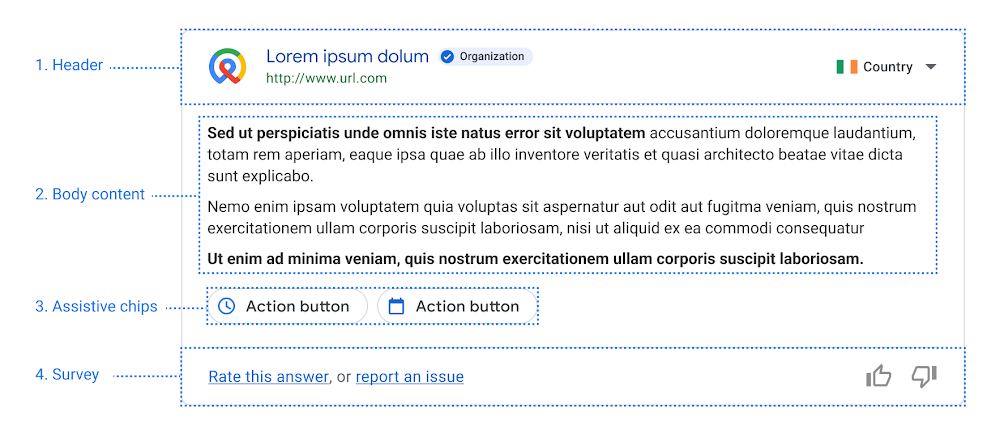
Employees often struggle to find the information they need to be productive. Countless hours are wasted each day as workers peruse a jungle of intranet pages, dig through emails, and otherwise struggle to find the resources they require. Dialogflow ES, a part of Google Cloud’s Contact Center AI (CCAI), can help. We’ve seen as much within Google. Two years ago, our intranet search team realized Dialogflow ES could provide better answers than other methods to employee queries. By harnessing it, they found that searching for answers to workplace questions is a kind of conversation, making Conversational AI technologies a natural enhancement to search functionality. Even better, Dialogflow ES required minimal development to get going.Getting help at scaleThe vast majority of Google’s workforce prefers to resolve problems with self-service resources when possible, according to research by our Techstop team, which provides IT support to the company’s 174,000 employees. Three-quarters of those self-service users start their searches on our internal search portal. Knowing this, our internal search team brainstormed a way to deliver quick answers that are visually similar to the knowledge cards that appear on Google Search. They developed a framework that ties these cards to web search phrases using a core feature of the Dialogflow API called “intents.” These intents use training phrases like “set up Android device” to capture common searches. Instead of powering a chatbot, the intents summon cards with relevant content. Some even contain mini-apps, providing information fetched and customized for the individual employee.Dialogflow ES doesn’t require you to build a full grammar, which can save a ton of time. So it can answer questions if it knows how, but people interacting with it don’t have to play guessing games to figure out how to get the computer to answer.This Dialogflow guide demonstrates how you can add some training phrases to help Dialogflow understand intents.In our internal search platform we call the smart content that we foreground Gadgets. Each one does one of three things: Define informational callout (usually a message detailing a timely change, alert, or update with a link to more information, for example, “Due to the rapidly updating Covid-19 situation, up to date information on return to office can be found <here>.”);Show a “featured answer” or set of follow-up questions and answers at the top (e.g., how to setup a security key);Present a fully interactive answer or tool that completes a simple task, shortcutting a more complicated workflow (e.g., how do I book time off?).Structured prioritization to address the right problemsWhen solving problems it’s important to use your time wisely. The Techstop team developed a large collection of ideas for gadgets, but didn’t have the resources to tackle them all, especially because some gadget ideas were much easier to implement than others. Some ideas came from Google’s internal search engine, telling the Techstop engineers what problems Googlers were researching most frequently. Others came from IT support data, which contained a wealth of wisdom about the most frequent problems Googlers have and how much time Techstop spends on each type of problem.For example, the team knew from helpdesk ticket data that a lot of Googlers needed help with their security keys, which are hardware used for universal 2-factor authentication. They also knew many people visited Techstop to ask about the different laptops, desktops, and other hardware available.But to use our time optimally the team didn’t just attack the biggest problems first. Instead they used the “ICE” method of prioritization, which involves scoring potential work for Impact, Confidence, and Ease. A gadget with high expected Impact will avert many live support interactions and help employees solve big problems quickly. With high Confidence, we feel reasonably sure we can create effective content and identify accurate Dialogflow training phrases to make the gadget work. With high Ease we think the gadget won’t be too difficult and time consuming to implement. Each of these three dimensions is a simple scale from one to ten, and you can compute an overall score by averaging the three.The Techstop team has continued to use the ICE method as new ideas arise, and it helps them balance different considerations and rank the most promising candidates. Not surprisingly, the first gadgets the team launched were high impact and didn’t take long to develop.Deriving intent with DialogflowDialogflow ES makes it easy to identify a user’s search intent by simply naming it– e.g., “file expense report”–and then providing training phrases related to that intent. We recommend about 15 training phrases or more for best results; in our case three to ten queries were enough to get us started–for example, “work from home expenses,” “expensing home office,” “home office supplies.” In the Dialogflow Console, you can make use of the built-in simulator to test what matches.This will let you do some quick experimentation and find out if this could work for some of your own use cases.The next step towards generating helpful results is to create a map from the intent to the smart content (Gadgets) you wish to show. The way you do this will depend on the languages and frameworks you are using, but it’s generally a data structure to associate string names from Dialogflow with the response you want to give.Then for every query to your system, while requesting search results, you can simultaneously request an intent match from Dialogflow (get started with Dialogflow ES with this quickstart guide). If Dialogflow returns a matching intent, look up the corresponding smart content in your map, and display it to your user. This could be as simple as rendering an additional HTML snippet, or as complex as triggering a Javascript-based interactive tool. With this system you can key off the intent’s action or the name to get the right results in front of the right people. Every intent has a unique name and a corresponding action, which can be associated with any number of intents. So if needed, multiple intents could map to one action, such as one gadget or one piece of HTML. You can also allow intents to bind parameters, so that you could give better results for “flights to <<airport>>”, for example.What if we want to make the results even stronger and more specialized to our audience?Tweaking the specificsDialogflow ES allows you to tune the matching threshold of intent matches in the settings screen. If its confidence value is below the threshold then it will return a default match. When you see the default intent in the search context, you simply do nothing extra. To prevent over-matching (because Dialogflow is primarily designed as a conservation agent, it really wants to find something to tell the user), we’ve found it is helpful to seed the default intent with a lot of common generic terms. For example, if we have an intent for “returning laptop”, it may help to have things like “return”, “return on investment”, “returning intern”, and “c++ return statement” in the default to keep it from over-indexing on common terms like “return”. This is only necessary if your people are likely to use your search interface for looking for information on other kinds of “returns”. You don’t have to plan for this up front and can adjust incrementally with feedback and testing.To support debugging and to make updating intents easier, we monitor for near misses and periodically review matches around the triggering threshold. One way to make this faster and help with debugging is to relax Dialogflow’s intent matching threshold. Instead of setting the confidence at 0.85, for example, we set it to say, 0.6. However, we still only show the user something if there is an intent match AND the confidence is over the real threshold of 0.85 (Dialogflow reports its confidence in its response so this is really only one more line of code). This way, we can inspect the results and see the cases where nothing extra was shown, what Dialogflow thought the closest match would be, if anything, and how close it was. This helps guide how to tune the training phrases.Close the feedback loopTo evaluate smart content promoted by our Dialogflow-based system, we simply look at the success rate (or interaction rate) compared to the best result the search produced. We want to provide extra answers that are relevant, which we evaluate based on clicks.If we are systematically doing better than the organic search results (having higher interaction rates), then providing this content at the top of the page is a clear win. Additionally, we can look at the reporting from the support teams who would have otherwise had to field these requests, and verify that we are mitigating the need for staffed-support loads–for example, by reducing the number of tickets being filed for help with work-from-home expenses. We’ve closed the feedback loop! Starting with the first step of the process, identify what issues have high support costs. Look for places where people should be able to solve a problem on their own. And finally measure improvements in search quality, support load, and user satisfactionRegularly review contentAfter all that it is also good to create some process to review the smart content that you are pushing to the top of the search results every few months. It’s possible that a policy has changed or results need to be updated based on new circumstances. You can also see if the success rate of your content is dropping or the amount of staffed-support load is increasing; both signal that you should review this content again. Another valuable tool is providing a feedback mechanism for searchers to explicitly flag smart content as incorrect or a poor match for the query, triggering review.Go on, do it yourself!So how can you put this to use now?It’s pretty fast to get Dialogflow up and running with a handful of intents, and use the web interface to test out your matching.Google’s Cloud APIs allow applications to talk to Dialogflow and incorporate its output. Think of each search as a chat interaction, and keep adding new answers and new intents over time. We also found it useful to build a “diff tool” to pass popular queries to a testing agent, and help us track where answers change when we have a new version to deploy.The newer edition of Dialogflow, Dialogflow CX, has advanced features for creating more conversational agents and handling more complex use cases. Its visual flow builder makes it easier to create and visualize conversations and handle digressions. It also offers easy ways to test and deploy agents across channels and languages. If you want to build an interactive chat or audio experience, check out Dialogflow CX.First time using these tools? Try out building your own virtual agent with this quickstart for Dialogflow ES. And start solving more problems faster! If you’d like to read more about how we’re solving problems like these inside Google, check out our collection of Corp Eng posts.
Quelle: Google Cloud Platform