Break down data silos with the new cross-cloud transfer feature of BigQuery Omni

To help customers break down data silos, we launched BigQuery Omni in 2021. Organizations globally are using BigQuery Omni to analyze data across cloud environments. Now, we are excited to launch the next big evolution for multi cloud analytics: cross-cloud analytics. Cross-cloud analytics tools help analysts and data scientists easily, securely, and cost effectively distribute data between clouds to leverage the analytics tools they need. In April 2022, we previewed a SQL supported LOAD statement that allowed AWS/Azure blob data to be brought into BigQuery as a managed table for advanced analysis. We’ve learned a lot in this preview period. A few learnings stand out:Cross-cloud operations need to meet analysts where they are. In order for analysts to work with distributed data, workspaces should not be siloed. As soon as analysts are asked to leave their SQL workspaces to copy data, set up permissions, or grant permission, workflows break down and insights are lost. Same SQL can be used to periodically copy data using BigQuery scheduled queries. The more of the workflow that can be managed by SQL, the better. Networking is an implementation detail, latency should be too. The longer an analyst needs to wait for an operation to complete, the less likely a complete workflow is to be completed end-to-end. BigQuery users expect high performance for a single operation, even if those operations are managed across multiple data centers.Democratizing data shouldn’t come at the cost of security. In order for data admins to empower data analysts and engineers, they need to be assured there isn’t additional risk in doing so. By default, data admins and security teams are increasingly looking for solutions that don’t persist user credentials between cloud boundaries. Cost control comes with cost transparency. Data transfer costs can get costly, and we hear frequently this is the number 1 concern for multi-cloud data organizations. Providing transparency into single operations and invoices in a consolidated way is critical to driving success for cross-cloud operations. Allowing administrators to cap costs for budgeting is a must.This feedback is why we’ve spent much of this year improving our cross-cloud transfer product to optimize releases around these core tenants: Usability: The LOAD SQL experience allows for data filtering and loading within the same editor across clouds. LOAD SQL supports data formats like JSON, CSV, AVRO, ORC and PARQUET. With semantics for both appending and truncating tables, LOAD supports both periodic syncs and refreshing the complete table semantics. We’ve also added SQL support for data lake standards like Hive partitioning and JSON data type.  Security: With a federated identity model, users don’t have to share or store credentials between cloud providers to access and copy their data. We also now support CMEK support for the destination table to help secure data as it’s written in BigQuery and VPC-SC boundaries to mitigate data exfiltration risks. Latency: With data movement managed by BigQuery Write API, users can effortlessly move just the relevant data without having to wait for complex pipes. We’ve improved job latency significantly for the most common load jobs and are seeing performance improvements with each passing day. Cost auditability: From one invoice, you can see all your compute and transfer costs for LOADs across clouds. Each job comes with statistics to help admins manage budgets.During our preview period, we saw good proof points on how cross-cloud transfer can be used to accelerate time to insight and deliver value to data teams. Getting started with a cross-cloud architecture can be daunting, but cross-cloud transfer has been used to help customers jumpstart proof of concepts because it enables the migration of subsets of data without committing to a full migration. Kargo used cross-cloud transfer to accelerate a performance test of BigQuery. “We tested Cross-Cloud Transfer to assist with a proof of concept on BigQuery earlier this year.  We found the usability and performance useful during the POC,” said Dinesh Anchan, Manager of Engineering at Kargo. We also saw this product being used to combine key datasets across clouds. A common challenge for customers is to manage cross-cloud billing data. CCT is being used to tie files together which have evolving schema on delivery for blob storage. “We liked the experience of using Cross-Cloud transfer to help consolidate our billing files across GCP, AWS, and Azure.  CCT was a nice solution because we could use SQL statements to load our billing files into BigQuery,” said the engineering lead of a large research institution. We’re excited to release the first of many cross-cloud features through BigQuery Omni. Check out the Google Cloud Next session to learn about more upcoming launches in the multicloud analytics space including support for Omni tables and local transformations to help supercharge these experiences for analysts and data scientists. We’re investing in cross-cloud because cloud boundaries shouldn’t slow innovation. Watch this space.Availability and pricingCross-Cloud Transfer is now available in all BigQuery Omni regions. Check the BigQuery Omni pricing page for data transfer costs.Getting StartedIt has never been easier for analysts to move data between clouds. Check out our getting started (AWS/Azure) page to try out this SQL experience. For a limited trial, BigQuery customers can explore BigQuery Omni at no charge using on-demand byte scans from September 15, 2022 to March 31, 2023 (the “trial period”) for data scans on AWS/Azure. Note: data transfer fees for Cross-Cloud Transfer will still apply.
Quelle: Google Cloud Platform
Find and Fix Vulnerabilities Faster Now that Docker’s a CNA

CNAs, or CVE Numbering Authorities, are an essential part of vulnerability reporting because they compose a cohort of bug bounty programs, organizations, and companies involved in the secure software supply chain. When millions of developers depend on your projects, like in Docker’s case, it’s important to be a CNA to reinforce your commitment to cybersecurity and good stewardship as part of the software supply chain.

Previously, Docker reported CVEs directly through MITRE and GitHub without CNA status (there are many other organizations that still do this today, and CVE reporting does not require CNA status).

But not anymore! Docker is now officially a CNA under MITRE, which means you should get better notifications and documentation when we publish a vulnerability.

What are CNAs? (And where does MITRE fit in?)

To understand how CNAs, CVEs, and MITRE fit together, let’s start with the reason behind all those acronyms. Namely, a vulnerability.

When a vulnerability pops up, it’s really important that it has a unique identifier so developers know they’re all talking about the same vulnerability. (Let’s be honest, calling it, “That Java bug” really isn’t going to cut it.)

So someone has to give it a CVE (Common Vulnerabilities and Exposures) designation. That’s where a CNA comes in. They submit a request to their root CNA, which is often MITRE (and no, MITRE isn’t an acronym). A new CVE number, or several, is then assigned depending on how the report is categorized, thus making it official. And to keep all the CNAs on the same page, there are companies that maintain the CVE system.

MITRE is a non-profit corporation that maintains the system with sponsorship from the US government’s CISA (Cybersecurity and Infrastructure Security Agency). Like CISA, MITRE helps lead the charge in protecting public interest when it comes to defense, cybersecurity, and a myriad of other industries.

The CVE system provides references and information about the scary-ickies or the ultra terrifying vulnerabilities found in the world of technology, making vulnerabilities for shared resources and technologies easy to publicize, notify folks about, and take action against.

If you feel like learning more about the CVE program check out MITRE’s suite of videos here or the program’s homepage.

Where does Docker fit in?

Docker has reported CVEs in the past directly through MITRE and has, for example, used the reporting functionality through GitHub on Docker Engine. By becoming a CNA, however, we can take a more direct and coordinated approach with our reporting.

And better reporting means better awareness for everyone using our tools!

Docker went through the process of becoming a CNA (including some training and homework) so we can more effectively report on vulnerabilities related to Docker Desktop and Docker Hub. The checklist for CNA status also includes having appropriate disclosure and advisory policies in place. Docker’s status as a CNA means we can centralize CVE reporting for our different offerings connected to Docker Desktop, as well as those connected to Docker Hub and the registry. 

By becoming a CNA, Docker can be more active in the community of companies that make up the software supply chain. MITRE, as the default CNA and one of the root CNAs (CISA is a root CNA too), acts as the unbiased reviewer of vulnerability reports. Other organizations, vendors, or bug bounty programs, like Microsoft, HashiCorp, Rapid7, VMware, Red Hat, and hundreds of others, also act as CNAs.

Keep in mind that Docker’s status as a CNA means we’ll only report for products and projects we maintain. Being a CNA also includes consideration of when certain products might be end-of-life and how that affects CVE assignment. 

Ch-ch-changes?

Will the experience of using Docker Hub and Docker Desktop because of Docker’s new CNA status? Short answer: no. Long answer: the core experience of using Docker will not change. We’ve just leveled up in tackling vulnerabilities and providing better notifications about those vulnerabilities.

By better notifications, we mean a centralized repository for our security advisories. Because these reported vulnerabilities will link back to MITRE’s CVE program, it makes them far easier to search for, track, and tell your friends, your dog, or your cat about.

To see the latest vulnerabilities as Docker reports them and CVEs become assigned, check out our advisory location here: https://docs.docker.com/security/. For historic advisories also check https://docs.docker.com/desktop/release-notes/ and https://docs.docker.com/engine/release-notes/.

Keep in mind that CVEs that get reported are those that affect the consumers of Docker’s toolset and will require remediation from us and potential upgrade actions from the user, just like any other CVE announcement you might have seen in the news recently.

So keep your fins ready for when CVEs we may announce might apply to you.

Help Docker help you

We still encourage users and security researchers to report anything concerning they encounter with their use of Docker Hub and/or Docker Desktop to security@docker.com. (For reference, our security and privacy guidelines can be found here.)

We also still encourage proper configuration according to Docker documentation and to not to do anything Moby wouldn’t do. (That means you should be whale-intentioned in your builds and help your fin-ends and family using Docker configure it properly.)

And while we can’t promise to stop using whale puns any time soon, we can promise to continue to be good stewards for developers — and a big part of that includes proper security procedures.
Quelle: https://blog.docker.com/feed/

New in Docker Desktop 4.15: Improving Usability and Performance for Easier Builds

Docker Desktop 4.15 is here, packed with usability upgrades to make it simpler to find the images you want, manage your containers, discover vulnerabilities, and work with dev environments. Not enough for you? Well, it’s also easier to build and share extensions to add functionality to Docker Desktop. And Wasm+Docker has moved from technical preview to beta!

Let’s dig into what’s new and great in Docker Desktop 4.15.

Improvements for macOS

Move Faster with VirtioFS — now GA

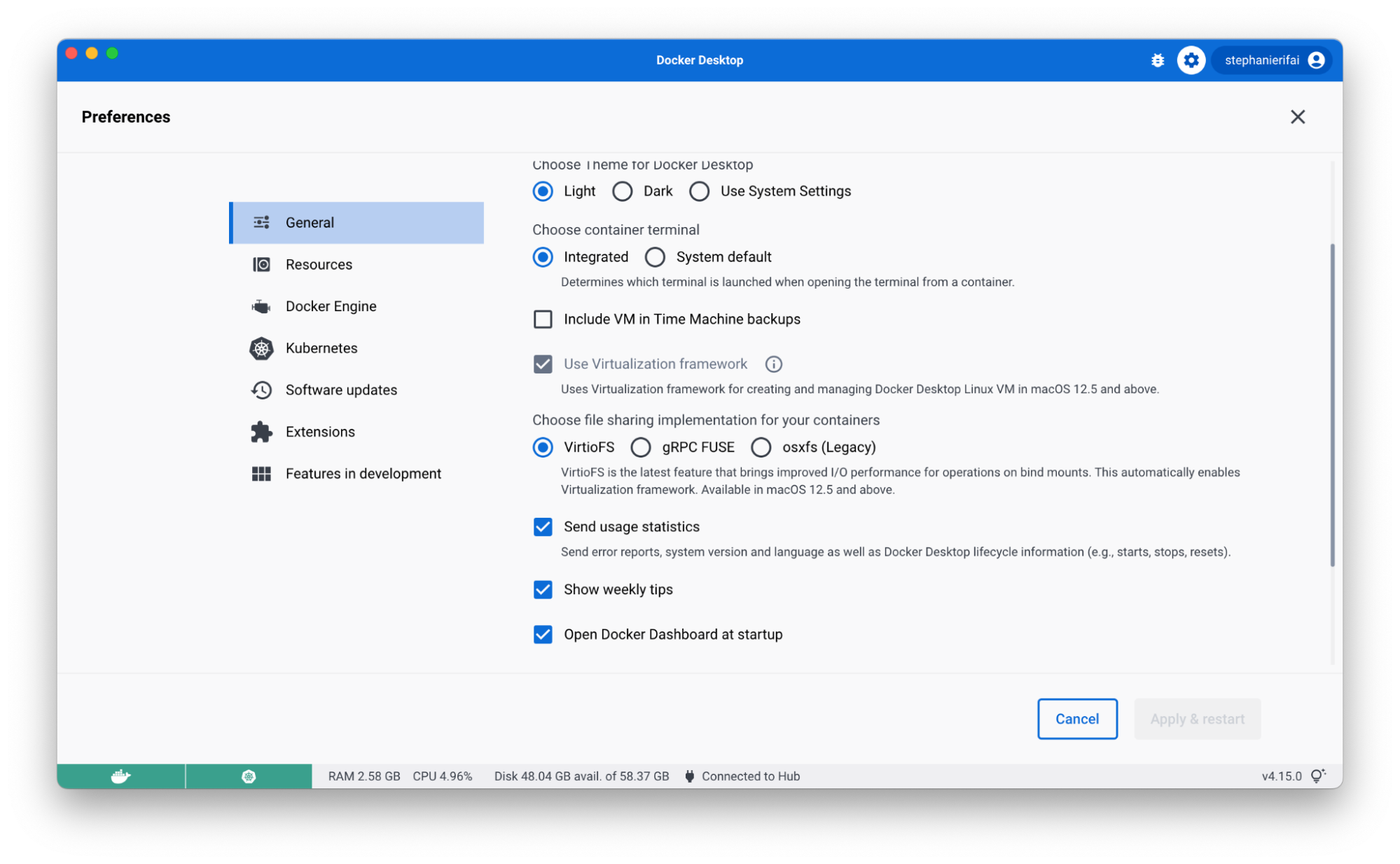
Back in March, we introduced VirtioFS to improve sharing performance for macOS users. With Docker Desktop 4.15, it’s now generally available and you can enable it on the Preferences page. 

Using VirtioFS and Apple’s Virtualization Framework can significantly reduce the time it takes to complete common tasks like package installs, database imports, and running unit tests. For developers, these gains in speed mean less time waiting for common operations to complete and more time focusing on innovation. 

This option is available for macOS 12.5 and above. If you encounter any issues, you can turn this off in your settings tab.

Adminless install during first run on macOS

Now you don’t need to grant admin privileges to install and run Docker Desktop. Previously, Docker Desktop for Mac had to install the privileged helper process com.docker.vmnetd on install or on the first run.

There are some actions that may still require admin privileges (like binding to a privileged port), but when it’s needed, Docker Desktop will proactively inform you that you need to grant permission.

For more information see permission requirements for Mac.

Jump in faster with quick search

When you work with Docker Desktop, you probably know exactly which container you want to start with or image you want to run. But there might be times when you don’t remember if it’s already running — or if you pulled it locally at all.

So you might check a few of the current tabs in the Docker Dashboard, or maybe do a docker ps in the CLI. By the time you find what you need, you’ve checked a few different places, spent some time searching Docker Hub to find the right image, and probably got a little annoyed.

With quick search, you get to skip all of this (especially the annoyance!) and find exactly what you’re looking for in one simple search — along with relevant actions like the option to start/stop a container or run a new image. It even searches the Docker Hub API to help you run any public and private images you’ve hosted there!

To get started, click the search bar in the header (or use the shortcut: command+K on Mac / ctrl+K on Windows) and start typing.

The first tab shows results for any local containers or compose apps. You can perform quick actions like start, stop, delete, view logs, or start an interactive terminal session with a running container. You can also get a quick overview of the environment variables.

If you flip over to the Images tab, you’ll see results for Docker Hub images, local images, and images from remote repositories. (To see remote repository images, make sure you’re signed into your Docker Hub account.) Use the filter to easily narrow down the result types you want to see.

When you filter for local images, you’ll see some quick actions like run and an overview of which containers are using the image.

With Docker Hub images, you can pull the image by tag, run it (running will also pull the image as the first step), view documentation, or go to Docker Hub for more details.

Finally, with images in remote repositories, you can pull by tag or get quick info, like last updated date, size, or vulnerabilities.

Be sure to check out the tips in the footer of the search modal for more shortcuts and ways to use it. We’d love to hear your feedback on the experience and if there’s anything else you’d like to see added!

Flexible image management

Based on user feedback, Docker Desktop 4.15 includes user experience enhancements for the images tab. Cleaning up multiple images can now be done easier with multi-select checkboxes (this functionality used to be behind the “bulk clean up” button).

You can also manage your columns to only show exactly what you want. Want to view your complete container and image names? Drag the dividers in the table header to resize columns. You can also sort columns by header attributes or hide columns to create more space and reduce clutter.

And if you navigate away from your tab, don’t worry! State persistence will keep everything in place so your sorting and search results will be right where you left them.

Know your image vulnerabilities automatically

Docker Desktop now automatically analyzes images for vulnerabilities. When you explore an image, Docker Desktop will automatically provide you with vulnerability information at a base image and image layer level. The base image overview provides a high level view of any dependencies in packages that introduce Common Vulnerabilities and Exposures (CVEs). And it’ll let you know if there’s a newer base image version available.

If you’d prefer images were only analyzed on viewing them, you can turn off auto-analysis in Settings > Features in development > Experimental features > Enable background SBOM indexing.

Thanks to everyone who provided feedback in our 4.14 release. And let us know what you think of the new image overview!

Use Dev Environments with any IDE

When you create a new Dev Environment via Docker Desktop, you can now use any editor or IDE you’ve installed locally. Docker Desktop bind mounts your source code directory to the container. You can interact with the files locally as you normally do, and all your changes will be reflected in the Dev Environment.

Dev Environments help you manage and run your apps in Docker, while isolated from your local environment. For example, if you’re in the middle of a complicated refactor, Dev Environments makes it easier to review a PR without having to stash WIP. (Pro tip: you can install our extension for Chrome or Firefox to quickly open any PR as a Dev Environment!)

We’ve been making lots of little fixes to make Dev Environments better, including:

Custom names for projects

Better private repo support

Better port handling

CLI fixes (like interactive docker dev open)

Let us know what other improvements you’d like to see!

Building and sharing Docker Extensions just got easier

Did you know that you can build your own Docker Extension? Whether you’re just sharing it with your team or adding it to the Extensions Marketplace, Docker Desktop 4.15 makes the process easier and faster.

Meet the Build tab

In the Extensions Marketplace, you’ve got your Browse tab, your Manage tab, and, now, your Build tab. The Build tab brings all the resources you need to get started into one centralized view. You’ll find links to videos, documentation, community resources, and more! To start building, click “+ Add Extensions” in Docker Desktop and navigate to the new Build tab.

Share a link to your extension with others

So now you’ve made an extension to share with your teammates or the community. You could submit it to the Extensions Marketplace, but what if you aren’t quite ready to? (Or what if it’s just for your team?)

Prior to Docker Desktop 4.15, the extension developer had to share a CLI command that looked something like this: docker extension install IMAGE[:TAG]. Then anyone who wanted to install the extension had to paste that command into their CLI. 

In Docker Desktop 4.15, we’ve simplified the process for both you and the developer you want to run your extension. When your extension’s ready to share, use the share button in the Manage tab to create a link. When the person you share it with opens on the link, they’ll be able to select the “Install” button from Docker Desktop.

Have an idea for a new Docker Extension?

If you have an idea for a new Docker Extension, we’ve got a new way that you can share them with Docker and the community. Inside the Extensions Marketplace, there’s a link to request an extension. This link will take you to our new GitHub repo that allows you to add your idea to our discussions and upvote existing ones. If you’re an extension developer, but aren’t sure what to build, be sure to check out the repo for some inspiration!

Docker+Wasm is now beta

We’ve integrated WasmEdge’s runwasi containerd shim into Docker Desktop (previously provided in a Technical Preview build).

This allows developers to run Wasm applications and compose Wasm applications with other containerized workloads, such as a database, in a single application stack. Learn more about it in the documentation and be on the lookout for more soon!

What else would make your life easier?

Take a test drive of the new usability upgrades and let us know what you think! Is there something you think we missed? Be sure to check out our public roadmap to see upcoming features — and to suggest any other ones you’d like to see.

And don’t forget to check out the release notes for a full breakdown of what’s new in Docker Desktop 4.15!
Quelle: https://blog.docker.com/feed/