Managing Dialogflow CX Agents with Terraform

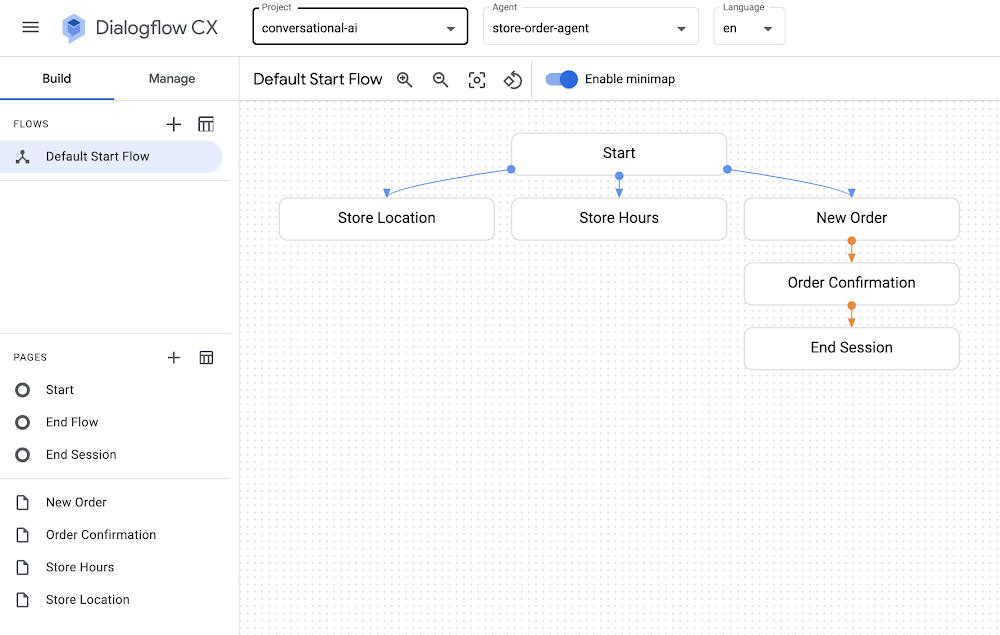
Dialogflow CX is a powerful tool in Google Cloud that you can use to design conversational agents powered by Natural Language Understanding (NLU) to transform user requests into actionable data. You can integrate voice and/or chat agents in your app, website, or customer support systems to determine user intent and interact with users.If you’ve ever wanted to get started with Dialogflow CX, you might have seen or ran through the quickstart steps to build a shirt ordering agent that you can ask for the store location, get store hours, or make a shirt order.While going through the quickstart steps, you might find yourself wanting to codify all of the Dialogflow CX components and settings, which would help you quickly spin up agents and manage their configuration programmatically. In fact, you might already be using infrastructure as code tooling and best practices to manage virtual machines in Compute Engine, Kubernetes clusters in GKE, or topics and subscriptions in Pub/Sub. You can also use the same infrastructure as code approach with your Dialogflow CX agents: Terraform and Google Cloud to the rescue!You can use the Terraform modules for Dialogflow CX along with the sample Terraform + Dialogflow CX configuration files to reproduce the chatbot/agent described in the “build a shirt ordering agent” quickstart. Try them out and spin up a Dialogflow CX agent with a single command in your own Google Cloud account!SetupThere are a few things that you’ll need to set up before you run the sample Terraform configuration files for Dialogflow CX.Register for a Google Cloud account.Enable the Dialogflow CX API.Install and initialize the Google Cloud CLI.Install Terraform.UsageOnce you’ve completed the setup on your local machine, you’re ready to spin up your own fully-configured Dialogflow CX agent in seconds:Clone the CCAI samples repository and cd into the dialogflow-cx/shirt-order-agent/ directory.Edit the values in variables.tf to specify your Google Cloud project ID along with your desired region and zone.Run terraform init to initialize the directory that contains the Terraform configuration files.Run terraform apply, the command that spins everything up!Once you run terraform apply and confirm the proposed plan, you’ll see messages about all of the components that were provisioned, including the agent, pages, intents, flows, and more:code_block[StructValue([(u’code’, u’google_dialogflow_cx_agent.agent: Creating…rngoogle_dialogflow_cx_agent.agent: Creation complete after 2srngoogle_dialogflow_cx_entity_type.size: Creating…rngoogle_dialogflow_cx_page.store_location: Creating…rngoogle_dialogflow_cx_intent.store_hours: Creating…rngoogle_dialogflow_cx_page.store_hours: Creating…rngoogle_dialogflow_cx_page.order_confirmation: Creating…rngoogle_dialogflow_cx_intent.store_location: Creating…rngoogle_dialogflow_cx_intent.store_hours: Creation complete after 1srngoogle_dialogflow_cx_page.store_location: Creation complete after 1srngoogle_dialogflow_cx_page.order_confirmation: Creation complete after 1srngoogle_dialogflow_cx_page.store_hours: Creation complete after 1srngoogle_dialogflow_cx_intent.store_location: Creation complete after 1srngoogle_dialogflow_cx_entity_type.size: Creation complete after 1srngoogle_dialogflow_cx_page.new_order: Creating…rngoogle_dialogflow_cx_intent.order_new: Creating…rngoogle_dialogflow_cx_intent.order_new: Creation complete after 0srngoogle_dialogflow_cx_page.new_order: Creation complete after 0s’), (u’language’, u”), (u’caption’, <wagtail.wagtailcore.rich_text.RichText object at 0x3ef4c6f145d0>)])]Now that you’ve provisioned your agent in Dialogflow CX, you’re ready to view and test your agent in the Dialogflow CX Console!How it worksWe’re using the Terraform modules for Dialogflow CX to define a conversational agent and all of its components. We’ve reproduced the agent described in the build a shirt ordering agent quickstart.All of the agent’s associated entity types, flows, intents, and pages are created and managed with Terraform, so you can edit your Terraform configuration files to change certain parameters, run terraform apply, and see your changes instantly reflected in the Dialogflow CX console.You might notice that the flows.tf file actually uses a local-exec command within a null_resource block to make a REST API call instead of using a Terraform resource for Dialogflow CX to define the flow. This approach was used since Dialogflow CX creates a default start flow when the agent is created rather than being created and managed by Terraform. As a result, we can use a REST API call to PATCH the default start flow and then modify its messages and routes. We can still use Terraform to templatize and trigger the REST API command, which means that you can manage any setting that is also available in the Dialogflow CX REST API, or even add custom callbacks to other Google Cloud services if needed.SummaryIt’s convenient to be able to manage conversational agents as code using Terraform in Google Cloud. We get all of the benefits of Dialogflow CX with the convenience of Terraform to manage everything in a stateful and version-control friendly way.Now that you’ve captured all of your Dialogflow CX agent settings and configuration in Terraform, you are ready to check your Terraform scripts into version control, spin up and destroy agents as you please using terraform apply and terraform destroy, or even store remote Terraform state in Google Cloud using the GCS backend.Take a look at the Terraform + Dialogflow CX sample code along with the Terraform modules for Dialogflow CX so you can spin up your own Dialogflow CX agents with a single command. If you found this Terraform code sample useful, be sure to star, watch, or ask questions in our CCAI samples repository on GitHub!aside_block[StructValue([(u’title’, u’Terraform + Dialogflow CX sample code’), (u’body’, <wagtail.wagtailcore.rich_text.RichText object at 0x3ef4c5a19750>), (u’btn_text’, u’TRY IT OUT!’), (u’href’, u’https://github.com/GoogleCloudPlatform/contact-center-ai-samples/tree/main/dialogflow-cx/shirt-order-agent’), (u’image’, None)])]
Quelle: Google Cloud Platform

What's new in Azure Data & AI: Empowering retailers to streamline operations and accelerate time to value

The new year brings opportunity for thoughtful reflection about the past year, both personally and professionally. 2022 was a year of firsts for me—first time having clam chowder at Pike Place Market as a local, first time going shopping for heels with my daughter, and first time delivering an Azure keynote at Inspire as a Microsoft employee when pre-COVID-19, I was a Partner listening in the audience. And here is another first; the start of a new blog series where I plan to share more about noteworthy and inspiring data and AI innovations we are releasing across Microsoft. Given the National Retail Federation’s Big Show this week, I’ll also highlight how these innovations impact retail.

Let’s explore what’s new for Azure Data & AI this month:

Microsoft underscores resilient retail at NRF

A bellwether for economic and societal trends, the retail industry continues to be on the front line of adaptive innovation. And rather than trying to predict the future, retailers are working to achieve greater business agility necessary to thrive in it. This means that, like Majid Al Futtaim Retail, they automate tedious processes so employees can focus on higher-value tasks. Like Grupo Bimbo, they unify disparate data points in real time so that employees can access a central source of truth when and where they need it. And, like CCC Group, they stay laser-focused on delivering differentiated customer experiences to build loyal fans. Across each of these organizations, data is seen as an accelerant for growth, powering more personalized customer experiences, cost-efficient supply chains, and proactive responses to market trends.

Business agility requires people, processes, and technologies to work in harmony, and to align on how massive amounts of data are managed, analyzed, and actioned to respond to market demands. Increasingly, these efforts focus on driving sustainable growth that limits carbon emissions, for example by using machine learning to more accurately forecast demand to reduce excess inventory and waste.

We know cloud technologies like databases, containers, and AI can enable more accurate decisions, but it can be challenging to ensure these technologies speak to each other in the right way at the right time on a global scale. This is where Azure and the Microsoft Intelligent Data Platform—the description we use to refer to all of the Data & AI Azure products and services we offer shine. With managed databases like Cosmos DB, analytics services like Azure Synapse, and leading AI offerings, retailers can take advantage of the “by design” integration the Microsoft Intelligent Data Platform offers, which means they are able to invest more time in creating value rather than integrating and managing their data estate.

The Microsoft Intelligent Data Platform came to life through new immersive demo experiences this year at NRF and I’m going to briefly highlight what we showcased at the conference. Earlier this week at NRF, Microsoft’s Alysa Taylor and Shelley Bransten spoke on the topic of Resilient Retail and shared examples of organizations digitizing their businesses to do more with less. You can read more about their talks on our Industry blog.

Microsoft also met with customers at our NRF booth to discuss strategies for making sense of all their data. For example, these two demos highlight how tight integrations between data, analytics, and AI can help make resilient retail a reality.

Wide World Importers (WWI), a global supermarket chain, wants to maximize the value of their data estate. By using Azure Synapse pipelines with Cosmos DB, they get real time insights which are automatically shared with the right decision makers through tools like Azure Data Explorer and Power BI. They’re able to track their supply chain data in real time and use predictive AI to reduce costs. They’re also able to govern their data estate from a single application one pane of glass using Microsoft Purview.

Next, Wide World Importers taps into the power of Azure AI to build a more connected customer experience. They use Azure Form Recognizer to detect and redeem promotional offers. Azure Cognitive Search helps customers find product information more quickly by recognizing their search intent and helps WWI deliver more personalized recommendations. Pre-built AI capabilities, such as speech recognition and computer vision, also differentiate the shopping experience and provide a more accessible flow.

The general availability of Azure OpenAI Service 

As Eric Boyd mentioned in his blog, we announced the general availability of Azure OpenAI Service as part of our ongoing partnership with OpenAI. Azure OpenAI Service provides a commercialization platform for businesses to leverage advanced AI models like GPT-3.5, Codex, and DALL*E to create innovative applications. Customers of all sizes across industries are using Azure OpenAI Service to do more with less, improve experiences for end users, and streamline operational efficiencies. 

Microsoft Responsible AI Dashboard now available

The digitization of retail enables retailers to meet customer expectations with increasing precision, from providing personalized recommendations online to restocking inventory based on computer vision in physical stores. Shoppers expect the technology behind their retail experience to apply data and AI responsibly. In December, we began rolling out our new Responsible AI dashboard in Azure Machine Learning, which includes capabilities like fairness assessment, interpretability, error analysis, and causal inferencing. And today, we are excited to announce the general availability of the Microsoft Responsible AI dashboard. Retailers can leverage the Responsible AI dashboard to optimize the shopper’s experience as well as build trust and positive perception for their brands.

See how you can learn more about Responsible AI.

Full text search capabilities come to Azure Cosmos DB for Apache Cassandra

Azure Cosmos DB has seen tremendous momentum within the retail industry, given its ability to automatically and instantly scale when traffic is unpredictable without sacrificing performance or cost efficiency. Microsoft runs both the Windows store and Xbox Live on Azure Cosmos DB for this very purpose. This month, we’re announcing several performance enhancements to Azure Cosmos DB to make it easier and faster for developers to query data stores in Azure Cosmos DB. These include the ability to do full text searches in Azure Cosmos DB for Apache Cassandra through a native integration with Azure Cognitive Search, and support for GraphQL and REST through Data API builder.

For more technical detail about these and other updates to Azure Cosmos DB, visit our developer blog.

JSON support for Azure Cache for Redis Enterprise generally available

Support for JSON documents in Azure Cache for Redis Enterprise tiers, delivered via the RedisJSON module, has been made generally available as of November 2022. This turns Azure Cache for Redis Enterprise into a high-performance NoSQL document store and drives efficiency for developers to modernize their applications. The new RedisJSON module update is well suited to retail customers looking to store, search, and index product catalogs and shopper data via a single atomic operation.

To learn more on Azure Cache for Redis Enterprise and the RedisJSON module please check out the blog.

Microsoft named a Leader in the 2022 Gartner Magic Quadrant for Insight Engines

In December, Microsoft was named a leader in the 2022 Gartner Magic Quadrant for Insight Engines, which evaluates the capabilities of various vendors in the market for providing enterprise-scale search for app development. Organizations benefit, no matter the industry, but Cognitive Search is an exceptionally powerful tool for retailers, helping them to quickly find and analyze data related to customer behavior, sales, and inventory. It can also be used to personalize the shopping experience for individual customers based on their past interactions and preferences.

Learn more and download the report.

Customers innovating with Azure Data & AI

I’d like to close my inaugural “what’s new” blog post with my favorite way of making everything I’ve covered above actionable—by sharing examples of our customers succeeding. I share them as a way of helping spark the understanding—maybe even a little imagination—so that others can better envision how this amazing new Data & AI technology can be used in their own organizations.

I hope you enjoyed reading this month’s edition of what’s new in Azure Data & AI. We look forward to sharing more insights and inspiration in the months ahead. If you have a question or idea you’d like to hear perspective on, please share in the comments section.

Grupo Bimbo transforms the data analysis of commercial areas with Microsoft Solutions

Mexico—The global baking company carries out hundreds of thousands of transactions globally and needed a way for collaborators to quickly access and act on insights to improve sales. By adopting Power BI and Azure Synapse, Grupo Bimbo was able to unify internal and external data, increase business agility, and democratize insights for increased productivity across the organization. Read the full Case Study.

How online marketplace CDON used AI to become a market leader

Sweden—CDON began as a small online retailer of CDs, DVDs, and games and quickly became the Nordic’s largest online marketplace. When CDON realized legacy technologies were holding it back, the company looked to Azure to accelerate its innovation and scale. Now their developers use Azure Cognitive Search, Azure DevOps, and other services to better understand the user experience on their website and increase personalization for better performance. Read the full CDON Case Study.

How AEON Group increased profits and maximized inventory with data and AI

Japan—Since opening its first store in December 2005, Maibasuketto, a member of the AEON Group's supermarket business, has expanded its footprint at a pace of 100 stores every year. To ensure its growth was sustainable, the company embarked on an initiative to optimize store ordering and operations using Azure Cognitive Services, maximizing supply chain and inventory based on selling patterns throughout the day. Read the full AEON Group Case Study.

How Fashable reimagines fashion design with Azure Machine Learning and PyTorch

Portugal—Using Azure Machine Learning, Fashable created an AI application that generates original clothing designs to quickly get a pulse on consumer preferences. This helps fashion companies understand customer demand, get to market faster, and reduce clothing waste by only producing what they know will sell. Read the full Fashable Case Study.

WTW accelerates delivery time with Azure Migration and Analytics

United Kingdom—Operating in more than 140 countries with over 40,000 employees, Willis Towers Watson (WTW) has decades of experience working with the world’s largest loyalty programs. To efficiently govern the exponential growth in data for these programs and apply innovations in advanced analytics and AI, WTW moved its workload to Azure. Now their employees have more time to focus on uncovering insights for clients. Read the full WTW Case Study.

Quelle: Azure

General availability of Azure OpenAI Service expands access to large, advanced AI models with added enterprise benefits

Large language models are quickly becoming an essential platform for people to innovate, apply AI to solve big problems, and imagine what’s possible. Today, we are excited to announce the general availability of Azure OpenAI Service as part of Microsoft’s continued commitment to democratizing AI, and ongoing partnership with OpenAI.

With Azure OpenAI Service now generally available, more businesses can apply for access to the most advanced AI models in the world—including GPT-3.5, Codex, and DALL•E 2—backed by the trusted enterprise-grade capabilities and AI-optimized infrastructure of Microsoft Azure, to create cutting-edge applications. Customers will also be able to access ChatGPT—a fine-tuned version of GPT-3.5 that has been trained and runs inference on Azure AI infrastructure—through Azure OpenAI Service soon.

Empowering customers to achieve more

We debuted Azure OpenAI Service in November 2021 to enable customers to tap into the power of large-scale generative AI models with the enterprise promises customers have come to expect from our Azure cloud and computing infrastructure—security, reliability, compliance, data privacy, and built-in Responsible AI capabilities.

Since then, one of the most exciting things we’ve seen is the breadth of use cases Azure OpenAI Service has enabled our customers—from generating content that helps better match shoppers with the right purchases to summarizing customer service tickets, freeing up time for employees to focus on more critical tasks.

Customers of all sizes across industries are using Azure OpenAI Service to do more with less, improve experiences for end-users, and streamline operational efficiencies internally. From startups like Moveworks to multinational corporations like KPMG, organizations small and large are applying the capabilities of Azure OpenAI Service to advanced use cases such as customer support, customization, and gaining insights from data using search, data extraction, and classification.

“At Moveworks, we see Azure OpenAI Service as an important component of our machine learning architecture. It enables us to solve several novel use cases, such as identifying gaps in our customer’s internal knowledge bases and automatically drafting new knowledge articles based on those gaps. This saves IT and HR teams a significant amount of time and improves employee self-service. Azure OpenAI Service will also radically enhance our existing enterprise search capabilities and supercharge our analytics and data visualization offerings. Given that so much of the modern enterprise relies on language to get work done, the possibilities are endless—and we look forward to continued collaboration and partnership with Azure OpenAI Service."—Vaibhav Nivargi, Chief Technology Officer and Founder at Moveworks.

“Al Jazeera Digital is constantly exploring new ways to use technology to support our journalism and better serve our audience. Azure OpenAI Service has the potential to enhance our content production in several ways, including summarization and translation, selection of topics, AI tagging, content extraction, and style guide rule application. We are excited to see this service go to general availability so it can help us further contextualize our reporting by conveying the opinion and the other opinion.”—Jason McCartney, Vice President of Engineering at Al Jazeera.

“KPMG is using Azure OpenAI Service to help companies realize significant efficiencies in their Tax ESG (Environmental, Social, and Governance) initiatives. Companies are moving to make their total tax contributions publicly available. With much of these tax payments buried in IT systems outside of finance, massive data volumes, and incomplete data attributes, Azure OpenAI Service finds the data relationships to predict tax payments and tax type—making it much easier to validate accuracy and categorize payments by country and tax type.”—Brett Weaver, Partner, Tax ESG Leader at KPMG.

Azure—the best place to build AI workloads

The general availability of Azure OpenAI Service is not only an important milestone for our customers but also for Azure.

Azure OpenAI Service provides businesses and developers with high-performance AI models at production scale with industry-leading uptime. This is the same production service that Microsoft uses to power its own products, including GitHub Copilot, an AI pair programmer that helps developers write better code, Power BI, which leverages GPT-3-powered natural language to automatically generate formulae and expressions, and the recently-announced Microsoft Designer, which helps creators build stunning content with natural language prompts.

All of this innovation shares a common thread: Azure’s purpose-built, AI-optimized infrastructure.

Azure is also the core computing power behind OpenAI API’s family of models for research advancement and developer production.

Azure is currently the only global public cloud that offers AI supercomputers with massive scale-up and scale-out capabilities. With a unique architecture design that combines leading GPU and networking solutions, Azure delivers best-in-class performance and scale for the most compute-intensive AI training and inference workloads. It’s the reason the world’s leading AI companies—including OpenAI, Meta, Hugging Face, and others—continue to choose Azure to advance their AI innovation. Azure currently ranks in the top 15 of the TOP500 supercomputers worldwide and is the highest-ranked global cloud services provider today. Azure continues to be the cloud and compute power that propels large-scale AI advancements across the globe.

Source: TOP500 The List: TOP500 November 2022, Green500 November 2022.

A responsible approach to AI

As an industry leader, we recognize that any innovation in AI must be done responsibly. This becomes even more important with powerful, new technologies like generative models. We have taken an iterative approach to large models, working closely with our partner OpenAI and our customers to carefully assess use cases, learn, and address potential risks. Additionally, we’ve implemented our own guardrails for Azure OpenAI Service that align with our Responsible AI principles. As part of our Limited Access Framework, developers are required to apply for access, describing their intended use case or application before they are given access to the service. Content filters uniquely designed to catch abusive, hateful, and offensive content constantly monitor the input provided to the service as well as the generated content. In the event of a confirmed policy violation, we may ask the developer to take immediate action to prevent further abuse.

We are confident in the quality of the AI models we are using and offering customers today, and we strongly believe they will empower businesses and people to innovate in entirely new and exciting ways.

The pace of innovation in the AI community is moving at lightning speed. We’re tremendously excited to be at the forefront of these advancements with our customers, and look forward to helping more people benefit from them in 2023 and beyond.

Getting started with Azure OpenAI Service

Learn more about Azure OpenAI Service and more about all the latest enhancements.
Apply for access to Azure OpenAI Service. Once approved for use, customers can log in to the Azure portal to create an Azure OpenAI Service resource and then get started either in our Studio website or via code:

How to create an Azure OpenAI Service resource
Quickstart: how to get started generating text

Read the blog: AI and the need for purpose-built cloud infrastructure.
Watch a video with tips on how to get started with Azure OpenAI Service:

Quelle: Azure






