Amazon Detective fügt Amazon VPC Flow Logs-Visualisierungen für Amazon EKS-Workloads hinzu

Amazon Detective fügt jetzt visuelle Zusammenfassungen und Analysen zu Ihren Amazon Virtual Private Cloud (VPC) -Flow-Protokollen aus Ihren Amazon Elastic Kubernetes Service (EKS) -Workloads hinzu. Diese neue Funktion visualisiert den gesamten Netzwerkverkehr Ihrer EKS-Workloads und ermöglicht es Ihnen, schnell Fragen wie „Welche Ports oder Netzwerkdienste wurden von meinen EKS-Workloads verwendet?“, „Gab es große Datenübertragungen von meinen EKS-Workloads?“ und „Welche IP-Adresse war mit meinen EKS-Workloads verbunden?“ zu beantworten. Diese Details helfen Sicherheitsanalysten, potenzielle Sicherheitsprobleme zu untersuchen, unerwartetes Netzwerkverhalten zu diagnostizieren und andere AWS-Ressourcen zu identifizieren, die betroffen sein könnten.
Quelle: aws.amazon.com

Amazon Aurora unterstützt PostgreSQL 14.6, 13.9, 12.13, 11.18

Nach der Ankündigung von Updates für die PostgreSQL-Datenbank durch die Open-Source-Community haben wir die mit Amazon Aurora PostgreSQL kompatible Edition aktualisiert, um PostgreSQL 14.6, 13.9, 12.13 und 11.18 zu unterstützen. Diese Versionen enthalten Produktverbesserungen und Bugfixes der PostgreSQL-Community sowie Aurora-spezifische Verbesserungen. Lesen Sie die Aurora-Versionsrichtlinie, um zu entscheiden, wie oft Sie ein Upgrade durchführen und wie Sie Ihren Upgrade-Prozess planen. Zur Erinnerung: Wenn Sie eine Version von Amazon Aurora PostgreSQL 10 ausführen, müssen Sie bis zum 31. Januar 2023 ein Upgrade auf eine neuere Hauptversion vornehmen. 
Quelle: aws.amazon.com

What’s New on WordPress.com: Tools to Make Designing Your Site Easier Than Ever

At WordPress.com, we’re always adding features and pushing our blocks and Site Editor to do more so that you can create, design, and publish amazing things with ease. Our newest features are largely design-focused, giving you the confidence to explore a variety of styles and then easily apply them across your entire site. 

Let’s jump in and see what’s new. 

Browse Mode: An easier way to navigate the Site Editor 

Browse Mode allows you to easily explore, navigate, and edit your site’s templates and template parts, including adding new templates right from this interface. To play around with Browse Mode, simply click your site’s icon from the Site Editor. 

When to use this feature: You want to see how all the pieces of your site fit together — and to jump between your templates and template parts for easy editing.  

Clearer access to your advanced block settings

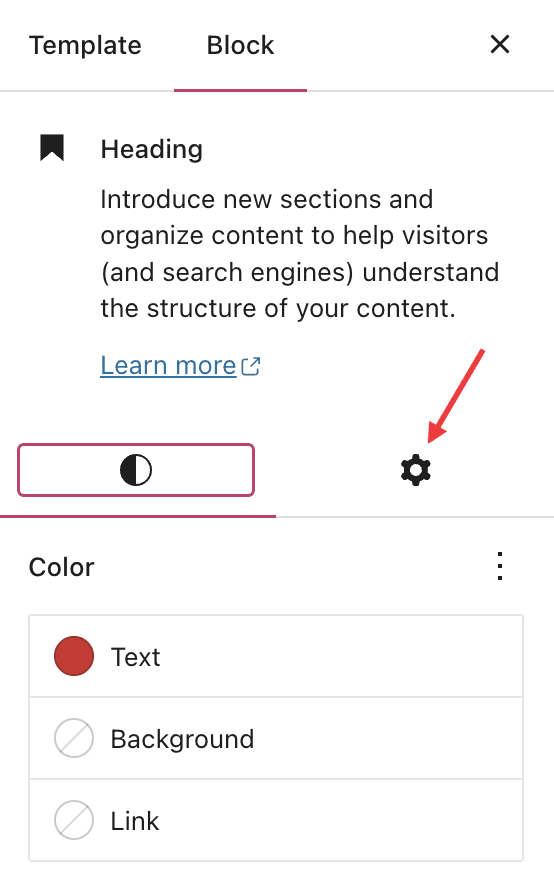
With more powerful blocks comes the need for easier, more intuitive access to advanced settings for those blocks. To that end, we’ve split block settings into two tabs within the sidebar. On the left side, you’ll find standard customization options like color, typography, and spacing. On the right side, you’ll find more advanced options, like layouts, custom CSS, and a button to apply changes across your entire site (more on that below).  

When to use this feature: You’re working on your navigation menu and need more customization than just color or typography options. Go over to advanced settings to change the orientation of the menu from horizontal to vertical — among other things! 

Preview style options with the Style Book 

A number of themes, including staff favorite Twenty Twenty Three, now come with styles, which change the look and feel of your site — color, spacing, etc. — within the overarching design aesthetic of the theme. 

With the newly launched Style Book, you can now see how various styles affect different blocks. You’re able to preview colors, typography, embeddable media, and more. 

When to use this feature: You’re curious about switching up the colors or typography on your site, but you want to know what it’ll look like, especially within specific blocks, before committing. 

Apply design changes across your entire site  

When working and designing in the Site Editor, it’s easy to find yourself having created a certain style that you really like and want emulated across your entire site. With our new “Apply globally” button, you can do just that. 

When to use this feature: You’ve spent some time styling a heading (or other block) on your homepage or a page template, and you want that look to carry over across all the headings (or whichever block you’re working with) on your site. 

In Case You Missed It 

In the midst of holiday season business, you may have missed some of our other recent and exciting updates:  

Boost your traffic with Blaze

Learn how to turn your posts and pages content into clean, compelling ads that run across millions of sites on WordPress.com and Tumblr.

Explore new themes   

We introduced five beautiful new designs in January, including our new default theme, Twenty Twenty Three. 

Grab yourself a .link domain 

A .link domain name and Link in Bio page supercharges your social media by giving you a place to host all of your links.

Insert chapter breaks on your videos 

Chapter breaks offer a quick, convenient way for viewers to navigate longer videos or see the outline of a video’s content at a glance. 

Share your work-in-progress website

With Site Previews, you can generate a unique link for your in-progress Business or eCommerce site that allows your team or clients to access and explore the site without needing to log in. 
Quelle: RedHat Stack

What Data Pipeline Architecture should I use?

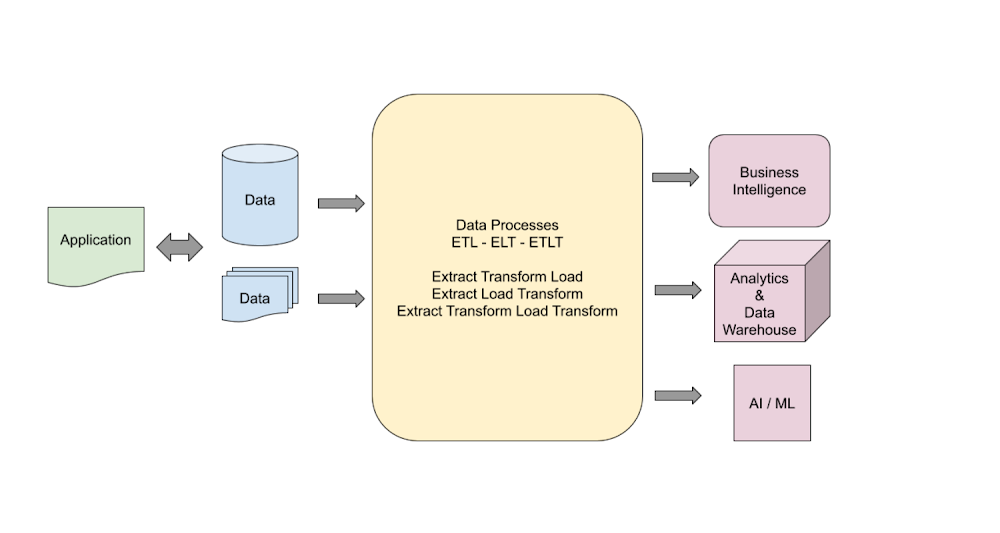
Data is essential to any application and is used in the design of an efficient pipeline for delivery and management of information throughout an organization. Generally, define a data pipeline when you need to process data during its life cycle. The pipeline can start where data is generated and stored in any format. The pipeline can end with data being analyzed, used as business information, stored in a data warehouse, or processed in a machine learning model.Data is extracted, processed, and transformed in multiple steps depending on the downstream system requirements. Any processing and transformational steps are defined in a data pipeline. Depending on the requirements, the pipelines can be as simple as one step or as complex as multiple transformational and processing steps.How to choose a design pattern?When selecting a data pipeline design pattern, there are different design elements that must be considered. These design elements include the following:Select data source formats.Select which stacks to use.Select data transformation tools.Choose between Extract Transform Load (ETL), Extract Load Transform (ELT), or Extract Transform Load Transform (ETLT).Determine how changed data is managed.Determine how changes are captured.Data sources can have a variety of data types. Knowing the technology stack and tool sets that we use is also a key element of the pipeline build process. Enterprise environments come with the challenges that require using multiple and complicated techniques to capture the changed data and to merge with the target data.I mentioned that most of the time the downstream systems define the requirements for a pipeline and how these processes can be interconnected. The processing steps and sequences of the data flow are the major factors affecting pipeline design. Each step might include one or more data inputs, and the outputs might include one or more stages. The processing between input and output might include simple or complex transformational steps. I highly recommend keeping the design simple and modular to ensure that you clearly understand the steps and transformation taking place. Also, keeping your pipeline design simple and modular makes it easier for a team of developers to implement development and deployment cycles. It also makes debugging and troubleshooting the pipeline easier when issues occur.The major components of a pipeline Include: Source dataProcessing Target storageSource data can be the transaction application, the files collected from users, and data extracted from an external API. Processing of the source data can be as simple as one step copying or as complex as multiple transformations and joining with other data sources. The target data warehousing system might require the processed data that is the result of the transformation (such as a data type change or data extraction), and lookup and updates from other systems. A simple data pipeline might be created by copying data from source to target without any changes. A complex data pipeline might include multiple transformation steps, lookup, updates, KPI calculations, and data storage into several targets for different reasons.Source data can be presented in multiple formats. Each will need a proper architecture and tools to process and transform. There can be multiple data types required in a typical data pipeline that might be in any of the following formats:Batch Data: A file with tabular information (CSV, JSON, AVRO, PARQUET and …) where the data is collected according to a defined threshold or frequency with conventional batch processing or micro-batch processing. Modern applications tend to generate continuous data. For this reason, micro-batch processing is a preferred design to collect the data from sources.Transactions Data: Application data such as RDBMS (relational data), NoSQL, Big Data.Stream Data:  Real-time applications that use Kafka, Google Pub/Sub, Azure Stream Analytics, or Amazon Stream Data. Streaming data applications can communicate in real time and exchange messages to meet the requirements. In Enterprise architecture design, the real time and stream processing is a very important component of design.Flat file – PDFs or other non-tabular formats that contain data for processing. For example, medical or legal documents that can be used to extract information.Target data is defined based on the requirements and the downstream processing needs. It’s common to build target data to satisfy the need for multiple systems. In the Data Lake concept, the data is processed and stored in a way that Analytics systems can get insight while the AI/ML process can use the data to build predictive models.Architectures and examplesMultiple architecture designs are covered that show how the source data is extracted and transformed to the target. The goal is to clever the general approaches, and it’s important to remember that each use case can be very different and unique to the customer and need special consideration.The data pipeline architecture can be broken down into Logical and Platform levels. The logical design describes how the data is processed and transformed from the source into the target. The platform design focuses on implementation and tooling that each environment needs, and this depends on the provider and tooling available in the platform. GCP, Azure, or Amazon have different toolsets for the transformation while the goal of the logical design remains the same (data transform) no matter which provider is used. Here is a logical design of a Data Warehousing pipeline:Here is the logical design for a Data Lake pipeline:Depending on the downstream requirements, the generic architecture designs can be implemented with more details to address several use cases.The Platform implementations can vary depending on the toolset selection and development skills. What follows are a few examples of GCP implementations for the common data pipeline architectures.A Batch ETL Pipeline in GCP – The Source might be files that need to be ingested into the analytics Business Intelligence (BI) engine. The Cloud Storage is the data transfer medium inside GCP and then Dataflow is used to load the data into the target BigQuery storage. The simplicity of this approach makes this pattern reusable and effective in simple transformational processes. On the other hand, if we need to build a complex pipeline, then this approach isn’t going to be efficient and effective.A Data Analytics Pipeline is a complex process that has both batch and stream data ingestion pipelines. The processing is complex and multiple tools and services are used to transform the data into warehousing and an AL/ML access point for further processing. Enterprise solutions for data analytics are complex and require multiple steps to process the data. The complexity of the design can add to the project timeline and cost but in order to achieve the business objectives, carefully review and build each component.Machine learning data pipeline in GCP is a comprehensive design that allows customers to utilize all GCP native services to build and process a machine learning process. For more information, see Creating a machine learning pipeline.GCP platform diagrams are created by Google Cloud Developer Architecture.How to choose a data pipeline architecture?There are multiple approaches to designing and implementing data pipelines. The key is to choose the design that meets your requirements. There are new technologies emerging that are providing more robust and faster implementations for data pipelines. Google Big Lake is a new service that introduces a new approach on data ingestion. BigLake is a storage engine that unifies data warehouses by enabling BigQuery and open source frameworks such as Spark to access data with fine-grained access control. BigLake provides accelerated query performance across multi-cloud storage and open formats such as Apache Iceberg.The other major factor in deciding the proper data pipeline architecture is the cost. Building a cost-effective solution is a major factor in deciding the design. Usually, streaming and real-time data processing pipelines are more expensive to build and run compared to using batch models. There are times that the budget runs the decision on which design to choose and how to build the platform. Knowing the details on each component and being able to do cost analysis of the solution ahead of time is important in choosing the right architecture design for your solution. GCP provides a cost calculator that can be used in these cases.Do you really need real-time analytics or will a near real-time system be sufficient? This can resolve the design decision for the streaming pipeline. Are you building cloud native solutions or migrating an existing one from on-premises? All of these questions are important in designing a proper architecture for our data pipeline.Don’t ignore the data volume when designing a data pipeline. The scalability of the design and services used in the platform is another very important factor to consider when designing and implementing a solution. Big Data is growing more and building capacity for processing. Storing the data is a key element to data pipeline architecture. In reality, there are many variables that can help with proper platform design. The data volume and velocity or data flow rates can be very important factors.If you are planning to build a data pipeline for a data science project, then you might consider all data sources that the ML Model requires for future engineering. The data cleansing process is mostly a big part of the data engineering team which must have adequate and sufficient transformational toolsets. Data science projects are dealing with large data sets, which will require planning for storage. Depending on how the ML Model is utilized, either real-time or batch processing must serve the users.What Next?Big Data and the growth of the data in general are posing new challenges for data architects and always challenging the requirements for data architecture. A constant increase of data variety, data formats, and data sources is a challenge as well. Businesses are realizing the value of the data and are automating more processes and demanding real-time access to the analytics and decision making information. This is becoming a challenge to take into consideration all variables for a scalable performance system. The data pipeline must be strong, flexible, and reliable. The data quality must be trusted by all users. Data privacy is one of the most important factors in any design consideration. I’ll cover these concepts in my next article.I highly recommend following Google Cloud quickstart and tutorials as the next steps to learn more about the GCP and experience hands-on practice.Interactive Tutorial: BigQuery tour for data analystsInteractive Tutorial: Train an AutoML tabular modelInteractive Tutorial: Analyze Billing data with BigQueryStay tuned. Thank you for reading! Have a question or want to chat? Find me on Twitter or LinkedIn.
Quelle: Google Cloud Platform