Oberlandesgericht Koblenz: 1&1 darf Unlimited-Tarif nicht durch Klausel aushöhlen
Willkürliche Kündigungen bei intensiver Datennutzung müssen auch Kunden von 1&1 nicht hinnehmen. Zuvor traf es Telefónica. (1&1, Verbraucherschutz)
Quelle: Golem

Willkürliche Kündigungen bei intensiver Datennutzung müssen auch Kunden von 1&1 nicht hinnehmen. Zuvor traf es Telefónica. (1&1, Verbraucherschutz)
Quelle: Golem

Der 31-Jährige soll einen riesigen Darknet-Marktplatz betrieben und am Drogenhandel mitverdient haben. Jetzt muss er sich vor Gericht verantworten. (Cybercrime, Security)
Quelle: Golem
I work on Docker Sandboxes, so I spend a lot of time talking about isolation, microVMs, disposable filesystems, blast radii, all the good infrastructure things.
But the Docker Sandboxes feature I keep reaching for in daily use is kits.
Kits sound like a packaging detail until you try to use a sandbox for real work. An empty sandbox is a good boundary. It’s also (eventually) ephemeral and empty, and that combination means annoyance and repeated setup work.
The agent gets a clean filesystem, a baseline restricted network, and a clean credentials environment. Then it immediately needs gcloud, Java, Maven, some internal CLI, your package registry credentials, and that one skill where you distilled the tacit knowledge your team accumulated for years.
Kits are the escape hatch from that ritual. A kit lets you describe what the sandbox needs, how it should get it, what it may reach, and which credentials it can use, then apply that description when the sandbox starts.
Empty means setup work
The usual sandboxing story is security-shaped: put the risky thing behind a boundary and limit the blast radius.
Developers rarely keep using tools because the architecture diagram has a nice boundary on it. They keep using tools when the workflow is less annoying than the alternative.
A blank sandbox starts from a place developers rarely start from in practice. Real developer machines have: SDKs, package managers, cloud CLIs, shell setup, local credentials, project docs, cached tools, and configuration nobody wants to reconstruct from memory. Some of it is good engineering. Some of it is archaeology. Both affect whether the agent can complete the task.
The failure is rarely dramatic. The agent spends a few minutes installing packages, hits a blocked registry, asks for an API key it should never see, and the sandbox starts to feel like the thing between you and the work.
At that point, the developer has a choice: spend ten minutes preparing the isolated environment, or run the agent on the host and move on with their life.
We all know which one will win.
What is an sbx kit?
The kits docs describe a kit as a spec.yaml plus optional files. The useful mental model is simpler: a kit is the contract between the sandbox and the tool you want available inside it.
A kit can install tools:
schemaVersion: "1"
kind: mixin
name: jq
commands:
install:
– command: "apt-get update && apt-get install -y jq"
That is the smallest version. Useful kits usually do more. They can drop files into /home/agent/ or the workspace, set non-secret environment variables, run startup commands, start background services, and add agent context to files such as CLAUDE.md or AGENTS.md.
They can also describe the outside world the sandbox is allowed to touch:
network:
allowedDomains:
– api.example.com
– "*.cdn.example.com"
deniedDomains:
– telemetry.example.com
And they can connect credentials without copying real secrets into the microVM. The standard pattern keeps the credential on the host, gives the agent a sentinel value, and lets the sandbox proxy inject the real header only when the request goes to an approved service.
network:
allowedDomains:
– api.example.com
serviceDomains:
api.example.com: my-service
serviceAuth:
my-service:
headerName: Authorization
valueFormat: "Bearer %s"
credentials:
sources:
my-service:
env:
– MY_SERVICE_API_KEY
environment:
proxyManaged:
# Agent sees "proxy-managed"; the host proxy injects the real token.
– MY_SERVICE_API_KEY
Inside the sandbox the agent sees MY_SERVICE_API_KEY=proxy-managed. The actual secret stays on the host. The proxy replaces the header on the way out.
That distinction is why credential support belongs in the kit contract. If the sandbox exists to keep the agent away from host secrets, copying those secrets into the microVM would be a strange way to celebrate.
Mixin kits are the norm
There are two kit shapes in the spec. A kind: sandbox kit defines a full agent runtime: image, entrypoint, policy, the whole thing. Use that when you are building an agent.
Most integrations should be mixins.
A mixin kit extends an existing sandbox with one capability. It installs the tool, opens the narrow network path, wires credentials, and gives the agent enough instructions to use the thing. The runtime stays with the agent kit.
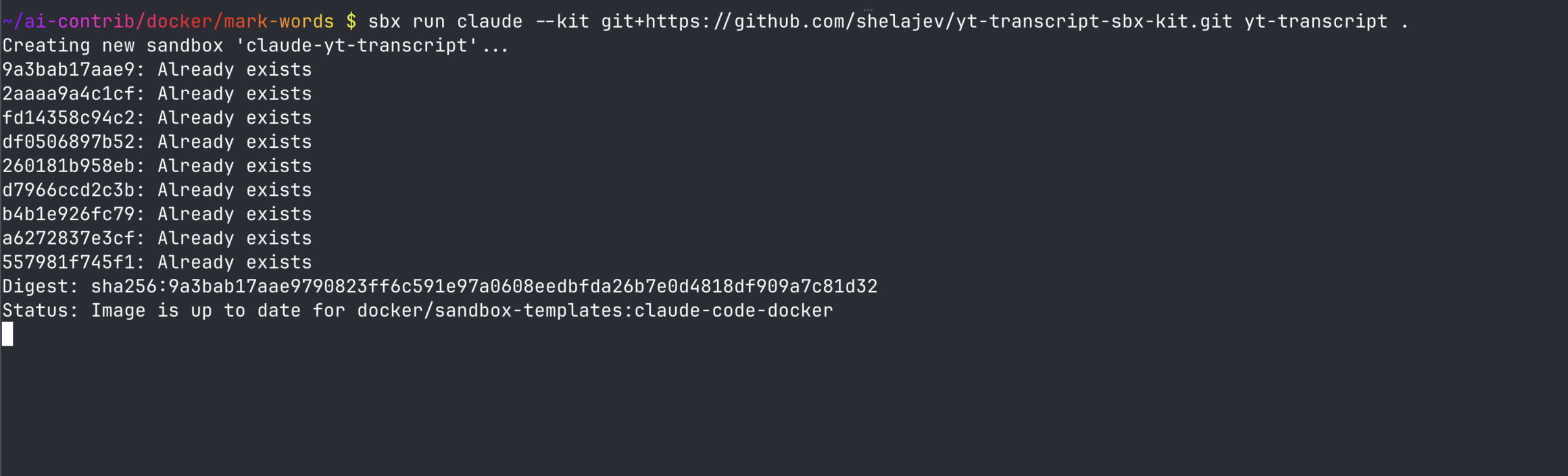
That is the shape I use for most of my own kits. For example, the kits I keep using daily are agy, yt-transcript, and tessl.
The YouTube kit is exactly what you think: give the sandbox the tools to fetch transcripts and media metadata without turning every new sandbox into a small dependency archaeology project. The Tessl kit is even more direct. It brings skills into the agent running inside the sandbox, so I do not need to inject them manually like a medieval peasant.
The nice part of mixins is that they stack.
A giant “Oleg’s entire laptop, but in a microVM” kit would be funny once and then become a maintenance incident. You want small kits with clear jobs:
a Java kit that installs a JDK, Maven, SDKMAN!, team Maven settings, and links to Spring docs;
a gcloud kit that installs the CLI, allows the right Google API domains, and wires credentials through the proxy;
a Google Workspace kit that gives the agent access to your email and Google Docs;
a Tessl kit that brings skills into the sandbox;
a YouTube transcript kit that adds yt-dlp, ffmpeg, and whatever network access those need.
Then a sandbox can be assembled for the task:
sbx run claude .
–kit docker.io/acme/sbx-java-kit:1.0
–kit docker.io/acme/sbx-gcloud-kit:1.0
–kit docker.io/acme/sbx-tessl-kit:1.0
The same agent now starts with a different contract around it.
At that point kits stop being a packaging mechanism and start being a productivity feature. The sandbox stays disposable, but the setup becomes repeatable. The developer can throw away the environment without throwing away the knowledge of how to rebuild it.
Sharing is caring
Local setup scripts are fine until the second person needs them. At that point they become documentation, and documentation becomes stale with excellent punctuality. Then someone pastes a token into a config file because the happy path was missing.
A kit gives that setup a place to live.
Vendors can publish kits for their CLIs or APIs. Inside a company, the same pattern works for package registries, cloud accounts, corporate proxy certificates, and preferred language toolchains. The user gets one –kit flag instead of a wiki page and a feeling of mild dread.
Distribution matters here. Kits support local directories, Git URLs, and OCI artifacts. For shared kits, OCI distribution is the obvious path because users can reference a versioned artifact directly:
sbx run claude –kit docker.io/acme/sbx-my-product-kit:1.0
Keep the source in GitHub or wherever your team collaborates. Publish the artifact to Docker Hub or another OCI registry. The source repo is where people review, patch, and complain politely. The registry is what makes the kit easy to consume.
All in all
Security is a good reason to care about kits. The network and credential contract becomes explicit, which is useful by itself. The daily-use reason is more prosaic: kits make sandboxes survivable as a development tool.
An empty sandbox is a boundary. A configured sandbox is a place where an agent can actually work. Kits are how that configuration becomes repeatable, reviewable, and shareable.
The kits docs and examples are enough to build a first mixin kit without inventing the shape from scratch.
Isolation only survives contact with developers when it is at least as convenient as skipping it.
Quelle: https://blog.docker.com/feed/
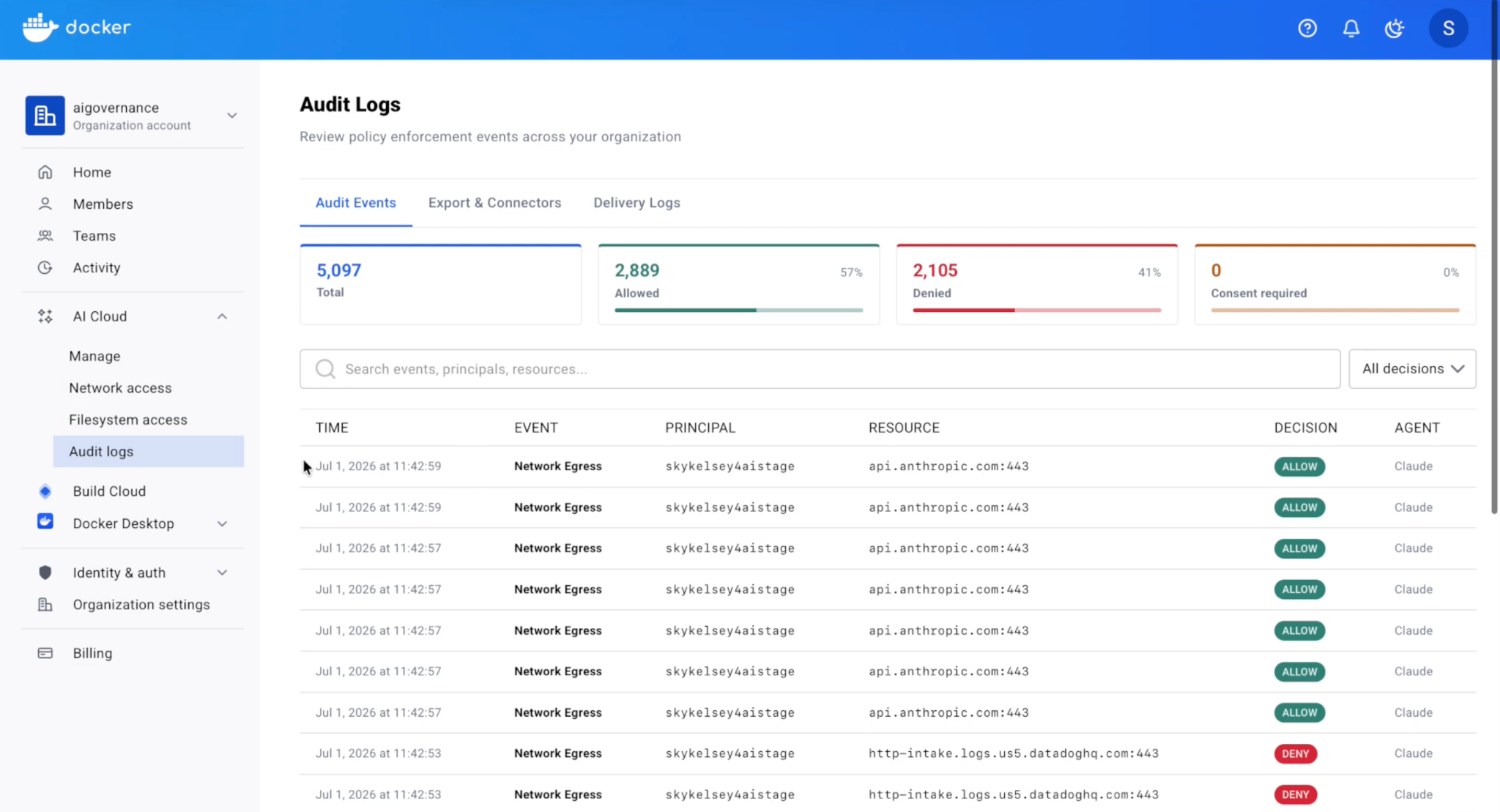
Now in Docker AI Governance: a single searchable record of every policy decision your agents trigger, streamed to the SIEM your security team already runs, so you can show what your agents did and what your policy stopped.
Today, Docker AI Governance now streams every policy decision in your organization into the SIEM your security team already runs, with a searchable record of all of it in Docker Cloud. You can see what your agents did, and what your policy stopped them from doing.
Enforcement is step one
When we launched AI Governance in May, our perspective was that controls have to live at the runtime layer where the agent actually executes, not as advisory rules a clever prompt can route around. Audit was one of the three layers we shipped on that principle, and the enforcement point has produced a structured event for every policy evaluation since day one.
Today, we’re making it easier to view and consume those events.
Why audit records matter
Security leads need to answer questions about agent behavior: what did that agent do, was it allowed, and which policy made the call.
Answering it should not require assembling evidence from machines they don’t administer. It should mean querying a system they already use. Increasingly it also comes first rather than after: security teams want a demonstrable audit record before they approve agent deployment at all.
What only the enforcement point can see
A policy decision has three outcomes. The action was allowed, it was denied, or it was held for a human.
A log collector can reconstruct the first one. Nothing outside the enforcement point can see the other two. A collector reads what an agent produced, so it never sees the tool call that was refused, the domain that was unreachable, or the credential that was requested and withheld. Those events leave no trace in output, because the process that would have produced the output never ran.
That is the difference between a record generated at the point of decision and logs gathered after the fact. A record of allowed actions shows that agents are active. A record of denials shows whether your controls are doing anything.
Audit Logs: Streamable to your SIEM tools
Audit logs are now available in Docker Cloud, and audit events can stream directly to your SIEM. Both are included with Docker AI Governance.
Audit logs in Docker Cloud. One searchable view for the whole organization, with 90 day retention and CSV export. Local disk delivery keeps working, and both modes can run at once.
Native SIEM streaming. Point Docker at your endpoint and forward audit records to the tools you already run, including Splunk and Dynatrace, via a generic HTTPS connection.
Coverage
Records cover Docker Sandboxes policy decisions and sandbox session events, for users with an AI Governance license under an enforced organization policy. Other source records (MCP Gateway enforcement decisions, for example) will share records through the same schema as they become available, so coverage will expand without extra integrations on your end.
Records are metadata only. They never contain your prompt content, agent output, or parameter values.
What’s next
Records are step one.
Once every decision an organization makes about its agents lands in one place, the useful question stops being what happened and starts being what should change. That is the direction we’re building toward: a system that tells you when something is off and what to do about it. More on that soon.
Available today
Audit logs are live for organizations on Docker AI Governance with an enforced organization policy. Read more here.
Quelle: https://blog.docker.com/feed/
Today, AWS Transform for full-stack Windows modernization announced general availability of offline source transformation, enabling customers to modernize Microsoft SQL Server databases to Amazon Aurora PostgreSQL without requiring a live database connection. AWS Transform now converts SQL Server storage objects, powered by AWS DMS, and code objects (stored procedures) using an agentic, interactive experience. Enterprises modernizing legacy .NET applications and their dependent SQL Server databases can now start their modernization by directly uploading the Data Design Language (DDL) source files from their databases.
With offline source transformation, customers upload SQL Server data design language (DDL) files, assess database and stored procedure complexity, and generate a customizable transformation plan. AWS Transform converts tables, schemas and converts code objects such as stored procedures and functions, validates functional equivalence, and deploys the converted schema to Aurora PostgreSQL. The same workflow transforms database dependent .NET applications to be PostgreSQL compatible .NET applications with updated connection strings, ADO.NET and Entity Framework data-access calls. To address remaining conversion issues, customers can iterate directly in the web console or hand off to their preferred IDE using the AWS Transform MCP server. A separate synthetic data workflow populates Aurora PostgreSQL with test data for end-to-end application validation.
AWS Transform for full-stack Windows modernization and offline source transformation is available in US East (N. Virginia). To get started, you can go to AWS Transform product page or see AWS Transform for full-stack Windows documentation.
Quelle: aws.amazon.com
AWS WAF now supports two new partner managed rule groups from Miggo Security, available through AWS Marketplace: Miggo Rules for AWS WAF – High Emerging Application Threats, and Miggo Rules for AWS WAF – AI/ML Application Protection. These rule groups give AWS WAF customers continuously updated protection against vulnerabilities that are being actively exploited, have public proof-of-concept code, or appear in the CISA Known Exploited Vulnerabilities (KEV) catalog, without writing or maintaining custom rules. The High Emerging Application Threats rule group focuses on vulnerabilities under active exploitation, and the AI/ML Application Protection rule group focuses on generative-AI application stacks such as AI agent frameworks, LLM gateways, and model-serving infrastructure. You can subscribe to either rule group and add it to a web ACL directly in the AWS WAF console through AWS Marketplace, with no additional configuration. Both rule groups support versioning, and pricing is set by Miggo through AWS Marketplace. To get started, visit the AWS WAF console or find the Miggo rule groups in AWS Marketplace. For more information, see the AWS WAF Developer Guide. For a full list of supported Regions, visit the AWS Regional Services page.
Quelle: aws.amazon.com
Amazon Elastic Container Registry (Amazon ECR) has increased the maximum image layer size limit to 200 GB, for images pushed via Docker push.
Previously, packaging assets required splitting data across multiple layers or offloading to external storage systems. With this update, customers can store up to 200 GB in a single image layer, eliminating extra complexity for use cases like embedding large language models, bundling genomics datasets, or packaging large binary dependencies directly into your container images. Images pushed using the AWS SDK or CLI; (UploadLayerPartAPI) remain limited to 50 GB.
This feature is available in all AWS Regions and partitions where Amazon ECR is available except the Middle East (Bahrain) and Middle East (UAE) Regions. To learn more, visit the Amazon ECR product page and refer to the Amazon ECR User Guide. For pricing information, see the Amazon ECR pricing page.
Quelle: aws.amazon.com
AWS Config now supports 15 additional AWS resource types across key services including Amazon Bedrock, Amazon OpenSearch Serverless, and Amazon SageMaker. This expansion provides greater coverage over your AWS environment, enabling you to more effectively discover, assess, audit, and remediate an even broader range of resources. With this launch, if you have enabled recording for all resource types, then AWS Config will automatically track these new additions. The newly supported resource types are also available in Config rules and Config aggregators. You can now use AWS Config to monitor the following newly supported resource types in all AWS Regions where the resources are available: Resource Types:
AWS::AppSync::DomainName
AWS::OpenSearchServerless::AccessPolicy
AWS::Bedrock::AutomatedReasoningPolicy
AWS::OpenSearchServerless::LifecyclePolicy
AWS::Bedrock::AutomatedReasoningPolicyVersion
AWS::SageMaker::ImageVersion
AWS::Bedrock::Blueprint
AWS::SageMaker::InferenceComponent
AWS::Bedrock::DataAutomationProject
AWS::SageMaker::PartnerApp
AWS::BedrockAgentCore::ApiKeyCredentialProvider
AWS::SageMaker::Project
AWS::Connect::UserHierarchyGroup
AWS::SageMaker::Space
AWS::Glue::Trigger
Quelle: aws.amazon.com

Vodafone Deutschland hat Angaben zu seinem Kabelnetz-Ausbau in den vergangenen zwölf Monaten gemacht. Anlass für Golem, einmal durchzurechnen, wie man es richtig gut machen könnte. Ein Bericht von Achim Sawall (Vodafone, Kabelnetz)
Quelle: Golem

Es hat keine zwei Jahre gedauert, um das nächste Terawatt Solarleistung zuzubauen. Besonders interessant ist, wo sich die Entwicklung beschleunigt. (Solarenergie, Energiewende)
Quelle: Golem