Increase gaming performance with NGads V620-series virtual machines

Gaming customers across the world tend to look for the same critical components when choosing their playing environment: Performance, Affordability, and Timely Content. And for gaming in the cloud, there’s a fourth: Reliability.

With these clear guidelines in mind, we are excited to announce the public preview of our new NGads V620-series virtual machines (VMs). This VM series has GPU, CPU, and memory resources balanced to generate and stream high-quality graphics for a performant, interactive gaming experience hosted on Microsoft Azure. The new NGads instances give online gaming providers the power and stability that they need, at an affordable price.   

The NGads V620-series are GPU-enabled virtual machines powered by AMD Radeon PRO V620 GPU and AMD EPYC 7763 CPUs. The AMD Radeon PRO V620 GPUs have a maximum frame buffer of 32GB which can be divided up to 4 ways through hardware partitioning, or by providing multiple users with access to shared, session-based operating systems such as Windows Server 2022 or Windows 11 EMS. 1 The AMD EPYC CPUs have a base clock speed of 2.45 GHz and a boost speed of 3.5 GHz. VMs are assigned full cores instead of threads, enabling full access to AMD’s powerful Zen 3 cores.

NGads instances come in four sizes, allowing customers to right-size their gaming environments for the performance and cost that best fits their business needs.

The two smallest instances rely on industry-standard SR-IOV technology to partition the GPUs into one-fourth and one-half instances, enabling customers to run workloads with no interference or security concerns between users sharing the same physical graphics card.

The VMs also feature the AMD Software Cloud Edition, which targets the same optimizations available in the consumer gaming version of the Adrenaline driver but is further tested and optimized for the cloud environment.

Instance ConfigsvCPU (Physical Cores)GPU Memory (GiB)GPU Partition Size  Memory (GiB)Azure Network (Gbps)Standard_NG8ads_V620_v188¼ GPU1610Standard_NG16ads_V620_v11616½ GPU3220Standard_NG32ads_V620_v132321x GPU6440Standard_NG32adms_V620_v132321x GPU17640

The NGads V620-series VMs will support a new AMD Cloud Software driver that comes in two editions: A Gaming driver with regular updates to support the latest titles, as well as a Professional driver for accelerated Virtual Desktop environments, with Radeon PRO optimizations to support high-end workstation applications.

Microsoft Azure, do more with less

Deployment in Azure enables gaming and desktop providers to take advantage of the infrastructure investments put in place by Microsoft in data centers across the world. This gives our customers the ability to only pay for what they use. They can depend on an infrastructure framework that is constantly kept up to date with highly reliable uptime. Customers can innovate faster to differentiate their offerings and provide customers with a richer experience. As our customers’ business needs expand, they can benefit from the economies of scale available from Azure. In addition, customers can build a more complete and robust solution through integration with the broad range of cloud services for storage, networking, and application management available as part of the Azure offerings.

Flexible workloads, flexible costs

High-performance GPU-accelerated workloads have always ranged from workstation design apps to VDI and simulation rendering. Each of these has the potential to tax even powerful graphics boards. Gaming workloads bring the additional challenges of requiring very fast graphics remoting—the interactive transfer of graphics and user controls over the internet. Further, there is a wide variety of games, connection types, and resolutions available to the user.

The NGads V620-series helps resolve these challenges by providing support for a range of visualization applications so that gaming or desktop service providers can optimize for precisely the experiences expected by the end users. Service provider customers can choose the right-sized VM that will best serve their needs without over-allocating resources. As the needs of their offering change, the common software support across VMs allows service providers to shift to a VM size with either a higher or lower GPU partition, or to shift capacity to other regions of the world as their business footprint expands.

Performance powered by AMD GPU and CPU

The NGads V620-series combines AMD Radeon™ GPU and Epyc™ CPU technology to provide a powerful and well-balanced environment for hosting rich and highly-interactive cloud services. 

The AMD Radeon PRO V620 GPU is based on AMD’s RDNA™ 2 Architecture, AMD Software, and AMD Graphics Virtualization technology. 

Each AMD Radeon PRO V620 GPU is equipped with 32MB of GDDR6 dedicated memory, a 256-bit memory interface with up to 512GB/s bandwidth, and ECC support for data correction.  To enhance the user experience, they are designed with hardware raytracing using 72 Ray Accelerators, 4608 Stream Processors, and a peak Engine Clock of 2200 MHz.

The AMD software supports the DirectX® 12.0, OpenGL®4.6, OpenCL™ 2.2, and Vulkan® 1.1 APIs for broad compatibility with gaming and graphics applications.  This enables the NG series VMs to support a very broad range of workloads from cloud gaming, GPU-enhanced VDI, and GPU-intensive Workstation-as-a-Service solutions.

The NGads V620-series uses GPU Partitioning to virtualize the GPU and provide partitions from the full 32 GB memory size (1x GPU), 16GB (one-half GPU), or 8GB (one-fourth GPU).  The Azure GPU Partitioning is based on the PCIe standard SR-IOV extension, which provides a highly predictable and secure method to host multiple independent user environments on the same hardware GPU board.

The AMD EPYC 7763 CPU is built on the 7nm process technology, featuring AMD Zen 3 cores, Infinity Architecture, and the AMD Infinity Guard suite of security features. The AMD EPYC CPUs have a base clock speed of 2.45GHz and a boost clock speed of 3.5 GHz to allow the user to take advantage of a single powerful core when required by the application.

Learn more about NGads V620-series

Customers can sign up for the NGads V620-series preview today. NGads V620-series VMs are initially available in the East US2, Europe West, and West US3 Azure regions.

Footnotes

EPYC-018: Max boost for AMD EPYC processors is the maximum frequency achievable by any single core on the processor under normal operating conditions for server systems
The post Increase gaming performance with NGads V620-series virtual machines appeared first on Azure Blog.
Quelle: Azure
Azure Virtual WAN now supports full mesh secure hub connectivity

In May 2023, we announced the general availability of Routing intent and routing policies for all Virtual WAN customers. This feature is powered by the Virtual WAN routing infrastructure and enables Azure Firewall customers to set up policies for private and internet traffic. We are also extending the same routing capabilities to all Firewall solutions deployed within Azure Virtual WAN including Network Virtual Appliances and software-as-a-service (SaaS) solutions that provide Firewall capabilities.

Routing Intent also completes two secured hub use cases wherein users can secure traffic between Virtual WAN hubs as well as inspect traffic between different on-premises (branch/ExpressRoute/SD-WAN) that transits through Virtual WAN hubs.

Azure Virtual WAN (vWAN), networking-as-a-service, brings networking, security, and routing functionalities together to simplify networking in Azure. With ease of use and simplicity built in, vWAN is a one-stop shop to connect, protect, route traffic, and monitor your wide area network.

In this blog, we will first describe routing intent use cases, product experiences, and summarize with some additional considerations and resources for using routing intent with Virtual WAN.

Use cases for Virtual WAN

You can use Routing Intent to engineer traffic within Virtual WAN in multiple ways. Here are the main use cases:

Apply routing policies for Virtual Networks and on-premises

Customers implementing hub-and-spoke network architectures with large numbers of routes often find their networks hard to understand, maintain, and troubleshoot. In Virtual WAN, these routes can be simplified for traffic between Azure Virtual Networks and on-premises (ExpressRoute, VPN, and SD-WAN).

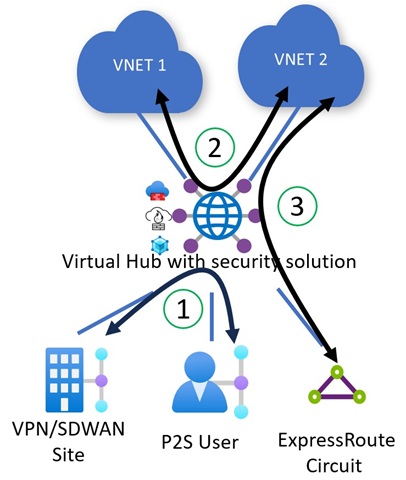
Virtual WAN makes this easier for customers by allowing customers to configure simple and declarative private routing policies. It is assumed that private routing policies will be applied for all Azure Virtual Networks and on-premises networks connected to Virtual WAN. Further customizations for Virtual Network and on-premises prefixes are currently not supported. Private routing policies instruct Virtual WAN to program the underlying Virtual WAN routing infrastructure to enable transit between two different on-premises (1) via a security solution deployed in the Virtual Hub. It also enables traffic transiting between two Azure Virtual Networks (2) or between an Azure Virtual Network and an on-premises endpoint (3) via a security solution deployed in the Virtual Hub. The same traffic use cases are supported for Azure Firewall, Network Virtual Appliances, and software-as-a-service solutions deployed in the hub.

Figure 1: Diagram of a Virtual Hub showing sample private traffic flows (between on-premises and Azure).

Apply routing policies for internet traffic

Virtual WAN lets you set up routing policies for internet traffic in order to advertise a default (0.0.0.0/0) route to your Azure Virtual Networks and on-premises. Internet traffic routing configurations allow you to configure Azure Virtual Networks and on-premises networks to send internet outbound traffic (1) to security appliances in the hub. You can also leverage Destination-Network Address Translation (DNAT) features of your security appliance if you want to provide external users access to applications in an Azure Virtual Network or on-premises (2).

Figure 2: Diagram of a Virtual Hub showing internet outbound and inbound DNAT traffic flows.

Apply routing policies for inter-hub cross-region traffic

Virtual WAN automatically deploys all Virtual Hubs across your Virtual WAN in a full mesh, providing zero-touch any-to-any connectivity region-to-region and hub-to-hub using the Microsoft global backbone. Routing policies program Virtual WAN to inspect inter-hub and inter-region traffic between two Azure Virtual Networks (1), between two on-premises (2), and between Azure Virtual Networks and on-premises (3) connected to different hubs. Every packet entering or leaving the hub is routed to the security solution deployed in the Virtual Hub before being routed to its final destination.

Figure 3: Diagram of inter-region and inter-hub traffic flows inspected by security solutions in the hub.

User experience for routing intent

To use routing intent, navigate to your Virtual WAN hub. Under Routing, select Routing Intent and routing policies.

Configure an Internet or Private Routing Policy to send traffic to a security solution deployed in the hub by selecting the next hop type (Azure Firewall, Network Virtual Appliance, or SaaS solution) and corresponding next hop resource.

Figure 4: Example configuration of routing intent with both Private and Internet routing policy in Virtual WAN Portal.

Azure Firewall customers can also configure routing intent using Azure Firewall Manager by enabling the ‘inter-hub’ setting.

Figure 5: Enabling Routing Intent through Azure Firewall Manager.

After configuring routing intent, you can view the effective routes of the security solution by navigating to your Virtual Hub, then select Routing, and click Effective Routes. The effective routes of the security solution provide additional visibility to troubleshoot how Virtual WAN routes traffic that has been inspected by the Virtual hub’s security solution.

Figure 6: View of getting the effective routes on a security solution deployed in the hub.

Before you get started with this feature, here are some key considerations:

The feature caters to users that consider Virtual Network and on-premises traffic as private traffic. Virtual WAN applies private routing policies to all Virtual Networks and on-premises traffic.

Routing intent is mutually exclusive with custom routing and static routes in the ‘defaultRouteTable’ pointing to Network Virtual Appliance (NVA) deployed in a Virtual Network spoke connected to Virtual WAN. As a result, use cases where users are using custom route tables or NVA-in-spoke use cases are not applicable.

Routing Intent advertises prefixes corresponding to all connections to Virtual WAN towards on-premises networks. Users may use Route Maps to summarize and aggregate routes and filter based on defined match conditions.

Learn more about Azure Virtual WAN

We look forward to continuing to build out Azure Virtual WAN and adding more capabilities in the future. We encourage you to try out the Routing Intent feature in Azure Virtual WAN and look forward to hearing more about your experiences to incorporate your feedback into the product.

How to configure Virtual WAN Hub routing policies

What’s new in Azure Virtual WAN?

Tutorial: Secure your virtual hub using Azure Firewall Manager

Fortinet Next-Generation Firewall

Check Point Cloud Guard for Virtual WAN

Install Palo Alto Networks Cloud NGFW in a Virtual WAN hub

The post Azure Virtual WAN now supports full mesh secure hub connectivity appeared first on Azure Blog.
Quelle: Azure

Explore the latest features for Datadog—An Azure Native ISV Service

Datadog – An Azure Native ISV Service, that brings the power of Datadog’s observability capabilities to Azure, is generally available since 2021. The natively integrated service allows you to monitor and diagnose issues with your Azure resources by automatically sending logs and metrics to your Datadog organization.

The service is easy to provision and manage, like any other Azure resource, using the Azure Portal, Azure Command-Line Interface (CLI), software development kits (SDKs), and more. You do not need any custom code or connectors to start viewing your logs and metrics on the Datadog portal.

The service has continued to grow and has been adopted well by our joint customers. This service is developed and managed by Microsoft and Datadog and based on your feedback, we continue to invest in deeper integrations to make the experience smoother for you. Here are some of the top features shipped recently that we would like to highlight:

Monitor multiple subscriptions with a single Datadog Resource

We are excited to announce a scalable multi-subscription monitoring capability that allows you to configure monitoring for all your subscriptions through a single Datadog resource. This simplifies the process of monitoring numerous subscriptions as you do not need to setup a separate Datadog resource in every single subscription that you wish to monitor.

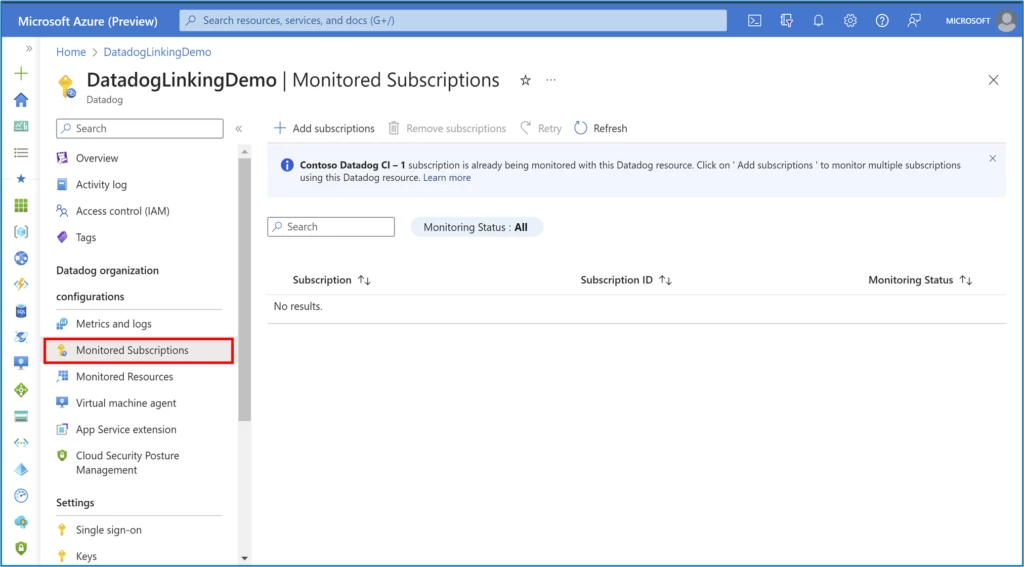
To start monitoring multiple subscriptions through a single “Datadog—An Azure Native ISV Service” resource, click on the Monitored Subscriptions blade under the Datadog organizations configurations section.

The subscription in which the Datadog resource is created is monitored by default. To include additional subscriptions, click on the “Add subscriptions” button and on the window that opens, select the subscriptions that you want to monitor using the same resource.

We recommend deleting redundant Datadog resources linked to the same organization and consolidating multiple subscriptions into a single Datadog resource wherever possible. This would help avoid duplicate data flow and issues like throttling. For example, in the image shown below, there is a resource named DatadogLinkingTest linked to the same organization in one of the subscriptions. You should ideally delete the resource before proceeding to add the subscription.

Click on Add to include the chosen subscriptions to the list of subscriptions being monitored through the Datadog resource.

The set of tag rules for metrics and logs defined for the Datadog resource apply to all subscriptions that are added for monitoring. If you wish to reconfigure the tag rules at any point, check Reconfigure rules for metrics and logs.

And now you are done. Go to the “Monitored Resources” blade in your Datadog resource and filter the subscription of your choice to check the status of logs and metrics being sent to Datadog for the resources in that subscription.

Likewise, agent management experience for App Services and virtual machines (VMs) also spans multiple subscriptions now. 

Check out Monitor virtual machines using the Datadog agent and Monitor App Services using the Datadog agent as an extension.

If at any point you wish to stop monitoring resources in a subscription via the Datadog resource, you can remove the subscription from the Monitored subscriptions list. In the Monitored Subscriptions blade, choose the subscription you no longer wish to monitor and click on “Remove subscriptions”. The default subscription (the one in which the Datadog resource is created) can’t be removed.

Log forwarder

The automatic log forwarding capability available out of the box with Datadog’s native integration on Azure eliminates time-consuming steps that require you to setup additional infrastructure and write custom code.

We are constantly working to support all resource categories on Azure Monitor to ship logs to Datadog. For customers who have setup monitoring tag rules in an Azure subscription, new resource types or categories get automatically enrolled for sending logs, without the need for customers to manually do any changes to enable new resource types. As of today, the native integration on Azure supports logs from 126 resource types to flow to Datadog.

Cloud Security Posture Management

In the Datadog Azure Native integration, enabling Cloud Security Posture Management (CSPM) for your Azure Resources is a straightforward operation in your Datadog resource. Navigate to the Cloud Security Posture Management blade, click on the checkbox to enable CSPM and click Save. The setting can be disabled at any point.

You can learn more about Datadog’s CSPM product here. 

Mute monitor for expected virtual machine shutdowns

Imagine alerts being sent for expected VM shutdowns and waking you up in the middle of the night. Yikes! Now, with just the click of a checkbox, you can avoid scenarios where Datadog’s disaster prevention alert notifications get triggered during scheduled shutdowns. To mute the monitor for expected Azure Virtual Machine shutdowns, select the checkbox shown below in the Metrics and Logs blade.

Hope you are excited to try out all the cool features highlighted in this blog!

Next steps

If you would like to subscribe to the service, check out Datadog – An Azure Native ISV Service from Azure marketplace.

If you already use the Datadog—an Azure Native ISV Service, and have feedback or feature requests, please share below in the comments.

To learn more about the service, check out our documentation—Get started with Datadog – an Azure Native ISV Service.

Share additional information about how you use resource and subscription logs to monitor and manage your cloud infrastructure and applications by responding to this survey.

The post Explore the latest features for Datadog—An Azure Native ISV Service appeared first on Azure Blog.
Quelle: Azure

Introducing Jetpack AI Assistant in WordPress.com

Imagine being able to quickly generate all types of content—headlines, entire posts, even translations—with the click of a button. Imagine significantly reducing your effort and time spent staring at a blank screen. 

Say hello to Jetpack AI Assistant. 

Jetpack AI Assistant is seamlessly integrated as a block within the WordPress.com editor. (If your WordPress site is hosted elsewhere, the AI Assistant is also available through the Jetpack plugin.) This powerful new tool is still in the experimental phase, but here’s just a sampling of what it can already help you do. 

5 ways you can make writing a breeze with Jetpack AI Assistant 

Create customized content

Jetpack AI Assistant utilizes a conversational system so that you can “chat” with it in natural language. Enter a prompt, such as “Write a list of Tokyo’s must-visit destinations,” and watch as the Assistant crafts an engaging piece of content. Compelling blog posts, detailed pages, structured lists, and comprehensive tables can be created in seconds.

Perfect your spelling and grammar on the fly

Ensure your content always reflects professional standards with Jetpack AI Assistant’s spelling and grammar correction features.

Adjust your tone to match your audience 

Whether you’re aiming for formal or conversational, Jetpack AI Assistant can adjust the tone of your content to your goals and audience makeup. 

Find that perfect creative title

Struggling to find a good title that will really capture your audience’s attention? It can be the hardest part of writing a post! Jetpack AI Assistant has you covered by reading the text and then creating suitable and compelling headlines.

Translate your writing with a single click

The Jetpack AI Assistant can translate your text into numerous languages, allowing you to effortlessly reach across locales and cultures. 

And that’s just the start of what Jetpack AI Assistant can do.

Can this really be free? 

Yes, it can! For a limited time, Jetpack AI Assistant is free to use for all WordPress.com customers. 

Activate the block with the Inserter or the “/” command shortcut. (If you didn’t know, here’s a fun tip: Hit the “/” button while in the post or page editor and type the name of the block you’re looking for. In this case, it would be “AI.”) 

Your rocketship to seamless content creation  

This is just the beginning! We’re working to expand Jetpack AI Assistant’s capabilities, so stay tuned for even more exciting features in the coming weeks.

Try the AI Assistant today and discover an even more streamlined creative process in WordPress.com. 
Quelle: RedHat Stack






