WordPress.com’s Year in Review
Our team here at WordPress.com, comprised of hundreds of people spread across the entire globe, accomplished a lot in 2023. On the blog, we published over 90 posts, from product upgrades, to brand new features, and even new additions to the Automattic family of products.
If you missed anything, here’s a recap of this year’s most important launches, announcements, and new features.
Table of Contents
2023 Video Recap An all-new mobile experienceLaunch your newsletter, from any planIgnite your growth with BlazeActivityPub for WordPress joins the Automattic familyHappy 20th anniversary, WordPress! Revamp your site seamlessly with staging sites A tour of the all-new Stats page Custom theme designs just got easier Managing and purchasing domains on WordPress.com has never been betterOne inbox to rule them all The all-new WordPress.com learning hub Jetpack’s AI Assistant is here to helpContinuous site editing, writing, and design improvementsAll. The. Themes.
2023 Video Recap
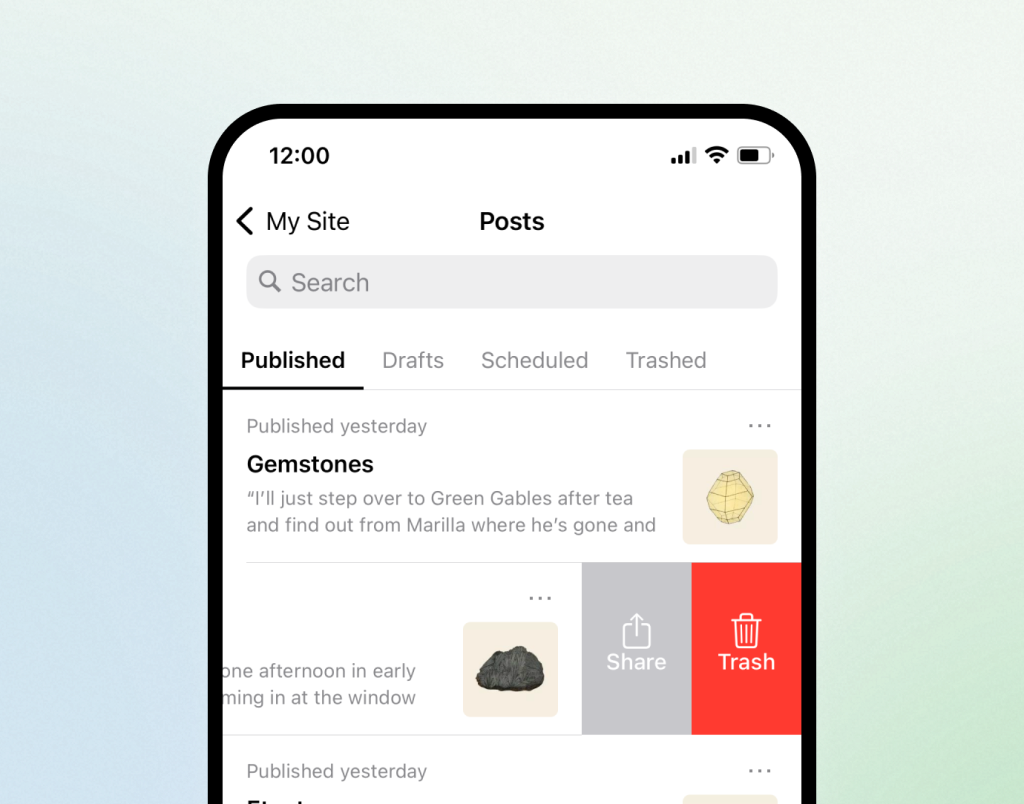
An all-new mobile experience
This year the Jetpack mobile app has made huge strides as the preferred mobile experience for WordPress.com customers. The team is continuously improving the app, making publishing, reading, and monitoring engagement easier than ever. If you haven’t tried it yet, now is the time!
Launch your newsletter, from any plan
Newsletters on WordPress.com have seen a huge number of improvements in 2023—from features like paid subscriptions on any plan and the introduction of a Paywall Block, to fresh resources like our Newsletters 101 course. No matter how you want to reach your audience, WordPress.com has you covered. Get started here.
Ignite your growth with Blaze
Early in the year, we launched Blaze—our self-serve advertising tool. This cool new feature allows anyone with a WordPress blog to advertise on WordPress.com and Tumblr in just a few clicks. How? By turning your site content into clean, compelling ads that run across our millions-strong network of blogs. Here are 5 tips for making the most of your ads.
ActivityPub for WordPress joins the Automattic family
This innovative plugin brings a whole new level of social networking to your website by integrating it with the wider federated social web. When installed, the plugin allows you to easily share your content and interact with users on Mastodon and other platforms that also support the ActivityPub protocol. Just as Automattic aims to do with all of our products, this plugin helps to decentralize the web, break down silos, and foster a more connected online ecosystem. Click here to learn more about getting started with ActivityPub for WordPress.
Happy 20th anniversary, WordPress!
On May 27, 2003, co-founders Matt Mullenweg and Mike Little announced that WordPress was available to the public. Their vision, as you can still read in their original post on WordPress.org, was to foster a means by which anyone could easily share and discuss their ideas with the world. What started as a humble open-source blogging platform is now the driving force behind over one-third of the internet’s most popular websites, including The New York Times, Salesforce, and Disney.
Revamp your site seamlessly with staging sites
In May, we announced the availability of staging sites, which made it easy to experiment with changes to your site. A few months later, we added to its capabilities with a synchronization feature that allows you to push changes from your staging site to your live, or “production,” site. You can now fearlessly try out new ideas and designs before publishing them to the world.
For all the developers and professional site creators out there, we’ve also launched SSH and WP-CLI access, site preview links, and global edge caching. Be sure to stay up to date with these technical tools at our WordPress.com Develop Blog.
A tour of the all-new Stats page
In addition to launching a new and improved mobile app, our intrepid Jetpack team also made significant changes to the Stats page. This all-new experience enhances your ability to analyze and optimize your site’s content. We’ve restructured the layout in a friendlier way, introduced new modules that reveal crucial data points, and revamped the overall look of this powerful analytics tool. Check it out for yourself.
Custom theme designs just got easier
Whether you want a simple blog that highlights recent posts, a visually stunning portfolio, or an online home for your small business, your website should be just as unique as you are. Our new site design tool guides you through the process of creating a memorable custom homepage, utilizing a library of hundreds of patterns, colors, and fonts that you can mix and match for whichever distinctive vibe you’re going for. Try it out for yourself right here.
Managing and purchasing domains on WordPress.com has never been better
Your domain is the lifeblood of your online presence. This year, we’ve been hard at work building a number of exciting features to ensure a world-class domain name experience on WordPress.com whether you have one domain or one hundred. We’ve introduced an all-new domains-focused dashboard, multi-year registrations, domain forwarding, convenient transfer, simple DNS imports, and more. Oh, by the way, if you’re coming from Google Domains, we’ll cover your transfer fees. Grab your piece of online real estate today.
One inbox to rule them all
In October, Automattic welcomed Texts.com to our growing family. This handy app brings all your chats into a single dashboard: iMessage, Slack, WhatsApp, Instagram, Telegram, Messenger, LinkedIn, Signal, Discord, and X, with more services on the way. Beyond the unmatched convenience, Texts.com also offers end-to-end encryption, as well as some delightful features that other messaging apps can’t seem to figure out, like scheduling messages to send when your recipient is awake, or the ability to mark as unread on services that still don’t have it. Sign up today. (Psst, be sure to check back for news on the iOS app!)
The all-new WordPress.com learning hub
Our incredible design and education teams moved all of our learning resources—courses, webinars, tutorials, forums, and more—into one convenient and beautifully-designed place at WordPress.com/learn. Our mission with the learning hub is to have one spot for all your WordPress.com questions and learning opportunities. Spend some time with this resource center and come away more confident than ever.
Jetpack’s AI Assistant is here to help
Jetpack AI Assistant is seamlessly integrated as a block within the WordPress.com editor. Whether you’re checking your spelling and grammar, need ideas for better titles or headings, or simply in need of an outline for your great idea, this incredible feature can help jumpstart your creativity. Give it a shot in the editor today by using the AI Assistant Block.
Continuous site editing, writing, and design improvements
WordPress is constantly improving and making it easier than ever to write, publish, and design your site. This year, we’ve seen the addition of the Details Block, footnotes, distraction-free mode, a style book (which lets you preview design variations), customizable button styles, sticky headers, Openverse integration, the Time to Read Block, and so much more.
All. The. Themes.
Our amazing themes design team released more themes in 2023 than any previous year in our history. Whether you’re a business owner, a community leader, a hobbyist, a blogger, or anything in between, you’re guaranteed to find a theme that matches the vision you have for your website. Check out the entire theme showcase to get a peek at the incredible variety of our design offerings. And there’s plenty more to come in 2024 and beyond; if you’re looking for something specific and can’t find it, let us know in the comments.
Quelle: RedHat Stack








