Dev-optimized, cloud-based workstations—Microsoft Dev Box is now generally available

Last month at Microsoft Build, we shared several new features in Microsoft Dev Box—ready-to-code, cloud-based workstations optimized for developer use cases and productivity. From new integrations with Visual Studio, a preview of configuration-as-code customization, and our own rollout of Dev Box internally, there was a lot to share, and the response to this news was great. Today, I’m excited to share another announcement—Microsoft Dev Box is now generally available.

Our journey to dev-optimized virtual desktops

We first announced Microsoft Dev Box at Microsoft Build 2022, but our journey didn’t start there. For more than seven years, we’ve focused on improving developer productivity and satisfaction with the power of the cloud. In 2016, we introduced Azure DevTest Labs, a service that enables development teams to create templatized virtual machines (VMs) for a variety of development and testing use cases.

Over the years, we’ve helped many customers build custom solutions on DevTest Labs to expand on its core features. One use case that has been especially popular is using DevTest labs to create persistent, preconfigured dev environments. But building these custom solutions on top of DevTest Labs is challenging, requiring significant effort to build out additional governance and management features. Customers wanted a turnkey solution.

Delivering fast, self-service dev environments in the cloud

In response, we introduced Visual Studio Codespaces in 2019—preconfigured, container- and Linux-based dev environments that developers could spin up in seconds directly from Visual Studio Code, providing developers with a fast and easy way to work on their apps while on the go.

Developers love Codespaces for its speed and mobility, and the service still exists today as GitHub Codespaces. But software development requires all sorts of tools. Initially, we built Codespaces to support Visual Studio Code and GitHub, but customers quickly started asking for support for other Integrated Development Environments (IDEs), source code management, and tools.

As a first step, we started to expand Codespaces to include support for Visual Studio. However, doing so revealed more challenges than we expected—primarily around enterprise-ready management and governance. That, combined with the fact that devs wanted access to all their tools in their cloud environment, made us realize we needed to deliver:

Enterprise-ready security, compliance, and cost management capabilities.

High-fidelity, cloud-based performance with built-in dev tool integrations.

Self-service access to preconfigured, project-specific resources.

Essentially, the solution needed to be a developer-optimized virtualization solution. Microsoft already offers Windows 365—delivering Cloud PCs, securely streaming your personalized Windows desktop, apps, settings, and content from the Microsoft Cloud to any device anywhere. Critically, Windows 365 is fully integrated with Microsoft Intune, which enables IT admins to manage their Cloud PCs alongside their physical devices. That was exactly what we were looking for, so we decided to use Windows 365 as the foundation for our new solution.

Transforming the dev workstation experience

With enterprise management taken care of, our next consideration was the underlying hardware. While high-powered compute was an obvious need, we soon realized that storage can also significantly impact developer performance. Large builds put a lot of strain on storage drives, which become a bottleneck if read or write speeds can’t keep up with the build. To account for this, we decided to include premium Solid-State Drivers (SSDs) in our product. But we still hadn’t addressed the primary challenges of dev workstations—long deployment times and configuration errors caused by complex projects and toolsets.

Solving these problems would require a more fundamental shift in how our service managed configurations and deployment. Devs work on all sorts of projects, many of which require specific tools. For these devs, a blanket, role-based configuration would require them to spend time tailoring their workstation and installing additional tools once it was provisioned. IT admins and dev leads alike needed a way to create multiple, tailored configurations and enable developers to spin up a new workstation on-demand that would be ready-to-code for their current project.

Our first step was to integrate our solution with the Azure Compute Gallery, providing a scalable way to share base images and manage image versions. We then set up a new management layer that enabled teams to organize their images and networking configurations by project. Now, dev leads and IT admins could set up multiple workstation configurations for a single project. Admins could even define the Azure region in which each workstation would deploy, ensuring a high-fidelity experience for devs around the world.

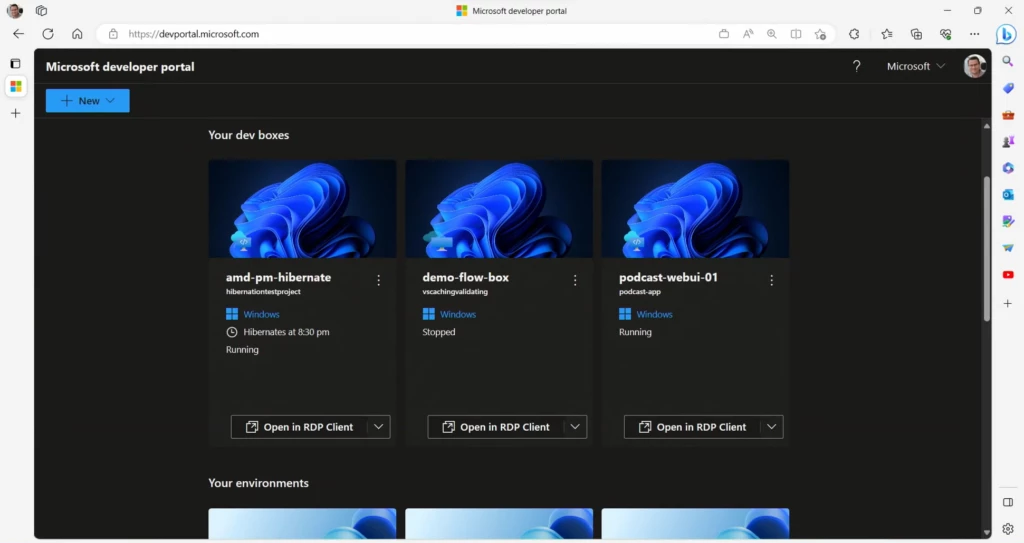
By preconfiguring workstations like this, we eliminated the need for devs to reach out to IT every time they needed a new workstation. And because we could make multiple workstation configurations available for a single project, devs weren’t locked into a single configuration—they could select a tailored workstation, spin it up, and start coding quickly. We even gave devs a specialized Developer Portal that offers fast, easy access to their project-based workstations. Devs can also use this portal to quickly deploy environments for any stage of development using Azure Deployment Environments, also generally available.

Arriving at Microsoft Dev Box

That’s how we ended up at Microsoft Dev Box—cloud-based workstations optimized for developer use cases and productivity. Dev Box combines developer-optimized capabilities with the enterprise-ready management of Windows 365 and Microsoft Intune. And as we work to improve Dev Box, we’ve continued to partner with other teams at Microsoft. Most recently, we worked closely with the Visual Studio team to add built-in integrations that optimize the Visual Studio experience on Dev Box. We’re also actively introducing configuration-as-code customization into Dev Box, which will provide dev leads even more granular control to configure dev boxes around specific tasks and enable them to connect Dev Box provisioning to their existing Git flow.

But before we launched Dev Box, we wanted to make sure it was truly enterprise-ready. At Microsoft, it’s common to test our services internally before releasing them. In this case, that meant stress-testing Dev Box against products with repos that are hundreds of gigabytes large. This has been a challenging but useful experience, and our learnings have helped us speed up the path to general availability. Already, there are more than 10,000 engineers using Dev Box at Microsoft, and we have several customers using Dev Box in production environments today.

Enabling the best of Dev Box with flexible pricing

From our initial work with customers, we learned a lot about their usage patterns and the use cases it can support. Dev Box works great as a full-time desktop replacement, or for specialized part-time use. You can spin up a high-powered Dev Box for a particularly compute-heavy task, or a second machine to isolate an experiment or proof of concept.

Initially, we planned on charging for Dev Box based on a pure consumption model—customers would only pay for Dev Box when it was running, and no more. Unfortunately, while this worked great for part-time Dev Box use, such a model left a lot of variability for administrators that wanted to pay a standardized monthly cost for full-time usage.

To accommodate different use cases, we’ve introduced a predictable monthly price for full-time Dev Box usage while keeping consumption-based, pay-as-you-go pricing that charges up to a monthly price cap. This model strikes a balance between the extremes of full consumption or subscription-only pricing, ensuring devs can optimize their spend for both full-time and part-time use cases.

Getting started with Microsoft Dev Box

Dev Box has already transformed the developer workstations at Microsoft from rigid, long-running desktops to project-specific, ready-to-code workstations in the cloud. We’re excited to see more developers leave behind the challenges of physical workstations to focus on writing the code only they can write. To see what Dev Box can do for your team, visit our website or start a proof of concept today.

If you’ve already started using Dev Box, we’d love to hear you think. Please submit any feedback you have so we can keep making Dev Box the best option for developer productivity.
The post Dev-optimized, cloud-based workstations—Microsoft Dev Box is now generally available appeared first on Azure Blog.
Quelle: Azure


Turn your vision into impact with Microsoft Azure

Organizations in every industry and every geography have an opportunity to harness the power of today’s technological advancements to solve their biggest challenges and create a positive impact in society as the landscape around us continues to evolve rapidly. At Microsoft, we understand that organizations with a strong digital foundation are best positioned to adapt, grow, and stay ahead of market forces. Working with our partner ecosystem, we are committed to helping our customers build the digital capabilities they need to stay agile in the face of change. 

By connecting customers with our 400,000-plus partner ecosystem, we want to enable organizations in every industry to leverage the Microsoft Cloud as the best foundational investment for bringing their biggest opportunities to life. The breadth and depth of cloud capabilities are underpinned by Microsoft Azure, which enables innovation wherever it’s needed and is the trusted platform to lead organizations into the era of AI. 

Our partners helping customers innovate with Azure

We continue to work with our partners to bring this value to life for our customers through six prioritized focus areas, outlined below, that maximize value for companies around the world. Our partners are actively helping companies achieve incredible innovations that are helping them stand out from the competition. 

We saw this recently with Autotechnics, a spare parts distributor in Ukraine, which needed a more resilient infrastructure to keep its data accessible to customers, even during times of crisis. They partnered with SoftwareOne to develop and implement a cloud-based migration in just a few days, using Azure to secure their data. The immediate result was that they were able to offer uninterrupted support to their customers that were reliant on their systems.  

At the same time, our partners are already leveraging Azure to create their own transformative AI solutions so that their customers can accelerate the value of this emerging technology. We are making it easier for our partners to innovate with agility using the same Azure AI platform and services that power the copilot solutions that Microsoft has brought to market over the past few months. ISVs like SymphonyAI, are building for the future on Azure with their own copilots. The new Sensa Copilot has the potential to transform the financial services and banking industry by integrating AI algorithms and machine learning models to find areas of previously undetected risk and to help financial crime investigators do their jobs more efficiently and effectively. 

The role of partners is more important than ever to help customers capitalize on this continuing wave of technological innovation, and we are invested in their success. 

New Azure capabilities and investments

Today, at Microsoft Inspire, we are sharing new advancements across Azure technologies, including: 

Unprecedented investments in partner incentives in Azure Migrate and Modernize and the brand-new offering for AI, analytics, and app innovation: Azure Innovate.

Enhanced capabilities across our products and tooling including Azure Migrate.

The preview of Extended Security Updates enabled by Azure Arc.

Expanding our partnership with Meta to bring Llama 2 to Azure AI and new innovations across the Azure AI portfolio.

GitHub Advanced Security for Azure DevOps public preview to increase developer productivity.

Below, we dive into our announcements in more detail, starting with our hero offerings and extending across our priority focus areas.

Hero offerings to accelerate cloud adoption 

Today we are excited to announce an unprecedented three times investment to increase the scale and availability of Azure Migrate and Modernize, along with the launch of Azure Innovate, an all-new dedicated $100M plus investment we are making in response to the heightened demands for analytics and AI.   

In response to partner feedback, we are maximizing opportunities by streamlining Azure incentives, tripling our investments, and simplifying partner engagement with these two offerings. This will make it easier than ever to access the funds to drive the greatest impact.  

These comprehensive offerings will help partners increase deal velocity and reduce time to value with funding that ranges from pre-to-post sales—like brand new assessments in Azure Migrate and Modernize, proof of concepts in Azure Innovate, and expanded implementation scenarios.   

For our customers, whether you are migrating to gain a secure and AI-ready foundation, or you are ready to build your own AI powered apps, now you have everything you need in one place. Our new offerings have expanded scenario coverage, richer investments and offers, and guidance from Microsoft experts and specialized partners. 

“SVA has been able to leverage the Azure Migrate and Modernize offering with our clients, as it provides a great argument for taking that leap and starting to modernize their applications. It allows us to approach our customers proactively in cases where they could clearly benefit from a cloud migration by showing them that they will have the support of both SVA and Microsoft in the process.“

—James Bell, Business Consultant, Competence Center Azure and Hybrid Solutions, SVA System Vertrieb Alexander GmbH

“The cloud has brought a number of financial benefits. Total savings that we achieved was more than 4.2 million euros. With Crayon and Microsoft as trusted partners we look forward to continuing the cloud project to support STADA‘s digitalization approach, which is focused on the delivery of a future ready and scalable IT Platform which drives operational excellence and enables STADA´s growth journey.“

—Igor Kosanovic, Global IT Infrastructure and Cloud Architect, Stada Group 

 Learn more about these new Azure offerings:

Partners can learn more and nominate here.

Customers can learn more about these benefits to help accelerate innovation here.   

Discover more about all Microsoft Inspire announcements here.

Migrate and secure Windows Server and SQL Server 

Customers have continued to trust Windows Server and SQL Server as foundational platforms for their mission-critical workloads for over 30 years. By migrating these workloads to Azure, customers can be on a secure and AI-ready platform to accelerate innovation using our comprehensive portfolio of AI and cloud-native services. True to our open and flexible roots, Microsoft is announcing new capabilities for customers to migrate and modernize on their terms: 

With Windows Server 2012/R2 end of support approaching in October, customers can remain protected by upgrading or using Extended Security Updates, available for free in Azure or purchasable for on-premises deployments. For customers who cannot meet the deadline, we are announcing Extended Security Updates enabled by Azure Arc. With Azure Arc, customers will be able to purchase and seamlessly deploy Extended Security Updates in on-premises or multi-cloud environments, right from the Azure portal.  

Announcing the preview of Azure Boost, a new system that offloads virtualization processes traditionally performed by the hypervisor and host OS onto next-generation hardware infrastructure, delivering new levels of performance and security for your workloads.  

Additional infrastructure announcements can help organizations migrate securely, which include: 

More capabilities in our free tool, Azure Migrate.

Expanded services in Azure Confidential Computing.

General availability of Azure Active Directory support for Azure Files REST API, enabling share level read and write access to file shares with better security and ease of use over storage account access key authorization. 

Power business decisions with cloud scale analytics

As we enter a new era accelerated by AI, an organization’s data is becoming even more critical as companies look to benefit from new insights that come from having a comprehensive view of their entire data estate. With the recent unveiling of Microsoft Fabric and Copilot in Microsoft Power BI, we are enabling our customers and partners to unlock the underutilized potential of this data.

Microsoft Fabric, now in public preview, brings together an organization’s data and analytics into a single, AI-powered platform that’s purpose-built to help customers unify their data estate, build powerful AI models, and responsibly put insights in the hands of everyone that needs access. Integrating proven technologies like Azure Data Factory, Microsoft Power BI, and Azure Synapse, with new experiences like Data Activator will help customers seamlessly go from data to insights to action—fostering a data-driven culture across the organization. I encourage partners to get access to a free Fabric trial.  

Copilot in Microsoft Power BI, now in private preview, combines advanced generative AI with your data to help everyone uncover and share actionable insights more quickly. Simply describe the insights you need, or ask a question about your data, and Copilot will analyze and pull the right information into a comprehensive report.

Build and modernize AI apps

Azure is designed to help you build the next generation of intelligent applications. From Azure OpenAI Service to Azure AI Studio, to Microsoft Fabric, it’s clear that AI can accelerate innovation within companies and for partners of all skill levels—leveraging the power of natural language to increase the value and relevance of data and machine learning. At this year’s Microsoft Build, we unveiled several new AI capabilities, and today, we’re excited to showcase continued momentum for partners and customers.

Vector search in Azure Cognitive Search, now available in preview, offers pure vector search, hybrid retrieval, and sophisticated reranking. Use vector search to create Generative AI applications that combine your own data with large language models, or to power novel semantic search scenarios such as image or audio search.

Azure AI Document Intelligence and Azure OpenAI Service work together, bringing powerful generative AI to document processing. With the Document Generative AI solution, you can ingest documents for report summarization, value extraction, knowledge mining, and new document content generation. 

Whisper model, coming soon to Azure OpenAI Service and Azure AI Speech, offers capabilities to transcribe and translate audio content as well as produce high-quality batch transcriptions at scale.

We are also excited to announce new features in Azure AI Speech; Custom Neural Voice, now generally available, and Real-time Diarization in public preview.

Today we announced a partnership with Meta to bring the Llama 2 family of large language models to Azure AI. Llama 2 is designed to enable developers and organizations to build generative AI-powered experiences. Now Azure customers can fine-tune and deploy the 7B, 13B, and 70B-parameter Llama 2 models easily and more safely on Azure. Models like Llama 2 allow organizations to customize for specific use cases and needs. Our model catalog continues to expand to meet our customer needs offering the latest open, frontier, and customer provided models.

Accelerate developer productivity 

We are reimagining developer experiences and helping customers innovate faster with the power of AI using the most comprehensive developer platform. GitHub Copilot writes 46 percent of code for developers who use it1 and enables developers to code up to 55 percent faster2. We are excited to extend our AI innovation to developer workloads, enabling faster time to market and increased developer productivity. 

Microsoft Dev Box, now generally available, is a virtualized solution that empowers developers to quickly spin up self-service workstations preconfigured for their tasks while maintaining centralized management to maximize security and compliance. 

GitHub Advanced Security for Azure DevOps public preview is generating significant excitement, with over 200 customers joining the waitlist in one week. GitHub Advanced Security, coupled with Microsoft Defender, offers protection against both threats to codebases as well as to applications running in Azure. Shopify secures both their code and the code they consume from the Open Source Community leveraging this technology.

Migrate enterprise apps 

There are a significant of custom line-of-business apps and customer-facing apps running in on-prem environments—many built using .NET and Java among others. One of the effective ways of modernizing with new AI experiences is by migrating legacy on prem applications first. Azure App Service is a PaaS offering that gives customers an easy path to the cloud, when they may be starting from a traditional IT environment. Their developers can keep innovating using the apps and development environments they know and love, such as Visual Studio, .NET, and Java, while offloading the cloud infrastructure and migration to Azure and its partners. 

Migrate SAP 

We have a strategic partnership with SAP and are jointly working with customers to help them move to SAP S/4 HANA by the 2027 end-of-support milestone. This represents a significant opportunity for customers to migrate, save, and optimize—and for our partners to support them on their migration journey. 

With AI being at the forefront of our business today, we have a unique opportunity with SAP and a great example of this is our new collaboration on integrating SAP SuccessFactors with Microsoft 365 Copilot and Copilot for Microsoft Viva Learning, as well as Azure OpenAI Service to enable new experiences designed to improve how organizations attract, retain, and skill their people. Read more about our recent joint announcements with SAP. 

Get started at Microsoft Inspire

With so much opportunity ahead, where should you get started? Be sure to tune in to the Microsoft Inspire sessions to hear how we are helping our partner community grow and scale with Microsoft Azure. We rely on our partners to bring tailored industry expertise and solutions to complement the innovation that Azure delivers.

The Impact of AI on Developer Productivity, Peng, 2023​

GitHub Copilot now has a better AI model and new capabilities, Zhao, 2023

The post Turn your vision into impact with Microsoft Azure appeared first on Azure Blog.
Quelle: Azure

Drive innovation in the era of AI with ISV Success

Microsoft Inspire is our annual event celebrating the community of over 400,000 Microsoft partners. With the rapid advancements in commercially available AI cloud services over the past year, any company building cloud applications—whether a start-up or an established ISV—has a tremendous opportunity to build their AI-based offerings and partner with Microsoft. The Microsoft Cloud offers a broad host of AI products and platforms that can be integrated with your applications to create powerful, comprehensive, and connected solutions that can be built and delivered through our marketplace, all with industry-leading security.

To support your organization’s growth and aid your exploration with our AI products and platforms, we’re excited to announce that ISV Success is now generally available to companies developing B2B cloud applications using the Microsoft Cloud. ISV Success helps companies build and publish their B2B cloud applications and acquire customers to drive sales through our marketplace. ISV Success has already enabled thousands of ISVs to launch new applications on our marketplace that are searchable and transactable by our millions of commercial customers. Since private preview, participation in ISV Success has grown by over 500 percent.

Harness opportunities with AI

ISV Success helps you create AI-powered applications across the Microsoft Cloud—our collective offering of Azure, Microsoft 365 (including Teams and Viva), Security, Dynamics 365, and Power Platform. Through ISV Success, you receive benefits with a retail value of more than USD125,000 to jumpstart your innovation. These benefits include cloud sandboxes and developer tools, curated resources, community guidance, and go-to-market support. To help you stay current and ahead on the latest AI capabilities, ISV Success is also offering AI trainings, so you know what’s coming and how to prepare.

AI’s rapid advancement serves as a driving motivator for embracing new business models and nurturing invention. Microsoft provides you access to our current and future innovations, enabling you to:

Build your own AI and large language models with Azure OpenAI Service in a private enterprise-grade environment. 

Innovate with Azure Cognitive Services and low-code technology with Microsoft Power Platform that help you develop apps quickly.

Learn more about upcoming feature roadmaps, share feedback on in-development work, and engage Microsoft 365 product groups with the Technology Adoption Program (TAP).

And there’s more. I’m excited to announce that by the end of the year, ISV Success participants will also have GitHub Copilot included in their benefits. With GitHub Copilot, ISVs can use an AI pair programmer to spend less time on repetitive code, and more time building innovative applications.

At Microsoft Inspire 2023 and amongst our Microsoft Partner of the Year awardees, there are already inspiring stories of technology providers tackling new customer challenges, leveraging the benefits of ISV Success. Here are a few examples of ISVs in ISV Success who are doing so.

DataStax: DataStax empowers organizations—and developers—to build real-time AI applications. As business moves faster and faster, DataStax is leaning into the marketplace to accelerate sales. Moving towards a digital-first, B2B sales motion, DataStax is closing multiple six-figure deals through the Microsoft commercial marketplace.

Profisee: Profisee’s master data management solution is how enterprises can overcome their data issues to unlock strategic initiatives. By centralizing their sales through marketplace—they’ve created a model for simplified selling that’s resulted in over 800 percent year-over-year growth in marketplace sales.

Tanium: Since joining ISV Success one year ago, Tanium has won multiple seven-digit deals through the Azure Marketplace. Tanium’s integrations with Microsoft provide Azure customers with effective and resilient IT operations and security at scale, with real-time visibility, control, and remediation for healthy and secure environments. And through the marketplace, Azure customers can get Tanium’s product almost instantly.

Sell faster and get bigger deals through the marketplace

Cloud marketplaces have emerged as the preferred method to support customers in managing their entire cloud estate. Commercial customers are increasingly navigating to marketplaces to find solutions that help them spend and fulfill their pre-committed cloud budgets. ISV Success provides expert guidance to get your solutions quickly listed on the marketplace so those customers can find, discover, try, and buy your solutions. After your solution is listed, ISV Success helps you optimize your marketing with Marketplace Rewards—now part of ISV Success—to accelerate sales.

To help you build new sales channels, multiparty private offers are now available on our marketplace when selling to customers in the United States. This feature empowers partners to collaborate together and create tailored solutions for customers. You can engage our broad partner ecosystem to sell your products and services on your behalf and scale your revenue generation while you sleep.

Pre-committed cloud budget is the largest driver for customers using cloud marketplaces. Microsoft automatically counts the entire sale towards a customer’s commitment when buying eligible solutions. With our new multiparty private offer capability, the sale counts towards the customer’s cloud consumption commitment if your solution is “Azure benefit eligible.” With advancements in private offers and flexible dealmaking features, your organization has the tools to reach customers, unlock budgets, and fuel growth. Over 85 percent of our enterprise customers with Microsoft Azure consumption commitments are actively buying through the marketplace—looking to maximize the value of their cloud spend.

“At Dynatrace, we typically sell into the enterprise, and nearly all our customers have cloud commitments. With 100% of their purchase for our solution counting towards their contract, the marketplace opportunity is a win-win. The number of marketplace deals we’re transacting are increasing because customers are looking to get more value from their investments and fulfill their commitments. And now with multiparty private offers, we can open new sales channels through our partnerships while helping customers maximize their spending power.”

—Ayla Anderson, Senior Manager, Microsoft Alliance, Dynatrace.

Partner with us and join ISV Success

This year at Microsoft Inspire, we are delighted to share with you the latest in AI technologies, connect you with experts who are ready to help you get started, and showcase real-world solutions powered by AI.

As we continue to grow the Microsoft Cloud and the marketplace as the best place to develop and sell AI-powered applications, we are most excited to see what you build next. We invite you to partner with us by joining ISV Success today.

Learn more

Join ISV Success.

Check out these Inspire sessions:

Innovate with Microsoft Cloud and get support with ISV Success.

The power of working together, through marketplace.

Evolving Microsoft Azure IP co-sell aligned with commercial marketplace.

The post Drive innovation in the era of AI with ISV Success appeared first on Azure Blog.
Quelle: Azure

Azure Data Explorer Technology 101

Imagine you are challenged with the following task: Design a cloud service capable of (1) accepting hundreds of billions of records on a daily basis, (2) storing this data reliably for weeks or months, (3) answering complex analytics queries on the data, (4) maintaining a low latency (seconds) of delay from data ingestion to query, and finally (5) completing those queries in seconds even when the data is a combination of structured, semi-structured, and free text?

This is the task we undertook when we started developing the Azure Data Explorer cloud service under the codename “Kusto”. The initial core team consisted of four developers working on the Microsoft Power BI service. For our own troubleshooting needs we wanted to run ad-hoc queries on the massive telemetry data stream produced by our service. Finding no suitable solution, we decided to create one.

As it turned out, we weren’t the only people in Microsoft who needed this kind of technology. Within a few months of work, we had our first internal customers, and adoption of our service started its steady climb.

Nearly five years later, our brainchild is now in public preview. You can watch Scott Guthrie’s keynote, and read more about what we’re unveiling in Azure Data Explorer announcement blog. In this blog post we describe the very basics of the technology behind Azure Data Explorer. More details will be available in an upcoming technology white paper.

What is Azure Data Explorer?

Azure Data Explorer is a cloud service that ingests structured, semi-structured, and unstructured data. The service then stores this data and answers analytic ad-hoc queries on it with seconds of latency. One common use is for ingesting and querying massive telemetry data streams. For example, the Azure SQL Database team uses the service to troubleshoot its service, run monitoring queries, and find service anomalies. This serves as the basis for taking auto-remediation actions. Azure Data Explorer is also used for storing and querying the Microsoft Office Client telemetry data stream, giving Microsoft Office engineers the ability to analyze how users interact with the individual Microsoft Office suite of applications. Another example depicts how Azure Monitor uses Azure Data Explorer to store and query all log data. Therefore, if you have ever written an Azure Monitor query, or browsed through your Activity Logs, then you are already a user of our service.

Users working with Azure Data Explorer see their data organized in a traditional relational data model. Data is organized in tables, and all data records of the table are of a strongly-typed schema. The table schema is an ordered list of columns, each column having a name and a scalar data type. Scalar data types can be structured (e.g. int, real, datetime, or timespan), semi-structured (dynamic), or free text (string). The dynamic type is similar to JSON – it can hold a single value of other scalar types, an array, or a dictionary of such values. Tables are contained in databases, and a single deployment (a cluster of nodes) may host multiple databases.

To illustrate the power of the service, below are some numbers from the database utilized by the team to hold all the telemetry data from the service itself. The largest table of this database accepts approximately 200 billion records per day (about 1.6 PB of raw data in total), and the data for that table is retained for troubleshooting purposes for 14 days.

The query I used to count these 200 billion records took about 1.2 seconds to complete:

KustoLogs | where Timestamp > ago(1d) | count

While executing this query, the service also sent new logs to itself (to the very same KustoLogs table). Shown below is the query to retrieve all of those logs according to the correlation ID, here forced to use the term index on the ClientActivityId column through the use of the has operator, simulating a typical troubleshooting point query.

KustoLogs | where Timestamp > ago(1d) | where ClientActivityId has “4c8fcbab-6ad9-491d-8799-9176fabaf93e”

This query took about 1.1 seconds to complete, faster than the previous query, even though much more data is returned. This is due to the fact that two indexes are used in conjunction – one on the Timestamp column and another on the ClientActivityId (string) column.

Data storage

The heart of the storage/query engine is a unique combination of three highly successful technologies: column store, text indexing, and data sharding. Storing data in a sharded column store makes it possible to store huge data sets, as data arranged in column order compresses better than data stored in row order. Query performance is also improved, as sharding allows one to utilize all available compute resources, and arranging data in columns allows the system to avoid loading data in columns that are not required by the particular query. The text index, and other index types, make it possible to efficiently skip entire batches of records when queries are predicated on the table’s raw data.

Fundamentally, data is stored in Azure Blob, with each data shard composed of one or more blobs. Once created through the ingestion process, a data shard is immutable. All its storage artifacts are kept the same without change, until the data shard itself is deleted. This has a number of important implications:

It allows multiple Compute nodes in the cluster to cache the data shard, without complex change management coordination between them.

It allows multiple Compute clusters to refer to the same data shard.

It adds robustness to the system, as there’s no complex code to “surgically modify” parts of existing storage artifacts.

It allows “travel back in time” to a previous snapshot as long as the storage artifacts of the data shard are not hard-deleted.

Azure Data Explorer uses its own proprietary format for the data shards storage artifacts, custom-built for the technology. For example, the format is built so that storage artifacts can be memory-mapped by the process querying them, and allows for data management operations that are unique to our technology, including index-only merge of data shards. There is no need to transform the data prior to querying.

Indexing at line speed

The ability to index free-text columns and dynamic (JSON-like) columns at line speed is one of the things that sets our technology apart from many other databases built on column store principles. Indeed, building up an inverted text index (Bloom filters are used for low-cardinality indexes, but are rarely useful for free-text fields) is a complex task in Compute resources (hash table often exceeds the CPU cache size) and Storage resources (the size of the inverted index itself is considerable).

Azure Data Explorer has a unique inverted index design. In the default case, all string and dynamic (JSON-like) columns are indexed. If the cardinality of the column is high, meaning that the number of unique values of the column approaches the number of records, then the engine defaults to creating an inverted term index with two “twists”. The index is kept at the shard level so multiple data shards can be ingested in parallel by multiple Compute nodes, and is low granularity so instead of holding per-record hit/miss information for each term, we only keep this information per block of about 1,000 records. A low granularity index is still efficient in skipping rarely occurring terms, such as correlation IDs, and is small enough so it’s more efficient to generate and load. Of course, if the index indicates a hit, the block of records must still be scanned to determine which of the individual records matches the predicate, but in most cases this combination results in faster (potentially much faster) performance.

Having low granularity, and therefore small, indexes also makes it possible to continuously optimize how data shards are stored in the background. Data shards that are small are merged together as a background activity, improving compression and indexing. For example, because the data they contain comes in continuously and we want to keep query latency small. Beyond a certain size, the storage artifacts holding the data itself stop getting merged, and the engine just merges the indexes, which are usually small enough so that merging them results in improved query performance.

Column compression

Data in columns is compressed by standard compression algorithms. By default, the engine uses LZ4 to compress data, as this algorithm has an excellent performance and reasonable compression ratio. In fact, we estimate that this compression is virtually always to be preferred over keeping the data uncompressed, simply because the saving on moving the data into the CPU cache is worth the CPU resources to decompress it! Additional compression algorithms are supported, such as LZMA and Brotli, but most customers just use the default.

The engine always holds the data compressed, including when it is loaded into the RAM cache.

One interesting trade-off is to avoid performing “vertical compression”, used, for example, by Microsoft SQL Server Analysis Server Tabular Models. This column store optimization looks for a few ways to sort the data before finally compressing and storing it, often resulting in better compression ratios and therefore improved data load and query times. This optimization is avoided by Azure Data Explorer as it has a high CPU cost, and we want to make data available for query quickly. The service does enable customers to indicate the preferred sort order of data for cases in which there is a dominant query pattern, and we might make vertical compression a future background activity as an optimization.

Metadata storage

Alongside the data, Azure Data Explorer also maintains the metadata that describes the data, such as:

The schema of each table in the database

Various policy objects that are used during data ingestion, query, and background grooming activities

Security policies

Metadata is stored according to same principles as data storage – in immutable Azure Blob storage artifacts. The only blob which is not immutable is the “HEAD” pointer blob, which indicates which storage artifacts are relevant for the latest metadata snapshot. This model has all the advantages noted above due to immutability.

Compute/Storage isolation

One of the early decisions taken by the designers of Azure was to ensure there’s isolation between the three fundamental core services: Compute, Storage, and Networking. Azure Data Explorer strictly adheres to this principle – all the persistent data is kept in Azure Blob Storage, and the data kept in Compute can be thought of as “merely” a cache of the data in Azure Blob. This has several important advantages:

Independent scale-out. We can independently scale-out Compute (for example, if a cluster’s CPU load grows due to more queries running concurrently) vs. Storage (for example, if the number of storage transactions per second grows to a point one needs additional Storage resources).

Resiliency to failures. In cases of failures, we can simply create a new Compute cluster and switch over traffic from the old Compute cluster without a complex data migration process.

The ability to scale-up Compute. Applying a similar procedure to the above, with the new cluster being of a higher Compute SKU than the older cluster.

Multiple Compute clusters using the same data. We can even have multiple clusters that use the same data, so that customers can, for example, run different workloads on different clusters with total isolation between them. One cluster acts as the “leader”, and is given permission to write to Storage, while all others act as “followers” and run in read-only mode for that data.

Better SKU fitness. This is closely related to scale-out. The Compute nodes used by the service can be tailored to the workload requirements precisely because we let Azure Storage handle durable storage with SKUs that are more appropriate for storage.

Last, but not least, is that we’re relying on Azure Storage for doing what it does best – store data reliably through data replication. This means that very little coordination work needs to happen between service nodes, simplifying the service considerably. Essentially, just metadata writes need to be coordinated.

Compute data caching

While Azure Data Explorer is careful to isolate Compute and Storage, it makes full use of the local volatile SSD storage as a cache – in fact, the engine has a sophisticated multi-hierarchy data cache system to make sure that the most relevant data is cached as “closely” as possible to the CPU. This system critically depends on the data shard storage artifacts being immutable, and consists of the following tiers:

Azure Blob Storage – persistent, durable, and reliable storage

Azure Compute SSD (or Managed Disks) – volatile storage

Azure Compute RAM – volatile storage

An interesting aspect of the cache system is that is works completely with compressed data. This means that the data is held compressed even when in RAM, and only decompressed when needed for an actual query. This makes optimal use of the limited/costly cache resources.

Distributed data query

The distributed data query technology behind Azure Data Explorer is strongly impacted by the scenario the service is built to excel in – ad-hoc analytics over massive amounts of unstructured data. For example:

The service treats all temporary data produced by the query as volatile, held in the cluster’s aggregated RAM. Temporary results are not written to disk. This includes data that is in-transit between nodes in the cluster.

The service has a rather short default for query timeouts (about four minutes). The user can ask to increase this timeout per query, but the assumption here is that queries should complete fast.

The service queries provide snapshot isolation by having all relevant data shards “stamped” on the query plan. Since data shards are immutable, all it takes is for the query plan to reference the combination of data shards. Additionally, since queries are subject to timeout (four minutes by default, can be increased up to one hour), it’s sufficient to guarantee that data shards “linger” for one hour following a delete, during which they are no longer available for new queries.

Perhaps most notable of all: The service implements a new query language, optimized for both ease of use and expressiveness. Our users tell us it is (finally!) a pleasure to author and read queries expressed in this syntax. The language’s computation model is similar to SQL in that it is built primarily for a relational data model, but the syntax itself is modeled after data flow languages, such as Unix pipeline of commands.

In fact, we regard the query language as a major step forward, and the toolset built around it as one of the most important aspects of the service that propelled its adoption. You can find more information about the query language. You can also take an online PluralSight course.

One interesting feature of the engine’s distributed query layer is that it natively supports cross-cluster queries, with optimizer support to re-arrange the query plan so that as much of the query is “remoted” to the other cluster as needed to reduce the amount of data exchanged between the two (or more) clusters.

Summary

In this post, we’ve touched on the very basics of the technology behind Azure Data Explorer. We will continue to share out more about the service in the coming weeks.

To find out more about Azure Data Explorer you can:

Try Azure Data Explorer in preview now.

Find pricing information for Azure Data Explorer.

Access documentation for Azure Data Explorer.

The post Azure Data Explorer Technology 101 appeared first on Azure Blog.
Quelle: Azure

Redefining how we deliver the power of Azure to the edge

At Microsoft Inspire 2023, I’m excited to hear from our partners, who are an integral part of our edge offerings and how we deliver value to customers. We live in a globally distributed world that is more connected than at any point in history, and organizations across the planet and across industries want to connect their operations to the cloud, embrace AI, and manage technology at scale with lower cost and less complexity.

One of the greatest challenges our customers face in their digital transformation journeys today is how to deliver cloud-connected experiences reliably across a globally distributed footprint that extends to where they live, work, and make decisions. They look for solutions that are simple, secure, and observable, either in retail brick-and-mortar stores with no technical staff or factories spread across multiple continents, so they can make local, real-time decisions and draw insights from aggregated data. Every industry has a unique set of business and operational needs that rely on a combination of cloud resources, on-premises servers, and datacenters, often from distributed offices and remote sites.

Microsoft Azure is a unified cloud-to-edge platform that enables our customers to span their global footprint, organizational boundaries, and complex operations out in the real world. Our goal is to make it easier for our customers and partners to bring just enough of Azure’s cloud-born capabilities wherever they need them. We deliver these capabilities from the cloud to the customer’s edge through a portfolio of cloud-to-edge services, tools, and infrastructure enabled by Azure Arc. With Azure Arc, customers can connect their on-premises, edge, and multicloud resources to Azure, deploy Azure native services on those resources, and extend Azure services to the edge.

Delivering cloud-native agility anywhere

Carnival Corporation is simplifying its distributed operations by using Azure to manage its complex physical environments.

Carnival Corporation’s operations span from their corporate headquarters in Miami, Florida to their portfolio of brands, operating 92 cruise ships sailing from more than 700 ports and destinations. Each vessel generates mountains of data while it serves every need of thousands of guests at a time while also traversing global waterways and the unpredictability that goes with it. Every hour across their vast and dynamic network, Carnival Corporation must coordinate a myriad of business functions—from supporting 160,000 team members with training and pay, to keeping more than 300,000 customers and crew safe. With these inherently complex operations, every vessel must be tracked, fueled, supplied, and staffed as they move about the world.  

To streamline their global operations, Carnival Corporation is deploying an array of Azure technologies, including Azure Arc. These technologies extend cloud computing beyond the four walls of the datacenter out to the edge—bringing cloud-native capabilities to ships, giving them a consistent operations and management platform that can fully manage services from ashore in the cloud, but also onboard their vessels.

Carnival Corporation’s digital transformation with Azure is making a positive impact on the operations and safety of its ships and their crews. Ultimately, Carnival Corporation’s customers reap the benefits from more efficient back-end operations and fewer disrupted itineraries with ships adjusting more easily to weather, scheduling, or navigational challenges to reach their destinations on time.

“When our guests have a wonderful experience on a Carnival Corporation ship, it’s the result of enormous behind-the-scenes management that now all occurs on Azure,”
—Franco Caraffi, IT Director, Global Maritime and Environmental Compliance at Carnival Corporation.

A Holland America ship, one of Carnival Corporation’s nine brands, cruising in front of the Seattle skyline.

Our partners are key to customer success at the edge

Customers, like Carnival Corporation, have operations across many locations and typically have existing infrastructure that must be supported to drive cloud-native agility to the edge. This is where partners, from original equipment manufacturers (OEMs) to independent software vendors (ISVs) to system integrators (SIs), play a critical role in easing adoption of cloud innovation and successfully turning cloud capabilities into business impact.

Microsoft is forging industry partnerships with infrastructure leaders that simplify and accelerate customers’ ability to take advantage of cloud capabilities. With Dell Technologies, we recently announced the Dell APEX Cloud Platform for Azure. As a result of engineering collaboration between Microsoft and Dell, it natively integrates with Azure to provide a turnkey experience to customers, including simplified deployment, consistent management, and orchestration capabilities for Azure Arc enabled infrastructure.

Partner collaborations like this help tighten the gaps that naturally occur when customers bring Azure together with their existing infrastructure, resulting in a more secure and consistent customer experience.

Simplifying operations, management, and security across distributed environments

Another important aspect of edge solutions is security. Our cloud-to-edge approach helps organizations unify security across multicloud deployments, datacenters, and thousands of remote edge sites with heterogeneous assets using trusted cloud-scale services such as Microsoft Defender for Cloud, Azure Monitor, Azure Policy, and more.

For more than 30 years, customers have trusted Windows Server and SQL Server as foundational platforms for their mission-critical workloads. At Microsoft Inspire 2023, we are announcing the availability of Extended Security Updates (ESU), enabled by Azure Arc, to streamline migration and modernization of server environments. With the upcoming end-of-support for Windows Server 2012/2012 R2 and SQL Server, customers will be able to purchase and seamlessly deploy the ESUs in on-premises or multicloud environments right from the Azure portal. ESUs enabled by Azure Arc give customers a cloud consistent way to help secure and manage their on-premises environments, starting with Windows Server and SQL Server, with a flexible model that enables them to plan their modernization, migration, or upgrade.

Learn how Azure Arc can help secure and manage cloud-to-edge operations

We want to make it easier for our customers and partners across every industry to harness the power of today’s technological advances to solve their biggest challenges. Whether you are a partner building cloud integrated solutions for on-premises deployments, or a customer looking to transform operations cloud-to-edge, Azure Arc can help you extend just enough Azure from the cloud to the edge to meet your needs. Today, you can take advantage of Azure Arc to secure and manage your distributed environments and drive innovation anywhere with Azure.
The post Redefining how we deliver the power of Azure to the edge appeared first on Azure Blog.
Quelle: Azure

AWS Lambda erkennt und stoppt jetzt rekursive Schleifen in Lambda-Funktionen

AWS Lambda kann jetzt rekursive Schleifen in Lambda-Funktionen erkennen und stoppen. Kunden erstellen ereignisgesteuerte Anwendungen mithilfe von Lambda-Funktionen, um Ereignisse aus Quellen wie Amazon SQS und Amazon SNS zu verarbeiten. In bestimmten Szenarien kann jedoch aufgrund einer Fehlkonfiguration der Ressource oder eines Codefehlers ein verarbeitetes Ereignis an denselben Service oder dieselbe Ressource zurückgesendet werden, die die Lambda-Funktion aufgerufen hat. Dies kann zu einer unbeabsichtigten rekursiven Schleife führen und für die Kunden eine unbeabsichtigte Nutzung und höhere Kosten bedeuten. Mit dieser Einführung stoppt Lambda rekursive Aufrufe zwischen Amazon SQS, AWS Lambda und Amazon SNS nach 16 rekursiven Aufrufen.
Quelle: aws.amazon.com

Amazon Connect startet APIs zum programmgesteuerten Löschen von Routing-Profilen und Warteschlangen

Amazon Connect bietet jetzt APIs zum programmgesteuerten Löschen von Routing-Profilen und Warteschlangen. Sie können jetzt Routing-Profil- und Warteschlangenressourcen entfernen, die nicht mehr benötigt werden. So können Sie Ihr Kontakt-Center optimieren, wenn sich die Anforderungen ändern und Sie sich an neue Strategien für Gesprächsabläufe, Kundendienstmitarbeitergruppen und andere Routing-Konfigurationen anpassen. Durch das Löschen ungenutzter Ressourcen wird auch Kapazität in Ihren Service-Limits freigegeben, sodass Sie neue Routing-Profile und Warteschlangen erstellen können.
Quelle: aws.amazon.com

Amazon-EC2-M7g- und R7g-Instances sind jetzt in zusätzlichen Regionen verfügbar

Ab heute sind M7g- und R7g-Instances von Amazon Elastic Compute Cloud (Amazon EC2) in den AWS-Regionen Europa (Frankfurt), Asien-Pazifik (Tokio) und Asien-Pazifik (Sydney) verfügbar. Diese Instances werden von AWS-Graviton3-Prozessoren betrieben und basieren auf dem AWS Nitro System. AWS-Graviton3-Prozessoren bieten im Vergleich zu AWS-Graviton2-Prozessoren eine bis zu 25 % bessere Rechenleistung. Das AWS Nitro System ist eine Sammlung von von AWS entwickelten Hardware- und Softwareinnovationen, die effiziente, flexible und sichere Cloud-Services mit isolierter Mehrmandantenfähigkeit, privaten Netzwerken und schnellem lokalen Speicher bereitstellen. 
Quelle: aws.amazon.com

Amazon Personalize erleichtert jetzt das Hinzufügen von Spalten zu bestehenden Datensätzen

Mit Amazon Personalize können Datensätze jetzt einfacher geändert werden, indem Kunden Spalten zu einem bestehenden Schema hinzufügen können. Amazon Personalize verwendet Datensätze, die von Kunden zur Verfügung gestellt werden, um in deren Auftrag individuelle Personalisierungsmodelle zu trainieren. Kunden ändern bestehende Datensätze, um neue Filterspalten für eine verbesserte Geschäftslogik hinzuzufügen und um neue Spalten hinzuzufügen, die das Modelltraining verbessern können. Bisher mussten Kunden, um neue Spalten hinzuzufügen, bestehende Ressourcen ab der Datensatzebene reproduzieren. Mit diesem Feature können Kunden ihr Schema schnell aktualisieren, um eine zusätzliche Spalte anzuhängen, ohne Ressourcen reproduzieren zu müssen.
Quelle: aws.amazon.com



