For users on our Business and eCommerce Plans, plugins are a critical part of the WordPress.com experience. We’re always looking for ways to simplify the process of discovering and installing powerful WordPress plugins.
As a result, we’re now making it possible to purchase certain plugins directly on the WordPress.com plugin page. Not only that, but WordPress.com will offer monthly and annual plugin pricing which provides site owners more flexibility.
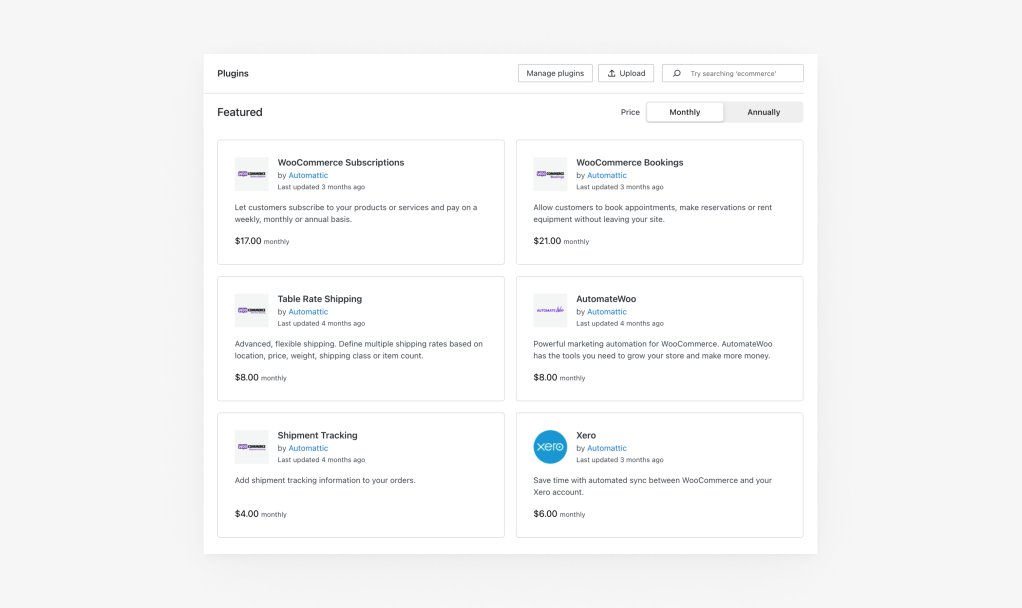
Initially, you can purchase six of our most popular WooCommerce plugins on the WordPress.com plugins page.
WooCommerce Subscriptions — Allow customers to subscribe to your products or services and pay on a weekly, monthly or annual basis.WooCommerce Bookings — Allow customers to book appointments, make reservations or rent equipment without leaving your site.WooCommerce Table Rate Shipping — Advanced, flexible shipping. Define multiple shipping rates based on location, price, weight, shipping class or item count.WooCommerce AutomateWoo — Powerful marketing automation for WooCommerce. AutomateWoo has the tools you need to grow your store and make more money.WooCommerce Shipment Tracking — Add shipment tracking information to your orders.WooCommerce Xero — Save time with automated sync between WooCommerce and your Xero account.
Purchasing a plugin via the new WordPress.com interface is simple. On the plugins page, click on one of the paid plugin cards to be redirected to a detailed product listing page. When you’re ready, click the purchase button in the top right of the product listing page. Your purchase won’t be final until you confirm your payment method and details on the following page. The plugin will be installed automatically.
This announcement is just the start — look for more paid plugins and other exciting updates over the coming months. Let us know in the comments below what plugins you would like to see available for purchase directly on WordPress.com.
Stay tuned and click here to begin exploring plugins now!
As a reminder, all plugins (free or paid) are currently only available to customers with a WordPress.com Business or eCommerce Plan. If you’re interested in purchasing or upgrading to an annual Business Plan, click here for a 25% discount off your first year.
Promo code: PLUGINSBLOG25
Quelle: RedHat Stack