Mirantis Response to Ukraine Crisis
Mirantis stands with the people of Ukraine.
Quelle: Mirantis
Mirantis stands with the people of Ukraine.
Quelle: Mirantis
The Friday Five is a weekly Red Hat® blog post with 5 of the week’s top news items and ideas from or about Red Hat and the technology industry. Consider it your weekly digest of things that caught our eye.
Quelle: CloudForms
One of the biggest challenges for implementing cloud native technologies is learning the fundamentals—especially when you need to fit your learning into a busy schedule. In this series, we’ll break down core cloud native concepts, challenges, and best practices into short, manageable exercises and explainers, so you can learn five minutes at a time. These … Continued
Quelle: Mirantis
With the release of Mirantis OpenStack for Kubernetes 22.1, we are enabling you to seamlessly maintain your security posture by simplifying life cycle management of your infrastructure, as well as providing operators with additional options for integration with modern networking solutions, in addition to providing developers with better performance for their workloads.
Quelle: Mirantis
Change doesn’t happen overnight. From mobile banking, connected vehicles, private 5G and more, learn how Red Hat’s global Telco, Media and Entertainment (TME) organization has been helping service proviers deliver innovation solutions:
Quelle: CloudForms
By pairing Baicells RAN software with Red Hat OpenShift, organizations can access a robust container-based architecture to deploy 5G and RAN solutions on a cloud environment that best meets their needs. Learn more.
Quelle: CloudForms
We’re delighted to welcome Vony Tjiu to Red Hat as a country manager for Indonesia. In her new role, she will be responsible for Red Hat’s business operations in one of Southeast Asia’s fastest growing emerging markets.
Quelle: CloudForms
“Are all your meetings so effective that you look forward to them?” Our CEO, Matt Mullenweg, recently asked us to reflect on this question. Live meetings have their place, and there are conversations that are better done in real-time, whether in person or through video chat. But they can be costly in terms of time and energy.
At Automattic, we are often asked how we manage remote work and how we avoid excessive meetings, and internal email chains. We use P2, a product powered by WordPress.com, to collaborate with colleagues across time zones. My team, for example, lives everywhere from the Philippines to Romania — there is very little time for us to meet live. P2 is a platform for us to brainstorm ideas, share project updates, and communicate asynchronously. It’s a place where we all start our workdays, no matter where we are in the world, and catch up on what we’re all working on, what tasks need to be done, and what decisions need to be made. Think of it as an internal journal. A bulletin board. A virtual watercooler.
For me, it’s kind of like reading the morning news. P2 can work for different kinds of teams or groups — people who work together within a distributed company, a virtual classroom or workshop cohort, an online business interacting with clients or partners, and more. Wondering how P2 can streamline your work, foster asynchronous collaboration, and eliminate unnecessary meetings? Here are 10 ways:
1. Offer courses that participants can take at their own pace
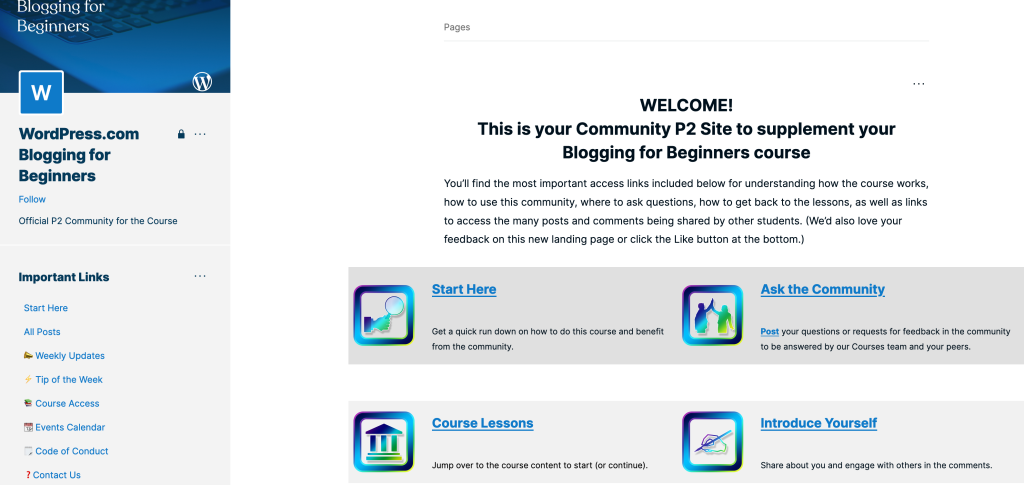
We offer courses to help you make the most of your WordPress.com site. For this curriculum, we use P2 as a community hub where students read lessons, ask questions, get tips, and interact with other participants. This can be done asynchronously — students do not need to join Zoom calls at times that don’t fit their schedule, which makes it accessible for everyone, from wherever they are.
2. Automate requests across teams and departments
You can use P2 to streamline processes in your organization, such as making requests. Need to send a contract to a new employee? Submit a request on your legal team’s P2. Looking for a designer to make a graphic for an upcoming blog announcement? Fill out a request on your design team’s P2. Hoping to parse stats on a recent campaign? Post a request on your data team’s P2. With these workflows in place, there’s no need to set up meetings to make these requests. Further discussions can happen in the post’s comments as needed.
3. Share status updates from across your company
At Automattic, we have a P2 called Thursday Updates where every team is required to post a biweekly status update, which might include project highlights and high-level summaries. At many organizations, these types of updates are often delivered in PowerPoint or Google Slides at live meetings, often to full rooms with people who don’t need to be there. With P2, you can present information and updates with an array of blocks, including media embeds and project tracking tools.
4. Set up a space to introduce new colleagues
The pandemic has changed the way we work, but traditionally, in many environments, new employees are often taken around and introduced to other staff. Automattic is a fully distributed company, and our teammates live around the world. One company tradition requires every new employee to write a welcome post on a designated P2, where they embed a short intro video about themselves. Other posts as part of the onboarding process include new employee interviews. These are all effective ways of getting to know people and to welcome them to your team — without needing to schedule a bunch of in-person meetings.
5. Create a private site to conduct trials with job candidates
The process of hiring a new employee, from start to finish, can be time-consuming. The entire interview timeline can take weeks, sometimes months, often facilitated through an exhausting combination of phone calls, Slack chats, Zoom calls, and in-person meetings. All roles at WordPress.com and the rest of Automattic involve a trial: a period when candidates work with us on a short-term project, and when both sides can assess whether it’s a good fit. We create P2s for candidates on trial, and at this stage are able to learn a lot about them, particularly the way they think, communicate, and collaborate. And this is important: we believe a culture of strong written communication is essential for remote organizations.
6. Set up a virtual notepad for meetings and brainstorms
Details of live meetings can be lost, especially when no one takes notes! At Automattic, we document external calls with clients and partners, sharing call notes in P2. And because P2s are searchable, employees — past, present, and future — can access important information discussed in meetings, even ones in which they were not present, to understand why decisions were made or to get the context they need to do their work. If you record video calls, you can also embed recordings on P2 with a number of video blocks, including Loom, Vimeo, and more, to supplement call notes.
7. Collaborate with partners and clients in a dedicated space
If you run a business, you might find that partners and clients often want to schedule a recurring meeting, even if there are no major updates to discuss. P2 is a great platform to complement — and eliminate unnecessary — live meetings. You can create a P2 for your partner or client and brand it visually with custom colors and their company logo, and tweak the sidebar with relevant links and resources. On this dedicated P2, partners and clients can share written updates, ask quick questions, set up future calls, and correspond with your team throughout the week. You can then schedule meetings only when needed.
8. Celebrate wins, publish retrospectives, and more
As you browse this list, you can see the power and versatility of P2. Powered by WordPress.com, P2 is, at its core, an internal journal — a space where your teammates, students, or group members can make announcements and share recaps. In some offices and work environments, people might schedule an after-work outing to commemorate a successful year, or plan an in-person retreat to discuss the long-term vision of a company. But these days, since it’s become harder to throw in-person events and to get together in person, we also use P2 to celebrate wins, post “state of the business” missives and share other essential longer-form content.
9. Share meetup guides and event summaries
Teams at WordPress.com and across Automattic periodically meet up in person, giving teammates scattered across the globe a chance to see one another in real life. Planning a meetup can take up a lot of time, from researching locations and booking lodging to ensuring flight and other travel costs are within budget. Meetup planners must also wrangle or be aware of accessibility issues, visa procedures of all attendees, internet speed tests, and other logistics. P2 is a great way to compile details and publish post-trip recaps, and archive travel resources for teams who visit these locations in the future. Folks interested in a particular destination can refer to these guides while planning, which cuts down meetings to essential ones only. (Fun fact: historically Lisbon, Portugal, and Hawaii have been the most popular meetup locations at Automattic.)
10. Publish self-guided resources and internal documentation
Teams across WordPress.com have access to a number of documentation P2s that we call Universities — such as Domain University and Scheduling University — that allow employees to self-train in new areas or brush up on skills. These P2s are quite comprehensive — learning this content might require a full-day live training session — but with these online “universities,” staff can work through resources and tutorials in their own time.
P2 is free for everyone. Ready to get started? Create your own P2 today.
Quelle: RedHat Stack
The evolution towards computerizing and transforming manufacturing systems has been dubbed “Industry 4.0.” But, what is Industry 4.0? What technologies are making it possible? Learn more.
Quelle: CloudForms
Each year around this time people ask, “what’s the big trend?” or “what’s the new technology we should be watching?” But the truth is, immediately adopting the “next big thing” isn’t the best strategy for CIOs, trivializing the longevity and impact of IT in an organization. Some technology persists for decades if not longer, and the decisions IT leaders make today can affect their organizations’ nimbleness and market response down the road, whether it’s in two years or 20.
Quelle: CloudForms






