Important OpenShift Commons Gathering Amsterdam 2020 Update: Shifts again!

We’re shifting again! The OpenShift Commons Gathering/Amsterdam will be rescheduled to align with the soon-to-be announced new dates for CNCF/Kubecon/EU 
KubeCon + CloudNativeCon Europe (originally set for March 30 to April 2, 2020) has been postponed to instead be held in July or August 2020. The CNCF is finalizing the date and will announce it shortly.  We expect that by mid-summer, there will be more clarity on the effectiveness of control measures to enable safe travel to industry events.
We are looking forward to still delivering all of our sessions and workshops, including the OpenShift 4.Kubernetes Release Updates and Road Map with Clayton Coleman, and all of our engineering project leads will still be delivering their “State of” Deep Dive talks. We’re working with our case study speakers and other guest speakers to ensure they can adjust their schedules (and vacation plans) to share their talks as well.
We will provide updates on the OpenShift Commons Gathering here.  We will re-open registration once the dust settles and dates are confirmed. If you’ve purchased a ticket to the March 30 Gathering and any of the associated workshops, you will receive a full refund.
The full agenda will still be here.
Stay Tuned and Connected for More Information
Thank you for your enthusiasm for and participation in the OpenShift Commons community. We couldn’t do this without the ongoing support of our members, sponsors, speakers and staff.
Join OpenShift Commons and get on the mailing lists and slack channels to stay in touch and up to date.
 
Please Note:  CNCF is regularly updating their site with latest Novel Coronavirus Updates here: https://events.linuxfoundation.org/kubecon-cloudnativecon-europe/attend/novel-coronavirus-update/
The post Important OpenShift Commons Gathering Amsterdam 2020 Update: Shifts again! appeared first on Red Hat OpenShift Blog.
Quelle: OpenShift

Turning a Page with Page Layouts

Need to add a new page to your site but don’t know where to start? Making a brand new site on WordPress.com and want to design a homepage quickly? There’s a new addition to the WordPress experience that’ll help with exactly that.

Let’s take a look at Page Layouts! They’re pre-designed pages you can drop content into, without needing to decide what to put where.

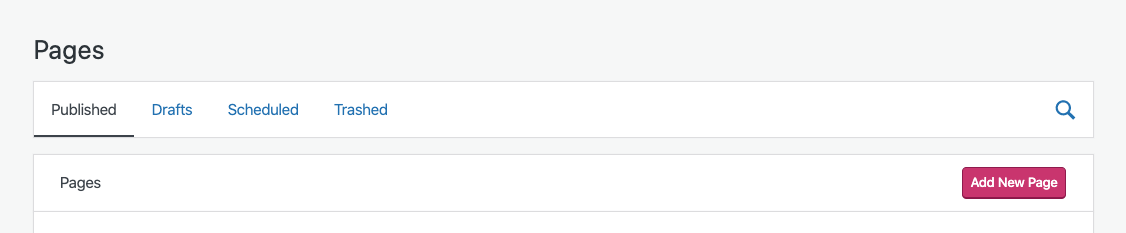
To add a Page Layout to your site, head to My Sites > Site > Pages and click the “Add New Page” button — it’s the pink one:

Next, we’ll show you a selection of layouts you can choose from — there are layouts available for

About pagesContact pagesServices pagesPortfolio pagesRestaurant Menu, Team, and Blog pagesand even starting points for Home pages

Here’s one of the available Portfolio Page Layouts, for example.

These layouts are all made using blocks in our block editor, which means you can edit the images, content, and layout all in one place. Start by replacing the default images and text, and you’ll be on your way!

You can use Page Layouts to make great-looking pages with only a few clicks. For inspiration, here are a selection of layouts using a variety of WordPress.com themes.

What other types of pages and designs would be useful for your site? Let us know what you’d like to see — we’d love to hear from you!
Quelle: RedHat Stack

What makes a good Operator?

In 2016, CoreOS coined the term, Operator. They started a movement about a whole new type of managed application that achieves automated Day-2 operations with a user-experience that feels native to Kubernetes.
Since then, the extensions mechanisms that underpin the Operator pattern, have evolved significantly. Custom Resource Definitions, an integral part of any Operator, became stable, got validation and a versioning feature that includes conversion. Also, the experience the Kubernetes community gained when writing and running Operators accumulated critical mass. If you’ve attended any KubeCon in the past 2 years, you will have noticed the increased coverage and countless sessions focusing on Operators.
The popularity that Operators enjoy, is based on the possibility to achieve a cloud-like service experience for almost any workload available wherever your cluster runs. Thus, Operators are striving to be the world’s best provider of their workload as-a-service.
But what actually does make for a good Operator? Certainly the user experience is an important pillar, but it is mostly defined through the interaction between the cluster user running kubectl and the Custom Resources that are defined by the Operator. 
This is possible with Operators being extensions of the Kubernetes control plane. As such, they are global entities that run on your cluster for a potentially very long time, often with wide privileges. This has some implications that require forethought.
For this kind of application, best practices have evolved to mitigate potential issues, security risks, or simply to make the Operator more maintainable in the future. The Operator Framework Community has published a collection of these practices: https://github.com/operator-framework/community-operators/blob/master/docs/best-practices.md
They are covering recommendations concerning the design of an Operator as well as behavioral best practices that come into play at runtime. They reflect a culmination of experience from the Kubernetes community writing Operators for a broad range of use cases. In particular, the observations the Operator Framework community made, when developing tooling for writing and lifecycling Operators.
Some highlights include the following development practices:

One Operator per managed application
Multiple operators should be used for complex, multi-tier application stacks
CRD can only be owned by a single Operator, shared CRDs should be owned by a separate Operator
One controller per custom resource definition

As well as many others.
With regard to best practices around runtime behavior, it’s noteworthy to point out these:

Do not self-register CRDs
Be capable of updating from a previous version of the Operator
Be capable of managing an Operand from an older Operator version
Use CRD conversion (webhooks) if you change API/CRDs

There are additional runtime practices (please, don’t run as root) in the document worth reading.
This list, being a community effort, is of course open to contributions and suggestions. Maybe you are planning to write an Operator in the near future and are wondering how a certain problem would be best solved using this pattern? Or you recently wrote an Operator and want to share some of your own learnings as your users started to adopt this tool? Let us know via GitHub issues or file a PR with your suggestions and improvements. Finally, if you want to publish your Operator or use an existing one, check out OperatorHub.io.
The post What makes a good Operator? appeared first on Red Hat OpenShift Blog.
Quelle: OpenShift
A Crash Course in Remote Management

Remote work is a prominent topic lately, as people around the world are doing their best to live their lives and keep themselves and their families safe and prepared during the COVID-19 outbreak. The impact of this outbreak is felt across societies and cultures as well as in the workplace.  

Automattic, the company behind WordPress.com, is a primarily distributed company with more than 1,000 employees across 76 countries. I’m an engineering lead, currently working on the Developer Experience team. As Automattic has grown, we’ve learned a lot about working remotely and across time zones, and have shared insights on what we see as the future of work on the Distributed podcast, hosted by our CEO, Matt Mullenweg. 

This week, Nicole Sanchez, the founder of Vaya Consulting and an expert on workplace culture, and I had an opportunity to co-present a Crash Course in Remote Management, a free one-hour webinar hosted on Zoom. Nicole has previously held social impact and leadership roles at GitHub and the Kapor Center for Social Impact.

Nicole and I walked an engaged audience through proven practices and what they’ve learned about leading, communicating with, and measuring the success of remote teams. Participants offered insightful questions, leading to lively discussions around:

Collaboration and relationship-building.The cost, benefit, and ideal frequency of bringing teams together for face-to-face interaction (in general, if not as commonly right now).Communicating and prioritizing messages across a variety of channels. Encouraging people to go outside, exercise, spend time with family, or otherwise step away from the computer (also known as being “AFK,” or “Away From Keyboard”) without the fear of being judged or anxiety over being less productive.

Some companies are encouraging employees to experiment with working from home, which can feel very different from in-person and office work. If you’re interested in learning more, please check out the full video recording of the course:

Matt’s latest blog post, “Coronavirus and the Remote Work Experiment No One Asked For,” is also worth a read. For more information and advice on COVID-19, please visit resources from the CDC, World Health Organization, and other health authorities.
Quelle: RedHat Stack

Self-hosted Load Balancer for OpenShift: an Operator Based Approach

Introduction
Some time ago, I published an article about the idea of self-hosting a load balancer within OpenShift to meet the various requirements for ingress traffic (master, routers, load balancer services). Since then, not much has changed with regards to the load balancing requirements for OpenShift. However, in the meantime, the concept of operators, as an approach to capture automated behavior within a cluster, has emerged. The release of OpenShift 4 fully embraces this new operator-first mentality.
Prompted by the needs of a customer, additional research on this topic was performed on the viability of deploying a self-hosted load balancer via an operator.
The requirement is relatively simple: an operator watches for the creation of services of type LoadBalancer and provides load balancing capabilities by allocating a load balancer in the same cluster for which the service is defined.

In the diagram above, an application is deployed with a LoadBalancer type of service. The hypothetical self-hosted load balancer operator is watching for those kinds of services and will react by instructing a set of daemons to expose the needed IP in an HA manner (creating effectively a Virtual IP [VIP]). Inbound connections to that VIP will be load balanced to the pods of our applications.
In OpenShift 4, by default, the router instances are fronted by a LoadBalancer type of service, so this approach would also be applicable to the routers.
In Kubernetes, a cloud provider plugin is normally in charge of implementing the load balancing capability of LoadBalancer services, by allocating a cloud-based load balancing solution. Such an operator as described previously would enable the ability to use LoadBalancer services in those deployments where a cloud provider is not available (e.g. bare metal).
Metallb
Metallb is a fantastic bare metal-targeted operator for powering LoadBalancer types of services. 
It can work in two modes: Layer 2 and Border Gateway Protocol (BGP) mode.
In layer 2 mode, one of the nodes advertises the load balanced IP (VIP) via either the ARP (IPv4) or NDP (IPv6) protocol. This mode has several limitations: first, given a VIP, all the traffic for that VIP goes through a single node potentially limiting the bandwidth. The second limitation is a potentially very slow failover. In fact, Metallb relies on the Kubernetes control plane to detect the fact that a node is down before taking the action of moving the VIPs that were allocated to that node to other healthy nodes. Detecting unhealthy nodes is a notoriously slow operation in Kubernetes which can take several minutes (5-10 minutes, which can be decreased with the node-problem-detector DaemonSet).
In BGP mode, Metallb advertises the VIP to BGP-compliant network routers providing potentially multiple paths to route packets destined to that VIP. This greatly increases the bandwidth available for each VIP, but requires the ability to integrate Metallb with the router of the network in which it is deployed. 
Based on my tests and conversations with the author, I found that the layer 2 mode of Metallb is not a practical solution for production scenarios as it is typically not acceptable to have failover-induced downtimes in the order of minutes. At the same time, I have found that the BGP mode instead would much better suit production scenarios, especially those that require very large throughput.
Back to the customer use case that spurred this research. They were not allowed to integrate with the network routers at the BGP level, and it was not acceptable to have a failover downtime of the order of minutes. 
What we needed was a VIP managed with the VRRP protocol, so that it could failover in a matter for milliseconds. This approach can easily be accomplished by configuring the keepalived service on a normal RHEL machine. For OpenShift, Red Hat has provided a supported container called ose-keepalived-ipfailover with keepalived functionality. Given all of these considerations, I decided to write an operator to orchestrate the creation of ipfailover pods.
Keepalived Operator
The keepalived operator works closely with OpenShift to enable self-servicing of two features: LoadBalancer and ExternalIP services.
It is possible to configure OpenShift to serve IPs for LoadBalancer services from a given CIDR in the absence of a cloud provider. As a prerequisite, OpenShift expects a network administrator to manage how traffic destined to those IPs reaches one of the nodes. Once reaching a node, OpenShift will make sure traffic is load balanced to one of the pods selected by that given service.
Similarly for ExternalIPs, additional configurations must be provided to specify the CIDRs range users are allowed to pick ExternalIPs from. Once again, a network administrator must configure the network to send traffic destined to those IPs to one of the OpenShift nodes.
The keepalived operator plays the role of the network administrator by automating the network configuration prerequisites.

When LoadBalancer services or services with ExternalIPs are created, the Keeplived operator will allocate the needed VIPs on a portion of the nodes by adding additional IPs on the node’s NICs. This will draw the traffic for those VIPs to the selected nodes.
VIPs are managed by a cluster of ipfailover pods via the VRRP protocol, so in case of a node failure, the failover of the VIP is relatively quick (in the order of hundreds of milliseconds).
Installation
To install the Keepalived operator in your own environment, consult the documentation within the GitHub repository.
Conclusions
The objective of this article was to provide an overview of options for self-hosted load balancers that can be implemented within OpenShift. This functionality may be required in those scenarios where a cloud provider is not available and there is a desire to enable self-servicing capability for inbound load balancers.
Neither of the examined approaches allows for the definition of a self-hosted load balancer for the master API endpoint. This remains an open challenge especially with the new OpenShift 4 installer. I would be interested in seeing potential solutions in this space.
The post Self-hosted Load Balancer for OpenShift: an Operator Based Approach appeared first on Red Hat OpenShift Blog.
Quelle: OpenShift

How to build a simple edge cloud: Q&A

The post How to build a simple edge cloud: Q&A appeared first on Mirantis | Pure Play Open Cloud.
Last week we held a webinar explaining the basics behind creating edge clouds, but we didn’t have enough time for all of the questions. So as is our tradition, here are the Q&As, including those we didn’t get to on the call.
Does Docker Platform support GPUs?
Docker Engine 19.03 added support for GPUs. Also, we are working on adding features that make GPU availability visible for orchestration.
What’s the difference between Docker and Docker Enterprise?
Docker CE or Community Edition is a free containerization platform managed by Docker, Inc.
Docker EE or Enterprise Engine is an integrated, fully supported and certified container platform, owned by Mirantis.
Docker EE is part of the Docker Enterprise platform, a suite of solutions to help manage and deploy applications securely which includes: Docker Trusted Registry, Docker Universal Control Plane, Docker Content Trust, and Docker Enterprise Engine.
So how would an edge device know where to contact the edge cloud? Would it be hard-coded?
It certainly COULD be hard-coded, though I personally would have the device call home just to find out where it should go for its actual configuration.
Is it passing the video data to the Google container, or is it passing a container to the Google platform?
The idea is for an edge node to pass only the important data to the next step (in this case the Kubernetes cluster running on GKE). So in this case, the container running in the simulated camera is passing only individual video frames to the container that’s running in the regional cloud.
To access an application that is present on an Edge Cloud, for example, through a Mobile Network, a GATEWAY (e.g., PGW, UPF) is required. The question is: Are these Network functions ready to run in Containers? Do containers offer the necessary security for such Network functions?
In fact, many of these virtual network functions, or VNFs, have not yet been containerized, and need to run in Virtual Machines. One way to do this is to use a project like Virtlet, which enables you to run VMs as first-class citizens in a Kubernetes container; this way you can use VMs and Containers together.  
That said, there are some cloud native network functions, or CNFs, that are already available, such as Magma.
In the demo, you used AWS and GCP, where did Mirantis come into the picture?
In this particular example, the AWS piece was where we were running Docker Enterprise, which is now part of Mirantis. However, the discussion is purely on the technology; Mirantis isn’t REQUIRED (though of course we would like you to consider it :)). Mirantis also has an Edge offering, Mirantis Cloud Platform Edge, that uses a different architecture.
In your demo, may I say the edge cloud is running at your NB?
I don’t quite understand the question, but the edge cloud in this case was a container running on my laptop, yes.
Can you please explain again about the mirror registry and cache?
A mirror registry is a registry that holds images you expect to need in your environment. The idea is to bring images closer to your nodes so they can fetch them quickly and more efficiently than having each engine fetch a copy on the external network.
A cache registry is setup to keep a copy of each image requested by engines in your environment, so that duplicate requests can retrieve the image locally instead of downloading it again and again.
Read docs on Registry configured as Cache or Mirror: https://docs.docker.com/registry/recipes/mirror/
You show as the UCP, but for the edge it seems very expensive to have a worked node with Docker EE, could you do this with Basic or Community engine at the edge, and still put your Image on Docker Trusted Registry?
Today, only Docker EE can pull from DTR. With Community Edition, you are missing key security features that are required to secure the last mile. If you have a need for a more efficient (reduced size) engine due to constraints in your device, please contact us for assistance and we will review your use case and offer advice.  That said, if you’re not going to use DTR, you could use Docker CE.
So, video data isn’t passed to the central Google location, it is the central location that pushes approved images to the edge and the edge does all the facial comparison?
No, it’s just the opposite. The edge recognizes that there is a face, but doesn’t identify it. It just passes the image on to the “regional” cloud. The regional cloud, which happens to be running on GKE in this case, does the facial comparison, and if it finds a stranger, passes that image on to the “central” cloud, which happens to be running on Docker Enterprise on AWS in this case. So the flow of data is from the edge to the center.
Can you take an example of configuration pushed to a camera device or a CPE device connecting a branch location? Like Walmart with CPE or Camera monitoring cash registers?
I’m not sure I completely understand the question, but I’ll take a stab at it. Devices can be updated via either push, or pull. In a push situation, the central cloud sends instructions to the edge device. These instructions may include the new configuration, or they may simply include instructions to phone home for that new configuration. In a pull situation, the device will “phone home” to check for any instructions or configuration changes it needs to complete.
There is another situation. We could have an ARM processor at the edge, and I believe there is not Docker EE engine in that case, but you could have development for an ARM processor on the Cloud.
Docker EE has been tested on Arm architecture and is ready for POC with customers. This applies to both cloud and Edge instances of Arm. Please contact us if you need more information on this use case.
My question is around multi-tenancy. How can multiple enterprises push configurations to the end CPE or Camera devices with a multi-tenant central controller hosted in Cloud? How can we build a hierarchy to address latency aspects?
This one might require more questions about the use case. In general, multi-tenancy starts with the ingress of applications in the registry. Here, multiple images are received, scanned, and staged before they are deemed acceptable and made available to the end device. These images can come from multiple sources including Independent Software Vendors. From the controller interface, the operator can securely deploy these apps on the end points running a container runtime such as Docker Enterprise. The Hierarchy that is built to address latency is accomplished by moving the applications that process the data closer to the source of data creation and minimizing how much of this data is moved on the network. Then, if you can react to the output without having to go through a central hub, you can keep the latency as low as possible.
At the edge device, do you actually install Docker and run a container in the device memory itself? If yes, what would be the memory footprint in the device’s memory for docker?
Yes, the Edge device is expected to have a Container runtime engine such as Docker Enterprise Engine. We have done work with customers to reduce the impact to memory while maintaining the security features required to ensure an end to end secure environment. If you want more details, we’d need to review your specific use case.
Can you compare running Docker and containers on the edge device versus an application written in a microcontroller language with the same functionality as the app running in the docker container alternative?
There is no impact to system performance due to running an app in a container versus directly on the OS. There is an overhead due to memory requirements. The question to ask is whether the use of containers in an end device with all the cloud native advantages outweigh the need for additional memory. As you can imagine the answer depends on the use case.
Today there are several frameworks being proposed to provide HW management for Edge Clouds such as: OpenStack DCN, Mobile Edgex, Akraino etc. Does this heterogeneous environment tend to converge to a single solution? Which in your opinion?
Like most similar decisions, this is going to depend on too many factors to make a decision like this, including use case, staff familiarity, integration with the rest of your infrastructure.
If the application’s data is not ready yet at the edge how will the edge app behave?
That’s the job of the Edge application; to deal with these issues so the processing closer to the center doesn’t have to.
Is the Python code available?
Yes, the Python code will be available as part of the “Build a Basic Edge Cloud” blog series. You can find part one of that series, which covers the actual surveillance system, here. Part 2, which is due out in the next few days, covers containerization, and part 3 will deploy the containers to their respective clusters.
What does the demo app use to pass the vid images and approved pics back and forth between edge and central? Is mirroring the best or are you using like a restAPI push to where it needs to go?
In the case of this demo, it’s using a mounted drive to pass images from the camera to the first container, and then it’s using a REST API to pass images between clusters. Not that this is the ONLY way to do it, by any stretch of the imagination; it’s just the simplest way to get the concept across.
Will this example work with open hardware such as Arduino ?
I’m assuming that your question is whether you need an Arduino to do this, or whether it will work with open hardware. In fact I’ve never used an Arduino (though I really, really want to), so I can confidently say that edge doesn’t depend on it. That said, your actual Edge Devices may have specific requirements, such as durability or low power requirements, but that’s based on your specific use case and not Edge per se.
What kind of edge nodes are you recommending if any? Thinking of high latency links where sending data to any cloud or out of the edge DC would be an issue.
It all depends on your use case. In some cases you may need specific hardware that fulfills a particular requirement, such as low power use or remote accessibility, or it may be a simple laptop or even a mobile phone. Remember, anything that’s outside of a datacenter is technically “edge”.
As far as latency, that’s one of the things you’re trying to mitigate with Edge in the first place; so while it might be too much to send an entire video stream, you might send just specific frames. Or perhaps you might send just specific measurements instead of complete telemetry, doing the initial analysis on the Edge node.
How do you write that security system for kubernetes just mentioned?
Check out the white paper about Trusted Docker Containers.
Don’t forget, you can view the whole webinar here!
The post How to build a simple edge cloud: Q&A appeared first on Mirantis | Pure Play Open Cloud.
Quelle: Mirantis

Helm and Operators on OpenShift Part 2

This is the second part of a two-part blog series discussing software deployment options on OpenShift leveraging Helm and Operators. In the previous part we’ve discussed the general differences between the two technologies. In this blog we will specifically the advantages and disadvantages of deploying a Helm chart directly via the helm tooling or via an Operator.
Part II – Helm charts and Helm-based Operators
Users that already have invested in Helm to package their software stack, now have multiples options to deploy this on OpenShift: With the Operator SDK, Helm users have a supported option to build an Operator from their charts and use it to create instances of that chart by leveraging a Custom Resource Definition. With Helm v3 in Tech Preview and helm binaries shipped by Red Hat, users and software maintainers now have the ability to use helm directly on OpenShift cluster.
When comparing Helm charts and Helm-based Operators, in principle the same considerations as outlined in the first part of this series apply. The caveat is that in the beginning, the Helm-based Operator does not possess advanced lifecycle capabilities over the standalone chart itself. There however are still advantages.
With helm-based Operators, a Kubernetes-native interface exists for users on cluster to create helm releases. Using a Custom Resource, an instance of the chart can be created in a namespace and configured through the properties of the resource. The allowed properties and values are the same as the values.yaml of the chart, so users familiar with the chart don’t need to learn anything new. Since internally a Helm-based Operator uses the Helm libraries for rendering, any type of chart type and helm feature is supported. Users of the Operator however don’t necessarily need the helm CLI to be installed but just kubectl to be present in order to create an instance. Consider the following example:
apiVersion: charts.helm.k8s.io/v1alpha1
kind: Cockroachdb
metadata:
 name: example
spec:
 Name: cdb
 Image: cockroachdb/cockroach
 ImageTag: v19.1.3
 Replicas: 3
 MaxUnavailable: 1
 Component: cockroachdb
 InternalGrpcPort: 26257
 ExternalGrpcPort: 26257
 InternalGrpcName: grpc
 ExternalGrpcName: grpc
 InternalHttpPort: 8080
 ExternalHttpPort: 8080
 HttpName: http
 Resources:
   requests:
     cpu: 500m
     memory: 512Mi
 Storage: 10Gi
 StorageClass: null
 CacheSize: 25%
 MaxSQLMemory: 25%
 ClusterDomain: cluster.local
 UpdateStrategy:
   type: RollingUpdate
The Custom Resource Cockroachdb is owned by the CockroachDB operator which has been created using the CockroachDB helm chart. The entire .spec section can essentially be a copy and paste from the values.yaml of the chart. Any value supported by the chart can be used here. Values that have a default are optional.
The Operator will transparently create a release in the same namespace where the Custom Resource is placed. Updates to this object cause the deployed Helm release to be updated automatically. This is in contrast to Helm v3, where this flow originates from the client side and installing and upgrading a release are two distinct commands.

While a Helm-based Operator does not magically extend the lifecycle management capabilities of Helm it does provide a more native Kubernetes experience to end users, which interact with charts like with any other Kubernetes resource.
Everything concerning an instance of a Helm chart is consolidated behind a Custom Resource. As such, access to those can be enforced restricted via standard Kubernetes RBAC, so that only entitled users can deploy certain software, irrespective of their privileges in a certain namespace. Through tools like the Operator Lifecycle Manager, a selection of vetted charts can be presented as a curated catalog of helm-based Operators.
 
 
As the Helm-based Operator constantly applies releases, manual changes to chart resources are automatically rolled back and configuration drift is prevented. This is different to using helm directly, where deleted objects are not detected and modified chart resources are only merged and not rolled back. The latter does not happen until a user runs the helm utility again. Dealing with a Kubernetes Custom Resources however may also present itself as the easier choice in GitOps workflows where only kubectl tooling is present.
When installed through the Operator Lifecycle Manager, a Helm-based Operator can also leverage other Operators services, by expressing a dependency to them. Manifests containing Custom Resources owned by other Operators can simply be made part of the chart. For example, the above manifest creating a CockroachDB instance could be shipped as part of another helm chart, that deploys an application that will write to this database.
When such charts are converted to an Operator as well, OLM will take care of installing the dependency automatically, whereas with Helm this is the responsibility of the user. This is also true for any dependencies expressed on the cluster itself, for example when the chart requires certain API or Kubernetes versions. These may even change over the lifetime of a release. While such out-of-band changes would go unnoticed by Helm itself, OLM constantly ensures that these requirements are fulfilled or clearly signals to the user when they are not.
On the flip side, a new Helm-based Operator has to be created, published to catalog and updated on cluster whenever a new version of the chart becomes available. In order to avoid the same security challenges Tiller had in Helm v2, the Operator should not run with global all-access privileges. Hence, the RBAC of the Operator is usually explicitly constrained by the maintainer according to the least-privilege principle.
The SDK attempts to generate the Operator’s RBAC rules automatically during conversion from a chart but manual tweaks might be required. The conversion process at a high level looks like this:

Restricted RBAC now applies to Helm v3: chart maintainers need to document the required RBAC for the chart to be deployed since it can no longer be assumed that cluster-admin privileges exist through Tiller. 
Quite recently the Operator-SDK moved to Helm v3. This is a transparent change for both users and chart maintainers. The SDK will automatically convert existing v2 releases to v3 once an updated Operator is installed.
In summary: end users that have an existing Helm charts at hand can now deploy on OpenShift using helm tooling, assuming they have enough permissions. Software maintainers can ship their Helm charts unchanged now to OpenShift users as well. 
Using the Operator SDK they get more control over the user and admin experience by converting their chart to an Operator. While the resulting Operator eventually deploys the chart in the same way the Helm binary would, it plays along very well into with the rest of the cluster interaction using just kubectl, Kubernetes APIs and proper RBAC, which also drives GitOps workflows. On top of that there is transparent updating of installed releases and constant remediation of configuration drift. Clusters 
Helm-based Operators also integrate well with other Operators through the use of OLM and its dependency model, avoiding re-inventing how certain software is deployed. Finally for ISVs, Helm-based Operators present an easy entry into the Operator ecosystem without any change required to the chart itself.
The post Helm and Operators on OpenShift Part 2 appeared first on Red Hat OpenShift Blog.
Quelle: OpenShift

Important OpenShift Commons Gathering Amsterdam 2020 Update: Shifts to Digital Conference

We’re turning OpenShift Commons Gathering/Amsterdam into a digital conference rather than a live event.
We’re going to deliver our first ever OpenShift Commons Gathering live online with Q&A, and take the Gatherings to a even wider global audience.
We will still share all of our main stage sessions, including OpenShift 4 and Kubernetes Release Update and Road Map with Clayton Coleman, and all of our engineering project leads will still be delivering their “State of” Deep Dive talks. We’re working to enable our case study speakers and other guest speakers to share their talks as well.
We will provide updates here soon and you can register here for the free virtual event and get notified with further details via email about when you can tune in and how to do so.
If you’ve purchased a ticket to the Gathering and any of the workshops, you will receive a full refund.
The full agenda will still be here.
Thank you for your enthusiasm for and participation in the OpenShift Commons community. We couldn’t do this without the ongoing support of our members, sponsors, speakers and staff.
Please Note: As of March 3, 2020, the KubeCon/Eu in Amsterdam (March 30 – April 2) is still happening. CNCF is regularly updating their site with latest Novel Coronavirus Updates here: https://events.linuxfoundation.org/kubecon-cloudnativecon-europe/attend/novel-coronavirus-update/
for relevant information.
The post Important OpenShift Commons Gathering Amsterdam 2020 Update: Shifts to Digital Conference appeared first on Red Hat OpenShift Blog.
Quelle: OpenShift

Helm and Operators on OpenShift, Part 1

With the release of Helm v3 as TechPreview on OpenShift 4 users and developers now have a wide variety of options to package and deploy software on OpenShift clusters. This became possible since Helm v3 does not rely on the Tiller component anymore that previously brought up a lot of security concerns.
With this new packaging option, users can now choose to deploy their software via OpenShift Templates, oc new-app, Helm v3 charts and Operators.
Leveraging the Operator SDK users since Helm v2 already have a supported option to leverage Helm charts on OpenShift. With the SDK any Helm chart can be converted into a fully functional Operator and deploy it on cluster in a consistent manner with the Operator Lifecycle Manager. From there on, the Operator would serve Helm releases from that chart as a service.
This is a two part blog series aiming to provide some guiding information for users starting out with Helm charts or looking for ways to package their software on top of OpenShift. The first part will discuss the differences between Helm and Operators. In the second part we are going to compare Helm Charts and Helm-based Operators.
Photo by Thomas Hawk
Part I – Helm and Operators
Helm charts lend themselves very well to package applications which lifecycle can entirely be covered by built-in capabilities Kubernetes. That is, they can be deployed simply by applying Kubernetes manifests while leveraging the Helm templating syntax to customize how these objects get created. Updates to software versions and configuration are conducted by updating/replacing the Kubernetes objects. This does not manage to take applications internal state into account however, hence stateless applications fit this pattern best.
In v3, Helm is used entirely through the helm CLI which is a utility usually run interactively outside of the cluster. Users simply find a chart for the desired software and customize its resources through Helm to deploy Kubernetes artifacts which eventually bring up said software.
After this deployment step the deployed software runs in an unmanaged fashion. That is, updates to either the software or the chart require users to notice and act manually. Manual changes to the deployed Kubernetes resources are accepted as long as they do not prevent a 3-way merge, but should be avoided to keep complexity down. Being based on explicit invocation through the helm CLI, deletions or changes to objects that are part of the charts will not be detected until the next time the Helm CLI is run. Since Helm has no visibility into the applications state additional manual steps are required in order to determine the success of the deployment.
Upgrading to a newer version of the chart needs to be treated with care: not all modifications are allowed, for example increasing the volume size in a StatefulSet’s volumeClaimTemplate. In such a case the current deployment needs to be recreated. Other changes are allowed but potentially disruptive and can result in data loss, for example when the chart changes from using Deployment to StatefulSets.
While access to Helm charts themselves is managed outside the cluster, the ability to deploy resources is subject to users RBAC since Helm v3.
This is easy to get started with and works well for distributed apps that do not maintain state. More complex applications, especially stateful workloads like databases or quorum-based distributed systems, need more careful orchestration. Although there are a lot of Helm charts available for such systems, they only enable the initial deployment. After that, Helms visibility into the workload ends.
However, especially in production these application types require ordered step-by-step sequences for typical Day-2 activities like updates and reconfiguration. To make matters more complex, these procedures need to take the applications internal state into account, in order to prevent downtime. For example: a rolling update of a distributed app may need to wait for the individual instances to regain quorum before proceeding to take out deployments. This becomes very difficult since Helm can only allow what Kubernetes supports out of the box, e.g. Deployment with basic readiness checks. Also, any advanced procedures like backup and restore can not be modeled with Helm charts.
Enter Operators. These custom Kubernetes controllers are running on the cluster and contain application specific lifecycle logic. With the application state in mind, complex procedures like reconfiguration, updates, backups or restore can be facilitated through the Operator in a consistent fashion. For example: before a backup of a managed database the Operator providing this database is able to flush out the database log and then quiesce the write activity on the filesystem, therefore providing a application-consistent backup. Operators can also be aware of workloads deployed by a previous version of the Operator and migrate them safely to newer deployment patterns.
But even before that, Operators start with providing a Kubernetes-native user experience, that does not mandate any new skills or tools on the user side. Operators enable the consumption of their managed workloads through Kubernetes Custom Resources. Thus they offer a cloud-like user experience: users don’t need to be experts in how the application is deployed or managed but can rely on the Custom Resource as the sole interface to interact with them. 
The Custom Resources appear and behave like standard Kubernetes objects. Instances of those Custom Resources represent managed workloads (usually deployed on the same cluster) and can be requested or reconfigured simply with the kubectl CLI.
Thanks to the application specific logic in the Operator’s controller, the application state can accurately be represented and reported through the status section of these Custom Resources, for example to convey access credentials to the user or live health data.
In contrast to Helm charts an Operator needs to be installed on the cluster first, usually by a user with a privileged role. But since they are running on the cluster in a constant software software loop, any manual change to provisioned resources are picked up immediately and rolled back, if diverging from the desired state. Multiple concurrent interactions on the same managed application are serialized and not blocked by a lock. Access to Operator services can be restricted to via regular RBAC on the Custom Resources.
In short: if the workload does not require any Day-2 operation beyond simple update/replace Kubernetes operations and resources are never manipulated manually, Helm is a great choice. There are a lot of charts available in the community that make it easy to get started, especially in test beds or development environments.
For everything else, Operators provide more application-aware logic for Day-2 operations that are especially important for production environments. Examples range from coordinated updates without downtime over to regularly running backup and even restore. They need to be installed first on cluster but interaction is then entirely handled via standard kubectl tooling leveraging Custom Resources. Projects like the Operator Lifecycle Manager aid cluster administrator in installing Operators and keep them updated. When deployed, Operators provide central orchestration and discovery, which is important to multi-tenant clusters. For individual users reconfiguration or updates to a managed application are as simple as changing a single value in Custom Resources. Creating a new resource can also trigger potentially complex workflows transparently in the background like backups and restore.
This way, users enjoy a cloud-like user experience, independently where the cluster is actually deployed.
The post Helm and Operators on OpenShift, Part 1 appeared first on Red Hat OpenShift Blog.
Quelle: OpenShift

Building a No-Code Blockchain App with IBM Blockchain Platform and Joget on OpenShift

This is a guest post by Julian Khoo, VP Product Development and Co-Founder at Joget Inc. Julian leads the development of the open source Joget no-code/low-code application platform.
1. Introduction
In this article, we will look at using a no-code approach to integrating blockchain technology, specifically an IBM Blockchain Platform network, into a full-fledged web application on the Joget application platform running on Red Hat OpenShift.

1.1 Blockchain and Digital Ledger Technology (DLT)
In recent times there have been many predictions on blockchain technology revolutionizing the world, transforming everything from banking to supply chains and even government. Even if you are not familiar with the term, you would probably have heard of the rise of cryptocurrency like Bitcoin which utilizes blockchain technology. So what exactly is a blockchain?
To start, it’s best to understand a broader term called digital ledger technology (DLT). DLT is simply a decentralized database, where data is stored by a network of computers with no central authority. Blockchain is a specific type of DLT, where records in the network are linked using cryptography and cannot be changed. This lends itself to solving problems where there are issues with trust and inefficiencies due to centralized authorities.
There are many blockchain implementations, which are broadly categorized as either permissionless or permissioned. Permissionless blockchain networks are essentially public so anyone can participate, while permissioned ones are for restricted private use. Permissionless networks work well for public areas such as cryptocurrencies, but in an enterprise environment and in many industries, private networks are essential. 
Enterprise blockchain networks might typically span across multiple organizations across an entire industry. With the need for permissioned private networks and participation by multiple organizations, how would a blockchain solution gain enough adoption to succeed? This is where Hyperledger comes in.
1.2 Hyperledger Fabric and IBM Blockchain Platform

Hyperledger is a not a company, nor a specific product, but rather an umbrella of open source blockchain projects for enterprise use cases. Hosted by the Linux Foundation with more than 250 participating organizations, the projects are divided into frameworks and tools. Frameworks are different implementations of blockchain technology, each of which has different strengths for different use cases. Tools, on the other hand, are utilities to help manage or complement the frameworks.
 

The most popular and mature framework currently is Hyperledger Fabric. Originally contributed by IBM, Fabric is emerging as the de-facto standard for enterprise blockchain platforms, with commercial implementations and support from major vendors including IBM, Oracle and SAP.

IBM Blockchain Platform, on the other hand, is an enterprise-ready and managed full stack blockchain-as-a-service (BaaS) offering that is based on Hyperledger Fabric. IBM Blockchain Platform can be deployed on OpenShift or Kubernetes on a private, public or hybrid cloud environment.
1.3 Blockchain Concepts
If you are new to blockchain technology, there are quite a lot of concepts to learn and understand. For the purpose of this sample app, here are some of the more important terms that are used to configure the blockchain integration.

Blockchain ledger is a journal of all transactions and data that are stored in a distributed network.
Peer nodes are the network components where copies of the blockchain ledger are hosted.
Members are organizations that are part of the blockchain network.
Certificate Authority (CA) issues certificates to identify users that belong to an organization.
Membership Services Provider (MSP) maps certificates to member organizations.
Transactions are requests to read or write data into the ledger.
Ordering service are nodes that orders transactions into a block to be written into the ledger.
Channels are private communication mechanisms to keep confidentiality between members in the network.
Smart contracts (called chaincode in Fabric) are code within the blockchain network that are invoked to query or update the ledger.

The diagram provided by the Hyperledger Fabric project below shows how an application integrates with a blockchain network via smart contracts:

More details are available in the Hyperledger Fabric documentation.
 
2. Overview of the App
Joget is an open source low-code/no-code application platform for faster, simpler digital transformation. To demonstrate the incorporation of blockchain technology in an app, let’s design a Joget app running on OpenShift that makes use of the Fabcar blockchain sample provided by IBM.

To demonstrate reading from and writing to the blockchain network, the app supports the following use cases:

Query and list of all records from the blockchain network.
Query and view a specific record from the blockchain network.
Write a new record into the blockchain network after an approval process.

With Joget, the blockchain app can be developed without coding. A form is visually designed, after which the App Generator is used to quickly create a full working app. The integration to the IBM Blockchain Platform network is then accomplished by simply configuring a set of Joget Hyperledger Fabric plugins. 
Here are some screenshots of the app in action:

Welcome: Home page

Fabcar Listing: List of all records from the blockchain network

Fabcar Form: View specific record from the blockchain network

Approval Process: Approve a creation of a new record
The next few sections provide more detailed information to setup the sample Hyperledger Fabric network on IBM Blockchain Platform, as well as to develop and configure the app.
 
3. Setup Hyperledger Fabric Network on IBM Blockchain Platform
To begin, let’s set up a Hyperledger Fabric Network on the IBM Blockchain Platform. 
3.1 Deploy IBM Blockchain Platform on IBM Cloud

Follow the step-by-step guide to setting up a basic Hyperledger Fabric network. The steps are summarized below:

Get an IBM Cloud Account and upgrade to “Pay-As-You-Go”. With IBM Cloud, you are entitled to a free 30 day preview.
Create the IBM Kubernetes Service
Create the IBM Blockchain Platform Service
Launch the IBM Blockchain Platform
Add the certificate authority (CA)
Register the users
Create the organization’s Membership Service Provider (MSP) definition
Create the peer node
Create the orderer
Add an organization as a consortium member on the orderer
Create the channel
Join the channel

3.2 Deploy Fabcar Blockchain Sample Smart Contract

Next, let’s deploy a sample smart contract on the network following the steps described in the Fabcar Blockchain Sample provided by IBM. 
The summarized steps are:

Clone the GitHub repository
Package the smart contract
Deploy FabCar Smart Contract on the network
Download connection profile JSON

At this point, you should have a connection profile JSON to connect to the blockchain network.
4. Design Joget App
Now that you have gotten the Fabcar network up and running, let’s start designing the Joget app that will query and update the records in the blockchain ledger. The Joget platform provides a modular dynamic plugin architecture to extend functionality. In this case, we will be using a set of Hyperledger Fabric plugins.
If you do not already have a running Joget platform, follow the steps in Automating Low Code App Deployment on Red Hat OpenShift with the Joget Operator to set up the Joget environment which typically only takes minutes.

4.1 Design New App
In the Joget App Center, login as an administrator and click on the Design New App button. Key in the relevant details e.g.

App ID: fabcar
App Name: Hyperledger Fabric Fabcar Sample

4.2 Design Fabcar Form
Using the Joget Form Builder, design a form with fields matching the properties in a Fabcar record. 

In this case create text fields with IDs that match a Fabcar record
 

Key

make

model

colour

owner

 
Click on the Save button to save the form.
4.3 Use App Generator to Create App
Once the form has been saved, click on the Generate App button to use the App Generator. Check the options for Generate Datalist, Generate CRUD and Generate Process – Approval Process, then Generate.
NOTE: The App Generator is a Joget Enterprise Edition feature, but you can manually create the list, process and UI in the Community Edition as well.
5. Configure Joget Hyperledger Fabric Plugins
At this point, a full app to manage records, along with an approval process to create a new record has been created. These records are in the internal Joget database though, so now we will start configuring Hyperledger Fabric Plugins to directly integrate with the blockchain network.
5.1 Upload Joget Hyperledger Fabric Plugins
Download the Hyperledger Fabric Plugins JAR file, and upload the downloaded jar file through Manage Plugins under System Settings.
NOTE: If you installed Joget on OpenShift using the Joget Operator, the default JBoss EAP application server configuration may limit file uploads to 10MB. To overcome this limitation, you can use the OpenShift CLI rsync command to directly upload the plugin file to the Joget pod:
mkdir app_plugins
cp joget-hyperledger-fabric.jar app_plugins/
oc rsync app_plugins pod_id:/home/jboss/wflow/
5.2 Configure List to Query Hyperledger Fabric Ledger
In the app, enable the Quick Edit Mode so that you can view the editable elements. Browse to the Fabcar Listing and click on the quick edit link for the List to open the Datalist Builder.

Switch to the Source tab, select the Hyperledger Fabric Datalist Binder then click on Next. 
In the plugin configuration, key in the relevant configuration. 

Hyperledger Fabric Configuration

Property
Value

User ID
user1

Affiliation
org1

Membership Service Provider (MSP ID)
org1msp

User Enrollment
Register New User

Admin ID
app-admin

Admin Secret
app-adminpw

Connection Profile JSON
Downloaded connection profile in JSON format

 
Transaction

Property
Value

Chaincode ID
fabcar

Function Name
queryAllCars

JSON Response Primary Key Property
Key

JSON Response Contains Nested Property
true

Base Nested Property Name
Record

If the configuration is correct, the Design tab will display the appropriate Fabcar columns to be used in the datalist. Add the columns to be displayed as required, then Save.

5.3 Configure Form to View Hyperledger Fabric Ledger Record
In the Fabcar Listing and click on View on a record. Click on the Fabcar Form quick edit link to open the Form Builder.

 
Switch to the Properties tab, select the Hyperledger Fabric Form Binder as the Load Binder then click on Next. 
In the plugin configuration, key in the relevant details. The Hyperledger Fabric Configuration values are similar to the configuration used for the datalist binder earlier.


Transaction

Property
Value

Chaincode ID
fabcar

Function Name
queryCar

Function Arguments
#requestParam.id#

JSON Response Contains Nested Property
true

Base Nested Property Name
Record

Note: #requestParam.id# is a request parameter hash variable to represent the id parameter in the URL.
Click on Save.
5.4 Configure Process to Update Hyperledger Fabric Ledger
In the Design App > Processes screen, click on Design Process to launch the Process Builder.

In the transition where the status is “Approved”, add a Tool called Invoke Fabric Transaction. 

In the Map Tools to Plugins page, select the Hyperledger Fabric Tool for that Tool. In the plugin configuration, key in the relevant details. The Hyperledger Fabric Configuration values are similar to the configuration used for the datalist binder earlier.

Transaction

Property
Value

Chaincode ID
fabcar

Function Name
updateCar

Function Arguments
#form.fabcar.Key#
#form.fabcar.make#
#form.fabcar.model#
#form.fabcar.colour#
#form.fabcar.owner#

Transaction Type
Update

 
Note: #form.fabcar.field# is a form hash variable that represents the form field value.
6. What’s Next
This example serves to demonstrate how you can build a blockchain app on the Joget platform without coding. Download the app and plugin for this sample, and get started with IBM Blockchain Platform and Joget.
To learn more about the Joget platform:

Visit the Joget product page
Learn with the Getting Started Guide in the Knowledge Base.
Learn via the Joget Academy.

Resources

https://developer.ibm.com/tutorials/quick-start-guide-for-ibm-blockchain-platform/

https://github.com/IBM/fabcar-blockchain-sample

https://developer.ibm.com/tutorials/hyperledger-fabric-java-sdk-for-tls-enabled-fabric-network/

https://blog.openshift.com/automating-low-code-app-deployment-on-red-hat-openshift-with-the-joget-operator/

https://dev.joget.org/community/display/KBv6/IBM+Blockchain+Platform+Hyperledger+Fabric+Plugins

The post Building a No-Code Blockchain App with IBM Blockchain Platform and Joget on OpenShift appeared first on Red Hat OpenShift Blog.
Quelle: OpenShift






