Enum Classes

Enum classes are a vital feature in Kotlin that allows you to determine a kit of constants, also noted as enums, in a type-safe manner. In this article, we’ll look at the concept of Kotlin enum class, how to utilize them, and some helpful techniques that go with them.
The post Enum Classes appeared first on ThoughtsOnCloud.
Quelle: Thoughts on Cloud

Make Your Site Faster With Our Global Edge Cache

No matter your website’s goals, speed and efficiency are key. The bottom line is that you want your website to be fast and accessible for visitors, no matter where they are in the world.

WordPress.com’s Global Edge Cache (pronounced like “cash”) makes your site load faster for visitors around the world by taking advantage of our global network of data centers. This feature is always enabled on Free, Personal, and Premium sites. For our Business and Commerce sites, you can now manage the Global Edge Cache settings from the “Hosting Configuration” page.

What is global edge caching?

Say your website is hosted at one of our data centers in Amsterdam and a visitor from Cape Town wants to access it. The request from the visitor has to travel halfway around the world and back again to be fulfilled—that is, load the site on their device. 

Through some backend technical wizardry, our Global Edge Cache means that the request only needs to travel to Johannesburg and back, saving your visitor tens or even hundreds of milliseconds. It may not seem like much, but when you’re online, every millisecond counts. 

In short, enabling this caching feature brings your content closer to your visitors, wherever they might be. This means faster load times, less waiting, and a better overall experience. And as we all know, a happy visitor is more likely to become a loyal customer or follower.

Speed up your site with three simple steps

The WordPress.com Global Edge Cache is always enabled for sites on Free, Personal, and Premium plans. On a Business or Commerce site, you can enable Global Edge Cache from the Hosting Configuration page.

Here’s how to do it: 

From your dashboard, go to Settings → Hosting Configuration.

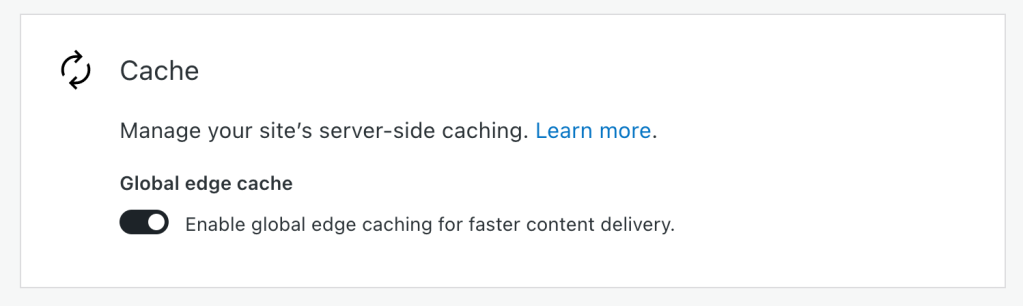
Scroll down to the “Cache” module.

Click the toggle for  “Enable global edge caching for faster content delivery.”

Once you click that toggle, you’re all set! 

Build your future on WordPress.com

Many hosts charge extra for this kind of edge caching, or require integration with a third-party provider. On WordPress.com, global edge caching is included on every plan, without any bandwidth restrictions.

This is just one more reason why WordPress.com stands out as the premier managed WordPress host. Be it staging sites, SSH and WP-CLI access, or unified site management, we’re always working on new tools to make WordPress.com an essential component of your development workflow. 

What other features would you like to see? How can we make WordPress.com an even more powerful place to build a website? Feel free to leave a comment or contact our friendly support team. And be sure to follow our develop blog to stay up-to-date with everything we’re doing to make your behind-the-scenes experience even better. 
Quelle: RedHat Stack
How to get the class in Kotlin? – getClass()

If you’re a Kotlin developer, you may have encountered instances when you needed to access the class facility of a specific sample. In Java, you typically use the .getClass() method to obtain the class object. However, Kotlin provides a more concise and intuitive way to achieve a similar result. This article will explore different approaches to getting the class in Kotlin and understand the alternative of .getClass().
The post How to get the class in Kotlin? – getClass() appeared first on ThoughtsOnCloud.
Quelle: Thoughts on Cloud

Introducing Footnotes, Details Block, and Writing Flow Improvements

The team at WordPress is always working to enhance your writing and publishing experience, whether adding brand-new features or fixing bugs and minor inconveniences. The latest round of updates includes a feature you’ve long been asking for, a new block, and a few improvements to the general flow and convenience of publishing. 

Let’s take a look! 

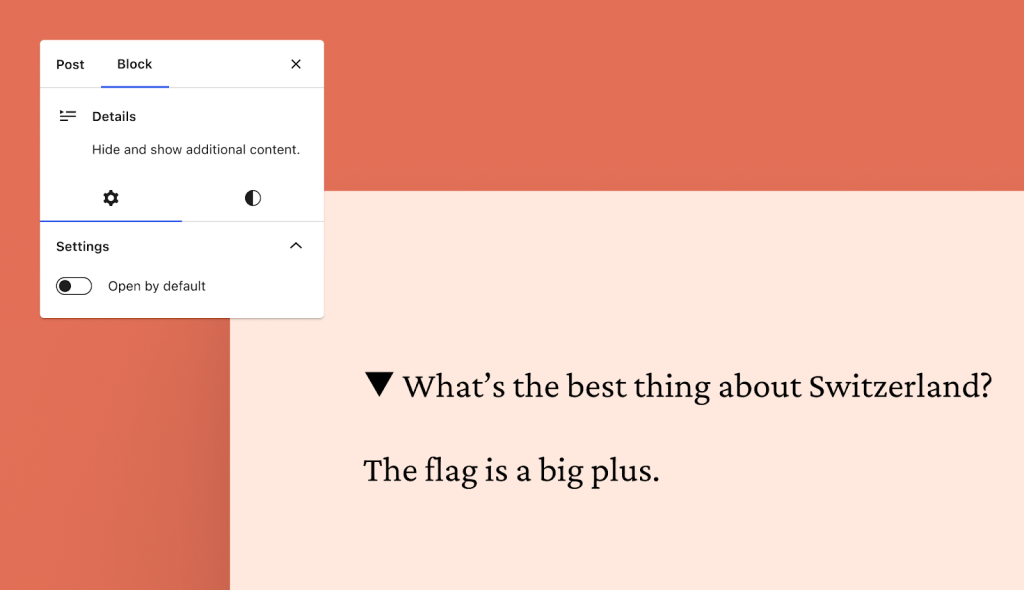
Hide content with the new Details Block 

The new Details Block features a drop-down arrow that reveals hidden information when clicked. This block provides a way to hide content that some readers might not want or need to see — detailed event information, fine print notices, methodology or research notes, spoilers for books and movies, even the punchline to a joke. It’s basically a way for readers to opt-in to viewing some bit of content. 

We’ve been using the Details Block internally at WordPress.com for ages, and we’re excited that it’s now been brought outside our digital office walls. 

Source your work or add context with footnotes

You’ve been asking for footnotes, and we’re glad to let you know that this feature is now available in the editor! 

To add a footnote: 

Click the small “More” arrow in the action bar that appears while editing a post/page, just to the right of the link icon.

Select “Footnote” at the top. 

From there, your cursor will automatically move to the footnote for you to add a reference or comment. 

Improve your writing flow with these small changes 

In addition to the new Details Block and Footnotes function, we’ve made a few small improvements to the overall writing flow that will make your writing and editing a bit smoother. 

“View post” button added 

It used to take multiple clicks from the editor to view published posts or pages. This inconvenience has been remedied with a new button at the top of the editor. When you click it you’ll be taken to the published post/page in a new tab. 

“Switch to draft” button moved 

This button has been placed next to the “Move to trash” button on the right sidebar. When you click “Switch to draft,” a confirmation box will appear asking you if you’re sure about un-publishing the post/page. 

“Preview” button enhanced 

The preview button has been streamlined and enhanced so that the icon displayed matches the device you’re previewing. “Desktop” mode, the default, displays a laptop icon while “Tablet” and “Mobile” display those respective devices. 

Are there other features that would your writing, editing, and publishing experience even better? Let us know in the comments!
Quelle: RedHat Stack

Upcoming Webinars: Discover the Power of Custom Headers

Few things command as much attention from your website visitors as the header. Beyond providing a practical spot for your logo and page navigation, it sets the tone for your entire site. With quality design and precise calls-to-action, it will guide users, improve conversions, enhance engagement, and optimize their journey through your site.

With the new Site Editor, anyone can easily create a stand-out header without writing a single line of code. Whether you’re a business owner or a passionate blogger, this webinar will empower you to create headers that represent your brand and resonate with your audience.

During this live demonstration, our experts will cover everything you need to know about customizing your site header:

Learn how to select, customize, and replace header template parts in the Site Editor

Discover how you can easily add and edit your site title, logo, social media links, a search bar, and other blocks in your custom header

Gain confidence in adding and customizing menus for site navigation

Attending this session is free and concludes with a live Q&A, so come prepared with your questions. If you aren’t able to attend any of the three sessions, we’ll send out a recording afterwards. So be sure to register below:

Register for this webinar

Don’t miss our other July webinars

We’ve arranged a series of engaging webinars this month, introducing you to the dynamic features of the WordPress Site Editor and the critical role a custom domain plays for your site. Both sessions aim to provide the tools required to elevate your WordPress.com site to new heights.

Mastering Custom Domains

Create a distinct online presence that reflects your brand and distinguishes you from competitors. Join us as we guide you through finding, registering, and linking a custom domain to your WordPress.com site. You will also gain a better understanding of how to set up a domain-specific email address and its consequential effect on increasing your email open rates.

Register for this webinar

Site Editor vs. Page Editor: Editing your entire site in WordPress

In this session where we’ll guide you in customizing every element of your WordPress site, from top to bottom. With our user-friendly Site Editor tools, you can personalize your entire website without needing coding experience!

Register for this webinar

Join us for our WordPress.com live webinars, carefully crafted with both beginners and seasoned site owners in mind. All our sessions are free to attend and conclude with a lively Q&A session, so you can engage directly with our expert Happiness Engineers.
Quelle: RedHat Stack

How to Convert Kotlin to Java in Android Studio

If you are working on an Android app development project, you might have encountered a situation where you need to transform Kotlin code into Java code. In this article, we will discuss how to convert Kotlin code to Java code in Android Studio, which provides a built-in feature for this purpose, as the official IDE for Android development.
The post How to Convert Kotlin to Java in Android Studio appeared first on ThoughtsOnCloud.
Quelle: Thoughts on Cloud

Kotlin when expression

In this tutorial, you will learn about Kotlin when{} block use cases. If you are just learning Kotlin or want to refresh your knowledge, this information will be useful for you.
The post Kotlin when expression appeared first on ThoughtsOnCloud.
Quelle: Thoughts on Cloud

Kotlin Flow in Android

A Kotlin Flow is a crucial constituent of this ecosystem. It resembles reactive streams and defines available methods and functions for producing, manipulating, and processing non-synchronous information streams.
The post Kotlin Flow in Android appeared first on ThoughtsOnCloud.
Quelle: Thoughts on Cloud

Android RecyclerView in Kotlin

RecyclerView is a UI (User Interface) component in Android development that provides a flexible and efficient way to display large data sets in a scrollable list or grid format. It is an improved version of the older ListView and GridView components, offering better performance and more advanced features.
The post Android RecyclerView in Kotlin appeared first on ThoughtsOnCloud.
Quelle: Thoughts on Cloud

Initializing by lazy and lateinit variables in Kotlin

In Kotlin, the lateinit and by lazy keywords ensure convenient ways to handle parameter beginning. They ensure flexibility and efficiency when working with variables that are not always available or are expensive to calculate. This article explores the concepts of lateinit and by lazy in Kotlin, their differences, and when to use each.
The post Initializing by lazy and lateinit variables in Kotlin appeared first on ThoughtsOnCloud.
Quelle: Thoughts on Cloud