Whitepaper: Selecting the right secure hardware for your IoT deployment

How do you go about answering those perplexing questions such as what secure hardware to use? How do I gauge the level of security? How much security do I really need and hence how much premium should I place on secure hardware? We’ve published a new whitepaper to shed light on this subject matter.

In our relentless commitment to securing IoT deployments worldwide, we continue to raise awareness to the true nature of security—that it is a journey and never an endpoint. Challenges emerge, vulnerabilities evolve, and solutions age thereby triggering the need for renewal if you are to maintain a desired level of security.

Securing your deployment as desired comprises planning, architecture, and execution main phases. For IoT, these are further broken down into sub-phases to include design assessment, risk assessment, model assessment, development, and deployment as shown in Figure 1. The decision process at each phase is equally important, the process must take all other phases into consideration for optimal efficacy. This is especially true when choosing the right secure hardware, also known as secure silicon or Hardware Secure Module(HSM), to secure an IoT deployment.
 

Figure 1: The IoT Security Lifecycle

Choosing the right secure hardware for securing an IoT deployment requires that you understand what you are protecting against (risk assessment), which drives part of the requirements for the choice. The other part of the requirements entails logistical considerations like provisioning, deployment and retirement, as well as tactical considerations like maintainability. These requirements in turn drive architecture and development strategies which then allow you to make the optimal choice of secure hardware. While this prescription is not an absolute guarantee for security, following these guidelines allows one to comfortably claim due diligence for a holistic consideration towards the choice of the right secure hardware, and hence the greatest chance of achieving security goals.

The choice itself requires knowledge of available secure hardware options as well as corresponding attributes such as protocol and standards compliances. We’ve developed a whitepaper, The Right Secure Hardware for Your IoT Deployment, to highlight the secure hardware decision process. This whitepaper educates on the Architecture Decision phase of the IoT security lifecycle. It comprises the second whitepaper for the IoT security lifecycle decision making series following previously published whitepaper, Evaluating Your IoT Security, which offers education on the Planning phase.
 
Download IoT Security Lifecycle whitepaper series:

Evaluating Your IoT Security.
The Right Secure Hardware for Your IoT Deployment.

What strategies do you use in selecting the right hardware to secure your IoT devices and deployment? We invite you to share your thoughts in comments below.
Quelle: Azure

Using Qubole Data Service on Azure to analyze retail customer feedback

It has been a busy season for many retailers. During this time, retailers are using Azure to analyze various types of data to help accelerate purchasing decisions. The Azure cloud not only gives retailers the compute capacity to handle peak times, but also the data analytic tools to better understand their customers.

Many retailers have a treasure trove of information in the thousands, or millions, of product reviews provided by their customers. Often, it takes time for particular reviews to show their value because customers "vote" for helpful or not helpful reviews over time. Using machine learning, retailers can automate identifying useful reviews in near real-time and leverage that insight quickly to build additional business value.

But how might a retailer without deep big data and machine learning expertise even begin to conduct this type of advanced analytics on such a large quantity of unstructured data? We will be holding a workshop in January to show you how easy that can be through the use of Azure and Qubole’s big data service.

Using these technologies, anyone can quickly spin up a data platform and train a machine learning model utilizing Natural Language Processing (NLP) to identify the most useful reviews. Moving forward, a retailer can then identify the value of reviews as they are generated by the user base and gain insights that can impact many aspects of their business.

Join Microsoft, Qubole, and Precocity for a half-day, hands on lab experience where we will show how to:

Leverage Azure cloud-based services and Qubole Data Service to increase the velocity of managing advanced analytics for retail
Ingesting a large retail review data set from Azure and leverage Qubole notebooks to explore data in a retail context
Demonstrate the autoscaling capability of a Qubole Spark cluster during a Natural Language Processing (NLP) pipeline
Train a machine learning model at scale using Open Source technologies like Apache Spark and score new customer reviews in real-time
Demonstrate use of Azure’s Event Hub and CosmosDB coupled with Spark Streaming to predict helpfulness of customer reviews in real-time

This workshop can be the basis of creating business value from reviews for other purposes including:

Fake review fraud detection
Identifying positive product characteristics
Identify influencers
Uncover new feature attributes for a product to inform merchandising

Register today for our event in Dallas, Texas on January 30th, 2017.

Space is limited, so register early!
Quelle: Azure

Maximize your VM’s Performance with Accelerated Networking – now generally available for both Windows and Linux

We are happy to announce that Accelerated Networking (AN) is generally available (GA) and widely available for Windows and the latest distributions of Linux providing up to 30Gbps in networking throughput, free of charge! 

AN provides consistent ultra-low network latency via Azure's in-house programmable hardware and technologies such as SR-IOV. By moving much of Azure's software-defined networking stack off the CPUs and into FPGA-based SmartNICs, compute cycles are reclaimed by end user applications, putting less load on the VM, decreasing jitter and inconsistency in latency.

With the GA of AN, region limitations have been removed, making the feature widely available around the world. Supported VM series include D/DSv2, D/DSv3, E/ESv3, F/FS, FSv2, and Ms/Mms.

The deployment experience for AN has also been improved since public preview. Many of the latest Linux images available in the Azure Marketplace, including Ubuntu 16.04, Red Hat Enterprise Linux 7.4, CentOS 7.4 (distributed by Rogue Wave Software), and SUSE Linux Enterprise Server 12 SP3, work out of the box with no further setup steps needed. Windows Server 2016 and Windows Server 2012R2 also work out of the box.

All the information needed to deploy a VM with AN can be found here, Windows AN VM or Linux AN VM.
Quelle: Azure

#Azure #SQLDW, the cost benefits of an on-demand data warehousing

Prices illustrated below are based on East US 2 as December 18th, 2017. For price changes updates, visit Azure Analysis Services, SQL Database, and SQL Data Warehouse pricing pages.

Azure SQL Data Warehouse is Microsoft’s SQL analytics platform, the backbone of your Enterprise Data Warehouse. The service is designed to allow customers to elastically and independently scale, compute and store. It acts as a hub to your data marts and cubes for an optimized and tailored performance of your EDW. Azure SQL DW offers guaranteed 99.9 percent high availability, PB scale, compliance, advanced security, and tight integration to upstream and downstream services so you can build a data warehouse that fits your needs. Azure SQL DW is the only data warehouse service enabling enterprises to gain insights from data everywhere with a global availability in more than 30 regions.

This is the last blog post in our series detailing the benefits of Hub and Spoke data warehouse architecture on Azure. On-premises, a Hub and Spoke architecture was hard and expensive to maintain. In the cloud, the cost of such architecture can be much lower as you can dynamically adjust compute capacity to what you need, when you need it. Azure is the only platform that enables you to create a high performing data warehouse that is cost optimized for your needs. You will see in this blog post how you can save up to 50 percent on cost by leveraging a Hub and Spoke design while increasing the overall performance and time to insights of your analytics solutions.

With the Microsoft Azure data platform you can build the data warehouse solution you want with workload isolation, advanced security and virtually unlimited concurrency. All of this can be done at an incredibly low cost if you leverage Azure Functions to build on-demand data warehousing. Imagine a company who wants to create a central data repository from a variety of source systems and push the combined data to multiple customers (e.g. ISV), suppliers (e.g. retail) or business units/departments. In this case study, this customer expects a strong activity for its Data Warehouse from 8 AM to 8PM during workdays. The performance ratio between high and low activity times is around 5x. They expect its curated data lake, SQL Data warehouse to be 10 TB large after compression and have peak time needs at 1,500 DWUs. For dash boarding and reports the solution will use Analysis Services, caching around 1 percent of the data. Thanks to SQL DB elastic Pools or Azure Analysis Services, the company can add concurrency, advanced security and workload isolation between their end users. SQL DB Elastic Pool offers a wide range of performance and cost with the cost per database starting at $0.60 with the Basic Tier.

The figure below illustrates the various benefits from moving to a Hub and Spoke Model. Microsoft Azure is the only platform offering the ability to build the data warehouse that fits your unique data warehousing needs.

Figure 1 – Benefits from a Hub and Spoke Architecture

In step one, this is the traditional data warehouse and is the starting point of building your Data Warehouse. Every data warehouse will have inherent limits that will be encountered with more and more people connecting to the service. In this example, with no auto-scale and a rigid level of provisioning you could spend $15k/month.

In step two, we introduce Azure Functions to use the full elasticity of SQL DW. In that simple example, we leverage the time trigger function and ask SQL DW to be at 1,500 DWUs at peak time (workdays 8AM-8PM) and 300 the rest of the time. This is a simple example, but you can go deeper on performance levels, add auto-scaling and auto-pausing/resuming to make your data warehouse auto-scale. In this example the cost goes down to $8k/month.

Step three is a great example on the breadth of customization you can make around SQL DW using SQL DB or Azure Analysis Services. No other data warehouse enables such a high level of customization because you cannot expand them. With that model, there is virtually no limit in concurrency and performance of your data warehouse. Here are a few examples of what you can do:

For high performance, interactive dash boarding and reports with pre-aggregate queries, Azure Analysis Services will be the right choice.
Do you want to provide a predictable performance to a large department at a fast speed? SQL DB Premium Single Database will be the right choice.
If you are an ISV, do you have a large number of customers that you need to accommodate at a free subscription level?  A Basic SQL DB Elastic Pool can accommodate a cost per database for less than $1/month.

Deploy in a SQL Data Warehouse Hub Spoke Template with SQL Databases.

In the example below, the cost of the data warehouse varies from $10k/month to $15.5k/month depending on what tier and service you pick. Remember that by offloading the performance from SQL DW to data marts or caching layers, you can dramatically reduce your DWU provisioning (while increasing concurrency). Also remember that you can leverage Azure Functions to start automating the level of performance you need at a specific point in time. Learn more about using Azure Functions to automate SQL DW Compute Levels.

In step four, you can further optimize the performance of your data marts by connecting them to Azure Analysis Services for caching. In this example, the cost is between $16k and $21.5k/month with the opportunity to be even lower if you offload the performance needs on your data marts.

Figure 2 – Summary of the benefits to build a Hub and Spoke Data Warehouse

In summary, we moved from a static and monolithic data warehouse costing $28k per month to an elastic Hub & Spoke data warehouse optimized for performance and accessed by thousands of users with a potential cost saving of 50 percent. We can guarantee you that each of the services will continue further integrating with each other to provide the best data warehouse experience.

If you need our help for a POC, contact us directly by submitting a SQL Data Warehouse Information Request. Stay up-to-date on the latest Azure SQL DW news and features by following us on Twitter @AzureSQLDW. Next week, we will feature the deeper integration between Azure Analysis Services and SQL DW.
Quelle: Azure

Detect the latest ransomware threat (aka Bad Rabbit) with Azure Security Center

This blog post was authored by Tim Burrell, Principal Engineering Manager, Microsoft Threat Intelligence Center .

The Windows Defender team recently updated the malware encyclopedia with a new ransomware threat, Ransom:Win32/Tibbar (also known as Bad Rabbit). This update includes comprehensive guidance on mitigating the new threat. Microsoft antimalware solutions, including Windows Defender Antivirus and Microsoft Antimalware for Azure services and virtual machines, were updated to detect and protect against this threat.

This post summarizes additional measures that you can take to prevent and detect this threat for workloads running in Azure through Azure Security Center. Get more information on enabling Azure Security Center.

Prevention

Azure Security Center scans your virtual machines and servers to assess the endpoint protection status. Issues without sufficient protection are identified in Compute, along with any related recommendations.

Drilling into the Compute pane, or the overview recommendations pane, shows more details including the Endpoint Protection installation recommendation, as shown below.

Clicking on this leads to a dialog allowing selection and installation of an endpoint protection solution, including Microsoft’s own antimalware solution for Azure services and virtual machines, which will help protect against such ransomware threats.

These recommendations and associated mitigation steps are available to Azure Security Center Free tier customers.

Detection

Azure Security Center customers who have opted into the Standard-Tier also benefit from generic and specific detections related to the Ransom:Win32/Tibbar.A (Bad Rabbit) ransomware. These alerts are accessed via the Detection pane highlighted below, and require the Azure Security Center Standard tier.

For example, generic alerts related to ransomware include:

Event log clearing which ransomware, such as Bad Rabbit, performs
Deleting shadow copies to prevent customers from recovering data. An example is shown below:

In addition, Azure Security Center has updated its ransomware detection with specific IOCs related to Bad Rabbit.

You should follow the remediation steps detailed in the alert, namely:

Run a full anti-malware scan and verify that the threat was removed.
Install and run Microsoft Safety Scanner.
Perform these actions preemptively on other hosts in your network.

Although the alert relates to a specific host, sophisticated ransomware tries to propagate to other nearby machines. It is important to apply these remediation steps to protect all hosts on the network, not just the host identified in the alert.
Quelle: Azure

BlockApps STRATO Suite upgrade now available on Azure

BlockApps was one of the first blockchains that was offered in Azure back in 2015. The partnership with the team on the STRATO product line has continued to evolve based on feedback from real world use cases and technical innovation from the engineering group at BlockApps. One of the most attractive and distinguishing elements to the STRATO product is the ability to consume the blockchain resources via a simple REST based API. This new generation of the product continues to use this model and adds new functionality. The new offerings that form the blockchain suite include the following:

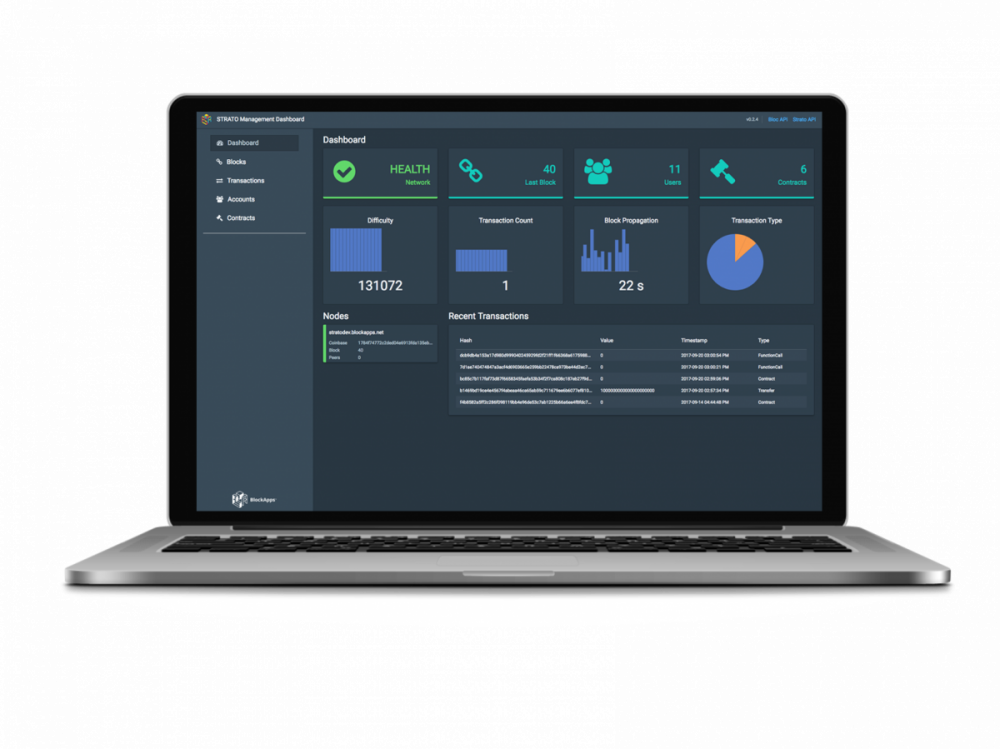
SMD (STRATO Management Dashboard)
Updated and simple Swagger documentation for easy to consume APIs
Updated version of BLOC
Cirrus Analytics
Flexible infrastructure scaling

STRATO Management Dashboard

The STRATO Management Dashboard provides a single pane of glass view into the blockchain network. In addition to purely surfacing telemetry from the blockchain, the dashboard allows customers to interact with the network with no coding skills required. The features offered by the dashboard are:

Telemetry and health of the blockchain
Network topology, including details about network peers
Account management, including creation of new accounts and funding of those accounts
Creation and execution of smart contracts
Querying blockchain state via Cirrus

Swagger Documentation

Providing a REST API that can be used to build applications is powerful on its own, however, allowing developers to quickly understand the API is also critical to get maximum benefit from the platform.  One of the most popular frameworks for both documenting an API and allowing simple interaction with it is Swagger. When creating a STRATO network via the Azure Marketplace in either Single or Multi- node form, the documentation is provided as part of the deployment for convenience. Additionally, the team at Blockapps have provided a running instance of this on their website.

There are two different APIs that get deployed as part of the STRATO network. These are accessed from the top right corner of the SMD interface.

Bloc

Bloc is one of the foundational elements of STRATO. Bloc is the API that abstracts the user from the complexity of the blockchain and of the more advanced operations provided by the STRATO API. In the way that an SDK makes it easier for users to work with a complex API, Bloc is the component that fills this need. This makes interacting with a blockchain simple and is powering the SMD interface to allow codeless account provisioning, contract creation and transaction signing/execution. Again, this component is integral to STRATO and is deployed as part of the network automatically.

Cirrus Analytics

Cirrus is a component of STRATO that provides real-time insights into smart contracts, specifically state contained within the smart contracts. Following the theme of Bloc and STRATO, a simple RESTful API is provided to access this. Additionally, Cirrus can be accessed directly in UI for in the SMD console. While blockchain technology can provide some new features that enterprises are interested in using, harnessing the data that is captured and stored in blockchain state data is not a trivial task. Cirrus works by indexing smart contracts and making aggregates and queries available to search and build analytics solutions on top of STRATO. The setup is very easy. The smart contract is tagged for indexing and that is really it. As changes are made to the state contained within the indexed contracts, the data is automatically available in SMD and via the Cirrus API.

Infrastructure Scaling

STRATO provides a catalog of unique features that make it desirable for enterprises that are building blockchain based applications. To make the process as simple as possible, the Azure cloud can be used to create both Single Node and Multinode networks using STRATO. This makes the process of creating simple to complex network topologies with STRATO, asking the user to provide some simple inputs to control the deployment. Breaking it down to simply providing the speed and size of the STRATO network, along with the network credentials required to access the private blockchain. Multinode networks can be created in minutes leveraging the hyperscale Azure cloud.

Next steps

The details above describe the unique value that STRATO provides, developer friendly and production ready! Create your own STRATO network by heading over to the Azure Marketplace in a Single VM or a full Multinode network. The goal is to make creating decentralized applications as simple as possible. BlockApps have workloads in production with STRATO, an example can be found in a case study from the team, on their website.
Quelle: Azure

Deep dive into Azure IoT Hub notifications and Device Twin

Azure IoT Hub notifications give detailed insight into operations happening in your IoT solution such as devices being registered, deregistered or reporting data. Combined with Device Twins, they offer a very powerful tool to control and monitor your IoT solution. Here is how you can replicate devices Twins properties to an external store leveraging Azure IoT Hub notifications.

Storing and managing devices data in Azure IoT

A key feature of Azure IoT Hub is the ability to execute SQL-based queries on data published from devices. Such data is persisted to an IoT Hub managed store allowing IoT solutions to simply query device data without having to provision their own store, define a data model, keep the store synchronized and handle the other challenges of building and maintaining a custom store.

That said, some IoT solutions require device data to be kept in an external store. Reasons may include the need to query device data in a manner not supported by the IoT Hub data store (i.e. graph queries, text search, etc.), the need to join the device data with a broader dataset or the need to control where the data is replicated.

To illustrate this, we created a sample that demonstrates the use of IoT Hub device lifecycle and twin change notifications to replicate device identities and twin properties to an external store – specifically an Azure Cosmos Graph Database. The sample maintains a graph of buildings, rooms, floors and thermostats. Thermostat vertices are dynamically added to the graph as new thermostat devices are provisioned and are updated as the thermostats report their room's temperature. The following diagram shows the architecture of the solution with the projects of the sample (in blue), their dependent Azure resources (in orange) and the overall data flow:

The samples are implemented in the following projects:

ThermostatAdmin.csproj – an admin tool that provisions new thermostats
ThermostatDevice.csproj – the thermostat devices that connect to the IoT Hub and report their room’s current temperature
SyncGraphDbApp.csproj – leverages Azure IoT Hub notifications to replicate thermostat data to the broader graph

Device Twin & Notification Primer

Device Twins are used to synchronize state between an IoT solution’s cloud service and its devices. Each device’s twin exposes a set of desired properties and reported properties. The cloud service populates the desired properties with values it wishes to send to the device. When a device connects it requests and/or subscribes for its desired properties and acts on them. Likewise, a device populates properties with values it wishes to send to the cloud service via its twin’s reported properties. The cloud service can retrieve any of a device’s reported or desired properties via point lookups or, as mentioned in the overview, a query across a set of devices based on its properties. Alternatively a cloud service can be notified of device lifecycle events and twin property change events allowing the service to react as new devices are added, existing devices are removed or as twin properties change.

Let’s go through some Device Twin basics used in the sample. First, each new thermostat needs to be registered with its IoT Hub as a device. This allows the thermostat to securely connect to its hub and allows the cloud service to reference the device via a user-defined device ID. Here's a snippet from ThermostatAdmin:

async Task AddThermostatAsync(RegistryManager registryManager, string deviceId)
{
var device = new Device(deviceId);

Console.WriteLine($"Add thermostat '{deviceId}' …");
await registryManager.AddDeviceAsync(device);
Console.WriteLine("Thermostat added");

Twin thermostat = await registryManager.GetTwinAsync(deviceId);
PrintTwin(thermostat);
}

Once the thermostat is registered a connection string can be composed that allows the physical thermostat to connect to the hub. IoT Hub currently supports authentication via symmetric keys and X.509 certificates. ThermostatDevice uses the former as follows:

// create a device client to emulate therostat sending temperature update
Console.WriteLine("Create device client and connect to IoT Hub …");
Service.Device device = await registryManager.GetDeviceAsync(deviceId);
if (device == null)
{
Console.WriteLine($"Thermostat {deviceId} not registered. Please register the thermostat first.");
return;
}

var authMethod = new DeviceAuthenticationWithRegistrySymmetricKey(deviceId, device.Authentication.SymmetricKey.PrimaryKey);
var connectionStringBuilder = Device.IotHubConnectionStringBuilder.Create(iotHubConnectionStringBuilder.HostName, authMethod);
DeviceClient deviceClient = DeviceClient.CreateFromConnectionString(connectionStringBuilder.ToString(), Device.TransportType.Mqtt);

await deviceClient.OpenAsync();
Console.WriteLine("Thermostat connected");

The code snippet above gets the previously registered device from the IoT Hub to obtain the device’s symmetric key used to generate authentication tokens. Typically the device will not have permissions to get its symmetric key in this manner but is done so for the sake of the sample. The sample then creates an instance of DeviceAuthenticationWithRegistrySymmetricKey object, which represents the authentication method used when communicating with the hub, passing the device’s symmetric key and ID. The IotHubConnectionStringBuilder helper class is then used to generate the device’s connection string using the DeviceAuthenticationWithRegistrySymmetricKey object and the URI to the IoT Hub where the device is registered. DeviceClient.CreateFromConnectionString is then used to create a DeviceClient with the newly formed connection string. OpenAsync opens a link to the hub.

Now that the thermostat is connected to the hub it can report its room’s current temperature. The following code snippet from ThermostatDevice reports the current temperature via twin reported properties:

var props = new TwinCollection();
props["temperature"] = temperature;

Console.WriteLine();
Console.WriteLine($"Update reported properties:");
Console.WriteLine(props.ToJson(Newtonsoft.Json.Formatting.Indented));

await deviceClient.UpdateReportedPropertiesAsync(props);
Console.WriteLine("Temperature updated");

The TwinCollection class specifies a set of properties to report. DeviceClient.UpdateReportedPropertiesAsync sends the set of properties to the IoT Hub where they are persisted in the hub's default store. The cloud service can then retrieve the properties for a specific device by its device ID or via queries as discussed earlier.

Device Twin Notifications are implemented using another IoT Hub feature called routes. Routes allow device messages and notifications from various IoT Hub sources to be forwarded to user specified endpoints based on a filter. For instance whenever a device is added or removed from an IoT Hub a routable notification is raised. Whenever a twin property is updated a routable notification is raised. In this sample, both of these notification types are routed to an preconfigured Azure Event Hub endpoint. SyncGraphDbApp listens on an Event Hub for these notifications and synchronizes the graph store. Routes can be configured via the Azure Portal or via ARM templates.

The full solution

To experience the end-to-end sample, you can follow the step-by-step instructions on GitHub.

In the sample, the SyncGraphDbApp application simulates a cloud service that leverages Azure IoT Hub notifications to replicate thermostat data to a Cosmos DB graph. SyncGraphDbApp uses device lifecycle notifications to create Thermostat vertices in the Cosmos DB Graph for each newly provisioned thermostat whenever a new Thermostat is registered via ThermostatAdmin. As ThermostatDevice publishes the thermostat's current temperature SyncGraphDbApp updates the Temperature field of the Thermostat vertex.

SyncGraphDbApp handles the processing of device lifecycle and twin change notifications. Internally its TwinChangesEventProcessor class reads notifications routed to a SyncGraphDBEventHub and updates the graph accordingly. The processor is implemented as a typical Azure Event Hub event processor meaning it has a corresponding factory class (TwinChangesEventProcessorFactory), implements IEventProcessor and is triggered by a EventProcessorHost. For more information on Azure Event Hub event processors see Event Hubs programming guide.

TwinChangesEventProcessor.ProcessEventAsync is called when a new batch of notifications arrive. ProcessEventAsync calls SyncDataAsync to process the batch and updates the event hub checkpoint based on the last successfully processed notification. The checkpoint allows SyncGraphDbApp to restart and resume processing without dropping any notifications.

public async Task ProcessEventsAsync(PartitionContext context, IEnumerable<EventData> messages)
{
List<EventData> messagesList = messages.ToList();
int lastSuccessfulIndex = -1;
while (messagesList.Count > 0)
{
lastSuccessfulIndex = await this.SyncDataAsync(context, messagesList);

await context.CheckpointAsync(messagesList[lastSuccessfulIndex]);

// remove all succeeded messages from the list
for (int i = 0; i < lastSuccessfulIndex + 1; i++)
{
messagesList.RemoveAt(0);
}
}
}

Each notification is processed based on its message source and operation type. These are pulled from each notification’s eventData. Properties header along with source hub name and device ID. The following table describes the meaning of each message source and operation type combination:

Message Source

Operation Type

Description

deviceLifeCycleEvents
createDeviceIdentity
A new device was registered in the hub

deviceLifeCycleEvents
deleteDeviceIdentity
An existing device was unregistered

twinChangeEvents
updateTwin
Contains a changeset to be applied to an existing twin in the graph (e.g. PATCH)

twinChangeEvents
replaceTwin
Contains a full twin to replace existing twin in graph (e.g. PUT)


SyncGraphDbApp internally implements SyncCommand subclasses to process each message source and operation type combination. To start CreateDeviceIdentitySyncCommand adds a new vertex to the graph that represents a new thermostat and associates the thermostat with a Room vertex based on its location via a new edge. The sample only allows one thermostat to be associated with a room at a time. Also note that notifications can have duplicates. As a result conflict errors must be handled.

try
{
Console.WriteLine("Add new thermostat vertex …");
vTwin = await this.AddVertexAsync("thermostat", graphTwinId, null);
}
catch (DocumentClientException ex) when (ex.Error.Code == "Conflict")
{
Console.WriteLine($"Thermostat vertex {graphTwinId} already exists in the graph.");
return;
}

// replace location
Location? location = this.ParseTaggedLocation(this.jTwin);
if (location != null)
{
await this.ReplaceLocationAsync(vTwin, location.Value);
}

DeleteDeviceIdentityCommand removes the existing vertex for the specified thermostat and the edge associating the thermostat with a room:

string graphTwinId = MapGraphTwinId(this.hubName, this.twinId);
Console.WriteLine($"Try remove twin {graphTwinId} from graph …");

await this.ExecuteVertexCommandAsync($"g.V('{graphTwinId}').drop()");

UpdateTwinSyncCommand performs two steps: 1) updates the temperature field of the thermostat's vertex and 2) associates a Thermostat vertex with a new Room vertex if its location changed:

string graphTwinId = MapGraphTwinId(this.hubName, this.twinId);

Console.WriteLine("Get thermostat vertex …");
Vertex vTwin = await this.GetVertexByIdAsync(graphTwinId);
if (vTwin == null)
{
Console.WriteLine("Vertex does not exist. Execute Add command …");
await this.AddTwinAsync(this.hubName, this.twinId, this.jTwin);
return;
}

Dictionary<string, string> properties = null;
string reportedTemperature = this.ParseReportedTemperature(this.jTwin);
if (!string.IsNullOrWhiteSpace(reportedTemperature))
{
properties = new Dictionary<string, string>
{
{"temperature", reportedTemperature }
};

Console.WriteLine("Update vertex temperature property …");
vTwin = await this.UpdateVertexAsync(graphTwinId, properties);
}

Location? location = this.ParseTaggedLocation(this.jTwin);
if (location != null)
{
await this.UpdateLocationAsync(vTwin, location.Value);
}

ReplaceTwinSyncCommand has the same implementation as UpdateTwinSyncCommand since changesets and full replacements are processed in the same manner for this scenario.

Tips & Tricks

SyncGraphDbApp is a single instance console application that demonstrates how to consume IoT Hub notifications and update an external store. In order to make the solution scale it needs to be hosted in an Azure Worker Role which scales to multiple instances and listens on a partitioned Event Hub. IoT Hub notifications use the notification's device ID as the Event Hub partition key. As a result, device lifecycle and twin change notifications are routed to a partition based on the notification's device ID. For more information please see documentation.
When processing twinChangeEvents notifications, both replaceTwin and updateTwin opTypes must be processed to ensure the latest changes are synced.
In the sample the IoT Hub routes are created when the IoT Hub is created. As a result, the target Event Hub contains all the device lifecycle and twin change events from the start of the hub's lifetime. This ensures SyncGraphDBApp receives all the events needed to completely sync the graph DB. However, if the SyncGraphDBApp needs to sync a hub that was previous created or if SyncGraphDBApp became unavailable for a period of time longer than the Event Hub's retention policy, SyncGraphDBApp would need a way to catch up. Such a catch-up procedure would work as follows:

Create IoT Hub's routes as explained previously.
Query IoT Hub for all twins and update Graph DB with results. SyncGraphDBApp's Program.RunSyncSampleAsync shows a simplistic implementation of this step.
Start processing notifications and only commit twin change notifications whose version is greater than the version in the Graph DB.

The routes created in this sample simply specify a source and a target for the notifications. IoT Hub routes also support a powerful filtering mechanism called a condition. For instance, if a thermostat reports a temperature over a specific threshold, the notification can be sent to another target that handles this condition differently (i.e. converts notification to a high priority email). The following route configuration includes a condition such that the notification is only forwarded to the specified target endpoint if the temperature reported property is over 100:

{
"name": "TemperatureExceedsThreshold",
"source": "TwinChangeEvents",
"condition": "$body.properties.reported.Temperature.NewValue > 100",
"endpointNames": [
"TemperatureExceedsThresholdNotifications"
],
"isEnabled": true
},

Let us know what you think

Once you have gone through the sample, let us know if you have feedback or suggestions, and do not hesitate to send us contributions directly on GitHub as well.

References

Understanding Device Twins
IoT Hub query language for device twins, jobs, and message routing
Event Hubs programming guide

Quelle: Azure

Azure GDPR resources: Unmatched focus on customer compliance needs

In June 2017, we alerted you via blog post that if you have GDPR questions, Azure has answers. Through a variety of listening channels, we have collected customer GDPR feedback, and have embarked in earnest on delivering the right content to customers. As part of our unwavering commitment to GDPR compliance, Azure has been busy producing collateral to help customers with their GDPR compliance needs. Azure is unmatched in the industry when it comes to addressing customers GDPR requirements, and we encourage customers to refer to the resources below when looking for GDPR answers.

1. Contractual commitment in the Online Services Terms via the inclusion of GDPR terms.

The GDPR requires that a controller only use a processor that guarantees it will “implement appropriate technical and organizational measures” such that the rights of data subjects are protected and the processing requirements of the GDPR are satisfied. In the context of Azure, Microsoft is a processor and its customer is the controller. The contract agreement also covers Microsoft’s role as a subprocessor as explained in GDPR Terms (Attachment 4).

2. Azure GDPR landing page provides essential information to customers on how to get started with GDPR compliance. It also links to the updated main Microsoft GDPR landing page for additional resources.

3. Assessment tools

Customer tool: Online self-evaluation tool with 26 questions intended to help customers review their overall level of readiness for GDPR compliance. The tool has been translated into German, French, Spanish, and Italian.
Partner tool: Detailed assessment tool with 125 questions partners can use for customer assessments. Questions and answers are stored in an Excel spreadsheet, with a corresponding Power BI dashboard for comprehensive visualization. The GDPR Detailed Assessment is intended to assist partners in facilitating customer assessments.

4. Technical white papers

Learn how to discover personal data with Azure: This article provides guidance on how to discover, identify, and classify personal data in several Azure services, including Azure Data Catalog, Azure Active Directory, SQL Database, Power Query for Hadoop clusters in Azure HDInsight, Azure Information Protection, Azure Search, and SQL queries for Azure Cosmos DB.
Learn how to manage personal data with Azure: This article provides guidance on how to correct, update, delete, and export personal data in Azure Active Directory and Azure SQL Database.
Learn how to protect personal data with Azure: This article provides pointers to other documentation to help customers use Azure security technologies and services to protect personal data.
Learn how to document and report personal data with Azure: This article discusses how to use Azure reporting services and technologies to help protect privacy of personal data.

5. Mainstream white papers

How Azure can help organizations become compliant with the GDPR: Provides links to online documentation to help customers meet GDPR requirements outlined in Articles 7, 9, 15, 20, 25, 30, 32, 33, and 46.
Guide to enhancing privacy and addressing GDPR requirements with the Microsoft SQL Platform: Provides specific guidance with links to online documentation for addressing GDPR requirements in Articles 25, 30, 32, 33, and 35.  Covers Azure SQL Database, Azure SQL Data Warehouse, SQL Server on Azure Virtual Machines, and other Microsoft SQL related technologies.
Supporting your GDPR compliance journey with Microsoft EMS: Describes how Microsoft Enterprise Mobility and Security (EMS) suite can help customers address key GDPR scenarios including data protection, data access restriction, data control in cloud apps, and detection of data breaches.
Beginning your GDPR journey: Provides introduction to GDPR across four pillars (Discover, Manage, Protect, Report) applicable to Microsoft online services.
GDPR overview: Provides high-level overview of GDPR structured as a series of questions and answers.
Data classification: Azure data classification for cloud readiness including references to GDPR.
Accelerate GDPR compliance with Microsoft Cloud: eBook that covers key GDPR requirements across Microsoft Online Services, including Azure.  Provides a rollup of the content from the GDPR Assessment Tool.

6. Partner resources

Available from the GDPR partner network. 

Stay tuned for additional white papers, tools, and workshops that we will be releasing in the coming months.

See a comprehensive overview of Azure compliance offerings.
Quelle: Azure

Azure Analysis Services web designer adds new DAX query viewer

In July, we released the Azure Analysis Services web designer. This new browser-based experience allows developers to start creating and managing Azure Analysis Services (AAS) semantic models quickly and easily. While SQL Server Data Tools (SSDT) and SQL Server Management Studio (SSMS) are still the primary tools for development, this new experience is intended to make modeling fast and easy. It is great for getting started on a new model or to do things such as adding a new measure to an existing model.

Today we are announcing new functionality that will allow you to generate, view and edit your DAX queries. This provides a great way to learn DAX while testing the data in your models. DAX or Data Analysis Expressions is a formula language used to create custom calculations in Analysis Services. DAX formulas include functions, operators, and values to perform advanced calculations on data in tables and columns.

To get started open the web designer from the Azure Portal.

Once inside the designer, select the model that you wish to query.

This opens up the query designer where you can drag and drop fields from the right to graphically generate and then run a query against your model.

Now switch the view from designer to query.

This will bring up the new query editor with the DAX query that was generated from the query that was graphically created in the previous steps.

The query text can be edited and rerun to see new results.


You can try the Azure Analysis web designer today by linking to it from a server in the Azure portal.

Submit your own ideas for features on our feedback forum. Learn more about Azure Analysis Services and the Azure Analysis Services web designer.
Quelle: Azure

Highlighting 3 New Features in Azure Data Factory V2

Having just announced the V2 preview availability of Azure Data Factory at Ignite in Orlando, I'm going to start a new blog series focusing on three new features in Azure Data Factory for different types of data integration users. These features are all available now, in preview, in the ADF V2 service. So, for part one of this series, I’ll focus on Data Engineers who build and maintain ETL processes. There are very important parts of building production-ready data pipelines:

1. Control Flow

For SSIS ETL developers, Control Flow is a common concept in ETL jobs, where you build data integration jobs within a workflow that allows you to control execution, looping, conditional execution, etc. ADF V2 introduces similar concepts within ADF Pipelines as a way to provide control over the logical flow of your data integration pipeline. In the updated description of Pipelines and Activities for ADF V2, you'll notice Activities broken-out into Data Transformation activities and Control activities. The Control activities in ADF will now allow you to loop, retrieve metadata and lookup from external sources, as found in documentation. 

2. Parameterized Pipelines

We've added the ability to parameterize pipelines, which can be used in conjunction with expressions and triggers (see triggers below under Scheduling) in new and exciting ways when defining data pipelines in ADF.

Here is an example of using parameters to chain activities and to conditionally execute the next activity in the pipeline so that you can an email and perform next actions on the data sets. This also demonstrates another new ADF activity, the Web activity which is used, in this case, to send an email. To learn more, please visit documentation.

3. Flexible Scheduling

We've changed the scheduling model for ADF so that when you build a pipeline in ADF V2, you will no longer build dataset-based time slices, data availability and pipeline time windows. Instead, you will attach separate Trigger resources that you can then use to reference pipelines that you've built and execute them on a wall-clock style schedule. As mentioned above, Triggers also support passing parameters to your pipelines, meaning that you can create general-use pipelines and then leverage parameters to invoke specific-use instances of those pipelines from your trigger. For the preview period, take a look at using the wall-clock calendar scheduling, which is an update to our ADF scheduling model from the time-slice dataset use case in V1. During the preview of the V2 ADF service, we will continue to add more Trigger types that you can use to execute your pipelines automatically.

Once you’ve built your data pipelines and schedules in Azure Data Factory V2, you’ll need to monitor those ETL jobs on a regular basis. During this initial preview period of the ADF V2 service, monitor your pipelines via PowerShell, Azure Monitor or .NET. We also just announced the preview for the new visual monitoring experience in the V2 ADF service. Here is how to get started with that monitoring experience.
Quelle: Azure