Microsoft’s open source journey: From 20,000 lines of Linux code to AI at global scale

Microsoft’s engagement with the open source community has transformed the company from a one-time skeptic to now being one of the world’s leading open source contributors. In fact, over the past three years, Microsoft Azure has been the largest public cloud contributor (and the second largest overall contributor) to the Cloud Native Computing Foundation (CNCF). So, how did we get here? Let’s look at some milestones in our journey and explore how open-source technologies are at the heart of the platforms powering many of Microsoft’s biggest products, like Microsoft 365, and massive-scale AI workloads, including OpenAI’s ChatGPT. Along the way, we have also introduced and contributed to several open-source projects inspired by our own experiences, contributing back to the community and accelerating innovation across the ecosystem.  

Innovate faster with open source on Azure

Embracing open source: Key milestones in Microsoft’s journey

2009—A new leaf: 20,000 lines to Linux. In 2009, Microsoft contributed more than 20,000 lines of code to the Linux kernel, initially Hyper‑V drivers, under General Public License, version 2 (GPLv2). It wasn’t our first open source contribution, but it was a visible moment that signaled a change in how we build and collaborate. In 2011, Microsoft was in the top 5 companies contributing to Linux. Today, 66% of customer cores in Azure run Linux.

2015—Visual Studio code: An open source hit. In 2015, Microsoft released Visual Studio Code (VS Code), a lightweight, open-source, cross-platform code editor. Today, Visual Studio and VS Code together have more than 50 million monthly active developers, with VS Code itself widely regarded as the most popular development environment. We believe AI experiences can thrive by leveraging the open-source community, just as VS Code has successfully done over the past decade. With AI becoming an integral part of the modern coding experience, we’ve released the GitHub Copilot Chat extension as open source on GitHub.

2018—GitHub and the “all-in” commitment. In 2018, Microsoft acquired GitHub, the world’s largest developer community platform, which was already home to 28 million developers and 85 million code repositories. This acquisition underscored Microsoft’s transformation. As CEO Satya Nadella said in the announcement, “Microsoft is all-in on open source… When it comes to our commitment to open source, judge us by the actions we have taken in the recent past, our actions today, and in the future.” In the 2024 Octoverse, GitHub reported 518 million public or open-source projects, over 1 billion contributions in 2024, about 70,000 new public or open-source generative AI projects, and about a 59% year-over-year surge in contributions to generative AI projects. 

Open source at enterprise scale: Powering the world’s most demanding workloads 

Open-source technologies, like Kubenetes and PostgreSQL, have become foundational pillars of modern cloud-native infrastructure—Kubernetes is the second largest open-source project after Linux and now powers millions of containerized workloads globally, while PostgreSQL is one of the most widely adopted relational databases. Azure Kubernetes Service (AKS) and Azure’s managed Postgres take the best of these open-source innovations and elevate them into robust, enterprise-ready managed services. By abstracting away the operational complexity of provisioning, scaling, and securing these platforms, AKS and managed PostgreSQL lets organizations focus on building and innovating. The combination of open source flexibility with cloud-scale reliability allows services like Microsoft 365 and OpenAI’s ChatGPT to operate at massive scale while staying highly performant.

COSMIC: Microsoft’s geo-scale, managed container platform powers Microsoft 365’s transition to containers on AKS. It runs millions of cores and is one of the largest AKS deployments in the world. COSMIC bakes in security, compliance, and resilience while embedding architectural and operational best practices into our internal services. The result: drastically reduced engineering effort, faster time-to-market, improved cost management, even while scaling to millions of monthly users around the world. COSMIC uses Azure and open-source technologies to operate at planet-wide scale: Kubernetes event-driven autoscaling (KEDA) for autoscaling, Prometheus, and Grafana for real-time telemetry and dashboards to name a few.

OpenAI’s ChatGPT: ChatGPT is built on Azure using AKS for container orchestration, Azure Blob Storage for user and AI-generated content, and Azure Cosmos DB for globally distributed data. The scale is staggering: ChatGPT has grown to almost 700 million weekly active users, making it the fastest-growing consumer app in history.1 And yet, OpenAI operates this service with a surprisingly small engineering team. As Microsoft’s Cloud and AI Group Executive Vice President Scott Guthrie highlighted at Microsoft Build in May, ChatGPT “needs to scale … across more than 10 million compute cores around the world,” …with approximately 12 engineers to manage all that infrastructure. How? By relying on managed platforms like AKS that combine enterprise capabilities with the best of open source innovation to do the heavy lifting of provisioning, scaling, and healing Kubernetes clusters across the globe. 

Consider what happens when you chat with ChatGPT: Your prompt and conversation state are stored in an open-source database (Azure Database for PostgreSQL) so the AI can remember context. The model runs in containers across thousands of AKS nodes. Azure Cosmos DB then replicates data in milliseconds to the datacenter closest to the user, ensuring low latency. All of this is powered by open-source technologies under the hood and delivered as cloud services on Azure. The result: ChatGPT can handle “unprecedented” load—over one billion queries per day, without a hitch, and without needing a giant operations team. 

Deploy containers on Azure Kubernetes Service

What Azure teams are building in the open

At Microsoft, our commitment to building in the open runs deep, driven by engineers across Azure who actively shape the future of open-source infrastructure. Our teams don’t just use open-source technologies, they help build and evolve them.  

Our open-source philosophy is straightforward: we contribute upstream first and then integrate those innovations into our downstream products. To support this, we play a pivotal role in upstream open-source projects, collaborating across the industry with partners, customers, and even competitors. Examples of projects we have built or contributed to include:  

Dapr (Distributed Application Runtime): A CNCF-graduated project launched by Microsoft in 2019, Dapr simplifies cloud-agnostic app development with modular building blocks for service invocation, state, messaging, and secrets.

Radius: A CNCF Sandbox project that lets developers define application services and dependencies, while operators map them to resources across Azure, AWS, or private clouds—treating the app, not the cluster, as the unit of intent.

Copacetic: A CNCF Sandbox tool that patches container images without full rebuilds, speeding up security fixes—originally built to secure Microsoft’s cloud images.

Dalec: A declarative tool for building secure OS packages and containers, generating software bill of materials (SBOMs) and provenance attestations to produce minimal, reproducible base images.

SBOM Tool: A command line interface (CLI) for generating SPDX-compliant SBOMs from source or builds—open-sourced by Microsoft to boost transparency and compliance.

Drasi: A CNCF Sandbox project released in 2024, Drasi reacts to real-time data changes using a Cypher-like query language for change-driven workflows. 

Semantic Kernel and AutoGen: Open-source frameworks for building collaborative AI apps—Semantic Kernel orchestrates large language models (LLMs) and memory, while AutoGen enables multi-agent workflows.

Phi-4 Mini: A compact 3.8 billion-parameter AI model released in 2025, optimized for reasoning and mathematics on edge devices; available on Hugging Face.

Kubernetes AI Toolchain Operator (KAITO): A CNCF Sandbox Kubernetes operator that automates AI workload deployment—supporting LLMs, fine-tuning, and retrieval-augmented generation (RAG) across cloud and edge with AKS integration. 

KubeFleet: A CNCF Sandbox project for managing applications across multiple Kubernetes clusters. It offers smart scheduling, progressive deployments, and cloud-agnostic orchestration. 

This is just a small sampling of some of the open-source projects that Microsoft is involved in—each one sharing, in code, the lessons we’ve learned from running systems at a global scale and inviting the community to build alongside us.  

Open Source + Azure = Empowering the next generation of innovation

Microsoft’s journey with open source has come a long way from that 20,000-line Linux patch in 2009. Today, open-source technologies are at the heart of many Azure solutions. And conversely, Microsoft’s contributions are helping drive many open-source projects forward—whether it’s commits to Kubernetes; new tools like KAITO, Dapr, and Radius; or research advancements like Semantic Kernel and Phi-4. Our engineers understand that the success of end user solutions like Microsoft 365 and ChatGPT rely on scalable, resilient platforms like AKS—which in turn are built on and sustained by strong, vibrant open source communities. 

Join us at Open Source Summit Europe 2025

As we continue to contribute to the open source community, we’re excited to be part of Open Source Summit Europe 2025, taking place August 25–27. You’ll find us at booth D3 with live demos, in-booth sessions covering a wide range of topics, and plenty of opportunities to connect with our Open Source team. Be sure to catch our conference sessions as well, where Microsoft experts will share insights, updates, and stories from our work across the open source ecosystem. 

1 TechRepublic, ChatGPT’s On Track For 700M Weekly Users Milestone: OpenAI Goes Mainstream, August 5, 2025.

The post Microsoft’s open source journey: From 20,000 lines of Linux code to AI at global scale appeared first on Microsoft Azure Blog.
Quelle: Azure
Agent Factory: Building your first AI agent with the tools to deliver real-world outcomes

This blog post is the second out of a six-part blog series called Agent Factory which will share best practices, design patterns, and tools to help guide you through adopting and building agentic AI.

Tools are defining the next wave of agentic AI

In the previous blog, we explored five common design patterns of agentic AI—from tool use and reflection to planning, multi-agent collaboration, and adaptive reasoning. These patterns show how agents can be structured to achieve reliable, scalable automation in real-world environments.

Across the industry, we’re seeing a clear shift. Early experiments focused on single-model prompts and static workflows. Now, the conversation is about extensibility—how to give agents a broad, evolving set of capabilities without locking into one vendor or rewriting integrations for each new need. Platforms are competing on how quickly developers can:

Integrate with hundreds of APIs, services, data sources, and workflows.

Reuse those integrations across different teams and runtime environments.

Maintain enterprise-grade control over who can call what, when, and with what data.

The lesson from the past year of agentic AI evolution is simple: agents are only as capable as the tools you give them—and only as trustworthy as the governance behind those tools.

Develop agentic AI in Azure AI Foundry

Extensibility through open standards

In the early stages of agent development, integrating tools was often a bespoke, platform-specific effort. Each framework had its own conventions for defining tools, passing data, and handling authentication. This created several consistent blockers:

Duplication of effort—the same internal API had to be wrapped differently for each runtime.

Brittle integrations—small changes to schemas or endpoints could break multiple agents at once.

Limited reusability—tools built for one team or environment were hard to share across projects or clouds.

Fragmented governance—different runtimes enforced different security and policy models.

As organizations began deploying agents across hybrid and multi-cloud environments, these inefficiencies became major obstacles. Teams needed a way to standardize how tools are described, discovered, and invoked, regardless of the hosting environment.

That’s where open protocols entered the conversation. Just as HTTP transformed the web by creating a common language for clients and servers, open protocols for agents aim to make tools portable, interoperable, and easier to govern.

One of the most promising examples is the Model Context Protocol (MCP)—a standard for defining tool capabilities and I/O schemas so any MCP-compliant agent can dynamically discover and invoke them. With MCP:

Tools are self-describing, making discovery and integration faster.

Agents can find and use tools at runtime without manual wiring.

Tools can be hosted anywhere—on-premises, in a partner cloud, or in another business unit—without losing governance.

Azure AI Foundry supports MCP, enabling you to bring existing MCP servers directly into your agents. This gives you the benefits of open interoperability plus enterprise-grade security, observability, and management. Learn more about MCP at MCP Dev Days.

The enterprise toolchain in Azure AI Foundry

Once you have a standard for portability through open protocols like MCP, the next question becomes: what kinds of tools should your agents have, and how do you organize them so they can deliver value quickly while staying adaptable?

In Azure AI Foundry, we think of this as building an enterprise toolchain—a layered set of capabilities that balance speed (getting something valuable running today), differentiation (capturing what makes your business unique), and reach (connecting across all the systems where work actually happens).

1. Built-in tools for rapid value: Azure AI Foundry includes ready-to-use tools for common enterprise needs: searching across SharePoint and data lake, executing Python for data analysis, performing multi-step web research with Bing, and triggering browser automation tasks. These aren’t just conveniences—they let teams stand up functional, high-value agents in days instead of weeks, without the friction of early integration work.

2. Custom tools for your competitive edge: Every organization has proprietary systems and processes that can’t be replicated by off-the-shelf tools. Azure AI Foundry makes it straightforward to wrap these as agentic AI tools—whether they’re APIs from your ERP, a manufacturing quality control system, or a partner’s service. By invoking them through OpenAPI or MCP, these tools become portable and discoverable across teams, projects, and even clouds, while still benefiting from Foundry’s identity, policy, and observability layers.

3. Connectors for maximum reach: Through Azure Logic Apps, Foundry can connect agents to over 1,400 SaaS and on-premises systems—CRM, ERP, ITSM, data warehouses, and more. This dramatically reduces integration lift, allowing you to plug into existing enterprise processes without building every connector from scratch.

One example of this toolchain in action comes from NTT DATA, which built agents in Azure AI Foundry that integrate Microsoft Fabric Data Agent alongside other enterprise tools. These agents allow employees across HR, operations, and other functions to interact naturally with data—revealing real-time insights and enabling actions—reducing time-to-market by 50% and giving non‑technical users intuitive, self-service access to enterprise intelligence.

Enterprise-grade management for tools

Extensibility must be paired with governance to move from prototype to enterprise-ready automation. Azure AI Foundry addresses this with a secure-by-default approach to tool management:

Authentication and identity in built-in connectors: Enterprise-grade connectors—like SharePoint and Microsoft Fabric—already use on-behalf-of (OBO) authentication. When an agent invokes these tools, Foundry ensures that the call respects the end user’s permissions via managed Entra IDs, preserving existing authorization rules. With Microsoft Entra Agent ID, every agentic project created in Azure AI Foundry automatically appears in an agent-specific application view within the Microsoft Entra admin center. This provides security teams with a unified directory view of all agents and agent applications they need to manage across Microsoft. This integration marks the first step toward standardizing governance for AI agents company wide. While Entra ID is native, Azure AI Foundry also supports integrations with external identity systems. Through federation, customers who use providers such as Okta or Google Identity can still authenticate agents and users to call tools securely.

Custom tools with OpenAPI and MCP: OpenAPI-specified tools enable seamless connectivity using managed identities, API keys, or unauthenticated access. These tools can be registered directly in Foundry, and align with standard API design best practices. Foundry is also expanding MCP security to include stored credentials, project-level managed identities, and third-party OAuth flows, along with secure private networking—advancing toward a fully enterprise-grade, end-to-end MCP integration model.

API governance with Azure API Management (APIM): APIM provides a powerful control plane for managing tool calls: it enables centralized publishing, policy enforcement (authentication, rate limits, payload validation), and monitoring. Additionally, you can deploy self-hosted gateways within VNets or on-prem environments to enforce enterprise policies close to backend systems. Complementing this, Azure API Center acts as a centralized, design-time API inventory and discovery hub—allowing teams to register, catalog, and manage private MCP servers alongside other APIs. These capabilities provide the same governance you expect for your APIs—extended to agentic AI tools without additional engineering.

Observability and auditability: Every tool invocation in Foundry—whether internal or external—is traced with step-level logging. This includes identity, tool name, inputs, outputs, and outcomes, enabling continuous reliability monitoring and simplified auditing.

Five best practices for secure, scalable tool integration

Enterprise-grade management ensures tools are secure and observable—but success also depends on how you design and operate them from day one. Drawing on Azure AI Foundry guidance and customer experience, a few principles stand out:

Start with the contract. Treat every tool like an API product. Define clear inputs, outputs, and error behaviors, and keep schemas consistent across teams. Avoid overloading a single tool with multiple unrelated actions; smaller, single-purpose tools are easier to test, monitor, and reuse.

Choose the right packaging. For proprietary APIs, decide early whether OpenAPI or MCP best fits your needs. OpenAPI tools are straightforward for well-documented REST APIs, while MCP tools excel when portability and cross-environment reuse are priorities.

Centralize governance. Publish custom tools behind Azure API Management or a self-hosted gateway so authentication, throttling, and payload inspection are enforced consistently. This keeps policy logic out of tool code and makes changes easier to roll out.

Bind every action to identity. Always know which user or agent is invoking the tool. For built-in connectors, leverage identity passthrough or OBO. For custom tools, use Entra ID or the appropriate API key/credential model, and apply least-privilege access.

Instrument early. Add tracing, logging, and evaluation hooks before moving to production. Early observability lets you track performance trends, detect regressions, and tune tools without downtime.

Following these practices ensures that the tools you integrate today remain secure, portable, and maintainable as your agent ecosystem grows.

What’s next

In part three of the Agent Factory series, we’ll focus on observability for AI agents—how to trace every step, evaluate tool performance, and monitor agent behavior in real time. We’ll cover the built-in capabilities in Azure AI Foundry, integration patterns with Azure Monitor, and best practices for turning telemetry into continuous improvement.

Did you miss the first post in the series? Check it out: The new era of agentic AI—common use cases and design patterns.

Azure AI Foundry
Build AI agents that automate tasks, enhance user experiences, and deliver results.

Learn more

The post Agent Factory: Building your first AI agent with the tools to deliver real-world outcomes appeared first on Microsoft Azure Blog.
Quelle: Azure
Building the Frontier Firm with Microsoft Azure: The business case for cloud and AI modernization

A new kind of enterprise is emerging—and it’s rewriting the rules of leadership.

Microsoft’s 2025 Work Trend Index calls them Frontier Firms: organizations that are not just adopting AI, but are powered by intelligence on tap, human-agent teams, and a new role for everyone; agent boss while rearchitecting their operations around it. These firms are moving beyond experimentation and into scaled transformation—powered by human-agent teams—by having agents as members of their team, reinventing processes, providing employees with new skills to scale their impact, and using a modern cloud foundation.

Read Microsoft’s 2025 Work Trend Index

What’s most inspiring is that they’re not waiting for perfect conditions. They’re building now for a competitive advantage.

81% of business leaders expect AI agents to be deeply integrated into workflows within the next 12–18 months.

82% say 2025 is a pivotal year to rethink how their organization operates.

And yet, only a fraction have modernized the infrastructure needed to support this shift.

This is the leadership gap. AI is the defining force of this era—but it can’t thrive on legacy systems. The ability to scale AI responsibly, securely, and enterprise-wide depends on a modern cloud foundation. And that’s where the leaders are separating from the laggards.

The future belongs to the Frontier Firm. And the foundation of every Frontier Firm is a modern cloud. The companies that will lead in AI tomorrow are the ones modernizing their digital core today. Cloud + AI isn’t a tech trend. It’s the new business model.

The gap between digital leaders and digital laggards is no longer theoretical—it’s measurable. While some organizations are reimagining their operating models with AI at the core, others are still debating pilot programs. This divergence is creating a new kind of competitive pressure—one that’s not just about technology, but about time.

In fact, according to the recent Microsoft 2025 Work Trend Index, Frontier Firms are already reshaping their industries. They are faster to market, more adaptive to change, and more efficient in how they scale intelligence across the enterprise. Meanwhile, digital laggards are stuck in a holding pattern, attempting to run AI on infrastructure that wasn’t built for it, managing data in silos that AI can’t learn from, and spending more time maintaining systems than innovating with them.

Technical debt is now one of the most significant barriers to digital transformation. This technical debt includes legacy systems that consume a disproportionate share of IT budgets, limits agility, and introduces security and compliance risks. Shifting from project-based funding to continuous modernization models can address this growing burden.

This is where cloud modernization becomes a company-level strategic—not just technical—imperative.

Legacy systems weren’t built for AI. Modernizing with Azure is how leaders unlock its full value—securely, responsibly, and at scale.

Modernization is a strategic imperative for competitive advantage, requiring rearchitecting business processes, people, and technology to unlock the full power of cloud-native services, advanced analytics, and enterprise-grade AI. Migrating and modernizing to Azure delivers more than technical efficiencies—it enables agility, innovation, and resilience at scale. A research report by IDC highlights numerous business outcomes from customers who have migrated and modernized on Azure. Let’s dive into some of the top strategic outcomes coming out of this report:

Agility: Faster execution of business change

IDC reports a 78% improvement in the speed of executing business changes for organizations modernizing with Azure. In a world where agility is a competitive advantage, this speed enables companies to respond to market shifts, regulatory changes, and customer demands with unprecedented responsiveness. Business leaders can pivot strategies, launch new offerings, or adapt operations quickly, turning agility into a core differentiator.

Innovation: More time focused on strategic initiatives

IDC found that organizations reported 69% time gain for IT teams to focus on innovation. By reducing time spent on maintenance and triaging, teams can invest in building new capabilities, experimenting with AI, and driving digital transformation. This shift allows technology leaders to move from “keeping the lights on” to driving strategic initiatives—such as AI adoption, automation, and digital transformation—that fuel long-term growth.

Speed to market: Accelerated product and service delivery

Modernized organizations saw a 43% faster time to market for new products and services. In fast-moving industries, being first—or fast—can mean the difference between market leadership or irrelevance. This outcome empowers leaders to seize new opportunities, capture market share, and drive revenue growth through innovation.

Resilience: Reduced downtime and risk

IDC reports a 90% reduction in unplanned downtime. That’s a business continuity imperative. In sectors like healthcare, manufacturing, and financial services, downtime can mean lost revenue, reputational damage, or worse. By modernizing on Azure, organizations ensure their critical systems are available and resilient, supporting business continuity and customer trust.

ROI and cost efficiency: Tangible business impact

IDC found a 344% three-year ROI and a 14-month payback period. Organizations also reported $902,700 in annual benefits per migrated and modernized application. These gains come from reduced infrastructure costs, improved performance, and better resource utilization. For business leaders, this means that investments in Azure modernization are not just cost centers, they are profit drivers. Rapid payback frees up capital for further innovation, while high ROI demonstrates that modernization is a growth strategy, not just an IT upgrade.

Modernization is a growth engine. The data proves it, and the leaders are already moving.

IDC found that organizations modernizing with Azure saw a 47% improvement in IT agility. That’s not just faster systems, its faster strategy, faster pivots, and faster innovation cycles. The business case is clear: the sooner you modernize, the sooner you unlock the full value of AI.

The future belongs to those who can scale AI responsibly. And that future starts with a modern cloud foundation.

Modernizing with Azure helps you and your team navigate the AI transformation with confidence—building a resilient, secure, and intelligent digital core that empowers your teams, delights your customers, and positions your organization as a leader in the era of AI.

To learn more about how your organization can modernize with Azure, check out the latest App Modernization Guidance and get in touch with your Microsoft expert.

Get the App Modernization Guidance

The post Building the Frontier Firm with Microsoft Azure: The business case for cloud and AI modernization appeared first on Microsoft Azure Blog.
Quelle: Azure

Agent Factory: The new era of agentic AI—common use cases and design patterns

This blog post is the first out of a six-part blog series called Agent Factory which will share best practices, design patterns, and tools to help guide you through adopting and building agentic AI.

Beyond knowledge: Why enterprises need agentic AI

Retrieval-augmented generation (RAG) marked a breakthrough for enterprise AI—helping teams surface insights and answer questions at unprecedented speed. For many, it was a launchpad: copilots and chatbots that streamlined support and reduced the time spent searching for information.

However, answers alone rarely drive real business impact. Most enterprise workflows demand action: submitting forms, updating records, or orchestrating multi-step processes across diverse systems. Traditional automation tools—scripts, Robotic Process Automation (RPA) bots, manual handoffs—often struggle with change and scale, leaving teams frustrated by gaps and inefficiencies.

This is where agentic AI emerges as a game-changer. Instead of simply delivering information, agents reason, act, and collaborate—bridging the gap between knowledge and outcomes and enabling a new era of enterprise automation.

Create with Azure AI Foundry

Patterns of agentic AI: Building blocks for enterprise automation

While the shift from retrieval to real-world action often begins with agents that can use tools, enterprise needs don’t stop there. Reliable automation requires agents that reflect on their work, plan multi-step processes, collaborate across specialties, and adapt in real time—not just execute single calls.

The five patterns below are foundational building blocks seen in production today. They’re designed to be combined and together unlock transformative automation.

1. Tool use pattern—from advisor to operator

Modern agents stand out by driving real outcomes. Today’s agents interact directly with enterprise systems—retrieving data, calling Application Programming Interface (APIs), triggering workflows, and executing transactions. Agents now surface answers and also complete tasks, update records, and orchestrate workflows end-to-end.

Fujitsu transformed its sales proposal process using specialized agents for data analysis, market research, and document creation—each invoking specific APIs and tools. Instead of simply answering “what should we pitch,” agents built and assembled entire proposal packages, reducing production time by 67%.

2. Reflection pattern—self-improvement for reliability

Once agents can act, the next step is reflection—the ability to assess and improve their own outputs. Reflection lets agents catch errors and iterate for quality without always depending on humans.

In high-stakes fields like compliance and finance, a single error can be costly. With self-checks and review loops, agents can auto-correct missing details, double-check calculations, or ensure messages meet standards. Even code assistants, like GitHub Copilot, rely on internal testing and refinement before sharing outputs. This self-improving loop reduces errors and gives enterprises confidence that AI-driven processes are safe, consistent, and auditable.

3. Planning pattern—decomposing complexity for robustness

Most real business processes aren’t single steps—they’re complex journeys with dependencies and branching paths. Planning agents address this by breaking high-level goals into actionable tasks, tracking progress, and adapting as requirements shift.

ContraForce’s Agentic Security Delivery Platform (ASDP) automated its partner’s security service delivery with security service agents using planning agents that break down incidents into intake, impact assessment, playbook execution, and escalation. As each phase completes, the agent checks for next steps, ensuring nothing gets missed. The result: 80% of incident investigation and response is now automated and full incident investigation can be processed for less than $1 per incident.

Planning often combines tool use and reflection, showing how these patterns reinforce each other. A key strength is flexibility: plans can be generated dynamically by an LLM or follow a predefined sequence, whichever fits the need.

4. Multi-agent pattern—collaboration at machine speed

No single agent can do it all. Enterprises create value through teams of specialists, and the multi-agent pattern mirrors this by connecting networks of specialized agents—each focused on different workflow stages—under an orchestrator. This modular design enables agility, scalability, and easy evolution, while keeping responsibilities and governance clear.

Modern multi-agent solutions use several orchestration patterns—often in combination—to address real enterprise needs. These can be LLM-driven or deterministic: sequential orchestration (such as agents refine a document step by step), concurrent orchestration (agents run in parallel and merge results), group chat/maker-checker (agents debate and validate outputs together), dynamic handoff (real-time triage or routing), and magentic orchestration (a manager agent coordinates all subtasks until completion).

JM Family adopted this approach with business analyst/quality assurance (BAQA) Genie, deploying agents for requirements, story writing, coding, documentation, and Quality Assurance (QA). Coordinated by an orchestrator, their development cycles became standardized and automated—cutting requirements and test design from weeks to days and saving up to 60% of QA time.

5. ReAct (Reason + Act) pattern—adaptive problem solving in real time

The ReAct pattern enables agents to solve problems in real time, especially when static plans fall short. Instead of a fixed script, ReAct agents alternate between reasoning and action—taking a step, observing results, and deciding what to do next. This allows agents to adapt to ambiguity, evolving requirements, and situations where the best path forward isn’t clear.

For example, in enterprise IT support, a virtual agent powered by the ReAct pattern can diagnose issues in real time: it asks clarifying questions, checks system logs, tests possible solutions, and adjusts its strategy as new information becomes available. If the issue grows more complex or falls outside its scope, the agent can escalate the case to a human specialist with a detailed summary of what’s been attempted.

These patterns are meant to be combined. The most effective agentic solutions weave together tool use, reflection, planning, multi-agent collaboration, and adaptive reasoning—enabling automation that is faster, smarter, safer, and ready for the real world.

Why a unified agent platform is essential

Building intelligent agents goes far beyond prompting a language model. When moving from demo to real-world use, teams quickly encounter challenges:

How do I chain multiple steps together reliably?

How do I give agents access to business data—securely and responsibly?

How do I monitor, evaluate, and improve agent behavior?

How do I ensure security and identity across different agent components?

How do I scale from a single agent to a team of agents—or connect to others?

Many teams end up building custom scaffolding—DIY orchestrators, logging, tool managers, and access controls. This slows time-to-value, creates risks, and leads to fragile solutions.

This is where Azure AI Foundry comes in—not just as a set of tools, but as a cohesive platform designed to take agents from idea to enterprise-grade implementation.

Azure AI Foundry: Unified, scalable, and built for the real world

Azure AI Foundry is designed from the ground up for this new era of agentic automation. Azure AI Foundry delivers a single, end-to-end platform that meets the needs of both developers and enterprises, combining rapid innovation with robust, enterprise-grade controls.

With Azure AI Foundry, teams can:

Prototype locally, deploy at scale: Develop and test agents locally, then seamlessly move to cloud runtime—no rewrites needed. Check out how to get started with Azure AI Foundry SDK.

Flexible model choice: Choose from Azure OpenAI, xAI Grok, Mistral, Meta, and over 10,000 open-source models—all via a unified API. A Model Router and Leaderboard help select the optimal model, balancing performance, cost, and specialization. Check out the Azure AI Foundry Models catalog.

Compose modular multi-agent architectures: Connect specialized agents and workflows, reusing patterns across teams. Check out how to use connected agents in Azure AI Foundry Agent Service.

Integrate instantly with enterprise systems: Leverage over 1,400+ built-in connectors for SharePoint, Bing, SaaS, and business apps, with native security and policy support. Check out what are tools in Azure AI Foundry Agent Service.

Enable openness and interoperability: Built-in support for open protocols like Agent-to-Agent (A2A) and Model Context Protocol (MCP) lets your agents work across clouds, platforms, and partner ecosystems. Check out how to connect to a Model Context Protocol Server Endpoint in Azure AI Foundry Agent Service.

Enterprise-grade security: Every agent gets a managed Entra Agent ID, robust Role-based Access Control (RBAC), On Behalf Of authentication, and policy enforcement—ensuring only the right agents access the right resources. Check out how to use a virtual network with the Azure AI Foundry Agent Service.

Comprehensive observability: Gain deep visibility with step-level tracing, automated evaluation, and Azure Monitor integration—supporting compliance and continuous improvement at scale. Check out how to monitor Azure AI Foundry Agent Service.

Azure AI Foundry isn’t just a toolkit—it’s the foundation for orchestrating secure, scalable, and intelligent agents across the modern enterprise.It’s how organizations move from siloed automation to true, end-to-end business transformation.

Stay tuned: In upcoming posts in our Agent Factory blog series, we’ll show you how to bring these pillars to life—demonstrating how to build secure, orchestrated, and interoperable agents with Azure AI Foundry, from local development to enterprise deployment.

Azure AI Foundry
Design, customize, and manage AI apps and agents at scale.

Learn more >

The post Agent Factory: The new era of agentic AI—common use cases and design patterns appeared first on Microsoft Azure Blog.
Quelle: Azure
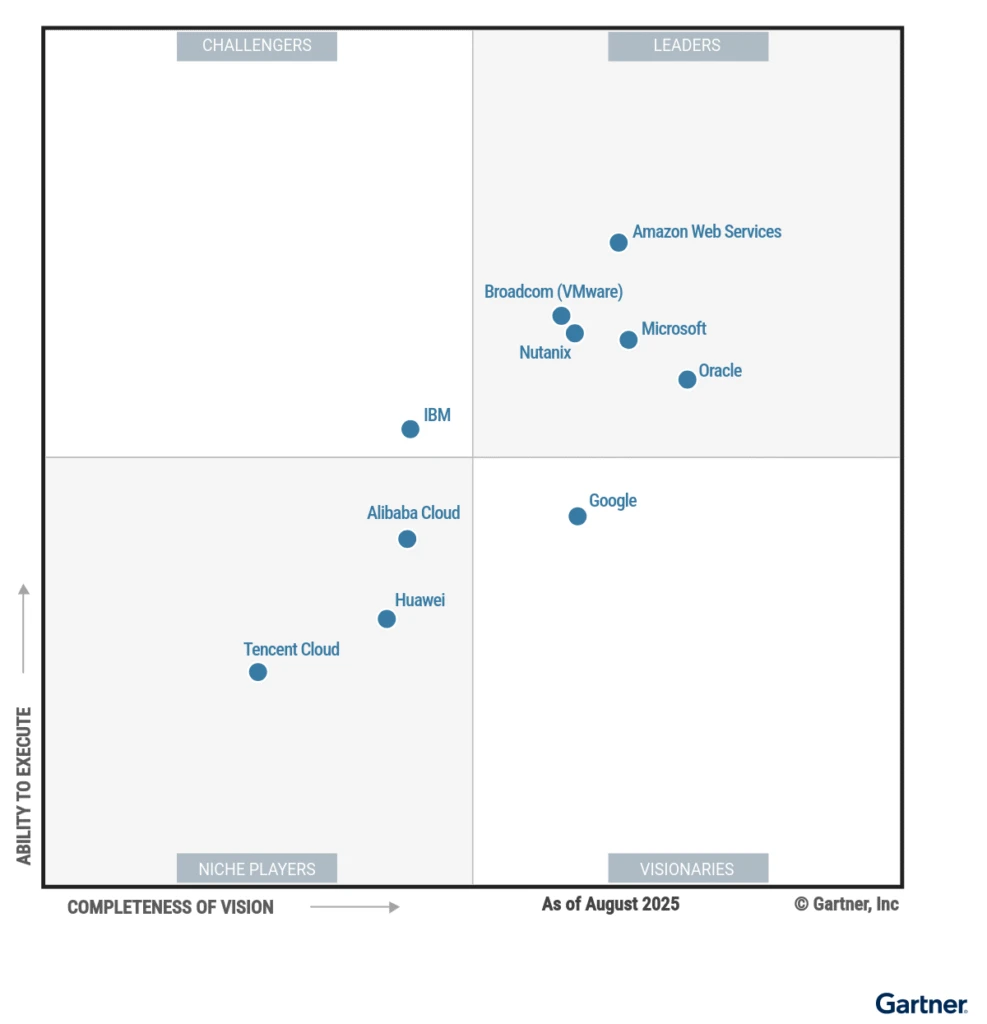
Microsoft is a Leader in the 2025 Gartner® Magic Quadrant™ for Container Management

We’re proud to announce that Microsoft has once again been recognized as a Leader in the 2025 Gartner Magic Quadrant for Container Management, for the third year in a row. We believe this recognition reflects the breadth, innovation, and real-world customer impact of our container portfolio.

From Azure Kubernetes Service (AKS) and Azure Container Apps (ACA) to our hybrid and multi cloud solutions with Azure Arc, Microsoft offers a comprehensive container management solution that meets customers where they are, whether they’re modernizing legacy applications, building cloud-native apps, or scaling the next generation of AI apps and agents.

A comprehensive container portfolio, from cloud to edge

Azure offers a broad set of container management capabilities designed to support both developers and IT operators. AKS is a robust and flexible managed Kubernetes service that runs in Azure and can also extend to on-premises environments through Azure Arc and Azure Local. For teams that want serverless simplicity, Azure offers Azure Container Apps with scale-to-zero, serverless GPUs, and the ability to run sand-boxed code.

This flexible approach, ranging from full control with AKS to ease of use with serverless containers, is tightly integrated with Azure’s broader cloud services, including networking, databases, and AI. It gives teams a unified platform that improves developer experience, enables faster AI innovation, and simplifies operations.

Get started with Azure Kubernetes Service

Developer experience: Build and ship faster

Modern application development starts with empowering developers. We’ve focused on improving the developer experience across the entire container lifecycle.

AKS Automatic (preview) streamlines Kubernetes for developers by provisioning production‑ready, secure, and automatically managed AKS clusters including node provisioning, scaling, upgrades, and CI/CD integration.

Automated deployments for AKS simplifies application delivery by seamlessly pushing code changes to AKS using GitHub Actions or Azure DevOps.

Developer tools like the Azure Developer CLI, Visual Studio Code AKS extension, and GitHub Actions make it easier to develop locally, integrate with CI/CD, and deploy to production.

GitHub Copilot, used by over 20M developers, brings generative AI seamlessly into container workflows, accelerating tasks like writing Kubernetes manifests, Dockerfiles, and CI/CD configs.

We’re also investing in DevSecOps across our services, enabling seamless integration of security, testing, and governance into developer pipelines. Microsoft Defender for Containers, policy-based governance via Azure Policy, and RBAC help teams enforce standards without slowing down innovation.

AI innovation: Building the next wave of AI apps

Containers are the foundation for modern applications, including AI and machine learning workflows. Microsoft has continued to focus on making it easier to run AI workloads in containerized environments.

AKS supports GPU-optimized containers, enabling customers to train and deploy models in the cloud or at the edge. Integration with Azure Machine Learning helps streamline model lifecycle management.

Azure Container Apps serverless GPUs allow teams to deploy inferencing workloads efficiently, with scale-to-zero and per-second billing.

Microsoft is also contributing to open innovation in this space, including through KAITO (Kubernetes AI Toolchain Operator), a CNCF sandbox project that simplifies deploying open-source models on Kubernetes.

Azure AI Foundry provides easy access to over 11 thousand models, including OpenAI GPT-4o and Meta’s Llama, for building secure, scalable AI apps.

These capabilities help organizations run AI workloads more cost-effectively, securely, and at scale.

Operational simplicity: Kubernetes that just works

Running containers at scale often requires deep operational insight. We’ve delivered several enhancements to help platform and operations teams reduce complexity and improve efficiency.

Azure Kubernetes Fleet Manager enables policy-driven governance and workload orchestration across multiple AKS clusters—including multi-cluster updates—simplifying platform management at enterprise scale.

With node auto-provisioning, AKS can automatically select and scale the most cost-effective VM sizes to match workload demands, removing guesswork and helping control costs.

Azure Advisor offers AKS cost recommendations designed to identify cost savings opportunities and provide actionable insights tailored to your cluster configuration.

Azure Arc streamlines edge and multicloud ops with unified Kubernetes management using GitOps, policy automation, and built-in Azure tools.

Our goal is to make running Kubernetes as frictionless as possible, whether customers are managing a single cluster or a global fleet.

Customers are achieving more with Azure container management

Organizations of all sizes and industries are using Azure to modernize apps, drive AI innovation, and improve operational agility:

ChatGPT, the fastest-growing app, scales AI workloads globally to 500M weekly users leveraging Azure Kubernetes Service, Azure Cosmos DB, and Azure GPU VMs.

Telefônica Brasil has reduced call center handling time by 9% while reliably managing over 5.3 million monthly queries with their intelligent I.Ajuda platform, built on AKS.

The Coca-Cola Company launched an immersive, AI-powered holiday campaign across 43 markets using Azure Container Apps and Azure AI Foundry, engaging over 1 million consumers in just 60 days with sub-millisecond performance.

Hexagon modernized its SDx platform with AKS, enabling dynamic scaling and zero‑downtime deployments that cut task processing times from days to under an hour, resulting in over 90% faster customer onboarding.

Delta Dental of California modernized its payment system with a hybrid Azure Kubernetes solution managed via Azure Arc, reducing infrastructure costs and ensuring compliance while handling 1.5 million daily transactions.

These examples underscore how Azure’s container management services are helping businesses move faster, operate more efficiently, and deliver better customer experiences.

Looking ahead

We’re honored to be recognized again as a Leader in the 2025 Gartner Magic Quadrant for Container Management, but we’re even more energized by what’s next.

In the coming months, expect continued investments in:

Simplifying fleet and multi-cluster operations.

Expanding AKS to smaller footprint edge environments.

Enhancing AI-powered cloud management experiences.

Our mission remains the same: to make building, operating, and scaling containerized applications easier, more intelligent, and more secure.

Learn more

Explore Azure Kubernetes Service, Azure Kubernetes Fleet Manager, and Azure Container Apps.

Learn more about building and modernizing AI apps on Azure.

Dive into the AKS community on YouTube, led by the Azure Kubernetes Service team, for the latest product updates.

Gartner, Magic Quadrant for Container Management, By Dennis Smith, Tony Iams, Wataru Katsurashima, Michael Warrilow, Lucas Albuquerque, Stephanie Bauman, 6 August 2025.

*Gartner is a registered trademark and service mark and Magic Quadrant is a registered trademark of Gartner, Inc. and/or its affiliates in the U.S. and internationally and are used herein with permission. All rights reserved. 

This graphic was published by Gartner, Inc. as part of a larger research document and should be evaluated in the context of the entire document. The Gartner document is available upon request here. 

Gartner does not endorse any vendor, product, or service depicted in its research publications, and does not advise technology users to select only those vendors with the highest ratings or other designation. Gartner research publications consist of the opinions of Gartner’s research organization and should not be construed as statements of fact. Gartner disclaims all warranties, expressed or implied, with respect to this research, including any warranties of merchantability or fitness for a particular purpose.
The post Microsoft is a Leader in the 2025 Gartner® Magic Quadrant™ for Container Management appeared first on Microsoft Azure Blog.
Quelle: Azure

GPT-5 in Azure AI Foundry: The future of AI apps and agents starts here

For business leaders building with AI, the conversation has moved beyond chat. The bar is higher: can your AI generate, reason, and deliver measurable outcomes—safely and at scale?

Today, we’re announcing general availability of OpenAI’s new flagship model, GPT-5, in Azure AI Foundry. This is more than a new model release; it is the most powerful LLM ever released across key benchmarks. GPT-5 in Azure AI Foundry pairs frontier reasoning with high-performance generation and cost efficiency, delivered on Microsoft Azure’s enterprise-grade platform so organizations can move from pilots to production with confidence. 

Enhance customer experiences with Azure AI Foundry

GPT-5 in Azure AI Foundry: Built for real-world workloads

In Azure AI Foundry, the GPT-5 models are available via API and orchestrated by themodel router. The GPT-5 series spans complementary strengths:

GPT-5, a full reasoning model provides deep, richer reasoning for analytics and complex tasks, like code generation, with a 272k token context.

GPT-5 mini powers real-time experiences for apps and agents that require reasoning, tool calling to solve customer problems.

GPT-5 nano is a new class of reasoning model which focuses on ultra-low-latency and speed with rich Q&A capabilities.

GPT-5 chat enables natural, multimodal, multi-turn conversations that remain context-aware throughout agentic workflows, with 128k token context.

Together, the suite delivers a seamless continuum from rigorous agentic coding tasks, to relatively simple Q&A—all delivered with the same Azure AI Foundry endpoint using model router in Foundry Models.

Under the hood, GPT-5 unifies advanced reasoning, code generation, and natural language interaction. It combines analytical depth with intuitive dialogue to solve end-to-end problems and explain its approach. Agentic capabilities allow multi-step tool use and long action chains with transparent, auditable decisions. As a frontier-level coding model, GPT-5 can plan complex agentic workflow, build migrations, and refactor code, as well as produce tests and documentation with clear rationale. Developer controls—including parameters like reasoning_effort and verbosity—let teams tune depth, speed, and detail, while new freeform tool-calling features enable broadens tool compatibility without rigid schemas.

Orchestrate with the model router—then scale with agents

Introducing GPT-5 to Azure AI Foundry is more than a model drop: it’s a leap forward for the platform. Starting today, developers can use the model router in Foundry Models to maximize the capabilities of the GPT-5 family models (and other models in Foundry Models) while saving up to 60% on inferencing cost with no loss in fidelity. Powered by a fine-tuned SLM under the hood, the model router evaluates each prompt and decides the optimal model based on the complexity, performance needs, and cost efficiency of each task. Let the model router pick the right model so that you can build your AI-powered applications with ease.

And orchestration doesn’t stop at routing—Foundry carries the same intelligence into agents. Coming soon, GPT-5 will be available in the Foundry Agent Service, pairing frontier models with built-in tools including new browser automation and Model Context Protocol (MCP) integrations. The result: policy-governed, tool-using agents that can search, act in web apps, and complete end-to-end tasks—instrumented with Foundry telemetry and aligned to Microsoft Responsible AI.

Accelerating business impact with GPT-5

These capabilities map directly to business impact.

In research and knowledge work, GPT-5 accelerates financial and legal analysis, market intelligence, and due diligence—reading at scale and producing decision-ready output with traceability. In operations and decisioning, it strengthens logistics support, risk assessment, and claims processing by pairing robust reasoning with policy adherence. Copilots and customer experience teams benefit from multi-turn, multimodal agents that reason in real time, call tools, resolve tasks, and revert to humans with more helpful context.

In software engineering, GPT-5 excels at code generation, application modernization, and quality engineering—improving code style and explanations to compress review cycles.

And for use cases which are cost or latency sensitive, GPT-5-nano’s ultra‑low‑latency architecture delivers rapid, high‑accuracy responses, making it the ideal target for fine‑tuning and the go‑to model for high‑volume, straightforward requests.

GPT-5 customer spotlight

Customers are unleashing GPT-5 across complex, mission-critical workloads—accelerating decision-making, supercharging coding, and catalyzing product innovation.

SAP

SAP is excited to be among the first to leverage the power of GPT-5 in Azure AI Foundry within our generative AI hub in AI Foundation. GPT-5 in Azure AI Foundry will enable our product team and our developer community to deliver impactful business innovations to our customers.
—Dr. Walter Sun, SVP and Global Head of AI, SAP SE

Relativity

The GPT-5 in Azure AI Foundry raises the bar for putting legal data intelligence into action… This next-generation AI will empower legal teams to uncover deeper insights, accelerate decision-making, and drive stronger strategies across the entire legal process.
—Dr. Aron Ahmadia, Senior Director, Applied Science, Relativity

Hebbia

The partnership between Hebbia and Azure AI Foundry gives financial professionals an unprecedented edge. With GPT-5’s advanced reasoning in Hebbia, they can pinpoint critical figures across thousands of documents and structuring complex financial analysis with speed and accuracy.
—Danny Wheller, VP of Business and Strategy

Building with AI in GitHub Copilot and Visual Studio Code

GPT-5 begins rolling out today to millions of developers using GitHub Copilot and Visual Studio Code, applying the flagship model’s advanced reasoning capabilities to increasingly complex problems—from sophisticated refactoring to navigating large codebases more effectively. GPT-5 helps developers write, test, and deploy code faster, while supporting agentic coding tasks with significant improvements to coding style and overall code quality. With GPT-5, developers not only code faster, but code better.

With today’s VS Code release, developers also gain a more powerful agentic coding experience directly within the editor: GitHub Copilot’s coding agent has an improved experience for autonomously tackling tasks in the background. Additionally, the GitHub Copilot chat experience brings increased productivity, including support beyond 128 tools for a single chat request and chat checkpoints allowing users to restore workspace changes to a prior point. Today, we are also announcing an updated extension to develop agents using the Azure AI Foundry extension all within VS Code environment.

These announcements extend Microsoft’s strategy to transform software development with AI, bringing advanced AI capabilities to the entire software lifecycle.

Security, safety, and governance by design

In all domains, security and safety is a layer cake of protections, which together provide protection for risk scenarios—and AI is no different. For AI, we think about layers with the model as the core. With GPT-5, the core is safer than before:

The Microsoft AI Red Team found GPT-5 to have one of the strongest safety profiles of any OpenAI model, performing on par with—or better than—o3.
—Dr. Sarah Bird, Chief Product Officer of Responsible AI, Microsoft

As we think about the safety, security, and governance layers around this core—Azure AI Foundry provides a number of additional controls:

Azure AI Content Safety protections are applied to every prompt and completion, such as prompt shields, which help to detect and mitigate prompt-injection attempts before they reach the model.

Built-in agent evaluators work with the AI Red Teaming Agent to run alignment, bias, and security tests throughout development and production, while continuous evaluation streams real-time metrics—latency, quality, safety, and fairness—stream into Azure Monitor and Application Insights for single-pane visibility.

Finally, security signals integrate directly with Microsoft Defender for Cloud, and runtime metadata and evaluation results are integrated to Microsoft Purview for audit, data-loss prevention, and regulatory reporting, extending protection and governance across the entire GPT-5 lifecycle.

Bringing AI into every workflow with GitHub Copilot and Visual Studio Code

Starting today, GPT-5 begins rolling out to millions of developers who use GitHub Copilot and Visual Studio Code who will be able to select GPT-5 to write, test, and deploy code—and develop agents using the Azure AI Foundry extension all within VS Code environment. GPT-5 supports complex agentic coding tasks with significant improvements to coding personality, front-end aesthetics, and code quality, highly desired improvements for the developer community.

Our evaluations show OpenAI GPT-5’s reasoning capabilities and contextual awareness exceed o3, enabling developers to tackle more complex problems—from refactoring to navigating large codebases. With GPT-5, users in the Visual Studio family can not only code faster, but code better.

VS Code and our recent decision to open-source GitHub Copilot, represents our commitment to open tools and standards and demonstrates our ability to meet the rapid pace of model innovations while keeping the developer experience at the forefront. In today’s release of VS Code, developers can. In today’s VS Code release, developers have even more control over their experience in chat—with improvements to the reliability of terminal tools, updates to the tool picker and limits, new checkpoints, and more.

Today’s announcement extends Microsoft’s strategy to transform software development with AI, bringing advanced AI capabilities to the entire software lifecycle.

Start building today

GPT-5 is available via our Standard offering in Azure AI Foundry, with deployment choices optimized for cost-efficiency and governance needs, including Global and Data Zone (United States, European Union) deployment options for data residency and compliance.1

With Azure AI Foundry’s first-class reliability, realtime evaluations, built-in observability, and secure deployment options, you can confidently move from pilot to production—all aided while unique tools like Model Router optimizes quality, latency, and cost across workloads.

Azure AI Foundry
Design, customize, and manage powerful, adaptable AI agents to get started today.

Learn more >

1Pricing is accurate as of August 2025
The post GPT-5 in Azure AI Foundry: The future of AI apps and agents starts here appeared first on Microsoft Azure Blog.
Quelle: Azure

Introducing Azure Storage Discovery: Transform data management with storage insights

We are excited to announce the public preview of Azure Storage Discovery, a fully managed service that provides you enterprise-wide visibility into your Azure Blob Storage data estate. It provides a single pane of glass to understand and analyze how your data estate has evolved over time, optimize costs, enhance security, and drive operational efficiency. Azure Storage Discovery integrates with the Azure Copilot enabling you to use natural language to unlock insights and accelerate decision-making without utilizing any query language.

As your organization expands its digital footprint in the cloud, managing vast and globally distributed datasets across various business units and workloads becomes increasingly challenging. Insights aggregated across the entire Azure Blob Storage data estate can simplify the detection of outliers, enable long-term trend analysis, and support deep dives into specific resources using filters and pivots. Currently, customers rely on disparate tools and PowerShell scripts to generate, maintain and view such insights. This requires constant development, deployment, and management of infrastructure at scale. Azure Storage Discovery automates and scales this process by aggregating insights across all the subscriptions in your Microsoft Entra tenant and delivering them to you directly within the Azure portal.

Learn more about Azure Storage Discovery

Whether you’re a cloud architect, storage administrator, or data governance lead, Azure Storage Discovery helps you quickly answer key questions about your enterprise data estate in Azure Blob Storage:

How much data do we store across all our storage accounts?

Which regions are experiencing the highest growth?

Can I reduce our costs by finding data that is not being frequently used?

Are our storage configurations aligned with security and compliance best practices?

With Azure Storage Discovery, you can now explore such insights—and many more—with just a few clicks and with a Copilot by your side.

From insight to action with Azure Storage Discovery

Azure Storage Discovery simplifies the process of uncovering and analyzing insights from thousands of storage accounts, transforming complexity into clarity with just a few clicks.

Some of the key capabilities are:

Tap into Azure Copilot to get answers to the most critical storage questions for your business, without needing to learn a new query language or writing a single line of code. You can use Copilot to go beyond the pre-built reports and bring together insights across capacity, activity, errors and configurations.

Gain advanced storage insights that help you analyze how the data estate in Azure Blob Storage is growing, identify opportunities for cost optimization, discover data that is under-utilized, pinpoint workloads that could be getting throttled and find ways to strengthen the security of your storage accounts. These insights are powered by metrics related to storage capacity (object size and object count), activity on the data estate (transactions, ingress, egress), aggregation of transaction errors and detailed configurations for data protection, cost optimization and security.

Interactive reports in the Azure Portal make it simple to analyze trends over time, drill into top storage accounts, and instantly navigate to the specific resources represented in each chart. The reports can be filtered to focus on specific parts of the data estate based on Storage account configurations like regions, redundancy, performance type, encryption type, and others. Organization-wide visibility with flexible scoping to gather insights for multiple business groups or workloads. Analyze up to 1 million storage accounts spread across different subscriptions, resource groups and regions within a single workspace. The ability to drill down and filter data allows you to quickly obtain actionable insights for optimizing your data estate.

Fully managed service available right in the Azure Portal, with no additional infrastructure deployment or impact on business-critical workloads.

Up to 30 days of historical data will automatically be added within hours of deploying Azure Storage Discovery and all insights will be retained for up to 18 months.

Customer stories

Several customers have already started exploring Azure Storage Discovery during the preview to analyze their enterprise Azure Blob Storage data estate. Here are a few customers who found immediate value during the preview.

Getting a 360-degree view of the data estate in Azure Blob Storage

Tesco, one of the world’s largest and most innovative retailers, has been leveraging Storage Discovery in preview to gain an “effortless 360 View” of its data estate in Azure Blob Storage. To boost agility in development, the cloud deployment at Tesco is operated in a highly democratized manner, giving departments and teams autonomy over their subscriptions and storage accounts. However, to manage their cloud spend, ensure their deployment is configured correctly and optimize their data estate, each team is looking for detailed insights in a timely manner. The Cloud Platform Engineering (CPE) team works with each team providing them centralized data for cost analysis, security, and operational reporting. Currently, gathering and reporting on these insights to each team is a highly manual and operationally challenging task. As early adopters they have been using Azure Storage Discovery to provide a centralized, tenant-wide dashboard—to enable a “single-pane-of-glass” for key metrics and baselines. This helps them reduce the resources and time associated with answering simple questions such as “how much data do we have, and where?” or “what’s our baseline trends?”

As our data estate in Azure Storage continues to grow, it has become time consuming to gather the insights required to drive decisions around ‘How’ and ‘What’ we do—especially at the pace which is often demanded by stakeholders. Today, a lot of this is done using PowerShell scripts which even with parallelism, take a significant time to run, due to our overall scale. Anything which reduces the time it takes me to gather valuable insights is super valuable. On the other side, if I were to put my Ops hat on, the data presented is compelling for conversations with application teams; allowing us to focus on what really matters and addressing our top consumers, as opposed to being ‘snowed in’ under a mountain of data.
—Rhyan Waine, Lead Engineer, Cloud Platform Engineering, Tesco

Manage budget by identifying Storage Accounts that are growing rapidly

Willis Towers Watson (WTW) is at the forefront of using generative AI to enhance their offering for Human Resources and Insurance services while also balancing their costs. With Azure Storage Discovery, the team was able to quickly identify storage accounts where data was growing rapidly and increasing costs. With the knowledge of which storage accounts to focus on, they were able to identify usage patterns, roll out optimizations and control their costs.

As soon as my team started using Storage Discovery, they were immediately impressed by the insights it provided. Their reaction was, ‘Great—let’s dive in and see what we can uncover.’ Very quickly, they identified several storage accounts that were growing at an unusual rate. With that visibility, we were able to zero in on those Storage Accounts. We also discovered data that hadn’t been accessed in a long time, so we implemented automatic cleanups using Blob Lifecycle Management to efficiently manage and delete unused data.
—Darren Gipson, Lead DevOps Engineer, Willis Towers Watson

How Storage Discovery works

To get started with Azure Storage Discovery, follow these two simple steps: first, configure a Discovery workspace which contains the definition of the resource, and then define the Scopes that represent your business groups or workloads. Once these steps are completed, Azure Storage Discovery will start aggregating the relevant insights and make them available to you in detailed dashboards that can be found in the Reports page.

Deploying a Discovery workspace enables you to select which part of your data estate in Azure Blob Storage you want to analyze. You can do this by selecting all the subscriptions and resource groups of interest within your Microsoft Entra tenant. Upon successful verification of your access credentials, Azure Storage Discovery will advance to the next step.

Once the workspace is configured, you can create up to 5 scopes, each representing a business group, a workload, or any other logical grouping of storage accounts that has business value to you. This filtering can be done by selecting ARM resource tags that were previously applied to your storage accounts.

After the deployment is successful, Azure Storage Discovery provides reports right within the Azure portal with no additional setup.

Pricing and availability

Storage Discovery is available in select Azure regions during public preview. The service offers a Free pricing plan with insights related to capacity and configurations retained for up to 15 days and a Standard pricing plan that also includes advanced insights related to activity, errors and security configurations retained for up to 18 months to analyze annual trends and cycles in your business workloads. Pricing is based on the number of storage accounts and objects analyzed, with tiered rates to support all sizes of data estates in Azure Blob Storage.

The Free and Standard pricing plans will be offered for free, with no additional cost until September 30th, 2025. Learn more about pricing in the Azure Storage Discovery documentation.

Get started with Azure Storage Discovery

You can get started using Azure Storage Discovery to unlock the full potential of your storage within minutes. We invite you to preview Azure Storage Discovery for data management of your object storage. To get started, refer to the quick start guide to configure your first workspace. To learn more, check out the documentation.

We’d love to hear your feedback. What insights are most valuable to you? What would make Storage Discovery more compelling for your business? Let us know at StorageDiscoveryFeedback@service.microsoft.com.

Discover more about Azure Storage Discovery

The post Introducing Azure Storage Discovery: Transform data management with storage insights appeared first on Microsoft Azure Blog.
Quelle: Azure

OpenAI’s open‑source model: gpt‑oss on Azure AI Foundry and Windows AI Foundry 

AI is no longer a layer in the stack—it’s becoming the stack. This new era calls for tools that are open, adaptable, and ready to run wherever your ideas live—from cloud to edge, from first experiment to scaled deployment. At Microsoft, we’re building a full-stack AI app and agent factory that empowers every developer not just to use AI, but to create with it.

That’s the vision behind our AI platform spanning cloud to edge. Azure AI Foundry provides a unified platform for building, fine-tuning, and deploying intelligent agents with confidence while Foundry Local brings open-source models to the edge—enabling flexible, on-device inferencing across billions of devices. Windows AI Foundry builds on this foundation, integrating Foundry Local into Windows 11 to support a secure, low-latency local AI development lifecycle deeply aligned with the Windows platform. 

With the launch of OpenAI’s gpt‑oss models—its first open-weight release since GPT‑2—we’re giving developers and enterprises unprecedented ability to run, adapt, and deploy OpenAI models entirely on their own terms. 

For the first time, you can run OpenAI models like gpt‑oss‑120b on a single enterprise GPU—or run gpt‑oss‑20b locally. It’s notable that these aren’t stripped-down replicas—they’re fast, capable, and designed with real-world deployment in mind: reasoning at scale in the cloud, or agentic tasks at the edge. 

And because they’re open-weight, these models are also easy to fine-tune, distill, and optimize. Whether you’re adapting for a domain-specific copilot, compressing for offline inference, or prototyping locally before scaling in production, Azure AI Foundry and Foundry Local give you the tooling to do it all—securely, efficiently, and without compromise. 

Create intelligent applications with Azure AI Foundry

Open models, real momentum 

Open models have moved from the margins to the mainstream. Today, they’re powering everything from autonomous agents to domain-specific copilots—and redefining how AI gets built and deployed. And with Azure AI Foundry, we’re giving you the infrastructure to move with that momentum: 

With open weights teams can fine-tune using parameter-efficient methods (LoRA, QLoRA, PEFT), splice in proprietary data, and ship new checkpoints in hours—not weeks.

You can distill or quantize models, trim context length, or apply structured sparsity to hit strict memory envelopes for edge GPUs and even high-end laptops.

Full weight access also means you can inspect attention patterns for security audits, inject domain adapters, retrain specific layers, or export to ONNX/Triton for containerized inference on Azure Kubernetes Service (AKS) or Foundry Local.

In short, open models aren’t just feature-parity replacements—they’re programmable substrates. And Azure AI Foundry provides training pipelines, weight management, and low-latency serving backplane so you can exploit every one of those levers and push the envelope of AI customization. 

Meet gpt‑oss: Two models, infinite possibilities

Today, gpt‑oss-120b and gpt‑oss-20b are available on Azure AI Foundry. gpt‑oss-20b is also available on Windows AI Foundry and will be coming soon on MacOS via Foundry Local. Whether you’re optimizing for sovereignty, performance, or portability, these models unlock a new level of control. 

gpt‑oss-120b is a reasoning powerhouse. With 120 billion parameters and architectural sparsity, it delivers o4-mini level performance at a fraction of the size, excelling at complex tasks like math, code, and domain-specific Q&A—yet it’s efficient enough to run on a single datacenter-class GPU. Ideal for secure, high-performance deployments where latency or cost matter.

gpt‑oss-20b is tool-savvy and lightweight. Optimized for agentic tasks like code execution and tool use, it runs efficiently on a range of Windows hardware, including discrete GPUs with16GB+ VRAM, with support for more devices coming soon. It’s perfect for building autonomous assistants or embedding AI into real-world workflows, even in bandwidth-constrained environments. 

Both models will soon be API-compatible with the now ubiquitous responses API. That means you can swap them into existing apps with minimal changes—and maximum flexibility. 

Bringing gpt‑oss to Cloud and Edge 

Azure AI Foundry is more than a model catalog—it’s a platform for AI builders. With more than 11,000 models and growing, it gives developers a unified space to evaluate, fine-tune, and productionize models with enterprise-grade reliability and security. 

Today, with gpt‑oss in the catalog, you can: 

Spin up inference endpoints using gpt‑oss in the cloud with just a few CLI commands.

Fine-tune and distill the models using your own data and deploy with confidence.

Mix open and proprietary models to match task-specific needs.

For organizations developing scenarios only possible on client devices, Foundry Local brings prominent open-source models to Windows AI Foundry, pre-optimized for inference on your own hardware, supporting CPUs, GPUs, and NPUs, through a simple CLI, API, and SDK.

Whether you’re working in an offline setting, building in a secure network, or running at the edge—Foundry Local and Windows AI Foundry lets you go fully cloud-optional. With the capability to deploy gpt‑oss-20b on modern high-performance Windows PCs, your data stays where you want it—and the power of frontier-class models comes to you. 

This is hybrid AI in action: the ability to mix and match models, optimize performance and cost, and meet your data where it lives. 

Empowering builders and decision makers 

The availability of gpt‑oss on Azure and Windows unlocks powerful new possibilities for both builders and business leaders. 

For developers, open weights mean full transparency. Inspect the model, customize, fine-tune, and deploy on your own terms. With gpt‑oss, you can build with confidence, understanding exactly how your model works and how to improve it for your use case. 

For decision makers, it’s about control and flexibility. With gpt‑oss, you get competitive performance—with no black boxes, fewer trade-offs, and more options across deployment, compliance, and cost. 

A vision for the future: Open and responsible AI, together 

The release of gpt‑oss and its integration into Azure and Windows is part of a bigger story. We envision a future where AI is ubiquitous—and we are committed to being an open platform to bring these innovative technologies to our customers, across all our data centers and devices. 

By offering gpt‑oss through a variety of entry points, we’re doubling down on our commitment to democratize AI. We recognize that our customers will benefit from a diverse portfolio of models—proprietary and open—and we’re here to support whichever path unlocks value for you. Whether you are working with open-source models or proprietary ones, Foundry’s built-in safety and security tools ensure consistent governance, compliance, and trust—so customers can innovate confidently across all model types. 

Finally, our support of gpt-oss is just the latest in our commitment to open tools and standards. In June we announced that GitHub Copilot Chat extension is now open source on GitHub under the MIT license—the first step to make VS Code an open source AI editor. We seek to accelerate innovation with the open-source community and drive greater value to our market leading developer tools. This is what it looks like when research, product, and platform come together. The very breakthroughs we’ve enabled with our cloud at OpenAI are now open tools that anyone can build on—and Azure is the bridge that brings them to life. 

Next steps and resources for navigating gpt‑oss

Deploy gpt‑oss in the cloud today with a few CLI commands using Azure AI Foundry. Browse the Azure AI Model Catalog to spin up an endpoint. 

Deploy gpt‑oss-20b on your Windows device today (and soon on MacOS) via Foundry Local. Follow the QuickStart guide to learn more.

Pricing1 for these models is as follows:

*See Managed Compute pricing page here.

1Pricing is accurate as of August 2025.

The post OpenAI’s open‑source model: gpt‑oss on Azure AI Foundry and Windows AI Foundry  appeared first on Microsoft Azure Blog.
Quelle: Azure

Scaling generative AI in the cloud: Enterprise use cases for driving secure innovation 

Generative AI was made for the cloud. Only when you bring AI and the cloud together can you unlock the full potential of AI for business. For organizations looking to level up their generative AI capabilities, the cloud provides the flexibility, scalability and tools needed to accelerate AI innovation. Migration clears the roadblocks that inhibit AI adoption, making it faster and easier to not only adopt AI, but to move from experimentation to driving real business value.

Whether you are interested in tapping into real-time insights, delivering hyper-personalized customer experiences, optimizing supply chains with predictive analytics, or streamlining strategic decision-making, AI is reshaping how companies operate. Organizations relying on legacy or on-premises infrastructure are approaching an inflection point. Migration is not just a technical upgrade, it is a business imperative for realizing generative AI at scale. Without the flexibility the cloud provides, companies face higher costs, slower innovation cycles, and limited access to the data that AI models need to deliver meaningful results. 

Deploy trusted AI quickly with Azure AI services.

For IT and digital transformation leaders, choosing the right cloud platform is key to successfully deploying and managing AI. With best-in-class infrastructure, high-performance compute capabilities, enterprise-grade security, and advanced data integration tools, Azure offers a comprehensive cloud ecosystem that forward-thinking businesses can count on when bringing generative AI initiatives to bear. 

In our technical guide, “Accelerating Generative AI Innovation with Cloud Migration” we outline how IT and digital transformation leaders can tap into the power and flexibility of Azure to unlock the full potential of generative AI. Let us explore a few real-world business scenarios where generative AI in the cloud is driving tangible impact, helping companies move faster, innovate, and activate new ways of working.

Use case 1: Driving smarter, more adaptive AI solutions with real-time data

One of the biggest challenges in AI adoption? Disconnected or outdated data. Ensuring that AI models have access to the most current and relevant data is where Retrieval-augmented generation (RAG) shines. RAG makes generative AI more accurate and reliable by pulling in real-time, trusted data, reducing the chance of errors and hallucinations. 

How does deploying RAG impact businesses? 

Unlike traditional AI models that rely on historical data, RAG-powered AI is dynamic, staying up to date by pulling in the latest information from sources like SQL databases, APIs, and internal documents. This makes it more accurate in fast-changing environments. RAG models help teams: 

Automate live data retrieval, improving efficiency by reducing the need for manual updates. 

Make smarter, more informed decisions by granting access to the latest domain specific information. 

Boost accuracy and speed in interactive apps. 

Lower operational costs by reducing the need for human intervention. 

Tap into proprietary data to create differentiated outcomes and competitive advantages. 

Companies are turning to RAG models to generate more accurate, up-to-date insights by pulling in live data. This is especially valuable in fast-moving industries like finance, healthcare, and retail, where decisions rely on the latest market trends, access to sensitive data, regulatory updates, and personalized customer interactions. 

The Azure advantage:

Cloud-based RAG apps help businesses move beyond static AI by enabling more adaptive, intelligent solutions. When RAG runs in the cloud, enterprises can benefit from reduced latency, high-speed data transfers, built-in security controls, and simplified data governance. 

Azure’s cloud services, including Azure AI Search, Azure OpenAI Service, and Azure Machine Learning, provide the necessary tools to support responsive and secure RAG applications. Together, these services help businesses stay responsive in rapidly changing environments so they are ready for whatever comes next. 

Use case 2: Embedding generative AI into enterprise workflows

Enterprise systems like enterprise resource planning (ERP) software, customer relationship management (CRM), and content management platforms are the backbone of daily operations and crucial to the success of an organization. However, they often rely on repetitive tasks and manual oversight. By integrating generative AI directly into these workflows, businesses can streamline tasks, unlock faster insights, and deliver more personalized, contextually relevant recommendations, all within the existing systems that teams are already using.

What is the business impact of embedding generative AI into enterprise application workflows? 

With AI built into core business applications, teams can work smarter and faster. With embedded generative AI in enterprise apps, industry leaders can: 

Optimize their operations by analyzing supply chain data on the fly, flagging anomalies and recommending actionable insights and proactive adjustments. 

Enrich customer experiences with personalized recommendations and faster response times. 

Automate routine tasks like data entry, report generation, and content management to reduce manual effort and expedite workflows. 

For organizations running on-premises ERP and CRM systems, the ability to integrate AI presents a compelling reason to move to the cloud.

The Azure advantage:

With Azure, companies can bring GenAI into everyday business operations without disrupting them, gaining scalable compute power, secure data access, and modernization while maintaining operational continuity. Migrating these systems to the cloud also simplifies AI integration by eliminating silos and enabling secure, real-time access to business-critical data. Cloud migration lays the foundation for continuous innovation, allowing teams to quickly deploy updates, integrate new AI capabilities, and scale across the enterprise without disruption. 

Azure services like Azure OpenAI Service, Azure Logic Apps, and Azure API Management facilitate seamless integration, amplifying ERP and CRM systems with minimal disruption. 

Microsoft’s collaborations with platforms like SAP showcase how cloud-powered AI delivers current intelligence, streamlined operations, and advanced security—capabilities that are difficult to achieve with on-premises infrastructure. 

When generative AI is embedded into core applications, it goes beyond supporting operations. It transforms them.

Use case 3: Generative search for contextually aware responses

As enterprise data continues to grow, finding the right information at the right time has become a major challenge. Generative search transforms how organizations access and use information. With generative search, employees are empowered to make smarter decisions faster. As data volume grows, generative search helps cut through the noise by combining hybrid search with advanced AI models to deliver context-aware, tailored responses based on real-time data.

How can businesses use generative search to achieve real impact? 

With generative search, companies are better equipped to put their data to work. This approach is ideal knowledge discovery, customer support, and document retrieval, where the goal is to provide meaningful insights, summaries, or recommendations. With generative search, enterprises can: 

Improve customer support by delivering relevant, real-time responses based on customer data. 

Surface critical insights by quickly navigating unstructured and proprietary data. 

Summarize and extract key information from dense documents in less time. 

Across industries, generative search expands access to critical information, helping businesses move faster and smarter.

The Azure advantage:

Cloud-based generative search leverages the processing power and model options available in cloud environments.

Azure services like Azure AI Search, Azure OpenAI Service, and Azure Machine Learning enable productive integration of generative search into workflows, heightening context-aware search. Azure AI Search combines vector and keyword search to retrieve the most relevant data, while Azure OpenAI Service leverages models like GPT-4 to generate summaries and recommendations.

Azure Machine Learning ensures search outcomes remain precise through fine-tuning, and Azure Cognitive Search builds comprehensive indexes for improved retrieval.

Additional components, such as Azure Functions for dynamic model activation and Azure Monitor for performance tracking, further refine generative search capabilities, empowering organizations to harness AI-driven insights with confidence. 

Use case 4: Smart automation with generative AI agents 

There has been plenty of chatter around agentic AI this year, and for good reason. Unlike traditional chatbots, generative AI agents autonomously perform tasks to achieve specific goals, adapting to user interactions and continuously improving over time without needing explicit programming for every situation.

How can AI agents impact a business’s bottom line? 

By optimizing their actions for the best possible outcomes, AI agents help teams streamline workflows, respond to dynamic needs, and amplify overall effectiveness. With intelligent agents in place, companies can:

Automate repetitive, routine tasks, boosting efficiency and freeing teams to focus on higher-value workflows.

Cut operational costs, thanks to reduced manual effort and increased process efficiency.

Scale effortlessly, handling increased workloads without additional headcount. 

Improve service delivery by enabling consistent and personalized customer experiences. 

As demand rises, they scale effortlessly, enabling businesses to manage higher workloads without additional resources. This adaptability is especially valuable in industries with rapidly fluctuating customer demands, including e-commerce, financial services, manufacturing, communications, professional services, and healthcare.

The Azure advantage:

Cloud-based generative AI enables agents to access and process complex, distributed data sources in real time, sharpening their adaptability and accuracy. Microsoft Azure provides a comprehensive suite of tools to deploy and manage generative AI agents successfully: 

Azure AI Foundry Agent Service simplifies the enablement of agents capable of automating complex business processes from development to deployment. 

Azure OpenAI Service powers content generation and data analysis, while Azure Machine Learning enables fine-tuning and predictive analytics. 

Azure Cognitive Services polishes natural language understanding and Azure Databricks facilitates scalable AI model development.

For capable deployment and monitoring, Azure Kubernetes Service (AKS) streamlines containerized workloads, while Azure Monitor tracks live performance, ensuring AI agents operate optimally.

With these capabilities, Azure equips enterprises to harness the full potential of generative AI automation. 

The Azure advantage for generative AI innovation

Migrating to the cloud isn’t just a technical upgrade, it’s a strategic move for companies that want to lead in 2025 and beyond. By partnering with Azure, organizations can seamlessly connect AI models to critical data sources, applications, and workflows, integrating generative AI to drive tangible business outcomes. Azure’s infrastructure gives IT teams the tools to move fast and stay secure at scale. By shifting to a cloud-enabled AI environment, companies are positioning themselves to fully harness the power of AI and thrive in the era of intelligent automation. 

Accelerating Generative AI Innovation with Cloud Migration
Access the whitepaper to learn more about how enterprise can realize the promise of generative AI with Azure. 

Learn more >

The post Scaling generative AI in the cloud: Enterprise use cases for driving secure innovation  appeared first on Microsoft Azure Blog.
Quelle: Azure

Project Flash update: Advancing Azure Virtual Machine availability monitoring

Previously, we shared an update on Project Flash as part of our Advancing Reliability blog series, reaffirming our commitment to helping Azure customers detect and diagnose virtual machine (VM) availability issues with speed and precision. This year, we’re excited to unveil the latest innovations that take VM availability monitoring to the next level—enabling customers to operate their workloads on Azure with even greater confidence. I’ve asked Yingqi (Halley) Ding, Technical Program Manager from the Azure Core Compute team, to walk us through the newest investments powering the next phase of Project Flash.
— Mark Russinovich, CTO, Deputy CISO, and Technical Fellow, Microsoft Azure.

Project Flash is a cross-division initiative at Microsoft. Its vision is to deliver precise telemetry, real-time alerts, and scalable monitoring—all within a unified, user-friendly experience designed to meet the diverse observability needs of virtual machine (VM) availability.

Flash addresses both platform-level and user-level challenges. It enables rapid detection of issues originating from the Azure platform, helping teams respond quickly to infrastructure-related disruptions. At the same time, it equips you with actionable insights to diagnose and resolve problems within your own environment. This dual capability supports high availability and helps ensure your business Service-Level Agreements are consistently met. It’s our mission to ensure you can:

Gain clear visibility into disruptions, such as VM reboots and restarts, application freezes due to network driver updates, and 30-second host OS updates—with detailed insights into what happened, why it occurred, and whether it was planned or unexpected.

Analyze trends and set alerts to speed up debugging and track availability over time.

Monitor at scale and build custom dashboards to stay on top of the health of all resources.

Receive automated root cause analyses (RCAs) that explain which VMs were affected, what caused the issue, how long it lasted, and what was done to fix it.

Receive real-time notifications for critical events, such as degraded nodes requiring VM redeployment, platform-initiated service healing, or in-place reboots triggered by hardware issues—empowering your teams to respond swiftly and minimize user impact.

Adapt recovery policies dynamically to meet changing workload needs and business priorities.

During our team’s journey with Flash, it has garnered widespread adoption from some of the world’s leading companies spanning from e-commerce, gaming, finance, hedge funds, and many other sectors. Their extensive utilization of Flash underscores its effectiveness and value in meeting the diverse needs of high-profile organizations.

At BlackRock, VM reliability is critical to our operations. If a VM is running on degraded hardware, we want to be alerted quickly so we have the maximum opportunity to mitigate the issue before it impacts users. With Project Flash, we receive a resource health event integrated into our alerting processes the moment an underlying node in Azure infrastructure is marked unallocatable, typically due to health degradation. Our infrastructure team then schedules a migration of the affected resource to healthy hardware at an optimal time. This ability to predictively avoid abrupt VM failures has reduced our VM interruption rate and improved the overall reliability of our investment platform.
— Eli Hamburger, Head of Infrastructure Hosting, BlackRock.

Learn more about Project Flash

Suite of solutions available today

The Flash initiative has evolved into a robust, scalable monitoring framework designed to meet the diverse needs of modern infrastructure—whether you’re managing a handful of VMs or operating at massive scale. Built with reliability at its core, Flash empowers you to monitor what matters most, using the tools and telemetry that align with your architecture and operational model.

Flash publishes VM availability states and resource health annotations for detailed failure attribution and downtime analysis. The guide below outlines your options so you can choose the right Flash monitoring solution for your scenario.

SolutionDescriptionAzure Resource Graph (general availability)For investigations at scale, centralized resource repositories, and historical lookups, you can periodically consume resource availability telemetry across all workloads at once using Azure Resource Graph (ARG).Event Grid system topic (public preview)To trigger time-sensitive and critical mitigations, such as redeploying or restarting VMs to prevent end-user impact, you can receive alerts within seconds of critical changes in resource availability via Event Handlers in Event Grid.Azure Monitor – Metrics (public preview)To track trends, aggregate platform metrics (e.g., CPU, disk), and configure precise threshold-based alerts, you can consume an out-of-the-box VM availability metric via Azure Monitor.Resource Health (general availability)To perform instantaneous and convenient per-resource health checks in the Portal UI, you can quickly view the RHC blade. You can also access a 30-day historical view of health checks for that resource to support fast and effective troubleshooting.

Figure 1: Flash endpoints

What’s new?

Public preview: User vs platform dimension introduced for VM availability metric

Many customers have emphasized the need for user-friendly monitoring solutions that provide real-time, scalable access to compute resource availability data. This information is essential for triggering timely mitigation actions in response to availability changes.

Designed to satisfy this critical need, the VM availability metric is well-suited for tracking trends, aggregating platform metrics (such as CPU and disk usage), and configuring precise threshold-based alerts. You can utilize this out-of-the-box VM availability metric in Azure Monitor.

Figure 2: VM availability metric

Now you can use the Context dimension to identify whether VM availability was influenced by Azure or user-orchestrated activity. This dimension indicates, during any disruption or when the metric drops to zero, whether the cause was platform-triggered or user-driven. It can assume values of Platform, Customer, or Unknown.

Figure 3: Context dimension

The new dimension is also supported in Azure Monitor alert rules as part of the filtering process.

Figure 4: Azure Monitor alert rule

Public preview: Enable sending health resources events to Azure Monitor alerts in Event Grid

Azure Event Grid is a highly scalable, fully managed Pub/Sub message distribution service that offers flexible message consumption patterns. Event Grid enables you to publish and subscribe to messages to support Internet of Things (IoT) solutions. Through HTTP, Event Grid enables you to build event-driven solutions, where a publisher service (such as Project Flash) announces its system state changes (events) to subscriber applications.

Figure 5: Event Grid system topics

With the integration of Azure Monitor alerts as a new event handler, you can now receive low-latency notifications—such as VM availability changes and detailed annotations—via SMS, email, push notifications, and more. This combines Event Grid’s near real-time delivery with Azure Monitor’s direct alerting capabilities.

Figure 6: Event Grid subscription

To get started, simply follow the step-by-step instructions and begin receiving real-time alerts with Flash’s new offering.

What’s next?

Looking ahead, we plan to broaden our focus to include scenarios such as inoperable top-of-rack switches, failures in accelerated networking, and new classes of hardware failure prediction. In addition, we aim to continue enhancing data quality and consistency across all Flash endpoints—enabling more accurate downtime attribution and deeper visibility into VM availability.

For comprehensive monitoring of VM availability—including scenarios such as routine maintenance, live migration, service healing, and degradation—we recommend leveraging both Flash Health events and Scheduled Events (SE).

Flash Health events offer real-time insights into ongoing and historical availability disruptions, including VM degradation. This facilitates effective downtime management, supports automated mitigation strategies, and enhances root cause analysis.

Scheduled Events, in contrast, provide up to 15 minutes of advance notice prior to planned maintenance, enabling proactive decision-making and preparation. During this window, you may choose to acknowledge the event or defer actions based on your operational readiness.

For upcoming updates on the Flash initiative, we encourage you to follow the advancing reliability series!
The post Project Flash update: Advancing Azure Virtual Machine availability monitoring appeared first on Microsoft Azure Blog.
Quelle: Azure

