New for developers: Azure Cosmos DB .NET SDK v3 now available

The Azure Cosmos DB team is announcing the general availability of version 3 of the Azure Cosmos DB .NET SDK, ​released in July. Thank you to all who gave feedback during our preview. 

In this post, we’ll walk through the latest improvements that we’ve made to enhance the developer experience in .NET SDK v3.

You can get the latest version of the SDK through NuGet and contribute on GitHub.

//Using .NET CLI
dotnet add package Microsoft.Azure.Cosmos

//Using NuGet
Install-Package Microsoft.Azure.Cosmos

What is Azure Cosmos DB?

Azure Cosmos DB is a globally distributed, multi-model database service that enables you to read and write data from any Azure region. It offers turnkey global distribution, guarantees single-digit millisecond latencies at the 99th percentile, 99.999 percent high availability, and elastic scaling of throughput and storage.

What is new in Azure Cosmos DB .NET SDK version 3?

Version 3 of the SDK contains numerous usability and performance improvements, including a new intuitive programming model, support for stream APIs, built-in support for change feed processor APIs, the ability to scale non-partitioned containers, and more. The SDK targets .NET Standard 2.0 and is open sourced on GitHub.

For new workloads, we recommend starting with the latest version 3.x SDK for the best experience. We have no immediate plans to retire version 2.x of the .NET SDK.

Targets .NET Standard 2.0

We’ve unified the existing Azure Cosmos DB .NET Framework and .NET Core SDKs into a single SDK, which targets .NET Standard 2.0. You can now use the .NET SDK in any platform that implements .NET Standard 2.0, including your .NET Framework 4.6.1+ and .NET Core 2.0+ applications.

Open source on GitHub

The Azure Cosmos DB .NET v3 SDK is open source, and our team is planning to do development in the open. To that end, we welcome any pull requests and will be logging issues and tracking feedback on GitHub.

New programming model with fluent API surface

Since the preview, we’ve continued to improve the object model for a more intuitive developer experience. We’ve created a new top level CosmosClient class to replace DocumentClient and split its methods into modular database and container classes. From our usability studies, we’ve seen that this hierarchy makes it easier for developers to learn and discover the API surface.

We’ve also added in fluent builder APIs, which make it easier to create CosmosClient, Container, and ChangeFeedProcessor classes with custom options.

View all samples on GitHub.

Stream APIs for high performance

The previous versions of the Azure Cosmos DB .NET SDKs always serialized and deserialized the data to and from the network. In the context of an ASP.NET Web API, this can lead to performance overhead. Now, with the new stream API, when you read an item or query, you can get the stream and pass it to the response without deserialization overhead, using the new GetItemQueryStreamIterator and ReadItemStreamAsync methods. To learn more, refer to the GitHub sample.

Easier to test and more extensible

In .NET SDK version 3, all APIs are mockable, making for easier unit testing.

We also introduced an extensible request pipeline, so you can pass in custom handlers that will run when sending requests to the service. For example, you can use these handlers to log request information in Azure Application Insights, define custom retry polices, and more. You can also now pass in a custom serializer, another commonly requested developer feature.

Use the Change Feed Processor APIs directly from the SDK

One of the most popular features of Azure Cosmos DB is the change feed, which is commonly used in event-sourcing architectures, stream processing, data movement scenarios, and to build materialized views. The change feed enables you to listen to changes on a container and get an incremental feed of its records as they are created or updated.

The new SDK has built-in support for the Change Feed Processor APIs, which means you can use the same SDK for building your application and change feed processor implementation. Previously, you had to use the separate change feed processor library.

To get started, refer to the documentation "Change feed processor in Azure Cosmos DB."

Ability to scale non-partitioned containers

We’ve heard from many customers who have non-partitioned or “fixed” containers that they wanted to scale them beyond their 10GB storage and 10,000 RU/s provisioned throughput limit. With version 3 of the SDK, you can now do so, without having to create a new container and move your data.

All non-partitioned containers now have a system partition key “_partitionKey” that you can set to a value when writing new items. Once you begin using the _partitionKey value, Azure Cosmos DB will scale your container as its storage volume increases beyond 10GB. If you want to keep your container as is, you can use the PartitionKey.None value to read and write existing data without a partition key.

Easier APIs for scaling throughput

We’ve redesigned the APIs for scaling provisioned throughput (RU/s) up and down. You can now use the ReadThroughputAsync method to get the current throughput and ReplaceThroughputAsync to change it. View sample.

Get started

To get started with the new Azure Cosmos DB .NET SDK version 3, add our new NuGet package to your project. To get started, follow the new tutorial and quickstart. We’d love to hear your feedback! You can log issues on our GitHub repository.

Stay up-to-date on the latest Azure #CosmosDB news and features by following us on Twitter @AzureCosmosDB. We can't wait to see what you will build with Azure Cosmos DB and the new .NET SDK!
Quelle: Azure

Announcing the preview of Azure Actions for GitHub

On Thursday, August 8, 2019, GitHub announced the preview of GitHub Actions with support for Continuous Integration and Continuous Delivery (CI/CD). Actions makes it possible to create simple, yet powerful pipelines and automate software compilation and delivery. Today, we are announcing the preview of Azure Actions for GitHub.

With these new Actions, developers can quickly build, test, and deploy code from GitHub repositories to the cloud with Azure.

You can find our first set of Actions grouped into four repositories on GitHub, each one containing documentation and examples to help you use GitHub for CI/CD and deploy your apps to Azure.

azure/actions (login): Authenticate with an Azure subscription.
azure/appservice-actions: Deploy apps to Azure App Services using the features Web Apps and Web Apps for Containers.
azure/container-actions: Connect to container registries, including Docker Hub and Azure Container Registry, as well as build and push container images.
azure/k8s-actions: Connect and deploy to a Kubernetes cluster, including Azure Kubernetes Service (AKS).

Connect to Azure

The login action (azure/actions) allows you to securely connect to an Azure subscription.

The process requires using a service principal, which can be generated using the Azure CLI, as per instructions. Use the GitHub Actions’ built-in secret store for safely storing the output of this command.

If your workflow involves containers, you can also use the azure/k8s-actions/docker-login and azure/container-actions/aks-set-context Actions for connecting to Azure services like Container Registry and AKS respectively.

These Actions help setting the context for the rest of the workflow. For example, once you have used azure/container-actions/docker-login, the next set of Actions in the workflow can perform tasks such as building, tagging, and pushing container images to Container Registry.

Deploy a web app

Azure App Service is a managed platform for deploying and scaling web applications. You can easily deploy your web app to Azure App Service with the azure/appservice-actions/webapp and azure/appservice-actions/webapp-container Actions.

The azure/appservice-actions/webapp action takes the app name and the path to an archive (*.zip, *.war, *.jar) or folder to deploy.

The azure/appservice-actions/webapp-container supports deploying containerized apps, including multi-container ones. When combined with azure/container-actions/docker-login, you can create a complete workflow which builds a container image, pushes it to Container Registry and then deploys it to Web Apps for Containers.

Deploy to Kubernetes

azure/k8s-actions/k8s-deploy helps you connect to a Kubernetes cluster, bake and deploy manifests, substitute artifacts, check rollout status, and handle secrets within AKS.

The azure/k8s-actions/k8s-create-secret action takes care of creating Kubernetes secret objects, which help you manage sensitive information such as passwords and API tokens. These notably include the Docker-registry secret, which is used by AKS itself to pull a private image from a registry. This action makes it possible to populate the Kubernetes cluster with values from the GitHub Actions’ built-in secret store.

Our container-centric Actions, including those for Kubernetes and for interacting with a Docker registry, aren’t specific to Azure, and can be used with any Kubernetes cluster, including self-hosted ones, running on-premises or on other clouds, as well as any Docker registry.

Full example

Here is an example of an end-to-end workflow which builds a container image, pushes it to Container Registry and then deploys to an AKS cluster by using manifest files.

on: [push]

jobs:
build:
runs-on: ubuntu-latest
steps:
– uses: actions/checkout@master

– uses: azure/container-actions/docker-login@master
with:
login-server: contoso.azurecr.io
username: ${{ secrets.REGISTRY_USERNAME }}
password: ${{ secrets.REGISTRY_PASSWORD }}

– run: |
docker build . -t contoso.azurecr.io/k8sdemo:${{ github.sha }}
docker push contoso.azurecr.io/k8sdemo:${{ github.sha }}

# Set the target AKS cluster.
– uses: azure/k8s-actions/aks-set-context@master
with:
creds: '${{ secrets.AZURE_CREDENTIALS }}'
cluster-name: contoso
resource-group: contoso-rg

– uses: azure/k8s-actions/k8s-create-secret@master
with:
container-registry-url: contoso.azurecr.io
container-registry-username: ${{ secrets.REGISTRY_USERNAME }}
container-registry-password: ${{ secrets.REGISTRY_PASSWORD }}
secret-name: demo-k8s-secret

– uses: azure/k8s-actions/k8s-deploy@master
with:
manifests: |
manifests/deployment.yml
manifests/service.yml
images: |
demo.azurecr.io/k8sdemo:${{ github.sha }}
imagepullsecrets: |
demo-k8s-secret

More Azure Actions

Building on the momentum of GitHub Actions, today we are releasing this first Azure Actions in preview. In the next few months we will continue improving upon our available Actions, and we will release new ones to cover more Azure services.

Please try out the GitHub Actions for Azure and share your feedback via Twitter on @AzureDevOps, or using Developer Community. If you encounter a problem during the preview, please open an issue on the GitHub repository for the specific action.
Quelle: Azure

Azure SDK August 2019 preview and a dive into consistency

The second previews of Azure SDKs which follow the latest Azure API Guidelines and Patterns are now available (.Net, Java, JavaScript, Python). These previews contain bug fixes, new features, and additional work towards guidelines adherence.

What’s New

The SDKs have many new features, bug fixes, and improvements. Some of the new features are below, but please read the release notes linked above and changelogs for details.

Storage Libraries for Java now include Files and Queues support.
Storage Libraries for Python have added Async versions of the APIs for Files, Queues, and Blobs.
Event Hubs libraries across languages have expanded support for sending multiple messages in a single call by adding the ability to create a batch avoiding the error scenario where a call exceeds size limits and giving batch size control to developers with bandwidth concerns.
Event Hubs libraries across languages have introduced a new model for consuming events via the EventProcessor class which simplifies the process of checkpointing today and will handle load balancing across partitions in upcoming previews.

Diving deeper into the guidelines: consistency

These Azure SDKs represent a cross-organizational effort to provide an ergonomic experience to every developer using every platform and as mentioned in the previous blog post, developer feedback helped define the following set of principles:

Idiomatic
Consistent
Approachable
Diagnosable
Compatible

Today we will deep dive into consistency.

Consistent

Feedback from developers and user studies have shown that APIs which are consistent are generally easier to learn and remember. In order to guide SDKs from Azure to be consistent, the guidelines contain the consistency principle:

Client libraries should be consistent within the language, consistent with the service and consistent between all target languages. In cases of conflict, consistency within the language is the highest priority and consistency between all target languages is the lowest priority.
Service-agnostic concepts such as logging, HTTP communication, and error handling should be consistent. The developer should not have to relearn service-agnostic concepts as they move between client libraries.
Consistency of terminology between the client library and the service is a good thing that aids in diagnosability.
All differences between the service and client library must have a good, articulated reason for existing, rooted in idiomatic usage.
The Azure SDK for each target language feels like a single product developed by a single team.
There should be feature parity across target languages. This is more important than feature parity with the service.

Let’s look closer at the second bullet point, “Service-agnostic concepts such as logging, HTTP communication, and error handling should be consistent.” Developers pointed out APIs that worked nicely on their own, but weren’t always perfectly consistent with each other. For example:

Blob storage used a skip/take style of paging, while returning a sync iterator as the result set:

let marker = undefined;
do {
   const listBlobsResponse = await containerURL.listBlobFlatSegment(
     Aborter.none,
     marker
   );

  marker = listBlobsResponse.nextMarker;
   for (const blob of listBlobsResponse.segment.blobItems) {
     console.log(`Blob: ${blob.name}`);
   }
} while (marker);


Cosmos used an async iterator to return results:

for await (const results of this.container.items.query(querySpec).getAsyncIterator()){
         console.log(results.result)
      }


Event Hubs used a ‘take’ style call that returned an array of results of a specified size:

const myEvents = await client.receiveBatch("my-partitionId", 10);


While using all three of these services together, developers indicated they had to work to remember more or refresh their memory by reviewing code samples.

The Consistency SDK Guideline

The JavaScript guidelines specify how to handle this situation in the section Modern and Idiomatic JavaScript:

☑️ YOU SHOULD use async functions for implementing asynchronous library APIs.

If you need to support ES5 and are concerned with library size, use async when combining asynchronous code with control flow constructs. Use promises for simpler code flows.  async adds code bloat (especially when targeting ES5) when transpiled.

☑️ DO use Iterators and Async Iterators for sequences and streams of all sorts.

Both iterators and async iterators are built into JavaScript and easy to consume. Other streaming interfaces (such as node streams) may be used where appropriate as long as they're idiomatic.

In a nutshell, it says when there is an asynchronous call that is a sequence (AKA list), Async Iterators are preferred.

In practice, this is how that principle is applied in the latest Azure SDK Libraries for Storage, Cosmos, and Event Hubs.

Storage, using an async iterator to list blobs:
for await (const blob of containerClient.listBlobsFlat()) {
   console.log(`Blob: ${blob.name}`);
}


Cosmos, still using async iterators to list items:
for await (const resources of resources.
                                 container.
                                 items.
                                 readAll({ maxItemCount: 20 }).
                                 getAsyncIterator()) {
     console.log(resources.doc.id)
}


Event Hubs – now using an async iterator to process events:
for await (const events of consumer.getEventIterator()){
     console.log(`${events}`)
   }

As you can see, a service-agnostic concept—in this case paging—has been standardized across all three services.

Feedback

If you have feedback on consistency or think you’ve found a bug after trying the August 2019 Preview (.Net, Java, JavaScript, Python), please file an Issue or pull request on GitHub (guidelines, .Net, Java, JavaScript, Python), or reach out to @AzureSDK on Twitter. We welcome contributions to these guidelines and libraries!
Quelle: Azure

6 ways we’re making Azure reservations even more powerful

Our newest Azure reservations features can help you save more on your Azure costs, easily manage reservations, and create internal reports. Based on your feedback, we’ve added the following features to Azure reservations:

Azure Databricks pre-purchase plan
AppService Isolated Stamp Fee reservations
Ability to automatically renew reservations
Ability to scope reservations to resource group
Enhanced usage data to help with charge back, savings, and utilization
API to get prices and purchase reservations


Azure Databricks pre-purchase plans

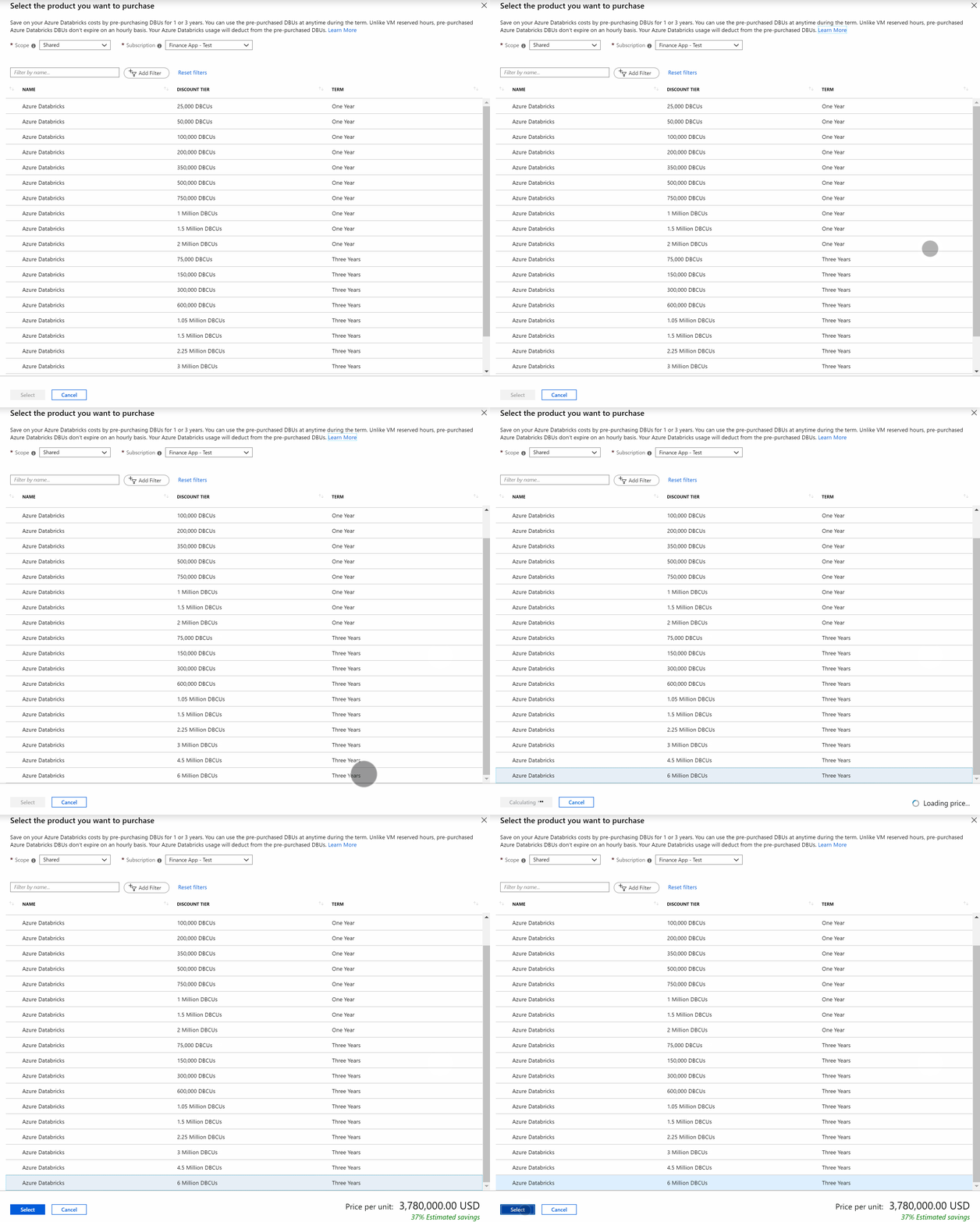
You can now save up to 37 percent on your Azure Databricks costs when you pre-purchase Azure Databricks commit units (DBCU) for one or three years. Any Azure Databricks use deducts from the pre-purchased DBUCs automatically. You can use the pre-purchased DBCUs at any time during the purchase term.

See our documentation "Optimize Azure Databricks costs with a pre-purchase" to learn more, or purchase an Azure Databricks plan in the Azure portal.


AppService Isolated stamp fee reservations

Save up to 40 percent on your AppService Isolated stamp fee costs with AppService reserved capacity. After you purchase a reservation, the isolated stamp fee usage that matches the reservation is no longer charged at the on-demand rates. AppService workers are charged separately and don’t get reservation discount.

Visit our documentation "Prepay for Azure App Service Isolated Stamp Fee with reserved capacity" to learn more or purchase a reservation in the Azure portal.


Automatically renew your reservations

Now you can setup your reservations to renew automatically. This ensures that you keep getting the reservation discounts without any gaps. You can opt-in to automatically renew your reservations anytime during the term of the reservation and opt-out anytime. You can also update the renewal quantity to better align with any changes in your usage pattern. To setup automatic renewal, just go to any reservation that you’ve already purchased and click on the Renewal tab.


Scope reservation to resource group

You can now scope reservations to a resource group. This feature is helpful in scenarios where same subscription has deployments from multiple cost centers, represented by their respective resource groups, and the reservation is purchased for a particular cost center. This feature helps you narrow down the reservation application to a resource group making internal charge-back easier. You can scope a reservation to a resource group at the time of purchase or update the scope after purchase. If you delete or migrate a resource group then the reservation will have to be rescoped manually.

Learn more in our documentation "Scope reservations."


Enhanced usage data to help with charge back, savings, and utilization

Organizations rely on their enterprise agreement (EA) usage data to reconcile invoices, track usage, and charge back internally. We recently added more details to the EA usage data to make your reservation reporting easier. With these changes you can easily perform following tasks:

Get reservation purchase and refund charges
Know which resource consumed how many hours of a reservation and charge back data for the usage
Know how many hours of a reservation was not used
Amortize reservation costs
Calculate reservation savings

The new data files are available only through Azure portal and not through the EA portal. Besides the raw data, now you can also see reservations in Cost Analysis.

You can visit our documentation "Get Enterprise Agreement reservation costs and usage" to learn more.


Purchase using API

You can now purchase azure reservation using REST APIs. The APIs below will help you get the SKUs, calculate the cost, and then make the purchase:

Get SKUs
Calculate cost
Purchase

Quelle: Azure

Rapidly develop blockchain solutions, but avoid the complexities

After first emerging as the basis for the Bitcoin protocol, blockchain has since gained momentum as a way to digitize business processes that extend beyond the boundaries of a single organization. While digital currencies use the shared ledger to track transactions and balances, enterprises are coming together to use the ledger in a different way. Smart contracts—codified versions of paper based agreements—enable multiple organizations to agree on terms that must be met for a transaction to be considered valid, empowering automated verification and workflows on the blockchain.

These digitized business processes, governed by smart contracts and powered by the immutability of blockchain, are poised to deliver the scalable trust today’s enterprises need. One Microsoft partner, SIMBA Chain, has created an offering that reduces the effort and time to start creating solutions using blockchain technology.

The Azure platform offers a wealth of services for partners to enhance, extend, and build industry solutions. Here we describe how one Microsoft partner uses Azure to solve a unique problem.

Simplifying blockchain app development

SIMBA stands for SIMpler Blockchain Applications. SIMBA Chain is a cloud based, Smart Contract as a Service (SCaaS) platform, enabling users with a variety of skill sets to build decentralized applications (dApps) and deploy to either iOS or Android.

The figure below shows the platform and the components (such as the Django web framework) used to communicate to a dApp using a pub/sub model. SIMBA Chain auto-generates the smart contract and API keys for deployment, and the app can be deployed to a number of backends for mobile apps (such as Android and iOS.) Communication to participate in the blockchain occurs through an API generated from a smart contract.

With this platform, anyone with a powerful idea can build a decentralized application. SIMBA Chain supports Ethereum and will add more blockchain protocols to their platform.

A time-saving technology

SIMBA Chain’s user-friendly interface greatly reduces the time and custom code generation required to build and deploy a blockchain-based application. Users can create and model a business application, define the assets along with the smart contracts parameters, and in a few simple clicks the SIMBA platform generates an API which interfaces with the ledger. By reducing application development time, SIMBA enables faster prototyping, refinement, and deployment.

Recommended next steps

Go to the Azure Marketplace listing for SIMBA Chain and click Get It Now.

Learn more about Azure Blockchain Service.
Quelle: Azure

Building Resilient ExpressRoute Connectivity for Business Continuity and Disaster Recovery

As more and more organizations adopt Azure for their business-critical workloads, the connectivity between organizations’ on-premises networks and Microsoft becomes crucial. ExpressRoute provides the private connectivity between on-premises networks and Microsoft. By default, an ExpressRoute circuit provides redundant network connections to Microsoft backbone network and is designed for carrier grade high availability. However, the high availability of a network connectivity is as good as the robustness of the weakest link in its end-to-end path. Therefore, it is imperative that the customer and the service provider segments of ExpressRoute connectivity are also architected for high availability.

Designing for high availability with ExpressRoute addresses these design considerations and talks about how to architect a robust end-to-end ExpressRoute connectivity between a customer on-premises network and Microsoft network core. The document addresses how to maximize high availability of an ExpressRoute in general, as well as components specific to Private peering and to Microsoft peering.

Private Peering High Availability

Each component of the ExpressRoute connectivity is key to build for high availability, including the first mile from on-premises to peering location, from multiple circuits to the same virtual network (VNet), and the virtual network gateway within the VNet.

To improve the availability of ExpressRoute virtual network gateway, Azure offers Zone-redundant virtual network gateways utilizing Availability Zones. ExpressRoute also supports Bidirectional Forwarding Detection (BFD) to expedite link failure detection and thereby significantly improving Mean Time To Recover (MTTR) following a link failure.

Microsoft Peering High Availability

Further, where and how you implement Network Address Translation (NAT) impacts MTTR of Microsoft PaaS services (including O365) consumed over Microsoft Peering following a connection failure. Path selection between the Internet and ExpressRoute on Microsoft Peering is also imperative to ensure a highly reliable and scalable architecture.


ExpressRoute Disaster Recovery Strategy

How about architecting ExpressRoute connectivity for disaster recovery and business continuity? Would it be possible to optimize ExpressRoute circuits in different regions both for local connectivity and to act as a backup for another regional ExpressRoute failure?  In the following architecture, how do you ensure symmetrical cross-regional traffic flow either via Microsoft backbone or via the organization’s global connectivity (outside Microsoft)? Designing for disaster recovery with ExpressRoute private peering addresses these concerns and talks about how to architect for disaster recovery using ExpressRoute private peering.

Summary

To build a robust ExpressRoute circuit, end-to-end ExpressRoute connectivity should be architected for high availability that maximizes redundancy and minimizes MTTR following a failure. A robust ExpressRoute circuit can withstand many single-point failures. However, to safeguard against disasters that impact an entire peering location, your disaster recovery plans should include geo-redundant ExpressRoute circuits. Failing over to geo-redundant ExpressRoute circuits face challenges including asymmetrical routing. The following documents help you architect highly available ExpressRoute circuit and design for disaster recovery using geo-redundant ExpressRoute circuits.


Designing for high availability with ExpressRoute
Designing for disaster recovery with ExpressRoute private peering
What are Availability Zones in Azure?
About zone-redundant virtual network gateways in Azure Availability Zones
Path selection between the Internet and ExpressRoute
Configure BFD over ExpressRoute

Quelle: Azure

Azure Stream Analytics now supports MATCH_RECOGNIZE

MATCH_RECOGNIZE in Azure Stream Analytics significantly reduces the complexity and cost associated with building, modifying, and maintaining queries that match sequence of events for alerts or further data computation.

What is Azure Stream Analytics?

Azure Stream Analytics is a fully managed serverless PaaS offering on Azure that enables customers to analyze and process fast moving streams of data and deliver real-time insights for mission critical scenarios. Developers can use a simple SQL language, extensible to include custom code, in order to author and deploy powerful analytics processing logic that can scale-up and scale-out to deliver insights with milli-second latencies.

Traditional way to incorporate pattern matching in stream processing

Many customers use Azure Stream Analytics to continuously monitor massive amounts of data, detecting sequence of events and deriving alerts or aggregating data from those events. This in essence is pattern matching.

For pattern matching, customers traditionally relied on multiple joins, each one detecting a single event in particular. These joins are combined to find a sequence of events, compute results or create alerts. Developing queries for pattern matching is a complex process and very error prone, difficult to maintain and debug. Also, there are limitations when trying to express more complex patterns like Kleene Stars, Kleene Plus, or Wild Cards.

To address these issues and improve customer experience, Azure Stream Analytics provides a MATCH_RECOGNIZE clause to define patterns and compute values from the matched events. MATCH_RECOGNIZE clause increases user productivity as it is easy to read, write and maintain.

Typical scenario for MATCH_RECOGNIZE

Event matching is an important aspect of data stream processing. The ability to express and search for patterns in a data stream enable users to create simple yet powerful algorithms that can trigger alerts or compute values when a specific sequence of events is found.

An example scenario would be a food preparing facility with multiple cookers, each with its own temperature monitor. A shut down operation for a specific cooker need to be generated in case its temperature doubles within five minutes. In this case, the cooker must be shut down as temperature is increasing too rapidly and could either burn the food or cause a fire hazard.

Query
SELECT * INTO ShutDown from Temperature
MATCH_RECOGNIZE (
LIMIT DURATION (minute, 5)
PARTITON BY cookerId
AFTER MATCH SKIP TO NEXT ROW
MEASURES
1 AS shouldShutDown
PATTERN (temperature1 temperature2)
DEFINE
temperature1 AS temperature1.temp > 0,
temperature2 AS temperature2.temp > 2 * MAX(temperature1.temp)
) AS T

In the example above, MATCH_RECOGNIZE defines a limit duration of five minutes, the measures to output when a match is found, the pattern to match and lastly how each pattern variable is defined. Once a match is found, an event containing the MEASURES values will be output into ShutDown. This match is partitioned over all the cookers by cookerId and are evaluated independently from one another.

MATCH_RECOGNIZE brings an easier way to express patterns matching, decreases the time spent on writing and maintaining pattern matching queries and enable richer scenarios that were practically impossible to write or debug before.

Get started with Azure Stream Analytics

Azure Stream Analytics enables the processing of fast-moving streams of data from IoT devices, applications, clickstreams, and other data streams in real-time. To get started, refer to the Azure Stream Analytics documentation.
Quelle: Azure

Overcoming language difficulties with AI and Azure services

Ever hear the Abbot and Costello routine, “Who’s on first?” It’s a masterpiece of American English humor. But what if it we translated it into another language? With a word-by-word translation, most of what English speakers laugh at, would be lost. Such is the problem of machine translation (translation by computer algorithm.) If a business depends on words to have an impact on the user, then translation services need to be seriously evaluated for accuracy and effect. This is how Lionbridge approaches the entire world of language translation—but now they can harness the capabilities of artificial intelligence (AI). The result is to ensure the translations reach a higher bar.

The Azure platform offers a wealth of services for partners to enhance, extend and build industry solutions. Here we describe how one Microsoft partner uses Azure to solve a unique problem.

Efficient partners for communication in life sciences

For those who deal in healthcare or life sciences, language should not be a barrier to finding the right information. The world of research and reporting is not limited to a few human languages. Life science organizations need to be able to find data from anywhere in the world. And for that, a translation service is needed that preserves not just the facts, but the effect of the original data. This is the goal of Lionbridge, a Microsoft partner dedicated to efficient translation.

In addition to localization, Lionbridge also serves as a guard against other dangers related to document handling. For example, there may be insufficient information provided to get a patient’s informed consent. Or a patient’s data can be disclosed by mistake. The penalties for any privacy violations can be steep. Having a third party whose sole business is to govern the documentation provides additional security against data mishandling.

The company can’t do this work on its own. It stresses a collaborative partnership approach to achieve the results needed. That begins with having fluency with human languages as well as with the technical domains. From their literature:

“Our team partners with yours to turn sensitive, complex, and frequently-changing content into words that resonate with every end user—from regulatory boards to care providers to patients—around the world. Our clients include pharmaceutical, medical device, medical publishing, and healthcare companies as well as Contract Research Organizations (CROs). Each demands strict attention to detail, expert understanding of nuanced requirements, and the utmost care for the end user.”

It comes as no surprise that Lionbridge depends on a host of skilled, professional translators—10,000 translators across 350 languages.

Specialized solutions

Due to the highly specialized service needs, the company operates as a consultant. After a meeting and evaluation of existing documentation and workflows, they will deliver a new workflow that includes technical services built on Azure. The company also creates a secure document exchange portal for managing translation into 350+ languages. The portal integrates with advanced workflow automation and AI powered translation. This advanced language technology enables far greater speed and volumes to be translated with increasing efficiency, opening up new languages, markets, and constituents for customers.

Lionbridge’s portal and translation management system have the appropriate controls in place in order to support a HIPAA-compliant workflow and are supported by globally distributed “Centers of Excellence.” The staff of the centers ensure adherence to ISO standards and are trained in supporting sensitive content, including personal health information (PHI).

The graphic shows the processes that are involved in creating a translation project. The project must first be defined. The project is then handed off to Lionbridge through their “Freeway Platform.” From there, it undergoes the translation process, with quality checks. The customer can see progress and results at a dashboard until the project is deemed complete.

Azure services used in solution

Azure App Service is used as a compute resource to host applications and is valued for its automated scaling and proactive monitoring.
Azure SQL Database is appreciated for its automated backup, geo-replication, and failover features.
Azure Service Fabric supports the need for a microservices oriented platform.
Azure Storage (mostly blobs) is used in many applications, including for CDN purposes to allow users to access application content in many parts of the words with high speed.
Azure Cognitive Services is used by some applications to provide AI capabilities.

Next steps

To find out more, go to the Lionbridge offering on the Azure Marketplace and click Contact me.

To learn more about other healthcare solutions, go to the Azure for health page.
Quelle: Azure

Introducing NVv4 Azure Virtual Machines for GPU visualization workloads

Azure offers a wide variety of virtual machine (VM) sizes tailored to meet diverse customer needs. Our NV size family has been optimized for GPU-powered visualization workloads, such as CAD, gaming, and simulation. Today, our customers are using these VMs to power remote visualization services and virtual desktops in the cloud. While our existing NV size VMs work great to run graphics heavy visualization workloads, a common piece of feedback we receive from our customers is that for entry-level desktops in the cloud, only a fraction of the GPU resources is needed. Currently, the smallest sized GPU VM comes with one full GPU and more vCPU/RAM than a knowledge worker desktop requires in the cloud. For some customers, this is not a cost-effective configuration for entry-level scenarios.

Announcing NVv4 Azure Virtual Machines based on AMD EPYC 7002 processors and virtualized Radeon MI25 GPU.

The new NVv4 virtual machine series will be available for preview in the fall. NVv4 offers unprecedented GPU resourcing flexibility, giving customers more choice than ever before. Customers can select from VMs with a whole GPU all the way down to 1/8th of a GPU. This makes entry-level and low-intensity GPU workloads more cost-effective than ever before, while still giving customers the option to scale up to powerful full-GPU processing power.

NVv4 Virtual Machines support up to 32 vCPUs, 112GB of RAM, and 16 GB of GPU memory.


Size
vCPU
Memory
GPU memory
Azure network

Standard_NV4as_v4
4
14 GB
2 GB
50 Gbps

Standard_NV8as_v4
8
28 GB
4 GB
50 Gbps

Standard_NV16as_v4
16
56 GB
8 GB
50 Gbps

Standard_NV32as_v4
32
112 GB
16 GB
50 Gbps

With our hardware-based GPU virtualization solution built on top of AMD MxGPU and industry standard SR-IOV technology, customers can securely run workloads on virtual GPUs with dedicated GPU frame buffer. The new NVv4 Virtual Machines will also support Azure Premium SSD disks. NVv4 will have simultaneous multithreading (SMT) enabled for applications that can take advantage of additional vCPUs.

For customers looking to utilize GPU-powered VMs as part of the desktop as a service (DaaS) offering, Windows Virtual Desktop provides a comprehensive desktop and application virtualization service running in Azure. The new NVv4-series Virtual Machines will be supported by Windows Virtual Desktop as well as Azure Batch  for cloud-native batch processing.

Remote display application and protocols are key to a good end user experience with VDI/DaaS in the cloud. The new virtual machine series will work with Windows Remote Desktop (RDP) 10, Teradici PCoIP, and HDX 3D Pro. The AMD Radeon GPUs support DirectX 9 through 12, OpenGL 4.6, and Vulkan 1.1.

Customers can sign up for NVv4 access today by filling out this form. NVv4 Virtual Machines will initially be available later this year in the South Central US and West Europe Azure regions and will be available in additional regions soon thereafter.
Quelle: Azure

Introducing the new HBv2 Azure Virtual Machines for high-performance computing

Announcing the second-generation HB-series Azure Virtual Machines for high-performance computing (HPC). HBv2 Virtual Machines are designed to deliver leadership-class performance, message passing interface (MPI) scalability, and cost efficiency for a variety of real-world HPC workloads.

HBv2 Virtual Machines feature 120 AMD EPYC™ 7002-series CPU cores, 480 GB of RAM, 480 MB of L3 cache, and no simultaneous multithreading (SMT). HBv2 Virtual Machines provide up to 350 GB/sec of memory bandwidth, which is 45-50 percent more than comparable x86 alternatives and three times faster than what most HPC customers have in their datacenters today.

Size
CPU cores
Memory: GB
Memory per CPU Core: GB
Local SSD: GiB
RDMA network
Azure network

Standard_HB120rs
120
480 GB
4 GB
1.6 TB
200 Gbps
40 Gbps

‘r’ denotes support for RDMA. ‘s’ denotes support for Premium SSD disks.

Each HBv2 virtual machine (VM) also features up to 4 teraFLOPS of double-precision performance, and up to 8 teraFLOPS of single-precision performance. This is a four times increase over our first generation of HB-series Virtual Machines, and substantially improves performance for applications demanding the fastest memory and leadership-class compute density.

Below are preliminary benchmarks on HBv2 across several common HPC applications and domains:

To drive optimal at-scale message passing interface (MPI) performance, HBv2 Virtual Machines feature 200 Gb/s HDR InfiniBand from our technology partners at Mellanox. The InfiniBand fabric backing HBv2 Virtual Machines is a non-blocking fat-tree with a low-diameter design for consistent, ultra-low latencies. Customers can use standard Mellanox/OFED drivers just as they would on a bare metal environment. HBv2 Virtual Machines officially support RDMA verbs and hence support all InfiniBand based MPIs, such as OpenMPI, MVAPICH2, Platform MPI, and Intel MPI. Customers can also leverage hardware offload of MPI collectives to realize additional performance, as well as efficiency gains for commercially licensed applications.

Across a single virtual machine scale set, customers can run a single MPI job on HBv2 Virtual Machines at up to 36,000 cores. For our largest customers, HBv2 Virtual Machines support up to 80,000 cores for single jobs.

Customers can also maximize the Ethernet interface of HBv2 Virtual Machines by using the SRIOV-based accelerated networking in Azure, which will yield up to 40 Gb/s of bandwidth, consistent, and low latencies.

Finally, the new H-series Virtual Machines feature local NVMe SSDs to deliver ultra-fast temporary storage for the full range of file sizes and I/O patterns. Using modern burst-buffer technologies like BeeGFS BeeOND, the new H-series Virtual Machines can deliver more than 900 GB/sec of peak injection I/O performance across a single virtual machine scale set. The new H-series Virtual Machines will also support Azure Premium SSD disks.

Customers can accelerate their HBv2 deployments with a variety resources optimized and pre-configured by the Azure HPC team. Our pre-built HPC image for CentOS is tuned for optimal performance and bundles key HPC tools like various MPI libraries, compilers, and more. The AzureHPC Project helps customers deploy an end-to-end Azure HPC environment reliably and quickly, and includes deployment scripts for setting up building blocks for networking, compute, schedulers, and storage. Also included is a growing list of tutorials for running HPC applications themselves.

For customers familiar with HPC schedulers and who would like to use these with HBv2 Virtual Machines, Azure CycleCloud is the simplest way to orchestrate autoscaling clusters. Azure CycleCloud supports schedulers such as Slurm, PBSPro, LSF, GridEngine, and HTCondor, and enables hybrid deployments for customers wishing to pair HBv2 Virtual Machines with their existing on-premises clusters. The new H-series Virtual Machines will also be supported by Azure Batch for cloud-native batch processing. HBv2 Virtual Machines will be available to all Azure platform partners.

Customers can sign up for HBv2 access today by filling out this form. HBv2 Virtual Machines will initially be available in the South Central US and West Europe Azure regions, with availability in additional regions soon thereafter.
Quelle: Azure






