Docker is Hiring!

Welcome to 2022! Even in normal times, the New Year is a time for looking back and looking forward. And even more after the last couple of years, we know that a lot of people are reassessing their lives and their priorities, and considering moving jobs. If that’s you, we wanted to let you know that Docker is growing fast, and invite you to look at our careers page where we have lots of open positions.

All our positions are remote. Before the pandemic, we had a mixture of office-based and remote employees, but when we were all forced to work from home we found it worked well for us, and we’re sticking with it. (Our VP of Engineering, Jean-Laurent de Morlhon, described more about our remote working journey in a previous blog post).

Where we’re hiring. Even though we’re fully remote, there are only certain countries we can hire in at the moment, based on compatible timezones with our existing teams, and where we’re familiar with local employment law. We plan to expand the list in future, but right now we’re only looking for people in these fifteen countries: Argentina, Brazil, Bulgaria, Canada, France, Germany, Mexico, Netherlands, Poland, Portugal, Romania, Spain, Sweden, UK and USA.

What positions we’re hiring for. As I said, we’re growing fast, and all of our departments are looking for people. Right now we’re looking for

Software developers. We cover a wide software stack in Docker, with everything from the OS, through backend applications, to full stack and UI; we write CLI apps, desktop apps & webs; and use Linux, Windows & Mac.Product managers and product designers. We believe in building the tools our users want, and making them easy to use. To make that happen, every Scrum team contains its own Product Manager and Product Designer.Support engineers and sustaining engineersData engineersSales and Marketing. We have a variety of sales positions from Business Development Reps to Director of Sales Development and a Technical Product Marketing Manager.HR and Finance. These teams support the growth of Docker and there are a variety of roles from HR Coordinator to Sr. Revenue Accountant and more.… with more on the way soon.

What we offer. We want Docker to be a great place to work, and one where people will want to stay for many years. Apart from a competitive salary, here are some of the benefits we offer. (The benefits are broadly the same in each of our countries, but do differ slightly because of local laws).

Freedom & flexibility: fit your work round your life. Now that we’ve fully embraced remote working, it’s important to us that employees get the benefits of that in terms of being able to devise schedules that fit round other parts of their life such as childcare commitments, social clubs, or exercise routines.Stock options. We’re a growing startup, and we want all employees to have a share in the success of the company.Virtual and (when possible!) in-person social events to build connections and have fun. We believe that it’s important to have opportunities to get to know your co-workers on a personal as well as a professional level, even more so in a fully remote company. If you know your colleagues, you will do better work, and have more fun doing it. To that end, we organize virtual and in-person events for teams, for cities or countries, and for the whole company.Home office setup: we want you to be comfortable while you work. If you don’t already have a proper desk, office chair, headset, or similar items, we will supply them.Work From Home allowance equivalent to US$100 after tax per month, to cover the cost of your home internet connection. If you’re using your internet connection for work, we believe we should pay for it.Vacation plan that encourages you to take time off. We don’t believe in burning people out: we want employees to be able to take time off to do the things they enjoy and come back refreshed.Whaleness days: a company-wide day off each month. To improve our work-life balance even further, as a company we shut down for one day each month. This is in addition to your normal vacation allowance. The best thing: unlike normal holidays, you don’t have a huge backlog of email and Slack messages the next day, because everyone else took the day off too!Generous maternity and parental leaveHealth insurance

Where to find out more. If you’re interested in working in an employee-friendly company that’s building the next generation of tools to make developers’ lives easier, then please visit our careers page at docker.com/careers. You can find the current list of vacancies there and apply. Or if you have any questions, you can email us at careers@docker.com. We look forward to hearing from you, and maybe even working with you soon!

DockerCon 2022

Join us for DockerCon 2022 on Tuesday, May 10. DockerCon is a free, one day virtual event that is a unique experience for developers and development teams who are building the next generation of modern applications. If you want to learn about how to go from code to cloud fast and how to solve your development challenges, DockerCon 2022. offers engaging live content to help you build, share and run your applications. Register today at https://www.docker.com/dockercon/
The post Docker is Hiring! appeared first on Docker Blog.
Quelle: https://blog.docker.com/feed/
Docker’s Top 10 Most Popular Blogs in 2021

As 2021 comes to an end, it’s time to look back on our top 10 most-read blogs of the year. They cover a range of topics, from updates to our subscription pricing to product announcements to security threats. Here’s a quick summary, starting with the most popular, then ordered by topic.

Updates and extensions to Docker product subscriptions

It should come as no surprise that changes to our product subscriptions — our biggest news of 2021 — was a major driver in blog readership for the year. In fact, three of the top 10 most popular blogs centered on this topic.

In the number one spot is Docker CEO Scott Johnston’s announcement on August 31, Docker is Updating and Expanding Our Product Subscriptions. Scott laid out the four subscription tiers — Docker Personal, Docker Pro, Docker Team, and Docker Business — and provided a detailed breakdown of what users need to know about each, pricing (where applicable), and the why behind the changes.

The fifth and seventh most popular blogs also deal with aspects of the changes to the subscription tiers. Coming in at number five, Steph Rifai zeroed in on the issue of Volume Management in her September 30 blog, Docker Desktop 4.1 Release: Volume Management Now Included with Docker Personal. And at number seven is a September 29 blog by yours truly examining Docker Captain Bret Fisher’s take on possible alternatives to Docker, Looking for a Docker Alternative? Consider This.

Apple Silicon News

Another big driver of eyeballs to our blog was news around developers being able to run Docker Desktop on Apple’s new M1 chip. The second most-read blog of the year is Dieu Cao’s April 15 blog, Released: Docker Desktop for Mac [Apple Silicon], announcing general availability. And coming in at number four is Stephen Turner’s February 17 blog announcing a preview, titled New Docker Desktop Preview for Apple M1 Released.

Log4j 2 Security Vulnerability

The biggest security threat of the year showed up this month, causing our developer community to scramble and work tirelessly these past few days. #HugOps to you. That’s why the third most-read blog of the year focused on fixes for the Log4j 2 vulnerability CVE-2021-44228. Justin Cormack’s blog and updates on the issue, Apache Log4j 2 CVE-2021-44228.

Responding to Your Feedback

The voice of the Docker developer community is hugely important to us. When you speak, we listen. Which is why two of the most-read blogs in 2021 were about improvements to our products in response to your feedback. 

Coming in at number six is Chris McLellan’s November 9 blog about the new Pause/Resume feature in Docker Desktop and other changes that make it easier to manage updates: Docker Desktop 4.2 Release: Save Your Battery with Pause / Resume, and Say Goodbye to the Update Pop-up. And at number nine is Dieu Cao’s April 8 blog on changes to how updates work in Docker Desktop, Changing How Updates Work with Docker Desktop 3.3. 

Preview: Docker Dev Environments

Our eighth most-read blog of the year is a tech preview that appeared back on June 23. Tech Preview: Docker Dev Environments by Ben De St Paer-Gotch dove into a powerful feature that allows developers to easily share their work-in-progress code for faster, higher-quality collaboration and code reviews.

Hear, Hear for Heredocs!

And the number 10 most-read blog for 2021 details how Docker’s BuildKit tool for building Dockerfiles now supports heredoc syntax, making it easier for developers to do things that were once difficult. The piece, titled Introduction to heredocs in Dockerfiles, was written by Justin Chadell, a member of the Docker community.

So there you have it — the top 10 most popular blogs of 2021. Here’s to an awesome year of growth and expansion in the developer community — and to more must-read blogs — in 2022.

Resources

Download the latest version of Docker Desktop now. See what’s coming up and recommend feature requests in the Docker public roadmap https://github.com/docker/roadmap

DockerCon2022

Join us for DockerCon2022 on Tuesday, May 10. DockerCon is a free, one day virtual event that is a unique experience for developers and development teams who are building the next generation of modern applications. If you want to learn about how to go from code to cloud fast and how to solve your development challenges, DockerCon 2022 offers engaging live content to help you build, share and run your applications. Register today at https://www.docker.com/dockercon/
The post Docker’s Top 10 Most Popular Blogs in 2021 appeared first on Docker Blog.
Quelle: https://blog.docker.com/feed/
Docker Captain Take 5 – Nana Janashia

Docker Captains are select members of the community that are both experts in their field and are passionate about sharing their Docker knowledge with others. “Docker Captains Take 5” is a regular blog series where we get a closer look at our Captains and ask them the same broad set of questions ranging from what their best Docker tip is to whether they prefer cats or dogs (personally, we like whales and turtles over here). Today, we’re interviewing Nana who has been a Docker Captain since 2021. She runs the YouTube channel TechWorld with Nana and is based in Austria.

How/when did you first discover Docker?

In a project I was working on as a junior software developer. I joined a team developing an IoT system where they had selected some of the cool modern technologies and Docker was one of them. 

Since Docker was just one of the many technologies we were using in the project, and because of the project deadlines, I was only able to learn just bits and pieces of Docker concepts during the project implementation phase, instead of a proper thorough introduction right at the beginning. So it took me two years to get a good big picture understanding of Docker, where I felt confident I really knew the tool. 

From today’s perspective, I wish I had just worked through a 3-4 hour crash course and properly learned it at the beginning. 

What is your favorite Docker command?

`docker exec -it container-id` 

I use it a lot when playing around with containers, testing and debugging stuff. 

What is your top tip for working with Docker that others may not know?

Running docker scan to check for any vulnerabilities in your images. This can give you a lot of confidence to know what kind of images you are producing and deploying. 

What’s the coolest Docker demo you have done/seen ?

For my DevOps bootcamp I built a scenario, where: 

I took a simple Nodejs application, dockerized it using a Dockerfile, added docker-compose file to run a database service and the application with, then configured a fully-automated CI/CD pipeline thatbuilt the image from this Dockerfile, pushed it to a private Docker registry, then automatically incremented the docker image version in a docker-compose file, copied it to an EC2 server, with Docker already installed on and started the application and its database by running docker-compose up on the ec2 server and finally validate that the application was deployed and the endpoint was accessible. 

It was really fun to see how Docker can be integrated so well with all these different technologies

Docker Community All Hands: Event Recap, December 2021

One year ago, we kicked off the Community All Hands (CAH) event. The goal was to bring together Docker staff and community members for the latest product updates. This time, we’ve evolved the CAH to include multiple community tracks that give our amazing community members the opportunity to share their knowledge and expertise.  

The event had a main track, hosted by our core team, and seven community tracks. We were blown away by the level of engagement and participation from our community – over 1000 people tuned in to watch the Community talks. 

We also had a networking section where people could speak to each other and meet Docker staff. This was a great opportunity for people to learn more about our team, meet the engineers behind the curtains, and even learn about how you can work at Docker.

Scott Johnston, CEO of Docker, kicked off the company’s Community All Hands event with a presentation on the yearly recap. He highlighted some of the most important moments and accomplishments of the Docker developer community over the past year. 

 The company is focusing its roadmap and priorities on three things for developers: speed, choice, and security. 

“It’s been quite a year for all of us, and we hope you are safe and continue to stay safe and well. But it’s been also a very positive year for the Docker developer community,” Scott said. “We’re so excited about heading into the next year. It’s going to be a phenomenal year with new features, content and experiences for developers.”

One of the highlights of our Community All Hands was a panel hosted by Peter McKee with key staff from Docker Desktop, including Engineers and Product Managers. They discussed Docker Desktop’s licensing questions, roadmap, and new features. Anca Iordache talked about Awesome Compose, a collection of templates to help you start your next Docker project.

We also hosted a beginner’s track to help you get started with containers. You can hear from Docker Captains about how you can overcome the barriers in learning when trying new technologies.

Finally, the members of our Open Source programs presented their projects and explained how they use Docker to speed up their work. They showcased their projects in multiple disciplines like Bioinformatics, Developer Tooling, Machine Learning, DevOps, and Security.

The Docker developer community is thriving, and the company is committed to continuing to support and invest in it. Thank you to all of the developers who have contributed to the Docker community over the past year – we can’t wait to see what you build next.

If you missed our Community All Hands meeting, we got you. You can watch all the talks and panels on demand.

DockerCon2022

Join us for DockerCon2022 on Tuesday, May 10. DockerCon is a free, one day virtual event that is a unique experience for developers and development teams who are building the next generation of modern applications. If you want to learn about how to go from code to cloud fast and how to solve your development challenges, DockerCon 2022 offers engaging live content to help you build, share and run your applications. Register today at https://www.docker.com/dockercon/
The post Docker Community All Hands: Event Recap, December 2021 appeared first on Docker Blog.
Quelle: https://blog.docker.com/feed/
WSL 2 GPU Support for Docker Desktop on NVIDIA GPUs

It’s been a year since Ben wrote about Nvidia support on Docker Desktop. At that time, it was necessary to take part in the Windows Insider program, use Beta CUDA drivers, and use a Docker Desktop tech preview build. Today, everything has  changed:

On the OS side, Windows 11 users can now enable their GPU without participating in  the Windows Insider program. Windows 10 users still need to register.Nvidia CUDA drivers have been released.Last, the GPU support has been merged in Docker Desktop (in fact since version 3.1).

Nvidia used the term near-native to describe the performance to be expected.

Where to find the Docker images

Base Docker images are hosted at https://hub.docker.com/r/nvidia/cuda. The original project is located at https://gitlab.com/nvidia/container-images/cuda.

What they contain

The nvidia-smi utility allows users to query information on the accessible devices.

$ docker run -it –gpus=all –rm nvidia/cuda:11.4.2-base-ubuntu20.04 nvidia-smi
Tue Dec 7 13:25:19 2021
+—————————————————————————–+
| NVIDIA-SMI 510.00 Driver Version: 510.06 CUDA Version: 11.6 |
|——————————-+———————-+———————-+
| GPU Name Persistence-M| Bus-Id Disp.A | Volatile Uncorr. ECC |
| Fan Temp Perf Pwr:Usage/Cap| Memory-Usage | GPU-Util Compute M. |
| | | MIG M. |
|===============================+======================+======================|
| 0 NVIDIA GeForce … On | 00000000:01:00.0 Off | N/A |
| N/A 0C P0 13W / N/A | 132MiB / 4096MiB | N/A Default |
| | | N/A |
+——————————-+———————-+———————-+

+—————————————————————————–+
| Processes: |
| GPU GI CI PID Type Process name GPU Memory |
| ID ID Usage |
|=============================================================================|
| No running processes found |
+—————————————————————————–

The dmon function of nvidia-smi allows monitoring the GPU parameters :

$ docker exec -ti $(docker ps -ql) bash
root@7d3f4cbdeabb:/src# nvidia-smi dmon
# gpu pwr gtemp mtemp sm mem enc dec mclk pclk
# Idx W C C % % % % MHz MHz
0 29 69 – – – 0 0 4996 1845
0 30 69 – – – 0 0 4995 1844

The nbody utility is a CUDA sample that provides a benchmarking mode.

$ docker run -it –gpus=all –rm nvcr.io/nvidia/k8s/cuda-sample:nbody nbody -benchmark

> 1 Devices used for simulation
GPU Device 0: “Turing” with compute capability 7.5

> Compute 7.5 CUDA device: [NVIDIA GeForce GTX 1650 Ti]
16384 bodies, total time for 10 iterations: 25.958 ms
= 103.410 billion interactions per second
= 2068.205 single-precision GFLOP/s at 20 flops per interaction

Quick comparison to a CPU suggest a different order of magnitude of performance. GPU is 2000 times faster:

> Simulation with CPU
4096 bodies, total time for 10 iterations: 3221.642 ms
= 0.052 billion interactions per second
= 1.042 single-precision GFLOP/s at 20 flops per interaction

What can you do with a paravirtualized GPU?

Run cryptographic tools

Using a GPU is of course useful when operations can be heavily parallelized. That’s the case for hash analysis. dizcza hosted its nvidia-docker based images of hashcat on Docker hub. This image magically works on Docker Desktop!

$ docker run -it –gpus=all –rm dizcza/docker-hashcat //bin/bash
root@a6752716788d:~# hashcat -I
hashcat (v6.2.3) starting in backend information mode

clGetPlatformIDs(): CL_PLATFORM_NOT_FOUND_KHR

CUDA Info:
==========

CUDA.Version.: 11.6

Backend Device ID #1
Name………..: NVIDIA GeForce GTX 1650 Ti
Processor(s)…: 16
Clock……….: 1485
Memory.Total…: 4095 MB
Memory.Free….: 3325 MB
PCI.Addr.BDFe..: 0000:01:00.0

From there it is possible to run hashcat benchmark

hashcat -b

Hashmode: 0 – MD5
Speed.#1………: 11800.8 MH/s (90.34ms) @ Accel:64 Loops:1024 Thr:1024 Vec:1
Hashmode: 100 – SHA1
Speed.#1………: 4021.7 MH/s (66.13ms) @ Accel:32 Loops:512 Thr:1024 Vec:1
Hashmode: 1400 – SHA2-256
Speed.#1………: 1710.1 MH/s (77.89ms) @ Accel:8 Loops:1024 Thr:1024 Vec:1

Draw fractals

The project at https://github.com/jameswmccarty/CUDA-Fractal-Flames uses CUDA for generating fractals. There are two steps to build and run on Linux. Let’s see if we can have it running on Docker Desktop. A simple Dockerfile with nothing fancy helps for that.

# syntax = docker/dockerfile:1.3-labs
FROM nvidia/cuda:11.4.2-base-ubuntu20.04
RUN apt -y update
RUN DEBIAN_FRONTEND=noninteractive apt -yq install git nano libtiff-dev cuda-toolkit-11-4
RUN git clone –depth 1 https://github.com/jameswmccarty/CUDA-Fractal-Flames /src
WORKDIR /src
RUN sed ‘s/4736/1024/’ -i fractal_cuda.cu # Make the generated image smaller
RUN make

And then we can build and run:

$ docker build . -t cudafractal
$ docker run –gpus=all -ti –rm -v ${PWD}:/tmp/ cudafractal ./fractal -n 15 -c test.coeff -m -15 -M 15 -l -15 -L 15

Note that the –gpus=all is only available to the run command. It’s not possible to add GPU intensive steps during the build.

Here’s an example image:

Machine learning

Well really, looking at GPU usage without looking at machine learning would be a miss. The tensorflow:latest-gpu image can take advantage of the GPU in Docker Desktop. I will simply point you to Anca’s blog earlier this year. She described a tensorflow example and deployed it in the cloud: https://www.docker.com/blog/deploy-gpu-accelerated-applications-on-amazon-ecs-with-docker-compose/

Conclusion: What are the benefits for developers? 

At Docker, we want to provide a turn key solution for developers to execute their workflows seamlessly:

With Docker Desktop, developers can run their code locally and deploy to the infrastructure of their choice.We provide support in the issue tracker https://github.com/docker/for-winDownload the latest version of Docker Desktop now.

DockerCon2022

Join us for DockerCon2022 on Tuesday, May 10. DockerCon is a free, one day virtual event that is a unique experience for developers and development teams who are building the next generation of modern applications. If you want to learn about how to go from code to cloud fast and how to solve your development challenges, DockerCon 2022 offers engaging live content to help you build, share and run your applications. Register today at https://www.docker.com/dockercon/
The post WSL 2 GPU Support for Docker Desktop on NVIDIA GPUs appeared first on Docker Blog.
Quelle: https://blog.docker.com/feed/

The Grace Period for the Docker Subscription Service Agreement Ends Soon – Here’s What You Need to Know

Remember the updates to our product subscription tiers we announced on August 31? You may recall we also announced a grace period for those that need to transition from a free to a paid subscription to use Docker Desktop. This is a friendly reminder that that grace period is ending on January 31, 2022.

Docker trusts our customers to be in compliance by January 31, 2022 and Docker Desktop will continue to function normally after January 31st. But this is a reminder that unpaid commercial use by companies over 250 employees or $10 million USD in annual revenue will be out of compliance with the Docker Subscription Service Agreement.

Updated Docker Subscription Tiers

To recap our August 31 announcement, Docker announced updated product subscription tiers — Docker Personal, Docker Pro, Docker Team and Docker Business. Docker Personal replaces Docker Free and it remains free for personal use, education, non-commercial open source projects, and small businesses. Docker Business is our newest subscription offering that enables commercial use of Docker Desktop, and includes additional enterprise-grade management and security features like Image Access Management, vulnerability scanning, SAML SSO, and more.

The updated subscription terms for Docker Desktop reflect our need to scale our business sustainably and enables us to continue providing value across all Docker subscriptions. Check out our pricing page and Subscription Cheat Sheet to compare our subscription tiers and figure out which subscription is right for you and your organization. 

Using Docker Desktop in large commercial organizations will require a Pro, Team or Business paid subscription, starting at $5 a month. Docker Desktop remains free for small businesses (fewer than 250 employees AND less than $10 million USD in annual revenue), as well as for personal use, education, and non-commercial open source projects.

Docker Desktop: More than a Container UI

Thousands of developers use Docker Desktop in production but many people may not realize just how much value Docker Desktop packs under the hood. Docker Desktop manages all the complexities of integrating, configuring and maintaining Docker Engine and Kubernetes in Windows and Mac desktop environments (filesystems, VMs, networking and more). This allows developers to spend more time building applications and less time tinkering with infrastructure. With a paid subscription, organizations get additional value from Docker Desktop, including capabilities for managing secure software supply chains, centralizing policy visibility and controls, and easily managing users and access for hundreds or thousands of developers.

Docker Business Enables Scalability and Security 

​​The new Docker Business subscription is designed for organizations that use Docker at scale for application development, and that require features like secure software supply chain management, single sign-on (SSO), container registry access controls and more. It has an easy-to-use SaaS-based management plane that allows IT leaders to efficiently observe and manage all their Docker development environments and accelerate their secure software supply chain initiatives. Docker Business also includes Image Access Management which gives admins the ability to control which container images developers can access from Docker Hub, ensuring teams are building securely from the start by using only trusted content. 

Image Access Management is just the first of many control-plane features to be added to Docker Business. In the not-too-distant future look for SAML-based SSO; support for local registries such as JFrog Artifactory, along with other public registries such as ECR; visibility into which images are being consumed, versions and security vulnerabilities, and more security, management, and  productivity features. Check out the Docker Business Whitepaper to learn more about how Docker Business extends the Docker experience developers already know and love with premium features and capabilities.

Learn More

Again, the Docker Subscription Service Agreement went into effect on August 31st and the grace period for those who need to switch to a paid Docker subscription under the new terms ends soon on January 31, 2022. We’ve put together resources to help make this transition as easy as possible: 

Use the Docker Subscription Cheat Sheet to figure out which subscription is right for you.Do the New Terms of Docker Desktop Apply If You Don’t Use the Docker Desktop UI? Read this to find out.Considering an alternative to Docker Desktop? Read this blog recapping Docker Captain Bret Fisher’s video on your options.Check out the FAQ on the subscription and licensing updates.Read about “The Magic Behind the Scenes of Docker Desktop.”Check out a recording from our recent Docker Business Webinar.

Learn more about Docker Business in our white paper, Build Modern and Secure Applications at Scale with Docker Business.

DockerCon2022

Join us for DockerCon2022 on Tuesday, May 10. DockerCon is a free, one day virtual event that is a unique experience for developers and development teams who are building the next generation of modern applications. If you want to learn about how to go from code to cloud fast and how to solve your development challenges, DockerCon 2022 offers engaging live content to help you build, share and run your applications. Register today at https://www.docker.com/dockercon/
The post The Grace Period for the Docker Subscription Service Agreement Ends Soon – Here’s What You Need to Know appeared first on Docker Blog.
Quelle: https://blog.docker.com/feed/

Apache Log4j 2 CVE-2021-44228

We know that many of you are working hard on fixing the new and serious Log4j 2 vulnerability CVE-2021-44228, which has a 10.0 CVSS score. We send our #hugops and best wishes to all of you working on this vulnerability, now going by the name Log4Shell. This vulnerability in Log4j 2, a very common Java logging library, allows remote code execution, often from a context that is easily available to an attacker. For example, it was found in Minecraft servers which allowed the commands to be typed into chat logs as these were then sent to the logger. This makes it a very serious vulnerability, as the logging library is used so widely and it may be simple to exploit. Many open source maintainers are working hard with fixes and updates to the software ecosystem.

We want to help you as much as we can in this challenging time, and we have collected as much information as possible for you here, including how to detect the CVE and potential mitigations. 

We will update this post as more information becomes available.

Am I vulnerable?

The vulnerable versions of Log4j 2 are versions 2.0 to version 2.14.1 inclusive. The first fixed version is 2.15.0. We strongly encourage you to update to the latest version if you can. If you are using a version before 2.0, you are also not vulnerable.

You may not be vulnerable if you are using these versions, as your configuration may already mitigate this (see the Mitigations section below), or the things you log may not include any user input. This may be difficult to validate however without understanding all the code paths that may log in detail, and where they may get input from. So you probably will want to upgrade all code using vulnerable versions.

The configuration for the docker scan command previously shipped in Docker Desktop versions 4.3.0 and earlier unfortunately do not pick up this vulnerability on scans. Please update to Docker Desktop 4.3.1+ with docker scan 0.11.0+, which we released today, 11 December 2021.

If you are using docker scan from Linux you can download binaries from GitHub and install in the plugins directory as explained in the instructions here. We will soon update the Linux CLI version to include the updated docker scan.

If you use the updated version, you should see a message in the output log like this:

Upgrade org.apache.logging.log4j:log4j-core@2.14.0 to org.apache.logging.log4j:log4j-core@2.15.0 to fix
✗ Arbitrary Code Execution (new) [Critical Severity][https://snyk.io/vuln/SNYK-JAVA-ORGAPACHELOGGINGLOG4J-2314720] in org.apache.logging.log4j:log4j-core@2.14.0
introduced by org.apache.logging.log4j:log4j-core@2.14.0

To test this, you can check a vulnerable image, for example this image contains a vulnerable version.

docker scan elastic/logstash:7.13.3

or to cut out all the other vulnerabilities

docker scan elastic/logstash:7.13.3 | grep ‘Arbitrary Code Execution’

For more information about docker scan, see the documentation.

Docker Hub Scans

Docker Hub security scans are currently not picking up the Log4j 2 vulnerability. We are working to fix this as soon as we can, and to re-scan existing images so you can see which ones are vulnerable. We apologise for this, and will update here as soon as we have fixed this. Please use docker scan from the updated version above until this has been remedied.

Mitigations

You may well want to use a web application firewall (WAF) as an initial part of your mitigation and fix process.

For containerized applications, if the version of Log4j 2 you are using is 2.10.0 or later, there is an environment variable or Java command line option you can use to disable the unsafe substitution behaviour. You can add the line:

ENV LOG4J_FORMAT_MSG_NO_LOOKUPS=true

to your Dockerfile, or you can add the equivalent flag “-Dlog4j.formatMsgNoLookups=true” to the command you run in your container, for example:

CMD [”java”, “-Dlog4j.formatMsgNoLookups=true”, “-jar”, “…”]

Both of these are equivalent. You can see how this works with an example proof of concept repo.

You can also configure the environment variable at runtime, which can be easier, for example for Kubernetes you could add these lines into your configuration.

spec:
containers:
– name: …
image: …
env:
– name: LOG4J_FORMAT_MSG_NO_LOOKUPS
value: “true”

For Docker Compose you can use something like:

web:
environment:
– LOG4J_FORMAT_MSG_NO_LOOKUPS=true

Docker Official Images

A number of the Docker Official images do contain the vulnerable versions of Log4j 2. The ones that we believe may contain vulnerable versions of Log4j 2, at the time of publishing this blog:

couchbase 

elasticsearch 

flink 

geonetwork 

lightstreamer 

logstash

neo4j 

nuxeo 

solr 

sonarqube 

storm 

xwiki 

We are in the process of updating Log4j 2 in these images to the latest version available. These images may not be vulnerable for other reasons, and you can check for this on the upstream websites.

In the meantime, for your running applications using these images, see Mitigations above for information on how you can set the environment variable at runtime to mitigate the CVE. Please note: geonetwork and logstash both use earlier versions of Log4j 2 for which the environment variable mitigation does not work, so you will not be able to mitigate these two in this way.

If you use other images as a base (such as openjdk) that do not have affected versions of Log4j 2, it is possible you may be adding Log4j 2 as part of your build on top of an unaffected image and will need to update your Log4j 2 dependency to the latest fixed version.

Other images on Docker Hub

We are working with the Docker Verified Publishers to identify and update their affected images. We are looking at ways to show you images that are affected and we will continue to update this post as we have more information.

Is Docker’s infrastructure affected?

Docker largely uses Go code in our applications, not Java. Although we do use some Java applications, we have confirmed we are not vulnerable to CVE-2021-44228.
The post Apache Log4j 2 CVE-2021-44228 appeared first on Docker Blog.
Quelle: https://blog.docker.com/feed/

Docker Secure Images: What Are They and How Do I Use Them?

One of the major challenges in today’s development environments is balancing innovation with security. Focusing on both is never a small effort and might seem tedious or constraining at times, but when security is implemented from the start, it can shorten development time and prevent exposure to vulnerabilities.

This is why Docker rolled out Docker Official Images (now also available on Amazon Elastic Container Registry Public) and the Docker Verified Publisher Program – so developers know they are starting development with reliable building blocks that have been curated and vetted by Docker. 

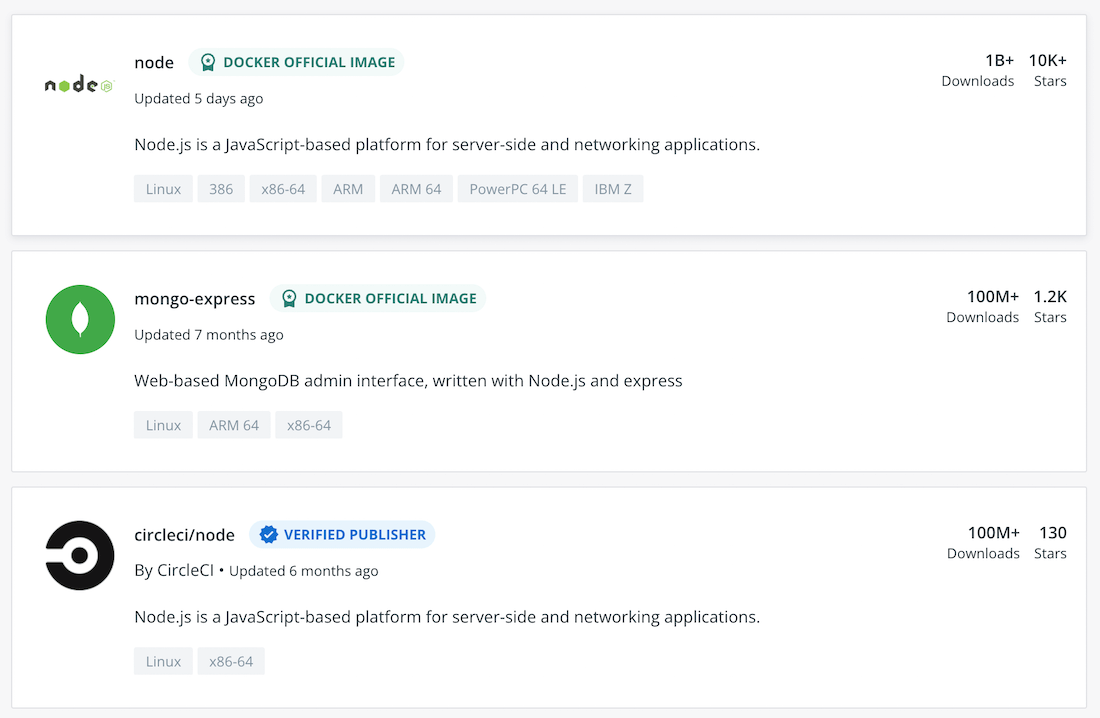
If you’ve seen those green and blue badges – “Official Image” and “Verified Publisher” – next to certain images on Docker Hub, then you’re already one step ahead of the rest. Docker Verified Publisher images come from repositories published by Docker partners, so you know you’re pulling your image from a trusted source. Docker Official Images are a curated set of images that are reviewed and published by a dedicated team, working in collaboration with upstream software maintainers, security experts, and the broader Docker community. You can use these images as fully-furnished starting points or drop-in solutions.

Your next question is likely, how do I start using those images? The good news is that our recent guide, “Jump-Starting Development with Secure Images from Docker”, lays this out for you, providing a step-by-step look at how to build with Docker Official Images and Verified Publisher Images, specifically installing a Python image and setting up a Ruby on Rails environment with multiple images. 

Docker helps developers build, share, and run applications that are secure from the start. The Docker Verified Publisher Program and Docker Official Images are just one of the ways we provide a solid foundation for your applications, so you can focus on building better software.

Get started with Docker Official and Verified Publisher images today by downloading our guide. Interested in joining the Docker Verified Publisher Program? Sign up here!

Resources

Blog: Docker Verified Publisher: Trusted Sources, Trusted ContentBlog: Welcome Canonical to Docker Hub and the Docker Verified Publisher ProgramPress Release: Docker Expands Trusted Content Offering for Developers Blog: Secure Software Supply Chain Best Practices 

DockerCon Live 2022

Join us for DockerCon Live 2022 on Tuesday, May 10. DockerCon Live is a free, one day virtual event that is a unique experience for developers and development teams who are building the next generation of modern applications. If you want to learn about how to go from code to cloud fast and how to solve your development challenges, DockerCon Live 2022 offers engaging live content to help you build, share and run your applications. Register today at https://www.docker.com/dockercon/
The post Docker Secure Images: What Are They and How Do I Use Them? appeared first on Docker Blog.
Quelle: https://blog.docker.com/feed/



