Kubernautic Data Platform for DataOps & MLOps

Kubernautic Data Platform base componentsIntroductionEvery digital transformation needs a data platform to transform data and master the challenges of Data Operations referred as DataOps to bring Data, Apps and Processes made by humans and machines together.To make data accessible in real time to the right data scientists by decoupling business decisions from the underlying infrastructure, organizations need to remove bottlenecks from their data projects by implementing a Data Platform based on the best DataOps practices.DataOps DefinedAccording to Wikipedia DataOps was first introduced by Lenny Liebmann, Contributing Editor, InformationWeek, in a blog post on the IBM Big Data & Analytics Hub titled “3 reasons why DataOps is essential for big data success” on June 19, 2014.DataOps is an automated, process-oriented methodology, used by analytic and data teams, to improve the quality and reduce the cycle time of data analytics. While DataOps began as a set of best practices, it has now matured to become a new and independent approach to data analytics.DataOps Re-DefinedEckerson Group re-defines DataOps as follow, which we like so much:“DataOps is an engineering methodology and set of practices designed for rapid, reliable, and repeatable delivery of production-ready data and operations-ready analytics and data science models. DataOps enhances an advanced governance through engineering disciplines that support versioning of data, data transformations, data lineage, and analytic models. DataOps supports business operational agility with the ability to meet new and changing data and analysis needs quickly. It also supports portability and technical operations agility with the ability to rapidly redeploy data pipelines and analytic models across multiple platforms in on-premises, cloud, multi-cloud, and hybrid ecosystems.” [1]Take it easy: DataOps combines Agile development, DevOps and statistical process controls and applies them to data analytics, but needs a well designed Data Platform!What is a Data Platform?We define a Data Platform as the infrastructure with a minimal set, easy to extend base components to successfully deliver data-driven business outcomes with increased productivity and improved collaboration between data engineers, data and security operators through a governed Self-service operation with the highest possible automation.That said, we believe a governed Self-service operation and automation is key to the success of most DataOps initiatives and needs a Platform to build Platforms. With Kubernautic Platform we made it happen to build a Data Platform based on Kubernetes, which is a Platform to build Platforms.Kubernautic Data Platform: DataOps Orchestration on KubernetesKubernautic Data Platform provides a cloud-native infrastructure with the base components as the foundation to run DataOps initiatives on Kubernetes through orchestration in a Self-service manner without the need to operate the platform on top of our Kubernautic offering.Kubernautic Data Platform is designed to enable data scientists to deploy, implement and run their data analytic pipelines built on top of Apache Kafka, Cassandra, MQTT implementations, Spark and Flink with Jupyter notebooks to achieve the following goals:Gather and manage data in one secure placeBuild and share interactive dashboardsReduce time spent on errors and operational tasksAccelerate productivity through team collaborationOrchestrate your development and production pipelines for re-usability and securityUnlock the full potential of DataOps without the need to operate the platformCreate innovative data analytics and deliver intelligent business valueDataOps Needs a Culture made by People to build the Data FactoryLike DevOps, DataOps is mainly a principle to create and develop a strategy in your organisation to overcome the cultural obstacles to achieve higher agility by development and delivery of enterprise grade data pipelines to turn data into value through automation and the right processes and product design made by people to build the Data Factory!Kubernautic Data Platform: The DataOps Data FactoryThese days machines are assembled mostly by machines designed by people and complex processes in a data-driven world to deliver products in factories.The following quote from Elon Musk describes the true problem and the solution to thinking of the Factory like a product.“We realised that the true problem, the true difficulty, and where the greatest potential is — is building the machine that makes the machine. In other words, it’s building the factory. I’m really thinking of the factory like a product.” Elon MuskWith Kubernautic Data Platform we deliver a highly automated system to build a Data Factory for DataOps to build enterprise grade data-driven products and services on top of our Kubernautic Platform.Some base components of Kubernautic Data Platform — which mainly provides the persistent layer of the platform — are presented through the following figure:Automation and Self-service at the heart of Kubernautic Data PlatformLike our Kubernautic public offering, where developers can get instant access for free to Spot Namespaces on Kubernetes or B2B customers within minutes to a dedicated Kubernetes cluster managed by Rancher Cluster Manager, Kuberbautic Data Platform provides the same agile experience to access the Data Factory for data pipeline and model orchestration, test and deployment automation for data pipelines and analytic models to make decisions faster with high quality data governed across a range of users, use cases, architectures and deployment options.According to Gartner’s Survey Analysis in March 2020 titled as “Data Management Struggles to Balance Innovation and Control” [2], only 22% of a data team’s time is spent on new initiatives and innovation.The Self-service capability of our Data Platform allows DevOps teams to provision Kubernetes clusters with DataOps base components within a few hours, not days or weeks waiting for IT operation teams to set-up the environment to explore, blend, enrich and visualize data. And exactly this Self-service capability of Kubernautic Data Platform boosts innovation by your DataOps projects.DataOps and MLOps are almost the same, but …MLOps stands for Machine Learning Operations and is almost the sibling of DataOps.We love the great blog post by Fernando Velez — Chief Data Technologist by Persistent — in Data-Driven Business and Intelligence titled as:“DataOps and MLOps: Almost, But Not Quite The Same” [3]and invite you to read through Fernando’s view on this topic, which might help to keep your Data and Machine Learning initiatives accurate over time with NoOps!Related resources[1] DataOps: More Than DevOps for Data Pipelines (by Eckerson Group)https://www.eckerson.com/articles/dataops-more-than-devops-for-data-pipelines[2] Survey Analysis: Data Management Struggles to Balance Innovation and Controlhttps://www.gartner.com/en/documents/3982237/survey-analysis-data-management-struggles-to-balance-inn[3] DataOps and MLOps: Almost, But Not Quite The Same https://www.persistent.com/blogs/dataops-and-mlops-almost-but-not-quite-the-same/Kubernautic Data Platform for DataOps & MLOps was originally published in Kubernauts on Medium, where people are continuing the conversation by highlighting and responding to this story.
Quelle: blog.kubernauts.io

How Docker Desktop Networking Works Under the Hood

Modern applications make extensive use of networks. At build time it’s common to apt-get/dnf/yum/apk install a package from a Linux distribution’s package repository. At runtime an application may wish to connect() to an internal postgres or mysql database to persist some state, while also calling listen() and accept() to expose APIs and UIs over TCP and UDP ports. Meanwhile developers need to be able to work from anywhere, whether in an office or at home or on mobile or on a VPN. Docker Desktop is designed to ensure that networking “just works” for all of these use-cases in all of these scenarios. This post describes the tools and techniques we use to make this happen, starting with everyone’s favorite protocol suite: TCP/IP.

TCP/IP

When containers want to connect to the outside world, they will use TCP/IP. Since Linux containers require a Linux kernel, Docker Desktop includes a helper Linux VM. Traffic from containers therefore originates from the Linux VM rather than the host, which causes a serious problem.

Many IT departments create VPN policies which say something like, “only forward traffic which originates from the host over the VPN”. The intention is to prevent the host accidentally acting as a router, forwarding insecure traffic from the Internet onto secure corporate networks. Therefore if the VPN software sees traffic from the Linux VM, it will not be routed via the VPN, preventing containers from accessing resources such as internal registries.

Docker Desktop avoids this problem by forwarding all traffic at user-level via vpnkit, a TCP/IP stack written in OCaml on top of the network protocol libraries of the MirageOS Unikernel project. The following diagram shows the flow of packets from the helper VM, through vpnkit and to the Internet:

When the VM boots it requests an address using DHCP. The ethernet frame containing the request is transmitted from the VM to the host over shared memory, either through a virtio device on Mac or through a “hypervisor socket” (AF_VSOCK) on Windows. Vpnkit contains a virtual ethernet switch (mirage-vnetif) which forwards the request to the DHCP (mirage/charrua) server.

Once the VM receives the DHCP response containing the VM’s IP address and the IP of the gateway, it sends an ARP request to discover the ethernet address of the gateway (mirage/arp). Once it has received the ARP response it is ready to send a packet to the Internet.

When vpnkit sees an outgoing packet with a new destination IP address, it creates a virtual TCP/IP stack to represent the remote machine (mirage/mirage-tcpip). This stack acts as the peer of the one in Linux, accepting connections and exchanging packets. When a container calls connect() to establish a TCP connection, Linux sends a TCP packet with the SYNchronize flag set. Vpnkit observes the SYNchronize flag and calls connect() itself from the host. If the connect() succeeds, vpnkit replies to Linux with a TCP SYNchronize packet which completes the TCP handshake. In Linux the connect() succeeds and data is proxied in both directions (mirage/mirage-flow). If the connect() is rejected, vpnkit replies with a TCP RST (reset) packet which causes the connect() inside Linux to return an error. UDP and ICMP are handled similarly.

In addition to low-level TCP/IP, vpnkit has a number of built-in high-level network services, such as a DNS server (mirage/ocaml-dns) and HTTP proxy (mirage/cohttp). These services can be addressed directly via a virtual IP address / DNS name, or indirectly by matching on outgoing traffic and redirecting dynamically, depending on the configuration.

TCP/IP addresses are difficult to work with directly. The next section describes how Docker Desktop uses the Domain Name System (DNS) to give human-readable names to network services.

DNS

Inside Docker Desktop there are multiple DNS servers:

DNS requests from containers are first processed by a server inside dockerd, which recognises the names of other containers on the same internal network. This allows containers to easily talk to each other without knowing their internal IP addresses. For example in the diagram there are 3 containers: “nginx”, “golang” and “postgres”, taken from the docker/awesome-compose example. Each time the application is started, the internal IP addresses might be different, but containers can still easily connect to each other by human-readable name thanks to the internal DNS server inside dockerd.

All other name lookups are sent to CoreDNS (from the CNCF). Requests are then forwarded to one of two different DNS servers on the host, depending on the domain name. The domain docker.internal is special and includes the DNS name host.docker.internal which resolves to a valid IP address for the current host. Although we prefer if everything is fully containerized, sometimes it makes sense to run part of an application as a plain old host service. The special name host.docker.internal allows containers to contact these host services in a portable way, without worrying about hardcoding IP addresses.

The second DNS server on the host handles all other requests by resolving them via standard OS system libraries. This ensures that, if a name resolves correctly in the developer’s web-browser, it will also resolve correctly in the developer’s containers. This is particularly important in sophisticated setups, such as pictured in the diagram where some requests are sent over a corporate VPN (e.g. internal.registry.mycompany) while other requests are sent to the regular Internet (e.g. docker.com).

Now that we’ve described DNS, let’s talk about HTTP.

HTTP(S) proxies

Some organizations block direct Internet access and require all traffic to be sent via HTTP proxies for filtering and logging. This affects pulling images during build as well as outgoing network traffic generated by containers.

The simplest method of using an HTTP proxy is to explicitly point the Docker engine at the proxy via environment variables. This has the disadvantage that if the proxy needs to be changed, the Docker engine process must be restarted to update the variables, causing a noticeable glitch. Docker Desktop avoids this by running a custom HTTP proxy inside vpnkit which forwards to the upstream proxy. When the upstream proxy changes, the internal proxy dynamically reconfigures which avoids having to restart the Docker engine.

On Mac Docker Desktop monitors the proxy settings stored in system preferences. When the computer switches network (e.g. between WiFi networks or onto cellular), Docker Desktop automatically updates the internal HTTP proxy so everything continues to work without the developer having to take any action.

This just about covers containers talking to each other and to the Internet. How do developers talk to the containers?

Port forwarding

When developing applications, it’s useful to be able to expose UIs and APIs on host ports, accessible by debug tools such as web-browsers. Since Docker Desktop runs Linux containers inside a Linux VM, there is a disconnect: the ports are open in the VM but the tools are running on the host. We need something to forward connections from the host into the VM.

Consider debugging a web-application: the developer types docker run -p 80:80 to request that the container’s port 80 is exposed on the host’s port 80 to make it accessible via http://localhost. The Docker API call is written to /var/run/docker.sock on the host as normal. When Docker Desktop is running Linux containers, the Docker engine (dockerd in the diagram above) is a Linux program running inside the helper Linux VM, not natively on the host. Therefore Docker Desktop includes a Docker API proxy which forwards requests from the host to the VM. For security and reliability, the requests are not forwarded directly over TCP over the network. Instead Docker Desktop forwards Unix domain socket connections over a secure low-level transport such as shared-memory hypervisor sockets via processes labeled vpnkit-bridge in the diagram above.

The Docker API proxy can do more than simply forward requests back and forth. It can also decode and transform requests and responses, to improve the developer’s experience. When a developer exposes a port with docker run -p 80:80, the Docker API proxy decodes the request and uses an internal API to request a port forward via the com.docker.backend process. If something on the host is already listening on that port, a human-readable error message is returned to the developer. If the port is free, the com.docker.backend process starts accepting connections and forwarding them to the container via the process vpnkit-forwarder, running on top of vpnkit-bridge.

Docker Desktop does not run with “root” or “Administrator” on the host. A developer can use docker run –privileged to become root inside the helper VM but the hypervisor ensures the host remains completely protected at all times. This is great for security but it causes a usability problem on macOS: how can a developer expose port 80 (docker run -p 80:80) when this is considered a “privileged port” on Unix i.e. a port number < 1024? The solution is that Docker Desktop includes a tiny helper privileged service which does run as root from launchd and which exposes a “please bind this port” API. This raises the question: “is it safe to allow a non-root user to bind privileged ports?”

Originally the notion of a privileged port comes from a time when ports were used to authenticate services: it was safe to assume you were talking to the host’s HTTP daemon because it had bound to port 80, which requires root, so the admin must have arranged it. The modern way to authenticate a service is via TLS certificates and ssh fingerprints, so as long as system services have bound their ports before Docker Desktop has started – macOS arranges this by binding ports on boot with launchd –  there can be no confusion or denial of service. Accordingly, modern macOS has made binding privileged ports on all IPs (0.0.0.0 or INADDR_ANY) an unprivileged operation. There is only one case where Docker Desktop still needs to use the privileged helper to bind ports: when a specific IP is requested (e.g. docker run -p 127.0.0.1:80:80), which still requires root on macOS.

Summary

Applications need reliable network connections for lots of everyday activities including: pulling Docker images, installing Linux packages, communicating with database backends, exposing APIs and UIs and much more. Docker Desktop runs in many different network environments: in the office, at home and while traveling on unreliable wifi. Some machines have restrictive firewall policies installed. Other machines have sophisticated VPN configurations. For all these use-cases in all these environments, Docker Desktop aims to “just work”, so the developer can focus on building and testing their application (rather than debugging ours!)

If building this kind of tooling sounds interesting, come and make Docker Desktop networking even better, we are hiring see https://www.docker.com/career-openings 

DockerCon2022

Join us for DockerCon2022 on Tuesday, May 10. DockerCon is a free, one day virtual event that is a unique experience for developers and development teams who are building the next generation of modern applications. If you want to learn about how to go from code to cloud fast and how to solve your development challenges, DockerCon 2022 offers engaging live content to help you build, share and run your applications. Register today at https://www.docker.com/dockercon/
The post How Docker Desktop Networking Works Under the Hood appeared first on Docker Blog.
Quelle: https://blog.docker.com/feed/

How Docker containers are supporting the COVID-19 genomic monitoring effort

This is a guest blog post from Dr. Kelsey Florek and Curtis Kapsak. A video presentation of this post from Docker’s Community All-Hands can be found here.

Dr. Kelsey Florek is the Senior Genomics and Data Scientist at the Wisconsin State Laboratory of Hygiene and a steering committee member of the State Public Health Bioinformatics group (StaPH-B).

Curtis Kapsak is a Bioinformatics Scientist at Theiagen Genomics and is a member of the State Public Health Bioinformatics group (StaPH-B). 

The rapid appearance and global spread of a novel Severe Acute Respiratory Syndrome (SARS) virus in 2019 pushed public health laboratories to develop new methods for genomic monitoring efforts on a scale never seen before. Adding to this challenge, the approaches typically used in genomic data analysis often rely on cutting edge and often niche open source software and libraries that increase the complexity of setting up analytical pipelines or workflows. This along with a varying landscape of compute environments ranging from on-prem workstations to public Cloud created a significant barrier for many laboratories attempting to perform viral genomic monitoring.

Developing a library of dockerized tools

Public health laboratories inherently need to meet rigorous quality control and quality assurance standards. The tests performed in public health laboratories are either reported back to clinics to be used for patient care or used in aggregate to inform public health interventions or outbreak investigations. Analytical workflows are held to the same standards as other laboratory developed tests and to support this effort, the State Public Health Bioinformatics consortium (StaPH-B) started developing a repository of dockerized software that was commonly used in public health genomic data analyses, StaPH-B/docker-builds. This repository was designed to address the need for accessible software that is both highly reliable and reproducible. Combined with a usage guide, this repository provided a centralized location of maintained and tested open source tools to support laboratories developing analysis workflows.

Since its initial development in 2018 the StaPH-B/docker-builds repository has grown to contain multiple versions of over 90 different analytical tools from 19 different contributors, with several of the COVID-19 specific images achieving over 1 million pulls. Between March 2021 and January 2022 as more laboratories began genomic monitoring we saw a logarithmic increase in the number of Docker image pulls on core COVID-19 genomic analysis software.

Supporting COVID-19 genomic analytics

Bioinformatic pipelines or workflows consist of a variety of tools and often start from a form of raw or primary DNA sequencing data. These tools perform a variety of transformative or summary tasks and vary in both their computational requirements and dependencies. The process of sequencing the SARS-CoV-2 viral genome involves sectioning off the viral genome and sequencing small portions of the DNA in parallel. The result is a dataset containing hundreds of thousands to millions of short strings containing A’s, T’s, C’s, and G’s in a variety of sequence combinations. COVID-19 workflows then take these datasets, reconstruct the genome and use a variety of techniques to then characterize the virus.

Many laboratories across the globe have moved towards using a dedicated workflow language like WDL or Nextflow for their analytical workflows. Combining a workflow language with dockerized software allows for the creation and routine usage of workflows that are highly portable and easily adapted to a variety of compute environments. This gives laboratories the ability to run small datasets on a laptop or scale to a high performance compute cluster or cloud environment for large datasets. Additionally, these workflow approaches allow developing a modular analysis framework that enables swapping out software as new versions are released or issues are identified. With the rapid and constant evolution of the virus that causes COVID-19, updates to classification software are also frequently updating to maintain the ability to accurately identify variants.

Keeping up to speed with viral evolution

The COVID-19 virus evolves a bit slower than influenza accruing on average two mutations per month and different variants (Alpha, Delta, Omicron, etc.) are differentiated by various combinations of mutations. Classifying a virus requires constructing a phylogenetic tree that models the relationship of the new virus to other viruses. However, constructing a tree to compare each new virus to every previous virus is both computationally expensive and impractical. To address this, two commonly used methods have emerged including using a set of selected reference viruses to build a tree (Nextclade) or machine learning to classify mutational patterns (Pangolin). Both of these approaches require regular updates to ensure classification is occurring accurately with the most recent information. Leveraging containerization, StaPH-B has been able to maintain images with the latest models allowing users to run workflows knowing they are using the most up to date, robust, and tested classification tools.

Summary

The highly portable, scaleable, and efficient nature of containerization has transformed how public health disease monitoring is performed. The implementation of containerized workflows have enabled laboratories to quickly adopt complex analytical workflows, which in turn has grown the scale of the viral monitoring effort. The open source repository maintained by StaPH-B would not be possible without the community of bioinformaticians driving innovation. With more laboratories turning to sequencing and complex analytics there is a growing demand for people to bridge the gap between biology and informatics. If you are interested in a career in bioinformatics and using data to solve health problems be sure to check out the APHL-CDC Bioinformatics Fellowship!

DockerCon2022

Join us for DockerCon2022 on Tuesday, May 10. DockerCon is a free, one day virtual event that is a unique experience for developers and development teams who are building the next generation of modern applications. If you want to learn about how to go from code to cloud fast and how to solve your development challenges, DockerCon 2022 offers engaging live content to help you build, share and run your applications. Register today at https://www.docker.com/dockercon/
The post How Docker containers are supporting the COVID-19 genomic monitoring effort appeared first on Docker Blog.
Quelle: https://blog.docker.com/feed/
File Sharing with Docker Desktop

One of the topics users of Docker Desktop often ask us about is file sharing. How do I see my source code inside my container? What’s the difference between a volume and a bind mount? Why is file sharing slower than on Linux, and how can I speed it up? In this blog post, I’ll cover the options you have, some tips and tricks, and finish with a sneak preview of what we’re currently working on.

Bind mounts and volumes

Suppose you run an Ubuntu container with docker run -it ubuntu bash. You’ll quickly find that (1) the container has its own filesystem, based on the filesystem in the Ubuntu image; (2) you can create, delete and modify files, but your changes are local to the container and are lost when the container is deleted; (3) the container doesn’t have access to any other files on your host computer.

So the natural next questions are, how can I see my other files? And how can my container write data that I can read later and maybe use in other containers? This is where bind mounts and volumes come in. Both of these use the -v flag to docker run to specify some files to share with the container.

The first option most people encounter is the bind mount, where part of your local filesystem is shared with the container. For example, if you run

docker run -it -v /users/stephen:/my_files ubuntu bash

then the files at /users/stephen will be available at /my_files in the container, and you can read and write to them there. This is very simple and convenient, but if you’re using Docker Desktop a named volume may have better performance, for reasons I’ll explain in the next section.

The second option, a named volume, is a filesystem managed by Docker. You can create a named volume with a command like docker volume create new_vol, and then share it into the container using the -v flag again:

docker run -it -v new_vol:/my_files ubuntu bash

These volumes persist even after the container has been deleted, and can be shared with other containers. You can also browse their contents from the Docker Desktop UI, using the Volumes tab that we added recently (and that is now free for all users including Docker Personal).

Performance considerations

To understand the performance differences between the options, we first have to talk briefly about how Docker Desktop works. Many people imagine that Docker Desktop is just a UI on top of some open source tools, but that’s only a small part of what it is. Docker Desktop is fundamentally an environment to develop and run Linux containers on your Mac or Windows machine, with seamless integration into the host so that it appears as if they’re running natively. It does this by setting up a Linux VM (or optionally a WSL 2 environment on Windows) in which to run the Docker engine and your containers, and then passing CLI commands, networking and files between the host and the VM.

Unfortunately it’s in the nature of virtualization that there is always an unavoidable small overhead in crossing the host-VM boundary. It’s only tiny, but in a development environment with a huge source tree and lots of reads and writes, it adds up, and can visibly affect performance. And because Docker Desktop does such a good job of hiding the underlying VM, it’s not obvious why this is happening. On Linux, the container has direct access to the bind-mounted filesystem, and because the implementation on Mac and Windows “feels native”, people intuitively expect the same performance there.

Named volumes do not suffer from the same problem because they are created inside the VM’s own filesystem, so they are as fast as on a Linux machine. In WSL 2, Windows manages file sharing rather than Docker managing it, but the same performance considerations apply: files mounted from the Windows file system can be slow, named volumes are fast, but in this case there is another option: files stored in the Linux filesystem are also inside the WSL VM so are fast too.

Best practices and tips

This gives us the main tip in optimizing performance. It’s convenient to use bind mounts at first, and you may find that they are fine for your use case. But if performance becomes a problem, then (1) make sure that you’re only sharing what you need to share, and (2) consider what could be shared in some other way than a bind mount. You have several options for keeping files inside the VM, including a named volume, Linux files in WSL, and the container’s own filesystem: which to use will depend on the use case. For example:

Source code that you are actively editing is an appropriate use of a bind mountLarge, static dependency trees or libraries could be moved into a named volume, or WSL, or even baked into the container imageDatabases are more appropriate in a named volume or WSLCache directories and logfiles should be put in a named volume or WSL (if you need to keep them after the container has stopped) or in the container’s own filesystem (if they can disappear when the container does).Files that the container doesn’t need shouldn’t be shared at all. In particular, don’t share the whole of your home directory. We have seen some people do this habitually so that they’ll always have access to whatever files they need, but unlike on Linux it’s not “free”.

One remaining option if you really need a bind mount for some large or high-traffic directory is a third-party caching/syncing solution, for example Mutagen or docker-sync. These essentially copy your files inside the VM for faster read/write access, and handle syncing (in one or both directions) between the copy and the host. But it involves an extra component to manage, so named volumes are still preferred where possible.

The future

We have used a variety of file sharing implementations over the years (Samba and gRPC FUSE on Windows Hyper-V; osxfs and gRPC FUSE on Mac; and Windows uses 9P on WSL 2). We have made some performance improvements over time, but none of them have been able to match native performance. But we are currently experimenting with a very promising new file sharing implementation based on virtiofs. Virtiofs is new technology that is specifically designed for sharing files between a host and a VM. It is able to make substantial performance gains by using the fact that the VM and the host are running on the same machine, not across a network. In our experiments we have seen some very promising results.

We have already released a preview of this technology for Docker Desktop for Mac, which you can get from our public roadmap (it requires macOS 12.2), and we are also planning to use it for the forthcoming Docker Desktop for Linux. We think that it will be able to make bind mounts a lot faster (although we would still recommend named volumes or the container’s own filesystem for appropriate use cases). We would love to hear your experiences of it.

Next steps

If you want to go into more depth about these topics, I recommend a talk that one of our Docker Captains, Jacob Howard, gave at DockerCon 2021 entitled A Pragmatic Tour of Docker Filesystems. It’s got loads of great information and practical advice packed into only 26 minutes!

To follow the progress of our current work on virtiofs, subscribe to the ticket on our public roadmap. That’s where we post preview builds, and we’d love you to try them and give us your feedback on them.

DockerCon2022

Join us for DockerCon2022 on Tuesday, May 10. DockerCon is a free, one day virtual event that is a unique experience for developers and development teams who are building the next generation of modern applications. If you want to learn about how to go from code to cloud fast and how to solve your development challenges, DockerCon 2022 offers engaging live content to help you build, share and run your applications. Register today at https://www.docker.com/dockercon/
The post File Sharing with Docker Desktop appeared first on Docker Blog.
Quelle: https://blog.docker.com/feed/

Docker Captain Take 5 – Thomas Shaw

Docker Captains are select members of the community that are both experts in their field and are passionate about sharing their Docker knowledge with others. “Docker Captains Take 5” is a regular blog series where we get a closer look at our Captains and ask them the same broad set of questions ranging from what their best Docker tip is to whether they prefer cats or dogs (personally, we like whales and turtles over here). Today, we’re interviewing Thomas Shaw, one of our Docker Captains. He works as a Principal Automation Engineer at DIGIT Game Studios and is based in Ireland.

How/when did you first discover Docker?

I remember it like it was yesterday.  he date was August 23rd 2013 and I was working as a Build Engineer for Demonware.  During a visit to the Vancouver office, one of the developers named Mohan Raj Rajamanickham mentioned “a cool new tool” called Docker. It sounded too good to be true but I downloaded version 0.5 the next day while waiting for the flight back home to Dublin, Ireland. I played with the Docker CLI for several hours on the flight and that was it.  Before the plane had touched the runway in Dublin I was completely sold on the potential of Docker. It solved an immediate problem faced by developers and build engineers alike, dependency hell.

Over the following 12 months we replaced our bare metal build agents with containerized build agents. It was a primitive approach at first. We built a CentOS 5 VM, tarred it up and created a container image from it. This was the base image on which we ran builds and tests over the next 2 years. We went from 8 bare metal build agents, each unique, each manually setup, each with different tooling versions to 4 build agents with just Docker installed.

It was a simple approach but it eliminated the management of several unique build agents. We saw a number of other benefits too, such as better build stability, increased build throughput by 300% and most importantly teams now owned their own dependencies. This approach worked well and around 2015 we started looking at moving our CI/CD pipelines into AWS. We originally took a hybrid approach and ran the majority of builds and tests in our own datacenter and just a handful in AWS. This was easier than expected. Docker made our workloads portable and we began to leverage the scalability of AWS for running tests. The unit tests (which were actually functional tests) for one of our main projects was taking over 1 hour per commit. Using containers we were able to split the tests across multiple containers on multiple build agents and we reduced the execution time to around 10 minutes. It was at this point that more folks started to pay attention to the potential of Docker.

What is your favorite Docker command?

I really enjoy “docker diff”. I find it incredibly useful to see what files/directories are being added or modified by the process within the container. It’s great for debugging. A close second would be “docker stats”.

What is your top tip for working with Docker that others may not know?

When possible, own your own base image and pin tooling versions. It’s convenient to use the public images on Docker Hub but when working in an organization where hundreds of developers are relying on the same base image try to bring it in house. We set up an image “bakery” at Demonware where we would build our base images nightly, with pinned versions of tools included, ran extensive tests, triggered downstream pipelines and verified that our base image was always in a good state. From experience it’s the base image where the most “bloat” occurs and keeping it lean can also help when moving the image around your infrastructure.

What’s the coolest Docker demo you have done/seen ?

My favorite demo was by Casey Bisson from Joyent. In the demo he showed off how Triton worked and how he could scale from a single container running locally out to an entire datacenter by just updating a single endpoint. This was in 2016 and I still love the simplicity of this approach.

What have you worked on in the past six months that you’re particularly proud of?

I’ve been using containers daily since late 2013 and still find new uses for them regularly. I’m currently working on improving developer tooling and UX at DIGIT Games Studios in Dublin. Part of this work includes containerizing our tooling and making it accessible in multiple ways including from Slack, command line, callable by API and even runnable from a spreadsheet. Docker enables us to bring the tooling closer to the end user whether they are technical or non technical. Rolling out updates to tools is now trivial.

What do you anticipate will be Docker’s biggest announcement this year?

Development Environments (DE) has received a huge amount of positive feedback based on the early announcements. I think the potential of DE is huge. To have these environments tightly integrated into a developers IDE, easily shareable and customizable will remove existing friction and help developers move from idea to production with greater velocity.

What are some personal goals for the next year with respect to the Docker community?

Our last Docker Dublin Meetup was in February 2020 and with a community of over 3000 members I’d like to start the in-person meetups again in 2022. I’d also like to continue running more Docker Workshops around Ireland and take the power of containerization out to other communities.

What talk would you most love to see at DockerCon 2022?

Any talks that include gaming would be great. I particularly loved the live migration demo of Quake a few years ago. Some studios are doing really cool stuff with containers. As early adopters of containers, Demonware may have some useful experiences to share with regard to their journey from self-hosted Kubernetes to the cloud. 

Looking to the distant future, what is the technology that you’re most excited about and that you think holds a lot of promise?

That’s a tough question. Any technology that focuses on the user experience first and is a joy to use excites me. From a gaming perspective Augmented Reality has so much potential, particularly for mobile gaming. I’m not going to mention Blockchain or NFTs since I don’t know enough about either to comment. They may have their place but if they negatively impact the environment as suggested then perhaps they need to go back to the drawing board for a few more iterations.

Rapid fire questions…

What new skill have you mastered during the pandemic?

Mindfulness.

Cats or Dogs?

Dogs.

Salty, sour or sweet?

Sweet.

Beach or mountains?

Mountains.

Your most often used emoji?

DockerCon2022

Join us for DockerCon2022 on Tuesday, May 10. DockerCon is a free, one day virtual event that is a unique experience for developers and development teams who are building the next generation of modern applications. If you want to learn about how to go from code to cloud fast and how to solve your development challenges, DockerCon 2022 offers engaging live content to help you build, share and run your applications. Register today at https://www.docker.com/dockercon/
The post Docker Captain Take 5 – Thomas Shaw appeared first on Docker Blog.
Quelle: https://blog.docker.com/feed/
How to Purchase a Docker Subscription from a Reseller

With the grace period for the new Docker subscription service agreement ending very soon on January 31, 2022, we want to make it easy for customers to use their preferred reseller to purchase a Docker subscription.

That’s why we recently announced that your preferred reseller can now purchase a Docker Business subscription through Nuaware. That’s right, Docker and Nuaware have teamed up to advance the adoption of Docker throughout the software engineering departments of large organizations. Nuaware has established relationships with 1,000’s of resellers around the globe.

Nuaware is a Trusted Partner

Nuaware is a specialized distributor in developer tools, DevOps, Cloud, and Cloud-Native technologies. They help large enterprises adopt modern architectures by supporting them with the right products, training, and partner ecosystem. Nuaware is part of Exclusive Networks, a global provider of cybersecurity and cloud solutions with offices in over 50 countries across 5 continents with a reseller network exceeding 18,000 partners. Nuaware was founded with the view that new platform and software development technologies are an ecosystem business and in order for an enterprise to successfully adopt new technologies like microservice architectures in production, they need specialist partners in many areas. Nuaware helps select and introduce the right technologies, partners, and training to take ideas into production.

Serving Our Customers Around the Globe

Developers using Docker are more productive, build more secure software, and are able to collaborate more effectively. Combined with Nuaware’s developer tool expertise and the reach of Exclusive Networks’ channel ecosystem of 18,000 specialist channel partners, Docker has an unparalleled ability to service our clients’ needs around the globe. No matter how you prefer or need to purchase your software, Docker has you covered. 

Get Started Today

Learn more about Docker Business and get started today by visiting https://www.nuaware.com/docker
The post How to Purchase a Docker Subscription from a Reseller appeared first on Docker Blog.
Quelle: https://blog.docker.com/feed/
Seamless Sign-in with Docker Desktop 4.4.2

Starting with Docker Desktop 4.4.2 we’re excited to introduce a new authentication flow that will take you through the browser to sign in, simplifying the experience and allowing users to get all the benefits of autofill from whatever browser password manager they may use. Gone are the days of going to your browser, opening your password manager, finding your Docker password, copying, and then returning back to the dashboard or command line to paste it in (maybe I’m alone here, but I can never remember my passwords on my own!). 

As part of this authentication change, we’ve also introduced Single Sign-on for users with a business subscription that enables benefits such as automated and secure onboarding of developers into the Docker platform, easy user management for managers and admins, and seamless authentication for Docker users. Read our blog to learn more about SSO.

Getting Started with the new Authentication Flow 

On versions 4.4.2 and above, when users click on “Sign in” from the Docker Dashboard or the Docker Menu, they will be redirected to their default browser.

Once in the browser, you will be prompted to enter your Docker ID. This will take you through the appropriate flow. If your organization has Single Sign-on enabled, you will get redirected to your Identity Provider. 

For the standard authentication pattern, users will then be sent to a screen to fill in their username and password. Then click “continue”.

Once you have successfully signed in you will get asked if you want to be taken back to the Docker Dashboard. You can choose to always allow opening Docker to reduce the number of steps in the future.

You’ll be returned to the Docker Dashboard, ready to continue working! 

It’s important to note that the command line interface (CLI) login flow and logging into Docker in other tools, such as Visual Studio Code, will continue to work as they do today. You can choose to use a personal access token (PAT) for these flows. 

Just update to or download 4.4.2+ to get all the benefits of a simplified sign in experience.

Introduced a fix for CVE-2021-45449 

Docker Desktop version 4.3.0 and 4.3.1 have a bug that may log sensitive information (access token or password) on the user’s machine during login. This only affects users if they are on Docker Desktop 4.3.0, 4.3.1 and the user has logged in while on 4.3.0, 4.3.1. Gaining access to this data would require having access to the user’s local files. Additionally, these logs may be included when users upload diagnostics, meaning access tokens and passwords might have been shared with Docker. We have deleted all potentially sensitive diagnostic files from our data storage and will continue to delete diagnostics reported from the affected versions on an ongoing basis. This vulnerability has been fixed in version 4.3.2 or higher. Learn more on our security page.

Chat with us!

We’d love to get your input on our work through user interview sessions. During these live feedback sessions we will often show work-in-progress features or ideas to get your input on, or ask you more about how you use Docker to discover any pain points when working with the product. We use these insights to help prioritize our roadmap and improve the user experience. Each session is typically 30 minutes to an hour. If you would like to take part in one of our user research studies please sign up and we will reach out to you when we have something to research or test.

We’re also working on two of your highest voted items: improving Mac filesystem performance, and implementing Docker Desktop for Linux. For filesystem performance, we’ve been releasing experimental builds using VirtioFS, and we’d love your input on how it works for you: check out the roadmap item for the latest build. For Docker Desktop for Linux, we will have some experimental builds soon, so be sure to follow that roadmap item for news.

 What else would you like us to focus on? Have your say by adding a thumbs-up emoji to your highest priorities on the roadmap, or create a new roadmap ticket if your idea isn’t yet there. We can’t wait to hear from you.

DockerCon Live 2022  

Join us for DockerCon Live 2022 on Tuesday, May 10. DockerCon Live is a free, one day virtual event that is a unique experience for developers and development teams who are building the next generation of modern applications. If you want to learn about how to go from code to cloud fast and how to solve your development challenges, DockerCon Live 2022 offers engaging live content to help you build, share and run your applications. Register today at https://www.docker.com/dockercon/
The post Seamless Sign-in with Docker Desktop 4.4.2 appeared first on Docker Blog.
Quelle: https://blog.docker.com/feed/
Introducing SSO for Docker Business

Single Sign-on (SSO) for Docker is now live! By enabling SSO, large organizations and enterprises can easily automate the onboarding and management of Docker users at scale. Users can authenticate using their organization’s standard identity provider (IdP). SSO is one of our most widely requested features, so we’re excited to ship this to our Docker Business customers.

Want to enable SSO for your organization? Here are the top things you need to know.

With SSO enabled, users can authenticate using their organization’s standard IdP.

How does SSO work in Docker?

SSO allows users to authenticate to Docker Hub and Docker Desktop using their organization’s standard identity provider (IdP) to access Docker. This will not only make it easier for new users to quickly get started with Docker using their organization-provided email, but it will also help large organizations scale their use of Docker in a more manageable and secure way. Docker currently supports SAML 2.0 and Azure Active Directory IdPs for easy implementation. Once SSO is enabled and configured for your organization, users must sign in to Docker Hub or Docker Desktop to initiate the SSO authentication process. 

How is SSO enabled?

SSO is available to organizations with an active Docker Business subscription. This means that customers under the other subscription tiers (e.g., Team) must first upgrade to a Docker Business account. Click here to learn how to upgrade your subscription. Customers with a Docker Business subscription, can visit our documentation for additional information on the enablement process.

Note: When SSO is enabled, logging into Docker via partner products (e.g., VS Code, Jfrog, etc.) will require Personal Access Tokens (PATs). 

How are users managed?

Users are managed through organizations in Docker Hub. To configure SSO, each user must already have an existing account in their organization’s IdP. When a user signs into Docker for the first time using their domain email address, they will be automatically added to the organization after the authentication is successful. All users must authenticate using the email domain specified during SSO setup (i.e., company email address). Admins can continue inviting new users to the organization using the Invite Member option in Docker Hub. 

How do we convert existing Docker users from non-SSO to SSO?

To convert existing Docker users from a non-SSO account to SSO, admins must verify:

Users have a company email address and account in the IdPUsers have the latest version of Docker Desktop (currently version 4.4.2) installed on their machinesUsers have created a Personal Access Token (PAT) to replace their passwords to allow them to log in through the Docker CLIAll CI/CD pipeline automation systems have replaced their passwords with PATsUsers with email addresses that include the “+” symbol are either added to your IdP or otherwise updated to not include the “+” symbol.

For additional requirements, please refer to our documentation.

What impact can be expected when onboarding users to SSO?

SSO can be enforced for your users once the steps (summarized above and in our documentation) are completed. After SSO is enforced, users can begin signing in using their organization-provided email and password, and then it’s business as usual. Please note that for users logging into Docker directly from the Docker CLI or via partner products (e.g., VS Code, Jfrog, etc.), Personal Access Tokens (PATs) may be required. 

For more guidance on how to roll out SSO within your organization, visit our documentation for more information.

Consider making the move today for access to SSO for Docker and other premier features for management and security at scale. Download our latest whitepaper and watch our webinar on-demand to learn more. You can also visit our public roadmap where you can leave feedback on what you want to see next for user management.

DockerCon Live 2022  

Join us for DockerCon Live 2022 on Tuesday, May 10. DockerCon Live is a free, one day virtual event that is a unique experience for developers and development teams who are building the next generation of modern applications. If you want to learn about how to go from code to cloud fast and how to solve your development challenges, DockerCon Live 2022 offers engaging live content to help you build, share and run your applications. Register today at https://www.docker.com/dockercon/
The post Introducing SSO for Docker Business appeared first on Docker Blog.
Quelle: https://blog.docker.com/feed/
Securing the Software Supply Chain with Docker Business

Organizations are increasingly facing new challenges in trying to protect their software supply chain. This has become especially difficult as the workforce has transitioned to a more distributed model with organizations scaling and onboarding more developers on distributed teams. With the number of software supply-chain attacks increasing by 650% in 2021, coordinating all of these developers introduces serious security, management, and visibility challenges for organizations.

We recently hosted a webinar, Securing the Software Supply Chain with Docker Business which is now available on-demand if you missed it. In the webinar, Docker’s CTO Justin Cormack and Customer Success Engineer Nikhi Anand walked through common security challenges, best practices for securing content, how Docker is helping to address the recent Log4j vulnerability, what Docker is actively doing to help keep developer’s work secure, and how Docker Business helps organizations standardize their use of Docker in a way that is scalable and more secure.

Watch a recording of the security webinar on-demand, or keep reading to catch up on what you’ve missed.

Best Practices for Securing Content: Docker Trusted Content

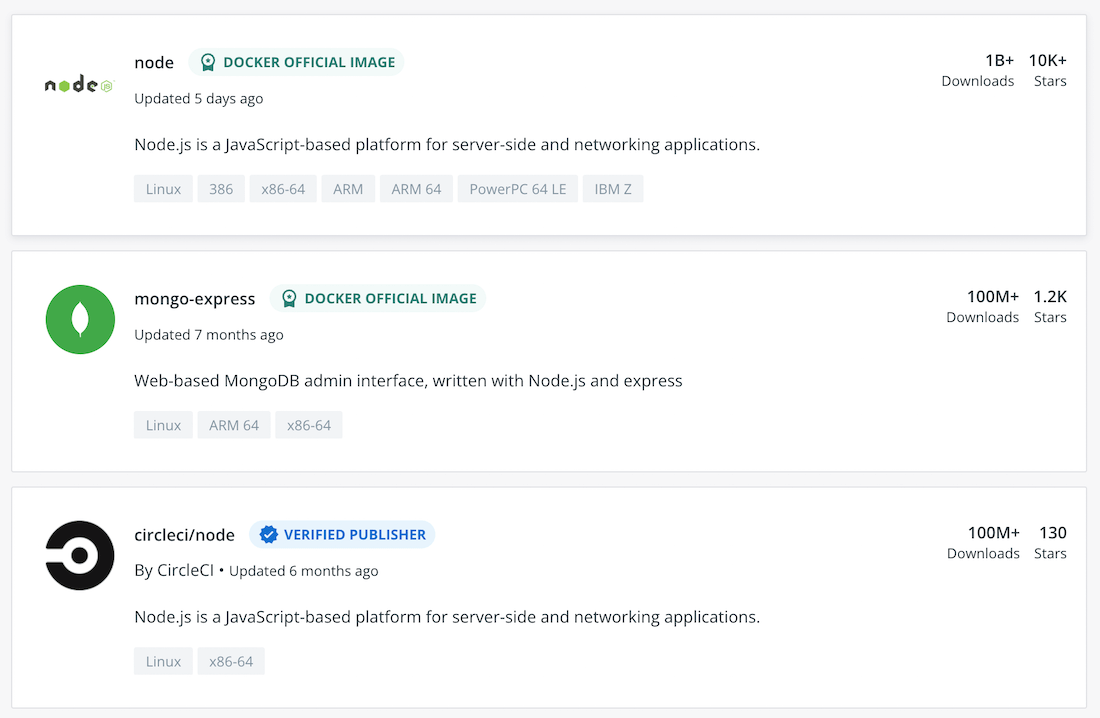
One of the key starting points for securing the supply chain is your developer’s laptops. It’s important that you have insight into which images your developers are using, where they’re coming from, how they’re maintained, and if they conform to current security best practices. Docker trusted content programs like Docker Official Images and the Docker Verified Publisher program provide developers with validation that these images come from trusted sources, reducing the risk of pulling malicious images from impostor repositories.

Docker Official Images are a curated set of Docker repositories hosted on Docker Hub. These images have clear documentation, promote best practices, and are designed for the most common use cases.

The Docker Verified Publisher Program enables Independent Software Vendors (ISVs), development tools vendors, and platform providers to distribute Dockerized content through Docker Hub. The Verified Publisher badge included on the Docker Hub repositories indicates that these repositories are published by Docker partners and are qualified to be included in the developer secure supply chain.

Pulling and running arbitrary public images opens businesses to security risks. Trusted content, including Docker Official Images and the Docker Verified Publisher Images, delivers the reliable building blocks needed for safer application development. These images are maintained, updated on a regular basis, and follow security best practices. 

Log4j Vulnerability

During the webinar, Docker CTO, Justin Cormack addressed the recent Log4j 2 vulnerability CVE-2021-44228. The Docker engineering team has been working on several solutions to help our users including:

Shipped several fixes to improve Docker vulnerability scanning so it’s able to pick up Log4j issues in container images. The team is tweaking this as needed.Added a note in the Docker Hub scanning interface that shows images affected by Log4jShipped a feature that shows whether Docker Official Images are vulnerable to Log4j or have been fixed.Put up a page on our website that shows Docker Official Images that contain vulnerable versions and information on the current status updates for Docker Official Images.

Docker’s own infrastructure and Docker Desktop are not affected by the Log4j 2 vulnerability. Docker largely uses Go code to build our applications, not Java. Although we do use some Java applications internally, we have confirmed we are not vulnerable to CVE-2021-44228 and CVE-2021-45046.

What Makes Docker Desktop Secure?

Docker Desktop is an integrated product designed to be a secure desktop system for users. In terms of mitigating security risks, Docker Desktop has a secure lightweight Linux VM that is managed by Docker. As well as setting up this VM with secure defaults, Docker Desktop keeps this VM and all other components up to date for you overtime by applying curl patches or security fixes as required. Docker Desktop also offers a choice of a Microsoft Hyper-V or WSL 2 backend. The Hyper-V backend we ship is fully managed by Docker.

Docker Business offers a control plane with features like Image Access Management and (soon to ship) Registry Access Management so admins can control and manage the images their developers are working with. We’ve been working on additional observability features and we’d love to hear your feedback, please upvote and let us know which features would be most useful for your developers on our roadmap.

Docker vs DIY from a Security Standpoint

One common challenge businesses face to successfully drive innovation is how to ensure developers have the tools they need to simplify their work and enable them to create value while spending minimal time on work that isn’t core to the business. Most business have a strong preference to buy commercial software rather than trying to build their own, some of the key factors in making these decisions are:

Cost of timeOpportunity costTime to valueCost of security risksDoes DIY with open source software make sense for our organization?

If developers are spending time building DIY development projects that aren’t core to the business, it could have a big impact on time to value and return on investment. If you’re considering a DIY with an open source software and Docker Engine approach it’s important to consider whether or not your software teams and engineering resources are prepared and equipped to keep all of the components of a DIY solution updated and all vulnerabilities patched over time.

When you take into account several factories including the cost of time, and time to value, and whether a DIY solution is the best for your organization, the data shows that most organizations will be better off buying commercial software rather than trying to build their own solutions. 

Docker SSO is Coming

Some final callouts from the webinar include the announcement that SSO is coming in January 2022 (this month). SSO will enable users to authenticate using their organizations standard identity provider to access Docker, this is one of our most requested features and is included with a Docker Business subscription.

Whitepaper: Build Modern and Secure Applications at Scale with Docker Business

To learn more about some of the topics discussed in the webinar and how Docker Business helps secure the software supply chain with advanced features and capabilities, check out our new Docker Business whitepaper.

Security Q&A

Docker’s CTO Justin Cormack and Customer Success Engineer Nikhi Anand answered Q&A live during the webinar, we’ve captured those webinar questions and answers below.

Is personal data collected with a Docker Desktop Subscription? 

We don’t collect any personal data or PII on Docker Desktop. We do collect anonymized data to better understand how people are using our products so we can improve them however all users have the option to opt out of anonymous data collection in their settings. In the future, we will offer a Docker Business feature that allows everyone in an organization to opt out–folks need to opt out on an individual basis for now but this feature is on our roadmap.

Is Docker Business subscription a SaaS offering? 

Yes the Docker Business control plane is offered as a service but Docker Desktop itself runs stand-alone on a developer’s workstation. We understand developers like to work offline, so admins can set whether they require team members to login and you can use Docker Desktop disconnected from the business control plane. 

How should I handle log4j in my containers?

Rebuilding and updating are your best solutions right now. The most important thing is to update to a fixed version as soon as you can. If you’re using Docker Official Images and deploying as is, look at the release notes on the Docker Official Images site and it’ll tell you if that version has been fixed. We provided scanning tools in the latest release of Docker Desktop that can detect if you have managed to remediate everything effectively so you can use those tools to help make sure that you’ve updated and that you haven’t missed anything.

What are the benefits of updating to the latest version of Docker Desktop?

It is highly recommended to upgrade to the newest version. The longer that you stay on aging software, the greater security risk that you create for yourself. Specifically, old software doesn’t have patches of recently discovered security vulnerabilities, new, frequently-updated software (one of the features of Docker Desktop) always has the latest patches.

Which one is more secure, Hyper-V or WSL 2?

The general consensus right now is that Hyper-V is a little more secure and easier to manage especially with Docker Desktop Hyper-V management and updates. WSL 2 gives you more features and a lot of developers enjoy using WSL 2 on Windows so Docker provides both options. The right option for you and your team really depends on your organization’s needs and requirements.

If we deploy an image to our clients, do the clients need to have a Docker Business subscription to run the image if they have more than 150 employees?

Docker Desktop is licensed based on the person who is using it so yes, your client will need a Docker Business subscription. We’ve had a lot of questions about this type of usage and we know that a lot of folks are using Docker Desktop in this way so we’re interested in learning more about which kind of integrated extensions to Docker Desktop would be helpful for the community. We have a roadmap issue around Desktop Extensions, please share your feedback with us there!

Can you talk a little about container signing and validation and how it’s implemented. 

We shipped an integrated project called Notary into Docker Hub years ago. We’re working with Microsoft, Amazon, and other partners on an updated version of this and we’re looking at it as the new container signing framework. We’re planning for this to come out in 2022.

Conclusion and additional resources 

Thanks for joining us for our Securing the Software Supply Chain with Docker Business webinar. Below are some additional resources to check out if you want to learn more about Docker Security practices and Docker Business.

The Grace Period for the Docker Subscription Service Agreement Ends Soon – Here’s What You Need to KnowOn-demand webinar: Management & Security at Scale with Docker BusinessWeb page: Considerations for Evaluating Docker Desktop AlternativesWhitepaper: Build Modern and Secure Applications at Scale with Docker BusinessBlog: Secure Software Supply Chain Best Practices

The post Securing the Software Supply Chain with Docker Business appeared first on Docker Blog.
Quelle: https://blog.docker.com/feed/






