Why Containers and WebAssembly Work Well Together

Developers favor the path of least resistance when building, shipping, and deploying their applications. It’s one of the reasons why containerization exists — to help developers easily run cross-platform apps by bundling their code and dependencies together.
While we’ve built upon that with Docker Desktop and Docker Hub, other groups like the World Wide Web Consortium (W3C) have also created complementary tools. This is how WebAssembly (AKA “Wasm”) was born.
Though some have asserted that Wasm is a replacement for Docker, we actually view Wasm as a companion technology. Let’s look at WebAssembly, then dig into how it and Docker together can support today’s demanding workloads.
What is WebAssembly?
WebAssembly is a compact binary format for packaging code to a portable compilation target. It leverages its JavaScript, C++, and Rust compatibility to help developers deploy client-server web applications. In a cloud context, Wasm can also access the filesystem, environment variables, or the system clock.
Wasm uses modules — which contain stateless, browser-compiled WebAssembly code — and host runtimes to operate. Guest applications (another type of module) can run within these host applications as executables. Finally, the WebAssembly System Interface (WASI) brings a standardized set of APIs to enable greater functionality and access to system resources.
Developers use WebAssembly and WASI to do things like:

Build cross-platform applications and games
Reuse code between platforms and applications
Running applications that are Wasm and WASI compilable on one runtime
Compile WebAssembly files to a single target for dependencies and code

 
How does WebAssembly fit into a containerized world?
If you’re familiar with Docker, you may already see some similarities. And that’s okay! Matt Butcher, CEO of Fermyon, explained how Docker and Wasm can unite to achieve some pretty powerful development outcomes. Given the rise of cloud computing, having multiple ways to securely run any software atop any hardware is critical. That’s what makes virtualized, isolated runtime environments like Docker containers and Wasm so useful.


Matt highlights Docker Co-Founder Solomon Hykes’ original tweet on Docker and Wasm, yet is quick to mention Solomon’s follow-up message regarding Wasm. This sheds some light on how Docker and Wasm might work together in the near future:
 

“So will wasm replace Docker?” No, but imagine a future where Docker runs linux containers, windows containers and wasm containers side by side. Over time wasm might become the most popular container type. Docker will love them all equally, and run it all ???? https://t.co/qVq3fomv9d
— Solomon Hykes (@solomonstre) March 28, 2019

 
Accordingly, Docker and Wasm can be friends — not foes — as cloud computing and microservices grow more sophisticated. Here’s some key points that Matt shared on the subject.
Let Use Cases Drive Your Technology Choices
We have to remember that the sheer variety of use cases out there far exceeds the capabilities of any one tool. This means that Docker will be a great match for some applications, WebAssembly for others, and so on. While Docker excels at building and deploying cross-platform cloud applications, Wasm is well-suited to portable, binary code compilation for browser-based applications.
Developers have long favored WebAssembly while creating their multi-architecture builds. This remains a sticking point for Wasm users, but the comparative gap has been narrowed with the launch of Docker Buildx. This helps developers achieve very similar results as those using Wasm. You can learn more about this process in our recent blog post.
During his presentation, Matt introduced what he called “three different categories of compute infrastructure. Each serves a different purpose, and has unique relevance both currently and historically:

Virtual machines (heavyweight class) – AKA the “workhorse” of the cloud, VMs package together an entire operating system — kernels and drivers included, plus code or data — to run an application virtually on compatible hardware. VMs are also great for OS testing and solving infrastructure challenges related to servers, but, they’re often multiple GB in size and consequently start up very slowly.
Containers (middleweight class) – Containers make it remarkably easy to package all application code, dependencies, and other components together and run cross-platform. Container images measure just tens to hundreds of MB in size, and start up in seconds.
WebAssembly (lightweight class) – A step smaller than containers, WebAssembly binaries are minuscule, can run in a secure sandbox, and start up nearly instantly since they were initially built for web browsers.

 
Matt is quick to point out that he and many others expected containers to blow VMs out of the water as the next big thing. However, despite Docker’s rapid rise in popularity, VMs have kept growing. There’s no zero-sum game when it comes to technology. Docker hasn’t replaced VMs, and similarly, WebAssembly isn’t poised to displace the containers that came before it. As Matt says, “each has its niche.”
Industry Experts Praise Both Docker and WebAssembly
A recent New Stack article digs into this further. Focusing on how WebAssembly can replace Docker is “missing the point,” since the main drivers behind these adoption decisions should be business use cases. One important WebAssembly advantage revolves around edge computing. However, Docker containers are now working more and more harmoniously with edge use cases. For example, exciting IoT possibilities await, while edge containers can power streaming, real-time process, analytics, augmented reality, and more.
If we reference Solomon’s earlier tweet, he alludes to this when envisioning Docker running Wasm containers. The trick is identifying which apps are best suited for which technology. Applications that need heavy filesystem control and IO might favor Docker. The same applies if they need sockets layer access. Meanwhile, Wasm is optimal for fuss-free web server setup, easy configuration, and minimizing costs.
With both technologies, developers are continuously unearthing both new and existing use cases.
Docker and Wasm Team Up: The Finicky Whiskers Game
Theoretical applications are promising, but let’s see something in action. Near the end of his talk, Matt revealed that the Finicky Whiskers game he demoed to start the session actually leveraged Docker, WebAssembly, and Redis. These three technologies comprised the game engine to form a lightning-fast backend:
 
Matt’s terminal displays backend activity as he interacts with the game.
 
Finicky Whiskers relies on eight separate WebAssembly modules, five of which Matt covered during his session. In this example, each button click sends an HTTP request to Spin — Fermyon’s framework for running web apps, microservices, and server applications.
These clicks generate successively more Wasm modules to help the game run. These modules spin up or shut down almost instantly in response to every user action. The total number of invocations changes with each module. Modules also grab important files that support core functionality within the application. Though masquerading as a game, Finicky Whiskers is actually a load generator.
A Docker container has a running instance of Redis and pubsub, which are used to broker messages and access key/value pairs. This forms a client-server bridge, and lets Finicky Whiskers communicate. Modules perform data validation before pushing it to the Redis pubsub implementation. Each module can communicate with the services within this Docker container — along with the file server — proving that Docker and Wasm can jointly power applications:


Specifically, Matt used Wasm to rapidly start and stop his microservices. It also helped these services perform simple tasks. Meanwhile, Docker helped keep the state and facilitate communication between Wasm modules and user input. It’s the perfect mix of low resource usage, scalability, long-running pieces, and load predictability.
Containers and WebAssembly are Fast Friends, Not Mortal Enemies
As we’ve demonstrated, containers and WebAssembly are companion technologies. One isn’t meant to defeat the other. They’re meant to coexist, and in many cases, work together to power some pretty interesting applications. While Finicky Whiskers wasn’t the most complex example, it illustrates this point perfectly.
In instances where these technologies stand apart, they do so because they’re supporting unique workloads. Instead of declaring one technology better than the other, it’s best to question where each has its place.
We’re excited to see what’s next for Wasm at Docker. We also want Docker to lend a helping hand where it can with Wasm applications. Our own Jake Levirne, Head of Product, says it best:
“Wasm is complementary to Docker — in whatever way developers choose to architect and implement parts of their application, Docker will be there to support their development experience,” Levirne said.
Development, testing and deployment toolchains that use Docker make it easier to maintain reproducible pipelines for application delivery regardless of application architecture, Levirne said. Additionally, the millions of pre-built Docker images, including thousands of official and verified images, provide “a backbone of core services (e.g. data stores, caches, search, frameworks, etc. )” that can be used hand-in-hand with Wasm modules.”
We even maintain a collection of WebAssembly/Wasm images on Docker Hub! Download Docker Desktop to start experimenting with these images and building your first Docker-backed Wasm application. Container runtimes and registries are also expanding to include native WebAssembly support.
Quelle: https://blog.docker.com/feed/
New Extensions, Improved logs, and more in Docker Desktop 4.10

We’re excited to announce the launch of Docker Desktop 4.10. We’ve listened to your feedback, and here’s what you can expect from this release. 
Easily find what you need in container logs
If you’re going through logs to find specific error codes and the requests that triggered them — or gathering all logs in a given timeframe — the process should feel frictionless. To make logs more usable, we’ve made a host of improvements to this functionality within the Docker Dashboard. 
First, we’ve improved the search functionality in a few ways:

You can begin searching simply by typing Cmd + F / Ctrl + F (for Mac and Windows).
Log search results matches are now highlighted. You can use the right/left arrows or  Enter / Shift + Enter  to jump between matches, while still keeping previous logs and subsequent logs in view.
We’ve added regular expression search, in case you want to do things like find all errors codes in a range.

Second, we’ve also made some usability enhancements:

Smart scroll, so that you don’t have to manually disable “stick to bottom” of logs. When you’re at the bottom of the logs, we’ll automatically stick to the bottom, but the second you scroll up it’ll stick again. If you want to restore this sticky behavior, simply click the arrow in the bottom right corner.

You can now select any external links present within your logs.
Selecting something in the terminal automatically copies that selection to the clipboard.

Third, we’ve added a new feature:

You can now clear a running container’s logs, making it easy to start fresh after you’ve made a change.

Take a tour of the functionality: https://drive.google.com/file/d/12TZjYwQgKcFrIaor1rMLkQxaUfR7KELA/view?usp=sharing
Adding Environment Variables on Image Run 
Previously you could easily add environment variables while starting a container from the CLI, but you’d quickly encounter roadblocks while starting your container afterwards from the Docker Dashboard. It wasn’t possible to add these variables while running an image. Now, when running a new container from an image, you can add environment variables that immediately take effect at runtime.

We’re also looking into adding some more features that let you quickly edit environment variables in running containers. Please share your feedback or other ideas on this roadmap item.
Containers Overview: bringing back ports, container name, and status
We want to give a big thanks to everyone who left feedback on the new Containers tab. It helped highlight where our changes missed the mark, and helped us quickly address them. In 4.10, we’ve:

Made container names and image names more legible, so you can quickly identify which container you need to manage
Brought back ports on the Overview page
Restored the “container status” icon so you can easily see which ones are running.

Easy Management with Bulk Container Actions
Many people loved the addition of bulk container deletion, which lets users delete everything at once. You can now simultaneously start, stop, pause, and resume multiple containers or apps you’re working on rather than going one by one. You can start your day and every app you need in a few clicks. You also have more flexibility while pausing and resuming — since you may want to pause all containers at once, while still keeping the Docker Engine running. This lets you tackle tasks in other parts of the Dashboard.

What’s up with the Homepage?
We’ve heard your feedback! When we first rolled out the new Homepage, we wanted to make it easier and faster to run your first container. Based on community feedback, we’re updating how we deliver that Homepage content. In this release, we’ve removed the Homepage so your default starting page is once again the Containers tab. 
But, don’t worry! While we rework this functionality, you can still access some of our most popular Docker Official Images while no containers are running. If you’d like to share any feedback, please leave it here.

New Extensions are Joining the Lineup
We’re happy to announce the addition of two new extensions to the Extensions Marketplace:

Ddosify – a simple, high performance, and open-source tool for load testing, written in Golang. Learn more about Ddosify here. 
Lacework Scanner – enables developers to leverage Lacework Inline Scanner directly within Docker Desktop. Learn more about Lacework here. 

Please help us keep improving
Your feedback and suggestions are essential to keeping us on the right track! You can upvote, comment, or submit new ideas via either our in-product links or our public roadmap. Check out our release notes to learn even more about Docker Desktop 4.10. 
Looking to become a new Docker Desktop user? Visit our Get Started page to jumpstart your development journey. 
Quelle: https://blog.docker.com/feed/

Key Insights from Stack Overflow’s 2022 Developer Survey

Continually taking the pulse of the development community is key to understanding development trends. Less than a week ago, Stack Overflow published the results of its 2022 Developer Survey. We eagerly reviewed these findings to discover how tech trends have changed over the past year.
While a lot of the players in the top 10 spots have remained consistent from last year, some trends spoke volumes. It’s clear that application development demands flexibility, agility, and tools that let you bring your own tech stack. Here’s why.
No Single Language Rules Them All
Nothing is certain but death, taxes…and JavaScript. The language has claimed the top spot among popular programming, scripting, and markup languages for the 10th year running. There’s also similar stability near the top of the rankings — where the usual suspects like HTML/CSS, SQL, and Python reign supreme. We’ve discussed the leaders, but what about the remaining languages?
2022’s top languages. Data courtesy of Stack Overflow.
 
Overall, the sheer variety of languages used has grown substantially in the past five years. While Stack Overflow tracked the popularity of 25 different technologies in 2017, this year’s most popular technologies list featured 42!
Given that hundreds of programming languages alone exist today — with roughly 50 considered “most popular” overall — it’s interesting to see such representation. There’s truly something out there for every imaginable use case. We love variety because it encourages innovation. However, it’s also worth noting that variety can represent added complexity for developers.
Diversity in Databases and Frameworks
Similar things can be said for databases and web frameworks, where no single technology claims 50% or greater usage. Developers demand flexible tools that let them innovate, since so many technologies are highly popular:
2022’s top database technologies. Data courtesy of Stack Overflow.
 
2022’s top web frameworks and technologies. Data courtesy of Stack Overflow.
 
Stack’s findings also underscore a key element of current development. Developers are using innumerable combinations of languages, frameworks, tools — and even OSes — during the development lifecycle. There’s no widespread consensus across these categories. Tech stacks are also increasingly use case driven, and not the other way around. Developers are also trying to reach even wider audiences.
The growing complexities stemming from these trends are major paint points. Therefore, having a consistent environment where you can universally build and deploy with any of your preferred technologies is incredibly valuable.
Cross-Platform Development Is Essential
Even if Windows holds the majority in personal use, there’s no clear OS winner. Developers are creating applications across a wide variety of platforms, which means that a consistent environment must be able to build and package cross-platform applications.


Our users have shared that tools like Docker Desktop, Docker Hub, and others have noticeably simplified and accelerated their cross platform development projects. It’s much easier to package all application code, dependencies, and essential components together when deploying atop varied operating systems and CPU architectures.
For experienced developers and even container newcomers, Docker CLI commands are both plentiful and usable. Alternatively, you can start, stop, and manage your containers using Docker Desktop’s Dashboard UI. Volume management and image management options are also included. Our goal is to equip all developers with the tools they need to get more done, faster — while enjoying themselves in the process.
Containers Are Going Strong
Gartner believes that 70% of organizations will be running multiple containerized apps by 2023. Momentum has definitely grown, and it’s led us to some very humbling discoveries in 2022: Docker is the #1 most loved development tool, and remains the #1 most-wanted tool.
 
Data courtesy of Stack Overflow.
 
Data courtesy of Stack Overflow.
 
Over 75% of devs who’ve regularly used Docker in the past year want to keep using it. More developers (37% vs. 30% in 2021) who haven’t yet used Docker are now interested. Additionally, professional developers currently view Docker as the most fundamental tool, jumping 14 percentage points since last year.
First and foremost, this couldn’t have been possible without countless contributions from our developer community. Your continual feedback across all of our products and tools has helped drive development forward — and improve developer experiences. Most new features have stemmed directly from community engagement and contributions to our public roadmap. Your collective input has been so impactful.
We also know how increasingly saturated the tooling market is becoming every day, which makes us feel even luckier to have a strong following. Thank you so much for your support, and for letting us streamline your critical daily workflows! If you’re considering using Docker for the first time, check out our Orientation documentation and Shy Ruparel’s “Getting Started with Docker” workshop:
 

Developers Value Flexibility, Ease, and Stability
We’ve noticed some main themes from Stack Overflow’s 2022 Developer Survey. Firstly, there’s a massive variety of technologies currently used across the industry. Second, developers are using these technologies both because they’re essential and because they love them so much. Third, containers are becoming even more popular as teams better understand their benefits.
Docker maintains a number of tools that make development easier. Beyond our container technology, each tool supports rapid development and deployment across highly-diverse environments. You can harness your favorite tech stack without encountering hiccups.
We think this can benefit millions upon millions of developers, and we couldn’t be happier that you agree. And if you haven’t given Docker a try, remember to download Docker Desktop. Here’s looking forward to another successful year!
Hungry for more data? You can view Stack Overflow’s complete survey results here, or read the official summary here.
Quelle: https://blog.docker.com/feed/
June 2022 Newsletter

The latest and greatest content for developers.

Introducing Dear Moby
Moby has accrued a “whaleth” of knowledge over the years, and as it turns out, can’t wait to share his advice and best practices with you — the Docker community. Submit your questions for the opportunity to be featured in our Dear Moby column or videos!

Learn More

News you can use and monthly highlights:
Serving Machine Learning Models With Docker: 5 Mistakes You Should Avoid – Here are a few quick tips on what to do and what not to do when serving your machine learning models with Docker.
Efficient Python Docker Image from any Poetry Project – Need to pack your python project into a Docker container? Using Poetry as a package manager? Check out how this Dockerfile can be a starting point for creating a small, efficient image out of your Poetry project, with no additional operations to perform.
NestJS and Postgres local development with Docker Compose – Modern applications demand high-performing frameworks that allow developers to build efficient and scalable server-side apps. Learn how you can use Docker Compose to build a local development environment for Nest.js and Postgresql with hot reloading.
Building a live chart with Deno, WebSockets, Chart.js, and Materialize – Here’s a quick step-by-step guide that helps you to build a simple live dashboard app that displays real-time data from a Deno Web Socket server in a real-time chart using Chart.js powered with Docker Compose.

Supporting the LGBTQ+ Community
Happy Pride! We’re always proud to swim alongside our LGBTQ+ community, colleagues, family, and friends. Learn more about eight organizations supporting the LGBTQ+ tech community.

Learn More

The latest tips and tricks from the community:

Merge+Diff: Building DAGs More Efficiently and Elegantly
Docker Technology Enables the Next Generation of Desktop as a Service
Kickstart Your Spring Boot Application Development
Building Your First Dockerized MERN Stack Web App
NestJS and Postgres local development with Docker Compose
9 Tips for Containerizing Your Spring Boot Code
How to Build and Deploy a Django-based URL Shortener App from Scratch

Creating Flappy Dock
The feedback from our community has been overwhelmingly positive for our latest feature releases, including Docker Extensions. To demonstrate the limitless potential of the SDK, our team had a little fun and created a game: Flappy Dock. See how we built it and try it for yourself.

Learn More

Educational content created by the experts at Docker:

Deploying Web Applications Quicker and Easier with Caddy 2
JumpStart Your Node.js Development
6 Development Tool Features that Backend Developers Need
Build Your First Docker Extension
Simplify Your Deployments Using the Rust Official Image
Cross Compiling Rust Code for Multiple Architectures
From Edge to Mainstream: Scaling to 100K+ IoT Devices
How to Quickly Build, Deploy, and Serve Your HTML5 Game
Connecting Decentralized Storage Solutions to Your Web 3.0 Applications

Docker Captain: Damian Naprawa
This month we’re welcoming a new Captain into our crew: Damian Naprawa. Damian started writing blogs for the Polish Docker Community to share his knowledge. His favorite command is docker sbom and he’s very interested in improving developer’s productivity.

Meet the Captain

See what the Docker team has been up to:

Dockerfiles now Support Multiple Build Contexts
Dockershim not needed: Docker Desktop with Kubernetes 1.24+
Introducing Registry Access Management for Docker Business
New Extensions and Container Interface Enhancements in Docker Desktop 4.9
Securing the Software Supply Chain: Atomist Joins Docker
Docker advances container isolation and workloads with acquisition of Nestybox
Welcome Tilt: Fixing the pains of microservice development for Kubernetes

DockerCon 2022 On-Demand
With over 50 sessions for developers by developers, watch the latest developer news, trends, and announcements from DockerCon 2022. From the keynote to product demos to technical breakout sessions, hacks, and tips & tricks, there’s something for everyone.

Watch On-Demand

Quelle: https://blog.docker.com/feed/
Docker Captain Take 5 – Damian Naprawa

Docker Captains are select community members that are both experts in their field and passionate about sharing their Docker knowledge with others. “Docker Captains Take 5” is a regular blog series where we get a closer look at our Captains and ask them the same broad set of questions, ranging from what their best Docker tip is to whether they prefer cats or dogs (personally, we like whales and turtles over here). Today, we’re interviewing Damian Naprawa, who recently became a Docker Captain. He’s a Software Architect at Capgemini and is based in Mielec, Poland.

How/when did you first discover Docker?
It was a long time ago! 
For the first time, I saw some blog posts about Docker and also participated in Docker introductory workshops (thanks to Bart & Dan!). However, I do remember that at the beginning I couldn’t understand how it works and what the benefits are from the developer’s perspective. Since I always want to not only use, but also understand how the technology I use works under the hood, I spent a lot of time on learning and practicing. 
After some time, the “aha” moment happened. I remember telling myself, “That’s awesome!”
After a couple of years, I decided to launch my own blog dedicated to the Polish community: szkoladockera.pl (in English it means “Docker School”). I wanted to help others understand Docker and containers, and hoped to share this great technology across the Polish community. I still remember how difficult it was for me – before that “aha” moment came, and before I started to know what I’m doing while using docker run commands.
What is your favorite Docker command?
It used to be docker exec (to see the container file system or for debugging purposes), but now the winner is docker sbom.
Why? Because one of my top interests is container security. 
With docker sbom, I can see every installed package inside my final Docker image – which I couldn’t see before. Every time we use a FROM command in the Dockerfile, we’re referring to some base image. In most cases, we don’t create them ourselves, and we aren’t aware of what packages are installed on an OS level (like curl) and application level (like Log4j). There could be a lot of packages that your app doesn’t need anymore, and you should be aware of that.
What is your top tip for working with Docker that others may not know?
Using Docker in combination with Ngrok lets developers expose their containerized, microservices-based apps to the internet directly from their machines. It’s very helpful when we want to present what code changes we made to our teammates, stakeholders, and clients, plus how it works from a user perspective – without needing to build and publish the app in the destination environment. You can find an example here.
What’s the coolest Docker demo you have done/seen?
I have seen and done a lot of demos. However, if I need to mention just one, there’s one I’m really proud of.

In 2021, I organized an online conference for the Polish community called “Docker & Kubernetes Festival”. During that, I held a talk called  “Docker for Developers”, where I presented quite a large amount of tips for working with Docker and how to speed up developer productivity. 
There were around 700 Polish community members watching it live and thousands who watched the recording.
What have you worked on in the past six months that you’re particularly proud of?
I’ve been working closely with developer teams on containerizing microservices-based apps written in Java and Python (ML). Since I used to code mostly with JavaScript and the .NET platform, it was a very interesting experience. I had to dive deeply into the Java and Python code to understand architecture and implementation details. I then advised developers on refactoring the code and smoothly migrating to containers.
What do you anticipate will be Docker’s biggest announcement this year?
Docker SBOM. It’s a game changer for me to have an overview of packages installed in my final docker image both on OS-level (like curl) and application level (like Log4j)
What are some personal goals for the next year with respect to the Docker community ?
I’d like to share more knowledge on my blog about specific technologies (like NestJS, Java, Python etc.) – how to prepare the Dockerfiles using best practices, and how to refactor apps to smoothly migrate them into containers.
What was your favorite thing about DockerCon 2022?
Since I’m working closely with development teams, everything related to microservices and speeding up developer productivity.
Looking to the distant future, what is the technology that you’re most excited about and that you think holds a lot of promise?
Containers, of course! I do see a huge demand for container experts and I predict this demand will increase. While speaking with the clients or with my students (of online courses), I’ve learned that companies have started to appreciate the benefits of containers, and they just want them in their workflows. 
Apart from that, I’m excited about web3 and NFT. I guess there’ll also be a demand for blockchain/web3 developers and security specialists in the next few years.
Rapid fire questions…
What new skill have you mastered during the pandemic?
I gave a lot of online demos and conducted a lot of webinars, but now I’m really keen to meet with people offline! I also started my podcast, More Than Containers, but I need to go back to regular recordings!
Cats or Dogs?
Both!
Salty, sour or sweet?
Salty. Nobody believes me, but I can live without sweet ???? 
Beach or mountains?
I love to travel, discover new things, and visit new places. Life is too short to choose between beach and mountains ????
Your most often used emoji?
Captain emoji! 
Quelle: https://blog.docker.com/feed/

9 Tips for Containerizing Your Spring Boot Code

At Docker, we’re incredibly proud of our vibrant, diverse and creative community. From time to time, we feature cool contributions from the community on our blog to highlight some of the great work our community does. Are you working on something awesome with Docker? Send your contributions to Ajeet Singh Raina (@ajeetraina) on the Docker Community Slack and we might feature your work!
Tons of developers use Docker containers to package their Spring Boot applications. According to VMWare’s State of Spring 2021 report, the number of organizations running containerized Spring apps spiked to 57% — compared to 44% in 2020.
What’s driving this significant growth? The ever-increasing demand to reduce startup times of web applications and optimize resource usage, which greatly boosts developer productivity.
Why is containerizing a Spring Boot app important?
Running your Spring Boot application in a Docker container has numerous benefits. First, Docker’s friendly, CLI-based workflow lets developers build, share, and run containerized Spring applications for other developers of all skill levels. Second, developers can install their app from a single package and get it up and running in minutes. Third, Spring developers can code and test locally while ensuring consistency between development and production.
Containerizing a Spring Boot application is easy. You can do this by copying the .jar or .war file right into a JDK base image and then packaging it as a Docker image. There are numerous articles online that can help you effectively package your apps. However, many important concerns like Docker image vulnerabilities, image bloat, missing image tags, and poor build performance aren’t addressed. We’ll tackle those common concerns while sharing nine tips for containerizing your Spring Boot code.
A Simple “Hello World” Spring Boot application
To better understand the unattended concern, let’s build a sample “Hello World” application. In our last blog post, you saw how easy it is to build the “Hello World!” application by downloading this pre-initialized project and generating a ZIP file. You’d then unzip it and complete the following steps to run the app.


Under the src/main/java/com/example/dockerapp/ directory, you can modify your DockerappApplication.java file with the following content:

package com.example.dockerapp;
import org.springframework.boot.SpringApplication;
import org.springframework.boot.autoconfigure.SpringBootApplication;
import org.springframework.web.bind.annotation.RequestMapping;
import org.springframework.web.bind.annotation.RestController;

@RestController
@SpringBootApplication
public class DockerappApplication {

@RequestMapping("/")
public String home() {
return "Hello World!";
}

public static void main(String[] args) {
SpringApplication.run(DockerappApplication.class, args);
}

}

 
The following command takes your compiled code and packages it into a distributable format, like a JAR:

./mvnw package
java -jar target/*.jar

 
By now, you should be able to access “Hello World” via http://localhost:8080.
In order to Dockerize this app, you’d use a Dockerfile.  A Dockerfile is a text document that contains every instruction a user could call on the command line to assemble a Docker image. A Docker image is composed of a stack of layers, each representing an instruction in our Dockerfile. Each subsequent layer contains changes to its underlying layer.
Typically, developers use the following Dockerfile template to build a Docker image.

FROM eclipse-temurin
ARG JAR_FILE=target/*.jar
COPY ${JAR_FILE} app.jar
EXPOSE 8080
ENTRYPOINT ["java", "-jar", "/app.jar"]

 
The first line defines the base image which is around 457 MB. The  ARG instruction specifies variables that are available to the COPY instruction. The COPY copies the  JAR file from the target/ folder to your Docker image’s root. The EXPOSE instruction informs Docker that the container listens on the specified network ports at runtime. Lastly, an ENTRYPOINT lets you configure a container that runs as an executable. It corresponds to your java -jar target/*.jar  command.
You’d build your image using the docker build command, which looks like this:

$ docker build -t spring-boot-docker .
Sending build context to Docker daemon 15.98MB
Step 1/5 : FROM eclipse-temurin
—a3562aa0b991
Step 2/5 : ARG JAR_FILE=target/*.jar
—Running in a8c13e294a66
Removing intermediate container a8c13e294a66
—aa039166d524
Step 3/5 : COPY ${JAR_FILE} app.jar
COPY failed: no source files were specified

 
One key drawback of our above example is that it isn’t fully containerized. You must first create a JAR file by running the ./mvnw package command on the host system. This requires you to manually install Java, set up the  JAVA_HOME environment variable, and install Maven. In a nutshell, your JDK must reside outside of your Docker container — adding even more complexity into your build environment. There has to be a better way.
1) Automate all the manual steps
We recommend building up the JAR during the build process within your Dockerfile itself. The following RUN instructions trigger a goal that resolves all project dependencies, including plugins, reports, and their dependencies:

FROM eclipse-temurin
WORKDIR /app

COPY .mvn/ .mvn
COPY mvnw pom.xml ./
RUN ./mvnw dependency:go-offline

COPY src ./src

CMD ["./mvnw", "spring-boot:run"]

 
💡 Avoid copying the JAR file manually while writing a Dockerfile
2) Use a specific base image tag, instead of latest
When building Docker images, it’s always recommended to specify useful tags which codify version information, intended destination (prod or test, for instance), stability, or other useful information for deploying your application in different environments. Don’t rely on the automatically-created latest tag. Using latest is unpredictable and may cause unexpected behavior. Every time you pull the latest image, it might contain a new build or untested release that could break your application.
For example, using the eclipse-temurin:latest Docker image as a base image isn’t ideal. Instead, you should use specific tags like eclipse-temurin:17-jdk-jammy , eclipse-temurin:8u332-b09-jre-alpin etc.
 
💡 Avoid using FROM eclipse-temurin:latest in your Dockerfile
3) Use Eclipse Temurin instead of JDK, if possible
On the OpenJDK Docker Hub page, you’ll find a list of recommended Docker Official Images that you should use while building Java applications. The upstream OpenJDK image no longer provides a JRE, so no official JRE images are produced. The official OpenJDK images just contain “vanilla” builds of the OpenJDK provided by Oracle or the relevant project lead.
One of the most popular official images with a build-worthy JDK is Eclipse Temurin. The Eclipse Temurin project provides code and processes that support the building of runtime binaries and associated technologies. These are high performance, enterprise-caliber, and cross-platform.

FROM eclipse-temurin:17-jdk-jammy

WORKDIR /app

COPY .mvn/ .mvn
COPY mvnw pom.xml ./
RUN ./mvnw dependency:go-offline

COPY src ./src

CMD ["./mvnw", "spring-boot:run"]

 
4) Use a Multi-Stage Build
With multi-stage builds, a Docker build can use one base image for compilation, packaging, and unit tests. Another image holds the runtime of the application. This makes the final image more secure and smaller in size (as it does not contain any development or debugging tools). Multi-stage Docker builds are a great way to ensure your builds are 100% reproducible and as lean as possible. You can create multiple stages within a Dockerfile and control how you build that image.
You can containerize your Spring Boot applications using a multi-layer approach. Each layer may contain different parts of the application such as dependencies, source code, resources, and even snapshot dependencies. Alternatively, you can build any application as a separate image from the final image that contains the runnable application. To better understand this, let’s consider the following Dockerfile:

FROM eclipse-temurin:17-jdk-jammy
ARG JAR_FILE=target/*.jar
COPY ${JAR_FILE} app.jar
EXPOSE 8080
ENTRYPOINT ["java", "-jar", "/app.jar"]

 
Spring Boot uses a “fat JAR” as its default packaging format. When we inspect the fat JAR, we see that the application forms a very small part of the entire JAR. This portion changes most frequently. The remaining portion contains the Spring Framework dependencies. Optimization typically involves isolating the application into a separate layer from the Spring Framework dependencies. You only have to download the dependencies layer — which forms the bulk of the fat JAR — once, plus it’s cached in the host system.
The above Dockerfile assumes that the fat JAR was already built on the command line. You can also do this in Docker using a multi-stage build and copying the results from one image to another. Instead of using the Maven or Gradle plugin, we can also create a layered JAR Docker image with a Dockerfile. While using Docker, we must follow two more steps to extract the layers and copy those into the final image.
In the first stage, we’ll extract the dependencies. In the second stage, we’ll copy the extracted dependencies to the final image:

FROM eclipse-temurin:17-jdk-jammy as builder
WORKDIR /opt/app
COPY .mvn/ .mvn
COPY mvnw pom.xml ./
RUN ./mvnw dependency:go-offline
COPY ./src ./src
RUN ./mvnw clean install

FROM eclipse-temurin:17-jre-jammy
WORKDIR /opt/app
EXPOSE 8080
COPY –from=builder /opt/app/target/*.jar /opt/app/*.jar
ENTRYPOINT ["java", "-jar", "/opt/app/*.jar" ]

 
The first image is labeled builder. We use it to run eclipse-temurin:17-jdk-jammy, build the fat JAR, and unpack it.
Notice that this Dockerfile has been split into two stages. The later layers contain the build configuration and the source code for the application, and the earlier layers contain the complete Eclipse JDK image itself. This small optimization also saves us from copying the target directory to a Docker image — even a temporary one used for the build. Our final image is just 277 MB, compared to the first stage build’s 450MB size.
5) Use .dockerignore
To increase build performance, we recommend creating a .dockerignore file in the same directory as your Dockerfile. For this tutorial, your .dockerignore file should contain just one line:

target

 
This line excludes the target directory, which contains output from Maven, from the Docker build context. There are many good reasons to carefully structure a .dockerignore file, but this simple file is good enough for now. Let’s now explain the build context and why it’s essential . The docker build command builds Docker images from a Dockerfile and a “context.” This context is the set of files located in your specified PATH or URL. The build process can reference any of these files.
Meanwhile, the compilation context is where the developer works. It could be a folder on Mac, Windows or a Linux directory. This directory contains all necessary application components like source code, configuration files, libraries, and plugins. With the .dockerignore file, we can determine which of the following elements like source code, configuration files, libraries, plugins, etc. to exclude while building your new image.
Here’s how your .dockerignore file might look if you choose to exclude the conf, libraries, and plugins directory from your build:


6) Favor Multi-Architecture Docker Images
Your CPU can only run binaries for its native architecture. For example, Docker images built for an x86 system can’t run on an Arm-based system. With Apple fully transitioning to their custom Arm-based silicon, it’s possible that your x86 (Intel or AMD) Docker Image won’t work with Apple’s recent M-series chips. Consequently, we always recommended building multi-arch container images. Below is the mplatform/mquery Docker image that lets you query the multi-platform status of any public image, in any public registry:

docker run –rm mplatform/mquery eclipse-temurin:17-jre-alpine
Image: eclipse-temurin:17-jre-alpine (digest: sha256:ac423a0315c490d3bc1444901d96eea7013e838bcf7cc09978cf84332d7afc76)
* Manifest List: Yes (Image type: application/vnd.docker.distribution.manifest.list.v2+json)
* Supported platforms:
– linux/amd64

 
We introduced the docker buildx command to help you build multi-architecture images. Buildx is a Docker component that enables many powerful build features with a familiar Docker user experience. All builds executed via Buildx run via the Moby BuildKit builder engine. BuildKit is designed to excel at multi-platform builds, or those not just targeting the user’s local platform. When you invoke a build, you can set the –platform flag to specify the build output’s target platform, (like linux/amd64, linux/arm64, or darwin/amd64):

docker buildx build –platform linux/amd64, linux/arm64 -t spring-helloworld .

7) Run as non-root user for security purposes
Running applications with user privileges is safer, since it helps mitigate risks. The same applies to Docker containers. By default, Docker containers and their running apps have root privileges. It’s therefore best to run Docker containers as non-root users. You can do this by adding USER instructions within your Dockerfile. The USER instruction sets the preferred user name (or UID) and optionally the user group (or GID) while running the image — and for any subsequent RUN, CMD, or ENTRYPOINT instructions:

FROM eclipse-temurin:17-jdk-alpine
RUN addgroup demogroup; adduser –ingroup demogroup –disabled-password demo
USER demo

WORKDIR /app

COPY .mvn/ .mvn
COPY mvnw pom.xml ./
RUN ./mvnw dependency:go-offline

COPY src ./src

CMD ["./mvnw", "spring-boot:run"]

8) Fix security vulnerabilities in your Java image
Today’s developers rely on third-party code and applications while building their services. By using external software without care, your code may be more vulnerable. Leveraging trusted images and continually monitoring your containers is essential to combatting this. Whenever you build a “Hello World” Docker image, Docker Desktop prompts you to run security scans of the image to detect any known vulnerabilities, like Log4Shell:

exporting to image 0.0s
== exporting layers 0.0s
== writing image sha256:cf6d952a1ece4eddcb80c8d29e0c5dd4d3531c1268291 0.0s
== naming to docker.io/library/spring-boot1 0.0s

Use ‘docker scan’ to run Snyk tests against images to find vulnerabilities and learn how to fix them

 
Let’s use the the Snyk Extension for Docker Desktop to inspect our Spring Boot application. To begin, install Docker Desktop 4.8.0+ on your Mac, Windows, or Linux machine and Enable Extension Marketplace.


Snyk’s extension lets you rapidly scan both local and remote Docker images to detect vulnerabilities.
 

Install the Snyk extension and supply the “Hello World” Docker Image.


Snyk’s tool uncovers 70 vulnerabilities of varying severity. Once you’re aware of these, you can begin remediation to galvanize your image.
 
💡 In order to perform a vulnerability check, you can use the following command directly against the Dockerfile: docker scan -f Dockerfile spring-helloworld
 
9) Use the OpenTelemetry API to measure Java performance
How do Spring Boot developers ensure that their apps are faster and performant? Generally, developers rely on third-party observability tools to measure the performance of their Java applications. Application performance monitoring is essential for all kinds of Java applications, and developers must create top notch user experiences.
Observability isn’t just limited to application performance. With the rise of microservices architectures, the three pillars of observability — metrics, traces, and logs — are front and center. Metrics help developers to understand what’s wrong with the system, while traces help you discover how it’s wrong. Logs tells you why it’s wrong, letting developers dig into particular metrics or traces to holistically understand system behavior.
Observing Java applications requires monitoring your Java VM metrics via JMX, underlying host metrics, and Java app traces. Java developers should monitor, analyze, and diagnose application performance using the Java OpenTelemetry API. OpenTelemetry provides a single set of APIs, libraries, agents, and collector services to capture distributed traces and metrics from your application. Check out this video to learn more.
Conclusion
In this blog post, you saw some of the many ways to optimize your Docker images by carefully crafting your Dockerfile and securing your image by using Snyk Docker Extension Marketplace. If you’d like to go further, check out these bonus resources that cover recommendations and best practices for building secure, production-grade Docker images.

Docker Development Best Practices
Dockerfile Best Practices
Build Images with BuildKit
Best Practices for Scanning Images
Getting Started with Docker Extensions


Quelle: https://blog.docker.com/feed/

Top Tips and Use Cases for Managing Your Volumes

The architecture of a container includes its application layer, data layer, and local storage within the containerized image. Data is critical to helping your apps run effectively and serving content to users.
Running containers also produce files that must exist beyond their own lifecycles. Occasionally, it’s necessary to share these files between your containers — since applications need continued access to things like user-generated content, database content, and log files. While you can use the underlying host filesystem, it’s better to use Docker volumes as persistent storage.
A Docker volume represents a directory on the underlying host, and is a standalone storage volume managed by the Docker runtime. One advantage of volumes is that you don’t have to specify a persistent storage location. This happens automatically within Docker and is hands-off. The primary purpose of Docker volumes is to provide named persistent storage across hosts and platforms.
This article covers how to leverage volumes, some quick Docker Desktop volume-management tips, and common use cases you may find helpful. Let’s jump in.
Working with Volumes
You can do the following to interact with Docker volumes:

Specify the -v (–volume) parameter in your docker run command. If the volume doesn’t exist yet, this creates it.
Include the volumes parameter in a Docker Compose file.
Run docker volume create to have more control in the creation step of a volume, after which you can mount it on one or more containers.
Run docker volume ls to view the different Docker volumes available on a host.
Run docker volume rm <volumename> to remove the persistent volume.
Run docker volume inspect <volumename> to view a volume’s configurations.

 
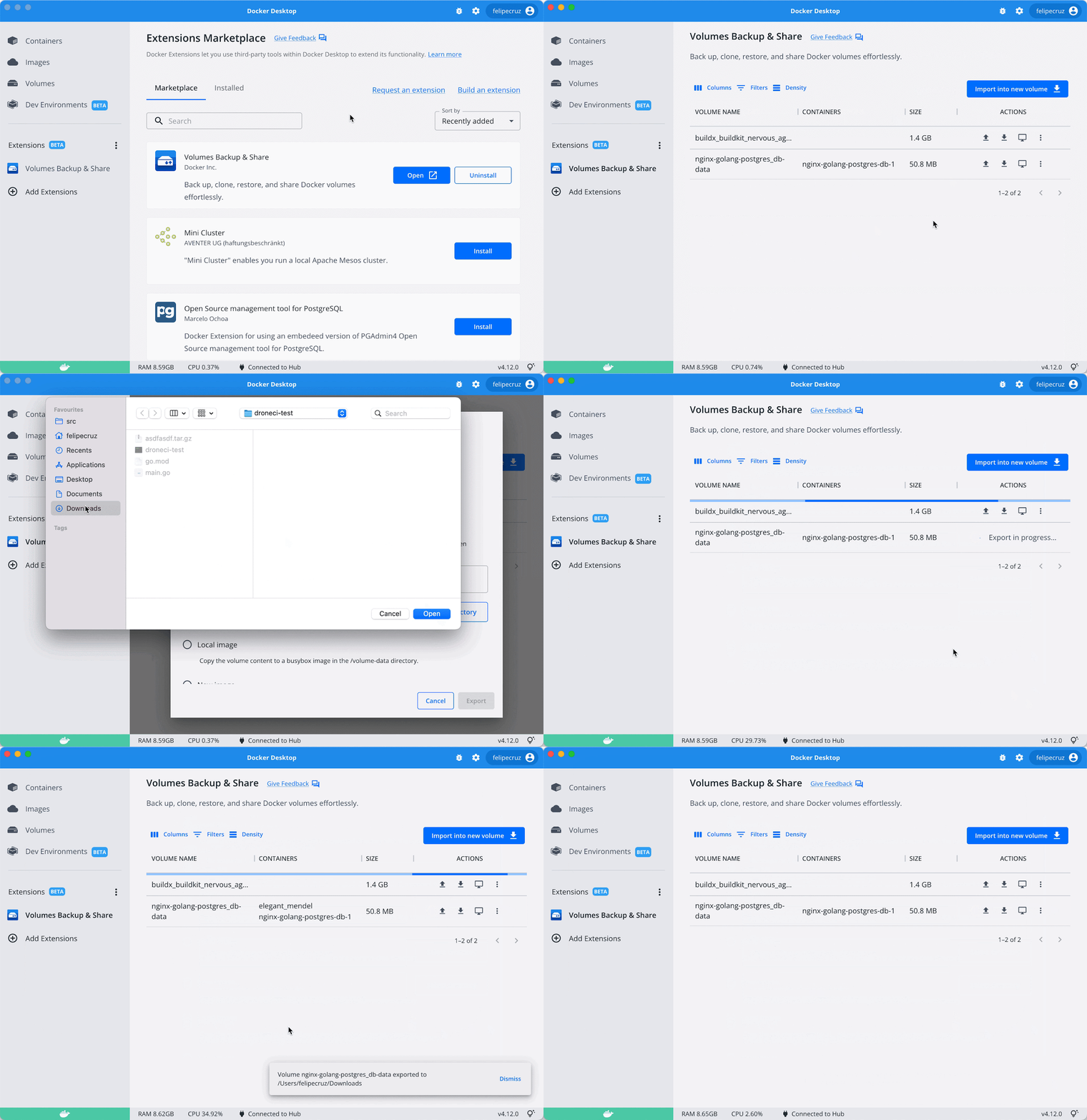
While the CLI is useful, you can also use Docker Desktop to easily create and manage volumes. Volume management has been one of the significant updates in Docker Desktop since v3.5, which we previously announced on our blog.
The following screenshots show the Volumes interface within Docker Desktop:


With Docker Desktop, you can do the following:

Create new volumes with the click of a button.
View important details about each volume (name, status, modification date, and size).
Delete volumes as needed.
Browse a volume’s contents directly through the interface.


Quick Tips for Easier Volume Management
Getting the most out of Docker Desktop means familiarizing yourself with some handy processes. Let’s explore some quick tips for managing Docker volumes.
Remove Unneeded Volumes to Save Space
Viewing each volume’s size within Docker Desktop is easy. Locate the size column and sort accordingly to view which volumes are consuming the most space. Volume removal isn’t automatic, so you need to manage this process yourself.
Simply find the volume you want to remove from your list, select it, and click either the trash can icon on the right or the red “Delete” button that appears above that list. This is great for saving local disk space. The process takes seconds, and Docker Desktop will save you from inadvertently removing active volumes — something best suited for the docker volume -f <volumename> command.
Leverage Batch Volume Selection
With Docker Desktop v4.7+, you can select multiple inactive volumes and delete them simultaneously. Alternatively, you can still use the docker volume prune CLI command to do this.
Ensure that your volumes are safe to delete, since they might contain crucial data. There’s currently no way to recover data from deleted or pruned volumes. It’s easier to erase critical application data while juggling multiple volumes, so exercise a little more caution with this CLI command.


Manage Data Within Volumes
You can also delete specific data within a volume or extract data from a volume (and save it) to use it externally. Use the three-dot menu to the right of a file item to delete or save your data. You can also easily view your volume’s collection of stored files in a familiar list format — helping you understand where important data and application dependencies reside.


Common and Clever Use Cases
Persisting Data with Named Volumes
The primary reason for using or switching to named volumes over bind mounts (which require you to manage the source location) is storage simplification. You might not care where your files are stored, and instead just need them reliably persisted across restarts.
And while you could once make a performance argument for named volumes on Linux or macOS, this is no longer the case following Docker Desktop’s v4.6 release.
There are a few other areas where named volumes are ideal, including:

Larger, static dependency trees and libraries
Database scenarios such as MySQL, MariaDB, and SQLite
Log file preservation and adding caching directories
Sharing files between different containers

 
Named volumes also give you a chance to semantically describe your storage, which is considered a best practice even if it’s not required. These identifiers can help you keep things organized — either visually, or more easily via CLI commands. After all, a specific name is much easier to remember than a randomized alphanumeric string (if you can remember those complex strings at all).
Better Testing and Security with Read-only Volumes
In most cases, you’ll want to provide a read and write storage endpoint for your running, containerized workloads. However, read-only volumes do have their perks. For example, you might have a test scenario where you want an application to access a data back end without overwriting the actual data.
Additionally, there might be a security scenario wherein read-only data volumes reduce tampering. While an attacker could gain access to your files, there’s nothing they could do to alter the filesystem.
You could even run into a niche scenario where you’re spinning up a server application — which requires read-write access — yet don’t need to persist your data between container runs. NGINX and Apache might particularly require write permissions for crucial PID or lock files. You can still leverage read-only volumes. Simply add the –tmpfs flag to denote a destination filesystem location.
Docker lets you define any volume as read-only using the :ro option, shown below:
docker run -v demovolume:/containerpath:ro my/demovolume
Tapping into Cloud Storage
Local storage is great, but your application may rely on cloud-based data sharing to run effectively. AWS and Azure are popular platforms, and it’s understandable that you’ll want to leverage them within your builds.
You can set up persistent cloud storage drivers, for Docker for AWS and Docker for Azure, using Docker’s Cloudstor plugin. This helps you get up and running with cloud-centric volumes after installation via the CLI. You can read more about setting up Cloudstor, and even starting a companion NGINX service, here.
What about shared object storage? You can also create volumes with a driver that supports writing files externally to NFS or Amazon S3. You can store your most important data in the cloud without grappling with application logic, saving time and effort.
Sharing Volumes Using Docker Compose
Since you can share Docker volumes among containers, they’re the perfect solution in a Docker Compose scenario. Each assigned container can have a volume parameter or you can share a volume among containers.
A Docker Compose file with volumes looks like this:

services:
db:
# We use a mariadb image which supports both amd64 & arm64 architecture
#image: mariadb:10.6.4-focal
# If you really want to use MySQL, uncomment the following line
image: mysql:8.0.27
command: ‘–default-authentication-plugin=mysql_native_password’
volumes:
– db_data:/var/lib/mysql
restart: always
environment:
– MYSQL_ROOT_PASSWORD=P@55W.RD123
– MYSQL_DATABASE=wordpress
– MYSQL_USER=wordpress
– MYSQL_PASSWORD=P@55W.RD123
expose:
– 3306
– 33060
wordpress:
image: wordpress:latest
ports:
– 80:80
restart: always
environment:
– WORDPRESS_DB_HOST=db
– WORDPRESS_DB_USER=wordpress
– WORDPRESS_DB_PASSWORD=P@55W.RD123
– WORDPRESS_DB_NAME=wordpress
volumes:
db_data:

 
This code creates a volume named db_data and mounts it at /var/lib/mysql within the db container. When the MySQL container runs, it’ll store its files in this directory and persist them between container restarts.
Check out our documentation on using volumes to learn more about Docker volumes and how to manage them.
Conclusion
Docker volumes are convenient file-storage solutions for Docker container runtimes. They’re also the recommended way to concurrently share data among multiple containers. Given the fact that Docker volumes are persistent, they enable the storage and backup of critical data. They also enable storage centralization between containers.
We’ve also explored working with volumes, powerful use cases, and the volume-management benefits that Docker Desktop provides aside from the CLI.
Download Docker Desktop to get started with easier volume management. However, our volume management features (and use cases) are always evolving! To stay current with Docker Desktop’s latest releases, remember to bookmark our evolving changelog.
Quelle: https://blog.docker.com/feed/

Docker Hub v1 API Deprecation

Docker has planned to deprecate the Docker Hub v1 API endpoints that access information related to Docker Hub repositories on September 5th, 2022.
Context
At this time, we have found that the number of v1 API consumers on Docker Hub has fallen below a reasonable threshold to maintain this version of the Hub API. Additionally, approximately 95% of Hub API requests target the newer v2 API. This decision has been made to ensure the stability and enhanced performance of our services so that we can continue to provide you with the best developer experience.
How does this impact you?
After the 5th of September, the following API routes within the v1 path will no longer work and will return a 404 status code:

/v1/repositories/<name>/images
/v1/repositories/<name>/tags
/v1/repositories/<name>/tags/<tag_name>
/v1/repositories/<namespace>/<name>/images
/v1/repositories/<namespace>/<name>/tags
/v1/repositories/<namespace>/<name>/tags/<tag_name>

If you want to continue using the Docker Hub API in your current applications, you must update your clients to use the v2 endpoints. Additional documentation and technical details about how to use the v2 API are available at the following URL: https://docs.docker.com/docker-hub/api/latest/
How do you get additional help?
If you have additional questions or concerns about the Hub v1 API deprecation process, you can contact us at v1-api-deprecation@docker.com.
Quelle: https://blog.docker.com/feed/
Securing the Software Supply Chain: Atomist Joins Docker

I’m excited to share some big news: Atomist is joining Docker. I know our team will thrive in its new home, and look forward to taking the great stuff we’ve built to a much larger audience.
I’ve devoted most of my career to trying to improve developer productivity and the development experience. Thus it’s particularly pleasing to me that Atomist is becoming part of a company that understands and values developers and has transformed developer experience for the better over the last 10 years. Docker’s impact on how we work has been profound and varied. Just a few of the ways I use it nearly every day: quickly spinning up and trying out a complex stack on my laptop without having to dread uninstallation; creating and destroying a database instance in seconds during CI to check the validity of a schema; confidently deploying my own code and third party products to production. Docker is both integral to development and a vital part of deployment. This is rare and makes it core to how we work.

What does this acquisition mean for users and customers?
First, Atomist’s technology can help Docker provide additional value throughout the delivery lifecycle. Docker will integrate Atomist’s rich understanding of the secure software supply chain into its products. To start with, this will surface in sophisticated reporting and remediation of container vulnerabilities. But that is just the start. As deployed software becomes more and more complex, it’s vital to understand what’s in production deployments and how it evolves over time. Container images are core to this, and Atomist’s ability to make sense of the supply chain both at any point in time and as it changes becomes ever more important. Security is just one application for this insight–although arguably the single most critical.
Second, Docker will leverage Atomist’s sophisticated integration platform. Docker (the company) understands that the modern development and delivery environment is heterogeneous. No single vendor can supply best of breed solutions for every stage, and it’s not in customers’ interests for them to do so. Atomist will help Docker customers understand what’s happening through the delivery flow, while preserving their ability to choose the products that best meet their needs.
Finally, Atomist’s automation technology will help Docker improve development experience in a variety of ways, driven by user input.
We’re proud to have built powerful, unique capabilities at Atomist. And we’re ready to take them to a much larger audience as Docker. This is an important point in a longer voyage, with the best yet to come. Want to be the first to experience the new features resulting from this combination? You can sign up for the latest updates by visiting this page. 
Quelle: https://blog.docker.com/feed/

How to Rapidly Build Multi-Architecture Images with Buildx

Successfully running your container images on a variety of CPU architectures can be tricky. For example, you might want to build your IoT application — running on an arm64 device like the Raspberry Pi — from a specific base image. However, Docker images typically support amd64 architectures by default. This scenario calls for a container image that supports multiple architectures, which we’ve highlighted in the past.
Multi-architecture (multi-arch) images typically contain variants for different architectures and OSes. These images may also support CPU architectures like arm32v5+, arm64v8, s390x, and others. The magic of multi-arch images is that Docker automatically grabs the variant matching your OS and CPU pairing.
While a regular container image has a manifest, a multi-architecture image has a manifest list. The list combines the manifests that show information about each variant’s size, architecture, and operating system.
Multi-architecture images are beneficial when you want to run your container locally on your x86-64 Linux machine, and remotely atop AWS Elastic Compute Cloud (EC2) Graviton2 CPUs. Additionally, it’s possible to build language-specific, multi-arch images — as we’ve done with Rust.
Follow along as we learn about each component behind multi-arch image builds, then quickly create our image using Buildx and Docker Desktop.
Building Multi-Architecture Images with Buildx and Docker Desktop
You can build a multi-arch image by creating the individual images for each architecture, pushing them to Docker Hub, and entering docker manifest to combine them within a tagged manifest list. You can then push the manifest list to Docker Hub. This method is valid in some situations, but it can become tedious and relatively time consuming.
 
Note: However, you should only use the docker manifest command in testing — not production. This command is experimental. We’re continually tweaking functionality and any associated UX while making docker manifest production ready.
 
However, two tools make it much easier to create multi-architectural builds: Docker Desktop and Docker Buildx. Docker Buildx enables you to complete every multi-architecture build step with one command via Docker Desktop.
Before diving into the nitty gritty, let’s briefly examine some core Docker technologies.
Dockerfiles
The Dockerfile is a text file containing all necessary instructions needed to assemble and deploy a container image with Docker. We’ll summarize the most common types of instructions, while our documentation contains information about others:

The FROM instruction headlines each Dockerfile, initializing the build stage and setting a base image which can receive subsequent instructions.
RUN defines important executables and forms additional image layers as a result. RUN also has a shell form for running commands.
WORKDIR sets a working directory for any following instructions. While you can explicitly set this, Docker will automatically assign a directory in its absence.
COPY, as it sounds, copies new files from a specified source and adds them into your container’s filesystem at a given relative path.
CMD comes in three forms, letting you define executables, parameters, or shell commands. Each Dockerfile only has one CMD, and only the latest CMD instance is respected when multiple exist.

 
Dockerfiles facilitate automated, multi-layer image builds based on your unique configurations. They’re relatively easy to create, and can grow to support images that require complex instructions. Dockerfiles are crucial inputs for image builds.
Buildx
Buildx leverages the docker build command to build images from a Dockerfile and sets of files located at a specified PATH or URL. Buildx comes packaged within Docker Desktop, and is a CLI plugin at its core. We consider it a plugin because it extends this base command with complete support for BuildKit’s feature set.
We offer Buildx as a CLI command called docker buildx, which you can use with Docker Desktop. In Linux environments, the buildx command also works with the build command on the terminal. Check out our Docker Buildx documentation to learn more.
BuildKit Engine
BuildKit is one core component within our Moby Project framework, which is also open source. It’s an efficient build system that improves upon the original Docker Engine. For example, BuildKit lets you connect with remote repositories like Docker Hub, and offers better performance via caching. You don’t have to rebuild every image layer after making changes.
While building a multi-arch image, BuildKit detects your specified architectures and triggers Docker Desktop to build and simulate those architectures. The docker buildx command helps you tap into BuildKit.
Docker Desktop
Docker Desktop is an application — built atop Docker Engine — that bundles together the Docker CLI, Docker Compose, Kubernetes, and related tools. You can use it to build, share, and manage containerized applications. Through the baked-in Docker Dashboard UI, Docker Desktop lets you tackle tasks with quick button clicks instead of manually entering intricate commands (though this is still possible).
Docker Desktop’s QEMU emulation support lets you build and simulate multiple architectures in a single environment. It also enables building and testing on your macOS, Windows, and Linux machines.
Now that you have working knowledge of each component, let’s hop into our walkthrough.
Prerequisites
Our tutorial requires the following:

The correct Go binary for your OS, which you can download here
The latest version of Docker Desktop
A basic understanding of how Docker works. You can follow our getting started guide to familiarize yourself with Docker Desktop.

 
Building a Sample Go Application
Let’s begin by building a basic Go application which prints text to your terminal. First, create a new folder called multi_arch_sample and move to it:
mkdir multi_arch_sample && cd multi_arch_sample
Second, run the following command to track code changes in the application dependencies:
go mod init multi_arch_sample
Your terminal will output a similar response to the following:

go: creating new go.mod: module multi_arch_sample
go: to add module requirements and sums:
go mod tidy

 
Third, create a new main.go file and add the following code to it:

package main

import (
"fmt"
"net/http"
)

func readyToLearn(w http.ResponseWriter, req *http.Request) {
w.Write([]byte("<h1>Ready to learn!</h1>"))
fmt.Println("Server running…")
}

func main() {

http.HandleFunc("/", readyToLearn)
http.ListenAndServe(":8000", nil)
}

 
This code created the function readyToLearn, which prints “Ready to learn!” at the 127.0.0.1:8000 web address. It also outputs the phrase Server running… to the terminal.
Next, enter the go run main.go command to run your application code in the terminal, which will produce the Ready to learn! response.
Since your app is ready, you can prepare a Dockerfile to handle the multi-architecture deployment of your Go application.
Creating a Dockerfile for Multi-arch Deployments
Create a new file in the working directory and name it Dockerfile. Next, open that file and add in the following lines:

# syntax=docker/dockerfile:1

# specify the base image to be used for the application
FROM golang:1.17-alpine

# create the working directory in the image
WORKDIR /app

# copy Go modules and dependencies to image
COPY go.mod ./

# download Go modules and dependencies
RUN go mod download

# copy all the Go files ending with .go extension
COPY *.go ./

# compile application
RUN go build -o /multi_arch_sample

# network port at runtime
EXPOSE 8000

# execute when the container starts
CMD [ "/multi_arch_sample" ]

 
Building with Buildx
Next, you’ll need to build your multi-arch image. This image is compatible with both the amd64 and arm32 server architectures. Since you’re using Buildx, BuildKit is also enabled by default. You won’t have to switch on this setting or enter any extra commands to leverage its functionality.
The builder builds and provisions a container. It also packages the container for reuse. Additionally, Buildx supports multiple builder instances — which is pretty handy for creating scoped, isolated, and switchable environments for your image builds.
Enter the following command to create a new builder, which we’ll call mybuilder:
docker buildx create –name mybuilder –use –bootstrap
You should get a terminal response that says mybuilder. You can also view a list of builders using the docker buildx ls command. You can even inspect a new builder by entering docker buildx inspect <name>.
Triggering the Build
Now, you’ll jumpstart your multi-architecture build with the single docker buildx command shown below:
docker buildx build –push
–platform linux/amd64,linux/arm64
–tag your_docker_username/multi_arch_sample:buildx-latest .
 
This does several things:

Combines the build command to start a build
Shares the image with Docker Hub using the push operation
Uses the –platform flag to specify the target architectures you want to build for. BuildKit then assembles the image manifest for the architectures
Uses the –tag flag to set the image name as multi_arch_sample

 
Once your build is finished, your terminal will display the following:
[+] Building 123.0s (23/23) FINISHED
 
Next, navigate to the Docker Desktop and go to Images > REMOTE REPOSITORIES. You’ll see your newly-created image via the Dashboard!


Conclusion
Congratulations! You’ve successfully explored multi-architecture builds, step by step. You’ve seen how Docker Desktop, Buildx, BuildKit, and other tooling enable you to create and deploy multi-architecture images. While we’ve used a sample Go web application, you can apply these processes to other images and applications.
To tackle your own projects, learn how to get started with Docker to build more multi-architecture images with Docker Desktop and Buildx. We’ve also outlined how to create a custom registry configuration using Buildx.
Quelle: https://blog.docker.com/feed/





