Introducing InfraKit, an open source toolkit for creating and managing declarative, self-healing infrastructure

Written by Bill Farner and David Chung
Docker’s mission is to build tools of mass innovation, starting with a programmable layer for the Internet that enables developers and IT operations teams to build and run distributed applications. As part of this mission, we have always endeavored to contribute software plumbing toolkits back to the community, following the UNIX philosophy of building small loosely coupled tools that are created to simply do one thing well. As Docker adoption has grown from 0 to 6 billion pulls, we have worked to address the needs of a growing and diverse set of distributed systems users. This work has led to the creation of many infrastructure plumbing components that have been contributed back to the community.

It started in 2014 with libcontainer and libnetwork. In 2015 we created runC and co-founded OCI with an industry-wide set of partners to provide a standard for container runtimes, a reference implementation based on libcontainer, and notary, which provides the basis for Docker Content Trust. From there we added containerd, a daemon to control runC, built for performance and density. Docker Engine was refactored so that Docker 1.11 is built on top of containerd and runC, providing benefits such as the ability to upgrade Docker Engine without restarting containers. In May 2016 at OSCON, we open sourced HyperKit, VPNKit and DataKit, the underlying components that enable us  to deeply integrate Docker for Mac and Windows with the native Operating System. Most recently,  in June, we unveiled SwarmKit, a toolkit for scheduling tasks and the basis for swarm mode, the built-in orchestration feature in Docker 1.12.
With SwarmKit, Docker introduced a declarative management toolkit for orchestrating containers. Today, we are doing the same for infrastructure. We are excited to announce InfraKit, a declarative management toolkit for orchestrating infrastructure. Solomon Hykes  open sourced it today during his keynote address at  LinuxCon Europe. You can find the source code at https://github.com/docker/infrakit
 
InfraKit Origins
Back in June at DockerCon, we introduced Docker for AWS and Azure beta to simplify the IT operations experience in setting up Docker and to optimally leverage the native capabilities of the respective cloud environment. To do this, Docker provided deep integrations into these platforms’ capabilities for storage, networking and load balancing.
In the diagram below, the architecture for these versions includes platform-specific network and storage plugins, but also a new component specific to infrastructure management.
While working on Docker for AWS and Azure, we realized the need for a standard way to create and manage infrastructure state that was portable across any type of infrastructure, from different cloud providers to on-prem.  One challenge is that each vendor has differentiated IP invested in how they handle certain aspects of their cloud infrastructure. It is not enough to just provision five servers;what IT ops teams need is a simple and consistent way to declare the number of servers, what size they should be, and what sort of base software configuration is required.  And in the case of server failures (especially unplanned), that sudden change needs to be reconciled against the desired state to ensure that any required servers are re-provisioned with the necessary configuration. We started InfraKit to solves these problems and to provide the ability to create a self healing infrastructure for distributed systems.
 
InfraKit Internals
InfraKit breaks infrastructure automation down into simple, pluggable components for declarative infrastructure state, active monitoring and automatic reconciliation of that state. These components work together to actively ensure the infrastructure state matches the user&;s specifications. InfraKit emphasizes primitives for building self-healing infrastructure but can also be used passively like conventional tools.
InfraKit at the core consists of a set of collaborating, active processes. These components are called plugins and different plugins can be written to meet different needs. These plugins are active controllers that can look at current infrastructure state and take action when the state diverges from user specification.
Initially, these plugins are implemented as servers listening on unix sockets and communicate using HTTP. By nature, the plugin interface definitions are language agnostic so it&8217;s possible to implement a plugin in a language other than Go. Plugins can be packaged and deployed differently, such as with Docker containers.
Plugins are the active components that provide the behavior for the primitives that InfraKit supports. InfraKit supports these primitives: groups, instances, and flavors. They are active components running as plugins.
Groups
When managing infrastructure like computing clusters, Groups make good abstraction, and working with groups is easier than managing individual instances. For example, a group can be made up of a collection of machines as individual instances. The machines in a group can have identical configurations (replicas, or so-called “cattle”). They can also have slightly different configurations and properties like identity,ordering, and persistent storage (as members of a quorum or so-called “pets”).
Instances
Instances are members of a group. An instance plugin manages some physical resource instances. It knows only about individual instances and nothing about Groups. Instance is technically defined by the plugin, and need not be a physical machine at all.   As part of the toolkit, we have included examples of instance plugins for Vagrant and Terraform. These examples show that it’s easy to develop plugins.  They are also examples of how InfraKit can play well with existing system management tools while extending their capabilities with active management.  We envision more plugins in the future &; for example plugins for AWS and Azure.
Flavors
Flavors help distinguish members of one group from another by describing how these members should be treated. A flavor plugin can be thought of as defining what runs on an Instance. It is responsible for configuring the physical instance and for providing health-check in an application-aware way.  It is also what gives the member instances properties like identity and ordering when they require special handling.  Examples of flavor plugins include plain servers, Zookeeper ensemble members, and Docker swarm mode managers.
By separating provisioning of physical instances and configuration of applications into Instance and Flavor plugins, application vendors can directly develop a Flavor plugin, for example, MySQL, that can work with a wide array of instance plugins.
Active Monitoring and Automatic Reconciliation
The active self-healing aspect of InfraKit sets it apart from existing infrastructure management solutions, and we hope it will help our industry build more resilient and self-healing systems. The InfraKit plugins themselves continuously monitor at the group, instance and flavor level for any drift in configuration and automatically correct it without any manual intervention.

The group plugin checks on the size, overall health of the group and decides on strategies for updating.
The instance plugin monitors for the physical presence of resources.
The flavor plugin can make additional determination beyond presence of the resource. For example the swarm mode flavor plugin would check not only that a swarm member node is up, but that the node is also a member of the cluster.  This provides an application-specific meaning to a node’s “health.”

This active monitoring and automatic reconciliation brings a new level of reliability for distributed systems.
The diagram below shows an example of how InfraKit can be used. There are three groups defined; one for a set of stateless cattle instances, one for a set of stateful and uniquely named pet instances and one defined for the Infrakit manager instances themselves. Each group will be monitored for their declared infrastructure state and reconciled independently of the other groups.  For example, if one of the nodes (blue and yellow) in the cattle group goes down, a new one will be started to maintain the desired size.  When the leader host (M2) running InfraKit goes down, a new leader will be elected (from the standby M1 and M3). This new leader will go into action by starting up a new member to join the quorum to ensure availability and desired size of the group.

InfraKit, Docker and Community
InfraKit was born out of our engineering efforts around Docker for AWS and Azure and future versions will see further integration of InfraKit into Docker and those environments, continuing the path building Docker with a set of reusable components.
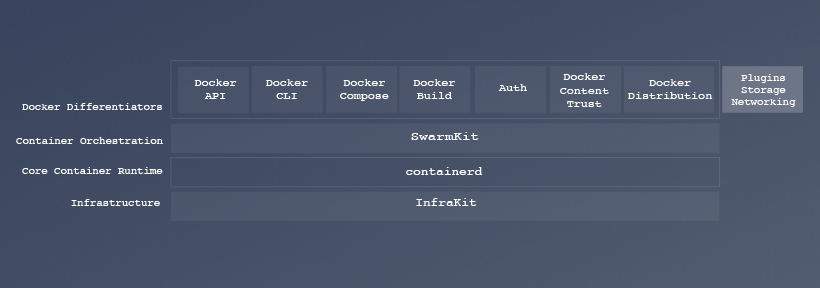
As the diagram below shows, Docker Engine is already made up of a number of infrastructure plumbing components mentioned earlier.  The components are not only available separately to the community, but integrated together as the Docker Engine.  In a future release, InfraKit will also become part of the Docker Engine.
With community participation, we aim to evolve InfraKit into exciting new areas beyond managing nodes in a cluster.  There’s much work ahead of us to build this into a cohesive framework for managing infrastructure resources, physical, virtual or containerized, from cluster nodes to networks to load balancers and storage volumes.
We are excited to open source InfraKit and invite the community to participate in this project:

Help define and implement new and interesting plugins
Instance plugins to support different infrastructure providers
Flavor plugins to support a variety of systems like etcd or mysql clusters
Group controller plugins like metrics-driven auto scaling and more
Help define interfaces and implement new infrastructure resource types for things like load balancers, networks and storage volume provisioners

Check out the InfraKit repository README for more info, a quick tutorial and to start experimenting &; from plain files to Terraform integration to building a Zookeeper ensemble.  Have a look, explore, and send us a PR or open an issue with your ideas!

Introducing InfraKit: A new open source toolkit for declarative infrastructureClick To Tweet

More Resources:

Check out all the Infrastructure Plumbing projects
Sign up for Docker for AWS or Docker for Azure
Try Docker today

The post Introducing InfraKit, an open source toolkit for creating and managing declarative, self-healing infrastructure appeared first on Docker Blog.
Quelle: https://blog.docker.com/feed/

How we improved Kubernetes Dashboard UI in 1.4 for your production needs​

With the release of Kubernetes 1.4 last week, Dashboard – the official web UI for Kubernetes – has a number of exciting updates and improvements of its own. The past three months have been busy ones for the Dashboard team, and we’re excited to share the resulting features of that effort here. If you’re not familiar with Dashboard, the GitHub repo is a great place to get started.A quick recap before unwrapping our shiny new features: Dashboard was initially released March 2016. One of the focuses for Dashboard throughout its lifetime has been the onboarding experience; it’s a less intimidating way for Kubernetes newcomers to get started, and by showing multiple resources at once, it provides contextualization lacking in kubectl (the CLI). After that initial release though, the product team realized that fine-tuning for a beginner audience was getting ahead of ourselves: there were still fundamental product requirements that Dashboard needed to satisfy in order to have a productive UX to onboard new users too. That became our mission for this release: closing the gap between Dashboard and kubectl by showing more resources, leveraging a web UI’s strengths in monitoring and troubleshooting, and architecting this all in a user friendly way.Monitoring GraphsReal time visualization is a strength that UI’s have over CLI’s, and with 1.4 we’re happy to capitalize on that capability with the introduction of real-time CPU and memory usage graphs for all workloads running on your cluster. Even with the numerous third-party solutions for monitoring, Dashboard should include at least some basic out-of-the box functionality in this area. Next up on the roadmap for graphs is extending the timespan the graph represents, adding drill-down capabilities to reveal more details, and improving the UX of correlating data between different graphs.LogsBased on user research with Kubernetes’ predecessor Borg and continued community feedback, we know logs are tremendously important to users. For this reason we’re constantly looking for ways to improve these features in Dashboard. This release includes a fix for an issue wherein large numbers of logs would crash the system, as well as the introduction of the ability to view logs by date.Showing More ResourcesThe previous release brought all workloads to Dashboard: Pods, Pet Sets, Daemon Sets, Replication Controllers, Replica Set, Services, & Deployments. With 1.4, we expand upon that set of objects by including Services, Ingresses, Persistent Volume Claims, Secrets, & Config Maps. We’ve also introduced an “Admin” section with the Namespace-independent global objects of Namespaces, Nodes, and Persistent Volumes. With the addition of roles, these will be shown only to cluster operators, and developers’ side nav will begin with the Namespace dropdown.Like glue binding together a loose stack of papers into a book, we needed some way to impose order on these resources for their value to be realized, so one of the features we’re most excited to announce in 1.4 is navigation.NavigationIn 1.1, all resources were simply stacked on top of each other in a single page. The introduction of a side nav provides quick access to any aspect of your cluster you’d like to check out. Arriving at this solution meant a lot of time put toward thinking about the hierarchy of Kubernetes objects – a difficult task since by design things fit together more like a living organism than a nested set of linear relationships. The solution we’ve arrived at balances the organizational need for grouping and desire to retain a bird’s-eye view of as much relevant information as possible. The design of the side nav is simple and flexible, in order to accommodate more resources in the future. Its top level objects (e.g. “Workloads”, “Services and Discovery”) roll up their child objects and will eventually include aggregated data for said objects.Closer Alignment with Material DesignDashboard follows Google’s Material design system, and the implementation of those principles is refined in the new UI: the global create options have been reduced from two choices to one initial “Create” button, the official Kubernetes logo is displayed as an SVG rather than simply as text, and cards were introduced to help better group different types of content (e.g. a table of Replication Controllers and a table of Pods on your “Workloads” page). Material’s guidelines around desktop-focused enterprise-level software are currently limited (and instead focus on a mobile-first context), so we’ve had to improvise with some aspects of the UI and have worked closely with the UX team at Google Cloud Platform to do this – drawing on their expertise in implementing Material in a more information-dense setting.Sample Use CaseTo showcase Dashboard 1.4’s new suite of features and how they’ll make users’ lives better in the real world, let’s imagine the following scenario:I am a cluster operator and a customer pings me warning that their app, Kubernetes Dashboard, is suffering performance issues. My first step in addressing the issue is to switch to the correct Namespace, kube-system, to examine what could be going on. Once in the relevant Namespace, I check out my Deployments to see if anything seems awry. Sure enough, I notice a spike in CPU usage. I realize we need to perform a rolling update to a newer version of that app that can handle the increased requests it’s evidently getting, so I update this Deployment’s image, which in turn creates a new Replica Set. Now that that Replica Set’s been created, I can open the logs for one of its pods to confirm that it’s been successfully connected to the API server. Easy as that, we’ve debugged our issue. Dashboard provided us a centralized location to scan for the origin of the problem, and once we had that identified we were able to drill down and address the root of the problem.Why the Skipped Versions?If you’ve been following along with Dashboard since 1.0,  you may have been confused by the jump in our versioning; we went 1.0, 1.1…1.4. We did this to synchronize with the main Kubernetes distro, and hopefully going forward this will make that relationship easier to understand.There’s a Lot More Where That Came FromDashboard is gaining momentum, and these early stages are a very exciting and rewarding time to be involved. If you’d like to learn more about contributing, check out UI. Chat with us Kubernetes Slack: sig-ui channel.–Dan Romlein, UX designer, ApprendaDownload KubernetesGet involved with the Kubernetes project on GitHub Post questions (or answer questions) on Stack Overflow Connect with the community on SlackFollow us on Twitter @Kubernetesio for latest updates
Quelle: kubernetes

How we improved Kubernetes Dashboard UI in 1.4 for your production needs​

With the release of Kubernetes 1.4 last week, Dashboard – the official web UI for Kubernetes – has a number of exciting updates and improvements of its own. The past three months have been busy ones for the Dashboard team, and we’re excited to share the resulting features of that effort here. If you’re not familiar with Dashboard, the GitHub repo is a great place to get started.A quick recap before unwrapping our shiny new features: Dashboard was initially released March 2016. One of the focuses for Dashboard throughout its lifetime has been the onboarding experience; it’s a less intimidating way for Kubernetes newcomers to get started, and by showing multiple resources at once, it provides contextualization lacking in kubectl (the CLI). After that initial release though, the product team realized that fine-tuning for a beginner audience was getting ahead of ourselves: there were still fundamental product requirements that Dashboard needed to satisfy in order to have a productive UX to onboard new users too. That became our mission for this release: closing the gap between Dashboard and kubectl by showing more resources, leveraging a web UI’s strengths in monitoring and troubleshooting, and architecting this all in a user friendly way.Monitoring GraphsReal time visualization is a strength that UI’s have over CLI’s, and with 1.4 we’re happy to capitalize on that capability with the introduction of real-time CPU and memory usage graphs for all workloads running on your cluster. Even with the numerous third-party solutions for monitoring, Dashboard should include at least some basic out-of-the box functionality in this area. Next up on the roadmap for graphs is extending the timespan the graph represents, adding drill-down capabilities to reveal more details, and improving the UX of correlating data between different graphs.LogsBased on user research with Kubernetes’ predecessor Borg and continued community feedback, we know logs are tremendously important to users. For this reason we’re constantly looking for ways to improve these features in Dashboard. This release includes a fix for an issue wherein large numbers of logs would crash the system, as well as the introduction of the ability to view logs by date.Showing More ResourcesThe previous release brought all workloads to Dashboard: Pods, Pet Sets, Daemon Sets, Replication Controllers, Replica Set, Services, & Deployments. With 1.4, we expand upon that set of objects by including Services, Ingresses, Persistent Volume Claims, Secrets, & Config Maps. We’ve also introduced an “Admin” section with the Namespace-independent global objects of Namespaces, Nodes, and Persistent Volumes. With the addition of roles, these will be shown only to cluster operators, and developers’ side nav will begin with the Namespace dropdown.Like glue binding together a loose stack of papers into a book, we needed some way to impose order on these resources for their value to be realized, so one of the features we’re most excited to announce in 1.4 is navigation.NavigationIn 1.1, all resources were simply stacked on top of each other in a single page. The introduction of a side nav provides quick access to any aspect of your cluster you’d like to check out. Arriving at this solution meant a lot of time put toward thinking about the hierarchy of Kubernetes objects – a difficult task since by design things fit together more like a living organism than a nested set of linear relationships. The solution we’ve arrived at balances the organizational need for grouping and desire to retain a bird’s-eye view of as much relevant information as possible. The design of the side nav is simple and flexible, in order to accommodate more resources in the future. Its top level objects (e.g. “Workloads”, “Services and Discovery”) roll up their child objects and will eventually include aggregated data for said objects.Closer Alignment with Material DesignDashboard follows Google’s Material design system, and the implementation of those principles is refined in the new UI: the global create options have been reduced from two choices to one initial “Create” button, the official Kubernetes logo is displayed as an SVG rather than simply as text, and cards were introduced to help better group different types of content (e.g. a table of Replication Controllers and a table of Pods on your “Workloads” page). Material’s guidelines around desktop-focused enterprise-level software are currently limited (and instead focus on a mobile-first context), so we’ve had to improvise with some aspects of the UI and have worked closely with the UX team at Google Cloud Platform to do this – drawing on their expertise in implementing Material in a more information-dense setting.Sample Use CaseTo showcase Dashboard 1.4’s new suite of features and how they’ll make users’ lives better in the real world, let’s imagine the following scenario:I am a cluster operator and a customer pings me warning that their app, Kubernetes Dashboard, is suffering performance issues. My first step in addressing the issue is to switch to the correct Namespace, kube-system, to examine what could be going on. Once in the relevant Namespace, I check out my Deployments to see if anything seems awry. Sure enough, I notice a spike in CPU usage. I realize we need to perform a rolling update to a newer version of that app that can handle the increased requests it’s evidently getting, so I update this Deployment’s image, which in turn creates a new Replica Set. Now that that Replica Set’s been created, I can open the logs for one of its pods to confirm that it’s been successfully connected to the API server. Easy as that, we’ve debugged our issue. Dashboard provided us a centralized location to scan for the origin of the problem, and once we had that identified we were able to drill down and address the root of the problem.Why the Skipped Versions?If you’ve been following along with Dashboard since 1.0,  you may have been confused by the jump in our versioning; we went 1.0, 1.1…1.4. We did this to synchronize with the main Kubernetes distro, and hopefully going forward this will make that relationship easier to understand.There’s a Lot More Where That Came FromDashboard is gaining momentum, and these early stages are a very exciting and rewarding time to be involved. If you’d like to learn more about contributing, check out UI. Chat with us Kubernetes Slack: sig-ui channel.–Dan Romlein, UX designer, ApprendaDownload KubernetesGet involved with the Kubernetes project on GitHub Post questions (or answer questions) on Stack Overflow Connect with the community on SlackFollow us on Twitter @Kubernetesio for latest updates
Quelle: kubernetes

Your Docker agenda for the month of October

From webinars to workshops, meetups to conference talks, check out our list of events that are coming up in October!

Online
Oct 13: Docker for Windows Server 2016 by Michael Friis
Oct 18: Docker Datacenter Demo by Moni Sallama and Chris Hines.
 
Official Docker Training Course
View the full schedule of instructor led training courses here!
Introduction to Docker: This is a two-day, on-site or classroom-based training course which introduces you to the Docker platform and takes you through installing, integrating, and running it in your working environment.
Oct 11-12: Introduction to Docker with Xebia &; Paris, France
Oct 19-20: Introduction to Docker with Contino &8211; London, United Kingdom
Oct 24-25: Introduction to Docker with AKRA &8211; Krakow, Germany
 
Docker Administration and Operations: The Docker Administration and Operations course consists of both the Introduction to Docker course, followed by the Advanced Docker Topics course, held over four consecutive days.
Oct 3-6: Docker Administration and Operations with Azca &8211; Madrid, Spain
Oct 11-15: Docker Administration and Operations with TREEPTIK &8211; Paris, France
Oct 18-21: Docker Administration and Operations with Vizuri &8211; Raleigh, NC
Oct 18-22: Docker Administration and Operations with TREEPTIK &8211; Aix en Provence, France
Oct 24-27: Docker Administration and Operations with AKRA &8211; Krakow, Germany
Oct 31- Nov 3: Docker Administration and Operations by Luis Herrera, Docker Captain &8211; Lisboa, Portugal
 
Advanced Docker Operations: This two day course is designed to help new and experienced systems administrators learn to use Docker to control the Docker daemon, security, Docker Machine, Swarm, and Compose.
Oct 10-11 Advanced Docker Operations with Ben Wootton, Docker Captain &8211; London, UK
Oct 26-27: Advanced Docker Operations with AKRA &8211; Krakow, Poland
 
North America & Latin America
Oct 5th: DOCKER MEETUP AT MELTMEDIA &8211; Tempe, AZ
The speaker, @leodotcloud, will discuss the background, present ecosystem of the Container Network Interface (CNI) for containers.
Oct 6th: DOCKER MEETUP AT RACKSPACE &8211; Austin, TX
Jeff Lindsay will give a preview talk to container days where he will cover what the different components of a cluster manager are and what are things you should pay attention to if you really wanted to build your own cluster management solution.
Oct 11th: DOCKER MEETUP AT REPLICATED &8211; Los Angeles, CA
Marc Campbell will share some best practices of using Docker in production, starting with using Content Trust and signed images (including the internals of how Content Trust is built), and then discussing a Continuous Integration/Delivery workflow that can reliably and securely deliver and run Docker containers in any environment.
Oct 12th: DOCKER MEETUP IN BATON ROUGE &8211; Baton Rouge, LA
This Docker meetup will be hosted by Brandon Willmott of the local VMware User Group.
Oct 12th: DOCKER MEETUP AT TUNE &8211; Seattle, WA
Join this meetup to hear talks from Nick Thompson from TUNE, Avi Cavali from Shippable and DJ Enriquez from OpenMail. Also Wes McNamee, a winner of the Docker 1.12 Hackathon, will also be presenting his project Swarm-CI. This is not to be missed!
Oct 13th: DOCKER MEETUP AT CAPITAL ALE HOUSE &8211; Richmond, VA
Scott Cochran, Master Software Engineer at Capital One, will be talking about his journey in adopting docker containers to solve business problems and the things he learned along the way.
Oct 17th: DOCKER MEETUP AT BRAINTREE &8211; Chicago, IL
Tsvi Korren, director of technical services at Aqua, is going to present a talk entitled &;Docker Container Application Security Deep Dive&; where he will discuss how to integrate compliance and security checks into your pipeline and how to produce a secure, verifiable image.
Oct 18th: DOCKER MEETUP AT THE INNEVATION CENTER &8211; Las Vegas, NV
Using the Docker volume plug-in with external container storage allows data to be persisted, allows per-container volume management and high-availability for stateful apps. Join this informative meetup with Gou Rao, CTO and co-founder of Portworx, where we’ll discuss: Best practices for managing stateful containerized applications.
Oct 18th: DOCKER MEETUP AT WILDBIT &8211; PHILADELPHIA, PA
Ben Grissinger, Solutions Engineer at Docker, will discuss Docker Swarm!  He will cover the requirements for using swarm mode and take a peak at what we can expect in the near future from Docker regarding swarm mode. Last but not he will be doing a demo using swarm mode and using a visualizer tool to display what is taking place in the swarm cluster during the demo of swarm mode in action.
Oct 18th: DOCKER MEETUP AT SANTANDER &8211; Sao Paulo, Brazil
Join Docker São Paulo for their 8th meetup. Get in touch if you would like to submit a talk.
Oct 29th: DOCKER MEETUP AT CI&T &8211; Campinas, Brazil
Save the date for the first Docker Campinas meetup. More details to follow soon.
 
Europe
Oct 4th: LINUXCON EUROPE / CONTAINERCON EU  &8211; Berlin, Germany
We had such a great time attending and speaking at LinuxCon and ContainerCon North America, that we are doing it again next week in Berlin – only bigger and better this time! Make sure to come visit us at booth and check out the awesome Docker sessions we have lined up.
Oct 4th: THE INCREDIBLE AUTOMATION DAY (TIAD) PARIS &8211; Paris, France
Roberto Hashioka from Docker will share how to build a powerful real-time data processing pipeline & visualization solution using Docker Machine and Compose, Kafka, Cassandra and Spark in 5 steps.
Oct 4th: DOCKER MEETUP IN COPENHAGEN &8211; Copenhagen, Denmark
Learn to be a DevOps &8211; workshop for beginners.
Oct 5th: WEERT SOFTWARE DEVELOPMENT MEETUP &8211; Weert, Netherlands
Kabisa will host a Docker workshop. The workshop is intended for people who are interested in Docker. Last year you have heard and read a lot about Docker. “Our workshop is a next step for you to gain some hands-on experience.”
Oct 6th: DOCKER MEETUP AT ZANOX &8211; Berlin, Germany
Patrick Chanezon: What&8217;s new with Docker, covering Docker announcements from the past 6 months, with a demo of the latest and greatest Docker products for dev and ops.
Oct 6th: TECH UNPLUGGED &8211; Amsterdam, The Netherlands
Docker Captain Nigel Poulton is presenting on container security at @techunplugged in Amsterdam.
Oct 11th: DOCKER MEETUP AT MONDAY CONSULTING GMBH &8211; Hamburg, Germany
Tom Hutter prepared some material about: aliases and bash-completion, Dockerfile, docker-compose, bind mount: access folders outside build root, supervisord, firewalls (iptables), housekeeping.
Oct 11th: London Dev Community Meetup &8211; London, United Kingdom
Building Microservices with Docker.
Oct 12th: GOTO &8211; LONDON &8211; London, United Kingdom
GOTO London will give you the opportunity to talk with people across all different disciplines of software development! Join Docker captain Adrian Mouat talk about Docker.
Oct 13th: DOCKER MEETUP AT YNOV BORDEAUX &8211; Bordeaux, France
David Gageot from Docker will be presenting.
Oct 15th: DOCKER MEETUP AT BKM &8211; Istanbul, Turkey
Event will be handled by Derya SEZEN and Huseyin BABAL and there will be cool topics about Docker with real life best practices and also we have some challenges for you. Do not forget to bring your laptops with you.
Oct 15th: DOCKER MEETUP AT BUCHAREST TECH HUB &8211; Bucharest, Romania
Welcome to the second workshop of the free Docker 101 Workshop Meetups!
This is going to be a 5h+ Workshop, so be prepared! This workshop is an introduction in the world of Docker containers. It provides an overview about what exactly is Docker and how can it benefit both developers looking to build applications quickly and  IT team looking to manage the IT environment.
Oct 17th: OSCON LONDON &8211; London, UK
Hear the latest about the Docker project from Patrick Chanezon.
Oct 18th: DOCKER MEETUP AT TRADESHIFT &8211; Denmark, Copenhagen
We are going to talk about Continuous Integration, Continuous Deployment. Why is that important, why should you care? CI/CD as it is abbreviated is not only about the technical, it is also about how you can improve your team with new tools that help you deliver features faster with fewer errors.
Oct 18th: DOCKER MEETUP AT HORTONWORKS BUDAPEST &8211; Budapest, Hungary
This Meetup will focus on the new features of Docker 1.12.
Oct 26th: DOCKER MEETUP AT DIE MOBILIAR &8211; Zürich, Switzerland
We are happy to announce the 11th Docker Switzerland meetup. Talks include an introduction into swarmkit by Michael Müller from Container Solutions.
Oct 26th: DOCKER MEETUP AT BENTOXBOX &8211; Verona, Italy
Join us for our first meetup! Docker Captain Lorenzo Fontana, DevOps Expert at Kiratech, will be joining us!
 
APAC
Oct 18th: DOCKER MEETUP AT DIMENSION DATA &8211; Sydney, Australia
“Docker inside out, reverse engineering Docker” By Anthony Shaw, “Group Director, Innovation and Technical Development” at Dimension Data. Summary: In this talk Anthony will be explaining how Docker works by reverse engineering the core concepts and illustrating the technology by building a Docker clone live during the talk.
Oct 18th: DOCKER MEETUP IN MELBOURNE &8211; Melbourne, Australia
Continuous Integration & Deployment for Docker Workloads on Azure Container Services. Presenter: Ken Thompson (OSS TSP, Microsoft).
Oct 18th: DOCKER MEETUP IN SINGAPORE &8211; Singapore, Singapore
Docker for AWS (Vincent de Smet) with a demo on using docker machine with a remote host by Sergey Shishkin.
Oct 22nd: DOCKER CLUSTERING WITH TECH NEXT MEETUP &8211; Pune, India
Dockerize a multi-container data crunching app.
 
The post Your Docker agenda for the month of October appeared first on Docker Blog.
Quelle: https://blog.docker.com/feed/

Your Guide to LinuxCon and ContainerCon Europe

Hey Dockers! We had such a great time attending and speaking at and North America, that we are doing it again next week in Berlin &; only bigger and better this time! Make sure to come visit us at booth and check out the awesome Docker sessions we have lined up:
Keynote!
Solomon Hykes, Docker’s Founder and CTO, will kick off LinuxCon with the first keynote at 9:25. If you aren’t joining us in Berlin, you can live stream his and the other keynotes by registering here.
Sessions
Tuesday October 4th:
11:15 &8211; 12:05 Docker Captain Adrian Mouat will deliver a comparison of orchestration tools including Docker Swarm, Mesos/Marathon and Kubernetes.
 
12:15 &8211; 1:05 Patrick Chanezon and David Chung from Docker’s technical team along with Docker Captain and maintainer Phil Estes will demonstrate how to build distributed systems without Docker, using Docker plumbing projects, including RunC, containerd, swarmkit, hyperkit, vpnkit, datakit.
 
2:30 &8211; 3:20 Docker’s Mike Goelzer will introduce the audience to Docker Services in Getting Started with Docker Services, explain what they are and how to use them to deploy multi-tier applications. Mike will also cover load balancing, service discovery, scaling, security, deployment models, and common network topologies.
 
3:30 &8211; 4:20 Stephen Day, Docker Technical Staff, will introduce SwarmKit: Docker&;s Simplified Model for Complex Orchestration. Stephen will dive into the model driven design and demonstrate how the components fit together to build a user-friendly orchestration system designed  to handle modern applications.
 
3:30 &8211; 4:20 Docker’s Paul Novarese will dive into User namespace and Seccomp support in Docker Engine, covering new features that respectively allow users to run Containers without elevated privileges and provide different containment methods.  
 
3:30 &8211; 4:20 Docker Captain Laura Frank will show how to use Docker Engine, Registry and Compose to quickly and efficiently test software in her session: Building Efficient Parallel Testing Platforms with Docker.
 
Wednesday October 5th:
2:30 &8211; 3:20 Docker Captain Phil Estes goes into details on why companies are choosing to use containers because of their security &8211; not in spite of it. In How Secure is your Container? A Docker Engine Security Update, Phil will demonstrate recent additions to the Docker engine in 2016 such as user namespaces and seccomp and how they continue to enable better container security and isolation.
 
3:40 &8211; 4:30 Aaron Lehmann, Docker Technical Staff, will cover Docker Orchestration: Beyond the Basics and discuss best practices for running a cluster using Docker Engine&8217;s orchestration features &8211; from getting started to keeping a cluster perfomant, secure, and reliable.
 
4:40 &8211; 5:30 Docker’s Riyaz Faizullabhoy and Lily Guo will deliver When The Going Gets Tough, Get TUF Going! The Update Framework (TUF) helps developers secure new or existing software update systems. In this session, you will learn the attacks that TUF protects against and how it actually does so in a usable manner.
 
Thursday October 6th:
10:50 &8211; 11:40 Docker Technical Staff Drew Erny will explain the mechanisms used in the core Docker Engine orchestration platform to tolerate failures of services and machines, from cluster state replication and leader-election to container re-scheduling logic when a host goes down in his session Orchestrating Linux Containers while Tolerating Failures.
11:50 &8211; 12:40 Docker’s Amir Chaudhry will explain Unikernels: When you Should and When you Shouldn’t to help you weigh the pros and cons of using unikernels and help you decide when when it may be appropriate to consider a library OS for your next project.
18:45: Docker Berlin meetup: Patrick Chanezon: What&8217;s new with Docker, covering Docker announcements from the past 6 months, with a demo of the latest and greatest Docker products for dev and ops.
Friday October 7th:
9:00am – 12:00 pm Docker Captain Neependra Khare will lead a Tutorial on Comparing Container Orchestration Tools.
1:00 pm – 5:00 pm In this 3 hour tutorial, Jerome Petazzoni will teach attendees how to Orchestrate Containers in Production at Scale with Docker Swarm.
 
In addition to our Docker talks, we have an amazing Docker Berlin meetup lined up just for you on Thursday October 6th. The meetup kicks off with Patrick Chanezon, a member of technical staff at Docker, will cover Docker announcements from the past 6 months and demo the latest and greatest Docker products for dev and ops. Then,  Paul J. Adams,  Engineering Manager at Crate.io, will demonstrate how easy it is to setup and manage a Crate database cluster using Docker Engine and Swarm Mode.
[Tweet “We&8217;re excited to be at LinuxCon + ContainerCon next week in Berlin! Here&8217;s our guide to the best sessions”]
CLICK TO TWEET
 
The post Your Guide to LinuxCon and ContainerCon Europe appeared first on Docker Blog.
Quelle: https://blog.docker.com/feed/

Docker Weekly Roundup | September 25, 2016


The last week of September 2016 is over and you know what that means; another news . Highlights include, a new commercial relationship between Docker and Microsoft, general availability of Docker containers on Windows Server 2016, and consolidation of Docker documentation on GitHub! As we begin a new week, let’s recap our five hottest stories:

Docker and Microsoft Partnership Docker announced a Commercial Partnership with Microsoft that doubles the container market by extending Docker Engine to Windows Server 2016.
Docker for Windows Server 2016 Microsoft announced general availability of Windows Server 2016, one of the most exciting new aspect of the announcement  is that containers on Windows are powered by Docker.
Containers for Windows a step-by-step guide on containerized workload, the various components, such as the Docker client tools, the Docker daemon, and the virtual machine host for running containers by Bruno Terkaly.
New Docs Repo on GitHub announcement of consolidation of all Docker documentation into a new single Pages-based repository on GitHub.
Image2Docker a new prototyping tool created by Docker Captain Trevor Sullivan for Windows VMs that shows how to replicate a VM Image to a Docker container.

Weekly roundup: Top 5 Docker stories for the week 09/25/16Click To Tweet

The post Docker Weekly Roundup | September 25, 2016 appeared first on Docker Blog.
Quelle: https://blog.docker.com/feed/

New Dockercast episode with Mano Marks from Docker

In case you missed it, we launched , the official Docker Podcast last month including all the DockerCon 2016 sessions available as podcast episodes.
In this podcast, we meet Mano Marks, Director of Developer Relations at Docker.  Mano catches us up on a lot of the new cool things that are going on with Docker.  We get into the new Docker 1.12 engine/swarm built-in orchestration. We also talk about some cool stuff that is happening with Docker and Windows as well as Raspberry Pi and Docker.
You can find the latest Dockercast episodes on the Itunes Store or via the SoundCloud RSS feed.


New dockercast episode w/ host @botchagalupe & our very own @manomarks as a guest!Click To Tweet

The post New Dockercast episode with Mano Marks from Docker appeared first on Docker Blog.
Quelle: https://blog.docker.com/feed/

How we made Kubernetes insanely easy to install

Editor’s note: Today’s post is by Luke Marsden, Head of Developer Experience, at Weaveworks, showing the Special Interest Group Cluster-Lifecycle’s recent work on kubeadm, a tool to make installing Kubernetes much simpler.Over at SIG-cluster-lifecycle, we’ve been hard at work the last few months on kubeadm, a tool that makes Kubernetes dramatically easier to install. We’ve heard from users that installing Kubernetes is harder than it should be, and we want folks to be focused on writing great distributed apps not wrangling with infrastructure!There are three stages in setting up a Kubernetes cluster, and we decided to focus on the second two (to begin with):Provisioning: getting some machinesBootstrapping: installing Kubernetes on them and configuring certificatesAdd-ons: installing necessary cluster add-ons like DNS and monitoring services, a pod network, etcWe realized early on that there’s enormous variety in the way that users want to provision their machines.They use lots of different cloud providers, private clouds, bare metal, or even Raspberry Pi’s, and almost always have their own preferred tools for automating provisioning machines: Terraform or CloudFormation, Chef, Puppet or Ansible, or even PXE booting bare metal. So we made an important decision: kubeadm would not provision machines. Instead, the only assumption it makes is that the user has some computers running Linux.Another important constraint was we didn’t want to just build another tool that “configures Kubernetes from the outside, by poking all the bits into place”. There are many external projects out there for doing this, but we wanted to aim higher. We chose to actually improve the Kubernetes core itself to make it easier to install. Luckily, a lot of the groundwork for making this happen had already been started.We realized that if we made Kubernetes insanely easy to install manually, it should be obvious to users how to automate that process using any tooling.So, enter kubeadm. It has no infrastructure dependencies, and satisfies the requirements above. It’s easy to use and should be easy to automate. It’s still in alpha, but it works like this:You install Docker and the official Kubernetes packages for you distribution.Select a master host, run kubeadm init.This sets up the control plane and outputs a kubeadm join […] command which includes a secure token.On each host selected to be a worker node, run the kubeadm join […] command from above.Install a pod network. Weave Net is a great place to start here. Install it using just kubectl apply -f https://git.io/weave-kubePresto! You have a working Kubernetes cluster! Try kubeadm today. For a video walkthrough, check this out:Follow the kubeadm getting started guide to try it yourself, and please give us feedback on GitHub, mentioning @kubernetes/sig-cluster-lifecycle!Finally, I want to give a huge shout-out to so many people in the SIG-cluster-lifecycle, without whom this wouldn’t have been possible. I’ll mention just a few here:Joe Beda kept us focused on keeping things simple for the user.Mike Danese at Google has been an incredible technical lead and always knows what’s happening. Mike also tirelessly kept up on the many code reviews necessary.Ilya Dmitrichenko, my colleague at Weaveworks, wrote most of the kubeadm code and also kindly helped other folks contribute.Lucas Käldström from Finland has got to be the youngest contributor in the group and was merging last-minute pull requests on the Sunday night before his school math exam.Brandon Philips and his team at CoreOS led the development of TLS bootstrapping, an essential component which we couldn’t have done without.Devan Goodwin from Red Hat built the JWS discovery service that Joe imagined and sorted out our RPMs.Paulo Pires from Portugal jumped in to help out with external etcd support and picked up lots of other bits of work.And many other contributors! This truly has been an excellent cross-company and cross-timezone achievement, with a lovely bunch of people. There’s lots more work to do in SIG-cluster-lifecycle, so if you’re interested in these challenges join our SIG. Looking forward to collaborating with you all!–Luke Marsden, Head of Developer Experience at WeaveworksTry kubeadm to install Kubernetes todayGet involved with the Kubernetes project on GitHub Post questions (or answer questions) on Stack Overflow Connect with the community on SlackFollow us on Twitter @Kubernetesio for latest updates
Quelle: kubernetes

Image2Docker: A New Tool for Prototyping Windows VM Conversions

Docker is a great tool for building, shipping, and running your applications. Many companies are already moving their legacy applications to Docker containers and now with the introduction of the Microsoft Windows Server 2016, Docker Engine can not run containers  natively on Windows.To make it even easier, there’s a new prototyping tool for Windows VMs that shows you how to replicate a VM Image to a container.
Docker Captain Trevor Sullivan recently released the Image2Docker tool, an open source project we’re hosting on GitHub. Still in it’s early stages, Image2Docker is a Powershell module that you can point at a virtual hard disk image, scan for common Windows components and suggest a Dockerfile. And to make it even easier, we’re hosting it in the Powershell Gallery to make it easy to install and use.
In Powershell, just type:
Install-Module -Name Image2Docker
And you’ll have access to Get-WindowsArtifacts and ConvertTo-Dockerfile. You can even select which discovery artifacts to search for.

Currently Image2Docker supports VHD, VHDK, and WIM images. If you have a VMDK, Microsoft provides a great conversion tool to convert VMDK images to VHD images.
And as an open source project, lead by a Docker Captain, it’s easy to contribute. We welcome contributions to add more discovery objects and functionality.
More Resources:

Check out Image2Docker in the Powershell Gallery
Contribute to Image2Docker
Learn More: Docker and Windows Server
Get Started with Windows Server Containers with Docker

Introducing Image2Docker: A New Tool for Prototyping @Windows VM Conversions by @pcgeek86Click To Tweet

The post Image2Docker: A New Tool for Prototyping Windows VM Conversions appeared first on Docker Blog.
Quelle: https://blog.docker.com/feed/

How Qbox Saved 50% per Month on AWS Bills Using Kubernetes and Supergiant

Editor’s Note: Today’s post is by the team at Qbox, a hosted Elasticsearch provider sharing their experience with Kubernetes and how it helped save them fifty-percent off their cloud bill. A little over a year ago, we at Qbox faced an existential problem. Just about all of the major IaaS providers either launched or acquired services that competed directly with our Hosted Elasticsearch service, and many of them started offering it for free. The race to zero was afoot unless we could re-engineer our infrastructure to be more performant, more stable, and less expensive than the VM approach we had had before, and the one that is in use by our IaaS brethren. With the help of Kubernetes, Docker, and Supergiant (our own hand-rolled layer for managing distributed and stateful data), we were able to deliver 50% savings, a mid-five figure sum. At the same time, support tickets plummeted. We were so pleased with the results that we decided to open source Supergiant as its own standalone product. This post will demonstrate how we accomplished it.Back in 2013, when not many were even familiar with Elasticsearch, we launched our as-a-service offering with a dedicated, direct VM model. We hand-selected certain instance types optimized for Elasticsearch, and users configured single-tenant, multi-node clusters running on isolated virtual machines in any region. We added a markup on the per-compute-hour price for the DevOps support and monitoring, and all was right with the world for a while as Elasticsearch became the global phenomenon that it is today.BackgroundAs we grew to thousands of clusters, and many more thousands of nodes, it wasn’t just our AWS bill getting out of hand. We had 4 engineers replacing dead nodes and answering support tickets all hours of the day, every day. What made matters worse was the volume of resources allocated compared to the usage. We had thousands of servers with a collective CPU utilization under 5%. We were spending too much on processors that were doing absolutely nothing. How we got there was no great mystery. VM’s are a finite resource, and with a very compute-intensive, burstable application like Elasticsearch, we would be juggling the users that would either undersize their clusters to save money or those that would over-provision and overspend. When the aforementioned competitive pressures forced our hand, we had to re-evaluate everything.Adopting Docker and KubernetesOur team avoided Docker for a while, probably on the vague assumption that the network and disk performance we had with VMs wouldn’t be possible with containers. That assumption turned out to be entirely wrong.To run performance tests, we had to find a system that could manage networked containers and volumes. That’s when we discovered Kubernetes. It was alien to us at first, but by the time we had familiarized ourselves and built a performance testing tool, we were sold. It was not just as good as before, it was better.The performance improvement we observed was due to the number of containers we could “pack” on a single machine. Ironically, we began the Docker experiment wanting to avoid “noisy neighbor,” which we assumed was inevitable when several containers shared the same VM. However, that isolation also acted as a bottleneck, both in performance and cost. To use a real-world example, If a machine has 2 cores and you need 3 cores, you have a problem. It’s rare to come across a public-cloud VM with 3 cores, so the typical solution is to buy 4 cores and not utilize them fully.This is where Kubernetes really starts to shine. It has the concept of requests and limits, which provides granular control over resource sharing. Multiple containers can share an underlying host VM without the fear of “noisy neighbors”. They can request exclusive control over an amount of RAM, for example, and they can define a limit in anticipation of overflow. It’s practical, performant, and cost-effective multi-tenancy. We were able to deliver the best of both the single-tenant and multi-tenant worlds.Kubernetes + SupergiantWe built Supergiant originally for our own Elasticsearch customers. Supergiant solves Kubernetes complications by allowing pre-packaged and re-deployable application topologies. In more specific terms, Supergiant lets you use Components, which are somewhat similar to a microservice. Components represent an almost-uniform set of Instances of software (e.g., Elasticsearch, MongoDB, your web application, etc.). They roll up all the various Kubernetes and cloud operations needed to deploy a complex topology into a compact entity that is easy to manage.For Qbox, we went from needing 1:1 nodes to approximately 1:11 nodes. Sure, the nodes were larger, but the utilization made a substantial difference. As in the picture below, we could cram a whole bunch of little instances onto one big instance and not lose any performance. Smaller users would get the added benefit of higher network throughput by virtue of being on bigger resources, and they would also get greater CPU and RAM bursting.Adding Up the Cost SavingsThe packing algorithm in Supergiant, with its increased utilization, resulted in an immediate 25% drop in our infrastructure footprint. Remember, this came with better performance and fewer support tickets. We could dial up the packing algorithm and probably save even more money. Meanwhile, because our nodes were larger and far more predictable, we could much more fully leverage the economic goodness that is AWS Reserved Instances. We went with 1-year partial RI’s, which cut the remaining costs by 40%, give or take. Our customers still had the flexibility to spin up, down, and out their Elasticsearch nodes, without forcing us to constantly juggle, combine, split, and recombine our reservations. At the end of the day, we saved 50%. That is $600k per year that can go towards engineering salaries instead of enriching our IaaS provider. Download KubernetesGet involved with the Kubernetes project on GitHub Post questions (or answer questions) on Stack Overflow Connect with the community on SlackFollow us on Twitter @Kubernetesio for latest updates
Quelle: kubernetes