5 Ways to Beat the Clock on Windows Server 2008 End of Support

In just over one year, Microsoft support for Windows Server 2008 will come to an end. Without the proper planning in place, the ripple effects may impact your business. The cost of maintenance will skyrocket, while security and compliance risks will increase without regular patches.
So, how can companies beat the clock? The short answer is enterprise container platforms can provide a fast and simple way to transform expensive and difficult-to-maintain applications into efficient, secure and portable applications ready for modern infrastructure – whether current Windows Server releases (such as WS 2016 or later) and/or into the cloud. Taking this approach saves a significant amount of money and improves security and performance across the application lifecycle.
We are already seeing immediate demand from customers in modernizing their existing Windows Server applications in preparation for the end of support in January 2020 – here are five key takeaways we have learned in the process.
 
1. Existing applications power businesses today
The fact is that most data in the largest businesses (or companies) in the world run on legacy applications. And these applications   can continue to provide value if enterprises containerize and migrate them to modern environments to make them more secure, cost-efficient and portable to hybrid/multi-cloud environments.
2. Security and compliance risks are real
Since Microsoft ended support for the Windows Server 2003 operating system three years ago, the product no longer receives security patches or assisted technical support from Microsoft. The same will hold true for Windows Server 2008 come January 2020. As a result, the threat of harmful viruses and other malicious software affecting your business increases. With Docker Enterprise, organizations benefit from integrated security across the application lifecycle with an auditable chain of custody – including image signing to maintain integrity in your software development process and security scanning to ensure verified and clean applications.
3. Applications will become portable and cloud-ready
Containerizing Windows Server legacy applications accelerates cloud migration and brings portability across environments and infrastructure – all without changing a single line of code. Docker Enterprise gives organizations the flexibility to deploy on-premises and across hybrid/multi-cloud environments based on their current and future needs, free of vendor lock in.
4. The ROI will be measurable and immediate
Traditional techniques for application modernization typically revolve around a complete application re-write and require an investment that can take years to materialize. Containerizing an application, on the other hand, enables organizations to realize the benefits associated with containers whether on-premises or in the cloud – from improved security and governance to cost-efficiencies. These savings from reduced VM usage and in operations, expenditure for patching and maintenance can then be allocated toward other strategic IT initiatives.
5. Change doesn’t have to be hard
Getting applications to run on Windows 2016 and in the cloud shouldn’t be a daunting task. And it doesn’t have to be. Containerizing most applications using Docker Enterprise requires no code changes. We also recently rolled out the Docker Windows Server Application Migration Program, which combines unique tools and services to make migrating and modernize legacy Windows applications easy to accomplish. As part of Docker Enterprise 2.1, Docker Application Converter automatically scans systems for specific applications and speeds up the containerization process by automatically creating Docker artifacts, further simplifying the process.
For more information on how the Docker Enterprise container platform can help you easily modernize your Windows Server legacy applications:

Learn more about Docker’s Windows Server Application Modernization program
Try the free, hosted trial of Docker Enterprise
Contact us to schedule an assessment and find out how much you can save

Here’s 5 ways to beat the clock on #Windows Server 2008 end of support:Click To Tweet

The post 5 Ways to Beat the Clock on Windows Server 2008 End of Support appeared first on Docker Blog.
Quelle: https://blog.docker.com/feed/

2018 Docker Community Awards


The Docker community has been at the heart of Docker’s success from the start. We are constantly in awe of the dedication and passion of the practitioners – users, customers, partners, contributors and maintainers – who make up our community. Early in December at DockerCon Barcelona we were humbled to honor a Docker Captain and a few very special Community Leaders whose activities over the past year have made a tremendous difference to us all. Together, the Docker Community has achieved so much, we can’t wait to see what 2019 has in store.
Tip of the Captains Hat Award
Bret Fisher
 
Docker Captain (and Community Leader) Bret Fisher was nominated to receive this inaugural award by his fellow Captains because his contribution and leadership serve as an example of what it means to be a Docker Captain. Bret teaches Docker to thousands of people through his Docker Mastery online course, conference workshops, and ask-me-anythings on YouTube Live. He is accessible and constantly sharing knowledge with the community and the Captains, and he helps drive improvements up and down the software stack of both Docker open source and Docker commercial products. In Bret’s own words:
“I’m so proud to be part of this community and honored to receive this award. I’ve personally watched Docker technologies change countless companies and careers, and I’m excited every day to help people further their knowledge. Keep on Dockering!”
Follow Bret @BretFisher
Community Leader of the Year Award(s)
The following Community Leaders were selected by Docker because they organize in person events, network with ecosystem partners, act as mentors, and create a safe space for people to come together and learn about Docker technology. In addition, they help their fellow Community Leaders and provide invaluable support and feedback they provide to Docker.
Cristiano Diedrich and Marco Antonio Martins Junior from the Porto Alegre User Group
 
 
Christiano shared: “I have been part of the Docker community here in Porto Alegre since the first meeting on May 26, 2015. Subsequently,  we have met as often as possible. For me, being a Community Leader is very rewarding because it gives me the opportunity to help other people with their doubts; we have a very intense community who are thirsty for knowledge.”
Follow Christiano @omatofino and Marco Antonio Martins Junior @somatorio
Augustine Corea from the Mumbai and Mangaluru User Groups
 
From Augustine: “It has been an absolute pleasure being one of the earliest organizers of the Docker community worldwide, first in Mumbai and then later in Mangaluru. And to have a ringside view of the explosive growth of Docker and it’s a measure of immense pride for me that I may have played a minuscule part in that around here. This award is as much for the local communities who had kept faith in me since 2014-15 when I told them about a tiny French tech company that had released an awesome OSS and would be a great boon for them. Also, I am grateful for the Docker community team for being a pillar of support for me and my fellow organizers through the years. I am having a whale of a time. Thank you.”
Follow Augustine @TalkorTweets
Adina-Valentina Radulescu from the Timisoara and Brasov user groups
 
 
From Adina: “Being part of the community always gives me power, courage and new learnings. Being part of the Docker Community allowed me to get involved and stay up to date with the latest Docker training and features. I also discovered the beauty of the Romanian community: interactive, open, self-learning, full of life, supportive. I have made new friends, connections and professional pals.”
Follow Adina @rav121rav
Mohammed Aboullaite from the Casablanca user group
 
From Mohammed: “Since its creation, Docker has been sparking innovation in the tech industry, while its community did, and continues to do, an amazing job helping members to boost their knowledge, fostering collaboration in OSS and providing devs & ops with a forum to learn about the container ecosystem. Being a Community Leader is a way to give back to the community, It’s an opportunity to share knowledge, expand my network and it helps to move the technology forward in Morocco.”
Follow Mohammed @laytoun
Michael Irwin from the Blacksburg user group
 
From Michael: “First off, I’m incredibly humbled receiving this recognition and award. Thanks to our local community and to Docker for helping put all of this together! Helping run the local Docker meetup has helped me grow in so many ways, from learning the technology, enjoying to teach others, how to organize events, and helping me reach out and network in situations I may not be the most naturally comfortable. We’ve developed a “Getting Started” series that has been used all over the world. I’m glad to be part of such a great community!”
Follow Michael @mikesir87
If you’re not yet involved in the Docker Community, join us! Here are some ways to get started.

Join your local user group
Join the Docker slack channel and help others by answering a question or sharing your learnings.
Submit a CFP for DockerCon San Francisco 2019
Attend DockerCon San Francisco 2019 and join the community in person!

The Docker community has been at the heart of Docker’s success from the start. At #DockerCon EU 2018 Docker Captain @BretFisher and Community Leaders @mikesir87, @omatofino, @somatorio, @rav121rav, @laytoun and @TalkorTweets were honored.Click To Tweet

The post 2018 Docker Community Awards appeared first on Docker Blog.
Quelle: https://blog.docker.com/feed/

Top 5 Blog Post 2018: Simplifying Kubernetes with Docker Compose and Friends

All this week we’ve been bringing you the top 5 blog posts for 2018 –coming in at #1 is our post on open sourcing our Docker Compose on Kubernetes capability. This new capability enables you to simplify the Kubernetes experience. To learn more, continue reading…     
Today we’re happy to announce we’re open sourcing our support for using Docker Compose on Kubernetes. We’ve had this capability in Docker Enterprise for a little while but as of today you will be able to use this on any Kubernetes cluster you choose.

Why do I need Compose if I already have Kubernetes?
The Kubernetes API is really quite large. There are more than 50 first-class objects in the latest release, from Pods and Deployments to ValidatingWebhookConfiguration and ResourceQuota. This can lead to a verbosity in configuration, which then needs to be managed by you, the developer. Let’s look at a concrete example of that.
The Sock Shop is the canonical example of a microservices application. It consists of multiple services using different technologies and backends, all packaged up as Docker images. It also provides example configurations using different tools, including both Compose and raw Kubernetes configuration. Let’s have a look at the relative sizes of those configurations:
$ git clone https://github.com/microservices-demo/microservices-demo.git
$ cd deployment/kubernetes/manifests
$ (Get-ChildItem -Recurse -File | Get-Content | Measure-Object -line).Lines
908
$ cd ../../docker-compose
$ (Get-Content docker-compose.yml | Measure-Object -line).Lines
174
Describing the exact same multi-service application using just the raw Kubernetes objects takes more than 5 times the amount of configuration than with Compose. That’s not just an upfront cost to author – it’s also an ongoing cost to maintain. The Kubernetes API is amazingly general purpose – it exposes low-level primitives for building the full range of distributed systems. Compose meanwhile isn’t an API but a high-level tool focused on developer productivity. That’s why combining them together makes sense. For the common case of a set of interconnected web services, Compose provides an abstraction that simplifies Kubernetes configuration. For everything else you can still drop down to the raw Kubernetes API primitives. Let’s see all that in action.
First we need to install the Compose on Kubernetes controller into your Kubernetes cluster. This controller uses the standard Kubernetes extension points to introduce the `Stack` to the Kubernetes API. You can use any Kubernetes cluster you like, but if you don’t already have one available then remember that Docker Desktop comes with Kubernetes and the Compose controller built-in, and enabling it is as simple as ticking a box in the settings.
To install the controller manually on any Kubernetes cluster, see the full documentation for the current installation instructions.
Next let’s write a simple Compose file:
version: “3.7”
services:
  web:
    image: dockerdemos/lab-web
    ports:
     – “33000:80″
  words:
    image: dockerdemos/lab-words
    deploy:
      replicas: 3
      endpoint_mode: dnsrr
  db:
    image: dockerdemos/lab-db
We’ll then use the docker client to deploy this to a Kubernetes cluster running the controller:
$ docker stack deploy –orchestrator=kubernetes -c docker-compose.yml words
Waiting for the stack to be stable and running…
db: Ready       [pod status: 1/1 ready, 0/1 pending, 0/1 failed]
web: Ready      [pod status: 1/1 ready, 0/1 pending, 0/1 failed]
words: Ready    [pod status: 1/3 ready, 2/3 pending, 0/3 failed]
Stack words is stable and running
We can then interact with those objects via the Kubernetes API. Here you can see we’ve created the lower-level objects like Services, Pods, Deployments and ReplicaSets automatically:
$ kubectl get all
NAME                       READY     STATUS    RESTARTS   AGE
pod/db-85849797f6-bhpm8    1/1       Running   0          57s
pod/web-7974f485b7-j7nvt   1/1       Running   0          57s
pod/words-8fd6c974-44r4s   1/1       Running   0          57s
pod/words-8fd6c974-7c59p   1/1       Running   0          57s
pod/words-8fd6c974-zclh5   1/1       Running   0          57s

NAME                    TYPE           CLUSTER-IP      EXTERNAL-IP   PORT(S)        AGE
service/db              ClusterIP      None            <none>        55555/TCP      57s
service/kubernetes      ClusterIP      10.96.0.1       <none>        443/TCP        4d
service/web             ClusterIP      None            <none>        55555/TCP      57s
service/web-published   LoadBalancer   10.102.236.49   localhost     33000:31910/TCP   57s
service/words           ClusterIP      None            <none>        55555/TCP      57s

NAME                    DESIRED   CURRENT   UP-TO-DATE   AVAILABLE   AGE
deployment.apps/db      1         1         1            1           57s
deployment.apps/web     1         1         1            1           57s
deployment.apps/words   3         3         3            3           57s

NAME                             DESIRED   CURRENT   READY     AGE
replicaset.apps/db-85849797f6    1         1         1         57s
replicaset.apps/web-7974f485b7   1         1         1         57s
replicaset.apps/words-8fd6c974   3         3         3         57s
It’s important to note that this isn’t a one-time conversion. The Compose on Kubernetes API Server introduces the Stack resource to the Kubernetes API. So we can query and manage everything at the same level of abstraction as we’re building the application. That makes delving into the details above useful for understanding how things work, or debugging issues, but not required most of the time:
$ kubectl get stack
NAME      STATUS      PUBLISHED PORTS   PODS     AGE      
words     Running     33000             5/5      4m
Integration with other Kubernetes tools
Because Stack is now a native Kubernetes object, you can work with it using other Kubernetes tools. As an example, save the as `stack.yaml`:
kind: Stack
apiVersion: compose.docker.com/v1beta2
metadata:
 name: hello
spec:
 services:
 – name: hello
   image: garethr/skaffold-example
   ports:
   – mode: ingress
     target: 5678
     published: 5678
     protocol: tcp
You can use a tool like Skaffold to have the image automatically rebuild and the Stack automatically redeployed whenever you change any of the details of your application. This makes for a great local inner-loop development experience. The following `skaffold.yaml` configuration file is all you need.
apiVersion: skaffold/v1alpha5
kind: Config
build:
 tagPolicy:
   sha256: {}
 artifacts:
 – image: garethr/skaffold-example
 local:
   useBuildkit: true
deploy:
 kubectl:
   manifests:
     – stack.yaml
The future
We already have some thoughts about a Helm plugin to make describing your application with Compose and deploying with Helm as easy as possible. We have lots of other ideas for helping to simplify the developer experience of working with Kubernetes too, without losing any of the power of the platform. We also want to work with the wider Cloud Native community, so if you have ideas and suggestions please let us know.
Kubernetes is designed to be extended, and we hope you like what we’ve been able to release today. If you’re one of the millions of Compose users you can now more easily move to and manage your applications on Kubernetes. If you’re a Kubernetes user struggling with too much low-level configuration then give Compose a try. Let us know in the comments what you think, and head over to GitHub to try things out and even open your first PR:

Compose on Kubernetes controller

#Docker Compose on Kubernetes is now open sourceClick To Tweet

The post Top 5 Blog Post 2018: Simplifying Kubernetes with Docker Compose and Friends appeared first on Docker Blog.
Quelle: https://blog.docker.com/feed/

Top 5 Blog Posts of 2018: Introducing the New Docker Hub

In case you missed our announcement a couple of weeks ago, Docker Hub now has an improved user experience for finding, storing and sharing Docker container images. Our second most popular blog of 2018 gives users a preview of the new Docker Hub. Read on to learn more about what’s new on Docker Hub!
 
Today, we’re excited to announce that Docker Store and Docker Cloud are now part of Docker Hub, providing a single experience for finding, storing and sharing container images. This means that:

Docker Certified and Verified Publisher Images are now available for discovery and download on Docker Hub
Docker Hub has a new user experience

 
Millions of individual users and more than a hundred thousand organizations use Docker Hub, Store and Cloud for their container content needs. We’ve designed this Docker Hub update to bring together the features that users of each product know and love the most, while addressing known Docker Hub requests around ease of use, repository and team management.
Here’s what’s new:
Repositories

View recently pushed tags and automated builds on your repository page
Pagination added to repository tags
Improved repository filtering when logged in on the Docker Hub home page

Organizations and Teams

As an organization Owner, see team permissions across all of your repositories at a glance.
Add existing Docker Hub users to a team via their email (if you don’t remember their of Docker ID)

New Automated Builds

Speed up builds using Build Caching
Add environment variables and run tests in your builds
Add automated builds to existing repositories

Note: For Organizations, GitHub & BitBucket account credentials will need to be re-linked to your organization to leverage the new automated builds. Existing Automated Builds will be migrated to this new system over the next few months. Learn more
 
Improved Container Image Search

Filter by Official, Verified Publisher and Certified images, guaranteeing a level of quality in the Docker images listed by your search query
Filter by categories to quickly drill down to the type of image you’re looking for

 
Existing URLs will continue to work, and you’ll automatically be redirected where appropriate. No need to update any bookmarks.
Verified Publisher Images and Plugins
Verified Publisher Images are now available on Docker Hub. Similar to Official Images, these images have been vetted by Docker. While Docker maintains the Official Images library, Verified Publisher and Certified Images are provided by our third-party software vendors. Interested vendors can sign up at https://goto.docker.com/Partner-Program-Technology.html.
Certified Images and Plugins
Certified Images are also now available on Docker Hub. Certified Images are a special category of Verified Publisher images that pass additional Docker quality, best practice, and support requirements.

Tested and supported on Docker Enterprise platform by verified publishers
Adhere to Docker’s container best practices
Pass a functional API test suite
Complete a vulnerability scanning assessment
Provided by partners with a collaborative support relationship
Display a unique quality mark “Docker Certified”

Let us know what you think
We’ll be rolling out the new Docker Hub to users over time at https://hub.docker.com.
Have feedback on these updates? We’d love to hear from you. Let us know in this short survey.
 

Introducing the New #Docker Hub: Combining the best of Docker Hub and Store with a fresh new UIClick To Tweet

The post Top 5 Blog Posts of 2018: Introducing the New Docker Hub appeared first on Docker Blog.
Quelle: https://blog.docker.com/feed/

Top 5 Blog Post of 2018: Play with Kubernetes

All this week, we have been bringing you the top 5 blog posts of 2018. Now for #3 on top 5 list – our blog post on Play with Kubernetes. Following the success of Play with Docker, earlier this year, we gave you the ability to learn Kubernetes from the convenience of our training site. Continue reading to learn more…
 
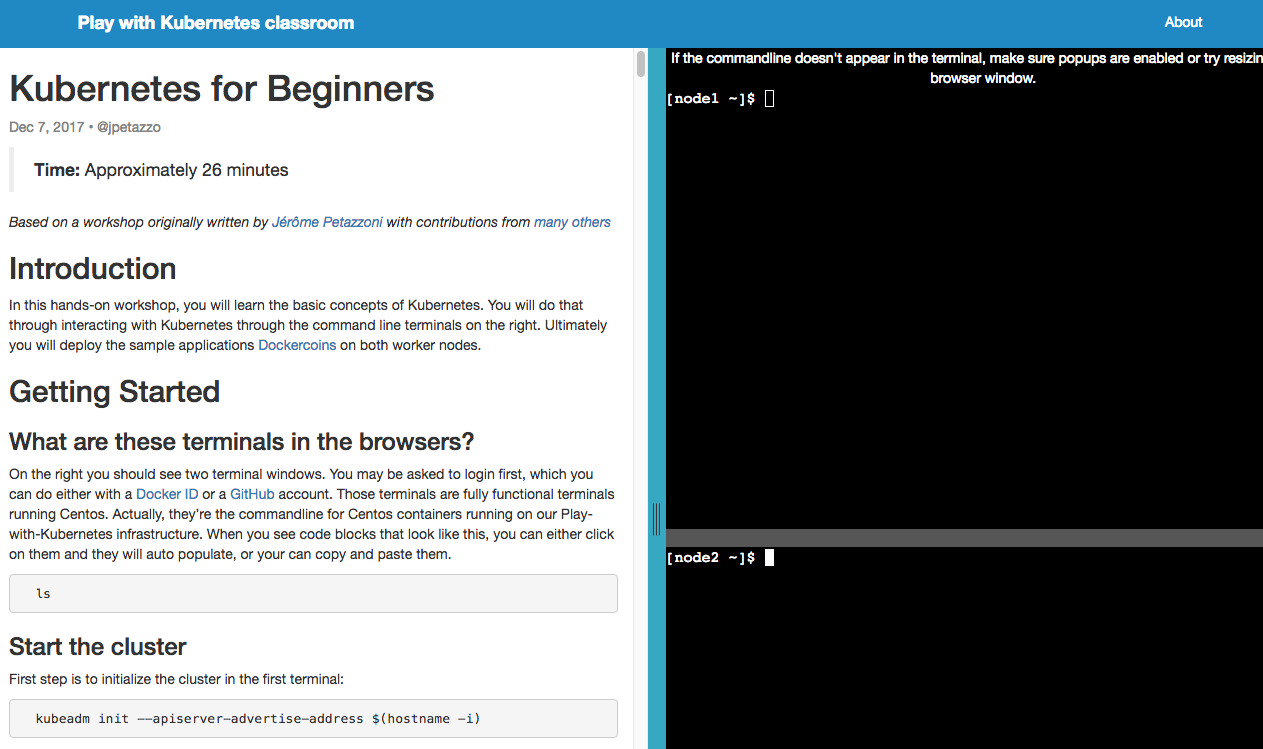
Every month for the last year, thousands of people have used Play with Docker and the accompanying hands-on Play with Docker Classroom training site. These sites allow you to use and learn Docker entirely within your own browser, without installing anything. Last summer, we quietly launched the companion site Play with Kubernetes, to give people a full command line while learning Kubernetes on the command line. And today we’re launching a new Kubernetes training site, the Play with Kubernetes Classroom.
The Play with Kubernetes Classroom is a workshop environment just like the Play with Docker Classroom. We currently have an extensive Kubernetes workshop originally based on Jérôme Petazzoni’s Container Training Kubernetes workshop. But instead of doing it all locally or setting up VMs in the cloud, you can now run through the workshop entirely in the browser.

Like the Play with Docker Classroom, we’ll be curating contributions of additional labs from the community. So give Kubernetes in your browser a try, and then come on over to the Play with Kubernetes repository to share your own tutorials with the community.

Check out the Play with Kubernetes Classroom
Try Kubernetes in Docker Enterprise Edition

Try Kubernetes in the browser with https://training.play-with-kubernetes.comClick To Tweet

The post Top 5 Blog Post of 2018: Play with Kubernetes appeared first on Docker Blog.
Quelle: https://blog.docker.com/feed/

Top 5 Blog Post of 2018: Docker Enterprise 2.0 with Kubernetes

Day 2 of our top blog posts of 2018 and coming in at Number 4 is the launch of Docker Enterprise 2.0 (formerly Docker Enterprise Edition). Docker’s industry-leading container platform is the only platform that simplifies Kubernetes and manages and secures applications on Kubernetes in multi-Linux, multi-OS and multi-cloud customer environments. To learn more about our Docker Enterprise, read on…
 
 
We are excited to announce Docker Enterprise Edition 2.0 – a significant leap forward in our enterprise-ready container platform. Docker Enterprise Edition (EE) 2.0 is the only platform that manages and secures applications on Kubernetes in multi-Linux, multi-OS and multi-cloud customer environments. As a complete platform that integrates and scales with your organization, Docker EE 2.0 gives you the most flexibility and choice over the types of applications supported, orchestrators used, and where it’s deployed. It also enables organizations to operationalize Kubernetes more rapidly with streamlined workflows and helps you deliver safer applications through integrated security solutions. In this blog post, we’ll walk through some of the key new capabilities of Docker EE 2.0.
Eliminate Your Fear of Lock-in
As containerization becomes core to your IT strategy, the importance of having a platform that supports choice becomes even more important. Being able to address a broad set of applications across multiple lines of business, built on different technology stacks and deployed to different infrastructures means that you have the flexibility needed to make changes as business requirements evolve. In Docker EE 2.0 we are expanding our customers’ choices in a few ways:

Multi-Linux, Multi-OS, Multi-Cloud – Most enterprise organizations have a hybrid or multi-cloud strategy and a mix of Windows and Linux in their environment. Docker EE is the only solution that is certified across multiple Linux distributions, Windows Server, and multiple public clouds, enabling you to support the broadest set of applications to be containerized and freedom to deploy it wherever you need.
Choice of Swarm or Kubernetes – Both orchestrators operate interchangeably in the same cluster meaning IT can build an environment that allows developers to choose how they want to have applications deployed at runtime. Teams can deploy applications to Swarm today and migrate these same applications to Kubernetes using the same Compose file. Applications deployed by either orchestrator can be managed through the same control plane, allowing you to scale more efficiently.

Docker EE Dashboard with containers deployed with both Swarm and Kubernetes
Deploying to Kubernetes via the admin UI
Manage via native Kubernetes CLI commands
Gain Operational Agility
Docker is well-known for democratizing containers for developers everywhere. In a similar manner, Docker Enterprise Edition is focused on making the management of a container environment very intuitive and easy for infrastructure and operations teams. This focus on the operational experience carries over to managing Kubernetes. With Docker EE 2.0, you get simplified workflows for the day-to-day management of a Kubernetes environment while still having access to native Kubernetes APIs, CLIs, and interfaces.

Simplified cluster management tasks -Docker EE 2.0 delivers easy-to-use workflows for the basic configuration and management of a container environment, including:

Single line commands to add new nodes to a cluster
One-click high availability of the management plane
Easy access to consoles and logs
Secure default configurations


Secure application zones – One way that Docker helps you scale is with efficient  multi-tenancy that doesn’t require building new clusters. By integrating with your corporate LDAP and Active Directory systems and setting resource access policies, you can get both logical and physical separation for different teams within the same cluster. For a Kubernetes deployment, this is a simple way to align Namespaces and nodes.

Enhanced Layer 7 Routing for Swarm – This release of Docker EE 2.0 also includes new enhancements for Layer 7 routing and load balancing. Based on the new Interlock 2.0 architecture which provides a highly scalable and highly available routing solution for Swarm, you can learn more about these enhancements here.
Kubernetes conformance – The streamlined operational workflows for managing Kubernetes are abstractions that run atop a full-featured and CNCF-conformant Kubernetes stack.  All core Kubernetes components and their native APIs, CLIs and interfaces are available to advanced users seeking to fine tune and troubleshoot the orchestrator.

Build a Secure, Global Supply Chain
Containers provide improved security through greater isolation and smaller attack surfaces, but delivering safer applications also requires looking at how these applications were created. Organizations need to know where the applications came from, who has had access to them, if they contain known vulnerabilities and if it’s approved for production. Docker EE 2.0 is the only solution that delivers a policy-based secure supply chain that is designed to give you governance and oversight over the entire container lifecycle without slowing you down.

Secure supply chain for Swarm and Kubernetes – With Docker EE 2.0, you can set policies around image promotions to automate the process of moving an application through test, QA, staging, and production. For example, you can set a policy around image vulnerability scanning results that only promotes clean images to production repositories. Additionally with Docker EE 2.0, administrators can enforce rules around which applications are allowed to be deployed. Only images that have been signed off by the right tools or teams will be allowed to run in production. These are automated processes that enforce governance without adding any manual bottlenecks to the delivery process. Learn more about these capabilities in Part 1 and Part 2 of this blog series.

Secure supply chain for globally distributed organizations – Many Docker EE customers are multinational corporations with offices and data centers located around the world. With Docker EE 2.0 we are introducing a number of features that allow these global organizations to maintain a secure and globally-consistent supply chain.

Centralized Image Repository – Some organizations want to maintain one source of truth for all applications. They want a centralized private image repository for their global organizations. With Docker EE 2.0, you can connect multiple EE clusters to a single, common private registry with a common set of security policies built in.
Remote Office Access – Many organizations have development teams that are not in the same location as the registry. To ensure that these developers can quickly download images from their location, Docker EE 2.0 includes an Image Caching capability to create local caches of the repository content. Caching extends the secure access controls and digital signatures to these remote offices to ensure no breaks in the supply chain.
Multi-site Availability and Consistency – Alternatively, some organizations wish to have separate registries for different office locations – possibly one for North America, one for Europe, one for Asia. But they also want to make sure that they are using common images. With the new Image Mirroring capability, organizations can set policies that “push” and “pull” images from one registry to another. This also means that if a certain region goes down, copies of the same images are available in the other registries.

How to Get Started
Docker EE 2.0 is a major milestone for enterprise container platforms. Designed to give you the broadest choice around orchestrators, application types, operating systems, and clouds and supporting the requirements of global organizations, Docker EE 2.0 is the most advanced enterprise-ready container platform in the market and it’s available to you today!
To learn more about this release:

Register for our upcoming Virtual Event featuring Docker Chief Product Officer, Scott Johnston, and Sr. Director of Product Management, Banjot Chanana, to hear more about how our enterprise customers are leveraging Docker EE, see demos of EE 2.0 and learn how Docker can help you on your containerization journey.
Try it for yourself in our free, hosted trial. Explore the advanced capabilities described in this blog in just 30 minutes.
Read more about Docker Enterprise Edition 2.0 or access the documentation.
Register for DockerCon 2018 in San Francisco (June 12-15) to hear from Docker experts and customers about their containerization journey.

Announcing #Docker Enterprise Edition 2.0 – the most advanced enterprise-ready container platform!Click To Tweet

The post Top 5 Blog Post of 2018: Docker Enterprise 2.0 with Kubernetes appeared first on Docker Blog.
Quelle: https://blog.docker.com/feed/

Top 5 Post: Improved Docker Container Integration with Java 10

As 2018 comes to a close, we looked back at the top five blogs that were most popular with our readers. For those of you that had difficulties with memory and CPU sizing/usage when running Java Virtual Machine (JVM) in a container, we are kicking off the week with a blog that explains how to get improved Docker container integration with Java 10 in Docker Desktop ( Mac or Windows) and Docker Enterprise environments.

Many applications that run in a Java Virtual Machine (JVM), including data services such as Apache Spark and Kafka and traditional enterprise applications, are run in containers. Until recently, running the JVM in a container presented problems with memory and cpu sizing and usage that led to performance loss. This was because Java didn’t recognize that it was running in a container. With the release of Java 10, the JVM now recognizes constraints set by container control groups (cgroups). Both memory and cpu constraints can be used manage Java applications directly in containers, these include:

adhering to memory limits set in the container
setting available cpus in the container
setting cpu constraints in the container

Java 10 improvements are realized in both Docker Desktop ( Mac or Windows) and Docker Enterprise environments.
Container Memory Limits
Until Java 9 the JVM did not recognize memory or cpu limits set by the container using flags. In Java 10, memory limits are automatically recognized and enforced.
Java defines a server class machine as having 2 CPUs and 2GB of memory and the default heap size is ¼ of the physical memory. For example, a Docker Enterprise Edition installation has 2GB of memory and 4 CPUs. Compare the difference between containers running Java 8 and Java 10. First, Java 8:
docker container run -it -m512 –entrypoint bash openjdk:latest

$ docker-java-home/bin/java -XX:+PrintFlagsFinal -version | grep MaxHeapSize
uintx MaxHeapSize := 524288000 {product}
openjdk version “1.8.0_162″

The max heap size is 512M or ¼ of the 2GB set by the Docker EE installation instead of the limit set on the container to 512M. In comparison, running the same commands on Java 10 shows that the memory limit set in the container is fairly close to the expected 128M:
docker container run -it -m512M –entrypoint bash openjdk:10-jdk

$ docker-java-home/bin/java -XX:+PrintFlagsFinal -version | grep MaxHeapSize
size_t MaxHeapSize = 134217728 {product} {ergonomic}
openjdk version “10” 2018-03-20

Setting Available CPUs
By default, each container’s access to the host machine’s CPU cycles is unlimited. Various constraints can be set to limit a given container’s access to the host machine’s CPU cycles. Java 10 recognizes these limits:
docker container run -it –cpus 2 openjdk:10-jdk
jshell> Runtime.getRuntime().availableProcessors()
$1 ==> 2

All CPUs allocated to Docker EE get the same proportion of CPU cycles. The proportion can be modified by changing the container’s CPU share weighting relative to the weighting of all other running containers. The  proportion will only apply when CPU-intensive processes are running. When tasks in one container are idle, other containers can use the leftover CPU time. The actual amount of CPU time will vary depending on the number of containers running on the system. These can be set in Java 10:
docker container run -it –cpu-shares 2048 openjdk:10-jdk
jshell> Runtime.getRuntime().availableProcessors()
$1 ==> 2

The cpuset constraint sets which CPUs allow execution in Java 10.
docker run -it –cpuset-cpus=”1,2,3″ openjdk:10-jdk
jshell> Runtime.getRuntime().availableProcessors()
$1 ==> 3

Allocating memory and CPU
With Java 10, container settings can be used to estimate the allocation of memory and CPUs needed to deploy an application. Let’s assume that the memory heap and CPU requirements for each process running in a container has already been determined and JAVA_OPTS set. For example, if you have an application distributed across 10 nodes; five nodes require 512Mb of memory with 1024 CPU-shares each and another five nodes require 256Mb with 512 CPU-shares each. Note that 1 CPU share proportion is represented by 1024.
For memory, the application would need 5Gb allocated at minimum.
512Mb x 5 = 2.56 Gb
256Mb x 5 = 1.28 Gb
The application would require 8 CPUs to run efficiently.
1024 x 5 = 5 CPUs
512 x 5 = 3 CPUs
Best practice suggests profiling the application to determine the memory and CPU allocations for each process running in the JVM. However, Java 10 removes the guesswork when sizing containers to prevent out of memory errors in Java applications as well allocating sufficient CPU to process work loads.

Improved Docker Container Integration with @Java 10Click To Tweet

To learn more about Docker solutions for Java Developers:

Follow the Docker for Java Developer blog and videos series
Start a hosted trial
Sign up for upcoming webinars

The post Top 5 Post: Improved Docker Container Integration with Java 10 appeared first on Docker Blog.
Quelle: https://blog.docker.com/feed/

Docker Certified Containers From IBM

The Docker Certified Technology Program is designed for ecosystem partners and customers to recognize containers and plugins that excel in quality, collaborative support and compliance. Docker Certification gives enterprises an easy way to run trusted software and components in containers on Docker Enterprise with support from both Docker and the publisher.  
As cloud computing continues to transform every business and industry, developers at global enterprises and emerging startups alike are increasingly leveraging container technologies to accelerate how they build modern web, mobile and IoT applications.  
IBM has achieved certification of its flagship Db2 database, Websphere-Liberty middleware server and Security Access Manager products now available on Docker Hub. These Certified Containers enable developers to accelerate building cloud-native applications for the Docker Enterprise platform.  Developers can deploy these solutions from IBM to any on-premises infrastructure or public cloud.  They are designed to assist in the modernization of traditional applications moving from on-premises monoliths into hybrid cloud microservices.
These solutions are validated by both Docker and IBM and are integrated into a seamless support pipeline that provides customers the world-class support they have become accustomed to when working with Docker and IBM.
Check out the latest certified technology available from IBM on Docker Hub:

IBM Security Access Manager
IBM WebSphere Application Server Liberty
IBM Db2 Developer-C Edition  

Learn More:

Learn more about Docker Enterprise and get a free trial today
Check out a Docker event near you
Contact us with any questions
Apply as a Partner


Now Available: #Docker Certified Containers from @IBM. Learn more here: Click To Tweet

 
The post Docker Certified Containers From IBM appeared first on Docker Blog.
Quelle: https://blog.docker.com/feed/

Speak at DockerCon San Francisco 2019 – Call for Papers is Open

 
Whether you missed DockerCon EU in Barcelona, or you already miss the fun, connections and learning you experienced at DockerCon – you won’t have to wait long for the next one. DockerCon returns to San Francisco on April 29 and extends through May 2, 2019 and the Call for Papers is now open. We are accepting talk submissions through January 18th at 11:59 PST.  
Submit a Talk

Attending DockerCon is an awesome experience, but so is speaking at DockerCon – it’s a great way to get to know the community, share ideas and collaborate. Don’t be nervous about proposing your idea – no topic is too small or too big. And for some speakers, DockerCon is their first time speaking publicly. Don’t be intimidated, DockerCon attendees are all looking to level up their skills, connect with fellow container fans and go home inspired to implement new containerization initiatives. Here are some suggested topics from the conference committee:

“How To” type sessions for developers or IT teams
Case Studies
Technical deep dives into container and distributed systems related components
Cool New Apps built with Docker containers
The craziest thing you have containerized
Wild Card – anything and everything!
The impact of change – both for organizations and ourselves as individuals and communities.
Inspirational stories

Note that our attendees expect practical guidance so vendor sales pitches will not be accepted.
Accepted speakers receive a complimentary conference pass, speakers gift and participate in a networking reception. Additionally, they receive help preparing their session, access to an online recording of their talk and the opportunity to share their experience with the broader Docker community.
 

Want to speak at #DockerCon SF 2019? The call for papers is now open. Submit a talk today:Click To Tweet

The post Speak at DockerCon San Francisco 2019 – Call for Papers is Open appeared first on Docker Blog.
Quelle: https://blog.docker.com/feed/
Desigual Transforms the In-Store Customer Experience with Docker Enterprise

Desigual Transforms the In-Store Customer Experience with Docker Enterprise

 
At DockerCon Barcelona, we awarded Desigual with the first ever Rising Star Docker Customer Innovation Award. The Desigual team earned the award by building a brand new in-store shopping assistant application in just 5 months thanks to Docker Enterprise. The digital shopping assistant is already deployed at over 100 stores, and is being rolled out to all of Desigual’s 500-plus clothing stores worldwide in the coming months.
In this 2 minute video, Desigual gives the highlights of their story:

The Desigual team analyzed existing sales data and found that of lost in-store sales, 60 percent were because a particular size was out of stock, and 40 percent were because a product wasn’t available in the catalog.
They wanted to create a customer-first shopping experience that would stand out among retail clothing brands and help store associates recommend alternatives to customers. To do that, they needed to tie multiple elements together: Store point-of-sale (POS), the online catalog, mobile capability, and personal attention through the shopper profile.
Mathias Kriegel, IT Ops Lead and Cloud Architect, and Joan Anton Sances, Software Architect, discussed the project and why they selected Docker Enterprise in their presentation at DockerCon Barcelona 2018.
They selected Docker Enterprise because it gives them enterprise-grade support and has let them create a secure and reliable software pipeline. It also met their need for Swarm and Kubernetes support, along with multi-platform support since the application has both .NET and Java components.
Desigual has shifted software development to a DevOps mentality and can now roll out updates or new software much faster and more reliably, even with a sophisticated technology stack that includes TIBCO enterprise software, Java, .NET and Android mobile components.
While all of Docker’s customers are starting to change how their software development and deployment process works, Desigual’s innovative thinking and customer focus stands out. Congratulations to the Desigual team for winning our 2018 Rising Star Customer Innovation Award!
Check this out:

Watch a 2 minute video on how Desigual uses Docker Enterprise
Learn more about Docker Enterprise

Discover how @desigual transforms their in-store customer experience with #Docker Enterprise. @mathkrieg @jantonsgClick To Tweet

 
The post Desigual Transforms the In-Store Customer Experience with Docker Enterprise appeared first on Docker Blog.
Quelle: https://blog.docker.com/feed/