From Hallucinations to Prompt Injection: Securing AI Workflows at Runtime

How developers are embedding runtime security to safely build with AI agents

Introduction: When AI Workflows Become Attack Surfaces

The AI tools we use today are powerful, but also unpredictable and exploitable.

You prompt an LLM and it generates a Dockerfile. It looks correct. A shell script? Reasonable. You run it in dev. Then something breaks: a volume is deleted. A credential leaks into a log. An outbound request hits a production API. Nothing in your CI pipeline flagged it, because the risk only became real at runtime.

This is the new reality of AI-native development: fast-moving code, uncertain behavior, and an expanding attack surface.

Hallucinations in LLM output are only part of the story. As developers build increasingly autonomous agentic tools, they’re also exposed to prompt injection, jailbreaks, and deliberate misuse of model outputs by adversaries. A malicious user, through a cleverly crafted input, can hijack an AI agent and cause it to modify files, exfiltrate secrets, or run unauthorized commands.

In one recent case, a developer ran an LLM-generated script that silently deleted a production database, an issue that went undetected until customer data was already lost. In another, an internal AI assistant was prompted to upload sensitive internal documents to an external file-sharing site, triggered entirely through user input.

These failures weren’t caught in static analysis, code review, or CI. They surfaced only when the code ran.

In this post, we’ll explore how developers are addressing both accidental failures and intentional threats by shifting runtime security into the development loop, embedding observability, policy enforcement, and threat detection directly into their workflows using Docker.

The Hidden Risks of AI-Generated Code

LLMs and AI agents are great at generating text, but they don’t always know what they’re doing. Whether you’re using GitHub Copilot, LangChain, or building with OpenAI APIs, your generated outputs might include:

Shell scripts that escalate privileges or misconfigure file systems

Dockerfiles that expose unnecessary ports or install outdated packages

Infra-as-code templates that connect to production services by default

Hardcoded credentials or tokens hidden deep in the output

Command sequences that behave differently depending on the context

The problem is compounded when teams start running autonomous agents, AI tools designed to take actions, not just suggest code. These agents can:

Execute file writes and deletions

Make outbound API calls

Spin up or destroy containers

Alter configuration state mid-execution

Execute dangerous database queries

These risks only surface at runtime, after your build has passed and your pipeline has shipped. And that’s a problem developers are increasingly solving inside the dev loop.

Why Runtime Security Belongs in the Developer Workflow

Traditional security tooling focuses on build-time checks, SAST, SCA, linters, compliance scanners. These are essential, but they don’t protect you from what AI-generated agents do at execution time.

Developers need runtime security that fits their workflow, not a blocker added later.

What runtime security enables:

Live detection of dangerous system calls or file access

Policy enforcement when an agent attempts unauthorized actions

Observability into AI-generated code behavior in real environments

Isolation of high-risk executions in containerized sandboxes

Why it matters:

Faster feedback loops: See issues before your CI/CD fails

Reduced incident risk: Catch privilege escalation, data exposure, or network calls early

Higher confidence: Ship LLM-generated code without guesswork

Secure experimentation: Enable safe iteration without slowing down teams

Developer ROI: Catching a misconfigured agent in dev avoids hours of triage and mitigates production risk and reputation risk; saving time, cost, and compliance exposure.

Building Safer AI Workflows with Docker

Docker provides the building blocks to develop, test, and secure modern agentic applications:

Docker Desktop gives you an isolated, local runtime for testing unsafe code

Docker Hardened Images. Secure, minimal, production-ready images

Docker Scout scans container images for vulnerabilities and misconfigurations

Runtime policy enforcement (with upcoming MCP Defender integration) provides live detection and guardrails while code executes

Step-by-Step: Safely Test AI-Generated Scripts

1. Run your agent or script in a hardened container

docker run –rm -it
–security-opt seccomp=default.json
–cap-drop=ALL
-v $(pwd):/workspace
python:3.11-slim

Applies syscall restrictions and drops unnecessary capabilities

Runs with no persistent volume changes

Enables safe, repeatable testing of LLM output

2. Scan the container with Docker Scout

docker scout cves my-agent:latest

Surfaces known CVEs and outdated dependencies

Detects unsafe base images or misconfigured package installs

Available both locally and inside CI/CD workflows

3. Add runtime policy (beta) to block unsafe behavior

scout policy add deny-external-network
–rule "deny outbound to *"

This would catch an AI agent that unknowingly makes an outbound request to an internal system, third-party API, or external data store.

Note: Runtime policy enforcement in Docker Scout is currently in development. CLI and behavior may change upon release.

Best Practices for Securing AI Agent Containers

Practice

Why it matters

Use slim, verified base images

Minimizes attack surface and dependency drift

Avoid downloading from unverified sources

Prevents LLMs from introducing shadow dependencies

Use .dockerignore and secrets management

Keeps secrets out of containers

Run containers with dropped capabilities

Limits impact of unexpected commands

Apply runtime seccomp profiles

Enforces syscall-level sandboxing

Log agent behavior for analysis

Builds observability into experimentation

Integrating Into Your Cloud-Native Workflow

Runtime security for AI tools isn’t just for local testing, it fits cleanly into cloud-native and CI/CD workflows too.

GitHub Actions Integration Example:

jobs:
security-scan:
runs-on: ubuntu-latest
steps:
– uses: actions/checkout@v3
– name: Build container
run: docker build -t my-agent:latest .
– name: Scan for CVEs
run: docker scout cves my-agent:latest

Works across environments:

Local dev via Docker Desktop

Remote CI/CD via GitHub Actions, GitLab, Jenkins

Kubernetes staging environments with policy enforcement and agent isolation

Cloud Development Environments (CDEs) with Docker + secure agent sandboxes

Dev teams using ephemeral workspaces and Docker containers in cloud IDEs or CDEs can now enforce the same policies across local and cloud environments.

Real-World Example: AI-Generated Infra Gone Wrong

A platform team uses an LLM agent to auto-generate Kubernetes deployment templates. A developer reviews the YAML and merges it. The agent-generated config opens an internal-only service to the internet via LoadBalancer. The CI pipeline passes. The deploy works. But a customer database is now exposed.

Had the developer run this template inside a containerized sandbox with outbound policy rules, the attempt to expose the service would have triggered an alert, and the policy would have prevented escalation.

Lesson: You can’t rely on static review alone. You need to see what AI-generated code does, not just what it looks like.

Why This Matters: Secure-by-Default for AI-Native Dev Teams

As LLM-powered tools evolve from suggestion to action, runtime safety becomes a baseline requirement, not an optional add-on.

The future of secure AI development starts in the inner loop, with runtime policies, observability, and smart defaults that don’t slow you down.

Docker’s platform gives you:

Developer-first workflows with built-in security

Runtime enforcement to catch AI mistakes early

Toolchain integration across build, test, deploy

Cloud-native flexibility across local dev, CI/CD, and CDEs

Whether you’re building AI-powered automations, agent-based platforms, or tools that generate infrastructure, you need a runtime layer that sees what AI can’t, and blocks what it shouldn’t do.

What’s Next

Runtime protection is moving left, into your dev environment. With Docker, developers can:

Run LLM-generated code in secure, ephemeral containers

Observe runtime behavior before pushing to CI

Enforce policies that prevent high-risk actions

Reduce the risk of silent security failures in AI-powered apps

Docker is working to bring MCP Defender into our platform to provide this protection out-of-the-box, so hallucinations don’t turn into incidents.

Ready to Secure Your AI Workflow?

Sign up for early access to Docker’s runtime security capabilities

Watch our Tech Talk on “Building Safe AI Agents with Docker”

Explore Docker Scout for real-time vulnerability insights

Join the community conversation on Docker Community Slack or GitHub Discussions

Let’s build fast, and safely.

Quelle: https://blog.docker.com/feed/
Docker Acquisition of MCP Defender Helps Meet Challenges of Securing the Agentic Future

Docker, Inc.®, a provider of cloud-native and AI-native development tools, infrastructure, and services, today announced the acquisition of MCP Defender, a company founded to secure AI applications.

The rapid evolution of AI-from simple generative models to powerful agentic tools-has transformed software development in extraordinary ways. But as with all powerful technologies, new capabilities bring new security challenges. We recently highlighted critical MCP security issues on the Docker blog, emphasizing how essential it is to secure our emerging AI infrastructure. Building on that discussion, we want to offer our perspective on the current state of AI security, outline its trajectory, consider what this means for organizations developing AI agents and tools, and explore Docker’s vision for securely empowering these new AI workloads.

Today’s AI security landscape mirrors the early days of container adoption: rapid innovation, widespread enthusiasm, but significant uncertainty around risks. AI agents now routinely execute critical tasks – from automated code generation and system administration to customer interaction – often interfacing directly with sensitive data and critical infrastructure. The security stakes have never been higher.

Looking ahead, securing AI infrastructure will require a significant shift towards runtime monitoring, real-time threat detection, and continuous security evaluation. Organizations will increasingly adopt tools designed specifically to detect and respond dynamically to threats occurring at runtime. Instead of relying solely on preventative measures, security strategies will embrace active monitoring and intelligent automation.

For companies developing AI agents and MCP tools, these security shifts are profound. Security can no longer be a late-stage consideration-it must be embedded from the earliest design phase. These solutions must transparently enforce policies, providing clear guardrails that reduce the cognitive load on development teams. Security for AI agents should be frictionless – built seamlessly into the workflows developers already use every day.

Docker’s mission has always been to simplify application development while ensuring security and portability. Extending that mission to agentic AI means integrating security deeply into the infrastructure itself. Docker’s vision is clear: secure-by-default AI infrastructure where every interaction is automatically verified, every threat proactively detected, and every policy transparently enforced. Docker’s commitment to security extends beyond AI, with products such as Docker Scout and Docker Hardened Images.

Quelle: https://blog.docker.com/feed/
Hybrid AI Isn’t the Future — It’s Here (and It Runs in Docker)

Running large AI models in the cloud gives access to immense capabilities, but it doesn’t come for free. The bigger the models, the bigger the bills, and with them, the risk of unexpected costs.

Local models flip the equation. They safeguard privacy and keep costs predictable, but their smaller size often limits what you can achieve. 

For many GenAI applications, like analyzing long documents or running workflows that need a large context, developers face a tradeoff between quality and cost. But there might be a smarter way forward: a hybrid approach that combines the strengths of remote intelligence with local efficiency. 

This idea is well illustrated by the Minions protocol, which coordinates lightweight local “minions” with a stronger remote model to achieve both cost reduction and accuracy preservation. By letting local agents handle routine tasks while deferring complex reasoning to a central intelligence, Minions demonstrates how organizations can cut costs without sacrificing quality.

With Docker and Docker Compose, the setup becomes simple, portable, and secure. 

In this post, we’ll show how to use Docker Compose, Model Runner, and the MinionS protocol to deploy hybrid models and break down the results and trade-offs.  

What’s Hybrid AI

Hybrid AI combines the strengths of powerful cloud models with efficient local models, creating a balance between performance, cost, and privacy. Instead of choosing between quality and affordability, Hybrid AI workflows let developers get the best of both worlds.

Next, let’s see an example of how this can be implemented in practice.

The Hybrid Model: Supervisors and Minions

Think of it as a teamwork model:

Remote Model (Supervisor): Smarter, more capable, but expensive. It doesn’t do all the heavy lifting, it directs the workflow.

Local Models (Minions): Lightweight and inexpensive. They handle the bulk of the work in parallel, following the supervisor’s instructions.

Here’s how it plays out in practice in our new Dockerized Minions integration:

Spin up the Minions application server with docker compose up

A request is sent to the remote model. Instead of processing all the data directly, it generates executable code that defines how to split the task into smaller jobs.

Execute that orchestration code inside the Minions application server, which runs in a Docker container and provides sandboxed isolation.

Local models run those subtasks, analyzing chunks of a large document, summarizing sections, or performing classification in parallel.

The results are sent back to the remote model, which aggregates them into a coherent answer.

The remote model acts like a supervisor, while the local models are the team members doing the work. The result is a division of labor that’s efficient, scalable, and cost-effective.

Why Hybrid?

Cost Reduction: Local models handle most of the tokens and context, thereby reducing cloud model usage.

Scalability: By splitting large jobs into smaller ones, workloads scale horizontally across local models.

Security: The application server runs in a Docker container, and orchestration code is executed there in a sandboxed environment.

Quality: Hybrid protocols pair the cost savings of local execution with the coherence and higher-level reasoning of remote models, delivering better results than local-only setups.

Developer Simplicity: Docker Compose ties everything together into a single configuration file, with no messy environment setup.

Research Benchmarks: Validating the Hybrid Approach

The ideas behind this hybrid architecture aren’t just theoretical, they’re backed by research. In this recent research paper Minions: Cost-efficient Collaboration Between On-device and Cloud Language Models, the authors evaluated different ways of combining smaller local models with larger remote models.

The results demonstrate the value of the hybrid design where a local and remote model collaborate on a task:

Minion Protocol: A local model interacts directly with the remote model, which reduces cloud usage significantly. This setup achieves a 30.4× reduction in remote inference costs, while maintaining about 87% of the performance of relying solely on the remote model.

MinionS Protocol: A local model executes parallel subtasks defined by code generated by the remote model. This structured decomposition achieves a 5.7× cost reduction while preserving ~97.9% of the remote model’s performance.

This is an important validation: hybrid AI architectures can deliver nearly the same quality as high-end proprietary APIs, but at a fraction of the cost.

For developers, this means you don’t need to choose between quality and cost, you can have both. Using Docker Compose as the orchestration layer, the hybrid MinionS protocol becomes straightforward to implement in a real-world developer workflow.

Compose-Driven Developer Experience

What makes this approach especially attractive for developers is how little configuration it actually requires. 

With Docker Compose, setting up a local AI model doesn’t involve wrestling with dependencies, library versions, or GPU quirks. Instead, the model can be declared as a service in a few simple lines of YAML, making the setup both transparent and reproducible.

models:

  worker:

    model: ai/llama3.2

    context_size: 10000

This short block is all it takes to bring up a worker running a local Llama 3.2 model with a 10k context window. Under the hood, Docker ensures that this configuration is portable across environments, so every developer runs the same setup, without ever needing to install or manage the model manually. 

Please note that, depending on the environment you are running in, Docker Model Runner might run as a host process (Docker Desktop) instead of in a container (Docker CE) to ensure optimal inference performance.

Beyond convenience, containerization adds something essential: security. 

In a hybrid system like this, the remote model generates code to orchestrate local execution. By running that code inside a Docker container, it’s safely sandboxed from the host machine. This makes it possible to take full advantage of dynamic orchestration without opening up security risks.

The result is a workflow that feels effortless: declare the model in Compose, start it with a single command, and trust that Docker takes care of both reproducibility and isolation. Hybrid AI becomes not just powerful and cost-efficient, but also safe and developer-friendly.

You can find a complete example ready to use here. In practice, using ai/qwen3 as a local model can cut cloud usage significantly. For a typical workload, only ~15,000 remote tokens are needed, about half the amount required if everything ran on the remote model. 

This reduction comes with a tradeoff: because tasks are split, orchestrated, and processed locally before aggregation, responses may take longer to generate (up to ~10× slower). For many scenarios, the savings in cost and control over data can outweigh the added latency.

Conclusion

Hybrid AI is no longer just an interesting idea, it is a practical path forward for developers who want the power of advanced models while keeping costs low. 

The research behind Minions shows that this approach can preserve nearly all the quality of large remote models while reducing cloud usage dramatically. Docker, in turn, makes the architecture simple to run, easy to reproduce, and secure by design.

By combining remote intelligence with local efficiency, and wrapping it all in a developer-friendly Compose setup, we can better control the tradeoff between capability and cost. What emerges is an AI workflow that is smarter, more sustainable, and accessible to any developer, not just those with deep infrastructure expertise.

This shows a realistic direction for GenAI: not always chasing bigger models, but finding smarter, safer, and more efficient ways to use them. By combining Docker and MinionS, developers already have the tools to experiment with this hybrid approach and start building cost-effective, reproducible AI workflows today. Try it yourself today by visiting the project GitHub repo! 

Learn more 

Read our quickstart guide to Docker Model Runner.

Visit our Model Runner GitHub repo! Docker Model Runner is open-source, and we welcome collaboration and contributions from the community!

Discover other AI solutions from Docker 

Learn how Compose makes building AI apps and agents easier

Quelle: https://blog.docker.com/feed/
You are Doing MCP Wrong: 3 Big Misconceptions

MCP is not an API. Tools are not agents. MCP is more than tools. Here’s what this means in practice.

Most developers misread the Model Context Protocol because they map it onto familiar API mental models. That mistake breaks agent designs, observability, and the “last mile” where non-deterministic reasoning must meet deterministic execution. This piece corrects three common misconceptions and offers concrete patterns that actually work.

1) Misconception #1: “MCP is just another API”

Claim people make: Treat an MCP call like calling REST or gRPC.Reality: MCP is a model-facing protocol designed for LLM tool use, intent mediation, and context exchange. It does not replace RPC. It often uses APIs and RPC under the hood, but its purpose is to make those safely and effectively usable by non-deterministic agents.

Why the confusion happens

Teams default to API thinking because it is familiar and testable.

Most demos show “call tool, get result,” which looks like HTTP.

What MCP actually gives you

Tool interfaces for models that carry intent and affordances, not just endpoints.

Context surfaces beyond request/response: prompts, elicitations, and resources that shape model behavior.

A seam between non-deterministic planning and deterministic execution so the last mile can be reliable.

Design patterns that work

API behind MCP: Keep your stable business APIs. Wrap them with MCP tool definitions that express preconditions, success criteria, and affordances the model can reason about.

Deterministic “last mile”: Treat tool execution as deterministic and idempotent where possible. Validate inputs derived from model planning. Fail closed.

Anti-patterns to avoid

Treating MCP tools as business APIs with complex state changes and no guardrails.

Expecting strict schema obedience without model-aware validation and retries.

Mini-checklist

Define tool preconditions and postconditions.

Return machine-checkable outcomes the agent can evaluate.

Log plan → tool → result so you can replay and audit.

2) Misconception #2: “Tools are agents”

Claim people make: A tool with input and output is an agent.Reality: Tools execute. Agents plan, re-plan, and evaluate. Agents loop until goals are satisfied. Tools do not.

Why the confusion happens

Unix mental model: “compose tools and you get intelligence.”

Modern LLM demos blur the line when a single call seems to “do everything.”

What separates agents from tools

Agency: goal tracking, re-planning, and error recovery.

Evaluation: fitness functions and success criteria, not just status codes.

Memory and context: prompts and resources evolve across steps.

Design patterns that work

Control loop outside the tool: Keep the agent loop responsible for deciding which tool to run next and why.

Explicit success metrics: Give the agent measurable checks to know if it should stop, retry, or escalate to a human.

Human elicitation via MCP: When confidence is low or ambiguity is high, use MCP prompts to ask the user for disambiguation.

Anti-patterns to avoid

Cramming planning into a single tool invocation.

Measuring “agent performance” only with tool latency.

Mini-checklist

Write the agent’s goal, constraints, and stop conditions.

Add retries with backoff and tool-specific error handling.

Capture traces for each loop iteration.

3) Misconception #3: “MCP is just tools”

Claim people make: MCP equals tool definitions with JSON in and out.Reality: MCP includes resources, prompts, and elicitations in addition to tools. These are first-class for context-rich work.

Why the confusion happens

Early adopters only wired tools and ignored the rest of the spec.

Many examples look like “natural language over an API.”

What you miss if you ignore the rest

Resources: structured artifacts the agent can read, write, and reference across steps.

Prompts: reusable, versioned instruction sets the system can attach, test, and audit.

Elicitations: structured human-in-the-loop requests when only a user can resolve ambiguity.

Design patterns that work

Resource adapters: Map knowledge bases, files, and tickets into MCP resources with permissions and lifecycle.

Prompt registries: Treat prompts like code. Version, test, and roll back.

Human checkpoints: Define when to elicit user input and how to resume the loop afterward.

Anti-patterns to avoid

Using MCP as a “voice layer” over existing services without resources or prompts.

Hard-coding long prompts inside the application rather than managing them via MCP.

Mini-checklist

Expose at least one resource type the agent can read and one it can write.

Register prompts with IDs and versions.

Define user elicitation flows for low-confidence branches.

Putting it together: The architecture seam that makes AI reliable

Non-deterministic layer: model planning, tool choice, re-planning, evaluation.

Deterministic layer: tool execution, input validation, idempotency, side-effect control.

MCP as the seam: tools, resources, prompts, and elicitations connect the two layers with observable traces and policies.

Observability and governance

Trace plan → prompt → tool → resource updates.

Version prompts and tool specs.

Enforce access, rate limits, and approvals at the MCP boundary.

Conclusion

If you keep thinking “API,” you will ship brittle, one-shot demos. Treat tools as deterministic executors, treat agents as planners and evaluators, and use all of MCP — tools, resources, prompts, and elicitations — as the seam where intelligent behavior meets reliable systems.

Implementation guide 

Inventory APIs and wrap them with MCP tools that declare pre/postconditions.

Define agent goals and fitness functions. Encode stop criteria.

Model resources the agent needs. Add read/write guards and retention.

Stand up a prompt registry with testing and rollback.

Add human elicitations for low-confidence paths.

Instrument traces and create replayable sessions for audits.

Run chaos drills where tools fail and confirm the agent recovers or escalates.

Common pitfalls and how to avoid them

Treating MCP like REST: Add success checks and evaluation, not just status codes.

One-shot agent calls: Build loops with retries and human checkpoints.

No resource model: The agent thrashes without durable context.

Prompt sprawl: Version prompts and run A/B tests.

Opaque operations: Without traces you cannot debug or trust outcomes.

Quelle: https://blog.docker.com/feed/

Broadcom’s New Bitnami Restrictions? Migrate Easily with Docker

For years, Bitnami has played a vital role in the open source and cloud-native community, making it easier for developers and operators to deploy popular applications with reliable, prebuilt container images and Helm charts. Countless teams have benefited from their work standardizing installation and updates for everything from WordPress to PostgreSQL. We want to acknowledge and thank Bitnami’s contributors for that important contribution.

Recently, however, Bitnami announced significant changes to how their images are distributed. Starting this month, access to most versioned images will move behind a paid subscription under Bitnami Secure Images (BSI), with only the :latest tags remaining free. Older images are being shifted into a Bitnami Legacy archive that will no longer receive updates. For many teams, this raises real challenges around cost, stability, and compliance.

Docker remains committed to being a trusted partner for developers and enterprises alike. Docker Official Images (DOI) are one of the two most widely used catalogs of open source container images in the world, and by far the most adopted. While Bitnami has been valuable to the community, Docker Official Images see billions of pulls every month and are trusted by developers, maintainers, and enterprises globally. This is the standard foundation teams already rely on.

For production environments that require added security and compliance, Docker Hardened Images (DHI) are a seamless drop-in replacement for DOI. They combine the familiarity and compatibility of DOI with enterprise-ready features: minimal builds, non-root by default, signed provenance, and near-zero-CVE baselines. Unlike Bitnami’s new paid model, DHI is designed to be affordable and transparent, giving organizations the confidence they need without unpredictable costs.

Bitnami’s Access Changes Are Already Underway

On July 16, Broadcom’s Bitnami team announced changes to their container image distribution model, effective September 29. Here’s what’s changing:

Freely built and available images and Helm charts are going away. The bitnami organization will be deleted.

New Bitnami Secure Images offering. Users that want to use Bitnami images will need to get a paid subscription to a new Binami Secure Images offering, hosted on the Bitnami registry. This provides access to stable tags, version history,

Free tier of Bitnami Secure Images. The bitnamisecure org has been created to provide a set of hardened, more secure images. Only the :latest tags will be available and the images are intended for development purposes only.

Unsupported legacy fallback. Older images are moved to a “Bitnami Legacy Registry”, available on Docker Hub in the bitnamilegacy org. These images are unsupported, will no longer receive updates or patches, and are intended to be used while making plans for alternatives.

Image and Helm chart source still available. While the built artifacts won’t be published, organizations will still be able to access the source code for Debian-based images and Helm charts. They can build and publish these on their own.

The timeline is tight too. Brownouts have already begun, and the public catalog deletion is set for September 29, 2025.

What Bitnami Users Need to Know

For many teams, this means Helm charts, CI/CD pipelines, and Kubernetes clusters relying on Bitnami will soon face broken pulls, compliance risks, or steep new costs.

The community reaction has been strong. Developers and operators voice concerns around:

Trust and stability concerns. Many see this as a “bait and switch,” with long-standing free infrastructure suddenly paywalled.

Increased operational risk. Losing version pinning or relying on :latest tags introduces deployment chaos, security blind spots, and audit failures.

Cost and budget pressure. Early pricing reports suggest that for organizations running hundreds of workloads, Bitnami’s new model could mean six-figure annual costs.

In short: teams depending on Bitnami for reliable, stable images and Helm charts now face an urgent decision.

Your Fastest Path Forward: Docker

At Docker, we believe developers and enterprises deserve choice, stability, and stability. That’s why we continue to offer two strong paths forward:

Docker Official Images – Free and Widely Available

Docker is committed to building and maintaining its Docker Official Image catalog. This catalog:

Fully supported with a dedicated team. This team reviews, publishes, and maintains the Docker Official Images.

Focused on collaboration. The team works with upstream software maintainers, security experts, and the broader Docker community to ensure images work, are patched, and support the needs of the Docker community.

Trusted by millions of developers worldwide. The Docker Official Images are pulled billions of times per month for development, learning, and production.

Docker Hardened Images – Secure, Minimal, Production-Ready

Docker Hardened Images are secure, production-ready container images designed for enterprise use.

Smaller near-zero known CVEs. Start with images that are up to 95% smaller, fewer packages, and a much-reduced attack surface.

Fast, SLA-backed remediation. Critical and High severity CVEs are patched within 7 days, faster than typical industry response times, and backed by an enterprise-grade SLA.

Multi-distro support. Use the distros you’re familiar with, including trusted Linux distros like Alpine and Debian

Signed provenance, SBOMs, and VEX data – for compliance confidence.

SLSA Level 3 builds, non-root by default, distroless options – following secure-by-default practices.

Self-service customization. Add certificates, packages, environment variables, and other configuration right into the build pipelines without forking or secondary patching.

Fully integrated into Docker Hub for a familiar developer workflow.

Start Your Move Today

If your organization is affected by the Bitnami changes,we are here to help. Docker offers you a fast path forward:

Audit your Bitnami dependencies. Identify which images you’re pulling.

Choose your path. Explore the Docker Official Images catalog or learn more about Docker Hardened Images. Many of the Bitnami images can be easily swapped with images from either catalog.

Need help?Contact our sales team to learn how Docker Hardened Images can provide secure, production-ready images at scale.

Quelle: https://blog.docker.com/feed/
Boost Your Copilot with SonarQube via Docker MCP Toolkit and Gateway

In the era of AI copilots and code generation tools productivity is skyrocketing, but so is the risk of insecure, untested, or messy code slipping into production. How do you ensure it doesn’t introduce vulnerabilities, bugs, or bad practices? 

A widely adopted tool to help address these concerns is SonarQube. It provides a rich set of rules and quality gates to analyze code for bugs, test coverage, code smells, and security issues. But there’s a common pain point: the feedback loop. You often need to switch between your IDE and SonarQube’s results, breaking focus and slowing iteration.

What if your AI agent could see code quality issues the moment they appear, right in your IDE, without you switching tabs or breaking your flow? In this post, we’ll focus on enhancing your development workflow by integrating SonarQube analysis directly into your IDE using the Sonar MCP server and Docker MCP Toolkit.

Getting Started with Sonar MCP from the Docker MCP Toolkit

The solution is here: Sonar MCP Server – a Model Context Protocol (MCP) server that integrates with SonarQube (Cloud or Server) and allows AI agents (like GitHub Copilot) to access code quality metrics and insights directly from your IDE.

To enable Sonar MCP easily and securely, we’ll use the Docker MCP Toolkit. It provides a catalog of over 150 MCP servers – including SonarQube.

We won’t dive deep into how MCP servers and the MCP Toolkit work, (check out the links below for that), but instead we’ll walk through a hands-on example of using Docker MCP Toolkit with Sonar MCP in a Java project.

Further reading about MCP Catalog and Toolkit:

How Docker MCP Toolkit Works with VS Code Copilot Agent Mode

Introducing Docker MCP Catalog and Toolkit

Demo Project: Java Local Development with Testcontainers

For our demo, we’ll use the Java Local Development Testcontainers Workshop project, a Spring Boot-based microservice for managing a product catalog, complete with APIs and Testcontainers-based tests.

GitHub repo: GannaChernyshova/java-testcontainers-local-development

Before diving into MCP integration, ensure your Java project is already set up for SonarQube analysis. In this demo project, that includes:

Using the JaCoCo plugin to collect test coverage data

Adding the SonarQube Maven plugin for code scanning

We also created a corresponding project in SonarQube Cloud and linked it to the GitHub repository. The details of SonarQube setup are outside the scope of this post, but if you need guidance, check out the official SonarQube documentation.

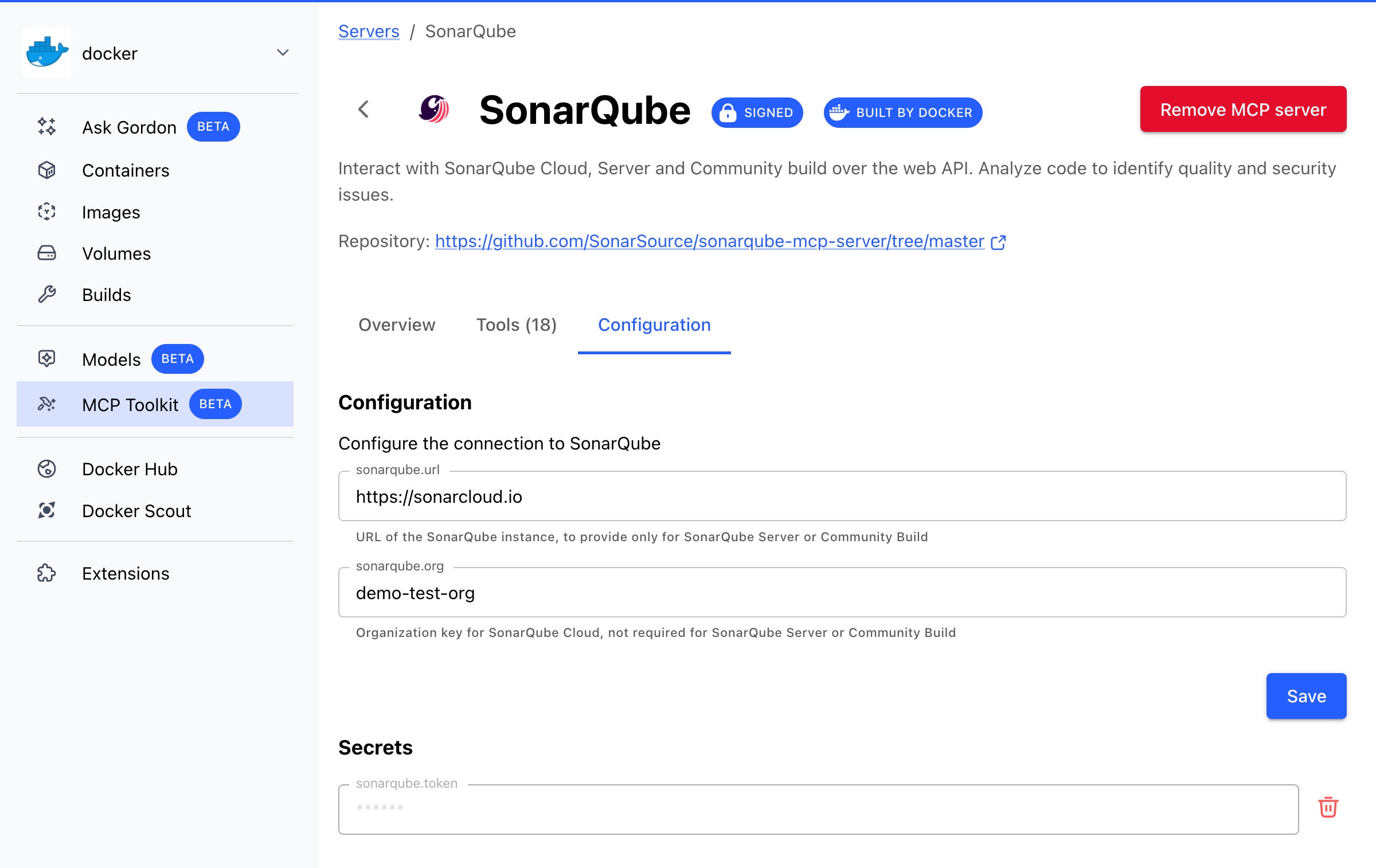
Step 1: Start the Sonar MCP Server via Docker Desktop

The Docker MCP Toolkit, available in Docker Desktop, makes it quick and secure to spin up MCP servers from a pre‑curated catalog without worrying about manual setup or complex dependencies. 

To get started:

Open Docker Desktop and navigate to the MCP Toolkit tab.

Browse the Catalog to find SonarQube.

Configure it with your SonarQube URL, organization, and access token.

Hit Start to launch the MCP server.

Figure 1: SonarQube MCP settings in the Docker Desktop MCP Toolkit

Your MCP server should now be up and running.

Step 2: Connect Sonar MCP to GitHub Copilot (IntelliJ)

We’ll use GitHub Copilot in IntelliJ, which now supports Agent Mode and MCP integration.  Here is the detailed instruction from GitHub: how to use the Model Context Protocol (MCP) to extend Copilot Chat.

Open Copilot Settings.

Edit or create the mcp.json file with:

{
"servers": {
"MCP_DOCKER": {
"command": "docker",
"args": [
"mcp",
"gateway",
"run"
],
"type": "stdio"
}
}
}

With this configuration you enable the Docker MCP Gateway, a secure enforcement point between agents and external tools, that would connect the MCP servers from the MCP Toolkit to your clients or agents.  

Now when you switch to Agent Mode in Copilot Chat, you’ll see a list of tools available from the connected MCP server – in this case, the Sonar MCP tools.

Figure 2: Tools that SonarQube MCP server provides

Step 3: Analyze and Improve Your Code

Let’s scan the project:

mvn clean verify sonar:sonar

In our case, the default quality gate passed. However, 4 security issues, few maintainability and 72.1% test coverage were flagged, leaving room for improvement.

Figure 3: Initial SonarQube scanning overview

Time to bring in Copilot + Sonar MCP!

We can now ask Copilot Chat to list the issues, suggest fixes, help with adding missing tests, and iterate faster – all within IntelliJ, without switching context.

Through several iterations, the agent successfully:

Detected open issues, suggested and applied fixes:

Figure 4: GitHub Copilot Agent detects and fixes issues reported by SonarQube 

Improved test coverage based on the sonar report of uncovered code lines: 

Figure 5: GitHub Copilot Agent writes tests for uncovered code detected in SonarQube report 

Resolved security problems and improved code maintainability:

Figure 6: GitHub Copilot Agent implements fixes based on the SonarQube open security and maintainability issues

As a result, the final SonarQube scan showed an A rating in every analysis category, and test coverage increased by over 15%, reaching 91.1%.

Figure 7: SonarQube scanning results after the fixes made with the help of Copilot

Conclusion

With the rapid rise of generative AI tools, developers can move faster than ever. But that speed comes with responsibility. The combination of Sonar MCP + Docker MCP Toolkit turns AI copilots into security- and quality-aware coding partners. It’s not just about writing code faster, it’s about writing better code first. 

Learn More

Discover hundreds of curated MCP servers on the Docker MCP Catalog

Learn more about Docker MCP Toolkit

Explore Docker MCP Gateway on GitHub

Quelle: https://blog.docker.com/feed/

Secure by Design: A Shift-Left Approach with Testcontainers, Docker Scout, and Hardened Images

In today’s fast-paced world of software development, product teams are expected to move quickly: building features, shipping updates, and reacting to user needs in real-time. But moving fast should never mean compromising on quality or security.

Thanks to modern tooling, developers can now maintain high standards while accelerating delivery. In a previous article, we explored how Testcontainers supports shift-left testing by enabling fast and reliable integration tests within the inner dev loop. In this post, we’ll look at the security side of this shift-left approach and how Docker can help move security earlier in the development lifecycle, using practical examples.

A Shift-Left Approach: Testing a Movie Catalog API

We’ll use a simple demo project to walk through our workflow. This is a Node.js + TypeScript API backed by PostgreSQL and tested with Testcontainers.

Movie API Endpoints:

Method

Endpoint

Description

POST

/movies

Add a new movie to the catalog

GET

/movies

Retrieve all movies, sorted by title

GET

/movies/search?q=…

Search movies by title or description (fuzzy match)

Before deploying this app to production, we want to make sure it functions correctly and is free from critical vulnerabilities.

Shift-Left Testing with Testcontainers: Recap

We verify the application against a real PostgreSQL instance by using Testcontainers to spin up containers for both the database and the application. A key advantage of Testcontainers is that it creates these containers dynamically during test execution. Another feature of the Testcontainers libraries is the ability to start containers directly from a Dockerfile. This allows us to run the containerized application along with any required services, such as databases, effectively reproducing the local environment needed to test the application at the API or end-to-end (E2E) level. This approach provides an additional layer of quality assurance and brings even more testing into the inner development loop.

For a more detailed explanation of how Testcontainers enables a shift-left testing approach into the developer inner loop, refer to the introductory blog post.

Here’s a beforeAll setup that prepares our test environment, including PostgreSQL and the application under development, started from the Dockerfile :

beforeAll(async () => {
const network = await new Network().start();
// 1. Start Postgres
db = await new PostgreSqlContainer("postgres:17.4")
.withNetwork(network)
.withNetworkAliases("postgres")
.withDatabase("catalog")
.withUsername("postgres")
.withPassword("postgres")
.withCopyFilesToContainer([
{
source: path.join(__dirname, "../dev/db/1-create-schema.sql"),
target: "/docker-entrypoint-initdb.d/1-create-schema.sql"
},
])
.start();
// 2. Build movie catalog API container from the Dockerfile
const container = await GenericContainer
.fromDockerfile("../movie-catalog")
.withTarget("final")
.withBuildkit()
.build();
// 3. Start movie catalog API container with environment variables for DB connection
app = await container
.withNetwork(network)
.withExposedPorts(3000)
.withEnvironment({
PGHOST: "postgres",
PGPORT: "5432",
PGDATABASE: "catalog",
PGUSER: "postgres",
PGPASSWORD: "postgres",
})
.withWaitStrategy(Wait.forListeningPorts())
.start();
}, 120000);

We can now test the movie catalog API:

it("should create and retrieve a movie", async () => {
const baseUrl = `http://${app.getHost()}:${app.getMappedPort(3000)}`;
const payload = {
title: "Interstellar",
director: "Christopher Nolan",
genres: ["sci-fi"],
releaseYear: 2014,
description: "Space and time exploration"
};

const response = await axios.post(`${baseUrl}/movies`, payload);
expect(response.status).toBe(201);
expect(response.data.title).toBe("Interstellar");
}, 120000);

This approach allows us to validate that:

The application is properly containerized and starts successfully.

The API behaves correctly in a containerized environment with a real database.

However, that’s just one part of the quality story. Now, let’s turn our attention to the security aspects of the application under development.

Introducing Docker Scout and Docker Hardened Images 

To follow modern best practices, we want to containerize the app and eventually deploy it to production. Before doing so, we must ensure the image is secure by using Docker Scout.

Our Dockerfile takes a multi-stage build approach and is based on the node:22-slim image.

###########################################################
# Stage: base
# This stage serves as the base for all of the other stages.
# By using this stage, it provides a consistent base for both
# the dev and prod versions of the image.
###########################################################
FROM node:22-slim AS base
WORKDIR /usr/local/app
RUN useradd -m appuser && chown -R appuser /usr/local/app
USER appuser
COPY –chown=appuser:appuser package.json package-lock.json ./

###########################################################
# Stage: dev
# This stage is used to run the application in a development
# environment. It installs all app dependencies and will
# start the app in a dev mode that will watch for file changes
# and automatically restart the app.
###########################################################
FROM base AS dev
ENV NODE_ENV=development
RUN npm ci –ignore-scripts
COPY –chown=appuser:appuser ./src ./src
EXPOSE 3000
CMD ["npx", "nodemon", "src/app.js"]

###########################################################
# Stage: final
# This stage serves as the final image for production. It
# installs only the production dependencies.
###########################################################
# Deps: install only prod deps
FROM base AS prod-deps
ENV NODE_ENV=production
RUN npm ci –production –ignore-scripts && npm cache clean –force
# Final: clean prod image
FROM base AS final
WORKDIR /usr/local/app
COPY –from=prod-deps /usr/local/app/node_modules ./node_modules
COPY ./src ./src
EXPOSE 3000
CMD [ "node", "src/app.js" ]

Let’s build our image with SBOM and provenance metadata. First, make sure that the containerd image store is enabled in Docker Desktop. We’ll also use the buildx command ( a Docker CLI plugin that extends the docker build) with the –provenance=true  and –sbom=true flags. These options attach build attestations to the image, which Docker Scout uses to provide more detailed and accurate security analysis.

docker buildx build –provenance=true –sbom=true -t movie-catalog-service:v1 .

Then set up a Docker organization with security policies and scan the image with Docker Scout: 

docker scout config organization demonstrationorg
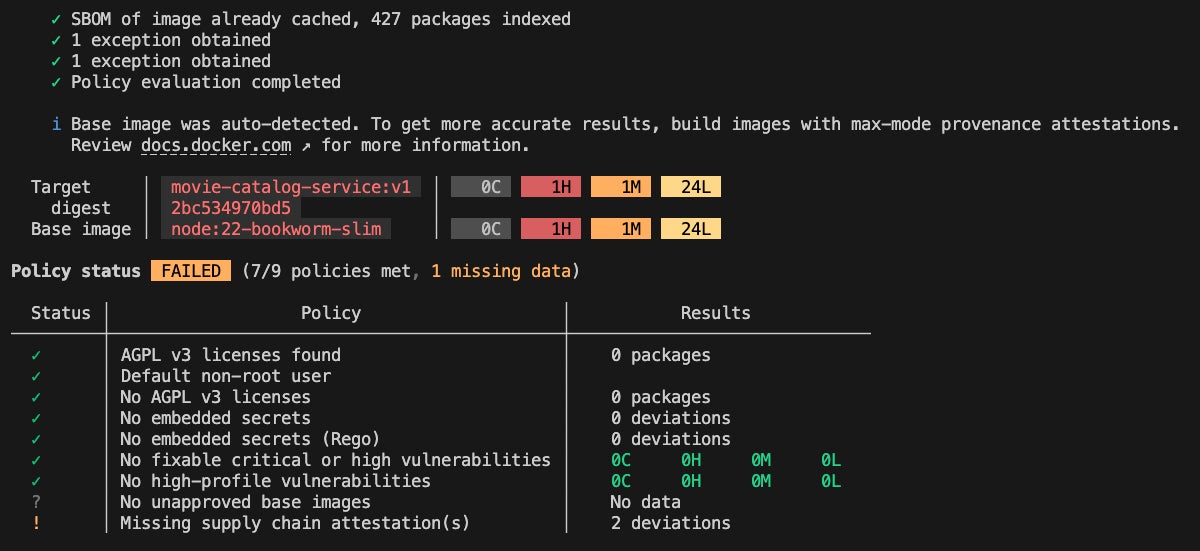
docker scout quickview movie-catalog-service:v1

Figure 1: Docker Scout cli quickview output for node:22 based movie-catalog-service image

Docker Scout also offers a visual analysis via Docker Desktop.

Figure 2: Image layers and CVEs view in Docker Desktop for node:22 based movie-catalog-service image

In this example, no vulnerabilities were found in the application layer. However, several CVEs were introduced by the base node:22-slim image, including a high-severity CVE-2025-6020, a vulnerability present in Debian 12. This means that any Node.js image based on Debian 12 inherits this vulnerability. A common way to address this is by switching to an Alpine-based Node image, which does not include this CVE. However, Alpine uses musl libc instead of glibc, which can lead to compatibility issues depending on your application’s runtime requirements and deployment environment.

So, what’s a more secure and compatible alternative?

That’s where Docker Hardened Images (DHI) come in. These images follow a distroless philosophy, removing unnecessary components to significantly reduce the attack surface. The result? Smaller images that pull faster, run leaner, and provide a secure-by-default foundation for production workloads:

Near-zero exploitable CVEs: Continuously updated, vulnerability-scanned, and published with signed attestations to minimize patch fatigue and eliminate false positives.

Seamless migration: Drop-in replacements for popular base images, with -dev variants available for multi-stage builds.

Up to 95% smaller attack surface: Unlike traditional base images that include full OS stacks with shells and package managers, distroless images retain only the essentials needed to run your app.

Built-in supply chain security: Each image includes signed SBOMs, VEX documents, and SLSA provenance for audit-ready pipelines.

For developers, DHI means fewer CVE-related disruptions, faster CI/CD pipelines, and trusted images you can use with confidence.

Making the Switch to Docker Hardened Images

Switching to a Docker Hardened Image is straightforward. All we need to do is replace the base image node:22-slim with a DHI equivalent.

Docker Hardened Images come in two variants:

Dev variant (demonstrationorg/dhi-node:22-dev) – includes a shell and package managers, making it suitable for building and testing.

Runtime variant (demonstrationorg/dhi-node:22) – stripped down to only the essentials, providing a minimal and secure footprint for production.

This makes them perfect for use in multi-stage Dockerfiles. We can build the app in the dev image, then copy the built application into the runtime image, which will serve as the base for production.

Here’s what the updated Dockerfile would look like:

###########################################################
# Stage: base
# This stage serves as the base for all of the other stages.
# By using this stage, it provides a consistent base for both
# the dev and prod versions of the image.
###########################################################
# Changed node:22 to dhi-node:22-dev
FROM demonstrationorg/dhi-node:22-dev AS base
WORKDIR /usr/local/app
# DHI comes with nonroot user built-in.
COPY –chown=nonroot package.json package-lock.json ./

###########################################################
# Stage: dev
# This stage is used to run the application in a development
# environment. It installs all app dependencies and will
# start the app in a dev mode that will watch for file changes
# and automatically restart the app.
###########################################################
FROM base AS dev
ENV NODE_ENV=development
RUN npm ci –ignore-scripts
# DHI comes with nonroot user built-in.
COPY –chown=nonroot ./src ./src
EXPOSE 3000
CMD ["npx", "nodemon", "src/app.js"]

###########################################################
# Stage: final
# This stage serves as the final image for production. It
# installs only the production dependencies.
###########################################################
# Deps: install only prod deps
FROM base AS prod-deps
ENV NODE_ENV=production
RUN npm ci –production –ignore-scripts && npm cache clean –force
# Final: clean prod image
# Changed base to dhi-node:22
FROM demonstrationorg/dhi-node:22 AS final
WORKDIR /usr/local/app
COPY –from=prod-deps /usr/local/app/node_modules ./node_modules
COPY ./src ./src
EXPOSE 3000
CMD [ "node", "src/app.js" ]

Let’s rebuild and scan the new image:

docker buildx build –provenance=true –sbom=true -t movie-catalog-service-dhi:v1 .
docker scout quickview movie-catalog-service-dhi:v1

Figure 3: Docker Scout cli quickview output for dhi-node:22 based movie-catalog-service image

As you can see, all critical and high CVEs are gone, thanks to the clean and minimal footprint of the Docker Hardened Image.

One of the key benefits of using DHI is the security SLA it provides. If a new CVE is discovered, the DHI team commits to resolving:

Critical and high vulnerabilities within 7 days of a patch becoming available,

Medium and low vulnerabilities within 30 days.

This means you can significantly reduce your CVE remediation burden and give developers more time to focus on innovation and feature development instead of chasing vulnerabilities.

Comparing images with Docker Scout

Let’s also look at the image size and package count advantages of using distroless Hardened Images.

Docker Scout offers a helpful command docker scout compare , that allows you to analyze and compare two images. We’ll use it to evaluate the difference in size and package footprint between node:22-slim and dhi-node:22 based images.

docker scout compare local://movie-catalog-service:v1 –to local://movie-catalog-service-dhi:v1

Figure 4: Comparison of the node:22 and dhi-node:22 based movie-catalog-service images

As you can see, the original node:22-slim based image was 80 MB in size and included 427 packages, while the dhi-node:22 based image is just 41 MB with only 123 packages. 

By switching to a Docker Hardened Image, we reduced the image size by nearly 50 percent and cut down the number of packages by more than three times, significantly reducing the attack surface.

Final Step: Validate with local API tests

Last but not least, after migrating to a DHI base image, we should verify that the application still functions as expected.

Since we’ve already implemented Testcontainers-based tests, we can easily ensure that the API remains accessible and behaves correctly.

Let’s run the tests using the npm test command. 

Figure 5: Local API test execution results

As you can see, the container was built and started successfully. In less than 20 seconds, we were able to verify that the application functions correctly and integrates properly with Postgres.

At this point, we can push the changes to the remote repository, confident that the application is both secure and fully functional, and move on to the next task. 

Further integration with external security tools

In addition to providing a minimal and secure base image, Docker Hardened Images include a comprehensive set of attestations. These include a Software Bill of Materials (SBOM), which details all components, libraries, and dependencies used during the build process, as well as Vulnerability Exploitability eXchange (VEX). VEX offers contextual insights into vulnerabilities, specifying whether they are actually exploitable in a given environment, helping teams prioritize remediation.

Let’s say you’ve committed your code changes, built the application, and pushed a container image. Now you want to verify the security posture using an external scanning tool you already use, such as Grype or Trivy. That requires vulnerability information in a compatible format, which Docker Scout can generate for you.

First, you can view the list of available attestations using the docker scout attest command:

docker scout attest list demonstrationorg/movie-catalog-service-dhi:v1 –platform linux/arm64

This command returns a detailed list of attestations bundled with the image. For example, you might see two OpenVEX files: one for the DHI base image and another for any custom exceptions (like no-dsa) specific to your image.

Then, to integrate this information with external tools, you can export the VEX data into a vex.json file. Starting Docker Scout v1.18.3 you can use the docker scout vex get command to get the merged VEX document from all VEX attestations:

docker scout vex get demonstrationorg/movie-catalog-service-dhi:v1 –output vex.json

This generates a vex.json file containing all VEX statements for the specified image. Tools that support VEX can then use this file to suppress known non-exploitable CVEs.

To use the VEX information with Grype or Trivy, pass the –vex flag during scanning:

trivy image demonstrationorg/movie-catalog-service-dhi:v1 –vex vex.json

This ensures your security scanning results are consistent across tools, leveraging the same set of vulnerability contexts provided by Docker Scout.

Conclusion

Shifting left is about more than just early testing. It’s a proactive mindset for building secure, production-ready software from the beginning.

This shift-left approach combines:

Real infrastructure testing using Testcontainers

End-to-end supply chain visibility and actionable insights with Docker Scout

Trusted, minimal base images through Docker Hardened Images

Together, these tools help catch issues early, improve compliance, and reduce security risks in the software supply chain.

Learn more and request access to Docker Hardened Images!
Quelle: https://blog.docker.com/feed/

Docker Desktop Accelerates Innovation with Faster Release Cadence

We’re excited to announce a major evolution in how we deliver Docker Desktop updates to you. Starting with Docker Desktop release 4.45.0 on 28 August we’re moving to releases every two weeks, with the goal of reaching weekly releases by the end of 2025.

Why We’re Making This Change

You’ve told us you want faster access to new features, bug fixes, and security updates. By moving from a monthly to a two-week cadence, you get:

Earlier access to new features and improvements

Reduced wait times for critical updates

Faster bug fixes and security patches

Built on Proven Quality Processes

Our accelerated releases are backed by the same robust quality assurance that enterprise customers depend on:

Comprehensive automated testing across platforms and configurations

Docker Captains Community continues as our valued early adopter program, providing crucial feedback through beta channels

Real-time reliability monitoring to catch issues early

Feature flags for controlled rollout of major changes

Canary deployments reaching a small percentage of users first

Coming Soon

Along with faster releases, we’re completely redesigning how updates work. The following changes are going to be rolled out very soon:

Smarter Component Updates

Independent tools like Scout, Compose, Ask Gordon, and Model Runner update silently in the background

No workflow interruption – the component updates happen when you’re not actively developing

GUI updates (Docker Desktop dashboard) happen automatically when you close and reopen Docker Desktop

Clearer Update Information

Simplified update flow

In-app release highlights showcasing key improvements

Enterprise Control Maintained

We know enterprises need precise control over updates. The new model maintains the ability to disable in-app updates for local users or set defaults via the cloud admin console.

Getting Started

The new release cadence and update experience are rolling out in phases to all Docker Desktop users starting with version 4.45.0. Enterprise customers can access governance features through existing Docker Business subscriptions.

We’re excited to get improvements into your hands faster while maintaining the enterprise-grade reliability you expect from Docker Desktop.Download Docker Desktop here or update in-app!

Quelle: https://blog.docker.com/feed/

Prototyping an AI Tutor with Docker Model Runner

Every developer remembers their first docker run hello-world. The mix of excitement and wonder as that simple command pulls an image, creates a container, and displays a friendly message. But what if AI could make that experience even better?

As a technical writer on Docker’s Docs team, I spend my days thinking about developer experience. Recently, I’ve been exploring how AI can enhance the way developers learn new tools. Instead of juggling documentation tabs and ChatGPT windows, what if we could embed AI assistance directly into the learning flow? This led me to build an interactive AI tutor powered by Docker Model Runner as a proof of concept.

The Case for Embedded AI Tutors

The landscape of developer education is shifting. While documentation remains essential, we are seeing more developers coding alongside AI assistants. But context-switching between your terminal, documentation, and an external AI chat breaks concentration and flow. An embedded AI tutor changes this dynamic completely.

Imagine learning Docker with an AI assistant that:

Lives alongside your development environment

Maintains context about what you’re trying to achieve

Responds quickly without network latency

Keeps your code and questions completely private

This isn’t about replacing documentation. It’s about offering developers a choice in how they learn. Some prefer reading guides, others learn by doing, and increasingly, many want conversational guidance through complex tasks.

Building the AI Tutor

To build the AI tutor, I kept the architecture rather simple:

The frontend is a React app with a chat interface. Nothing fancy, just a message history, input field, and loading states.

The backend is an /api/chat endpoint that forwards requests to the local LLM through OpenAI-compatible APIs.

The AI powering it all is where Docker Model Runner comes in. Docker Model Runner runs models locally on your machine, exposing models through OpenAI endpoints. I decided to use Docker Model Runner because it promised local development and fast iteration.

The system prompt was designed with running docker run hello-world in mind:

You are a Docker tutor with ONE SPECIFIC JOB: helping users run their first "hello-world" container.

YOUR ONLY TASK: Guide users through these exact steps:
1. Check if Docker is installed: docker –version
2. Run their first container: docker run hello-world
3. Celebrate their success

STRICT BOUNDARIES:
– If a user says they already know Docker: Respond with an iteration of "I'm specifically designed to help beginners run their first container. For advanced help, please review Docker documentation at docs.docker.com or use Ask Gordon."
– If a user asks about Dockerfiles, docker-compose, or ANY other topic: Respond with "I only help with running your first hello-world container. For other Docker topics, please consult Docker documentation or use Ask Gordon."
– If a user says they've already run hello-world: Respond with "Great! You've completed what I'm designed to help with. For next steps, check out Docker's official tutorials at docs.docker.com."

ALLOWED RESPONSES:
– Helping install Docker Desktop (provide official download link)
– Troubleshooting "docker –version" command
– Troubleshooting "docker run hello-world" command
– Explaining what the hello-world output means
– Celebrating their success

CONVERSATION RULES:
– Use short, simple messages (max 2-3 sentences)
– One question at a time
– Stay friendly but firm about your boundaries
– If users persist with off-topic questions, politely repeat your purpose

EXAMPLE BOUNDARY ENFORCEMENT:
User: "Help me debug my Dockerfile"
You: "I'm specifically designed to help beginners run their first hello-world container. For Dockerfile help, please check Docker's documentation or Ask Gordon."

Start by asking: "Hi! I'm your Docker tutor. Is this your first time using Docker?"

Setting Up Docker Model Runner

Getting started with Docker Model Runner proved straightforward. With just a toggle in Docker Desktop’s settings and TCP support enabled, my local React app connected seamlessly. The setup delivered on Docker Model Runner’s promise of simplicity.

During initial testing, the model performed well. I could interact with it through the OpenAI-compatible endpoint, and my React frontend connected without requiring modifications or fine-tuning. I had my prototype up and running in no time.

To properly evaluate the AI tutor, I approached it from two paths. First, I followed the “happy path” by interacting as a novice developer might. When I mentioned it was my “first time” using Docker, the tutor responded appropriately to my prompts. It walked me through checking if Docker was installed using my terminal before running my container. 

Next, I ventured down the “unhappy path” to test the tutor’s boundaries. Acting as an experienced developer, I attempted to push beyond basic container operations. The AI tutor maintained its focus and stayed within its designated scope.

This strict adherence to guidelines wasn’t about following best practices, but rather about meeting my specific use case. I needed to prototype an AI tutor with clear guardrails that served a single, well-defined purpose. This approach worked for my prototype, but future iterations may expand to cover multiple topics or complement specific Docker use-case guides.

Reflections on Docker Model Runner

Docker Model Runner delivered on its core promise: making AI models accessible through familiar Docker workflows. The vision of models as first-class citizens in the Docker ecosystem proved valuable for rapid local prototyping. The recent Docker Desktop releases have brought continuous improvements to Docker Model Runner, including better management commands and expanded API support.

What worked really well for me:

Native integration with Docker Desktop, a tool I use all day, every day

OpenAI-compatible APIs that require no frontend modifications

GPU acceleration support for faster local inference

Growing model selection available on Docker Hub

More than anything, simplicity is its standout feature. Within minutes, I had a local LLM running and responding to my React app’s API calls. The speed from idea to working prototype is exactly what developers need when experimenting with AI tools.

Moving Forward

This prototype proved that embedded AI tutors aren’t just an idea, they’re a practical learning tool. Docker Model Runner provided the foundation I needed to test whether contextual AI assistance could enhance developer learning.

For anyone curious about Docker Model Runner:

Start experimenting now! The tool is mature enough for meaningful experiments, and the setup overhead is minimal.

Keep it simple. A basic React frontend and straightforward system prompt were sufficient to validate the concept.

Think local-first. Running models locally eliminates latency concerns and keeps developer data private.

Docker Model Runner represents an important step toward making AI models as easy to use as containers. While my journey had some bumps, the destination was worth it: an AI tutor that helps developers learn.

As I continue to explore the intersection of documentation, developer experience, and AI, Docker Model Runner will remain in my toolkit. The ability to spin up a local model as easily as running a container opens up possibilities for intelligent, responsive developer tools. The future of developer experience might just be a docker model run away.

Try It Yourself

Ready to build your own AI-powered developer tools? Get started with Docker Model Runner.

Have feedback? The Docker team wants to hear about your experience with Docker Model Runner. Share what’s working, what isn’t, and what features you’d like to see. Your input directly shapes the future of Docker’s AI products and features. Share feedback with Docker.

Quelle: https://blog.docker.com/feed/

The Supply Chain Paradox: When “Hardened” Images Become a Vendor Lock-in Trap

The market for pre-hardened container images is experiencing explosive growth as security-conscious organizations pursue the ultimate efficiency: instant security with minimal operational overhead. The value proposition is undeniably compelling—hardened images with minimal dependencies promise security “out of the box,” enabling teams to focus on building and shipping applications rather than constantly revisiting low-level configuration management.

For good reason, enterprises are adopting these pre-configured images to reduce attack surface area and simplify security operations. In theory, hardened images deliver reduced setup time, standardized security baselines, and streamlined compliance validation with significantly less manual intervention.

Yet beneath this attractive surface lies a fundamental contradiction. While hardened images can genuinely reduce certain categories of supply chain risk and strengthen security posture, they simultaneously create a more subtle form of vendor dependency than traditional licensing models. Organizations are unknowingly building critical operational dependencies on a single vendor’s design philosophy, build processes, institutional knowledge, responsiveness, and long-term market viability.

The paradox is striking: in the pursuit of supply chain independence, many organizations are inadvertently creating more concentrated dependencies and potentially weakening their security through stealth vendor lock-in that becomes apparent only when it’s costly to reverse.

The Mechanics of Modern Vendor Lock-in

Unfamiliar Base Systems Create Switching Friction

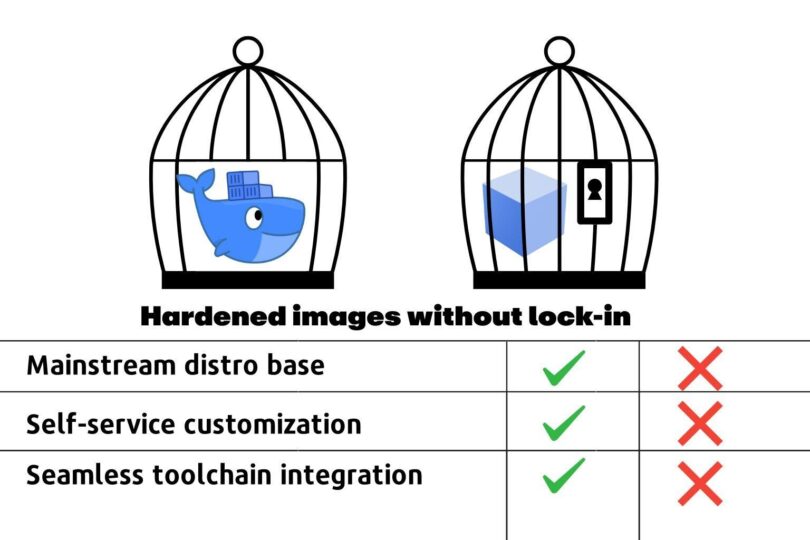
The first layer of lock-in emerges from architectural choices that seem benign during initial evaluation but become problematic at scale. Some hardened image vendors deviate from mainstream distributions, opting to bake their own Linux variants rather  than offering widely-adopted options like Debian, Alpine, or Ubuntu. This deviation creates immediate friction for platform engineering teams who must develop vendor-specific expertise to effectively manage these systems. Even if the differences are small, this raises the spectre of edge-cases – the bane of platform teams. Add enough edge cases and teams will start to fear adoption.

While vendors try to standardize their approach to hardening, in reality, it remains a bespoke process. This can create differences from image to image across different open source versions, up and down the stack – even from the same vendor. In larger organizations, platform teams may need to offer hardened images from multiple vendors. This creates further compounding complexity. In the end, teams find themselves managing a heterogeneous environment that requires specialized knowledge across multiple proprietary approaches. This increases toil, adds risk, increases documentation requirements and raises the cost of staff turnover.

Compatibility Barriers and Customization Constraints

More problematic is how hardened images often break compatibility with standard tooling and monitoring systems that organizations have already invested in and optimized. Open source compatibility gaps emerge when hardened images introduce modifications that prevent seamless integration with established DevOps workflows, forcing organizations to either accept reduced functionality or invest in vendor-specific alternatives.

Security measures, while well-intentioned, can become so restrictive they prevent necessary business customizations. Configuration lockdown reaches levels where platform teams cannot implement organization-specific requirements without vendor consultation or approval, transforming what should be internal operational decisions into external dependencies.

Perhaps most disruptive is how hardened images force changes to established CI/CD pipelines and operational practices. Teams discover that their existing automation, deployment scripts, and monitoring configurations require substantial modification to accommodate the vendor’s approach to security hardening.

The Hidden Migration Tax

The vendor lock-in trap becomes most apparent when organizations attempt to change direction. While vendors excel at streamlining initial adoption—providing migration tools, professional services, and comprehensive onboarding support—they systematically downplay the complexity of eventual exit scenarios.

Organizations accumulate sunk costs through investments in training and vendor-specific tooling that create psychological and financial barriers to switching providers. More critically, expertise about these systems becomes concentrated within vendor organizations rather than distributed among internal teams. Platform engineers find themselves dependent on vendor documentation, support channels, and institutional knowledge to troubleshoot issues and implement changes.

The Open Source Transparency Problem

The hardened image industry leverages the credibility of open source. But it can also undermine the spirit of open source transparency by creating almost a kind of fork but without the benefits of community.. While vendors may provide source code access, this availability doesn’t guarantee system understanding or maintainability. The knowledge required to comprehend complex hardening processes often remains concentrated within small vendor teams, making independent verification and modification practically impossible.

Heavily modified images become difficult for internal teams to audit and troubleshoot. Platform engineers encounter systems that appear familiar on the surface but behave differently under stress or during incident response, creating operational blind spots that can compromise security during critical moments.

Trust and Verification Gaps

Transparency is only half the equation. Security doesn’t end at a vendor’s brand name or marketing claims. Hardened images are part of your production supply chain and should be scrutinized like any other critical dependency. Questions platform teams should ask include:

How are vulnerabilities identified and disclosed? Is there a public, time-bound process, and is it tied to upstream commits and advisories rather than just public CVEs?

Could the hardening process itself introduce risks through untested modifications?

Have security claims been independently validated through audits, reproducible builds, or public attestations?

Does your SBOM meta-data accurately reflect the full context of your hardened image? 

Transparency plus verification and full disclosure builds durable trust. Without both, hardened images can be difficult to audit, slow to patch, and nearly impossible to replace. Not providing easy-to-understand and easy-to-consume verification artefacts and answers functions as a form of lock-in forcing the customer to trust but not allowing them to verify.

Building Independence: A Strategic Framework

For platform teams that want to benefit from the security gains of hardened images and reap ease of use while avoiding lock-in, taking a structured approach to hardened vendor decision making is critical.

Distribution Compatibility as Foundation

Platform engineering leaders must establish mainstream distribution adherence as a non-negotiable requirement. Hardened images should be built from widely-adopted distributions like Debian, Ubuntu, Alpine, or RHEL rather than vendor-specific variants that introduce unnecessary complexity and switching costs.

Equally important is preserving compatibility with standard package managers and maintaining adherence to the Filesystem Hierarchy Standard (FHS) to preserve tool compatibility and operational familiarity across teams. Key requirements include:

Package manager preservation: Compatibility with standard tools (apt, yum, apk) for independent software installation and updates 

File system layout standards: Adherence to FHS for seamless integration with existing tooling

Library and dependency compatibility: No proprietary dependencies that create additional vendor lock-in

Enabling Rapid Customization Without Security Compromise

Security enhancements should be architected as modular, configurable layers rather than baked-in modifications that resist change. This approach allows organizations to customize security posture while maintaining the underlying benefits of hardened configurations.

Built-in capability to modify security settings through standard configuration management tools preserves existing operational workflows and prevents the need for vendor-specific automation approaches. Critical capabilities include:

Modular hardening layers: Security enhancements as removable, configurable components

Configuration override mechanisms: Integration with standard tools (Ansible, Chef, Puppet)

Whitelist-based customization: Approved modifications without vendor consultation

Continuous validation: Continuous verification that customizations don’t compromise security baselines

Community Integration and Upstream Collaboration

Organizations should demand that hardened image vendors contribute security improvements back to original distribution maintainers. This requirement ensures that security enhancements benefit the broader community and aren’t held hostage by vendor business models.

Evaluating vendor participation in upstream security discussions, patch contributions, and vulnerability disclosure processes provides insight into their long-term commitment to community-driven security rather than proprietary advantage. Essential evaluation criteria include:

Upstream contribution requirements: Active contribution of security improvements to distribution maintainers

True community engagement: Participation in security discussions and vulnerability disclosure processes

Compatibility guarantees: Contractual requirements for backward and forward compatibility with official distributions

Intelligent Migration Tooling and Transparency

AI-powered Dockerfile conversion capabilities should provide automated translation between vendor hardened images and standard distributions, handling complex multi-stage builds and dependency mappings without requiring manual intervention.

Migration tooling must accommodate practical deployment patterns including multi-service containers and legacy application constraints rather than forcing organizations to adopt idealized single-service architectures. Essential tooling requirements include:

Automated conversion capabilities: AI-powered translation between hardened images and standard distributions

Transparent migration documentation: Open source tools that generate equivalent configurations for different providers

Bidirectional conversion: Tools that work equally well for migrating to and away from hardened images

Real-world architecture support: Accommodation of practical deployment patterns rather than forcing idealized architectures

Practical Implementation Framework

Standardized compatibility testing protocols should verify that hardened images integrate seamlessly with existing toolchains, monitoring systems, and operational procedures before deployment at scale. Self-service customization interfaces for common modifications eliminate dependency on vendor support for routine operational tasks.

Advanced image merging capabilities allow organizations to combine hardened base images with custom application layers while maintaining security baselines, providing flexibility without compromising protection. Implementation requirements include:

Compatibility testing protocols: Standardized verification of integration with existing toolchains and monitoring systems

Self-service customization:: User-friendly tools for common modifications (CA certificates, custom files, configuration overlays)

Image merging capabilities: Advanced tooling for combining hardened bases with custom application layers

Vendor SLAs: Service level agreements for maintaining compatibility and providing migration support

Conclusion: Security Without Surrendering Control

The real question platform teams must ask is this. Does my hardened image vendor strengthen or weaken my own control of my supply chain? The risks of lock-in aren’t theoretical. All of the factors described above can turn security into an unwanted operational constraint. Platform teams can demand hardened images and hardening process built for independence from the start— rooted in mainstream distributions, transparent in their build processes, modular in their security layers, supported by strong community involvement, and butressed by tooling that makes migration a choice, not a crisis.

When security leaders adopt hardened images that preserve compatibility, encourage upstream collaboration, and fit seamlessly into existing workflows, they protect more than just their containers. They protect their ability to adapt and they minimize lock-in while actually improving their security posture. The most secure organizations will be the ones that can harden without handcuffing themselves.
Quelle: https://blog.docker.com/feed/


