Top Questions for Getting Started with Docker
Does Docker run on Windows?
Yes. Docker is available for Windows, MacOS and Linux. Here are the download links:
Docker Desktop for WindowsDocker Desktop for MacLinux
What is the difference between Virtual Machines (VM) and Containers?
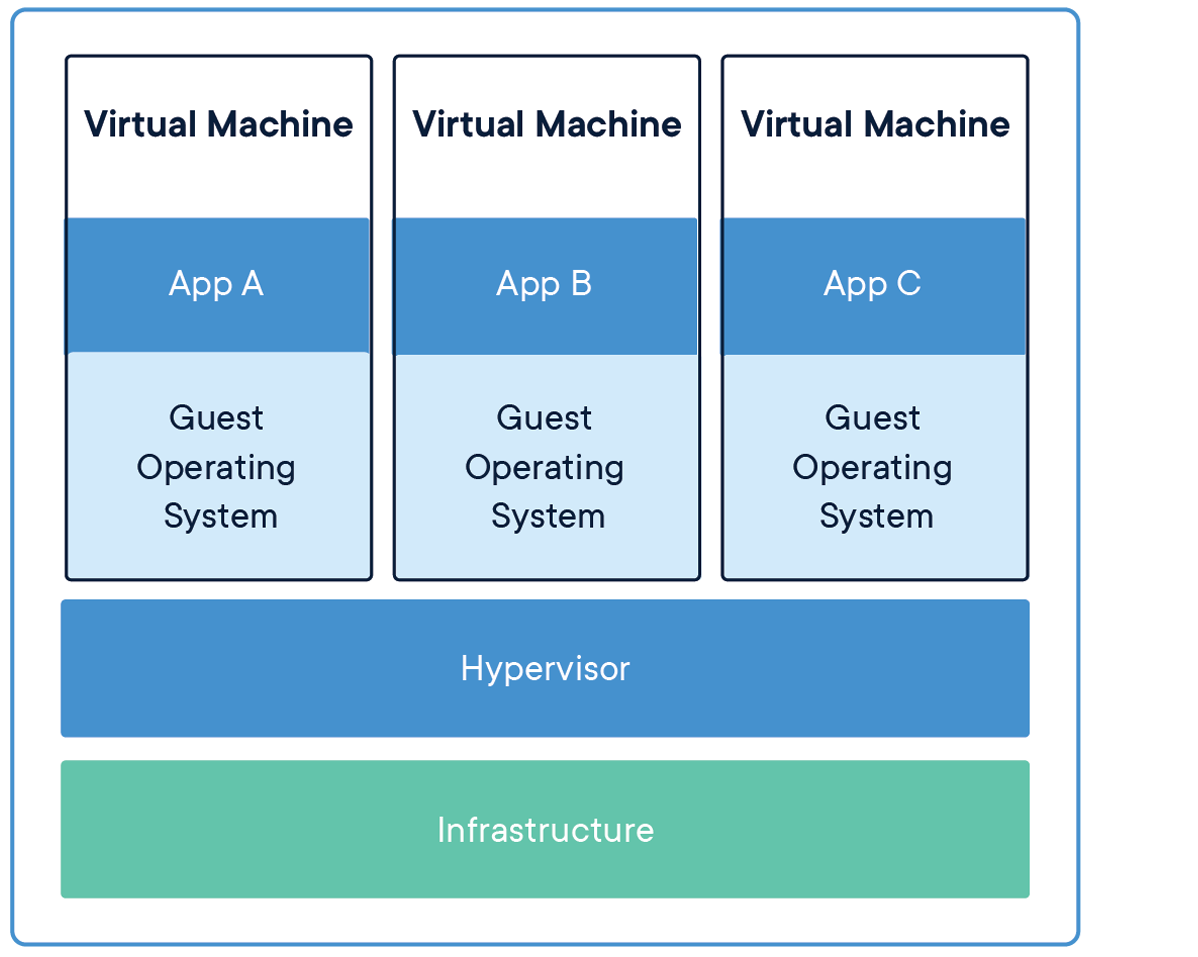
This is a great question and I get this one a lot. The simplest way I can explain the differences between Virtual Machines and Containers is that a VM virtualizes the hardware and a Container “virtualizes” the OS.
If you take a look at the image above, you can see that there are multiple Operating Systems running when using Virtual Machine technology. Which produces a huge difference in start up times and various other constraints and overhead when installing and maintaining a full blow operating system. Also, with VMs, you can run different flavors of operating systems. For example, I can run Windows 10 and a Linux distribution on the same hardware at the same time. Now let’s take a look at the image for Docker Containers.
As you can see in this image, we only have one Host Operating System installed on our infrastructure. Docker sits “on top” of the host operating system. Each application is then bundled in an image that contains all the configuration, libraries, files and executables the application needs to run.
At the core of the technology, containers are just an operating system process that is run by the OS but with restrictions on what files and other resources they can consume and have access to such as CPU and networking.
Since containers use features of the Host Operating System and therefore share the kernel, they need to be created for that operating system. So, for example, you can not run a container that contains linux binaries on Windows or vice versa.
This is just the basics and of course the technical details can be a little more complicated. But if you understand these basic concepts, you’ll have a good foundation of the difference between Virtual Machines and Containers.
What is the difference between an Image and a Container?
This is another very common question that is asked. I believe some of the confusion stems from the fact that we sometimes interchange these terms when talking about containers. I know I’ve been guilty of it.
An image is a template that is used by Docker to create your running Container. To define an image you create a Dockerfile. When Docker reads and executes the commands inside of your Dockerfile, the result is an image that then can be run “inside a container.”
A container, in simple terms, is a running image. You can run multiple instances of your image and you can create, start and stop them as well as connect them to other containers using networks.
What is the difference between Docker and Kubernetes?
I believe the confusion between the two stems from the development community talking as if these two are the same concepts. They are not.
Kubernetes is an orchestrator and Docker is a platform from building, shipping and running containers. Docker, in and of itself, does not handle orchestration.
Container Orchestration, in simple terms, is the process of managing and scheduling the running of containers across nodes that the orchestrator manages.
So generally speaking, Docker runs one instance of a container as a unit. You can run multiple containers of the same image, but Docker will not manage them as a unit.
To manage multiple containers as a unit, you would use an Orchestrator. Kubernetes is a container orchestrator. As well is AWS ECS and Azure ACI.
Why can’t I connect to my web application running in a container?
By default, containers are secure and isolated from outside network traffic – they do not expose any of its ports by default. Therefore if you want to be able to handle traffic coming from outside the container, you need to expose the port your container is listening on. For web applications this is typically port 80 or 443.
To expose a port when running a container, you can pass the –publish or -p flag.
For example:
$ docker run -p 80:80 nginx
This will run an Nginx container and publish port 80 to the outside world.
You can read all about Docker Networking in our documentation.
How do I run multiple applications in one container?
This is a very common question that I get from folks that are coming from a Virtual Machine background. The reason being is that when working with VMs, we can think of our application as owning the whole operating system and therefore can create multiple processes or runtimes.
When working with containers, it is best practice to map one process to one container for various architectural reasons that we do not have the space to discuss here. But the biggest reason to run one process inside a container is in respect to the tried and true KISS principle. Keep It Simple Simon.
When your containers have one process, they can focus on doing one thing and one thing only. This allows you to scale up and down relatively easily.
Stay tuned to this blog and my twitter handle (@pmckee) for more content on how to design and build applications with containers and microservices.
How do I persist data when running a container?
Containers are immutable and you should not write data into your container that you would like to be persisted after that container stops running. You want to think about containers as unchangeable processes that could stop running at any moment and be replaced by another very easily.
So, with that said, how do we write data and have a container use it at runtime or write data at runtime that can be persisted. This is where volumes come into play.
Volumes are the preferred mechanism to write and read persistent data. Volumes are managed by Docker and can be moved, copied and managed outside of containers.
For local development, I prefer to use bind mounts to access source code outside of my development container.
For an excellent overview of storage and specifics around volumes and bind mounts, please checkout our documentation on Storage.
Conclusion
These are just some of the common questions I get from people new to Docker. If you want to read more common questions and answers, check out our FAQ in our documentation.
Also, please feel free to connect on twitter (@pmckee) and ask questions if you like.
The post Top Questions for Getting Started with Docker appeared first on Docker Blog.
Quelle: https://blog.docker.com/feed/







