Deployment models for the Cloud Spanner emulator

This is the first of a three-part series of blog posts, which together will form a solution guide for developers using the Cloud Spanner emulator. In this series, after a quick introduction to the Cloud Spanner emulator, we will explore the usage of the emulator with a Cloud Spanner sample application called OmegaTrade. We will manually deploy the OmegaTrade application’s backend service with a Cloud Spanner emulator backend instead of the Cloud Spanner instance and compare the pros and cons of running an emulator locally vs a remote GCE instance vs Cloud Run. But first, let’s talk about what the Cloud Spanner emulator is and how it can simplify your development process.Overview Cloud Spanner is a fully managed, distributed relational database offered on Google Cloud. Since its launch in 2017, Cloud Spanner has seen great interest and adoption, with customers from industries like gaming, retail, social media, and financial services running production workloads on Cloud Spanner. In addition to the recently-announced support for more granular instance sizing, which can be very handy for small or non-production workloads, Cloud Spanner offers a no-cost option that supports light-weight, offline environments, such as Continuous Integration and Continuous Delivery/Deployment (CI/CD).This option is the Cloud Spanner emulator, which enables application developers to emulate an instance of Cloud Spanner locally for development and testing.Introduction to the Cloud Spanner emulator The Cloud Spanner emulator enables a no-cost experience for developers to quickly build and test applications with Cloud Spanner without the need for a GCP project, a billing account, or even an Internet connection. The emulator provides the same APIs as the Cloud Spanner production service with some limitations. An important thing to note is that the emulator is in-memory and does not persist data across restarts. All of the configuration, schema, and data are lost upon a restart. The emulator is intended for local development and testing use cases – e.g., stand it up for a test suite with a known state, run the tests, verify its new state, then shut it down. It is also possible to deploy an emulator on a remote GCE instance and use it as a database for learning, development and testing purposes in a shared environment. The Cloud Spanner emulator should not be used for performance testing and while the emulator can be used in development and test environments, it is still a good idea to verify your application by running it against the Cloud Spanner service before it is deployed to production. For a complete list of supported features and limitations of the emulator, take a look at the README file in GitHub. For a more detailed introduction to the Cloud Spanner emulator, read this post. Running the Cloud Spanner emulator There are multiple options available for running the emulator – a pre-built Docker image, pre-built Linux libraries, Bazel, or by building a custom Docker image. Below is a comparison between multiple ways of provisioning and starting the emulator and their respective use cases.OptionUse caseCostRun the emulator locally:Docker imagegcloud commandsLinux binariesBazelFor most of the development and testing use cases, this is the quickest way to get started. All configurations, schema, data etc are lost upon a restart of the emulator process(es).FreeDeploy the emulator on a Remote GCE instance: Manual / gcloud deploymentProvision via TerraformProvide a free (in terms of Spanner cost) experience of Cloud Spanner for multiple team members Although the configurations, schema and data are lost on a restart of the GCE VM or emulator services, the services on the remote instance allow multiple developers to troubleshoot a specific problem collaborativelyIn organizations that have segregation of Dev, Test and Prod GCP projects, a remote deployment on a GCE instance within the VPC can serve as a Cloud Spanner or Test environment, which can result in cost savings Continuous unit and integration tests can be run against the Cloud Spanner emulator, which saves costs. However, note that the emulator service is not intended for performance testsIn a GitOps driven environment, provisioning the emulator using a Terraform template can make it easier to set up CI pipelines Minimal (emulator itself is free, cost depends on the GCE instance type chosen)Deploy the emulator on Cloud Run Since the emulator is available as a pre-built image on GCR, it can be deployed on Cloud Run as a service. Note that you can only bind one port on Cloud Run and the emulator has two services – a REST server that runs on a default port 9020 and a gRPC server that runs on port 9010Cloud Run can be a good choice if you want to use either the REST gateway or gRPCAll client libraries are built on gRPC. Cloud Run supports gRPC (after enabling HTTP2). If your application uses client libraries or the RPC API, an emulator can be deployed to accept connections on port 9010  If you would like to use the REST interface alone, you can configure Cloud Run to send requests to port 9020Minimal (emulator itself is free, so the only cost is that of running this service on Cloud Run) Sample Cloud Spanner application: OmegaTradeThroughout this series, we will use an application called OmegaTrade to demonstrate the configuration of the Cloud Spanner emulator both locally and on a remote GCE instance or Cloud Run. OmegaTrade is a stock chart visualization tool built in NodeJS with a Cloud Spanner database backend. For this series of blogs, we will use the backend service of the OmegaTrade app along with the Cloud Spanner emulator. You can find the sample app repository here. To learn more about the app and its features relevant for Cloud Spanner, see this blog post.  Coming soonIn the next part, we will learn about running the Cloud Spanner emulator locally and containerizing and deploying the sample app on an emulator running locally. Stay tuned!Related ArticleDeploying a Cloud Spanner-based Node.js applicationWe illustrate how to deploy a Node.js application on Cloud Spanner, and cover a few important Cloud Spanner concepts along the way.Read Article
Quelle: Google Cloud Platform
Google Cloud announces new Cloud Digital Leader training and certification

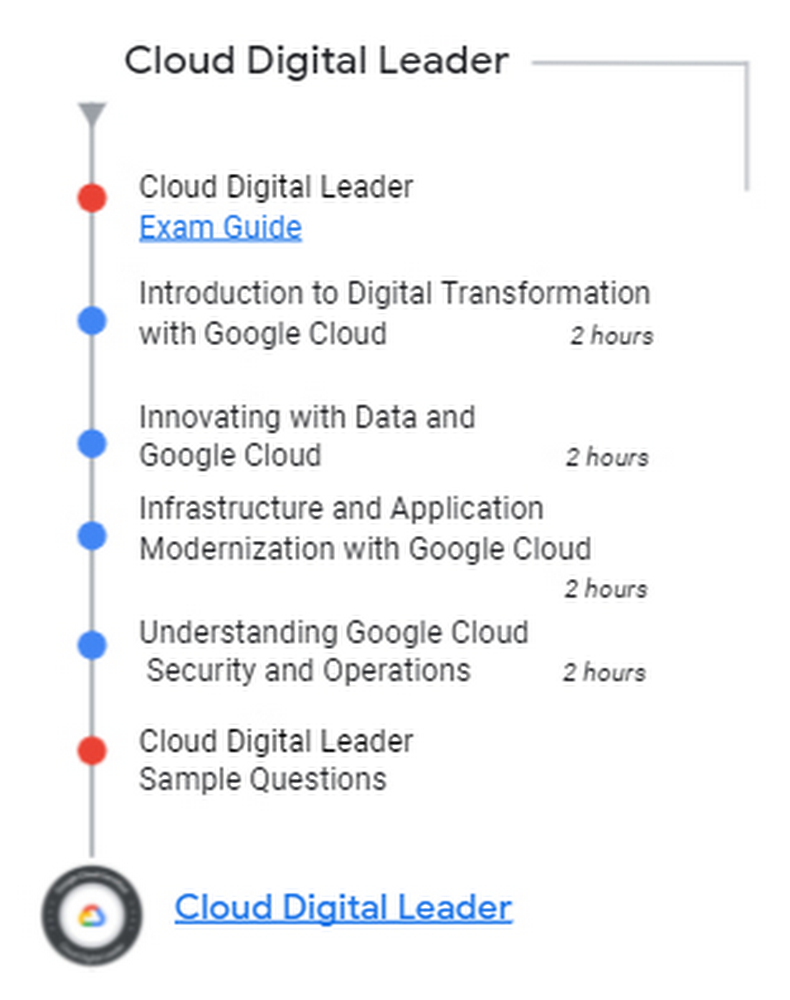
You asked for it, we listened! Today we’re announcing the Cloud Digital Leader learning pathway, our first offering for business professionals that includes both training and certification.  The Cloud Digital Leader learning pathway is designed to skill-up individuals and teams that work with technical Google Cloud practitioners so they can contribute to strategic cloud-related business decisions.  A Cloud Digital Leader understands and can distinguish not only the various capabilities of Google Cloud core products and services, but also how they can be used to achieve desired business goals.We asked one of our customers that participated in the beta why they are excited about this new offering and they said:”ANZ is transforming its technology landscape by addressing the size and complexity of our current estate and fully embracing cloud. Our strategic advantage has always been our people; they are crucial to the transformation. One of the best ways to ensure they are set up for success is to provide relevant learning opportunities. The benefit of the Google Cloud Digital Leader certification is it provides general cloud knowledge and a shared language across the bank so no one is left behind. This means our technology teams as well as our business and enablement teams.”, Michelle Dobson, Head of Cloud COE & Enablement, Australia and New Zealand Banking Group LimitedCloud Digital Leader Training The Cloud Digital Leader training courses are designed to increase your team’s cloud confidence so they can collaborate with colleagues in technical cloud roles and contribute to informed cloud-related business decisions.The courses provide customers with fundamental knowledge related to digital transformation with Google Cloud. The four courses are:1: Introduction to Digital Transformation with Google Cloud2: Innovating with Data and Google Cloud3: Infrastructure and Application Modernization with Google Cloud4: Understanding Google Cloud Security and OperationsCompletion of these courses is recommended (not required) as one of the steps to prepare for the Google Cloud Digital Leader Certification exam. Cloud Digital Leader CertificationAcquiring the Google Cloud Digital Leader Certification is an opportunity for your entire team to demonstrate its strong understanding of cloud capabilities, which can enhance organizational innovation with Google Cloud.The Cloud Digital Leader exam is role-independent and does not require hands-on experience with Google Cloud.  The Cloud Digital Leader exam assesses your knowledge in three areas:General cloud knowledgeGeneral Google Cloud knowledgeGoogle Cloud products and servicesThis certification is a new offering and additional resources will be available soon. Check back on the learning path page.Start Innovating with Google CloudGet your team started on their Cloud Digital Leader learning journey! Speak to your sales representative about skilling up your team.Review the Cloud Digital Leader Certification exam using the exam guide. Take the Cloud Digital Leader learning pathRelated ArticleNew to Google Cloud? Here are a few free trainings to help you get startedFree resources like hands-on events, on-demand training, and skills challenges can help you develop the fundamentals of Google Cloud so y…Read Article
Quelle: Google Cloud Platform
Upgrade Postgres with pglogical and Database Migration Service

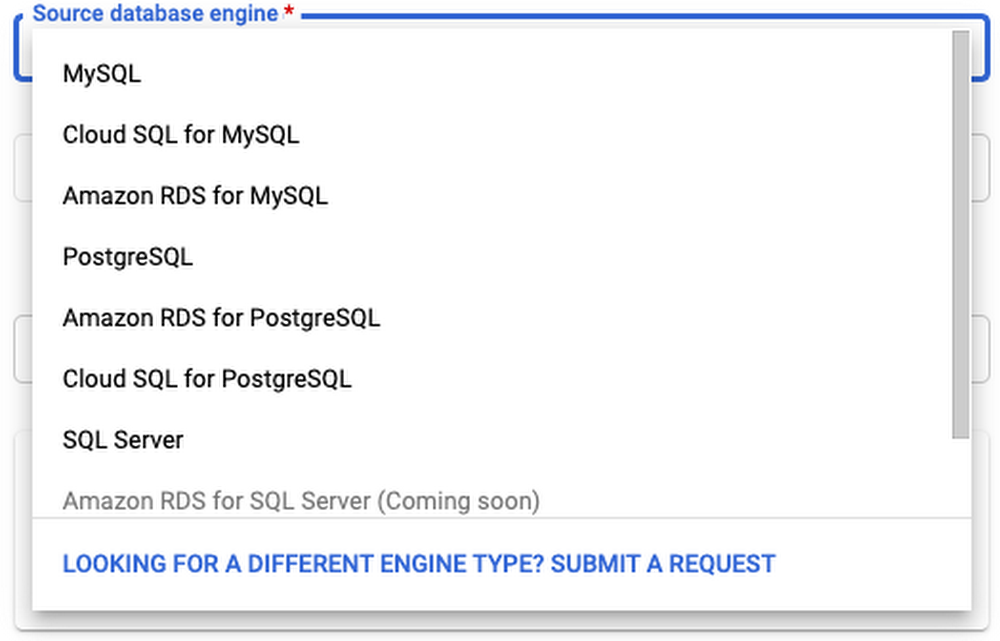
As many of you are probably aware, Postgres is ending long term support for version 9.6 in November, 2021. However, if you’re still using version 9.6, there’s no need to panic!  Cloud SQL will continue to support version 9.6 for one more year after in-place major version upgrades becomes available. But if you would still like to upgrade right now, Google Cloud’s Database Migration Service (DMS) makes major version upgrades for Cloud SQL simple with low downtime.This method can be used to upgrade from any Postgres version, 9.6 or later. In addition, your source doesn’t have to be a Cloud SQL instance. You can set your source to be on-prem, self-managed Postgres, or an AWS source to migrate to Cloud SQL and upgrade to Postgres at the same time!DMS also supports MySQL migrations and upgrades, but this blog post will focus on Postgres. If you’re looking to upgrade a MySQL instance, check out Gabe Weiss’s post on the topic.Why are we here?You’re probably here because Postgres 9.6 will soon reach end of life. Otherwise, you might want to take advantage of the latest Postgres 13 features, like incremental sorting and parallelized vacuuming for indexes. Finally, you might be looking to migrate to Google Cloud SQL, and thinking that you might as well upgrade to the latest major version at the same time. Addressing version incompatibilitiesFirst, before upgrading, we’ll want to look at the breaking changes between major versions. Especially if your goal is to bump up multiple versions at once (for example, upgrading from version 9.6 to version 13) you’ll need to account for all of the changes between those versions. You can find these changes by looking at the Release Notes for each version after your current version, up to your target version.For example, before you begin upgrading a Postgres 9.6 instance, you’ll need to first address the incompatibilities in version 10, including renaming any SQL functions, tools, and options that reference “xlog” to “wal”, removing the ability to store unencrypted passwords on the server, and removing support for floating point timestamps and intervals. Preparing the source for migrationThere are a few steps we’ll need to take before our source database engine is ready for a DMS migration. A more detailed overview of these steps can be found in this guide. First, you must create a database named “postgres” on the source instance. This database may already exist if your source is a Cloud SQL instance.Next, install the pglogical package on your source instance. DMS relies on pglogical to transfer data between your source and target instances. If your source is a Cloud SQL instance, this step is as easy as setting the cloudsql.logical_decoding and cloudsql.enable_pglogical flags to on.  Once you have set these flags, restart your instance for them to take effect.This post will focus on using a Cloud SQL instance as the source, but you can find instructions for RDS instances here, and foron-prem/self-managed instances here. If your source is a self-managed instance (i.e. on Compute Engine), an on-premises instance, or an Amazon RDS/Aurora instance, this process is a little more involved. Once you have enabled the pglogical flags on the instance, you will need to install the extension on each of your source databases that is not one of the following template databases: template0 and template1. If you are using a source other than Cloud SQL, you can check here to see what source databases need to be excluded.If you’re running Postgres 9.6 or later on your source instance, run CREATE EXTENSION IF NOT EXISTS pglogical; on each database in the source instance that will be migrated. Next, you’ll need to grant privileges on the to-be-migrated databases to the user that you’ll be using to connect to the source instance during migration. Instructions on how to do this can be found here. When creating the migration job, you will enter the username and password for this user when creating a connection profile.Creating the migration job in DMSThe first steps for creating a migration job in DMS are to define a source and destination. When defining a source, you’ll need to create a connection profile by providing the username and password of the migration user that you granted privileges to earlier, as well as the IP address for the source instance. The latter will be auto-populated if your source is a Cloud SQL instance:Next, when creating the destination, you’ll want to make sure that you have selected your target version of Postgres:After selecting your source and destination, you choose a connectivity method (see this very detailed post by Gabe Weiss for a deep-dive on connectivity methods) and then run a test to make sure your source can connect to your destination. Once your test is successful, you’re ready to upgrade! Once you start the migration job, data stored in the two instances will begin to sync. It might take some time until the two instances are completely synced. You can periodically check to see whether all of your data has synced by following the steps linked here. All the while, you can keep serving traffic to your source database until you’re ready to promote your upgraded destination instance.Promoting your destination instance and finishing touchesOnce you’ve run the migration, there are still a few things you need to do before your destination instance is production-ready. First, make sure any settings you have enabled on your source instance are also applied to your destination instance. For example, if your organization requires that production instances only accept SSL connections, you can turn on the enforce-SSL flag for your instance. Some system configurations, such as high availability and read replicas, can only be set up after promoting your instance. To reduce downtime, DMS migrations run continuously while applications still use your source database. However, before you  promote your target to the primary instance, you must first shut down all client connections to the source  to prevent further changes. Once all changes have been replicated to the destination instance, you can promote the destination, ending the migration job. More details on best practices when promoting can be found here.Finally, because DMS depends on pglogical to migrate data, there are a few limitations of pglogical that DMS inherits:The first is that pglogical only migrates tables that have a primary key. Any other tables will need to be migrated manually. To identify tables that are missing a primary key, you can run this query. There are a few strategies you can use for migrating tables without a primary key, which are describedhere.Next, pglogical only migrates the schema for materialized views, but not the data. To migrate over the data, first run SELECT schemaname, matviewnameFROM pg_matviews; to list all of the materialized view names. Then, for each view, run REFRESH MATERIALIZED VIEW <view_name>Third, pglogical cannot migratelarge objects. Tables with large objects need to be transferred manually. One way to transfer large objects is to use pg_dump to export the table or tables that contain the large objects and import them into Cloud SQL. The safest time to do this is when you know that the tables containing large objects won’t change. It’s recommended to import the large objects after your target instance has been promoted, but you can perform the dump and import steps at any time.Finally, pglogical does not automatically migrate users. To list all users on your source instance, run du. Then follow the instructions linked here to create each of those users on your target instance. After promoting your target and performing any manual steps required, you’ll want to update any applications, services, load balancers, etc to point to your new instance. If possible, test this out with a dev/staging version of your application to make sure everything works as expected. If you’re migrating from a self-managed or on-prem instance, you may have to adjust your applications to account for the increased latency of working with a Cloud SQL database that isn’t right next to your application. You may also need to figure out how you can connect to your Cloud SQL instance. There are many paths to connecting to Cloud SQL, including the Cloud SQL Auth proxy, libraries for connecting with Python, Java, and Go, and using a private IP address with a VPC connector. You can find more info on all of these connection strategies in the Cloud SQL Connection Overview docs.We did it! (cue fireworks)If you made it this far, congratulations! Hopefully you now have a working, upgraded Cloud SQL Postgres instance. If you’re looking for more detailed information on using DMS with Postgres, take a look at our documentation.Related ArticleMySQL major version upgrade using Database Migration ServiceGoogle’s Database Migration Service gives us the tool we need to perform Major Version upgrades for MySQL.Read Article
Quelle: Google Cloud Platform
Making VMware migrations to Google Cloud simpler than ever

Just over a year ago we launched Google Cloud VMware Engine to help enterprises easily migrate their VMware workloads to Google Cloud. Since then, we helped retailers, financial institutions, telcos, and other global customers move to Google Cloud to lower their total cost of ownership (TCO) and modernize their applications with Google Cloud services. To help more VMware users ease their transition to the cloud, we’re excited today to announce the Catalyst Program.Moving to the cloud can bring up concerns about how to rationalize existing license investments you have made. The Google Cloud Catalyst Program provides Google Cloud VMware Engine users financial flexibility and choice to accelerate your journey to Google Cloud. Google Cloud Catalyst Program benefits include:Financial flexibility: Eligible customers can now get one-time Google Cloud credits to help offset existing VMware license investments. This offer may be combined with other Google Cloud offers to reduce your overall cloud TCO. For example, credits may be applied to PayGo, monthly (1 or 3 year) commitment, or prepay commitment SKUs consumed during the first 12 months of the program.Choice: You are free to apply earned credits across any Google Cloud service, including Google Cloud VMware Engine. In addition, this program is available directly through Google Cloud or through existing Google Cloud channel partners you work with.Consumption-based: Moving to the cloud often expands the reach of enterprises resulting in the need for increased  cloud resources. We’ve designed this program to grow with your business. As you shift more of your business to the cloud, you earn additional credits which can be applied toward any future Google Cloud spend.You now have a plethora of incentives to help you execute on your journey to Google Cloud. Our Rapid Assessment and Migration Program (RAMP) program provides free assessment and planning tools to help you understand your inventory and develop a migration game plan. You can also take advantage of our on-demand or committed use discounts for one- and three-year terms with monthly and prepay upfront payment plans. And, now you can take advantage of the Catalyst Program to help offset existing VMware licensing investments, which can be combined with other Google offers.Google Cloud customers and partners share some of the benefits of participating in the Catalyst Program: “The Google Cloud VMware Engine Catalyst Program will help us rationalize our existing license investments flexibly and reduce the cost of migration. The potential savings in OPEX makes good sense since we were going to migrate anyway and this program will help us move our business to the cloud more rapidly.”—Jason Elliott, Senior Manager, Cloud Infrastructure, Southwire. “We see first-hand that migrating to the cloud can be a complex and costly process. The Catalyst Program represents a unique way for customers to offset some of the migration costs, while Google Cloud VMware Engine removes much of the cloud migration complexity.”—Gregory Lehrer,  Vice President Strategic Technology Partnerships, VMware“By combining Google Cloud technologies with services and offerings from SADA, customers will benefit from greater innovation, operational efficiency, and risk mitigation along their cloud journey. The Catalyst Program is a simple and powerful way to reduce the cost of migrating to the cloud and help accelerate an enterprise’s digital transformation.”—Miles Ward, CTO, SADATo learn more about the Google Cloud VMware Engine Catalyst Program, please download this program overview.  To apply for the program, please contact us.Related ArticleNew in Google Cloud VMware Engine: autoscaling, Mumbai expansion, etc.A review of the latest updates to Google Cloud VMware Engine.Read Article
Quelle: Google Cloud Platform

Understanding Cloud SQL Maintenance: how long does it take?

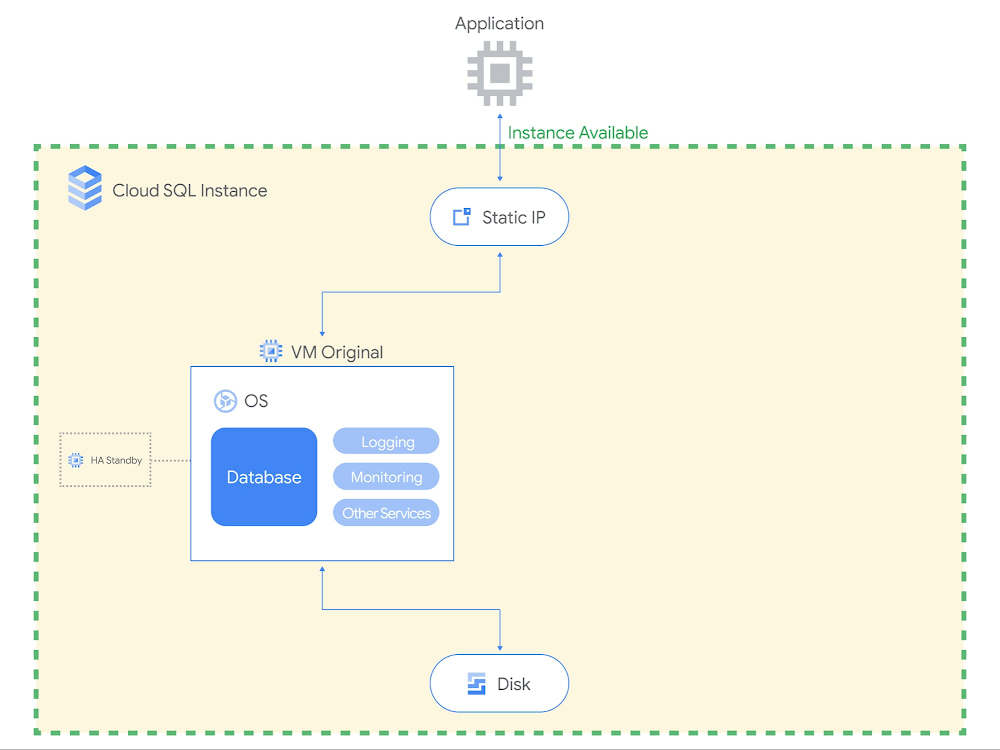
Imagine never needing to patch your database ever again. If you’ve had to previously take down your production database to update its operating system, you know patching can be quite the chore. Cloud SQL users happily cross this burden off their to-do list, since Cloud SQL manages routine database maintenance for them. But what all is included in maintenance, and how long does maintenance take to complete?In Part 1 of this blog series, I introduced how maintenance fits together with other Cloud SQL system updates to keep users’ instances running optimally. In Part 2 of this series, I’ll be going into more detail about what changes are included in Cloud SQL maintenance, how long it lasts, and how we’ve designed maintenance to minimize application downtime.What changes are made during Cloud SQL maintenance?Maintenance events are software rollouts that update a Cloud SQL instance’s operating system and the database engine. Cloud SQL performs maintenance to ensure that our users’ databases are reliable, secure, performant, and up-to-date with the latest features. Through maintenance, we deliver new Cloud SQL features, database version upgrades, and operating system patches.Cloud SQL features.In order to launch new features like IAM database authentication and database auditing, we update the database engine and install new plugins to the database.Database version upgrades. The database software providers that develop MySQL, PostgreSQL, and SQL Server deploy new releases several times a year. With each new minor version comes bug fixes, security patches, performance enhancements, and new database features. Users can check these out by reviewing the MySQL, PostgreSQL, and SQL Server release notes. We upgrade Cloud SQL instances to the most recent minor version shortly after release, so that our users benefit from running the latest database engine.Operating system patches. We continuously monitor for newly identified security vulnerabilities in the VM operating system. Upon discovery, we patch the operating system to protect customers from new exploitsThese updates require us to disconnect the database instance temporarily. While maintenance is crucial for ensuring applications run smoothly, we understand that nobody likes service disruption. We typically bundle these improvements together and schedule maintenance once every few months.How long is the database down during maintenance?As of August 2021, the typical period of connectivity loss for a database instance is:PostgreSQL – 30 seconds or lessMySQL – 60 seconds or lessSQL Server – 120 seconds or lessIf you’ve been self-managing databases and performing maintenance using rolling updates across a cluster, you may be used to even faster numbers than what is available today in database-as-a-service. We are always working to bring Cloud SQL maintenance downtime closer towards zero, and this year we completed a redesign of our maintenance workflow to significantly reduce maintenance downtime. Maintenance downtime is on average 80% shorter than it was 12 months ago. For MySQL and PostgreSQL, Cloud SQL’s average maintenance downtime is now shorter than that of Amazon RDS and Azure Database, according to figures published in online documentation as of August 2021.What happens during maintenance downtime?To understand why maintenance incurs downtime, you need to understand Cloud SQL’s maintenance workflow. Cloud SQL utilizes a shared disk failover workflow for maintenance that largely resembles our automatic failover workflow for highly available instances. In short, we set up an updated database with the new software, stop the original database, start up the updated database, and then switch over the disk and static IP to the updated database.Let’s do a walkthrough with some visuals. In the pre-maintenance state (see below diagram), the client communicates to the original VM through a static IP address. The  data is stored on a persistent disk that is attached to the original VM. In this example, the Cloud SQL instance has high availability configured, which means that another VM is on standby to take over in the event of an unplanned outage. The Cloud SQL instance is serving traffic to the application.Before maintenanceIn Step 1, as shown below, we set up an updated VM with the latest database engine and OS software. The updated VM gets fully up and running, apart from the database engine which hasn’t yet started. For highly available instances, we also set up a new standby VM as well. Note that the updated VM is set up in the same zone as the original VM, so that the Cloud SQL instance will communicate to the application from the same zone after maintenance as it did before maintenance. By installing the software update on another VM while the Cloud SQL instance is still serving traffic to the application, we substantially shorten the total downtime.Step 1: Set up updated VMIn Step 2, we gracefully shut down the database engine on the original VM. The database engine needs to be shut down so that the disk can be detached from the original VM and attached to the updated VM. Before shutting down, the database engine waits for a few seconds for ongoing transactions to be committed and existing connections to drain out. After that, any open transactions or long-running transactions are rolled back. During this process, the database stops accepting new connections and existing connections are dropped. Step 2 is when the instance first becomes unavailable and maintenance downtime begins.Step 2: Shut down original VM (downtime begins)In Step 3, the disk is detached from the original VM and attached to the updated VM. The static IP address is reconfigured to point to the updated VM as well. This ensures that the IP address the application used before maintenance remains the same after maintenance too. Note that the database cache is cycled out with the original VM, meaning that the database cache is effectively cleared during maintenance.Step 3: Switch over to updated VMIn Step 4, the updated database engine is started up on the now-attached disk. Using a single disk ensures that all transactions written to the instance prior to maintenance are still present on the updated instance after maintenance. In the event that any incomplete transactions didn’t finish rolling back during database engine shutdown, the database engine automatically goes through crash recovery in order to ensure that the database is restored to a usable state. Note that crash recovery means that downtime is higher for instances experiencing high activity when maintenance begins.Step 4: Start up updated VM (downtime ends on completion)Upon the completion of Step 4, the Cloud SQL instance is once again available to accept connections and back to serving traffic to the application.After maintenanceTo the application, apart from the updated software, the Cloud SQL instance looks the same. The application still connects to the Cloud SQL instance using the same static IP address, and the updated VM is running in the same zone as the original VM. All data written to the original database is preserved.Hopefully, these diagrams explain why maintenance still incurs some downtime, even after our improvements. We still invest in making maintenance even faster. To stay current with our latest maintenance downtime numbers, check out our documentation.What are Cloud SQL users doing to reduce impact from maintenance even further? Stay tuned for Part 3, where we will cover how users optimize for maintenance by utilizing Cloud SQL maintenance settings and designing their applications to be resilient to maintenance.Related ArticleUnderstanding Cloud SQL Maintenance: why is it needed?Get acquainted with the way maintenance works in Cloud SQL so you can effectively plan availability.Read Article
Quelle: Google Cloud Platform
Google Cloud disaster recovery using Actifio, VMware Engine and Zerto

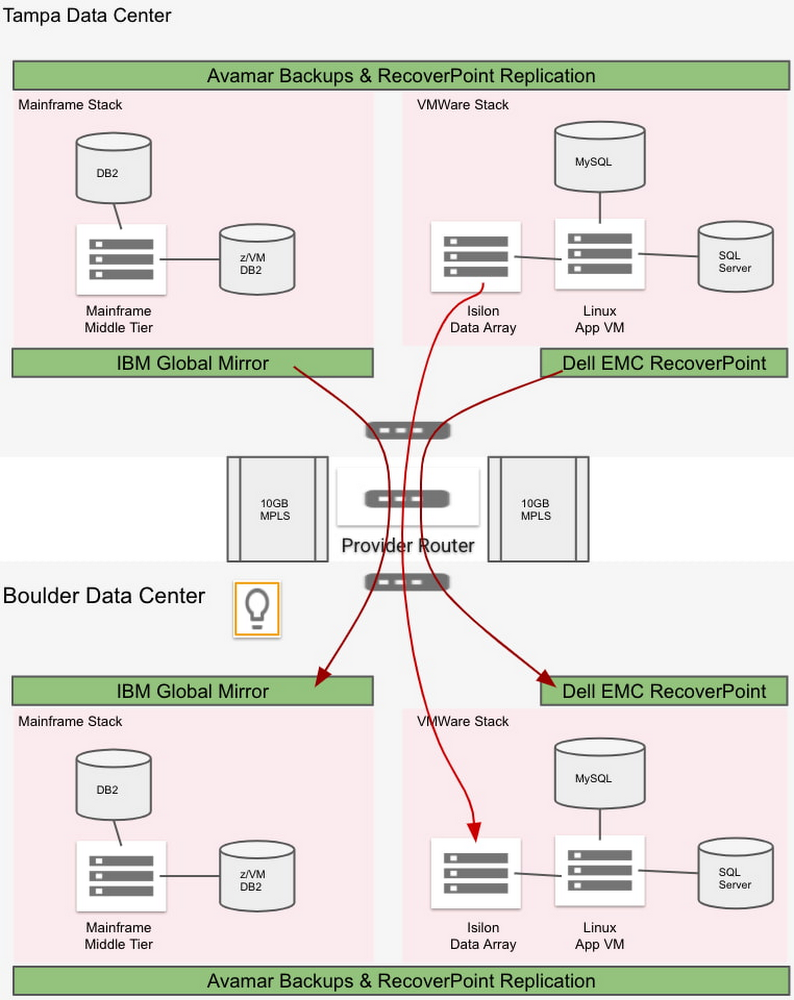
Some of the most desirable applications to move into the cloud are ones that run on proprietary platforms such as VMware, connected to enterprise storage arrays. But because those applications are often mission-critical, they can also be the most challenging—especially if they have demanding disaster recovery time objectives (RTOs) and recovery point objectives (RPOs), and are configured using an isolated, “bubble” network. We want to help you find the right DR solution for your cloud projects quickly. In this blog post, we review the basic concepts involved in doing DR in the cloud. Then, we present an example use case of a fictionalized customer, Acme Corporation. Acme has a bubble network and very short RPO/RTO of two hours and four hours, respectively. We then evaluate several popular DR solutions that meet their requirements, and show you how to deploy them in Google Cloud.Getting to know Acme Corp.Acme Corp. is your classic legacy enterprise, and runs all of its applications on VMware and mainframe infrastructure in two on-premises data centers—one primary and the other for remote DR. Acme wants to move into Google Cloud to modernize infrastructure and reduce costs. As such, it needs to find a robust disaster recovery solution for  a Google Cloud environment that can achieve its tight RPO/RTO requirements.Further complicating the design, Acme practices DR with a bubble or “isolation network,” where the VMs in primary and DR sites have the same set of private IPs. This bubble network requirement brings additional challenges to the disaster recovery architecture in the cloud. The following diagram illustrates Acme’s different stacks of system, application and data, as well as how they perform backups and disaster recovery in their current on-prem data center environment.Figure 1: On-prem network and disaster recoveryFrom the diagram, you can see the details of Acme’s setup:For its current DR strategy, Acme conducts block-level data replication for all the data and resources in its on-prem data centers. Its overall RPO is two hours, and the RTO is four hours.Acme has 500 VMs for Windows and 3000 servers in total. Avamar can take daily backups of VMs, OSs, persistent disks and databases. Data is replicated to the DR data center. These backups are not used for DR.IBM Global Mirror conducts block-level data replication for DR for the IBM mainframe stack, including the mainframe middle tier, the DB2 database (configuration table) and z/VM DB2 database (core server).Isilon (i.e., PowerScale) SyncIQ conducts data replication for DR for Acme’s Isilon file data.EMC RecoverPoint conducts data replication for DR for the VMware stack, including VMware VM-based applications, SQL Server, and MySQL databases.By migrating to Google Cloud, the following changes apply to Acme’s system and applications:Both IBM DB2 and z/VM DB2 are migrated into Compute Engine-based “Linux/Unix/Windows”, LUW DB2IBM Global Mirror is not applicable in the Google Cloud environment anymoreEMC RecoverPoint is not available in the GCP environmentIsilon, now called PowerScale, is now available as a SaaS solution in the Google Cloud environmentIn addition, when it moved to Google Cloud, Acme adopted Apigee to orchestrate its web services, and that environment also needs to be protected. Taken together, there are three major requirements that will determine the DR solution that we design for Acme’s systems running in Google Cloud:Two-hour RPO requirement for production systemsSupport for the current bubble network design and implementation, to avoid a major system and application rewriteThe ability to orchestrate the disk remount for thousands of VMs, each of which may have up to 24 disks mountedA solution for the Apigee stackBased on our team’s experience implementing this DR architecture for a real-world customer, we created this example DR solution for Acme. We divide Acme’s systems and applications in GCP into the following stacks:Apigee, the Google-provided managed service. PowerScale (Isilon), running as a third party managed service in GCP.Databases and applications running in VMs with a maximum of two-hour RPO. Production applications running in VMs with data that don’t need to meet 2-hour RPO. Exploring potential solutionsWith those requirements in mind, we explored the following approaches. Native regional DR and snapshotsGCP native regional DR via architecture design works well for cloud-native systems that are designed with HA and DR requirements. However, for Acme, this solution would require major application architecture changes. Also, this solution won’t work with bubble network constraints because IP conflicts prevent real-time VM-level traffic between the primary and DR regions.Further, this architecture relies on taking incremental snapshots for each disk. For Acme, this is unworkable: With its 3,000 servers, it will take great effort to make sure that each disk is restored from its snapshots and then mounted to the restored VM in the right order. This becomes almost impossible to manage without a multi-threading orchestration tool to automate this process under the situation of disaster recovery. We decide not to go down this path. ActifioAnother promising solution is Actifio GO, a Backup and DRService platform available on Google Cloud. It delivers backup, disaster recovery, migration to Google Cloud, database and VM cloning for test data management (TDM), and ransomware recovery, as well as enabling analytics with BigQuery. Actifio GO’s service architecture comprises several components that work in unison to deliver the service. It also supports our bubble network requirement. The following diagram illustrates the design of the Actifio DR solution for Acme.Figure 2: Actifio disaster recovery for a network with identical IPsTo support Acme’s bubble network and keep the same IP addresses in the DR region, we need the same set of Acme VPC and network settings in Acme’s Google Cloud DR region. Therefore, we have “acme-transit-DR-vpc” in the DR region mirror the “acme-transit-vpc” in the primary Google Cloud region. This is further made possible by the fact that Actifio uses Google Cloud Storage—more on that later. Actifio Global Manager (AGM) is hosted in Google’s network. AGM needs to establish VPC peering with Acme’ VPC, so it can deploy Actifio Sky into Acme’s network to work as the agents for backup and recovery. The bubble network prevents us from deploying Actifio Sky into “acme-transit-vpc” and “acme-transit-DR-vpc” because AGM will peer with two VPCs with the IP ranges. Therefore, we create separate VPCs in each region, “sky-vpc-east” and “sky-vpc-central”, to run Actifio Sky.In this configuration, since VPC peering is non-transitive (no more than two VPCs connected sequentially), AGM VPCs don’t see the peering details of individual SKY VPCs with DR and Primary VPC CIDR ranges. Thus, the CIDR ranges for “sky-vpc-east” and “sky-vpc-central” need to be carefully selected because they need to peer with AGM VPC, “acme-transit-vpc” and “acme-transit-DR-vpc” respectively. Actifio GO uses Cloud Storage to store its backup files. For local region backup only, we can use single-region Cloud Storage in the same region. For disaster recovery, we can use a Cloud Storage bucket in the DR region, improving performance. Actifio also can work with multi-region Cloud Storage buckets for high availability. Because Cloud Storage is used mainly for disaster recovery here, we recommended using either near-line or cold-line storage classes.For general VMs where Actifio cannot meet the required RPO/RTO, Acme can migrate those on-prem VMs into Google Cloud VMware Engine, as described in the next section.Google Cloud VMware Engine and ZertoGoogle Cloud VMware Engine is a fully managed service running the VMware platform natively on Google Cloud bare metal infrastructure in Google Cloud locations and fully integrating with the rest of Google Cloud. To meet Acme’s demanding RTO/RPO requirements for its most demanding applications, we explore coupling it with Zerto, a scalable replication platform that virtually eliminates data loss and downtime to ensure continuous availability. Google Cloud VMware Engine also works for mainframe applications. For these applications, the migrated OpenFrame instance can also run on VMware VMs in Google Cloud VMware Engine if needed. Then, we achieve cross-region DR using two Google VMware Private Clouds mirroring VMs using Zerto replication and restoration. Designed correctly, the RPO/RTO for this solution can be very small (RPO < 30 mins), easily satisfying Acme’s RPO/RTO (2 hours/4 hours) requirements. The following two diagrams, replication and recovery, illustrate Acme’s Google Cloud VMware Engine + Zerto disaster recovery solution.Figure 3: Google Cloud VMware Engine + Zerto Data Replication for a network with identical IPsFigure 4: Google Cloud VMware Engine + Zerto Data Recovery for a network with identical IPsThe network configuration happens mainly on the Google Cloud VMware Engine level. Google Cloud VMware Engine uses Private Service Access connection to peer with the Acme VPC to bring its VPC into the Acme network. Because Acme uses a bubble network with identical IPs in the DR region, we configure “acme-transit-vpc” in the Primary region and “acme-transit-DR-vpc” in the DR region. Also, we have “Workload Subnets” with the same CIDRs in both Google Cloud VMware Engine VPCs. Under normal circumstances, both Google Cloud VMware Engine VPCs are peered with the “acme-transit-vpc” VPC. Also, the route to the “Workload Subnets” in the GCVE-central (DR region) is turned off, so that there is no IP conflict. We configure Zerto to replicate data from GCVE-primary to GCVE-dr via the peered network connection through “acme-transit-vpc”. In the event of a disaster in the primary Google Cloud region, the peered connection between GCVE-dr and “acme-transit-vpc” is manually disconnected. Then GCVE-dr is peered with the “acme-transit-DR-vpc”. Also, the route to the “Workload Subnets” in the GCVE-dr region is turned on. Then, Zerto restores the replicated VMs, data and applications into the “Workload Subnets”. You can find detailed instructions on how to set up the Google Cloud VMware Engine VPC and configure the network connections with an existing Google Cloud VPC in the following document: Setting up private services access. PowerScale (Isilon) To protect Acme’s PowerScale (Isilon) array, we use Dell EMC Powerscale SyncIQ to replicate data between PowerScale nodes across regions via multi-NICs VM that reside in the primary region but which have a secondary Network Interface (NIC) for the bubble network in the DR region.Figure 5: PowerScale (Isilon) Disaster RecoveryApigeeLast but not least, we need to protect Acme’s Apigee environment, which it uses for microservices deployed in Google Cloud. Apigee offers a globally redundant level of data centers where traffic can be serviced in multiple regions or countries so that if an entire region goes offline, the data still flows. As shown in the diagram below, with a multi-region Apigee license in place, network traffic can be automatically routed to the disaster recovery region.Figure 6: Apigee Disaster RecoverySummaryIt’s a complicated setup, but that’s not unusual for enterprises looking to migrate a variety of demanding applications to the cloud. You can see our final Acme disaster recovery architecture in the following diagram, with current on-prem DR architecture on the left and Google Cloud DR architecture on the right.Figure 7: The Disaster Recovery Architecture OverviewTo learn more about how to configure your DR environment for Google Cloud, check out the following documentation: Actifio GO Documentation Library and Configuring disaster recovery using Zerto. Alternatively, please reach out to us—we’d be happy to explore your particular use case with you! Special thanks to our former colleague Jianhe Liao for his contributions to this blog post.Related ArticleNew in Google Cloud VMware Engine: autoscaling, Mumbai expansion, etc.A review of the latest updates to Google Cloud VMware Engine.Read Article
Quelle: Google Cloud Platform

PyTorch on Google Cloud: How to deploy PyTorch models on Vertex AI

This article is the next step in the series of PyTorch on Google Cloud using Vertex AI. In the preceding article, we fine-tuned a Hugging Face Transformers model for a sentiment classification task using PyTorch on Vertex Training service. In this post, we show how to deploy a PyTorch model on the Vertex Prediction service for serving predictions from trained model artifacts. Now let’s walk through the deployment of a Pytorch model using TorchServe as a custom container by deploying the model artifacts to a Vertex Endpoint. You can find the accompanying code for this blog post on the GitHub repository and the Jupyter Notebook.Deploying a PyTorch Model on Vertex Prediction ServiceVertex Prediction service is Google Cloud’s managed model serving platform. As a managed service, the platform handles infrastructure setup, maintenance, and management. Vertex Prediction supports both CPU and GPU inferencing and offers a selection of n1-standard machine shapes in Compute Engine, letting you customize the scale unit to fit your requirements. Vertex Prediction service is the most effective way to deploy your models to serve predictions for the following reasons:Simple: Vertex Prediction service simplifies model service with pre-built containers for prediction that requires you to only specify where you store your model artifacts. Flexible: With custom containers, Vertex Prediction offers flexibility by lowering the abstraction level so that you can choose whichever ML framework, model server, preprocessing, and post-processing that you need.Assistive: Built-in tooling to track performance of models and explain or understand predictions.TorchServe is the recommended framework to deploy PyTorch models in production. TorchServe’s CLI makes it easy to deploy a PyTorch model locally or can be packaged as a container that can be scaled out by the Vertex Prediction service. The custom container capability of Vertex Prediction provides a flexible way to define the environment where the TorchServe model server is run. In this blog post, we deploy a container running a TorchServe model server on the Vertex Prediction service to serve predictions from a fine-tuned transformer model from Hugging Face for the sentiment classification task. You can then send input requests with text to a Vertex Endpoint to classify sentiment as positive or negative.Figure 1. Serving with custom containers on Vertex Prediction serviceFollowing are the steps to deploy a PyTorch model on Vertex Prediction:Download the trained model artifacts.Package the trained model artifacts including default or custom handlers by creating an archive file using the Torch Model Archiver tool.Build a custom container (Docker) compatible with the Vertex Prediction service to serve the model using TorchServe.Upload the model with the custom container image as a Vertex Model resource.Create a Vertex Endpoint and deploy the model resource to the endpoint to serve predictions.1. Download the trained model artifactsModel artifacts are created by the training application code that are required to serve predictions. TorchServe expects model artifacts to be in either a saved model binary (.bin) format or a traced model (.pth or .pt) format. In the previous post, we trained a Hugging Face Transformer model on the Vertex Training service and saved the model as a model binary (.bin) by calling the .save_model() method and then saved the model artifacts to a Cloud Storage bucket.Based on the training job name, you can get the location of model artifacts from Vertex Training using the Cloud Console or gcloud ai custom-jobs describe command and then download the artifacts from the Cloud Storage bucket.2. Create a custom model handler to handle prediction requestsTorchServe uses a base handler module to pre-process the input before being fed to the model or post-process the model output before sending the prediction response. TorchServe provides default handlers for common use cases such as image classification, object detection, segmentation and text classification. For the sentiment analysis task, we will create a custom handler because the input text needs to be tokenized using the same tokenizer used at the training time to avoid the training-serving skew. The custom handler presented here does the following:Pre-process the input text  before sending it to the model for inference using the same Hugging Face Transformers Tokenizer class used during trainingInvoke the model for inferencePost-process output from the model before sending back a response3. Create custom container image with TorchServe to serve predictionsWhen deploying a PyTorch model on the Vertex Prediction service, you must use a custom container image that runs a HTTP server, such as TorchServe in this case. The custom container image must meet the requirements to be compatible with the Vertex Prediction service. We create a Dockerfile with TorchServe as the base image that meets custom container image requirements and performs the following steps:Install dependencies required for the custom handler to process the model inference requests. For e.g. transformers package in the use case.Copy trained model artifacts to /home/model-server/ directory of the container image. We assume model artifacts are available when the image is built. In the notebook, we download the trained model artifacts from the Cloud Storage bucket saved as part of hyperparameter tuning trials.Add the custom handler script to /home/model-server/ directory of the container image.Create /home/model-server/config.properties to define the serving configuration such as health check and prediction listener portsRun the Torch Model Archiver tool to create a model archive file from the files copied into the image /home/model-server/. The model archive is saved in the /home/model-server/model-store/ with name same as <model-name>.marLaunch Torchserve HTTP server to enable serving of the model referencing the configuration properties and the model archive fileLet’s understand the functionality of TorchServe and Torch Model Archiver tools in these steps.Torch Model ArchiverTorchserve provides a model archive utility to package a PyTorch model for deployment and the resulting model archive file is used by torchserve at serving time. Following is the torch-model-archiver command added in Dockerfile to generate a model archive file for the text classification model:Model Binary (–serialized-file parameter): Model binary is the serialized Pytorch model that can either be the saved model binary (.bin) file or a traced model (.pth) file generated using TorchScript – Torch Just In Time (JIT) compiler. In this example we will use the saved model binary generated in the previous post by fine-tuning a pre-trained Hugging Face Transformer model.NOTE: JIT compiler trace may have some device-dependent operations in the output. So it is often a good practice to generate the trace in the same environment where the model will be deployed.Model Handler (–handler parameter): Model handler can be TorchServe’s default handlers or path to a python file to handle custom TorchServe inference logic that can pre-process model inputs or post-process model outputs. We defined a custom handler script in the previous section of this post.Extra files (–extra-files parameter): Extra files allow you to package additional files referenced by the model handler. For example, a few of the files referred in the command are:index_to_name.json: In the custom handler defined earlier, the post-processing step uses an index-to-name JSON file to map prediction target indexes to human-readable labelsconfig.json: Required for AutoModelForSequenceClassification.from_pretrained method to load the modelvocab.txt: vocab files used by the tokenizerTorchServeTorchServe wraps PyTorch models into a set of REST APIs served by a HTTP web server. Adding the torchserve command to the CMD or ENTRYPOINT of the custom container launches this server. In this article we will only explore prediction and health check APIs. The Explainable AI API for PyTorch models on Vertex endpoints is currently supported only for tabular data.TorchServe Config (–ts-configparameter):  TorchServe config allows you to customize the inference address and management ports. We also configure service_envelop field to json to indicate the expected input format for TorchServe. Refer to TorchServe documentation to configure other parameters. We create a config.properties file and pass it as TorchServe config.Model Store (–model-storeparameter): Model store location from where local or default models can be loadedModel Archive (–modelsparameter):  Models to be loaded by TorchServe using [model_name=]model_locationformat. Model location is the model archive file in the model store.4. Build and push the custom container imageRun the following command to build the container image based on the Dockerfile and tag it with a name compatible with your Container Registry repository:Before pushing the image to the Container Registry, you can test the docker image locally by sending input requests to a local TorchServe deployment running inside docker.To run the container image as a container locally, run the following command:To send the container’s server a health check, run the following command:This request uses a test sentence. If successful, the server returns the prediction in the following format:After the response is verified, it confirms that the custom handler, model packaging and torchserve config are working as expected. You can stop the TorchServe local server by stopping the  container.Now push the custom container image to the Container Registry, which will be deployed to the Vertex Endpoint in the next step.NOTE: You can also build and push the custom container image to the Artifact Registry repository instead of the Container Registry repository.5. Deploying the serving container to Vertex Endpoint We have packaged the model and built the serving container image. The next step is to deploy it to a Vertex Endpoint. A model must be deployed to an endpoint before it can be used to serve online predictions. Deploying a model associates physical resources with the model so it can serve online predictions with low latency. We use Vertex SDK for Python to upload the model and deploy it to an endpoint. Following steps are applicable to any model trained either on Vertex Training service or elsewhere such as on-prem.Upload modelWe upload the model artifacts to Vertex AI and create a Model resource for the deployment. In this example the artifact is the serving container image URI. Notice that the predict and health routes (mandatory routes) and container port(s) are also specified at this step.After the model is uploaded, you can view the model in the Models page on the Google Cloud Console under the Vertex AI section.Figure 2. Models page on Google Cloud console under the Vertex AI sectionCreate endpointCreate a service endpoint to deploy one or more models. An endpoint provides a service URL where the prediction requests are sent. You can skip this step if you are deploying the model to an existing endpoint.After the endpoint is created, you can view the endpoint in the Endpoints page on the Google Cloud Console under the Vertex AI section.Figure 3. Endpoints page on Google Cloud console under the Vertex AI sectionDeploy the model to endpointThe final step is deploying the model to an endpoint. The deploy method provides the interface to specify the endpoint where the model is deployed and compute parameters including machine type, scaling minimum and maximum replica counts, and traffic split.After deploying the model to the endpoint, you can manage and monitor the deployed models from the Endpoints page on the Google Cloud Console under the Vertex AI section.Figure 4. Manage and monitor models deployed on Endpoint from Google Cloud console under the Vertex AI sectionTest the deploymentNow that the model is deployed, we can use the endpoint.predict() method to send base64 encoded text to the prediction request and get the predicted sentiment in response.Alternatively, you can also call the Vertex Endpoint to make predictions using the gcloud beta ai endpoints predict command. Refer to the Jupyter Notebook for complete code.Cleaning up the environmentAfter you are done experimenting, you can either stop or delete the Notebooks instance. Delete the Notebook instance to prevent any further charges. If you want to save your work, you can choose to stop the instance insteadTo clean up all Google Cloud resources created in this post and the previous post, you can delete the individual resources created:Training JobsModelEndpointCloud Storage BucketContainer ImagesFollow the Cleaning Up section in the Jupyter Notebook to delete the individual resources.What’s next?Continuing from the training and hyperparameter tuning of the PyTorch based text classification model on Vertex AI, we showed deployment of the PyTorch model on Vertex Prediction service. We deployed a custom container running a TorchServe model server on the Vertex Prediction service to serve predictions from the trained model artifacts. As the next steps, you can work through this example on Vertex AI or perhaps deploy one of your own PyTorch models.ReferencesDeploying models on Vertex Prediction serviceCustom container requirements for prediction | Vertex AIGitHub repository with code and accompanying notebookIn the next article of this series, we will show how you can orchestrate a machine learning workflow using Vertex Pipelines to tie together the individual steps which we have seen so far, i.e. training, hyperparameter tuning and deployment of a PyTorch model. This will lay the foundation for CI/CD (Continuous Integration / Continuous Delivery) for machine learning models on the Google Cloud platform.Stay tuned. Thank you for reading! Have a question or want to chat? Find authors here – Rajesh [Twitter | LinkedIn] and Vaibhav [LinkedIn].Thanks to Karl Weinmeister and Jordan Totten for helping and reviewing the post.
Quelle: Google Cloud Platform

VMs and their relevance to a cloud-native future: A conversation

VMs and their relevance to a cloud-native future: A conversationLast week, we published the first episode of VM End-to-End, a series of curated conversations between a “VM skeptic” and a “VM enthusiast”. Join Brian and Carter as they explore why VMs are some of Google’s most trusted and reliable offerings, and how VMs benefit companies operating at scale in the cloud. Here’s a transcript of the first episode:Carter Morgan (VM skeptic): My team asked me to research VMs and see how they compare to other cloud-native approaches, like microservices, containers, and serverless. And to be honest with you, I am not excited about it at all. So I’ve brought in someone who is, Brian, resident VM expert. Welcome, Brian!Brian Dorsey (VM enthusiast): Hello. I’m super happy to be here, because I am really excited about VMs.Carter: How? See this is why I wanted to bring you here. I don’t understand how you can be so excited about VMs, already?Brian: How can you not? It is like the best of both worlds. You’ve got a stable, reliable system you can run anything on, and you’re in the cloud, close to all of the new features, and you get new automation tooling.Carter: See, that’s what I’m kind of skeptical about. When I think about the features of a modern system, I’m not sure that a VM can provide me with those.Brian: Okay. Well, let’s be kind of specific there. What do you mean by a modern system?Carter: When I think about a modern system, I think about things like modularity. I think about scalability and reliability. I want automation. I don’t want to have to do everything manually. I even think about portability and being able to move my workloads wherever they need to go. I also don’t want to implement everything by hand. I don’t want to have to do everything myself. Is that something I can get with a VM?Brian: Yeah. Great, because I actually think we can get most of that, and I wonder, why not? Let’s go one level deeper and then we’ll come back out. In your mind, what is a VM?Carter: Oh, you’re putting me on the spot, Brian?!Brian: Yep.Carter: Okay. A VM, it’s a computer, but it’s a virtualization. It’s a slice of a computer. And so, what it lets you do is it lets you run multiple operating systems on one machine, so it looks like you have multiple machines running on one physical machine.Brian: Yep. Absolutely. And in the cloud kind of not.Carter: Oh, what?Brian: Yeah. So here’s why I say not. The obstructions are all there, so you’ve got memory CPU, disk, networking. And instead of from one computer, in the cloud, that’s coming from all of the computers in a data center. So the CPU is coming from a lot of machines. The networking is from the whole data center. And so, I like to think about it as instead of a slice of a computer, it’s a slice of the data centerCarter: Instead of a slice of a computer, it’s a slice of a data center. That sounds interesting. Impressive, even. But also abstract. Do you have some examples of features that you can get from a cloud VM that you can’t get from a traditional VM on one machine?Brian: My turn to be specific. Yeah. I think one example is like bin packing. You talk about these VMs, and their different shapes. So you have one that needs a lot of CPU and another that needs a lot of memory. Maybe you’ve got a bunch of them that need a lot of CPU and they don’t fit so well in the same box without orphaning some of the memory or CPU. And if you’re running those in a whole data center, or you can basically just leave it to Google to solve that problem, you can just have whatever shape machine you want and we’ll figure out where to put it. Basically, that lets you customize your machines to exactly what you need.Carter: Okay. That’s very interesting, because that’s a hard problem. And so, if you can just let Google handle where your workloads are going to go, that’s a good benefit. If that’s the only benefit of cloud VMs though, I’m not sure I’m sold on them over other approaches. Is there anything else we got?Brian: Absolutely. There’s a ton of stuff we could talk about in terms of automation and other things. But I think another really concrete example is disks, and it’s kind of my favorite there, because you think about a physical disk and you read and write blocks from it, right? It’s a block device. In the data center level, those blocks could be on hundreds or thousands of different machines, and so all of them are working together to give you more reliability and make things smoother, more predictable in terms of performance. So what you get out of it is something that looks a lot like a SAN, you can take backups of disks that are running even, or if you’ve run out of space, like I think almost all of us have, you can just make the disk bigger. So, things like that.Carter: That’s impressive, especially like you’re saying being able to run and just scale up, scale down or resize. Okay. Then another very targeted question. It’s going to sound like a dig. I don’t mean it to you. Google’s putting a lot of effort and resources into Google Kubernetes Engine (GKE). And so, is Google even still investing in VMs?Brian: Absolutely. Where do you think these containers run? Every Kubernetes cluster is running on top of a whole bunch of VMs. And so, everything you learned about VMs applies to those clusters that you’re running. Also, another example is our managed databases, so Cloud SQL. So if you’re running Postgres or MySQL on a Cloud SQL, that’s running on VMs. And there’s a bunch of other examples, too.Carter: I can’t get away from VMs, even if I tried, it sounds like.Brian: Nope.Carter: Okay. The way you’re saying that is making me think that maybe I need to rethink my idea that VMs are just old, dusty pieces of technology. So I want to be clear, definitively, are you saying that VMs have a place in a cloud-native future?Brian: Absolutely. I want to take old and dusty and turn that into mature and reliable. Then the future part, all these things are built on top of it and we’re building new things over time. So we’ve got tools for scaling clusters of machines up and down. That’s using Kubernetes, but you can use it directly. And we keep investing and doing more and more things there. So, absolutely, part of the future as well.Carter: Okay. Then what about if I wanted to switch to them? I’m pretty familiar with Kubernetes. It’s fairly easy to get started. What about with VM? Is it going to take me years to get started on these?Brian: No. It’s just a computer. Basically, anything that’s already running on a computer somewhere, even if you don’t have the team who built it nearby, you can run that on a VM and in turn you can run it on a cloud VM and get a bunch of the cloud benefits as well.Carter: All right. I must admit that you’ve swayed me a little bit. I’m still skeptical, but what you said made a lot of sense. I still have a lot of questions. I want to know about keeping costs down. I want to know how to update VMs. I have this idea in my head that they’re really slow to start and stop. Stateful data, I’m curious about that.Brian: Awesome. How much time do you have?Carter: All right. You know what, let’s have this convo another day, and maybe, just maybe we can agree that VMs do matter in a cloud-native future.Related Article5 things you didn’t know about the new Tau VMsLearn about Google Cloud’s new Tau VM family, including its first instance type, T2D VMs.Read Article
Quelle: Google Cloud Platform

The new Google Cloud region in Toronto is now open

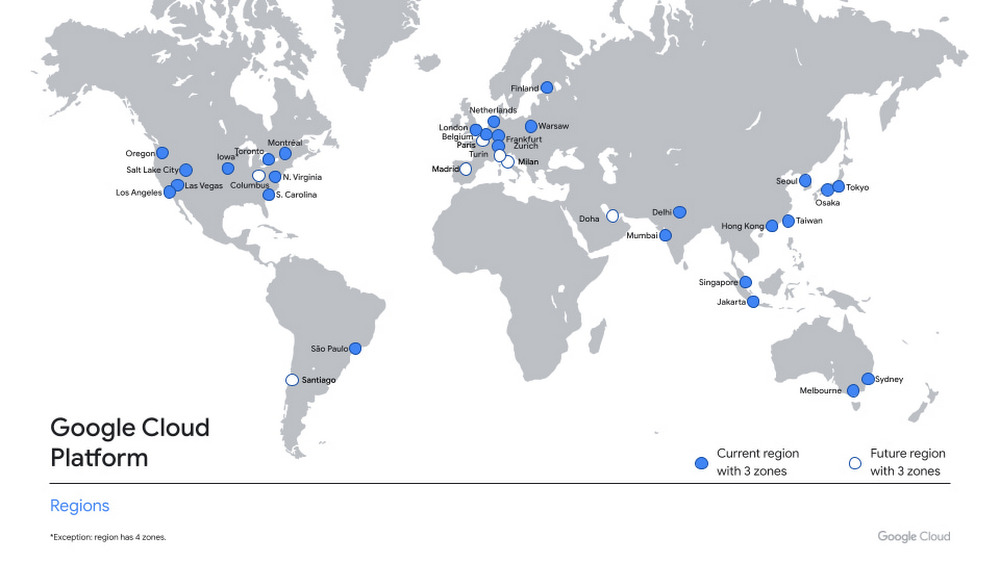
For over a decade, we’ve been investing in Canada to become a go-to cloud partner for organizations across the country. Whether they’re in financial services, media and entertainment, retail, telecommunications or the public sector, a rapidly growing number of organizations located or operating in Canada are choosing Google Cloud to help them build applications better and faster, store data, and deliver awesome experiences to their users, all on the cleanest cloud in the industry. To support this growing customer base, we’re excited to announce that the new Google Cloud region in Toronto is now open. As you’d expect, we’re thrilled about this news, but we aren’t the only ones that have been looking forward to this launch. We asked some of our customers operating in Canada for their take on the upcoming cloud region. Here’s what they had to say:”Our alliance with Google is truly distinctive in the Canadian market as we are working together to co-innovate and create new services for key industries, including communications technology, healthcare, agriculture, security, and the connected home. The new cloud region in Toronto marks another key milestone that will propel TELUS’ digital leadership by further leveraging the scalability, reliability and cost effectiveness of Google Cloud to support improved customer experience and build stronger, healthier and more sustainable communities.”—Hesham Fahmy, Chief Development Officer, TELUS “We’re simplifying, modernizing and digitizing Scotiabank to enhance the customer experience for our 25 million customers across the globe. By leveraging powerful cloud-based services including Google Cloud, we’re able to put the most advanced software engineering, data analytics and machine learning tools in the hands of our talented employees. We welcome Google Cloud’s investment in Toronto and look forward to the opportunities the Toronto Cloud Region will present to our Technology team.”—Michael Zerbs, Group Head Technology & Operations, Scotiabank “Cloud technologies—and the access to scalable compute, rich geospatial datasets and smart analytics tools—will be critical  contributors to support climate action and sustainable policy decisions. At Natural Resources Canada, scientists and researchers are applying innovative digital solutions to support Canada’s natural resource sector. The new Google Cloud region in Toronto will provide our scientists, technologists and researchers with the products and services necessary to turn Earth data into actionable insights.”—Vik Pant, PhD, Chief Scientist and Chief Science Advisor, Natural Resources Canada “At Accenture, we bring together technology and human ingenuity to create and respond to change. We’re thrilled to join forces with Google Cloud and their newest region in Toronto with an important mutual goal: to accelerate cloud innovation in Canada. Our clients already know us for our deep industry intelligence, cloud-first expertise and market-renowned delivery. We’re now combining that with Google’s human-centric design to bring even more opportunities to our clients across all industries.”—Jeffrey Russell, President of Accenture in Canada. “We are thrilled to see Google’s commitment to Canada. We look forward to helping our joint customers transform their operations, leveraging Google Cloud’s latest data center in Toronto. At Deloitte, we believe cloud is THE opportunity to reimagine everything.”—Terry Stuart, Deloitte Chief Digital Officer, Canada. “As Canadian organizations increasingly leverage cloud to transform their businesses, we are excited about the new opportunities that the Toronto Google Cloud region brings to the market. We look forward to continuing our strong partnership with Google Cloud to bring customized and innovative solutions that help Canadian companies fully realize the value of cloud technology, so that they can compete and win on the global stage.”—Andrew Caprara, Chief Operating Officer, Softchoice Toronto joins 27 existing Google Cloud regions connected via our high-performance network, helping customers better serve their users and customers throughout the globe. In combination with our Montreal region, customers now benefit from improved business continuity planning with distributed, secure infrastructure needed to meet IT and business requirements for disaster recovery, while maintaining data sovereignty.The new region launches with three zones, allowing organizations of all sizes and industries to distribute apps and storage to protect against service disruptions, and with our core portfolio of Google Cloud Platform products, including Compute Engine, App Engine, Google Kubernetes Engine, Bigtable, Spanner, and BigQuery.We’re working to bring you new cloud products and capabilities in Canada, and our goal is to allow you to access those services quickly and easily—wherever you might be in the country. The past year has proved how important easy access to digital infrastructure, technical education, training and support are to helping businesses respond to the pandemic. We’re particularly proud of the teams who faced the unique challenges of building a cloud region during this time to help our customers and community accelerate their digital transformation.  To support all of our users, customers and government organizations in Canada, we’ll continue to invest in new infrastructure, engineering support and solutions. We’re currently hosting our first ever Google Cloud Accelerator Canada to bring the best of Google’s programs, products, people and technology to startups doing interesting work in the cloud. We’ve recently received Protected B accreditation with Canadian Centre for Cyber Security, which is crucial for healthcare, education, and regulated industries adopting cloud services. We’re also pleased to announce the preview of Assured Workloads for Canada—a capability which allows you to secure and configure sensitive workloads in accordance with your specific regulatory or policy requirements. For help migrating to Google Cloud, please contact our local partners. For additional details on Google Cloud regions, please visit our locations page, where you’ll find updates on the availability of additional services and regions. You can always contact us to help you get started or access our many educational resources. We’re excited to see what you build next with Google Cloud.Related ArticleGCP arrives in Canada with launch of Montréal regionLa version française est ici: La plateforme infonuagique de Google (Google Cloud) fait son entrée au Canada avec son lancement à MontréalRead Article
Quelle: Google Cloud Platform

How Veolia’s API-first approach is powering sustainable resource management

When you think of water, waste, and energy management, you may think of pipes, wires, cables, and waste recycling – but as Veolia Group is demonstrating, more sophisticated cloud technologies are becoming increasingly vital too. APIs and API management, in particular, have emerged as a cornerstone of Veolia’s technology strategy, with Apigee, Google Cloud’s API management platform, serving as a “central nervous system for our data,” said Pascal Dalla-Torre, Group CTO at Veoilia. APIs and API management form the foundation for use cases across the company that range from modernizing management of those pipes and waste recycling, to unlocking new revenue opportunities, to enabling more efficient ways of partnering both across business units and externally. And they’re driving results: Dalla-Torre says that in the first half of 2021, APIs helped his team double the number of partners it works with, to more than 40. APIs aren’t new for Veolia, which serves businesses and municipalities in 52 countries. The company has been using APIs for years for tasks such as IT modernization, with APIs allowing different legacy systems to interoperate, even if they were never designed to do so. But these integration projects are often bespoke one-offs, and Veolia wanted to go beyond simply connecting systems. By building and managing standardized APIs that are shared across internal clients, Dalla-Torre’s team helps these business units to better serve municipalities and other customers. Without a centralized API effort, different internal developers could easily duplicate and muddy one another’s efforts. Different business units might redundantly create new APIs instead of reusing existing ones, or they might build APIs atop systems using different data structures and approaches, each competing with the others to be the “source of truth” for various projects. A managed API platform eliminates these problems, providing internal developers with consistent access to data and functionality that they can granularly combine for new apps or customer services. “Development has been a lot faster” since the company invested in Apigee, says Pascal Dalla-Torre. He added that projects that once took years now take months, weeks or even days. These more agile approaches to APIs, as well as data analytics technologies in the cloud, are helping Veolia to improve facilities maintenance, for example. “Turning off a fleet of incinerators is expensive,” notes Dalla-Torre. “But by connecting data sources to analytics services via APIs, maintenance needs can be projected more precisely. Rather than turning off an entire system and manually inspecting physical infrastructure, we can focus on areas most likely to need servicing while leaving the rest of the system up and running.” Another example, and one of the first significant projects built under this API-first approach, was a water management developer portal that lets large municipalities and other customers access Veolia APIs that connect to crucial data on water consumption, leaks, water quality, and other variables. Equipped with these digital assets, customers can then build new digital experiences for their own projects, such as an app to help consumers understand their water usage or services to monitor water quality or potential leaks. Armed with best practices derived from the water management portal, Veolia has adopted an API-first approach throughout the company and in just the first five months of 2021, traffic to these APIs quadrupled.In this model, APIs are essentially products for developers, and like any digital product, they need to be managed so that Dalla-Torre’s team can secure them, learn from their usage, iterate on them, and establish best practices. “It arms us with the necessary tools to scale, secure, and measure our APIs to deliver the best experience to our customers and partners,” he said. “Apigee helps us quickly and easily deliver great customer experiences. It abstracts away the backend IT complexity, and helps us provide information and data to our customers quickly, consistently and securely,” says Pascal Dalla-Torre.What’s more, the same API platform that Veolia uses internally is available to customers, partners, and other third parties, creating multiple tracks of innovation around the firm’s digital assets, both inside and outside of the company. By letting third parties combine Veolia data and functionality with their own APIs, the companies are  unlocking opportunities to increase the variety of ways their digital assets are leveraged for revenue-driving services, whether through their own projects or those of partners. “APIs allow Veolia to access new ecosystems and partners that will bring new innovation opportunities for us,” says Dalla-Torre.By creating an API ecosystem that enables internal and external developers to securely access the data and services they need to build new applications, Veolia demonstrates the differences between merely using technology and becoming a technology-first organization.To learn more about how APIs and Apigee API management are used by many other companies like Veolia, read The State of the API Economy 2021 report.Related ArticleRead Article
Quelle: Google Cloud Platform



