Building and expanding network services for a smart and connected world

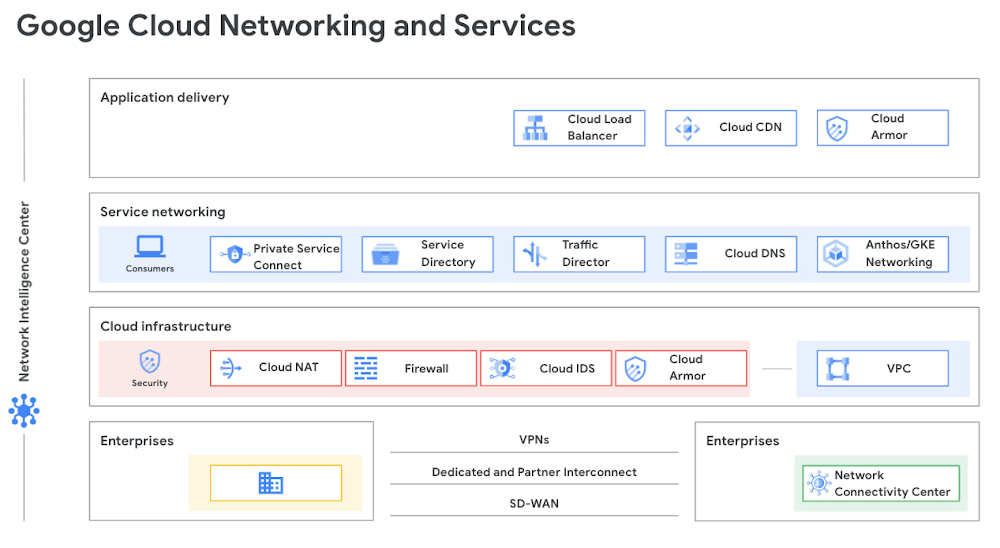
Organizations are increasingly adopting multicloud implementations and hybrid deployments as a part of their cloud strategy. Networking is at the foundation of this digital transformation. Google has built a massive planet-scale network infrastructure serving billions of users every day. Our global network continues to expand in footprint with four new regions announced this year in Chile, Germany, Saudi Arabia and Israel. Regions in Delhi NCR, Melbourne, Warsaw and Toronto are now open. We also announced six new subsea cables which connect different parts of the world. Google Cloud offers a broad portfolio of networking services built on top of planet-scale infrastructure that leverages automation, advanced AI, and programmability, enabling enterprises to connect, scale, secure, modernize and optimize their infrastructure, without worrying about the complexity of the underlying network. In the past year, we’ve made several advancements to our networking services stack, from layer 1 to layer 7, so you can easily and flexibly scale your business. And what better time to discuss this progress as we gear up for Next ’21!Click to enlargeSimplify connectivity for hybrid environmentsLet’s start with connectivity. Networking can get complex, especially in hybrid and multicloud deployments. That’s why we introduced Network Connectivity Center in March as a single place to manage global connectivity. Network Connectivity Center provides deep visibility into the Google Cloud network with tight integration with third-party solutions. In May, we integrated Network Connectivity Center with Cisco, Fortinet, Palo Alto Networks, Versa Networks and VMware to be able to use their SD-WAN and firewall capabilities with Google Cloud, and Network Connectivity Center will be generally available for all customers in October. Operate confidently with advanced securityThe network security portfolio secures applications from fraudulent activity, malware, and attacks. Cloud Armor, our DDoS protection and WAF service, has four new updates:Integration with Google Cloud reCAPTCHA Enterprise bot and fraud management (in Preview). Learn more in the blog here.Per-client rate limiting, including two rule actions: throttle- and rate-based-ban are available (also in Preview). Both bot management and rate limiting are available in Standard and Managed Protection Plus tiers. Edge security policies allow you to configure filtering and access control policies for content that is stored in cache for Cloud CDN and Cloud Storage; this feature is also now in Preview. Adaptive Protection, our ML-based, application-layer DDoS detection and WAF protection mechanism, is now Generally Available. Other updates in the area of network security include: Cloud IDS, developed with threat detection technologies from Palo Alto Networks, was announced in July and is currently in Preview.In Cloud firewalls, the Firewall Insights capability has expanded, and hierarchical rules became available earlier this year. Cloud NAT has released in Preview new scaling features: destination-based NAT rules and dynamic port allocation.The solution blueprint for Cloud network forensics and telemetry, along with a companion blog comparing methods for harvesting telemetry for network security analytics are both available.Consume services faster with service-centric networkingPrivate Service Connect is a service-centric approach to networking that simplifies consumption and delivery of applications in the cloud. We’re adding support for HTTP(S) Load Balancer, which gives you granular control over your policies, and enables new capabilities such as vanity domain names and URL filtering. It provides tighter integration with services running on Google Kubernetes Engine (GKE) and provides more flexibility for the producers offering managed services. You can connect to services like Bloomberg, Elastic and MongoDB via Private Service Connect so you can develop apps faster and securely on Google Cloud.“MongoDB’s partnership with Google is an integral part of our strategy to support modern apps and mission-critical databases and to become a cloud data company. Private Service Connect allows our customers to connect to MongoDB Atlas on Google Cloud seamlessly and securely and we’re excited for customers to have this additional and important capability.” said Andrew Davidson, VP of Cloud Product at MongoDB.Lastly, managed services in Private Service Connect are now auto-registered with Service Directory in the consumer network, making service consumption even simpler.  Service-centric networking extends to GKE and Anthos, which provide a consistent development and operations experience for hybrid and multicloud environments. With Anthos network gateway in Preview, you get more service-centric networking control for your Anthos clusters, with features like Egress NAT Gateway and BGP-based load balancing. With Anthos network gateway, you can streamline costs by removing dependencies on third-party vendors. We’ve added Multi-NIC pod capabilities to our Anthos clusters, allowing customers and partners to offer services by using containerized network functions.Finally, as your GKE clusters grow in size, scalability becomes a big concern. With discontiguous pod CIDR, IP addresses are now a mutable resource, allowing you to increase your cluster size dynamically. No more deleting and recreating the cluster to increase their cluster size.Deliver applications to users anywhereWith Google Cloud’s extensive global network footprint, Cloud Load Balancing can help bring apps in single or multiple regions as close to your users as possible. Cloud Load Balancing now includes advanced traffic management for finer-grained control over your network traffic. These also include Regional Load Balancers which provide additional jurisdiction compliance for workloads that require it. Additionally we support hybrid load balancing capabilities where you can load balance on-prem and multicloud services. In order to serve apps to users quickly with the right level of redundancy and granularity, we are announcing DNS Routing Policiesin Cloud DNS. Now in Preview, this feature lets you steer traffic using DNS, with support for geo-location and weighted round robin policies. We’re also excited to announce that Cloud Domains will be generally available in October. Cloud Domains makes it easy for our cloud customers to register new domains or transfer in existing ones. Cloud Domains is integrated with Cloud DNS to make it easy to create public DNS zones and enable DNSSEC.Adopt proactive network operationsWe have made some exciting strides in Network Intelligence Center, our network monitoring, verification and optimization platform designed to help you move from reactive to proactive network operations. We announced General Availability of Dynamic Reachability within Connectivity Tests module, and General Availability of the Global Performance Dashboard. With Dynamic Reachability, you can get VM-level granularity for loss and latency measurements. Global Performance Dashboard shows real-time overall Google Cloud network performance metrics such as latency and packet loss, so you can correlate per-project performance metrics to the rest of Google Cloud. Find out more at Next ‘21 We have some great deep dive networking sessions at Next ‘21 with our product managers and engineers. Please join us and hear from our product leaders, partners and customers on how to leverage the Google Cloud network for your next cloud initiative. Register for Next and build your custom session playlist today!Sessions:INF105 – What’s new and what’s next with networkingINF205 – Simplifying hybrid networking and servicesINF212 – Delivering 5G networks and ecosystems with distributed cloudINF304 – Next generation load balancingINF305 – Monitor and troubleshoot your network infrastructure with centralized monitoringPAR205 – Google Cloud IDS for Network-based Threat Detection with Palo Alto NetworksSEC211 – Innovations in DDoS, WAF, firewall & network-based threat detectionHOL115 – HTTP Load Balancer with Cloud Armor
Quelle: Google Cloud Platform

Built-in transparency, automation, and interoperability for Cloud KMS

Cloud KMS helps customers implement scalable, centralized, fast cloud key management for their projects and apps on Google Cloud. As use of Cloud KMS has grown, many organizations have looked for ways to better understand crypto assets and to make more informed decisions around data management and compliance.  In response, the Cloud KMS team is pleased to announce several new features to help customers meet goals around increased transparency, improved interoperability, and greater automation as they use Cloud KMS.Transparency:  Key Inventory DashboardOne major request we’ve heard from our largest adopters of Cloud KMS is for improved transparency around their crypto inventory. The newly-launched Key Inventory Dashboard helps customers more easily explore, search, and review the keys used in their organization, all from one place in the Google Cloud Console.Key Inventory Dashboard provides you comprehensive information about your cryptographic keys, details such as key name, creation date, latest/next rotation dates and rotation frequency, among many other attributes. These insights are comprehensively presented in table form, which makes it easy to sort and filter keys by various attributes.Key Inventory Dashboard summarizes details about each key in a project –including key name, region, and rotation frequencyFiltering results in Key Inventory Dashboard using Key attributesThe Key Inventory Dashboard is just the first step — stay tuned for announcements in the coming months about additional ways we’re bringing increased transparency to customers’ key inventory.Interoperability:  PKCS#11Today, customers need to use the Cloud KMS API to make use of Cloud KMS or Cloud HSM.  But we know that many customers want (and sometimes need) to use the PKCS#11 standard to allow their applications to make use of Google Cloud cryptography.  We want to support these needs while also giving customers more options for easily integrating their applications and infrastructure with Google Cloud.Our Cloud KMS PKCS #11 Library – an open source project now in General Availability – allows you to access software keys in Cloud KMS or hardware keys in Cloud HSM and use them for encrypt and decrypt operations with the PKCS #11 v2.40 API.  Additionally, we are announcing that this library is being made available as an open source project and we welcome the community’s contributions for possible inclusion in subsequent versions.Our investment in the PKCS#11 library is one of several efforts to increase customer ease of integrating their applications and infrastructure with Google Cloud.  As we continue to plan new ways for customers to make use of Cloud KMS, we welcome additional customer feedback about what encryption features and methods will be most helpful in bringing more data and workloads to Google Cloud.Automation: Variable Key Destruction and Fast Key DeletionThrough improved automation, customers now have the ability to decide how long after they schedule a key for destruction that destruction will occur, as well as additional assurance about how quickly Google will fully purge customers’ destroyed key material.For newly created or imported software or hardware keys, customers may use our new Variable Key Destruction feature to specify a length  of time between 0-120 days (for imported keys) and 1-120 days (for non-imported keys created within Google Cloud) that a key will remain in “Scheduled for destruction” state after a customer requests the key to be destroyed.  This increased control and automation means that customers can specify the destruction window that is right for them.  Customers who need to destroy keys very shortly after attempting to do so can rest assured that their keys will be destroyed more quickly; alternatively, those who want a longer window to prevent inadvertent key destruction may opt for this. In all cases, customers may specify a key destruction window that has day, hour, or even minute-level granularity.Once a customer key has been destroyed, our new Fast Key Deletion functionality – rolling out by late October – will assure customers that all remnants of their destroyed key material will be fully purged from all parts of Google’s infrastructure.  Fast Key Deletion reduces Google’s data deletion commitment on destroyed keys from 180 days to 45 days. This means that all traces of destroyed key material will now be completely removed from Google’s data centers no later than 45 days after the time of destruction.  While Google completely purges all key material that customers want to destroy, customers who import keys to Google Cloud now have new options to recover keys once they are destroyed.  With the new Key Re-Importfeature, imported keys previously listed in “Destroyed” state can be restored to “Enabled” by re-uploading the original key material.  Re-Import can be conducted both via the command line interface as well as via Cloud Console.  This allows customers with imported keys who purposefully destroyed a key or who accidentally destroyed a key to later reimport that key.Key Re-Import allows customers to re-import key material for keys that were previously destroyed.What’s Next for Cloud KMSWe’re continuing our work to make encryption from Google Cloud the most complete, secure, and easy-to-use of any major cloud provider. Stay tuned for further updates on how we’re working to deliver additional transparency, interoperability, and automation. As always, we welcome your feedback. To learn more about all the features of Cloud KMS, see our documentation.Related ArticleNew Google Cloud whitepaper: Getting the most out of your Cloud Key Management ServiceThe Google Cloud security team published a whitepaper titled “Cloud Key Management Service Deep Dive” to help you get the most out of clo…Read Article
Quelle: Google Cloud Platform

Build and run a Discord bot on top of Google Cloud

Stuck at home these past–checks calendar–732 months, I’ve been spending a lot more time on Discord (an online voice, video and text communications service) than I ever thought I would. Chatting with far-flung friends, playing games, exploring, finding community as I am able, and generally learning about a platform I had not used all that much before the pandemic. And part of that fun was seeing all the cool bots people have made on Discord to liven things up: moderation, trivia, and games: many little, weird, random games. So I wondered: could I make one? Since bots are just code that interact with Discord’s APIs, they have to have a computer to run on. Cool, I have one of those. But I don’t want my bot to disappear just because my computer is off, so I need something better: a computer that can always stay on. Reliable infrastructure. If only I could find that somewhere…What would it take to actually run a bot on someone else’s (ie. Google’s) computers?I’m assuming here that you’ve set up your Discord developer account, made a New Application (with a clever name of course), got the bot token from the menu under Settings > Bot > Token (have to Copy or Reveal), and have that stored safely on a sticky note by your desk.Now, on to Google Cloud! First make sure you have an account set up and are able to create new resources. We’ll need a Virtual Machine (VM), part of Google Compute Engine. In Google Cloud, make a new project, head to Compute, and create a new instance. The smallest instance is going to be fine for this Hello, World example, so let’s use an f1-micro instance, because it’s free! To get that going I chose us-east1 as my region, Series N1, then Machine type f1-micro.Click to enlargeWhile I love me some serverless architecture, and it’s usually much lower overhead, in this case we want to have a persistent instance so there’s always a process ready to respond to a request, via the Discord API. We want to avoid any timeouts that might emerge if a serverless solution takes time to spin up listeners. At the same time, we need to avoid having more than one process running, otherwise we could have multiple responses to a Discord signal, which will be confusing.In choosing our VM we need something running Python 3.5+, to support our Discord bot code. The default (as I write) is Debian GNU/Linux 10 (buster) which is running Python 3.7, good enough for us! Once the VM is live we can start getting our code setup on it. You’ve got a few options for connecting to the Linux VMs.  Once you’ve done so, time to install and run some code!To run our code we want to install and setup pip (package installer for python), usingThen run…to install the Discord library onto your server.We can drop our code directly into a new bot.py file; organizing it into more structured files will come after we move past the Hello, World! stage. For now you’ll hard code the bot token into bot.py, even though that gives me the shivers.And now we’re ready to run our bot!python3 bot.pyAnd you can add it to our server by going back to the Discord Developer portal, select our App, and look under Settings for OAuth2. Once you choose the right scope (we can stick with just bot for now), a new link will appear below the Scopes box, starting withLoading that in your browser is all it takes to add you new bot the the server you have permissions to manage, and now you are all set! Test it out by sending the message `..hello` to your server.You can read more about the Free Tier for Compute Engine and other services, and come back next time for a deeper exploration into operations for your Google Cloud-powered Discord bot.Related ArticleWhat are the components of a Cloud VM?Join Brian and Carter as they explore why VMs are some of Google’s most trusted and reliable offerings, and how VMs benefit companies ope…Read Article
Quelle: Google Cloud Platform

Monitoring feature attributions: How Google saved one of the largest ML services in trouble

An emergency in the largest MLOps at GoogleClaudiu Gruia is a software engineer at Google who works on machine learning (ML) models that recommend content to billions of users daily. In Oct 2019, Claudiu was notified by an alert from a monitoring service. A specific model feature (let us call this feature F1) had reduced in importance. The importance of the feature is measured using the concept of Feature Attribution, the influence of the feature on the model’s predictions. This reduction in importance was associated with a large drop in the model’s accuracy.The attribution (feature importance) of the feature F1 dropped suddenlyIn response to the alert, Claudiu quickly retrained the model, and the two other features (F4 and F6 below) rose in importance, effectively substituting for F1, eliminating the drop in model quality. Had it not been for the alert and Claudiu’s quick fix, the user-experience of a large consumer service would have suffered.After the retraining, the feature F4 and F6 covered the F1 lossMonitoring without the ground truthSo what happened? F1 was a feature generated by a separate team. On further investigation, it was found that a certain infrastructure migration caused F1 to significantly lose coverage and consequently its attribution across examples.The easiest way to detect this kind of model failure is to track one or more model quality metrics (e.g., accuracy), and alert the developer if the metric drops below a threshold. But unfortunately, most model quality metrics rely on comparing the model’s prediction to “ground truth” labels which may not be available in real-time. For instance, in tasks such as fraud detection, credit lending or estimating conversion rates for online ads, the groundtruth for a prediction may lag by days, weeks or months. In the absence of the ground truth, ML engineers at Google rely on proxy measures of model quality degradations, derived using model inputs and predictions as two available observables. There are two main measures:Feature Distribution monitoring: detecting the skew and drift of feature distribution Feature Attribution monitoring: detecting the skew and drift of feature importance scoreIn the recent post Monitor models for training-serving skew with Vertex AI, we explored the first measure, Feature Distribution monitoring, for detecting any skew and anomalies happening in the feature itself at the serving time (in comparison to training or some other baseline). In the rest of this post, we discuss the second measure, Feature Attribution monitoring, which has also been successfully used to monitor large ML services at Google.Feature Attributions monitoringFeature Attributions is a family of methods for explaining a model’s predictions on a given input by attributing it to features of the individual inputs. The attributions are proportional to the contribution of the feature to the prediction. They are typically signed, indicating whether a feature helps push the prediction up or down. Finally, attributions across all features are required to add up to the model’s prediction score.(Photo by Dlanglois, CC BY-SA 3.0)Feature Attributions have been successfully used in the industry and also at Google to improve model transparency, debug models, and assess model robustness. Prominent algorithms for computing feature attributions include SHAP, Integrated Gradients and LIME. Each algorithm offers a slightly different set of properties. For an in-depth technical discussion, refer to our AI Explanations Whitepaper.An Example of Feature AttributionsMonitoring Feature AttributionsWhile feature distribution monitoring is a handy tool, it suffers from the following limitations: (1) Feature drift scores do not convey the impact the drift has on the model’s prediction (2) There is no unified drift measure that works across different feature types and representations (numeric, categorical, images, embeddings, etc.), (3) Feature drift scores do not account for drift in the correlation between features. To address this, on September 10th, Vertex Model Monitoring added new functionality to monitor feature attributions. In contrast to feature distribution monitoring, the key idea is to monitor the contribution of each feature to the prediction (i.e., attribution) during serving to report any significant drifts relative to training (or some other baseline). This has several notable benefits:Drift scores correspond to impact on predictions. A large change in attribution to a feature by definition means that the feature’s contribution to the prediction has changed. Since the prediction is equal to the sum of the feature contributions, large attribution drift is usually indicative of large drift in the model predictions. (But there may be false positives if the attribution drifts across features cancel out leading to negligible prediction drift. For more discussion on false positives and false negatives, please see Note #1)Uniform analysis units across feature representations. Feature attributions are always numeric, regardless of the underlying feature type. Moreover, due to their additive nature, attributions to a multi-dimensional feature (e.g., embeddings) can be reduced to a single numeric value by adding up the attributions across dimensions. This allows using standard univariate drift detection methods for all feature types.  Account for feature interactions. Attributions account for the feature’s contribution to the prediction, both individually and via interactions with other features. Thus, distribution of feature attributions may change, even if the marginal distribution of the feature does not change but its correlation with the features it interacts with changes.Monitor feature groups. Since attributions are additive, we can add up attributions to related features to obtain attribution to a feature group. For instance, in a house pricing model, we can combine the attribution to all features pertaining to the location of the house (e.g., city, school district) into a single value. This group-level attribution can then be tracked to monitor for changes in the feature group.Track importances across model updates. Monitoring attributions across model retraining helps understanding how the relative importance of a feature changes with model retraining. For instance, in the example mentioned in the beginning, we noticed that features F4 and F6 stepped up in importance after retraining.Enabling the serviceVertex Model Monitoring now supports Feature AttributionsOnce a prediction endpoint is up and running, you can turn on skew or drift detection for both Feature Distibution and Feature Attributions by running a single gcloud command like the following; no need for any pre-processing or extra setup tasks.Here are the key parameters:emails: The email addresses to which you would like monitoring alerts to be sentendpoint: the prediction endpoint ID to be monitoredprediction-sampling-rate: This parameter controls the fraction of the incoming prediction requests that are logged and analyzed for monitoring purposesfeature-thresholds: Specify which input features to monitor Feature Distribution, along with the alerting threshold for each feature. feature-attribution-thresholds: Specify which input features to monitor Feature Attributions, along with the alerting threshold for each feature. You can also use the Console UI of setup the monitoring when creating a new Endpoint:Using Console UI to set up a Feature Attributions and Feature Distribution monitoringFor the detailed instructions on how to set up the monitoring, please refer to the documentation. After enabling it, you would see some alerts on the console like below whenever any feature attribution skews or drifts are detected, and also receive an email for the same. The Ops engineer can then take appropriate corrective action.Example: The feature attribution of “cigsPerDay” has crossed the alert thresholdDesign choicesLastly, we go over two important technical considerations involved in designing feature attributions monitoring.Selecting the prediction class for attribution. In case of classification models, feature attributions are specific to an input and prediction class. When monitoring a distribution of inputs, which prediction class must be used for computing attributions? We recommend using the class that is considered as the prediction decision for the input. For multiclass models, this is usually the class with the largest score (i.e., “argmax” class). In some cases there is a specific protagonist class (for e.g., the “fraud”  class in a fraud prediction model) whose score is considered by downstream applications. In such cases, it is reasonable to always use the protagonist class for attributions. Comparing attribution distributions. There are several choices for comparing distributions of attributions, including, distribution divergence metrics (e.g., Jensen-Shannon divergence) and various statistical tests (e.g. Kolmogorov-Smirnov test). Here, we use a relatively simple method of comparing the average absolute value of the attributions. This value captures the magnitude of contribution of each feature. Since attributions are in units of the prediction score, the difference in average absolute attribution can also be interpreted in units of prediction score. A large difference typically translates into a large impact on the prediction.Next stepsTo get started with Feature Attribution monitoring, start trying it with the Model Monitoring documentation. Also, Marc Cohen created a great Notebook material for learning how to use the functionality with an end-to-end scenario. By incorporating Vertex Model Monitoring and Explainable AI features with the best practices, you would be able to experience and learn “how to build and operate Google-scale production ML systems” for supporting mission critical businesses and services.Note #1:When Feature Attribution monitoring exposes false positives and false negativesFeature Attribution monitoring is a powerful tool, but also has some caveats; sometimes it exposes false positives and false negatives, as illustrated by the following cases. Thus, when you apply the method to a production system, consider using it in a combination with other methods such as Feature Distribution monitoring for better understanding of the behaviour of your ML models.[False negative] Univariate drift in attributions may fail to capture multivariate drift in features when the model has no interactionsExample: Consider a linear model y = x1 +…+ xn. Here, univariate drift in attributions will be proportional to univariate drift in features. Thus, attribution drift would be tiny if univariate drift in features is tiny, regardless of any multivariate drift.[False negative] Drift in features that are unimportant to the model but affect model performance but may not manifest up in the attribution space.Example: Consider a task y = x1 XOR x2 and model  y_hat = x1. Let’s say the training distribution is an equal mix of <1, 0> and <0, 0> while the production distribution is an equal mix of <1, 1> and <0, 1>. While feature x2 has zero attribution (and therefore zero attribution drift), drift in x2 has a massive impact on model performance.[False positive] Drift in important features may not always affect model performanceExample: Let’s say in the XOR example, the production distribution consists  of just <1, 0>. While there is large drift in the input feature x1, it does not affect performance.Note #2: Combining Feature Distribution and Feature AttributionsBy combining both Feature Distribution and Feature Attributions monitoring, we can obtain deeper insights on what changes might be affecting the model. The table below provides some potential directions based on combining the observations from the two monitoring methods.Related ArticleMonitor models for training-serving skew with Vertex AIThis blog post focuses on how Vertex AI enables one of the core aspects of MLOps: monitoring models deployed in production for training-s…Read Article
Quelle: Google Cloud Platform

Announcing Apigee Integration: An API-first approach for connecting data and applications

Enterprises across the globe are struggling to innovate because their data and applications are siloed, disconnected, and not easily accessible. Today, Google Cloud is announcing the general availability of Apigee Integration, a solution that helps enterprises easily connect their existing data and applications and surface them as easily accessible APIs that can power new experiences. Google Cloud’s Apigee is an industry-leading, full lifecycle API management platform that provides businesses control over and visibility into the APIs that connect applications and data across the enterprise and across clouds. With the launch of Apigee Integration, Google Cloud brings together the best of API management and integration, all in a unified platform leveraging cloud-native architecture principles that allows enterprise IT teams to scale their operations, improve developer productivity, and increase the speed to market.Data and applications are enablers of digital experiences. However, for many enterprises across the world, data and applications are siloed, buried inside various on-premises and cloud servers, and cannot be easily accessed by internal developers or partners. This challenge slows down efforts of digital transformation by extending development timelines from weeks to months. Integration and API management solutions address this challenge by enabling developers to seamlessly connect their data and applications, and surface them as easily consumable APIs.According to Holger Mueller, Vice President and Principal Analyst at Constellation Research, “Organizations across the world have had to fast track their digital transformation efforts to meet the ever-expanding list of customer demands with the key focus on achieving business growth. A successful integration and API strategy is a crucial component of a successful digital strategy. Companies who are able to build the infrastructure that connects data and applications, and makes them accessible via APIs to internal and external developers are more likely to lead their industries in innovation and growth. Looking ahead, it’s critical that companies can address important connectivity challenges by integrating fragmented data and applications, and surfacing them as managed APIs.”Our approach to integration leads with the digital experiences that customers, frontline employees, and partners need, and then the ability to deliver customization of data and services to deliver the impact needed. This “API-first” approach means that APIs are the end products that address a set of specific business requirements. Therefore, the design and development of an API comes before the configuration of back-end data and infrastructure. With this launch, Apigee can now enable enterprise IT teams to accelerate the speed of innovation by reducing the risk associated with data connectivity challenges. Apigee Integration will be generally available to Apigee customers starting October 6th will have the following capabilities:A unified solution that lets developers not only connect their existing applications, but also build and manage APIs within the same interface.A set of pre-built connectors to Salesforce, Cloud SQL (MySQL, PostgreSQL), Cloud Pub/Sub and BigQuery. Connectors for additional third-party applications and databases are coming soon.Advanced integration patterns that enable use cases such as required looping, parallel execution, data mapping, conditional routing, manual approvals,  and event-based triggers. ATB Financial is one of the many Apigee customers who have leveraged the API-first integration approach to power their digital transformation efforts. According to the company’s Vice President of Tech Strategy & Architecture, Innes Holman: “Connecting our enterprise applications to solutions for our employees, partners, and clients requires coordination of many factors including security and data compatibility. With Apigee Integration and API Management, we are planning to facilitate our API integration approach by connecting, securing, and managing the multitude of data & applications required to support digital experiences at ATB Financial.”To learn more please visit this page. We also continue to add rich capabilities to make it easier for enterprise developers and architects to leverage API management alongside other technologies and processes. We are announcing the following updates to Apigee:Software Development Lifecycle Tools: Apigee is adding capabilities that give developers more flexibility to create, modify, test, and deploy Apigee APIs to production using their existing SDLC tools and processes. This includes an extension to the Google Cloud Code Plugin for VS code, integration with GIT-based repos, and a CLI for archive bundling and deployment. Click here to learn more.Native Policies for Conversational AI Integration:To enable faster deployment of conversational AI solutions, Apigee now has out-of-the-box policies to connect with DialogFlow. These capabilities are generally available and will allow users to  parse DialogFlow requests, set responses, and validate parameters captured by DialogFlow. To learn more about these capabilities, watch this video.GraphQL Support: To power more use cases related to data, we are also announcing native Apigee support for GraphQL APIs. Developers can now extend all REST API management capabilities, including productizing APIs, limiting API traffic, publishing to portals, security against BOT attacks, monitoring, and monetizing to GraphQL APIs. Click here to learn more.Want to learn more? Join us at Next ‘21  to hear from our product leaders and customers on how to leverage the Apigee for your next digital transformation initiative.Related ArticleThe time for digital excellence is here—Introducing Apigee XApigee X, the new version of Google Cloud’s API management platform, helps enterprises accelerate from digital transformation to digital …Read Article
Quelle: Google Cloud Platform

Improve your security posture with new Overly Permissive Firewall Rule Insights

Are you a network security engineer managing large shared VPCs with many projects and applications deployed, and struggling to clean up hundreds of firewall rules accumulated overtime in the VPC firewall rule set? Are you a network admin setting up open firewall rules to accelerate cloud migration, but later struggling to close them down without worrying about causing outages? Are you a security admin trying to get a realistic assessment of the quality of your firewall rule configuration, and to evaluate and improve your security posture? If the answer to any of the questions above is a “Yes”, you’ve come to the right place!Firewall Insights and What’s New? In a previous blog post, we introduced the new tool Firewall Insights that provides visibility to firewall rule usage metrics and automatic analysis on firewall rule misconfigurations.  Today we would like to introduce a new module within Firewall Insights called “Overly Permissive Firewall Rule Insights”.Overly permissive firewall rules have been a major issue for many of our customers, both during cloud migration as well as the subsequent operational phase. In the past, some customers have attempted to address this pain point by writing their own scripts or manually reviewing large volumes of firewall rules to detect the problem. The results have not been successful. With the “Overly Permissive Firewall Rule Insights”, customers can now rely on GCP to automatically analyze massive amounts of firewall logs and generate easy-to-understand insights and recommendations to help them optimize their firewall configurations and improve their network security posture. Overly Permissive Firewall Rule InsightsThe type of insights and recommendations that can be generated through the Overly Permissive Firewall Rule analysis include the following: Unused firewall rulesUnused firewall rule attributes, such as IP ranges, port ranges, tags, service accounts, etcOpen IP and port ranges that are unnecessarily wideIn addition, using machine learning algorithms, the Firewall Insights engine can also look for similar firewall rules in the same organization and use its historical usage data to make predictions on the future usage for those unused rules and attributes, so that users could have additional datapoint to help them make better decisions during firewall rule optimization. Now let’s take a look at how you can generate these insights for your projects. Enable and configure the Overly Permissive Firewall Rule InsightsFirst you will need to enable the “Overly Permissive Rule Insights” module on the Firewall Insights page – Configuration:Once enabled, the system will start scanning the firewall logs for the project during the “Observation Window” and generate insight updates on a daily basis. The default observation window for this analysis is 6 weeks, but you adjust it based on your traffic pattern by doing it in the “Observation Period” configuration tab:Discover unused allow rules and attributes to clean upIf you are like most of the network and security admins working with complex cloud networks, you probably have accumulated a set of firewall rules that you know are not optimally configured, but don’t know where to start to clean them up. With the Overly Permissive Firewall Rule Insights, you can rely on GCP to help give you the answer. Once you enable this module and firewall logging for the target project, the system will analyze all network logs to reveal the traffic pattern that is going through the firewall rules. Firewall Rule Insights will automatically generate a list of allowed rules that has no hit, or specific IPs, ports or tags configured in an allow rule that did not have any hit, so you can focus your investigation on this group of rules and attributes for cleanup. Meanwhile, the system will also look at the firewall rules similarly configured in your organization and their hit pattern to make a prediction whether or not the unused rules and attributes are likely to be hit in the near future, so that you can use this information as a reference to decide whether it is safe to remove a rule or attribute from your firewall rule configuration.Get  recommendations on how to minimize permitted IP & port rangesSometimes when you are in a hurry to get  application connectivity established, you may open an overly wide IP or port range on your firewall thinking you will close that down later, but never really do it properly. This is a common problem that many network and security admins run into. A typical scenario where such a thing happens is during the cloud migration. If this is an issue you are struggling with, now you have a solution with the Overly Permissive Firewall Rule Insights. With Overly Permissive Firewall Rule Insights, customer can rely on GCP to automatically scan the firewall logs for a VPC network, analyze its firewall rules and the patterns of the traffic coming in and out of this network, identify these overly permissive IP and port ranges in the allow rules, and make recommendations on how to replace these wide ranges with smaller ranges to close down portions in those ranges that are not needed for legitimate traffic.To ensure this function works properly and make accurate recommendations, you will need to enable firewall logging for all rules you are looking to optimize because the engine relies on Firewall Log as its data source for the analysis. The insights are updated on a daily basis based on incremental analysis done on new log entries processed for that day. For more information on the Firewall Insights product, please refer to our public documentation.Related ArticleTake control of your firewall rules with Firewall InsightsFirewall Insights creates visibility into your firewall rule set so you can organize the chaos and end the headache of managing them.Read Article
Quelle: Google Cloud Platform

Cloud CISO Perspectives: September 2021

We’re busy getting ready for Google Cloud Next ‘21 where we’re excited to talk about the latest updates to our security portfolio and new ways we’re committing to help all of our customers build securely with our cloud. Here are a few sessions you don’t want to miss with our Google Cloud security experts and customers that cover top-of-mind areas in today’s cybersecurity landscape: The path to invisible securitySecure supply chain best practices & toolshareRansomware and cyber resilienceOperate with zero trust using BeyondCorp EnterpriseTrust the cloud more by trusting it less: Ubiquitous data encryptionIn this month’s post, I’ll recap the latest from Google Cloud security and industry highlights for global compliance efforts and healthcare organizations.Thoughts from around the industrySupporting federal Zero Trust strategies in the U.S.: Google Cloud recently submitted our recommendations for the Office of Management and Budget (OMB) guidance document on Moving the U.S. Government Towards Zero Trust Cybersecurity Principles and on NIST’s Zero Trust Starting Guide. We strongly support the U.S. Government’s efforts to embrace zero trust principles and architecture as part of its mandate to improve the cybersecurity of federal agencies under the Biden Administration’s Executive Order on Cybersecurity.  We believe that successfully modernizing the government’s approach to security requires a migration to zero trust architecture and embracing the security benefits offered by modern, cloud-based infrastructure. This is especially true following the recent SolarWinds and Hafnium attacks, which demonstrated that, even with best efforts and intentions, credentials will periodically fall into the wrong hands. This demands a new model of security that recognizes implicit trust in any component of a complex, interconnected system can create significant security risks. To learn more about about our holistic zero trust implementation at Google and products customers can adopt on their zero trust journey, visit: A unified and proven Zero Trust system with BeyondCorp and BeyondProd, BeyondProd: A new approach to cloud-native security BeyondCorp: A New Approach to Enterprise SecuritySovereignty in the cloud:The ability to achieve greater levels of digital sovereignty has been a growing requirement from cloud computing customers around the world. In our previously published materials, we’ve characterized digital sovereignty requirements into three distinct pillars: data sovereignty, operational sovereignty and software sovereignty. These requirements are not mutually exclusive, each requires different technical solutions, and each comes with its own set of tradeoffs that customers need to consider. What also comes through clearly is that customers want solutions that meet their sovereignty requirements without compromising on functionality or innovation. We’ve been working diligently to provide solutions, with capabilities built into our public cloud platform and, with our recent announcement to provide sovereign cloud solutions powered by Google Cloud to be offered through trusted partners. Compliance update across Asia-Pacific:In the APAC region, there have been some key regulatory updates over the course of the last year, including IRAP (Information Security Registered Assessors Program), a framework for assessing the implementation and effectiveness of an organization’s security controls against the Australian government’s security requirements and RBIA (Risk Based Internal Audit), an internal audit methodology that provides assurance to a Board of Directors on the effectiveness of how risks are managed. We’ve posted updates to guidance and resources that help support our customer’s regulatory and compliance requirements as part of our compliance offerings, which include compliance mappings geared toward assisting regulated entities with their regulatory notification and outsourcing requirements.Open Source Technology Improvement Fund:We recently pledged to provide $100 million to support third-party foundations that manage open source security priorities and help fix vulnerabilities. As part of this commitment, we are excited to announce our support of the Open Source Technology Improvement Fund (OSTIF) to improve security of eight open-source projects, including Git, Laravel, Jackson-core & Jackson-databind and others. President’s Council of Advisors on Science and Technology (PCAST): Some personal news I am excited to share this month. I’m honored to be appointed by President Biden to the President’s Council of Advisor on Science and Technology. It’s a role I take with great responsibility alongside my fellow members and I look forward to sharing more about what we can help the nation achieve in important areas like cybersecurity. I’m also very proud to be joining the most diverse PCAST in history. Must reads / listen security stories and podcastsWe’ve been recapping the media and podcast hits from Google security leaders and industry voices. Keep reading below to catch up on the latest security highlights in the news this month:Security for the Telecom Transformation:I sat down with fellow CISOs from major telecommunications providers to discuss the future of security for the industry’s transformation. We covered topics like IT modernization with the cloud, zero trust and best practices for detection and response. WSJ CIO Network Summit:Last week, Google’s Heather Adkins participated in a fireside chat with WSJ Deputy Editor Kim Nash where their conversation covered a broad range of timely cybersecurity topics, including opportunities and challenges for CIOs under the Biden Cybersecurity EO like IT modernization, the definition of zero trust as a security philosophy rather than a specific set of tools based on our lessons learned at Google and best practices for how CIOs and CISOs can work together toenhance security and achieve business objectives in tandem by adopting modern technologies like the cloud. Read more in this article for highlights from their insightful and incredibly timely interview for today’s cybersecurity environment.Washington Post Live – Securing Cyberspace:Google Cloud’s Jeanette Manfra appeared onWashington Post Live to discuss the growing need for heightened cybersecurity across industries to prevent future cyberattacks, the role of the Cybersecurity and Infrastructure Security Agency (CISA) in facilitating conversations between industries and how to deepen the partnerships between the public and private sectors to benefit our collective security. Not Your Bug, But Still Your Problem: Why You Must Secure Your Software Supply Chain:Google Cloud VP of Infrastructure and Google Fellow Eric Brewer and I sat down with Censys.io CTO Derek Abdine for a recent Webinar to discuss how organizations can better understand their software supply chain risks and stay in control of their assets and what software is deployed both inside and outside the network. Debunking Zero Trust in WIRED: Alongside Google’s Sr. Director of Information Security Heather Adkins and Google Cloud’s Director of Risk and Compliance Jeanette Manfra, we help breakdown the true meaning of zero trust in today’s security landscape and that the term is not a magic set of products, but a philosophy that organizations need to adopt across their business when it comes to security architectures. Google Cloud Security Podcast:Our team continues to collaborate with voices from across the industry in our podcast. This month, episodes unpacked topics like malware hunting with VirusTotal, cloud attack surface management with Censys.io CTO Derek Abdine, and cloud certification best practices and tips with The Certs Guy!Google Cloud Security HighlightsUpdated data processing terms to reflect new EU Standard Contractual Clauses:For years, Google Cloud customers who are subject to European data protection laws have relied on our Standard Contractual Clauses (SCCs) to legitimize overseas data transfers when using our services. In response to new EU SCCs approved by the European Commission in June, we just updated our data processing terms for Google Cloud Platform and Google Workspace. For customers, this approach offers clear and transparent support for their compliance with applicable European data protection laws. Along with this update, we published a new paper that outlines the European legal rules for data transfers and explains our approach to implementing the SCCs so that customers can better understand what our updated terms mean for them and their privacy compliance.Toronto Region Launch: We announced our latest cloud region in Toronto, Canada. Toronto joins 27 existing Google Cloud regions connected via our high-performance network, helping customers better serve their users and customers throughout the globe. In combination with our Montreal region, customers now benefit from improved business continuity planning with distributed, secure infrastructure needed to meet IT and business requirements for disaster recovery, while maintaining data sovereignty. As part of this expansion, we also announced the preview availability of Assured Workloads for Canada—a capability which allows customers to secure and configure sensitive workloads in accordance with specific regulatory or policy requirements.Protecting healthcare data with Cloud DLP: Our solutions team recently released a detailed guidefor getting started with Cloud DLP to protect sensitive healthcare and patient data. Cloud DLP helps customers inspect and mask this sensitive data with techniques like redaction, bucketing, date-shifting, and tokenization, which help strike the balance between risk and utility. The guide outlines the steps customers can take to create a secure foundation for protecting patient data.Network Forensics and Telemetry blueprint:To detect threat actors in cloud infrastructure, network monitoring can provide agentless detection insight where endpoint logs can not. In the cloud, with powerful technologies like Google Cloud’s Packet Mirroring service, capturing network traffic across your infrastructure is simpler and more streamlined. Our new Network Forensics and Telemetry blueprint allows customers to easily deploy capabilities for network monitoring and forensics via Terraform to aid visibility through Chronicle or any SIEM. We also published a helpful companion blog comparing the range of analytics options available on Google Cloud for network threat detection.Backup and Disaster Recovery in the Cloud: The ability to recover quickly from security incidents is a fundamental capability for every security program, and cloud technology offers a wide range of options to help make organizations more resilient. Recent posts from our teams provide up-to-date views of workload-specific and enterprise-wide Google Cloud backup and DR options.That wraps up another month of my cybersecurity thoughts and highlights. If you’d like to have this Cloud CISO Perspectives post delivered every month to your inbox, click here to sign-up. And remember to register for Google Cloud Next ‘21 conference happening October 12-14 virtually. Related ArticleCloud CISO Perspectives: August 2021Google Cloud CISO Phil Venables shares his thoughts on JCDC, Whitehouse Cybersecurity Summit, and other cloud security developments.Read Article
Quelle: Google Cloud Platform

Do more with less: Introducing Cloud SQL Cost optimization recommendations with Active Assist

With Cloud SQL, teams spend less time on database operations and maintenance and more time on innovation and digital transformation efforts. This increased bandwidth for strategic work can sometimes lead to significant growth in database fleet size, which in turn can introduce operational complexity when it comes to managing cost. If your financial operations team flags that database instances are exceeding their budget, it can take a substantial amount of toil, expertise and time to identify waste across a large number of projects. And given the mission critical nature of your databases, it can be difficult to make changes with confidence while optimizing costs.We are, therefore, excited to introduce Cloud SQL cost insights and recommendations powered by Active Assist to address these challenges, while minimizing the effort required to keep costs optimized. These new recommenders will help you detect and right-size over-provisioned Cloud SQL instances, detect idle instances, and optimize your Cloud SQL billing. Cloud SQL recommendations use advanced analytics and machine learning to identify, with a high degree of confidence, the over-provisioned and idle instances in your fleet, as well as the ones that may be able to take advantage of committed use discounts. This feature is available for Cloud SQL for MySQL, PostgreSQL and SQL Server via the Recommender API and Recommendation Hub today, which makes it easy for you to integrate this feature with your company’s existing workflow management and communication tools, or to export results to a BigQuery table for custom analysis.Renault Group, a French multinational automobile manufacturer and one of our early customers for Cloud SQL recommendations, is already a fan:When we first ran Google’s early prototype, we were really impressed with its accuracy, given that we know how challenging it can be to analyze and interpret activity on database instances. After thoroughly testing this feature on 140 pilot projects, we ended up realizing that almost 20% of our Cloud SQL instances were idle and took appropriate actions. Not only did these recommendations help us reduce waste, but they also saved us significant effort in the writing and maintaining of custom scripts. We are looking to bring this in as part of our organization-wide optimization dashboard. Stéphane Gamondes Cloud Office Product Leader, Renault GroupWhat are the main sources of waste in cloud databases?Based on our Cloud SQL analysis and customer feedback, we identified the three most common reasons for exceeding budget:Over-provisioned resources. When developers err on the safe side and provision unnecessarily large instances, it can lead to unnecessary spending. It’s also common for database administrators who are used to provisioning larger instances on-premises, where it can be non-trivial to quickly increase instance size, to carry this practice over into the cloud environment, where it’s not as critical due to its elasticity. Idle resources. Cloud SQL makes it extremely easy for developers to create new instances to build a prototype, or run a dev/test environment. As a result, it’s not uncommon to see idle instances left running in non-production environments.Discounts not leveraged. While workloads with predictable resource needs can benefit from the committed use discounts, we see that many customers don’t always utilize those discounts, partially due to the complexity associated with figuring them out at scale.Let’s take a peek at these new Cloud SQL cost recommendations.Recommendation Hub example summary cardRightsize overallocated instancesOne of the key challenges associated with detection and remediation of overallocated instances is the definition of what it means for a database instance to be too large for a given workload. Active Assist uses machine learning and Google’s fleet-level Cloud SQL telemetry data to identify instances that have low peak utilization for CPU and/or memory, to ensure that they can be rightsized with minimal risk and have enough capacity to still handle their peak workloads after they are right-sized.To make it easier for you to act on each of these right sizing recommendations, this feature also provides an at-a-glance view of your instance usage over the past 30 days:example rightsize overallocated instances recommenderStop idle InstancesIdle or abandoned resources are known to be one of the largest contributors to waste in cloud spending, ranging from entire projects to individual Cloud SQL instances that tend to be forgotten about. One of the challenges associated with detecting and remediating such instances is learning to distinguish between Cloud SQL instances that have low level of activity by design, from the ones that are truly idle but that still show some activity due to health monitoring and maintenance, for example. This feature uses machine learning to estimate activity across all the Cloud SQL instances managed by Google and identify, with a high degree of precision, the instances that are likely to be idle.Leverage long term commitments discounts Cloud SQL committed use discounts give you a 25% discount off of on-demand pricing for a one-year commitment and a 52% discount for a three-year commitment. Figuring out the most optimal committed use discounts can be easier said than done, as it requires a thorough analysis of each workload’s usage patterns to establish the stable usage baseline and estimate the impact of the billing model changes. Active Assist detects Cloud SQL workloads with predictable resource needs and recommends to purchase committed use discounts.Unlike the sizing and idle instance recommendations, committed usage discount recommendations for Cloud SQL are only available in private preview today (please use this form if you are interested in early access). The committed usage recommendations offer you an alternative choice between optimizing to cover your stable usage or maximize savings.Getting started with Cloud SQL cost optimization recommendationsHead over to Recommendation Hub to see if there are already some Cloud SQL cost optimization recommendations available on your project. You can also automatically export all recommendations from your Organization to BigQuery and then investigate the recommendations with DataStudio or Looker, or use Connected Sheets that let you use Google Workspace Sheets to interact with the data stored in BigQuery without having to write queries.As with any other Recommender, you can choose to opt out of data processing at any time by disabling the appropriate data groups in the Transparency & control tab under Privacy & Security settings.We hope that you can leverage Cloud SQL cost recommendations to optimize your database fleet and reduce cost, and can’t wait to hear your feedback and thoughts about this feature! Please feel free to reach us at active-assist-feedback@google.com and we also invite you to sign up for our Active Assist Trusted Tester Group if you would like to get early access to the newest features as they are developed.Related ArticleDatabase observability for developers: introducing Cloud SQL InsightsNew Insights tool helps developers quickly understand and resolve database performance issues on Cloud SQL.Read Article
Quelle: Google Cloud Platform

What is Cloud Load Balancing?

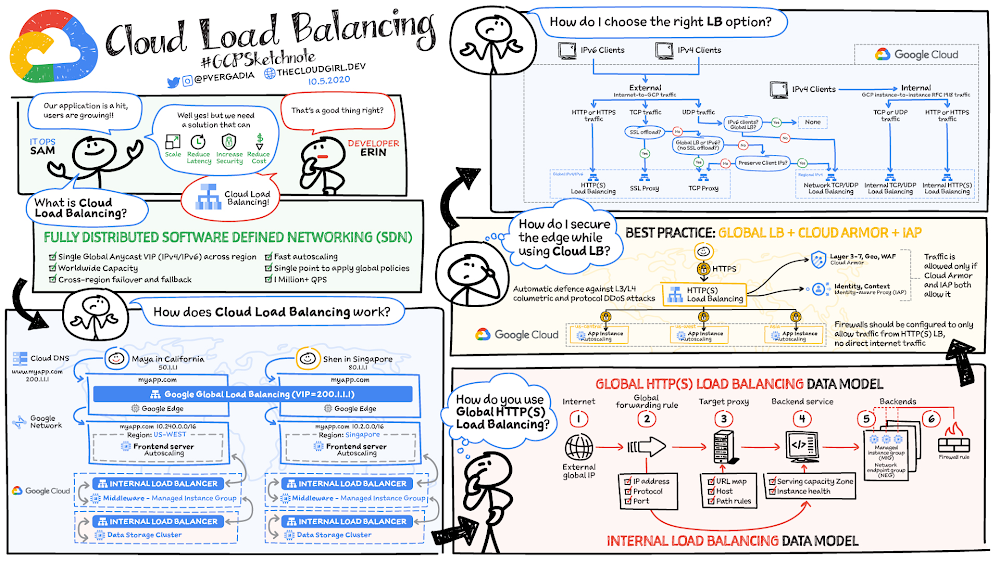
Let’s say your new application has been a hit. Usage is growing across the world and you now need to figure out how to scale, optimize, and secure the app while keeping your costs down and your users happy. That’s where Cloud Load Balancing comes in. What is Cloud Load Balancing?Cloud Load Balancing is a fully distributed load balancing solution that balances user traffic (HTTP(s), HTTPS/2 with gRPC, TCP/SSL, UDP, and QUIC) to multiple backends to avoid congestion, reduce latency, increase security, and reduce costs. It is built on the same frontend-serving infrastructure that powers Google, supporting 1 million+ queries per second with consistent high performance and low latency. Software-defined network(SDN) Cloud Load Balancing is not an instance- or device-based solution, which means you won’t be locked into physical infrastructure or face HA, scale, and management challenges. Single global anycast IP and autoscaling:Cloud Load Balancing front-ends all your backend instances in regions around the world. It provides cross-region load balancing, including automatic multi-region failover, which gradually moves traffic in fractions if backends become unhealthy or scales automatically if more resources are needed.Click to enlargeHow does Cloud Load Balancing work?External load balancingConsider the following scenario. You have a user, Shen, in California. You deploy your frontend instances in that region and configure a load-balancing Virtual IP (VIP). When your user base expands to another region, all you need to do is to create instances in additional regions. There is no change in the VIP or the DNS server settings. As your app goes global, the same patterns follow: Maya from India is routed to the instance closer to her in India. If the instances in India are overloaded and are autoscaling to handle the load, Maya will seamlessly be redirected to the other instances in the meantime and route back to India when instances have scaled sufficiently to handle the load. This is an example of external load balancing at Layer 7.Internal load balancingIn any three-tier app, after the frontend you have the middleware and the data sources to interact with, in order to fulfill a user request. That’s where you need Layer 4 internal load balancing between the frontend and the other internal tiers. Layer 4 internal load balancing is for TCP/UDP traffic behind RFC 1918 VIP, where the client IP is preserved.You get automatic heath checks and there is no middle proxy; it uses the SDN control and data plane for load balancing. How to use global HTTP(S) load balancingFor global HTTP(s) load balancing the Global Anycast VIP (IPv4 or IPv6) is associated with a forwarding rule, which directs traffic to a target proxy. The target proxy terminates the client session, and for HTTPs you deploy your certificates at this stage, define the backend host, and define the path rules. The URL map provides Layer 7 routing and directs the client request to the appropriate backend service. The backend services can be managed instance groups (MIGs) for compute instances, or network endpoint groups (NEGs) for your containerized workloads. This is also where service instance capacity and health is determined. Cloud CDN is enabled to cache content for improved performance. You can set up firewall rules to control traffic to and from your backend. The internal load balancing setup works the same way; you still have a forwarding rule but it points directly to a backend service. The forwarding rule has the Virtual IP address, Protocol, and up to five ports. How to secure your application with Cloud Load BalancingAs a best practice,run SSL everywhere. With HTTPS and SSL proxy load balancing you can use managed certs, for which Google takes care of the provisioning and managing the SSL certificate lifecycle. Cloud Load Balancing supports multiple SSL certificates, enabling you to serve multiple domains using the same load balancer IP address and port. It absorbs and dissipates layer 3 and layer 4 volumetric attacks across Google’s global load balancing infrastructureAdditionally, with Cloud Armor, you can protect against Layer 3 to Layer 7 application level attacksBy using Identity Aware Proxy and firewalls you can authenticate and authorize access to backend services. How to choose the right load balancing optionWhen deciding which load balancing option is right for your use case, consider factors such as: Internal vs external, global vs regional and type of traffic (HTTPs, TLS, or UDP)If you are looking to reduce latency, improve performance, enhance security, and lower costs for your backend systems then check out Cloud Load Balancing. It is easy to deploy in just a few clicks; simply set up the frontend and backends associated with global VIP and you are good to go!  For a more in-depth look into the service check out the documentation.For more #GCPSketchnote, follow the GitHub repo. For similar cloud content follow me on Twitter @pvergadia and keep an eye out on thecloudgirl.dev Related ArticleGlobal HTTP(S) Load Balancing and CDN now support serverless computeNow, our App Engine, Cloud Run and Cloud Functions serverless compute offerings can take advantage of global load balancing and Cloud CDN.Read Article
Quelle: Google Cloud Platform

Manage Capacity with Pub/Sub Lite Reservations. It’s easier and cheaper.

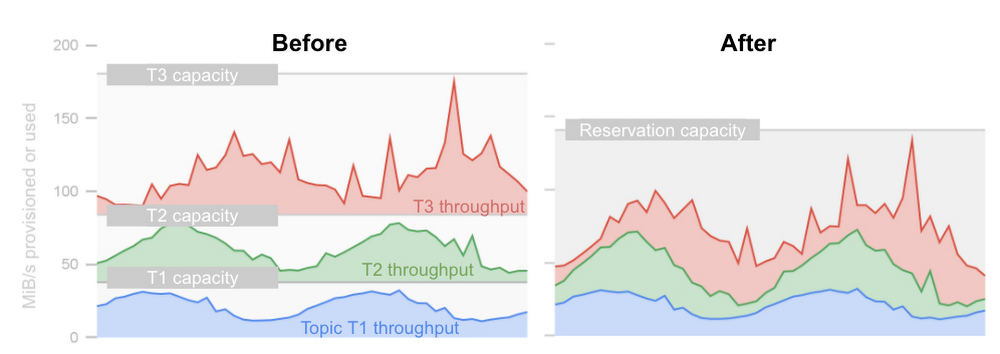
If you need inexpensive managed messaging for streaming analytics, Pub/Sub Lite was made for you.  Lite can be as much as 10 times cheaper than Pub/Sub.  But, until now, the low price came with a lot more work. You had to manage the read and write throughput capacity of each partition of every topic.  Have 10 single-partition topics? Make sure you watch 10 write and another 10 read capacity utilization metrics or you might run out of capacity.Hello, ReservationsWe did not like this either. So we launched Pub/Sub Lite Reservations to manage throughput capacity for many topics with a single number.  A reservation is a regional pool of throughput capacity.  The capacity can be used interchangeably for read or write operations by any topic within the same project and region as the reservation. You can think of this as provisioning a cluster of machines and letting it handle the traffic.  Except instead of a cluster, there is just a single number. Less work is great, of course. It is even better when it saves you money.  Without reservations, you must provision each topic partition for the highest peaks in throughput.  Depending on how variable your traffic is this can mean that half or more of the provisioned capacity is unused most of the time. Unused, but not free. Reservations allow you to handle the same traffic spikes with less spare capacity.  Usually, the peaks in throughput are not perfectly correlated among topics. If so, the peaks in the aggregate throughput of a reservation are smaller, relative to the time average, than the peaks in individual topics.  This makes for less variable throughput and reduces the need for spare capacity. As a cost-saving bonus, reservations do away with the explicit minimum capacity per partition. There is still a limit on the number of partitions per reservation. With this limit, you pay for at least 1 MiB/s per topic partition.  This is not quite “scale to zero” of Pub/Sub, but beats the 4 MiB/s required for any partition without reservations.An IllustrationSuppose you have three topics with traffic patterns that combine a diurnal rhythm with random surges.  The minimum capacity needed to accommodate this traffic is illustrated below.“Before” you provision for the spikes in each topic independently. “After,” you aggregate the traffic, dampening most peaks.  In practice, you will provision more than shown here to anticipate the peaks you haven’t seen.  You will also likely have more topics. Both considerations increase the difference in favor of reservations. Are Reservations Always Best?For all the benefits of shared capacity, it has the “noisy neighbor” problem.  A traffic peak on some topics can leave others without capacity.  This is a concern if your application critically depends on consistent latency and high availability.  In this case, you can isolate noisy topics in a separate reservation. In addition, you can limit the noise by setting throughput caps on individual topics. All in all, if you need to stream tens of megabytes per second at a low cost, Lite is now an even better option. Reservations are generally available to all Pub/Sub Lite users.  You can use reservations with existing topics. Start saving money and time by creating a Pub/Sub Lite reservation in the Cloud Console and let us know how it goes at pubsub-lite-helpline@google.com.
Quelle: Google Cloud Platform