Functions, events, triggers oh my! How to build event-driven app

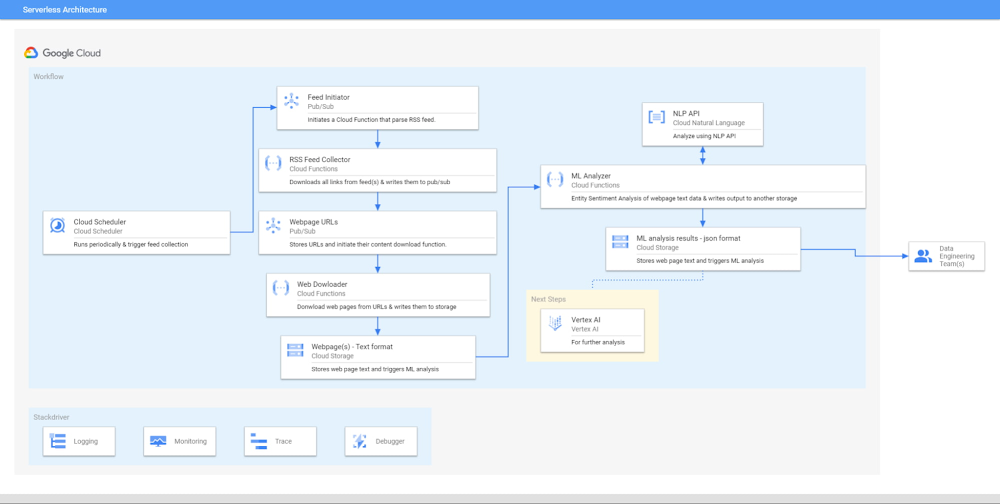
Today, many developers want to design applications using an event-driven architecture (EDA). This software architecture paradigm promotes the production, detection, consumption of, and reaction to events. It’s an architectural pattern best applied to design and implement applications and systems that transmit events among loosely-coupled software components and services. You can build event-driven applications using Cloud Functions, our Functions-as-a-Service (FaaS) product, leveraging events and triggers. Events are all kinds of activities or things like changes to data in a database, files added to a storage system, or a new virtual machine instance being created etc., that happens within your cloud environment that you might want to take action on. You can evoke a function when any events occur via a trigger. Cloud Functions offers scalable pay-as-you-go functions as a service (FaaS) that can run your code with zero server management, and can work in events and triggers.This blog explains how you can use Cloud Functions, events, and triggers together to help build scalable event-driven architecture. Using an example of a recent news event, we’ll explain the architecture and the step-by-step process of building an entity-sentiment metadata repository for all known entities (such as person, location, organization, event, consumer goods, etc.) using Cloud Functions, events, triggers, and the Natural Language API. You can then use this repository to determine the sentiment (positive or negative) expressed about different entities within the news. For example, Google Cloud Next ‘21 took place October 12-14, 2021, where there were discussions about a broad range of Google Cloud products. Understanding how these products were received by various media outlets or developer blogs can be valuable information to understand the overall effectiveness of the event.Understanding Cloud Functions, events, and triggersBefore we go into our example, let’s review the various components of the architecture.Events are all kinds of activities or things like changes to data in a database, files added to a storage system, or a new virtual machine instance being created etc., that happen within a cloud environment that might require reactive action. Cloud Functions supports events from the following providers:HTTPCloud StorageCloud Pub/SubCloud FirestoreFirebase (Realtime Database, Cloud Storage, Analytics, Auth)Cloud LoggingFor example, a new message published to a Cloud Pub/Sub topic or a change to a Cloud Storage bucket can generate an event which can trigger an action. An event can result in a change to the application state. For example, when a customer purchases a product, the product state changes from “available” to “sold”. In addition to these primary event sources, many other sources may provide messages via Pub/Sub, such as Cloud Build notifications, or Cloud Scheduler Jobs.There are two distinct types of Cloud Functions: HTTP functions, and event-driven functions. Further, event-driven functions can be either background functions or CloudEvent functions, depending on which Cloud Functions runtime they are written for.HTTP functionsHTTP functions can be invoked from standard HTTP requests. Clients sending these HTTP requests wait for the response synchronously, and HTTP functions can support handling of common HTTP request methods like GET, PUT, POST, DELETE, and OPTIONS. Event-driven functionsCloud Functions can use event-driven functions to handle events from your Cloud infrastructure, such as messages on a Pub/Sub topic, or changes in a Cloud Storage bucket. Cloud Functions supports two sub-types of event-driven functions:Background functions: Event-driven functions written for the Node.js, Python, Go, and Java Cloud Functions runtimes are known as background functions. See Writing Background Functions for more details.CloudEvent functions:  Event-driven functions written for the .NET, Ruby, and PHP runtimes are known as CloudEvent functions. See Writing CloudEvent Functions for more details.Event-driven functions such as Background Functions and CloudEvent Functions can be used when Cloud Functions are invoked indirectly in response to an event, such as a message on a Pub/Sub topic, a change in a Cloud Storage bucket, or a Firebase event. CloudEvent functions are conceptually similar to background functions. The principal difference between the two types of functions is that CloudEvent functions use an industry-standard event format known as CloudEvents. Another difference is that Cloud Functions itself can invoke CloudEvent functions using HTTP requests, which can be reproduced in other compute platforms. Taken together, these differences can enable CloudEvent functions to be moved seamlessly between compute platforms.We will use CloudEvent functions throughout this blog to build a demo that explains how to build event-driven architectures using Cloud Functions.Understanding event-driven architecture (EDA)Event-driven architecture (EDA) is a software architecture paradigm promoting the production, detection, consumption of, and reaction to events. This architectural pattern can be best applied to design and implement applications and systems that transmit events among loosely coupled software components and services. Putting everything together with an exampleThis example focuses on creating an event-driven architecture to build a service that analyzes RSS feeds content using managed services like Cloud Functions (event-driven), Cloud Scheduler, and the Google Cloud Machine Learning APIs.Goal With this example, we want to collect, analyze, and store RSS feeds and their Entity Sentiment Analysis at a given interval every day, using Machine Learning APIs. Entity Sentiment Analysis combines both entity analysis and sentiment analysis and attempts to determine the sentiment (positive or negative) expressed about entities within the text. This can be useful when:You want to identify all the entities like product, company, or person mentioned in any blog or news article.You want to discover sentiment expressed about the entity. With these kinds of use cases, data engineering teams can look at recent trends like entities mentioned the most in news, and their sentiment to understand how they are perceived in the market. Architecture:Click to enlargeThe above architecture illustrates the workflow of how an RSS feed can be analyzed as soon as it is collected. Here is the logic: Step 1: One RSS feed link will contain one or many URLs. Write a function to parse these URLs from RSS feed links and store them in a queue. Step 2: Write a function that reads URLs from the queue in Step 1, one by one, and download their web page contents. Store all web page contents in persistent storage.Step 3: Finally, write another function that reads web page contents from stored persistent storage in Step 2, analyze them, and write the results to another persistent storage target. Here is a step-by-step process to build the above steps using Google Cloud managed services: Step 1: Cloud Scheduler writes a sample message to Pub/Sub. This is just to invoke a cloud function that is configured to start as soon as this event occurs.A configuration like above writes a message to a Pub/Sub topic at 5 AM PDT every day. Step 2: An RSS feed contains one or many web page URLs. A message written to Pub/Sub in Step 1 triggers a cloud function that downloads the contents of the RSS feed and parses a list of web page URLs from its content. These URLs are then written to another Pub/Sub topic for further processing.With a configuration such as the one above, Cloud Functions starts executing at 5AM when the scheduler event arrives via the Pub/Sub trigger.Here is sample code written in C#, .NET core 3.1, to parse RSS feed(s) and collect web page URLs from it.Function PublishMessageWithRetrySettingsAsync can be found here.Step 3:  A URL entry written to Pub/Sub in Step 2 triggers a new cloud function that downloads web page text and writes the text to a Cloud Storage bucket.With a configuration like the one above, a cloud function will execute for each web page URL collected from the RSS feed and written to Pub/Sub in Step 2. Here is sample code written in Python 3.9 to download web page text and store it in Cloud Storage. BeautifulSoup library is used to parse web pages and extract text.Step 3 will result in web page text stored in Cloud Storage as shown below:Step 4:A new file creation event in Step 3 triggers a new cloud function that does entity sentiment analysis on the web page text and writes results to another Cloud Storage bucket.With a configuration like this, a cloud function will execute for each web page text downloaded and stored in a Cloud Storage bucket.Here is sample code written in Nodejs 14 to read data from a Cloud Storage bucket, parse  the download web page text, and store it in Cloud Storage.analyzeEntitySentiment function does Entity Sentiment Analysis. Natural Language API has several methods for performing analysis and annotation on text data. Here are examples of how to perform analysis on text data using Natural Language API.The analysis data collected can be used by data engineering teams to find out answers to questions like: ‘Which entities (person, product etc) were discussed the most in recent times?’ and ‘What is the sentiment associated with these entities?’ These questions can help in understanding the overall effectiveness of existing marketing campaigns or latest trends, to help create better marketing or public relations campaigns. Resources:All logs from above services will be available in Cloud Logging. Cloud Functions can be tested and debugged locally. All services are loosely coupled. Vertex AI can be used to analyze the meta data collected at the end..Summary: Cloud Functions can be powerful services that can be used to build event-driven applications with minimal effort. The above walkthrough demonstrates Cloud Functions events, trigger integrations with different Google Cloud services, and its multi-language support. To get started, check out the references below.References:Calling Cloud FunctionsTesting Event-Driven FunctionsCloud Functions Local DevelopmentDeploying Cloud FunctionsRelated ArticleTips for writing and deploying Node.js apps on Cloud FunctionsFollow these tips for writing performant, observable, Node.js applications that run on Cloud Functions.Read Article
Quelle: Google Cloud Platform
Spark on Google Cloud: Serverless Spark jobs made seamless for all data users

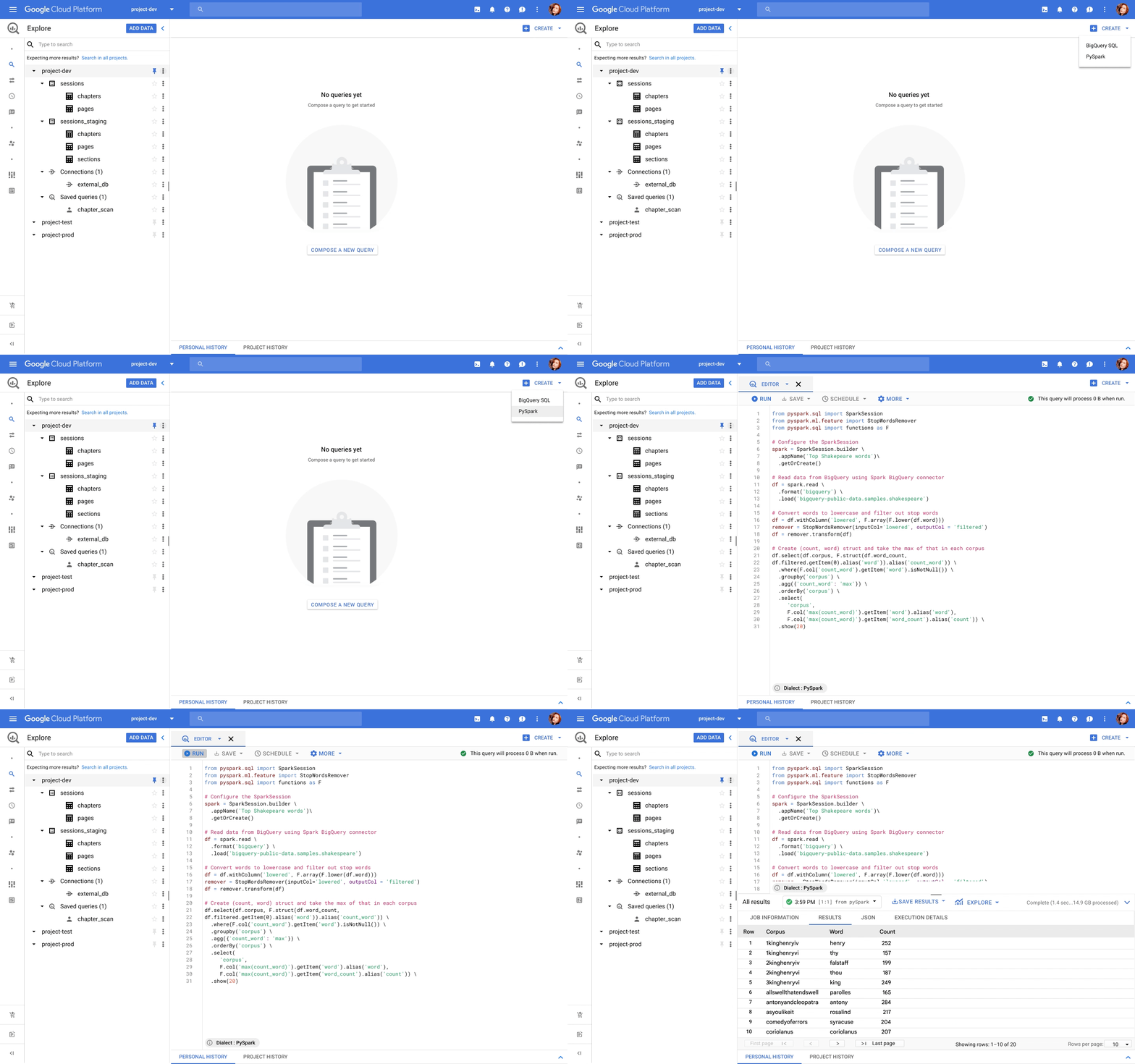
Apache Spark has become a popular platform as it can serve all of data engineering, data exploration, and machine learning use cases. However, Spark still requires the on-premises way of managing clusters and tuning infrastructure for each job. Also, end to end use cases require Spark to be used along with technologies like TensorFlow, and programming languages like SQL and Python. Today, these operate in silos, with Spark on unstructured data lakes, SQL on data warehouses, and TensorFlow in completely separate machine learning platforms. This increases costs, reduces agility, and makes governance extremely hard; prohibiting enterprises from making insights available to the right users at the right time.Announcing Spark on Google Cloud, now serverless and integratedWe are excited to announce Spark on Google Cloud, bringing industry’s first autoscaling serverless Spark, seamlessly integrated with the best of Google Cloud and open source tools, so you can effortlessly power ETL, data science, and data analytics use cases at scale. Google Cloud has been running large scale business critical Spark workloads for enterprise customers for 6+ years, using open source Spark in Dataproc. Today, we are furthering our commitment by enabling customers to:Eliminate time spent managing Spark clusters: With serverless Spark, users submit their Spark jobs, and let them do auto-provision, and autoscale to finish.Enable data users of all levels: Connect, analyze, and execute Spark jobs from the interface of users’ choice including BigQuery, Vertex AI or Dataplex, in 2 clicks, without any custom integrations.Retain flexibility of consumption: No one size fits all. Use Spark as serverless, deploy on Google Kubernetes Engine (GKE), or on compute clusters based on the requirements.With Spark on Google Cloud, we are providing a way for customers to use Spark in a cloud native manner (serverless), and seamlessly with tools used by data engineers, data analysts, and data scientists for their use cases. These tools will help customers on their way to realize the data platform redesign they have embarked on.”Deutsche Bank is using Spark for a variety of different use cases. Migrating to GCP and adopting Serverless Spark for Dataproc allows us to optimize our resource utilization and reduce manual effort so our engineering teams can focus on delivering data products for our business instead of managing infrastructure. At the same time we can retain the existing code base and knowhow of our engineers, thus boosting adoption and making the migration a seamless experience.”—Balaji Maragalla, Director Big Data Platform, Deutsche Bank“We see serverless Spark playing a central role in our data strategy. Serverless Spark will provide an efficient, seamless solution for teams that aren’t familiar with big data technology or don’t need to bother with idiosyncrasies of Spark to solve their own processing needs. We’re excited about the serverless aspect of the offering, as well as the seamless integration with BigQuery, Vertex AI, Dataplex and other data services.” —Saral Jain, Director of Engineering, Infrastructure and Data, Snap Inc.Dataproc Serverless for SparkPer IDC, developers spend 40% time writing code, and 60% of the time tuning infrastructure and managing clusters. Furthermore, not all Spark developers are infrastructure experts, resulting in higher costs and productivity impact. With serverless Spark, developers can spend all their time on the code and logic. They do not need to manage clusters or tune infrastructure. They submit Spark jobs from their interface of choice, and processing is auto-scaled to match the needs of the job. Furthermore, while Spark users today pay for the time the infrastructure is running, with serverless Spark they only pay for the job duration.Spark through BigQueryBigQuery, the leading data warehouse, now provides a unified interface for data analysts to write SQL or PySpark. The code is executed using serverless Spark seamlessly, without the need for infrastructure provisioning. BigQuery has been the pioneer for serverless data warehousing, and now supports serverless Spark for Spark-based analytics.Spark through Vertex AIData scientists no longer need to go through custom integrations to use Spark with their notebooks. Through Vertex AI Workbench, they can connect to Spark with a single click, and do interactive development. With Vertex AI, Spark can easily be used together with other ML frameworks like TensorFlow, Pytorch, Sci-kit learn, and BigQuery ML. All the Google Cloud security, compliance, and IAM are automatically applied across Vertex AI and Spark. Once you are ready to deploy the ML models, the notebook can be executed as a Spark job in Dataproc, and scheduled as part of Vertex AI Pipelines.Spark through DataplexDataplex is an intelligent data fabric that enables organizations to centrally manage, monitor, and govern their data across data lakes, data warehouses, and data marts with consistent controls, providing access to trusted data and powering analytics at scale. Now, you can use Spark on distributed data natively through Dataplex. Dataplex provides a collaborative analytics interface, with 1-click access to SparkSQL, Notebooks, or PySpark, and the ability to save, share, search notebooks and scripts alongside data.Flexibility of consumptionWe understand one size does not fit all. Spark is available for consumption in 3 different ways based on your specific needs. For customers standardizing on Kubernetes for infrastructure management, run Spark on Google Kubernetes Engine (GKE) to improve resource utilization and simplify infrastructure management. For customers looking for Hadoop style infrastructure management, run Spark on Google Compute Engine (GCE). For customers, who’re looking for no-ops Spark deployment, use serverless Spark! ESG Senior Analyst Mike Leone commented, “Google Cloud is making Spark easier to use and more accessible to a wide range of users through a single, integrated platform. The ability to run Spark in a serverless manner, and through BigQuery and Vertex AI will create significant productivity improvement for customers. Further, Google’s focus on security and governance makes this Spark portfolio useful to all enterprises as they continue migrating to the Cloud.”Getting startedDataproc Serverless for Spark will be Generally Available within a few weeks. BigQuery and Dataplex integration is in Private Preview. Vertex AI workbench is available in Public Preview, you can get started here. For all capabilities, you can request for Preview access through this form.You can work with Google Cloud partners to get started as well.“We are excited to partner with Google Cloud as we look to provide our joint customers with the latest innovations on Spark. We see Spark being used for a variety of analytics and ML use cases. Google is taking Spark a step further by making it serverless, and available through BigQuery, Vertex AI and Dataplex for a wide spectrum of users.” —Sharad Kumar, Cloud First data and AI Lead at AccentureFor more information, visit our website or the watch announcement video and our conversation with Snap at Next 2021.
Quelle: Google Cloud Platform

Best practices for securing your applications and APIs using Apigee

Enterprises across the globe are seeing surging demand for digital experiences from their customers, employees, and partners. For many of these enterprises, hundreds of business applications are hosted in private or public clouds that interact with their users (customers, partners, and employees) spread across geographies, channels (web, mobile, APIs, VPNs, and cloud services), and time zones. As a consequence of this surge in demand, enterprises are also experiencing increased pressure to fortify their technical infrastructure against cyber attacks. The number of reported cyber attacks on U.S. companies rose 69% in 2020 from the previous year, according to the Federal Bureau of Investigation. Web and API attacks cannot be prevented but can be mitigated—a recent study showed that 55% of organizations experience a DDoS attack at least every month. While many enterprises are accelerating digital transformation to build omnichannel experiences, they need to keep security and privacy top of mind across all of these channels. This goal can only be supported by implementing a robust security architecture and organizational policy enforcement model that enables enterprises to prevent, detect, and react to newer threats, in near-real time. While it is easy to say, implementation of such a system can be extremely challenging. Best practices for securing your applications and APIsTo help organizations navigate these challenges, we recently published, “Best practices for securing your applications and APIs using Apigee,” which describes the best practices and approaches that can help companies secure their applications and APIs using Apigee API management, Google Cloud Armor,reCAPTCHA Enterprise, andCloud CDNThese best practices include using Apigee as a proxy layer to protect backend APIs, Google Cloud Armor as a Web Application Firewall (WAF), Cloud CDN for caching, and comprehensive web app and API protection with the Google Cloud solution. Use Apigee as a proxy layerIn this pattern, Apigee is a facade layer that can secure and protect your backend APIs with its out-of -box capabilities.Apigee offers a wide range of security features that can be applied consistently across all your APIs. It can be used to route the requests to different backends, which helps with your migration effort too. Use Google Cloud Armor as a WAF layer along with ApigeeTo increase your security footprint, you could easily enable Google Cloud Armor along with Apigee. Google Cloud Armor provides web application firewall (WAF) capabilities and helps to prevent distributed denial of service (DDoS) attacks. It can also help you to mitigate the threat to applications from the risks listed in the OWASP Top 10. For more information on how to configure rules in Google Cloud Armor, see the Google Cloud Armor How-to guidesor check out this blog post about Apigee and Google Cloud Armor.Use Cloud CDN for cachingBy using Cloud CDN: Content Delivery Network, you can use the Google global network to serve content closer to users, which accelerates response times for your websites and applications. Cloud CDN also offers caching capabilities to provide responses much faster. It helps you to secure the backend by returning the response from its cache and handling traffic spikes. It can also help to minimize web server load, compute, and network usage. To implement this architecture, you must enable Cloud CDN on the load balancer that’s serving the Apigee traffic. To learn more, check out this blog post.Implement comprehensive Web App and API Protection (WAAP)To further enhance your security profile, you can also use WAAP, which brings together Google Cloud Armor, reCAPTCHA Enterprise, and Apigee to help protect your system against DDoS attacks and bots. It also provides web application firewall (WAF) and API protection. We recommended WAAP for enterprise use cases where the API calls are made from a website or mobile applications. You can set applications to load the reCAPTCHA libraries to generate a reCAPTCHA token and send it along when they make a request. For more information on WAAP, check out this blog post or read this whitepaper.Next stepsAs more and more organizations get into and accelerate their digital transformation journey, systems and business channels will rely more on digital interactions, and the need for tightened levels of security and protection will continue to rise significantly. Building an architecture that can help your organizations deliver fast and efficiently with improved threat protection and visibility is of the utmost importance.  Get started with the “Best practices for securing your applications and APIs using Apigee” Cloud Architecture Pattern Read about OWASP Top 10 mitigation options on Google Cloud from our Cloud Architecture Center and find out how Apigee and other GCP products can help mitigate OWASP Top 10 attacks.View the Enhance API security with Apigee and Cloud Armor videoWatch this video to learn How to protect your APIs against these 6 security threatsRead and ask questions in the Apigee community.Explore the Apigee repository on GitHub.Related ArticleBetter protect your web apps and APIs against threats and fraud with Google CloudHow Google Cloud’s Web App and API Protection (WAAP) solution protects enterprises from rising security & fraud threatsRead Article
Quelle: Google Cloud Platform

Cloud Data Loss Prevention is now automatic!

Data is one of your most valuable assets; understanding and using data effectively powers your business. However, it can also be a source of privacy, security, and compliance risk.  The data discovery and classification capabilities of Cloud Data Loss Prevention (DLP) have helped many Google Cloud customers identify where sensitive data resides. However, data growth is outpacing the ability to manually inspect data, and data sprawl means sensitive data is increasingly appearing in places it’s not expected. You need a solution for managing data risk that can automatically scale with the rapid growth of your data without additional management overhead.To help, we are happy to announce that we’re making Cloud DLP automatic: automatic discovery, automatic inspection, automatic classification, automatic data profiling. Now available in preview for BigQuery, you can enable Cloud DLP across your entire organization to gain visibility into your data risk.  With rich insights for each table and column, you can focus on the outcome, manage data risk, and ultimately help to safely accelerate your business. Automatic DLP is an example of Google Cloud’s Invisible Security vision, where the capability to understand and protect your data is engineered into the platform. Here are the benefits of Automatic DLP:Continuous monitoring: Cloud DLP automatically profiles new tables as you create them across your org. Also, it periodically reprofiles tables that you modify.Low overhead: No jobs to manage.  Enable it directly in the Cloud Console for an entire organization or select folders or projects.Data residency: Cloud DLP will inspect your data and generate data profiles in the same geographic region that your data lives in (as configured in BigQuery).Google-driven: Powered by industry leading Cloud DLP, we figure out how to inspect and profile your tables and columns.  You can focus on the outcomes.Rich insights: Table and column profiles give you details about the data risk and sensitivity of your data including Cloud DLP’s predicted infoType.Data profilesA data profile is a set of metrics and insights that Cloud DLP gathers from scanning your data. Among these metrics are the predicted infoTypes found in BigQuery tables, “free text” score, uniqueness score, and the data risk level.  Use these insights to make informed decisions about how you protect, share, and use your data.  You can get results directly in the Cloud Console or export profile details to BigQuery for custom analysis and reporting:Managing your data riskHere are few example scenarios of how DLP profiles can help you understand and manage data risk:Scenario 1: Table found with credit card numbers and a high uniqueness scoreLet’s say that a column in a table with 10M rows was classified with a predicted infoType of “CREDIT_CARD_NUMBER” and a high uniqueness score. This indicates that you likely have 10M unique credit card numbers in this table. A lower uniqueness score might indicate that you have fewer numbers repeated in the table. Potential Action to Take: If this type of data is acceptable for you to store and process, you can lower this data risk by applying a BigQuery Policy Tag which would restrict access to this column to only those with specific permission.  Alternatively, if you do not want to store this raw information, consider tokenizing the data using Cloud DLP’s de-identification methods or solutions for PCI Tokenization. Scenario 2: Table found with several infoTypes and a high free text score. Let’s say that a column in a table does not have a strong predicted infoType but has hints of PHONE_NUMBER, US_SOCIAL_SECURITY_NUMBER, and DATE_OF_BIRTH along with a high “free text” score. This indicates that you may have a column of unstructured data in your table that has occasional instances of PII.  This could, for example, be a note field or comment field where someone types in PII such as “customer was born on 1/1/1985” and is an indication of potential risk.Potential Action to Take:  Consider running a deep scan of this column using Cloud DLP’s on-demand inspection for BigQuery so that you can understand where instances of PII may exist in specific rows or cells.  Or consider using Cloud DLP’s masking capability to replace this table with a de-identified version.Scenario 3: Table found with sensitive data and shared publiclyLet’s say that a table contains customer EMAIL_ADDRESS and PHONE_NUMBER and it was shared with a marketing partner. However, instead of being shared directly, this table was made public. This greatly increases the risks of exposure of this sensitive information. Potential Action to Take:  Adjust permissions to this table to remove public access groups like AllUsers or AllAuthenticatedUsers.  Instead, add the specific users or groups that should have access to the data. Get started with Automatic DLPAutomatic DLP Profiling is available now in preview for BigQuery.    To get started, open the Cloud DLP page in the Cloud Console and check out our documentation.Related ArticleTake charge of your data: using Cloud DLP to de-identify and obfuscate sensitive informationIn our previous “Taking charge of your data” post, we talked about how to gain visibility into your data using the Cloud Data Loss Preven…Read Article
Quelle: Google Cloud Platform
Supercharge your Google Cloud workloads with up-to-date best practices from Architecture Framework

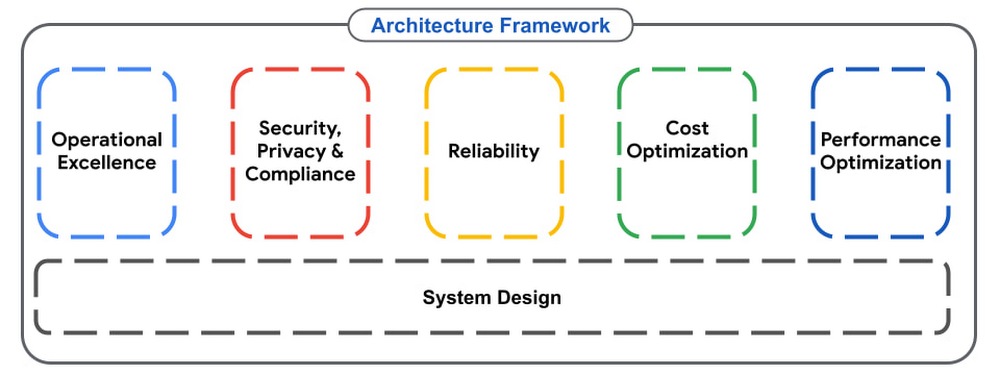
Architecture Framework helps customers utilize a set of canonical best practices to design and build workloads on Google Cloud that are secure, reliable, and scalable, while applying cost and performance optimization techniques. The Architecture Framework is organized into 6 pillars.System design considerations cover foundational building blocks such Compute, Storage, and Database, expanding best practices to aid your workload design.Operational excellence covers topics to help you build and optimize operational capabilities. Security, privacy, and compliance covers security and compliance considerations that will enhance your security posture.  Reliability covers topics that improve the resilience for your workloads.Cost optimization covers techniques and best practices to lower your cloud operation costs. Performance optimization covers tools and techniques to improve your workload efficiency.Today we are releasing an updated version (2.0) of the framework. The framework is now a dedicated function to help customers adopt best practices from the time workloads are first deployed, and is informed by the collective experience of Google Cloud employees, partners, and customers. Each pillar is broken down into modular sub-topics to help you focus on specific topics such as “Networking from System design” or “High Availability from Reliability,” while describing Google Cloud and open source products to help you design your workloads.Why use a Framework?At Google Cloud, we continuously improve our products and features to help our customers unlock their business potential. Publishing a canonical set of best practices helps Googlers, our partners, and Google cloud users to align with the framework and build a success path for running workloads on GCP.  As the collective wisdom associated with a newer technology grows over time, we want to reflect key learnings from operating workloads associated with those technologies, so that others can learn from our experience.We have seen many happy customers who have engaged with Google’s sales, support, and Professional Services teams to conduct an Architecture Framework Workshop, and as a result were able to identify items they could improve in their workloads. We recommend reviewing and aligning workloads with Architecture Framework best practices as an ongoing exercise, an approach that grows in importance as products mature, use cases emerge, useful patterns (and anti-patterns) accumulate, and wisdom is aggregated through Architecture Framework content over time.What’s Next?We’re continuing to work to enhance our catalog of best practices to make it easier for customers and partners of Google Cloud to analyze opportunities to optimize your workloads and business functions. Stay tuned for more updates as we publish additional content and widen exposure, awareness, and feedback for Architecture Framework via a forthcoming launch through Google Cloud Communities.  We expect future content releases to incorporate an increasing volume of contribution from Google’s partner and customer base in addition to ongoing contributions from Google employees. As always, we welcome your feedback. Last but not least, initiatives such as the Architecture Framework can only be successful through the collective effort of experts passionate about sharing best practices. We started small with a core group of GCP experts who helped build the initial framework, and quickly were able to build momentum through Google’s internal 20% program, allowing us to tap into expertise spread across different functions and locations within Google.  Learn more about Architecture Framework at cloud.google.com/architecture/frameworkSpecial thank you to the community of Googlers who helped deliver Architecture Framework Version 2.0: Vivek Rau, Pathik Sharma, Daniel Lees, Amber Yadron, Shylaja Nukala, Brandon Bouier, Fernando Rubbo, Jenny Rosewood, Rafee Mohamed, Kumar Dhanagopal, Markus Schneider, Minh “MC” Chung, Rachel Tsao, Sam Moss, Nitin Vashishtha, Pritesh Jani, Ravi Bhatt, Olivia Zhang, Zach Seils, Tabitha Smith, Jhilam Biswas, Mohamed Fawzi, Vijay John-Britto, Alida Wilms, Mike Pope, Arun Reddy, Abhijeet Rajwade, Lucy Carey, Todd Kopriva, Victoria Hurd, Michelle Irvine, Iain Foulds, Olaf Schnapauff, Hamsa Buvaraghan, Maridi Makaraju, Gargi Singh, Nahuel Lofeudo, and Mark Schlagenhauf.Related ArticleRead Article
Quelle: Google Cloud Platform

Next Reaction: Monitor your conversations, get started with CCAI Insights

In this year’s NEXT session: AI103 Using CCAI insights to better understand your customers, a new conversational AI tool has been introduced, CCAI Insights. With Contact Center AI Insights, business stakeholders and QA compliance teams can analyze and monitor customer service interactions and patterns in their contact center data. It gives businesses insights into the topics that are being discussed by their end-users. You can monitor how those conversations have been handled by the service agent through transcripts, caller sentiment detection, silence detection, entity identification, and topic modeling.CCAI Insights can be used stand-alone but it also seamlessly integrates with all other Contact Center AI Solution products like Dialogflow and Agent Assist, as part of our Conversational AI offerings.The first thing you will have to do is import conversations to your CCAI Insights instance. In a production environment, you will likely have CCAI Insights integrated with your virtual agent and contact center systems that push conversations via the runtime integrations in real-time to CCAI Insights. – However, it’s also possible to import existing datasets manually.Importing a text chat conversationLet’s start with importing a text conversation between an end-user and a virtual agent into CCAI insights. The data that’s imported in CCAI insights, under the hood makes use of Cloud’s Spanner. In case regionalization matters to you, because of enterprise data regulations, it’s good to know that US and EU regionalization is on the roadmap for early next year. With that being said, there is also a setting to delete the data after a preset period of time (TTL) and all data can be exported via API, Cloud Data Fusion, or direct to BigQuery.You can import it through Google Cloud Storage by pointing to the GCS URL and providing the name of the virtual agent who handled the chat.As seen in the listing below. Your conversation will need a specific JSON format, which defines: the text, the timestamp, the user id, and the role.Once the conversation is imported, you can dive into the conversation and press the Start analysis button. This will analyze your conversation transcript and annotate bits of your conversation, such as locations, persons, or objects. Clicking on these entities will highlight the parts of the conversation where those entities were mentioned. You can imagine that it’s extremely useful for a business or contact center managers to get insights on the topics that are being discussed in the call or chat. For example, in the case of a chatbot, are these the topics the chatbot was trained on? Or should you come up with a set of intents?In the conversation hub, you can use the filter to include or exclude conversations based on agent ID, transcript, duration, turn count, and more. These filters can be combined to find specific conversations, and it’s possible to label these so you can find it back, or if you want to review these over a longer period of time.Importing a call (audio) conversationWe can do the same for audio recordings. You will need to have a two-channel audio file of a uniform sample rate and encoding supported by Cloud Speech-to-Text. Speech-to-Text could generate a transcript from an audio file. What’s important is that your transcript matches the Speech-to-Text response format, which contains the bits of a sentence with the start and end timestamps for each word, as shown in the below listing. Each conversational turn is tagged with a channel tag to refer to the speaker that is speaking on that channel.Once you dive into your conversation, you can analyze the audio, and it’s also possible to play the audio recording.Besides the entities, chat and audio conversations can also analyze the silence and the sentiment of the caller and the agent. This is very useful for contact center managers who want to learn from customer escalations. Importing large datasetsLastly, you can also import conversations as a batch to import existing large datasets. You can import these through scripts using the API or via Cloud Data Fusion.Topic modelingA CCAI Insights topic model uses Google’s Natural Language Processing to generate primary topics for each conversation in your dataset. You can then deploy the model to analyze future conversations as they’re imported.To train your own topic model with good accuracy, you will need a minimum of 10 thousand conversations. Then you can start the training. Please understand that training a topic model can take up to 12 hours, as it’s a very extensive process, as it analyzes every conversation with each other, to find the most common entities.Once your model has been successfully trained from customer data, you can deploy the model and view the most used topic drivers. Note the screenshot below, who would have known that apparently your human or virtual service agents spend a lot of time answering questions on how people can login to their accounts!Conversation highlightsSmart Highlights automatically detect highlights through keywords and/or phrases in your conversation without requiring additional configuration. Smart Highlights draws from various possible scenarios to detect highlights, such as asking to hold, ensuring that an issue was resolved, a complaint, and more. Any highlights present in a conversation are labeled in the returned transcript on sentence level. It analyzes each conversation turn and categorizes the user’s intention.It’s also possible to create your own highlighters by providing keywords. In the below screenshot, you can see a custom highlighter tagging conversational turns discussing money amounts.When using CCAI Insights combined with Dialogflow, it’s possible to create intelligent highlighters using Dialogflow intents.As you have read in this article, CCAI Insights enables businesses to hear what customers are saying to make data-driven business decisions and increase operational efficiency. To learn more about CCAI Insights, check out the documentation.Related ArticleGoogle Cloud expands CCAI and DocAI solutions to accelerate time to valueGoogle Cloud deepens customer understanding with Contact Center AI Insights and transforms contract management with Contract DocAIRead Article
Quelle: Google Cloud Platform

Next Reaction: Features to reduce IT carbon emissions and build climate-related solutions

Climate technology strategies are becoming increasingly important. A Google-commissioned study by IDG shows that 90% of IT departments are making sustainability a priority; and with the advances in machine learning, many organizations are also increasingly interested in building climate solutions whether it’s using geo-spatial data or predictive maintenance. This is why we are happy to share four announcements at NEXT 2021 that help IT teams improve their sustainability efforts, or build complex ML big data climate solutions that are usually computationally intensive.  From a making IT operations greener, Google Cloud is offering two fundamental tools:1)  A free Carbon Footprint dashboard is now available in your Cloud project. It displays gross carbon emissions from the electricity associated with the usage of covered Google Cloud services for the selected billing account. With growing requirements for Environmental Social and Governance (ESG) accuracy; accounting for IT carbon emissions is necessary to measure progress against the carbon reduction targets required to avert the worst consequences of climate change.  By using Carbon Footprint, you have access to your cloud infrastructure’s energy related emissions data needed for your internal carbon inventories and external carbon disclosures, with one click. This dashboard was built in collaboration with customers  like Atos, Etsy, HSBC, L’Oréal, and Salesforce.Ensure you have viewer access to the billing account. You will be able to view pre-built charts that summarize kilograms of CO2 equivalent (kgCO2e) in the past 12 months, by project, product, and region. It can take up to 21 days for the previous month to become available.For greater customization, you can optionally export your Carbon Footprint data to BigQuery which is a database with a free tier of upto 10GB of storage and 1 TB of queries per month in order to perform data analysis, or create custom dashboards and reports. You can optionally further dig into the carbon footprint reporting methodology. 2) We are helping IT practitioners make informed decisions when selecting the greenest compute resources. When selecting a region you can view the lowest carbon impact inside Cloud Console location selectors with the green leaf icon.Drop-down with green leaf icons to select a less carbon emitting region. The following tool also enables you to make greener choices when choosing what regions to house your compute resources, and accounts for variables like price, latency, and sustainability.Screenshot of Google Cloud region picker to help customers select the greenest regions for their cloud projects.One of the greatest IT low-hanging fruits for reducing gross emissions is locating and deleting unattended projects using the Active Assist Recommender. The recommender uses machine learning to identify, with a high degree of confidence, projects that are likely abandoned based on API and networking activity, billing, usage of cloud services, and other signals. By deleting these projects, you reduce costs, mitigate security risks, and reduce carbon emissions.In August, Active Assist analyzed the aggregate data from all customers across our platform, and over 600,000 kgCo2e was associated with projects that it recommended for cleanup or reclamation. If customers deleted these projects they would significantly reduce future emissions.The next two announcements help organizations build climate solutions using ML and satellite imagery:1) Whether your organization is trying to understand changes on the Earth due to supply chain operations, or performing risk modeling on upcoming climatic changes, developers and scientists have turned to Google Earth Engine  because it houses the world’s largest catalog of satellite imagery and geo-spatial data.  Over the past year we have worked with numerous organizations that use Earth Engine datasets and analyze them in managed services like a BigQuery database or apply Machine Learning via Vertex AI (to name a few). This is why we are offering an enterprise-grade experience of Earth Engine and Google Cloud services. You can sign-up via this formEarth Engine’s data catalog2) We are announcing expanded partnerships with these five geo-data focused independent software vendors (ISVs) to access sustainability datasets with low latency on Google Cloud: CARTO, Climate Engine, Geotab, NGIS, and Planet.Carto is a location Intelligence platform that enables organizations to use spatial data and analysis for more efficient delivery routes, better behavioral marketing, strategic store placements, and more.Climate Engine is an Enterprise-level deployment of Google Earth Engine. It provides organizations with a centralized system to ingest, process, and deliver Earth data into decision-making contexts. Geotab connects commercial vehicles to the internet and provides web-based analytics to help customers better manage their fleets. NGIS uses software and data to tackle issues such as sustainable development, biodiversity and conservation, preservation of Indigenous rights and interests, climate change and disaster risk reduction.Planet has a fleet of approximately 200 earth imaging satellites (the largest in history) to  image the whole Earth land mass daily to deliver insights in agriculture, forestry, mapping, and government.Related ArticlePeople and planet AI: How to build a Time Series Model to classify fishing activities in the seaIn this episode of People & Planet AI, we share how to build a time series classification app that includes latitude and longitudinal fis…Read Article
Quelle: Google Cloud Platform

Next Reaction: Making multicloud easier for all

If you’re like me, tracking all the news coming out of Google Cloud Next can be a bit overwhelming at times in a good way. There is just so much exciting stuff happening. So, in order to help us both out a bit I sat down to capture some of the key announcements that were made on the second day of Next, as well as provide some context around why I’m so excited about them. One of the overarching themes was how Google Cloud is making it easier for our customers to build and manage hybrid and multi-cloud environments. Coming from years of managing large enterprise environments this is all music to my ears. Developers and practitioners live in a world where they need to run code in a multitude of different environments. And, each of these environments usually comes with its own set of management tools. For years we’ve longed for the mythical “single pane of glass” that would provide us with a centralized place to manage and observe the disparate platforms where our apps were running. After hearing yesterday’s announcements I couldn’t be more excited about the direction Google Cloud is headed with respect to managing workloads everywhere that matters to the enterprise, from other public clouds to bare metal and VMs in their own data centers. Let’s jump in and look a bit deeper at what was announced. Anthos for VMsToday, a lot of organizations are looking to standardize on Kubernetes as their target platform for new applications. However, these same companies have hundreds of applications running in virtual machines, usually on VMware vSphere. This means that IT staff have to use one set of tools and processes for containerized workloads and another for VM-based workloads. That’s another pane of glass, if you’re counting.Anthos for VMs aims to reduce this complexity by allowing operators to centralize the management of VM-based applications with Anthos. You can use Anthos for VMs in a couple of different ways. First, if you have a large investment in VMware vSphere, and you’re not quite ready for a large-scale migration from VMs to containers, you can connect your vSphere instances to the Anthos control plane. This mode of operation doesn’t force you to move your workloads, but you still get a ton of benefits around centralized operational and security policies while also gaining insight into operational health via the Anthos dashboard. These VMs stay in place but are “attached” to your unified Anthos-based control plane.If your organization wants to migrate VM workloads off an existing virtualization platform to save on licensing costs or reduce complexity, Anthos for VMs can help there as well. Anthos for VMs uses Kubevirt, an open source solution for running VMs on Kubernetes, to allow you to “shift” your workloads from a traditional VM management platform to Kubernetes.  Not only do you get the benefits I just mentioned around security policies and unified observability, but now you have a single set of tools for running and managing both your containerized and virtualized applications. If you’re like me, you’re probably wondering “What types of workloads should I be focused on migrating?” Anthos for VMs is a great choice for Virtual Network Functions (think virtualized firewalls, routers etc.) as well as monolithic applications. Even with that guidance there might still be a large pool of applications you could consider migrating. To help narrow down which applications are the best fit, you can use our updated fit assessment tool. This tool will examine your workloads and tell you how much effort might be involved in moving them. There are a couple things I really love about this announcement. First, this isn’t an all or nothing proposition. You can attach some of your vSphere instances to Anthos, shift another chunk of VMs to directly running on Anthos, and maybe leave some alone. Those decisions will be driven by what makes the most sense for your organization from both an IT as well as a business perspective. Making Multi-Cloud Easier With A Unified APIAnother big announcement from Next was around multi-cloud. Specifically the new Anthos Multi-cloud API. Anthos is gaining traction today because customers want to have a unified mechanism for deploying and managing workloads across different environments – including different cloud providers. Previously you could run Anthos clusters on AWS, and recently we introduced via preview support for Anthos clusters on Azure. With the release of Anthos Multi-cloud API, which is coming in Q4 2021, we’re making that even easier. This new API allows you to easily deploy and manage Anthos clusters across cloud providers with a unified set of tools: whether you use the command line, the API, or Google Cloud Console – you get a unified experience. Making Anthos Features Easier To Consume From GKE To Your Data CenterWhen I talk to customers about Anthos I often hear “I really like a lot of Anthos’s functionality, but I don’t really need everything it has to offer today. It’d be great if we could run just [feature or component X] on my existing GKE clusters.” Over the past year or so we’ve worked hard to address those types of requests. For instance, you can run both Anthos Service Mesh (ASM) and Anthos Config Management (ACM) on both Anthos and GKE clusters, with standalone pricing for ACM and ASM on GKE. And, yesterday we announced that ASM now supports hybrid deployment models – meaning you can have a single mesh spanning your cloud and on-prem resources. Again, another example of simplifying your tooling and processes by allowing you to leverage the same technology across multiple environments and deployment patterns. ConclusionToday’s announcements bring us one step closer to realizing the utopian vision of a single pane of glass. Now with Anthos you can consistently manage containerized workloads running across cloud providers as well as on-prem running on VMware or bare metal. Add into that the ability to manage VMs running on vSphere or on an Anthos cluster and your tool sets and processes have become vastly simplified.If you’ve not had a chance, be sure to watch yesterday’s announcements or read the blog post to get more details on this week’s launches. After that, head over to the Anthos page to learn how you can start reducing complexity and increasing flexibility with Anthos today.  Related ArticleIntroducing Anthos for VMs and tools to simplify the developer experienceAt Google Cloud Next ‘21, we opened up Anthos to virtual machines, and revealed enhancements to our developer and operator tools.Read Article
Quelle: Google Cloud Platform

Next Reaction: Security and zero-trust announcements

Trillions in Cybercrime?Phishing, spam, malware and devious websites? Oh my!I’ve talked a lot about Zero Trust security in the past, and the meme means many things to many people. For Google we want to make sure that security-across your cloud workloads, on-premises systems, collaboration tools and devices-is reliable and invisible. And today’s announcements help with that as Google builds security into more of the systems people use every day. That means better protection AND less work for us all as we protect our hapless, err… ‘focused’ employees from attack.One pretty cool example? Automatic Data Loss Prevention in BigQuery. So your sensitive data, such as phone numbers, credit card info, names, addresses, can be identified and protected from leaks, across your entire company. I see this as an extension of our Zero Trust philosophy: every network, device, person, service is untrusted until it proves itself. And that means data moving around, or access to internal systems, needs to be validated before being allowed.This year has also brought its share of high-profile cyberattack headlines, including ransomware at numerous big names and all manner of cryptomining or DDoS malware. I don’t see any sign of it decreasing either, as more and more companies make themselves appealing targets as they gather data and shift services to the internet.To help you protect yourself we’re extending the Zero Trust philosophy to your software supply chain, so that you can know exactly what software you’re building, deploying and shipping, with protection against unwanted changes that could compromise your data. I’m excited to see new helpful tools for creating and enforcing supply chain policy, as well as open source frameworks that can help you understand your software, like SLSA.Obviously it’s great to protect your key systems (and I hope you’re with me on that) but what about the employees and their devices? Attackers can usually get some malware onto an endpoint more easily than they can onto your infrastructure, and from there they just travel across and up to ‘explore’ for anything juicy to steal. So we need to protect people: enter Chrome threat protection!I love seeing innovation in this space: machine learning based URL checking to detect phishing sites in real-time, plus document detection, so we can help you do an in-depth scan of sketchy docs that might have malware but let benign attachments through quickly. On top of that new customized messages for malware and data loss prevention in the browser, so you can tune your communications to your employees or direct them to a good place to learn more about how you’re protecting them.As before: we want to make you more secure, but also make it easier at the same time. And these upgrades to WebProtect and BeyondCorp Enterprise help you do just that.I really enjoyed the Next ’21 announcements, and look forward to helping you all take advantage of the newest features in our security suite. Stay safe out there, and keep your data yours!Related ArticleBuild a more secure future with Google CloudHow Google Cloud secures the world with our people, platforms and products, announcements for Next 21Read Article
Quelle: Google Cloud Platform

Introducing Anthos for VMs and tools to simplify the developer experience

When it comes to software development using Google Cloud, we have three guiding principles. First, developing on Google Cloud needs to be open—we rely heavily on open-source technologies so that it’s easier to move apps between environments, recruit skilled developers, and access the latest innovations sooner. Second, developing for Google Cloud should also be easy—we strive to offer intuitive, integrated tools that run well wherever you build your code, while minimizing your operational overhead. Finally, running on Google Cloud should be transformative—we offer services that help unleash your imagination, along with best practices and professional services to help you bring your ideas to life. Today, at Google Cloud Next ‘21, we announced a variety of new tools and capabilities to deliver on those principles. Opening Anthos to virtual machines Since announcing Anthos, our open-source-based platform for hybrid and mutlicloud deployments in 2018, we have continued to receive strong reception from customers and partners. In fact, in Q2 2021, Anthos compute under management grew more than 500% year-over-year. Anthos unifies the management of infrastructure and applications across on-premises, edge, and multiple public clouds, as well as ensuring consistent operation at scale. Based on Google Kubernetes Engine (GKE), Anthos was originally designed to run applications in containers. To help you make that transition, we automated the process to migrate and modernize existing apps using Migrate for Anthos and GKE from various virtual machine environments to containers. While we have seen many customers make the leap to containerization, some are not quite ready to move completely off of virtual machines (VMs). They want a unified development platform where developers can build, modify, and deploy applications residing in both containers and VMs in a common, shared environment. Today, we are announcing Anthos for Virtual Machines in preview, allowing you to standardize on Kubernetes while continuing to run some workloads that cannot be easily containerized in virtual machines. Anthos for VMs will help platform developers standardize on an operation model, process and tooling; enable incremental modernization efforts; and support traditional workloads like Virtual Network Functions (VNFs) or stateful monolithic workloads. You can take advantage of Anthos for VMs in two ways – either by attaching your vSphere VMs, or shifting your VMs as-is. For customers with active VMware environments, the Anthos control plane can now connect to your vSphere environment and attach your vSphere VMs, allowing you to apply consistent security and policies across clusters, gain visibility into the health and performance of your services, and manage traffic for both VMs and containers. Alternately, Anthos for VMs allows you to shift VMs as-is onto Anthos with KubeVirt, an open-source virtualization API for Kubernetes. Now you can build, modify, and deploy applications residing in both application containers as well as VMs on a common, shared Anthos environment. This is a great option for organizations that prefer to use open-source virtualization, as those same organizations often prefer to run Anthos on bare metal. To help get started, we provide you with a fit assessment tool to identify which approach to take. Taking your Anthos experience furtherWe’re also making it easier for you to manage containerized workloads already running in other clouds through Anthos. While you can already run containers in AWS and Azure from Anthos, we’re taking this a step further with the new Anthos Multi-Cloud API. Generally available in Q4 ‘21, this new API lets you provision and manage GKE clusters running on AWS or Azure infrastructure directly from the command line interface or the Google Cloud Console, all while being managed by a central control plane. This gives you a single API to manage all your container deployments regardless of which major public cloud you’re using, thus minimizing the time you spend jumping between user interfaces to accomplish day-to-day management tasks like creating, managing, and updating clusters. Over the past year, we’ve brought some of the innovations originally developed for hybrid and multicloud use cases in Anthos back to GKE running in Google Cloud. Specifically, Anthos Config Management and Anthos Service Mesh are now generally available for GKE as standalone services with pay-as-you-go pricing. GKE customers can now use Anthos Config Management to take advantage of config and policy automation at a low incremental per-cluster cost, and use Anthos Service Mesh to enable next-level security and networking on container-based microservices.Last but not least, we are excited to announce that starting today, Anthos Service Mesh is generally available to support a hybrid mesh. This gives you the flexibility to have a common mesh that spans both your Google Cloud and on-prem deployments. Customers like Western Digital have already experienced many benefits from adopting Anthos as their application modernization platform:”As a global storage leader with sophisticated manufacturing facilities around the world, Western Digital sees cloud technology as an enabler of our key business priorities: reducing time to deliver products and services, rationalizing our entire application footprint, and meeting customer demand for IoT and edge applications,” said Jahidul Khandaker, senior vice president and CIO, Western Digital. “Anthos is our unified management platform of choice—it gives us insights across our Google Cloud and on-premises environments, while keeping the doors open for a multi-cloud future. Anthos has delivered several advantages for our developers: a richer user experience, greater security, and enhanced flexibility to manage factory applications—no matter where they reside—on-prem, in the cloud or a mix of both.”Easy does itIn addition to being an open platform, we strive to make Google Cloud easy to use for operators as well as developers. For example, earlier this year we introduced GKE Autopilot, a mode of operations in GKE that empowers you to simplify operations by offloading the management of infrastructure, control plane, and nodes. With GKE Autopilot, customers like Ubie, a Japanese-based healthcare technology company, have eliminated the need to configure and maintain infrastructure, which helped their development teams focus on making healthcare more accessible.With Cloud Run, our serverless compute platform, you can abstract away infrastructure management entirely. This year, our focus has been on bringing the simplicity of Cloud Run to more workloads, like traditional applications written in Java Spring Boot, ASP.NET, and Django, among others. Along with a new second generation execution environment for enhanced network and CPU performance, we’ve added committed-use discounts and introduced new CPU allocation controls and price, allowing you to save up to 17% and 25%, respectively, on your compute bill. New connectors for Workflows, integration between Cloud Functions and Secret Manager, and support for min instances are just a few of the other ways we’ve made it easier to build modern, serverless apps. Easy for developers Developers spend a lot of time inside their integrated development environments (IDEs), writing code. Last year we announced Cloud Shell Editor, which makes the process of writing code as seamless as possible. It comes with your favorite developer tools (e.g., docker, minikube, skaffold, and many more) preinstalled, and this year, we added ~100 live tutorials to it—no more switching between the documentation, the terminal, and your code! Once that code is ready, you want building it and deploying it to be as seamless as possible. Today we are announcing Cloud Build Hybrid, which lets you build, test, and deploy across clouds and on-prem systems, so developers get consistent CI/CD tooling across their environments, and platform engineers don’t have to worry about maintaining and scaling their systems. Cloud Build is also integrated with Artifact Registry, which now allows you to store not only in containers, but also language-specific artifacts in one place. Finally, with the recently launched Google Cloud Deploy, which is a managed, continuous delivery service initially for GKE, we’re making it easy to scale your pipelines across your organization.Easy for operatorsWhen your applications are up and running, you need to observe and analyze them for better operations and business insights. While we already offer a fully managed metrics and alerting service with Cloud Monitoring, some Kubernetes users want to continue using open-source Prometheus without the scaling and management headaches. This is precisely why today we are announcing the preview of Managed Service for Prometheus, helping you avoid vendor lock-in and delivering compatibility with your existing Prometheus alerts, workflows, and Grafana dashboards. Now you have all of the benefits of Prometheus, minus the management hassle. To give you easy diagnostics and deeper insights from across your business and systems, today we also combined Cloud Logging with the performance and power of BigQuery to introduce Log Analytics. Currently in preview, Log Analytics allows you to rapidly store, manage, and analyze log data. This enables you to effectively move your operations from a reactive to proactive model. Zero-trust simplified for application developersWe also make it easy for developers to build secure applications from the get-go, whether they’re writing code, running it through the CI/CD pipeline, or in production. This zero-trust software supply chain is made possible by fully managed services that provide you with a consistent way to define and enforce policy, establish provenance, and prevent modification or tampering. And we’re continuing to enhance our zero-trust software supply chain capabilities with new features. For example, developers can now scan containers for vulnerabilities using the simple “gcloud artifacts docker images scan” command. Now generally available, we’re also announcing that you can pair Cloud Run with Binary Authorization and, in a few clicks, ensure that only trusted container images make it to production. In addition, Binary Authorization now integrates with Cloud Build to automatically generate digital signatures and make it easy to set up deploy-time constraints that ensure only images signed by Cloud Build are sanctioned. Learn more about how we are making security easier here.Transform your cloud with GoogleNo matter where you are along the journey to transform your applications, we are here to partner with you. Whether its with the new product functionality we described today at Next, research and best practices such as the 2021 Accelerate State of DevOps report from Cloud’s DevOps Research and Assessment (DORA) team, or professional services such as the Google Cloud Application Modernization Program (CAMP), we’re here to help.
Quelle: Google Cloud Platform



