Google Cloud Next Rollup for Data Analytics

October 23rd (this past Saturday!) was my 4th Googlevarsery and we are wrapping an incredible Google Next 2021! When I started in 2017, we had a dream of making BigQuery Intelligent Data Warehouse that would power every organization’s data driven digital transformation. This year at Next, It was amazing to see Google Cloud’s CEO, Thomas Kurian, kick off his keynote with CTO of WalMart, Suresh Kumar , talking about how his organization is giving its data the “BigQuery treatment”.AS  I recap Next 2021 and  reflect on our amazing journey over the past 4 years, I’m so proud of the opportunity I’ve had to work with some of the world’s most innovative companies from Twitter to Walmart to Home Depot, Snap, Paypal and many others.   So much of what we announced at Next is the result of years of hard work, persistence and commitment to delivering the best analytics experience for customers. I believe that one of the reasons why customers choose Google for data is because we have shown a strong alignment between our strategy and theirs and because we’ve been relentlessly delivering innovation at the speed they require. Unified Smart Analytics Platform Over the past 4 years our focus has been to build industries leading unified smart analytics platforms. BigQuery is at the heart of this vision and seamlessly integrates with all our other services. Customers can use BigQuery to query data in BigQuery Storage, Google Cloud Storage, AWS S3, Azure Blobstore, various databases like BigTable, Spanner, Cloud SQL etc. They can also use  any engine like Spark, Dataflow, Vertex AI with BigQuery. BigQuery automatically syncs all its metadata with Data Catalog and users can then run a Data Loss Prevention service to identify sensitive data and tag it. These tags can then be used to create access policies. In addition to Google services, all our partner products also integrate with BigQuery seamlessly. Some of the key partners highlighted at Next 21 included Data Ingestion (Fivetran, Informatica & Confluent), Data preparation (Trifacta, DBT),  Data Governance (Colibra), Data Science (Databricks, Dataiku) and BI (Tableau, PowerBI, Qlik etc).Planet Scale analytics with BigQueryBigQuery is an amazing platform and over the past 11 years we have continued to innovate in various aspects. Scalability has always been a huge differentiator for BigQuery. BigQuery has many customers with more than 100 petabytes of data and our largest customer is now approaching  an exabyte of data. Our large customers have run queries over trillions of rows. But scale for us is not just about storing or processing a lot of data. Scale is also how we can reach every organization in the world. This is the reason we launched BigQuery Sandbox which enables organizations to get started with BigQuery without a credit card. This has enabled us to reach tens of thousands of customers. Additionally to make it easy to get started with BigQuery we have built integrations with various Google tools like Firebase, Google Ads, Google Analytics 360, etc. Finally, to simplify adoption we now provide options for customers to choose whether they would like to pay per query, buy flat rate subscriptions or buy per second capacity. With our autoscaling capabilities we can provide customers best value by mixing flat rate subscription discounts with auto scaling with flex slots.Intelligent Data Warehouse to empower every data analyst to become a data scientistBigQuery ML is one of the  biggest innovations that we have brought to market over the past few years. Our vision is to make every data analyst a data scientist by democratizing Machine learning. 80% of time is spent in moving, prepping and transforming data for the ML platform. This also causes a huge data governance problem as now every data scientist has a copy of your most valuable data.  Our approach was very simple.  We asked:”what if we could bring ML to data rather than taking data to an ML engine?” That is how BigQuery ML was born. Simply write 2 lines of SQL code and create ML models. Over the past 4 years we have launched many models like regression, matrix factorization, anomaly detection, time series, XGboost, DNN etc. These  models are used by customers to solve complex  business problems simply from segmentation, recommendations, time series forecasting, package delivery estimation etc. The service is very popular: 80%+ of our top customers are using BigQueryML today.  When you consider that the average adoption rate of ML/AI is in the low 30%, 80% is a pretty good result!We announced tighter integration of BQML with Vertex AI. Model explainability will provide the ability to explain the results of predictive ML classification and regression models by understanding how each feature contributes to the predicted result. Also users will be able to manage, compare and deploy BigQuery ML models in Vertex; leverage Vertex Pipelines to train and predict BigQuery ML models.Real-time streaming analytics with BigQuery Customer expectations are changing and everyone wants everything in an instant: according to Gartner, by the end of 2024, 75% of enterprises will shift from piloting to operationalizing AI, driving a 5X increase in streaming data and analytics infrastructures.The BigQuery’s storage engine is optimized for real-time streaming. BigQuery supports streaming ingestion of 10s of millions of events in real-time and there is no impact on query performance. Additionally customers  can use materialized views and BI Engine (which is now GA) on top of streaming data. We guarantee always fast, always fresh data. Our system automatically updates MVs and BI Engine. Many customers also use our PubSub service to collect real-time events and process these through Dataflow prior to ingesting into BigQuery. This is a streaming ETL pattern which is very popular. Last year,we announced PubSub Lite to  provide customers with a 90% lower price point and aTCO that is lower than any DIY Kafka deployment. We also announced Dataflow Prime, it is our next generation platform for Dataflow. Big Data processing platforms have only focused on horizontal scaling to optimize workloads. But we have seen new patterns and use cases like streaming AI where you may have a few steps in pipelines that perform data prep and then customers  have to run a GPU based model. Customers  want to use different sizes and shapes of machines to run these pipelines in the most optimum manner. This is exactly what Dataflow Prime does. It delivers vertical auto scaling with the right fitting for your pipelines. We believe this should lower costs for pipelines significantly.With Datastream as our change data capture service (built on Alooma technology), we have solved the last key problem space for customers. We can automatically detect changes in your operational databases like MySQL, Postgres, Oracle etc and sync them in BigQuery.Most importantly, all these products work seamlessly with each other through a set of templates. Our goal is to make this even more seamless over next year. Open Data Analytics with BigQueryGoogle has always been a big believer in Open Source initiatives. Our customers love using various open source offerings like Spark, Flink, Presto, Airflow etc. With Dataproc & Composer our customers have been able to run various of these open source frameworks on GCP and leverage our scale, speed and security. Dataproc is a great service and delivers massive savings to customers moving from on-prem Hadoop environments. But customers want to focus on jobs and not clusters. That’s why we launched Dataproc Serverless Spark (GA) offering at Next 2021. This new service adheres to one of our key design principles we started with: make data simple.  Just like with BigQuery, you can simply RUN QUERY. With Spark on Google Cloud, you simply RUN JOB.  ZDNet did a great piece on this.  I invite you to check it out!Many of our customers are moving to Kubernetes and wanted to use that as the platform for Spark. Our upcoming Spark on GKE offering will give the ability to deploy spark workloads on existing Kubernetes clusters.  But for me the most exciting capability we have is, the ability to run Spark directly on BigQuery Storage. BigQuery storage is highly optimized analytical storage. By running Spark directly on it, we again bring compute to data and avoid moving data to compute. BigSearch to power Log AnalyticsWe are bringing the power of Search to BigQuery. Customers already ingest massive amounts of log data into BigQuery and perform analytics on it. Our customers have been asking us for better support for native JSON and Search. At Next 21 we announced the upcoming availability of both these capabilities.Fast cross column search will provide efficient indexing of structured, semi-structured and unstructured data. User friendly SQL functions let customers rapidly find data points without having to scan all the text in your table or even know which column the data resides in. This will be tightly integrated with native JSON, allowing customers to get BigQuery performance and storage optimizations on JSON as well as search on unstructured or constantly changing  data structures. Multi & Cross Cloud AnalyticsResearch on multi cloud adoption is unequivocal — 92% of businesses in 2021 report having a multi cloud strategy. We have always believed in providing customers choice to our customers and meeting them where they are. It was clear that all our customers wanted us to take our gems like BigQuery to other clouds as their data was distributed on different clouds. Additionally it was clear that customers wanted cross cloud analytics not multi-cloud solutions that can just run in different clouds. In short, see all their data with a single pane of glass, perform analysis on top of any data without worrying about where it is located, avoid egress costs and finally perform cross cloud analysis across datasets on different clouds.With BigQuery Omni, we deliver on this vision, with a new way of analyzing data stored in multiple public clouds.  Unlike competitors, BigQuery Omni does not create silos across different clouds. BigQUery provides a single control plane that shows an analyst all data they have access to across all clouds. Analyst just writes the query and we send it to the right cloud across AWS, Azure or GCP to execute it locally. Hence no egress costs are incurred. We announced BQ Omni GA for both AWS and Azure at Google Next 21 and I’m really proud of the team for delivering on this vision.  Check out Vidya’s session and learn from Johnson and Johnson how they innovate in a multi-cloud world.Geospatial Analytics with BigQuery and Earth EngineWe have partnered with our Google Geospatial team to deliver GIS functionality inside BigQuery over the years. At Next we announced that customers will be able to integrate Earth Engine with BigQuery, Google Cloud’s ML technologies, and Google Maps Platform. Think about all the scenarios and use-cases your team’s going to be able to enable sustainable sourcing, saving energy or understanding business risks.We’re integrating the best of Google and Google Cloud together to – again – make it easier to work with data to create a sustainable future for our planet.  BigQuery as a Data Exchange & Sharing PlatformBigQuery was built to be a sharing platform. Today we have 3000+ organizations sharing more than 250 petabytes of data across organizations. Google also brings more than 150 public datasets to be used across various use cases. In addition to this, we are also bringing some of the most unique datasets like Google Trends to BigQuery. This will enable organizations to understand in real-time trends and apply to their business problems.I am super excited about the Analytics Hub Preview announcement. Analytics Hub will provide the ability for organizations to build private and public analytics exchanges. This will include data, insights, ML Models and visualizations. This is built on top of the industry leading security capabilities of BigQuery.Breaking Data SilosData is distributed across various systems in the organization and making it easy to break the data silo and make all this data accessible to all is critical. I’m also particularly excited about the Migration Factory we’re building with Informatica and the work we are doing for data movement, intelligent data wrangling with players like Trifacta and FiveTran, with whom we share over 1,000 customers (and growing!).  Additionally we continue to deliver native Google service to help our customers. We acquired Cask in 2018 and launched our self service Data Integration service in Data Fusion. Now Fusion allows customers to create complex pipelines with just simple drag and drop. This year we focused on unlocking SAP data for our customers. We have launched various SAP connectors and accelerators to achieve this.At GCP Next we also announced our BigQuery Migration service in preview. Many of our customers are migrating their legacy data warehouses and data lakes to BigQuery. BigQuery Migration Service provides end-to-end tools to simplify migrations for these customers. And today, to make migrations to BigQuery easier for even more customers, I am super excited to announce the acquisition of CompilerWorks. CompilerWorks’ Transpiler is designed from the ground up to facilitate SQL migration in the real world and will help our customers accelerate their migrations. It supports migrations from over 10 legacy enterprises data warehouses and we will be making it available as part of our BigQuery Migration service in the coming months.Data Democratization with BigQueryOver the past 4 years we have focused a lot on making it very  easy to derive actionable insights from data in BigQuery. Our priority has been to provide a strong ecosystem of partners that can provide you with great tools to achieve this but also deliver native Google capabilities. With our BI engine GA announcement which we introduced in 2019, previewed earlier this year and showcased with tools like Microsoft PowerBI and Tableau, is now available for all to play with.BigQuery + Data Studio are like peanut butter and Jelly. They just work well together. We launched BI Engine first with Data Studio and scaled it to all the users. More than 40% of our BigQuery customers use Data Studio. Once we knew BI Engine works extremely well we now have made it an integral part of BigQuery API and launched it for all our internal and partner BI tools. We announced GA for BI Engine at Next 2021 but we were already GA with Data Studio for the past 2 years. We recently moved the Data Studio team back into Google Cloud making the partnership even stronger. If you have not used Data Studio, I encourage you to take a look and get started for free today here!! Connected Sheets for BigQuery is one of my favorite combinations. You can give every business user in your organization the ability to analyze billions of records using standard Google Sheets experience. I personally use it everyday to analyze all our product data. We acquired Looker in Feb 2020 with a vision of providing a semantic modeling layer to our customers with a governed BI solution. Looker is tightly integrated with BigQuery including BigQuery ML. Our latest partnership with Tableau where Tableau customers will soon be able to leverage Looker’s semantic model, enabling new levels of data governance while democratizing access to data. Finally, I have a dream that one day we will bring Google Assistant to your enterprise data. This is the vision of Data QnA. We are in early innings on this and we will continue to work hard to make this vision a reality. Intelligent Data Fabric to unify the platformAnother important trend that shaped our market is the Data Mesh.  Earlier this year, Starburst invited me to talk about this very topic. We have been working for years on this concept, and although we would love for all data to be neatly organized in one place, we know that our customers’ reality is that it is not (If you want to know more about this, read about my debate on this topic with Fivetran’s George Fraser, a16z’s Martin Casado and Databricks’ Ali Ghodsi).Everything I’ve learned from customers over my years in this field is that they don’t just need a data catalog or a set of data quality and governance tools, they need an intelligent data fabric.  That is why we created Dataplex, whose general availability we announced at Next.Dataplex enables customers to centrally manage, monitor, and govern data across data lakes, data warehouses, and data marts, while also ensuring data is securely accessible to a variety of analytics and data science tools.  It lets customers organize and manage data in a way that makes sense for their business, without data movement or duplication. It provides logical constructs – lakes, data zones, and assets – which enable customers to abstract away the underlying storage systems to build a foundation for setting policies around data access, security, lifecycle management, and so on.  Check out Prajakta Damle’s session and learn from Deutsche Bank how they are thinking about a unified data mesh across distributed data.Closing ThoughtsAnalysts have recognized our momentum and, as I look back at this year, I couldn’t thank our customers and partners enough for the support they provided my team and I across our large Data Analytics portfolio: in March, Google BigQuery was named a Leader in The Forrester Wave™: Cloud Data Warehouse, Q1 2021.  And in June, Dataflow was named a Leader in The Forrester Wave™: Streaming Analytics, Q2 2021 report.If you want to get a taste for why customers choose us over other hyperscalers or cloud data warehousing, I suggest you watch the Data Journey series we’ve just launched, which documents the stories of organizations modernizing to the cloud with us.The Google Cloud Data Analytics portfolio has become a leading force in the industry and I couldn’t be more excited to have been part of it.  I do miss you, my customers and partners, and I’m frankly bummed that we didn’t get to meet in person like we’ve done so many times before (see a photo of my last in-person talk before the pandemic), but this Google Next was extra special, so let’s dive into the product innovation and their themes.I hope that I will get to see you in person next time we run Google Next!
Quelle: Google Cloud Platform


Model training as a CI/CD system: Part II

In the first part of the blog post, we discussed how to monitor code changes and submit a TensorFlow Extended (TFX) pipeline to Vertex AI for execution. We concluded that post with a few questions:What if we wanted to maintain a schedule (say hourly — usually dependent on the use-case) to trigger the pipeline runs on Vertex AI? What if we wanted a system such that during the experimentation phase whenever a new architecture is published as a Pub/Sub topic the same pipeline needs to be executed (but with different hyperparameters)? In this final half of the blog post, we will tackle these situations and discuss some possible workarounds.ApproachWe present a diagrammatic overview of the workflow we will realize in Figures 1 and 2. First, we will use Cloud Build to:Clone a repository from GitHub that contains all the code needed to build and compile a TFX pipeline ready for execution. Build and push a custom Docker image that will be used to execute the pipeline. Upload the compiled pipeline to a bucket on Google Cloud Storage (GCS). This is pictorially depicted in Figure 1.Figure 1: Workflow for generating the compiled TFX pipelineThe said pipeline is capable of taking runtime parameters as inputs. This is particularly helpful when you’d want to keep your pipeline components the same while performing different experiments with different sets of hyperparameters, for example. As a result, you will reuse the pipeline and only create different experiments with varying hyperparameters. Note that you could use this same pipeline for model retraining based on the availability of new data as well. For the purpose of this post, we will keep things simple and will pass the model hyperparameters (number of epochs and optimizer learning rate) as the pipeline runtime parameters.In Figure 2, we present the other half of our workflow that would take the compiled TFX pipeline and submit it to Vertex AI for execution. Figure 2: Workflow for executing a compiled TFX pipelineWe can either take the compiled pipeline spec and submit it to Vertex AI for execution, or we can use a trigger mechanism for initiating the pipeline execution. The latter case is particularly useful to handle situations when you want to connect the bridge between an event and pipeline execution. Examples for this event include the arrival of new data, new model architectures, a new set of hyperparameters, new preprocessing logic, etc. Based on events like these you’d want to have a mechanism that automatically triggers or schedules the execution of your pipelines. We will cover two workarounds:One where we will publish a message to a topic on Pub/Sub which a Cloud Function will be subscribed to. This Cloud Function will then be responsible for initiating the pipeline execution. For context, the topic message will contain model hyperparameters and their values. In the other solution, we will schedule a job using Cloud Scheduler which will be responsible for triggering the Cloud Function for pipeline execution. If you’d like to know how to trigger a model training pipeline based on the arrival of new training data in a BigQuery database, refer to this blog post. Implementation detailsIn this section, we discuss the technical details of the approaches we presented above. We will not go too deep into the TFX related components and instead focus on the bits primarily at play here. We will provide relevant references for readers interested to know more about the parts not covered here in great detail. The code shown throughout this section is available in this repository. We have used this Google Cloud repository as our main source of reference. TFX pipeline and compilationFor the purpose of this post, we will be using the TFX pipeline shown in this TFX tutorial. It uses the Palmer Penguins dataset and trains a simple neural network in TensorFlow that can predict the species of a penguin. The pipeline has the following TFX components: CsvExampleGen, Cloud AI Trainer, and Pusher.Discussing the pipeline bits by bits is out of scope for this post and we refer the readers to the original tutorial linked above. The pipeline code is first hosted on a GitHub repository. You can also host your code on BitBucket, GitLab, and so on, or even Cloud Repositories. Recall from Figure 1, we will be compiling this pipeline and get it uploaded to a GCS Bucket. Our pipeline should be able to take parameters at runtime and for that, we will be using RuntimeParameters provided by TFX. In our case, these will be the number of epochs and learning rate for the optimizer we would use. We can do this like so:You can refer to the entire pipeline creation and compilation code from here.But the story does not end here. We still have to build and push a custom Docker image including all the utility scripts and any other Python packages. This Docker image will eventually be used by Vertex AI to run the submitted pipeline. On top of this, we will also need to automate all the steps we discussed so far as a sort of build process for which we will Cloud Build. Cloud Build operates with YAML specifications and our specification looks like so:This specification file may be easier to read once you refer to the YAML specification document we linked above. The variables prepended with “$” are the ones we set when we call this YAML file for initiating the build process on Cloud Build. After this specification file is configured, we just need to initiate a run on Cloud Build:SUBSTITUTIONS hold all of our variables relevant to the pipeline specification:The entire build process is demonstrated in this notebook. If the build is submitted successfully to Cloud Build it would appear like so on the dashboard:Figure 3: A demo build on Cloud BuildThe output of the build will be a compiled pipeline specification file (in .json) that can be submitted to Vertex AI (or other orchestrators) for execution. Pub/Sub & Cloud FunctionsWe now create a Pub/Sub topic and deploy a Cloud Function that will be subscribed to this Pub/Sub topic.We will publish messages to this topic and as soon as this is done our Cloud Function will be triggered. If you are confused with this bit don’t worry, it will get cleared up in a moment. The Cloud Function will be responsible for parsing the message published to the Pub/Sub topic and then triggering the pipeline run on Vertex AI and it looks like so: Take note of the Python function (trigger_pipeline()), this is going to be important when deploying our Cloud Function. You can find all the components of the Cloud Function from here. To deploy the Cloud Function we first specify our environment variables and then perform the deployment of it. Some important parameters from the gcloud functions deploy command:trigger-topic which is the name of our Pub/Sub topic, source is the directory where the relevant files specific to Cloud Function are hosted, and entry-point is the name of the Python function we discussed above. For more context, the directory to which source is pointing at contains the following files: requirements.txt specifying the Python packages needed for the Cloud Function, main.py containing the definition of trigger_pipeline().After the Cloud Function is deployed, we can view it on a dashboard and get a number of important statistics:Figure 4: Cloud Function dashboardNow we can publish a message to the Pub/Sub topic we had created earlier. As soon as we do so the Cloud Function subscribed to the topic will get triggered and submit our pipeline with the parsed parameters to Vertex AI. Our pipeline looks like so graphically:Figure 5: Graphical representation of our TFX pipeline on Vertex AIYou can find the entire integration with Pub/Sub and Cloud Function in this notebook. Cloud SchedulerThere are a number of situations where you want to run the pipeline periodically. For example, we might want to wait for a certain period of time until we get enough data. Based on this we can perform batch predictions to extract embeddings or monitor the model performance.This can be done by integrating Cloud Scheduler to the existing system. Cloud Scheduler is a fully managed enterprise-ready service to handle cron jobs, and we can easily connect it to other GCP services such as Pub/Sub.There are two ways to create a job for Cloud Scheduler. The first option is to use the gcloud CLI tool. You need to get credentials for Cloud Scheduler for your service account. Please follow this official document on how to create a service account and download the service account key. Once you have downloaded the service account key, you need to set up the environment variable pointing to the service account key JSON file:The gcloud command will recognize the environment variable automatically. The gcloud scheduler jobs create pubsub creates a periodic job to publish a Pub/Sub topic with a given message. The value of the –schedule option should be set according to the standard cron job format. For instance “*/3 * * * *” means run a task every three minutes. Running a MLOps pipeline every three minutes doesn’t reflect a real world situation, but it is only set to demonstrate the behaviour of Cloud Scheduler. The value of the –topic option should be matched to the topic name that you have created for the Pub/Sub previously. The –message-body option lets you deliver additional data to the Pub/Sub in JSON format. In this example, we have used it to push hyperparameters to the Cloud Function. One thing to note when you use Jupyter Notebook is that the JSON format string should be encoded by json.dumps method. This makes sure the JSON format string isn’t broken when injected in the CLI.Figure 6: TFX pipeline runs launched periodically on Vertex AIThe second option is to use Python API for Google Cloud Scheduler. Actually, there are a number of APIs supporting different programming languages since the API is built on top of the language-neutral gRPC/Protocol buffer. Here we only demonstrate the usage in Python.There are three main differences compared to gcloud command. First, the message should be encoded in utf-8. This makes sure the message is encoded in bytes, and data parameter in PubsubTarget requires the message to be bytes. Second, the name of Pub/Sub topic should follow the “projects/<PROJECT-ID>/topics/<TOPIC-NAME>” format. Third, the Scheduler Job name should follow the “projects/<PROJECT-ID>/locations/<REGION-ID>/jobs/<JOB-NAME>” format. With these differences in mind, the code above should be straight-forward to understand. For further details  about the Python API, please check out RPC specification and the official document on Python API. Also, you can find a complete demonstration of what is covered in this notebook. CostFor this post, the costing only stems from Vertex AI because the rest of the components like Pub/Sub, Cloud Functions have very minimal usage. Each pipeline execution run on Vertex AI costs $0.03. For training the model, we chose a n1-standard-4 machine type whose price is $0.19 per hour and we did not use GPUs. So, as per our estimates, the upper bound of the costs incurred should not be more than $5. In any case, you should use this GCP Price Calculator to get a better understanding of how your costing might come up after consuming the GCP services. ConclusionIn this two-part blog post, we covered how we can treat model training as a CI/CD system. We covered various tools that are needed in order to accomplish that especially in the context of GCP. We hope you gained some insights as to why this approach might be beneficial when you are operating at scale. But this is only the tip of an iceberg. With tools like Vertex AI the possibilities are practically endless, and we encourage you to implement your own workflows on Vertex AI.AcknowledgementsWe are grateful to the ML-GDE program that provided GCP credits for supporting our experiments. We sincerely thank Karl Weinmeister of Google for his help with the review. Related ArticleModel training as a CI/CD system: Part IA machine learning system is essentially a software system. So, to operate with such systems scalably we need CI/CD practices in place to…Read Article
Quelle: Google Cloud Platform

Coca-Cola Bottlers Japan collects insights from 700,000 vending machines with Vertex AI

Cola-Cola Bottlers Japan operates about 700,000 vending machines across JapanJapan is home to millions of vending machines installed on streets and in buildings, sports stadiums and other facilities. Vending machine owners and operators, including beverage manufacturers, stock these machines with different product combinations depending on location and demand. For example, they primarily display coffee and energy drinks in machines placed in offices and sports drinks and mineral water in machines at sports facilities. The combinations also vary by season: for example, owners and operators may display cold beverages in summer and hot beverages in winter. Traditionally, vending machine operators have relied on the intuition and experience of sales managers to determine the optimum product mix for each vending machine. However, in recent years, manufacturers such as Coca-Cola Bottlers Japan (CCBJ) have turned to data to analyze and make strategic decisions about when and where to locate products in machines.CCBJ is the number one Coca-Cola bottler in Asia and vending machines comprise the bulk of its business. The organization operates about 700,000 machines across Tokyo, Osaka, Kyoto, and 35 prefectures. Minori Matsuda, Google Developer Expert and also Data Science Manager at CCBJ, says “The billions of data records collected from 700,000 physical devices are a great asset and a treasure trove we can take advantage of.”Minori points out that when considering the mix of products in vending machines in sporting facilities, the managers naturally assume sports drinks would generally sell well. However, analysis of purchase data – including hot drinks and hot drinks plus sports drinks – found many parents purchased sweet drinks such as milk tea when they attended games or sessions involving their children.  “Analyzing data gives us new discoveries and, by using catchy storytelling techniques from exploratory data analysis, we are instilling a data culture within our company,” he says. “It’s worth creating by looking at facts rather than making assumptions!”Minori believes that to analyze the vast amount of data collected from more than 700,000 vending machines, the business needs a powerful analytical platform. However, until recently, CCBJ had to extract data for analysis from its core systems, load this data into a warehouse it created and perform the required analyses.  The billions of records of data generated across the fleet – including transaction data – exposed some challenges for traditional analysis platforms. hey could not efficiently process data at considerable scale: it could take a day to return results and required extensive maintenance due to the size.CCBJ considered building a machine learning (ML) platform as a layer on top of existing systems in August 2020 and opted for Google Cloud the following month.  “I feel that Google Cloud has an edge in all products and is very well thought out,“ says Minori, noting the scalability and cost of the platform allows the business to take a ‘trial and error’ approach to achieve the best outcomes from ML. Google Cloud also delivered the required visibility and the flexibility to help the business deliver change every day against key performance indicators. MLOps platform streamlines ML pipeline developmentCCBJ built its analysis platform using Vertex AI (formerly AI Platform) centered on a BigQuery analytics data warehouse, and partly using AutoML for tabular data. “We have created a prediction model of where to place vending machines, what products are lined up in the machines and at what price, how much they will sell, and implemented a mechanism that can be analyzed on a map,” says Minori, adding that building the platform with Google Cloud was not difficult. “We were able to realize it in a short period of time with a sense of speed, from platform examination to introduction, prediction model training, on-site proof of concept to rollout.”The data analytics platform with Vertex AI at Coca-Cola Bottlers JapanThe new data analytics platform of CCBJ consists of the following parts:Data SourcesThe data collected from the vending machines are all stored on BigQuery.Data Discovery and Feature EngineeringMinori and other data scientists at CCBJ are using Vertex Notebooks, where they access the data on BigQuery by executing SQL queries directly from the Notebooks. This environment is used for the data discovery process and feature engineering. ML TrainingFor ML training, CCBJ uses AutoML for Tabular data, Custom model training on Vertex AI, and BigQuery ML. AutoML gives model performance with AUC curves and also feature importance graphs.ML Prediction and ServingFor ML prediction, CCBJ uses Online Prediction for AutoML models and Online Prediction for custom models for real time prediction when the sales person find the interesting pointBatch Prediction is used for generating a large prediction map that covers the whole countryThe prediction results are distributed to sales managers’ tabletsCCBJ started constructing the platform in September 2020, and completed it within a month. The business has conducted proofs of concept at its base in Kyoto since February 2021, and since April, has rolled out the platform to sales managers in 35 prefectures in one metropolitan area. “Data analysis is built into the day-to-day routines of sales managers with 100% utilization,” says Minori. “They can utilize the prediction results on tablets that were able to achieve pretty high accuracy from the start.”The hardest part was the education of sales managers in the field; having them understand the reasoning behind the ML prediction results for particular outcomes, so they could be convinced to make use of the results. “For example, regarding a new installation location predicted by the model, it seemed that there was no effective information for installation from the map information, but when I actually went there, there was a motorcycle shop and it was a place where young people who like motorcycles gathered,” says Minori. “Or there is a small meeting place where the elderly in the neighborhood are active. “In many cases, new discoveries that cannot be understood from map information alone can be derived from the data.”Minori also points to a phenomenon whereby humans pursued and confirmed factors inferred by the model – meaning that once they experienced analysis and it worked effectively, they asked why the same type of analysis or prediction could not be undertaken next time. The resulting cycle of more inquiries generated, more information gathered and more data captured for analysis meant the accuracy of results was improved.Sales managers use tablets to access the real time prediction results Minori describes Vertex AI as having a number of strengths in helping CCBJ build a ML data analysis platform. “One of the major merits of Vertex AI was that we were able to realize MLOps that streamlines the entire development life cycle from construction of the ML pipeline to its execution,” he says.With near real-time data analysis through Google Cloud, CCBJ teams can spend time developing strategies rather than waiting for data requested from the IT systems department. Exploratory data analysis is also considerably easier as repeated trial and error has greatly improved the accuracy of analyses. Before we used Machine Learning, most machine placement processes were done by human senses, by looking at a map to find the suggestion points. By using Machine Learning to generate a massive number of placement point suggestions, the efficiency of routing of salespeople have been dramatically improved. In the future, CCBJ aims to automate the continuous training pipeline with Vertex AI. “CCBJ is a tech company that operates in the food industry,” says Minori. With the organization operating a vending machine network of 700,000 units, it would like to create new businesses based on utilization and analyzing data. Some of these businesses may be based on Sustainable Development Goals (SDGs) initiatives such as the utilization of recycled PET bottles, measures to prevent food loss and ways of using vending machines to contribute to local communities, which we have been working on for some time. It would be interesting if we could collaborate with Google Cloud on these in the future.”Minori Matsuda,  Google Developer Expert (ML), and Data Science Manager at Coca-Cola Bottlers JapanRelated ArticleNew to ML: Learning path on Vertex AIIf you’re new to ML, or new to Vertex AI, this post will walk through a few example ML scenarios to help you understand when to use which…Read Article
Quelle: Google Cloud Platform

Leveraging APIs to create value for telco ecosystems: STC's digital transformation

Editor’s note: Today we hear from Haitham AlFaraj, Senior Vice President of Technology and Operations, Yazeed Alfaris, Vice President of Application, and Faisal  Alhatlani, Applications Planning & Control GM from STC, which does business as “STC.” Since 1998, STC has been a telecommunications leader in Saudi Arabia and the surrounding region. Learn how STC uses APIs as part of its digital transformation strategy to expand business and connect with partners and customers more effectivelyThe world is changing for telecommunications operators. We live in a digital age when people, information, and services are more connected than ever, and people expect virtually any service on demand, at their fingertips. STC is already a telecommunications leader in the Middle East, but to remain on top in a competitive field, we must continue to grow and provide valuable experiences for our customers.We adopted a four-pillar strategy to prepare our company for the future, supporting the Saudi 2030 Vision. Our “DARE” strategy is built around the core goals to digitize STC, accelerate core asset performance, reinvent customer experiences at world-class standards, and expand scale and scope. We strive to become the digital platform for youth and entrepreneurs and build a vibrant ecosystem to modernize many daily activities in Saudi Arabia.Digital transformation is at the heart of each of these pillars. When looking at all of the ways that we want to grow, change, and evolve digitally, we recognized that APIs are essential to our transformation. By adopting APIs at every level of our business, we can make our digital services more secure and accessible to consumers (inside and outside of our organization), connect with our partner ecosystem more effectively, and quickly deliver new customer services. Embracing APIs across the companyTo realize the full potential of APIs, we started pushing an API-first strategy, even for internal groups. Rather than creating numerous potentially redundant single-use features and point-to-point integrations, we instructed teams to create APIs as products that can be reused by internal teams, partners, and other STC group subsidiaries. We’ve already deployed over 100 API products across various use cases, and we’re continuing to double down on expanding.Because of the growing API program’s  requirements for security, runtime governance, and a seamless onboarding experience of our API products, we needed a robust, scalable, and flexible API management solution. Selecting such a critical component of our digital architecture was not easy. We went through a comprehensive evaluation process, inspecting multiple solutions.In the end, we chose Google Cloud’s Apigee API Management Platform. We appreciate not only that Apigee has strong security and functionality, but also that the platform is very easy to use. The strong support and thought leadership that we have received from Apigee since implementation has helped us feel even more confident that we made the right choice.Apigee has helped us drive our API program towards success by enabling us to take on innovative digital transformation initiatives, such as participating in the TM FORUM Open API, which aims to enable service providers to improve their IT and operational agility and customer centricity.The success of our API program can also be seen in our API traffic volume, which has increased by over 300% from Q1 2020 to Q1 2021, driven by usage from our subsidiaries. Prioritizing developer success Developers are key to the success of our API-first mindset, as developers are the ones who consume our APIs and bring new services to STC customers. To ensure that developers are successfully utilizing our APIs, we believe building a seamless, self-service onboarding experience via a centralized developer portal is crucial. An API developer portal not only offers a 360-degree view of digital assets and the value they provide but also helps accelerate adoption of APIs and simplify their discovery STC has set foot in this direction by creating a unified API developer portal that leverages Apigee. The Apigee Developer Portal is very straightforward, with fast and simple onboarding. Developers can read about APIs, test them, and easily subscribe to them, all in a single location. With self-service experiences in place, we can encourage more members of the developer community to explore our APIs, no matter whether they work with a major corporation or as an independent app creator. This will lead to more diverse services and greater value for our customers.We have already launched our developer portal with several dozen internal developers onboarded. We have released internal APIs that power key initiatives, and we have also released some APIs to our partner ecosystem. We expect the number of developers and APIs to increase dramatically when we launch it publicly. With Apigee, we have confidence that our system will continue to scale and provide all of our users with excellent experiences.Delivering new customer servicesOne of the first APIs that we released for our partners is the Direct-Carrier Billing (DCB) API, which enables STC customers to pay for partner services via their STC bill. Instead of creating unique integrations for each partner, partners can now connect using our DCB API. This has allowed us to onboard new partners such as Netflix, Apple, Microsoft, and Amazon in record time. Customers have reacted very positively to these new services, with subscriptions rising steadily.We also used Apigee to manage creation and delivery of the APIs needed to launch STC Pay, a secure digital wallet solution from STC Group. Before implementing Apigee, it might have taken us close to a year to create the foundation to run this offering, but by implementing API-first strategies and powerful API management capabilities, we launched STC Pay in just three months. This shows how APIs can help us reach new lines of business and grow the reach of STC.Exploring the digital futureWe’re currently working with business units to understand how we can use APIs to monetize STC assets and create new revenue streams. We also plan to start opening up API management to subsidiaries across STC Group, such as STC Kuwait and STC Bahrain. This will open the doors to more collaboration and sharing through APIs.We see our current API management program naturally evolving into a federated API platform that serves multiple business segments. As API adoption increases within the organization, we anticipate increased focus on public APIs and connectivity with mobile / standalone apps, as opposed to server-to-server communications. These initiatives will make API security more important than ever.At STC, we believe that a continued focus on digital transformation will have a positive impact on the growth of our company. API management will continue to play an important role in our transformation by helping us use APIs to create value for our company, our partners, and our customers.To learn more about how APIs and Apigee API management are used by many other companies like STC, read the Telecom State of the API Economy 2021 report.Related ArticleStaying ahead with API-powered Application InnovationWatch Google Cloud’s Application Innovation webinar series.Read Article
Quelle: Google Cloud Platform

ICYMI – Top AI Announcements and Sessions from Google Cloud Next ‘21

Google Cloud Next is our chance to share what we’ve been working on with customers, partners, and the AI/ML community, and, I am excited to say that we didn’t disappoint. At Next 2021, we continued to build successfully on our promise of making AI more accessible, more focused on business outcomes, and fast-tracking the time-to-value for customers. We shared new announcements across ConversationalAI, DocumentAI and Ease of Deployment and Implementation. Besides these announcements, we also presented a variety of content designed to help you expand your AI & ML skills and expertise with perspectives from Googlers, partners, and customer experts. Here are details on each announcement and how you can learn more: Better Document Understanding What’s new: Contract DocAI, now in preview, lets users extract insights from the unstructured text in contracts, helping to accelerate contract lifecycles and reduce the cost of contract processing.This offering is part of Google Cloud Document AI solution, a scalable cloud-based AI platform to help businesses efficiently scan, analyze, and understand documents. You can read more about the Contract DocAI launch at Google Cloud expands CCAI and DocAI solutions to accelerate time to valueSee it for yourself: View DocAI in action at the Next 2021 Developer Keynote hosted by Urs Holzle, SVP Technical Infrastructure, Google Cloud Hear from our customers:“With Contract DocAI, we built Smart Import for existing contracts, which has helped customers gain more access, visibility, and insights for all their contracts. Our customers can now upload contracts 75% faster while saving up to 40% on costs. Smart Import also unlocks contract data that was previously inaccessible and enables other parts of the business to make better, faster decisions. With the power of Google Cloud’s Contract DocAI, we’ve been able to focus on unlocking greater value for our customer, instead of having to spend time, effort, and money pursuing AI innovation ourselves.” Cai GoGwilt, CTO, Ironclad Learn more: Watch the session with Ironclad to learn how they are leveraging the power of Contract DocAI to help customers turn contracting into a hub where business happens, instead of being a blocker.Reimagine Customer Experience with Conversational AIWhat’s new: Contact Center AI (CCAI) Insights is now generally available. CCAI Insights provides out-of-the-box and custom modeling techniques to make it easier for contact center teams to better understand customer interaction data. CCAI Insights extends the impact of Google Cloud’sCCAI solution, which lets businesses enable rich and conversational customer experiences via capabilities such asAI-powered virtual agents andlive Agent Assist. You can read more about the CCAI Insights launch at Google Cloud expands CCAI and DocAI solutions to accelerate time to value See it for yourself: Check out this CCAI Insights demo to start unlocking insights from conversations. Hear from our customers:“With CCAI Insights, TELUS is looking at processing 20 million voice calls for analytics. This will help agents resolve customer inquiries faster and with less effort, which will lead to significant savings via agent effort reduction in the first year of production. Our goal is also to save our customers tens of thousands of hours by using AI to guide them to the channel that best supports their needs and allows for quicker resolutions such as self-serve and digital applications, making it easier to perform transactions on-line. This leads to customers spending reduced time with customer care and improved customer experiences.”—Mike Kellner,  Director, AI Data & Analytics, TELUS Learn more: Watch the CCAI Insights session with Telus Digital or check out the “Customer impact with Conversational AI” session featuring Home Depot. Unlock Rapid ML ModelingWhat’s new: With the launch ofVertex AI in May 2021, we empowered data scientists and engineers to build reliable, standardized AI pipelines that take advantage of the power of Google Cloud’s data pipelines. At Next 2021, we took this a step further with the preview launch of Vertex AI Workbench, a unified user experience to build and deploy ML models faster, accelerating time-to-value for data scientists and their organizations. Data scientists can now build and train models 5X faster on Vertex AI than on traditional notebooks. This is primarily enabled by integrations across data services (likeDataproc,BigQuery,Dataplex, and Looker), which significantly reduce context switching.  You can read more about the Vertex AI Workbench launch at Turn data into value with a unified and open data cloudSee it for yourself: View a technical demo of Vertex AI Workbench integration with BigQuery and Earth Engine. Hear from our customers:“From managing our online catalog and inventory, to building a strong logistics network, to making it easier to share product data with suppliers, we rely on services including BigQuery to ensure that we are able to access high-performance, low-maintenance data at scale. Vertex AI Workbench and Vertex AI Training accelerate our adoption of highly scalable model development and training capabilities.” —Matt Ferrari, Head of Ad Tech, Customer Intelligence, and Machine Learning; Engineering and Product at Wayfair  Learn more: Watch the customer panel on Vertex AI with Twitter and Wayfair Beyond AnnouncementsWe offered a total of 13 sessions and 6 developer focused Hands on Labs within the AI & ML track at Next 2021. In case you missed them, see our “Guide to all things AI & ML at Google Cloud Next” to catch up with all our content, now available on-demand content.Related ArticleNext Reaction: Monitor your conversations, get started with CCAI InsightsA new conversational AI tool has been introduced, CCAI Insights. With Contact Center AI Insights, business stakeholders and QA compliance…Read Article
Quelle: Google Cloud Platform

Tau T2D VMs now in Preview: Independent testing validates market-leading price-performance

In June, we announced a new virtual machine (VM) family, Tau VMs, that extends Compute Engine’s VM offerings with an option that delivers the best price-performance among leading clouds for scale-out workloads. The first member of the Tau VM family, T2D, is now available in Preview. This week, we are excited to share the results of independent testing by Phoronix, validating Google’s claims on price-performance leadership.  Phoronix, a site devoted to Linux hardware reviews and benchmarking, put T2D to the test with its benchmark suite. The Phoronix article details the results of benchmarking vs. Graviton-based VM instances from Amazon Web Services.“Across a wide range of tests carried out, the Google Cloud Tau VMs consistently showed great value and performance-per-dollar,” said Michael Larabel, Founder, Phoronix. The testing shows that Tau T2D VMs deliver, on average, 52% higher performance for 8 vCPU VMs and 47% higher performance for 32 vCPU VMs across a variety of tests including image processing, database, video codec, compile time, compression and cryptography. Tau (T2D) VMs are based on the latest 3rd Generation AMD EPYC™ processors, bringing improved price-performance for many workloads without the need to migrate away from the x86 architecture. With access to a full “Zen 3” core per vCPU plus optimizations from Google Cloud, customers will get the best possible performance for scale-out workloads. To read more about how Tau VMs provide significant advantages and value to customers, click here.Google Kubernetes Engine supportGoogle Kubernetes Engine (GKE) is the leading platform for organizations looking for advanced container orchestration, delivering the highest levels of reliability, security, and scalability. You can preview GKE node pools based on Tau VMs and explore how you can take advantage of improved price-performance for your scale-out containerized workloads, especially CPU-bound workloads such as web-serving with encryption, video encoding, compression/decompression, and image processing. Using Tau VMs along with GKE Cost Optimization Best Practices can help lower your total cost of ownership. You can add Tau VMs to new or existing GKE clusters by specifying the T2D machine type in your GKE node-pools.Available now in preview  The T2D machine family is available today in Preview in us-central1 (a/f), europe-west4 (a/c), asia-southeast1 (b/c) and will become available in other Google Cloud regions in the coming months, as listed on the regions and zones page.To learn more about T2D VMs or other Compute Engine VM options, check out our machine types and our pricing pages. To get started,  go to the Google Cloud Console and select T2D for your VMs.Related ArticleNew Tau VMs deliver leading price-performance for scale-out workloadsCompute Engine’s new Tau VMs based on AMD EPYC processors provide leading price/performance for scale-out workloads on an x86-based archi…Read Article
Quelle: Google Cloud Platform

Expanding our partnership with NetApp to make cloud migration easier

As organizations continue to evolve to meet the needs of their stakeholders, they are increasingly looking to adopt the cloud and digitally transform their business. Since our partnership with NetApp began in 2018, we’ve been focused on delivering the infrastructure, tools, and services to help customers on their cloud migration journey and benefit from their data to better serve their customers. “Customers are looking to adopt flexible and scalable solutions that meet the needs of their business,” said Ronen Schwartz, SVP & GM, Cloud Volumes, NetApp. “Our long-standing partnership with Google Cloud continues to deliver innovative solutions for customers as they look to migrate and run their business critical applications in the cloud while unlocking the power of their data with industry-leading cloud services.”Innovative, industry-first solutions have become the standard for our partnership. From the general availability of NetApp Cloud Volumes Service (CVS) for Google Cloud in 2019, to our collaboration on new architectures in 2020 with the release of the software-defined CVS powered by Google Kubernetes Engine (GKE), we continue to deliver first-of-its-kind enterprise file storage services together. In 2021, the pace of innovation has only increased—together, we delivered volume replication powered by SnapMirror, which efficiently copies volume data from one Google Cloud region to another for data consistency, development, testing, or disaster recovery. We’ve also made our services available globally—you can now run Cloud Volumes ONTAP in all 28 Google Cloud regions, and CVS is now available in 19 regions, allowing you to access our services wherever you are around the globe. All of this is backed up by a 99.99% SLA for CVS, enabling high availability for your enterprise workloads.Hundreds of customers including MailerLite, a leader in marketing automation, have benefitted from our joint services. MailerLite was looking to move millions of files to the cloud without disruption as they were facing availability, management, and maintenance challenges as their business scaled. By leveraging NetApp CVS on Google Cloud, MailerLite was able to migrate over 100 million files to Google Cloud in about an hour, removing their ongoing infrastructure overhead, saving developer hours, and eliminating the scalability limitations they previously experienced. Expanding our partnershipLast week at Google Cloud Next ‘21, we announced we are expanding our strategic partnership in two ways to make it even easier for customers to migrate and run business critical applications on Google Cloud. First, NetApp will provide storage infrastructure for the newly announced Google Distributed Cloud Hosted, where data resides in customer-owned data centers and colocation facilities. This enables a safe and secure way to modernize an on-premises deployment while still meeting data security and privacy requirements.Additionally, for customers looking to migrate their VMware workloads to Google Cloud, we announced preview access for NetApp Cloud Volumes as datastores for Google Cloud VMware Engine. By providing customers with the choice to scale compute and storage independently, customers can now reduce costs and complexity when migrating and running storage-bound workloads. This also allows customers to address regional disaster recovery use cases, making it easier and more cost-effective to move on-premises workloads into Google Cloud. To get started, you can sign up for preview access using the Registration for Preview Access form.Looking forwardWe’re excited for what’s to come with our partnership and committed to delivering value to customers across industries. Google Cloud is a Gold sponsor at this week’s NetApp Insight, and we invite you to join our spotlight session featuring Google Cloud and NetApp leaders. Additionally, we are leading multiple breakout sessions where you will hear from our product team on how you can accelerate cloud adoption with Google Cloud and NetApp. You can also learn more and get started today by visiting our NetApp on Google Cloud website.Related ArticleGoogle Cloud showcases new integrations and solutions with Ecosystem Partners at Next ‘21This week at Google Cloud Next, we’re excited to highlight new partner integrations, services, and solutions that play a critical role in…Read Article
Quelle: Google Cloud Platform

Bring no-code apps to your Gmail inbox. Here’s how.

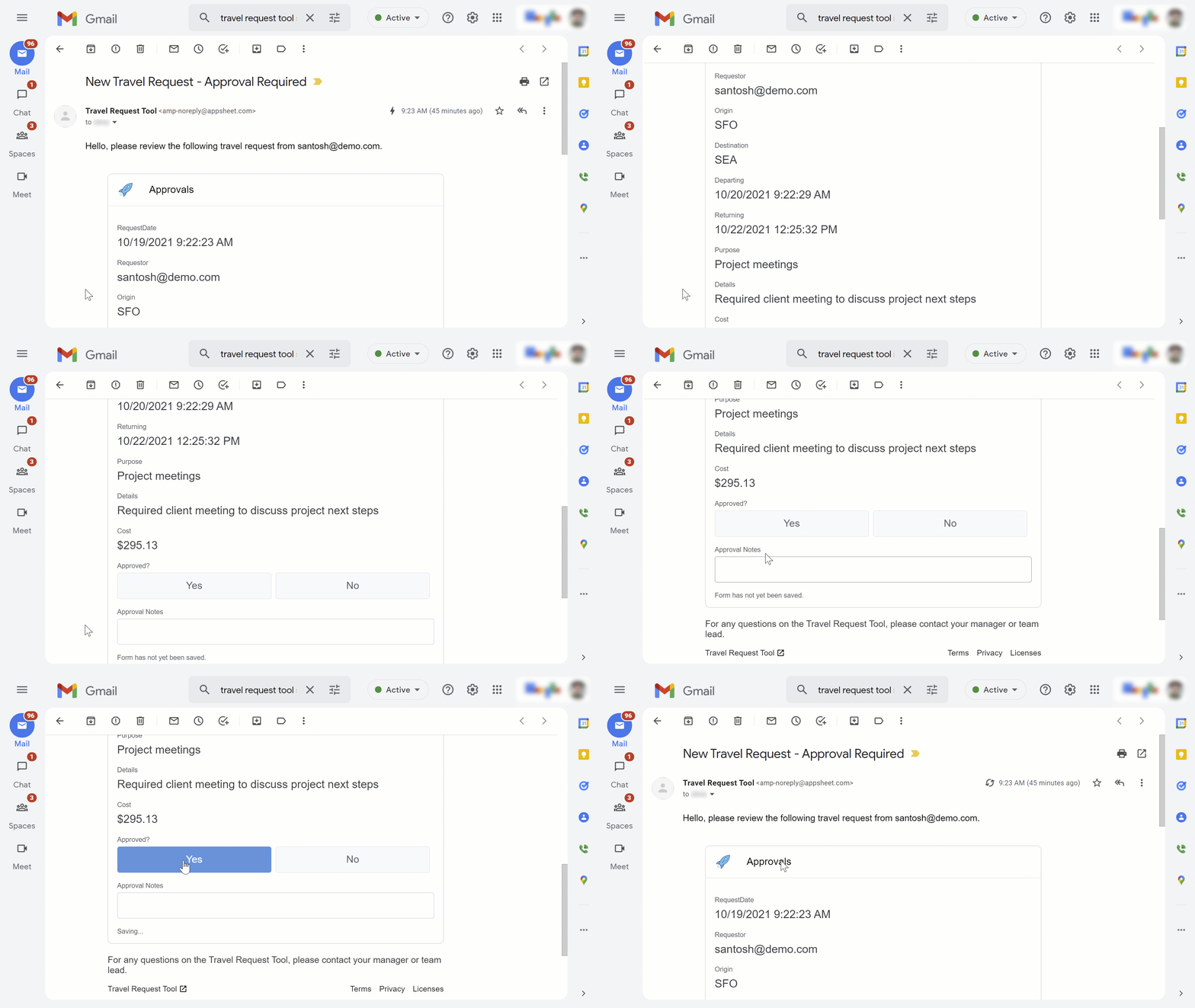
Last week weannounced AppSheet in Gmail, a new feature that lets you use custom-built no-code applications, created in AppSheet, directly in your inbox as a dynamic email. Too often, daily workflows are spread across multiple applications, slowing productivity as we navigate from one app to another and back again. By putting business apps and email in the same interface, AppSheet in Gmail helps make these frustrations a thing of the past, saving users from the breaks in focus that come with switching among multiple services. AppSheet’s new capabilities within Gmail are powerful because previously, creating a dynamic email would have required coding skills and a lot of patience. Because AppSheet is a true no-code platform, anyone can create one, making it easier than ever to translate a great idea into software and deploy it to teammates in an easily consumable fashion. AppSheet apps can be connected to the data source of your choice, such as a Google Sheet, SQL database, or Salesforce. This is especially useful if you are creating a dynamic email, because it means you and your colleagues can update data in any of these data sources without having to leave your inbox.How AppSheet in Gmail worksLet’s see how an AppSheet dynamic email works. In this example, we have a Travel Request app that is used for creating travel requests and sending them to an approver who can respond to them using a Dynamic Email in Gmail. Here’s what that looks like in Gmail:Up-to-date details about the travel request are shown directly in the email, because the data source is queried for the latest data when the email is opened (that’s where the “dynamic” in “dynamic email” comes from).Here’s where it gets interesting. The person receiving the dynamic email (here, the “approver”) can review the details, add comments and make approval decisions, and then submit their response directly from the email. This updates the app’s data source (Google Sheets, in this case). Here’s what the Sheets data looks like after the travel request has been approved via Gmail, with the user’s approval decision (“TRUE”), approval date, and additional notes appearing in the travel request row in the Google Sheet:And for extra extensibility, once this data is written back to the data source, it can then trigger additional automations (workflows), such as sending a confirmation email or an SMS text message. Create your first dynamic email in AppSheetSetting up a dynamic email takes only a few minutes. You’ll start by setting up an automation, which allows your app to detect certain conditions and then take appropriate actions. In our example, we’ve created a bot that detects when a new Travel Request is created by a user, and then automatically sends an email to the approver with key details.Next, in the dynamic email section, from the “Use Dynamic Email” dropdown, we’ll select our “Approvals” view, since that is the view we’ll want to appear in the user’s email. Then we’ll specify recipients and optional information like additional text to include in the email:And that’s it! With AppSheet’s dynamic emails, Gmail isn’t just one app among many where you and your teammates get work done—it’s a central destination for seamless collaboration of all kinds.  Want some more help creating your first dynamic email in AppSheet? Check out this how-to video that walks through the process step by step.
Quelle: Google Cloud Platform

Trust Google Cloud more with ubiquitous data encryption

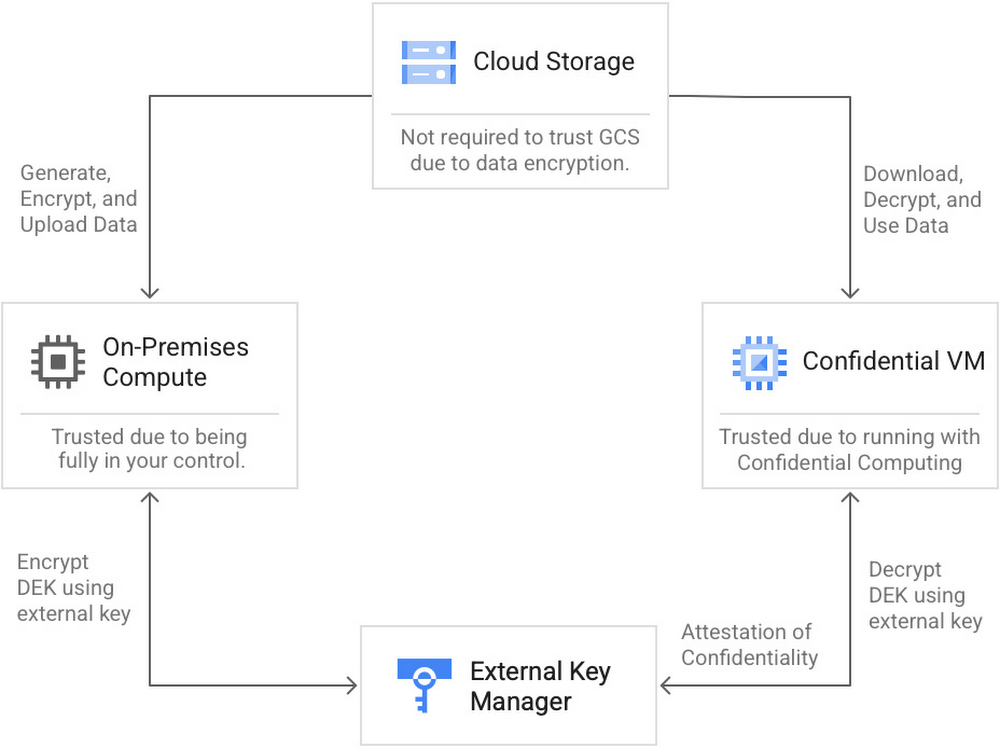
As you move data to the cloud, you face the important question of how to verifiably protect data from unauthorized access without limiting your options for storage and processing. Using public cloud services requires you to place inherent trust in your cloud provider, which can be uncomfortable for your most sensitive data and workloads. On Google Cloud Platform, you can use solutions such as Cloud External Key Manager (EKM)when encrypting data-at-rest to store and manage keys outside of Google’s infrastructure and Confidential Computing to encrypt data-in-use with keys that remain resident in the processor and unavailable to Google.  However, while these solutions can reduce the level of implicit trust surrounding data at-rest or in-use, you still need to trust the cloud provider when data  transitions from one state to another, or when the data is in-transit.  So how do you deal with these challenges? At Cloud Next 2021, we announced a first of its kind solution that provides customers with ubiquitous data encryption which delivers unified control over data at-rest, in-use, and in-transit, all with keys that are under your control.  With ubiquitous data encryption:You control the access to your data regardless of whether it’s on storage, in memory, or in flightYou can take full advantage of compute and storage power of GCPYou can reduce your level of implicit trust in GoogleTo build this solution, we leveraged Google Cloud’s confidential computing and Google Cloud EKM, working with partners, including Thales, to ensure that you can continue to use your existing EKM setup. In doing so, we made it possible to seamlessly encrypt your data as they are sent to the cloud, using your external key management solution, in a way that only a confidential VMcan decrypt and compute on it. In order to make sure the key can only be used in a confidential environment, we leverage Confidential VM’s attestation feature. How to setup and use ubiquitous data encryptionThe workflow to set up and use this capability is designed to be simple:Start by creating an encryption key outside GCP using your current external key management solution (for this solution, we currently support Thales Ciphertrust, with more EKM partner integrations to come)Grant access to your EKM encryption keys to the Confidential VMservice Use the gsutil tool to upload your data to Google Cloud Storage (GCS) using our lib. This will seamlessly encrypt your data using the key generated in Step 1.In your application running in a confidential VM, use gsutil to download the GCS data using our lib. This will seamlessly decrypt your data without revealing the key outside the confidential VM.If the application tries to access the GCS data on a non-confidential VM, it will fail when attempting to decrypt the data.How ubiquitous data encryption helps reduce implicit trustAdvanced configuration optionsYou can also add additional safeguards and optionally require more than one party to authorize access to your encryption key: for example, you can require a Cloud KMS key, in addition to your on-prem encryption key, to be present for every decryption operation. This provides even more control over the key access model, because it splits the ability to encrypt and decrypt across multiple parties.Customers handling highly regulated financial services data have started seeing immediate results from this integration between Confidential Computing and Cloud EKM: “Google’s new ubiquitous data encryption capabilities will allow us to bring more of our data and workloads to the cloud. Being able to encrypt data at-rest, in-use, and in-transit with a key that we control allows us to continue to meet our strict data security standards while being able to take advantage of the powerful storage and compute capabilities of Google Cloud.”– Jörn-Marc Schmidt, Vice President, Cryptography Engineering & Solutions, Deutsche BankTake the next stepIn summary, this new ubiquitous data encryption solution can help reduce your implicit trust in Google Cloud so you can bring even more of your sensitive data to  GCP. Please see our documentation for more information and reach out via this form to get started or with comments or questions.Related ArticleIntroducing Google Cloud Confidential Computing with Confidential VMsGoogle Cloud will now offer the ability to encrypt data in use, while it’s being processed in a Google data center.Read Article
Quelle: Google Cloud Platform

SenseData’s journey with Google Cloud’s managed database services

Editor’s note: Learn how SenseData helps Brazilian companies embrace customer success, rapidly evolving their products on Google Cloud and Google managed database services. SenseData has grown from a handful of customers to 140, manages multi-terabytes of data, and is now moving to Google BigQuery for data warehousing.SenseData is a customer success company, and we have one product. We gather information from our clients’ systems and aggregate it all in a single platform that they use to make smarter decisions about their business. Some clients want to increase sales, some want to reduce churn, and others want to see a more comprehensive picture of their customers.Our customer base has grown very quickly and so has the data our platform collects, manages, and makes consumable. Just 5 years ago, we had a minimum viable customer success product (MVP). Brazilian B2B customers don’t have a “default” software stack, so they use a mishmash of systems and software to manage the customer relationship. Our objective was to integrate the data from all these different systems. We were on the cloud for that reason, and our goal was to be cloud-agnostic, using open-source software like MySQL and other tools to manage data.  Over time, our outlook has changed. It all started when we participated in the first Google Campus Residency for Startups. The residency introduced us to Google Cloud Platform and Google managed database services. After burning through our credits, we really haven’t looked back. We see the value of being a “Google Cloud shop.” As we have evolved, we’ve taken advantage of new managed database services from Google. We are really impressed with how Google also evolves with changes in data formats and storage. Best of all, with Cloud SQL for MySQL and PostgreSQL, and now BigQuery, we don’t have to worry about backups, restores, replicas, and everything else that database administrators must do. We can focus on using our talent to keep improving our platform.Oh, MySQL, how we’ve outgrown you: Building an ecosystem with Google servicesOur original architecture consisted of MySQL, an application server, and a cloud infrastructure from another vendor. During our campus residency, we moved to GCP and we started using Cloud SQL for MySQL because our clients’ data formats and sources were all over the map—Oracle, Microsoft SQL Server, Google Sheets, CSVs stored on other cloud infrastructure, and systems with only VPN access to data sources. As our clients grew, the fact that our platform was written so that all the customer data was completely separated sent us beyond the boundaries of MySQL, and we moved to PostreSQL through Cloud SQL. Some indexes and queries were not performing well for us in MySQL. In PostgreSQL, by doing nothing differently and with the same indexes and queries, the performance was consistently better. We have an ORM tool (SQLAlchemy) on top of the database layer of our app. So, it was very easy to migrate from MySQL to PostgreSQL.At the same time, we moved to Kubernetes with Google Kubernetes Engine. The result of that combination was an ecosystem that could accommodate various technical needs. For example, to build a firewall, we could start Kubernetes and create an egress rule that easily handled load balancing. Each customer has an external address using the same external IP, and inside Kubernetes, host rules can pinpoint and choose addresses.This ecosystem represented a big turning point for us. We had not planned on putting all our tech and data eggs in one basket, but our experience showed us the importance of having a first-rate database and managed database services—the lower latency, the support, and everything that comes with it. We quickly came to understand how Google can help companies during the growth process. We decided to take advantage of other GCP resources because Google makes it easy to access their first-rate services. Like two peas in a pod: Offering clients peace of mind with Google Cloud SQLAny client of a company like SenseData that has a cloud offering or uses cloud storage and data management is going to be concerned about its data security and whether other customers might get access to it. SenseData uses Google services to ensure that their data stays separate. On GCP with Cloud SQL for PostgreSQL, we have single tenancy per database, and multiple customer databases per instance. In other words, the instance is shared, but the logical database is not. We also have custom data that is JSON-B, which describes data binding relationships between JSON documents and hypermedia. If one of our clients is a SaaS company that sells consulting services, e-commerce storefronts, and a mobile app that calls a taxi service, we can easily perform joins of that custom data with all the various types of data collected by the client. Then we can deliver metrics and calculations that meet their needs.Separation of data is a piece of application layer cakeFor logical separation at the application layer, we use a cluster that has 13 nodes with 4 CPUs and 15 GB RAM. Inside the cluster, the logical separation uses namespaces. The onboarding and production are inside their own namespaces. Inside the config map of Kubernetes, there’s a patch that directs the customer to the database specific to that customer.In other words, the pod is the deployment method. The config map tells the pod to answer to the specific database. The service view has a named port or even a specific app selector that it serves. The egress rule of the host indicates the domains that go to each server and the port. This method allows us to have a different service for each customer. The BigQuery idea: Data warehousing in the cloud to help customers meet KPIsRecently we started to work with BigQuery. We made the decision to deploy because we were migrating the analytics from another vendor to Looker and wanted to improve performance and address the KPI needs of our biggest clients. These clients have a million customers, and the performance of some of their KPIs was not optimal. Many are ecommerce customers who want to track product sales against KPIs. For each product, they must look at historic sales data, hunt for specific SKUs, try to determine when the product was last purchased, and so on. Imagine doing that for multiple products concurrently. This gets very complicated in PostgreSQL BigQuery offers us a faster and easier way to address performance and increase scalability. All our calculations will migrate over to BigQuery. Once all the data is aggregated, it can go back to PostgreSQL. We use a Python client to get it from BigQuery to Cloud SQL. This evolution of Cloud SQL and data warehousing is impressive. It gives us the freedom to try new configurations and data management techniques. Two years down the road from now, we’re sure that if we have to change how we handle customer data, there will be an evolution of Cloud SQL or some other Google service that will help us make the switch. One isn’t the loneliest number: Cloud SQL makes database management easyCloud SQL and Google Cloud Platform help us by providing all the complicated database management services, plus observation, monitoring, and more. As a result, the SenseData infrastructure has been managed by just one person for about 6 years. Even though we have grown to 140 customers with terabytes of data, it’s still mostly a one-person job. How is this possible? The answer is simple. We don’t have to deal with backups, maintenance downtime, and resolving replication issues. Cloud SQL serves up everything for us instead. We don’t have to staff a team that includes a DBA, someone to manage networking, someone to administer VMs, and so on. That’s a big value for us. If we had stuck to our original plan to find cloud solutions no matter the vendor, we might not be able to stay so lean. The database services managed by Google, along with GCP and GKE, really make a difference. Learn more about SenseData and Cloud SQL. You can also take Cloud SQL for a spin with our free trial, And be sure to check out our recent blog on how Cloud SQL makes data protection easy.
Quelle: Google Cloud Platform