Avoiding GCF anti-patterns part 2: How to reuse Cloud Function instances for future invocations

Editor’s note: Over the next several weeks, you’ll see a series of blog posts focusing on best practices for writing Google Cloud Functions based on common questions or misconceptions as seen by the Support team.  We refer to these as “anti-patterns” and offer you ways to avoid them.  This article is the second post in the series.ScenarioYou notice that your Function is exhibiting one of the follow:slow to respond to a requestdemonstrates unexpected behavior on subsequent executionsruns out of memory over timeMost common root issueIf your Cloud Function is slow to respond, have you considered moving code into the global scope? However, if your Function is demonstrating unexpected behavior on subsequent executions or is running out of memory over time, do you have code written in the global scope that could be causing the issue?   How to investigateDoes your Function perform an expensive operation, e.g. time or network intensive operation, on every invocation within the Function event handler body? Examples include:opening a network connectionimporting a library referenceinstantiates an API client objectYou should consider moving such expensive operations into the global scope. What is the global scopeGlobal scope is defined as any code that is written outside the Function event handler. Code in the global scope is only executed once on instance startup. If a future Function invocation reuses that warm instance, the code in the global scope will not re-run again.  Technically speaking, code in global scope is executed additionally on the initial deployment for a “health check” – see Other helpful tips section below for more information about health checks.How to update your Function to use the global scopeSuppose you’re saving to Firestore. Instead of making the connection on each invocation, you can make the connection in the global scope. Cloud Functions tries to reuse the execution environment of the previous function when possible, e.g. the previous instance is still warm. This means you can potentially speed up your Functions by declaring variables in the global scope. Note: to be clear, there is no guarantee the previous environment will be used. But when the instance can be used, you should see performance benefits.In the example below, you’ll see how the connection to Firebase is outside the body of the Function event handler. Anything outside the Function event handler is in global scope.Lazy Initialization and global scopeWhen using global scope, it’s important to be aware of lazy initialization. When you use lazy initialization, you only initialize the code if or when you actually need it, while persisting that object in global scope for potential reuse. To illustrate, suppose your Function might have to create 2 or more network connections; however, you don’t know which of these connections you’ll need until runtime. You can use lazy initialization to delay making the connection until it is required, with the potential of retaining that connection for the next invocation. Other helpful tipsA couple of things to note when writing code in the global scope:It is paramount to have correct error handling and logging in global scope. If your code performs a deterministic operation (e.g. initializing a library) and crashes in the global scope, your Function will fail to deploy (known as a “health check” – more below). However, if you are performing an non-deterministic operation in the global scope (e.g. calling an API that could fail intermittently on any Function invocation), you will see an error “Could not load the function, shutting down” or “Function failed on loading user code.” in your logs. For background functions that have enabled the automatically retry on failure feature, PubSub will retry such failures due to errors in user code. The most important takeaway is that you have tested your code in global scope and have written proper error handling and logging. You can read more about Function deployments failing while executing code in the global scope in the troubleshooting guide. You might be surprised to see extra information in your logs coming from your code in global scope, e.g. the output from a `console.log()` statement. When a Cloud Function is deployed, a health check is performed to make sure the build succeeds and your Function has appropriate service account permissions. This health check will execute your code written in the global scope, hence the “extra” call in your logs.Related ArticleAvoiding GCF anti-patterns part 1: How to write event-driven Cloud Functions properly by coding with idempotency in mindFirst post in a series on how to avoid anti-patterns in Google Cloud Functions as seen by the Support team. This post explores what idemp…Read Article
Quelle: Google Cloud Platform

Road to an open and flexible cloud network with new Network Connectivity Center partners

At Google Cloud we aim to provide our customers with the flexibility to choose the networking solutions that best fit their needs. Network Connectivity Center, our unified network connectivity management solution, is generally available in 15 regions across the U.S., U.K., India, Australia, and Japan, and we are en route to expanding this coverage to include all Google Cloud regions, enabling global onramp to the cloud.We are committed to maintaining an open and flexible cloud networking environment that will enable interconnectivity with the Google Cloud network, and partners play a critical role in this. Today, as part of that commitment, we’re excited to announce partnerships with Alkira, Arista, Aruba, Aviatrix, Cisco Meraki and Citrix, who are leading the charge in software-defined networking solutions. Together, we are providing streamlined onramp from their leading solutions to Google Cloud through integration with Network Connectivity Center.To recap, we introduced Network Connectivity Center back in March to help you simplify how you deploy, manage and scale on-prem and cloud networks. Network Connectivity Center gives you the universal connectivity control you need to connect all your networking resources together in a simple and scalable model. Network Connectivity Center can connect your entire enterprise network including on-prem, multi-site, and hybrid networks all in one place; and with Network Intelligence Center, you can monitor and troubleshoot the network. Together, you get a vantage point for looking at your Google Cloud network and all the networks connected to it. In May we announced some exciting new partnerships that extend your connectivity choices. We are now pleased to announce new networking partnerships that seamlessly extend our partners’ solution into Google Cloud via Network Connectivity Center. These integrations enable global connectivity, allowing VPN or third-party virtual appliances to easily connect with VPCs using standard BGP, enabling dynamic route exchange and simplifying the overall network architecture and connectivity model. Now, you have the flexibility to deploy, operate and manage all your connectivity needs with these third-party solutions, minimizing operational overhead for your networking teams.Read more for details about Network Connectivity Center integrations from our partners:AlkiraWith Alkira Network Cloud, powered by the Alkira Cloud Services Exchange, enterprises can have consistent and simplified experience of provisioning and operating global networks across users, sites and clouds with integrated next-generation security services. At the core of Alkira Cloud Services Exchange are the Alkira Cloud Exchange Points (Alkira CXPs) that are distributed around the world and are interconnected through a high-speed low-latency Alkira Cloud Backbone, allowing enterprises to instantly establish global secure network connectivity.Network Connectivity Center simplifies cloud onramp by connecting to one or multiple Alkira CXPs as spokes in a single-region or multi-region deployment model. Routing information is dynamically exchanged to allow communication between Google Cloud VPCs and Alkira CXPs. Learn more here.Arista Arista CloudEOS is a multi-cloud and cloud-native networking solution supporting autonomic operation to deliver an enterprise-class, highly secure, and reliable networking experience for extending an enterprise network to the cloud. Network Connectivity Center integration with CloudEOS means enterprises can quickly connect to Google Cloud with a simplified provisioning and deployment model. The partnership will deliver simplified high-scale deployments across your public cloud and on-premises infrastructure. Learn more here.Aruba The Aruba EdgeConnect edge and Aruba SD-Branch platforms power a self-driving wide area network for cloud-first enterprises. These SD-WAN platforms enable enterprises to improve their network performance for running all cloud applications and services via broadband—even consumer broadband. The Aruba EdgeConnect and Aruba SD-Branch integrations with the Google Cloud Network Connectivity Center enable enterprises to use their SD-WAN fabric for branch-to-Google-Cloud connectivity over the public internet by running EdgeConnect and Virtual Gateway instances in Google Cloud VPCs. The resulting network service enables high-performance connectivity between SD-WAN-connected branches and workloads in Google Cloud. Enterprises will experience a simplified and automated cloud on-ramp experience for their Google Cloud workloads. Learn more here.Aviatrix The Aviatrix cloud network platform brings multi-cloud networking, security, and operational visibility that enterprise customers require. Aviatrix software leverages public cloud provider APIs to interact with and directly program native cloud-networking constructs, abstracting the unique complexities of each cloud to form one network data plane while also adding advanced networking and security features.Google Cloud Network Connectivity Center integrated with Aviatrix simplifies cloud onboarding while unifying connectivity across Google Cloud networks. Enterprise customers can leverage the Aviatrix cloud network platform to orchestrate a repeatable cloud footprint, accelerate deployment time, and integrate with native Google Cloud constructs for on-prem and cloud connectivity through Network Connectivity Center. Learn more here.CiscoCisco Meraki MX and vMX are built on a cloud architecture to deliver network security and experience for any workload, from anywhere. Cloud architecture teams can now create a secure fabric that optimizes connectivity between offices, remote workers, and services running in Google Cloud.The integration with Network Connectivity Center extends the secure Meraki SD-WAN fabric deeper into Google Cloud, enabling dynamic route exchange for connectivity to VPCs. In this way, distributed branches and remote users can dynamically and securely access cloud workloads across multiple regions. Learn more here.Citrix Citrix SD-WAN is a core networking capability of the Citrix unified approach to a Secure Access Service Edge (SASE) architecture. A unified approach makes it easy for IT to enable secure, resilient, and automated connectivity between hybrid workers and applications hosted in Google Cloud. Together, Citrix SD-WAN and Google Cloud Network Connectivity Center enable IT teams to simplify their network architecture for site-to-cloud and site-to-site connectivity. This integrated and automated approach helps IT rapidly scale networks to Google Cloud and ensure your hybrid workforce is always connected. Now hybrid workers everywhere get fast, low-latency access to enterprise workloads, desktop-as-a-service (DaaS) or Citrix Virtualized Applications and Desktops (CVAD), by leveraging Google Cloud’s global backbone using Citrix SD-WAN. Citrix SD-WAN’s unique ability to inspect and prioritize the CVAD HDX protocol provides the highest level of responsiveness and reliability for hybrid workers. Learn more here.Getting Started Our partnerships truly democratize access to the cloud from anywhere by making that access simple and reliable. Our vision is to allow you and your customers to connect to workloads in any cloud or on-prem locations with a consistent experience that is easy to secure and manage. You can get started with the Network Connectivity Center here. You can learn more about our partners and how to deploy their solution with the Network Connectivity Center here.Related ArticleIntroducing Network Connectivity Center: A revolution in simplifying on-prem and cloud networkingWith Network Connectivity Center, you can connect and manage VPNs, interconnects, third-party routers and SD-WAN across on-prem and cloud…Read Article
Quelle: Google Cloud Platform

reCAPTCHA Enterprise puts users first

reCAPTCHA has defended the web for more than 14 years, and is protecting more than 5+ million websites on the Internet today. The heart of our mission has always been to be hard on bots and easy on humans. This is a challenge that evolves with all the new ways the web can be used and the increasing sophistication of bots. reCAPTCHA started with simple warped text. As bots got smarter, reCAPTCHA provided harder images for end users to solve. We recognize this race between the intelligence of AI and humans has made the users’ experience increasingly challenging. So, in the latest version of reCAPTCHA, reCAPTCHA Enterprise, we’ve created a new detection method that provides a frictionless experience for users, but is still effective at identifying bots.reCAPTCHA Enterprise has been built on two primary principles that put end users first:Protect usersProvide a frictionless user experienceProtect UsersToday, reCAPTCHA Enterprise is a pure security product. Information collected is used to provide and improve reCAPTCHA Enterprise and for general security purposes. We don’t use this data for any other purpose.reCAPTCHA Enterprise has codified these requirements in our terms, which restrict reCAPTCHA Enterprise to be used to fight spam and abuse. It cannot be used for other purposes such as determining credit worthiness, employment eligibility, financial status, or insurability of a user. Additionally, none of the data collected can be used for personalized advertising by Google.To further keep users safe, reCAPTCHA Enterprise customers are required to explicitly inform applicable end users that the customer has implemented reCAPTCHA Enterprise. Customers need to comply with all applicable privacy laws and regulations, especially those applying to personal data. This includes providing a privacy policy for their API client that clearly and accurately describes to users the information collected and uses of that information. For customers with end users in the European Union, this includes compliance with the EU User Consent Policy.reCAPTCHA Enterprise has also increased the number of features, including integrated multi-factor authentication and password check, to protect against account takeovers and keep end users safe. You can learn more about this use case in a recent blog. Provide a Frictionless User ExperienceSince reCAPTCHA Enterprise was launched in 2018, the priority has been to integrate into as many web pages on a website as a frictionless solution. This means end users do not have to identify crosswalks or decrypt text before proceeding on a web page. reCAPTCHA Enterprise detects bots by observing on-page behavior rather than having users solve tests. reCAPTCHA’s adaptive risk analysis engine identifies attacker patterns more accurately by looking at activities across different pages on a website. This is more difficult for bots to mimic and reduces user friction. This can help improve your business’ individual goals such as customer satisfaction and brand loyalty. The Future: A Total Fraud SolutionAs reCAPTCHA Enterprise is now a frictionless solution, it can be installed across a website’s entire user experience to detect fraud and abuse. Users will be able to interact with a website secured by reCAPTCHA Enterprise without having to solve additional challenges or otherwise be impeded. Recognizing companies’ need for an integrated fraud solution, the reCAPTCHA Enterprise team is working to build a complete and integrated set of tools to defend against fraud all the way from a pageview, to login, through the final payment. This will not only provide a single solution for our customers to adopt, but it will also provide an integrated view of fraud across all user actions.Related ArticleProtect your organization from account takeovers with reCAPTCHA EnterpriseHow reCAPTCHA Enterprise helps protect your websites from fraudulent activity like account takeovers and hijackingRead Article
Quelle: Google Cloud Platform
Cloud Domains, now GA, makes it easy to register and manage custom domains

In February, we announced Cloud Domains, which makes it easy for Google Cloud customers to register new domains. Today, we’re excited to announce that Cloud Domains is in general availability. We created Cloud Domains with the goal of simplifying domain-related tasks, and we’ve continued to build on the initial release with new functionality.Click to enlargeCloud Domains allows you to manage access controls for domains through Cloud IAM and manage your domain registrations and renewals through Cloud Billing, for a more seamless experience with the rest of Google Cloud. Cloud Domains is also tightly integrated with Cloud DNS. In just one click, you can create Cloud DNS zones and associate them with your Cloud Domains, while the Cloud DNS API makes it easy for you to bulk-manage DNS zones for your domain portfolio. With Cloud Domains, you can also enable DNSSEC for your Public DNS Zones for enhanced security. When transferring domains, you can call Cloud DNS APIs to set up DNS for the newly transferred domains. Cloud Domains works better with your other Google Cloud applications such as Cloud Run, Google App Engine and Cloud DNS as everything is managed under the same Google Cloud Platform project, greatly simplifying domain verification and configuration. Finally, we’ve added the ability to transfer third-party domains into Cloud Domains via a simple API, which supports a wide variety of top-level domains. This allows you to consolidate your domain portfolio in one place and utilize APIs for programmatic management. With this API, bulk transfer of your domains into Cloud Domains becomes much simpler. Customers such as M32 Connect are already benefiting from the continued feature innovation of Cloud Domains.  “As a cloud-native ad tech and analytics company, we have to manage massive amounts of domains. Being able to manage them in bulk through APIs and CLI allows us to automate new parts of our infrastructure. Google Cloud helps us improve our time-to-market while reducing human interventions on tedious activities. Cloud Domains is a breath of fresh air!” – Claude Cajolet, Head of Technology Management and Monetization Architecture, M32 Connect To get started with Cloud Domains, read this getting started guide. Then, click over to the Cloud Console and start registering new domains today!Related ArticleIntroducing Cloud Domains: Easily register and manage custom domainsThere’s a new domain registration and management portal that’s tightly integrated with Google Cloud.Read Article
Quelle: Google Cloud Platform

How Pokémon GO scales to millions of requests?

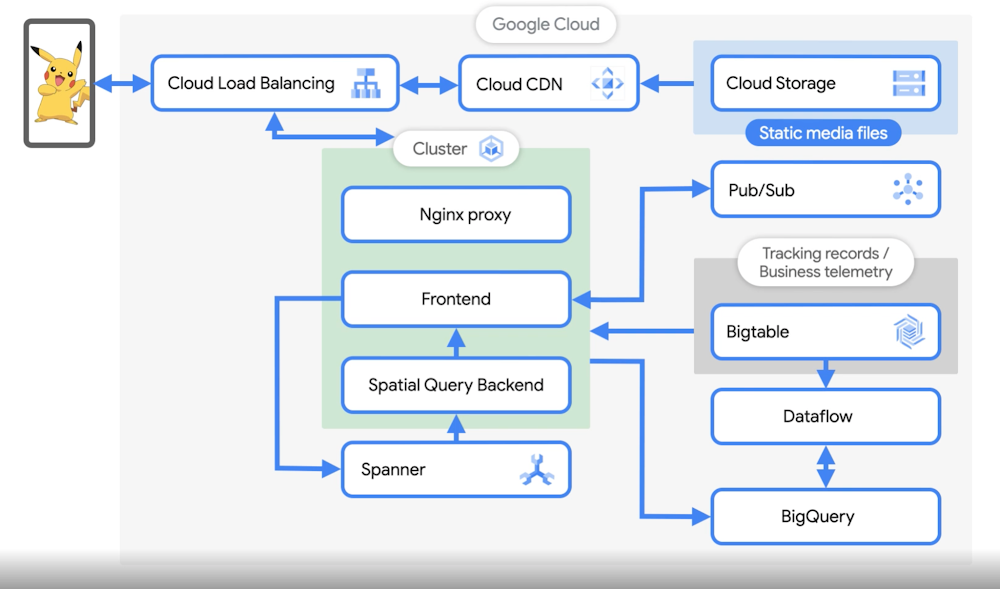
Have you caught Pokémons? Pokémon GO is a popular game played by millions, but it scales extremely well. This blog is a behind-the-scenes look into how the Pokémon GO engineering team manages and maintains the scale. Joining me is James Prompanya, Senior Engineering Manager at Niantic Labs who leads the server infrastructure team for  Pokémon GO. Let’s see what he had to say when I asked him about the  architecture that powers this extremely popular game. Checkout the video!Priyanka:What is Pokémon GO?James:  It’s not your typical mobile game. It’s a game that involves walking around to catch these little Pokémon creatures that are appearing all around you in the real world. It encourages you to go outside, explore, and discover things using augmented reality.A big part of that is the community aspect of it. When the game first came out, we hadn’t built community features into the game yet, but players still met with others in real life, played together, and pointed out when rare, powerful Pokémon would appear. Everyone sees the same Pokémon, and shares the same virtual world, so when someone points out a Pokémon, you’d just see crowds of people running out after it. Nowadays, we make this  a major part of the game by hosting regular live events such as community days, raid hours, all culminating in GO Fest, our annual celebration during the summer and our biggest event of the year.During these events, transactions go from 400K per second to close to a million in a matter of minutes as soon as regions come online.Priyanka:How does the Pokémon GO backend scale to handle peaks in traffic during events such as Pokémon GO Fest? James:There are lots of services we scale, but Google Kubernetes Engine and Cloud Spannerare the main ones. Our front end service is hosted on GKE and it’s pretty easy to scale the nodes there — Google Cloud provides us with all the tools we need to manage our Kubernetes cluster. The Google Cloud console is easy to use, with detailed monitoring graphs, tools, and logging available to use with just a few clicks. The support we get from Google engineers is top notch, and they’re always able to assist at any given moment, or in preparation for our large events such as Pokémon GO Fest.  We had Google engineers (virtually) sitting side by side with us ready to tackle any issues from running such a large scale event – it was like having an extra support team working directly with us.At any given time, we have about 5000 Spanner nodes handling traffic. We also have thousands of Kubernetes nodes running specifically for Pokémon GO, plus the GKE nodes running the various microservices that help augment the game experience. All of them work together to support millions of players playing all across the world at a given moment. And unlike other massively multiplayer online games, all of our players share a single “realm”, so they can always interact with one another and share the same game state.    Priyanka:Were you always using Spanner? Or did you decide to make that architectural decision as the game got popular? James:We started off using Google Datastore. It was an easy way to get started without having to worry about managing another piece of infrastructure. As the game matured, we decided we needed more control over the size and scale of the database. We also like the consistent indexing that Cloud Spanner provides, which allows us to use more complex database schemas with primary and secondary keys. Finally, Datastore is non-relational with Atomic & Durable transactions, but we needed a relational database with full consistency. Spanner provides all of this, plus global ACID transactions.Priyanka:Let’s say I am a player, playing the game right now. I opened the app to catch Pokémon. What is happening behind the scenes – how does the request flow work?James: When a user catches a Pokémon, we receive that request via Cloud Load Balancing. All static media, which is stored in Cloud Storage, is downloaded to the phone on the first start of the app.  We also have Cloud CDN enabled at Cloud Load Balancing level to cache and serve this content. First, the traffic from the user’s phone reaches Global Load Balancer which then sends the request to our NGINX reverse proxy. The reverse proxy then sends this traffic to our front-end game service.The third pod in the cluster is the Spatial Query Backend. This service keeps a cache that is sharded by location. This cache and service then decides which Pokémon is shown on the map, what gyms and PokéStops are around you, the time zone you’re in, and basically any other feature that is location based. The way I like to think about it is the frontend manages the player and their interaction with the game, while the spatial query backend handles the map.  The front end retrieves information from spatial query backend jobs to send back to the user.Priyanka:What happens when I hunt a Pokémon down and catch it?James: When you catch the Pokémon, we send an event from the GKE frontend to Spanner via the API and when that write request from the frontend to spanner is complete. When you do something to update the map like gyms and PokéStops, that request sends a cache update and is forwarded to the spatial query backend. Spanner is eventually consistent: once the update is received, the spatial data is updated in memory, and then used to serve future requests from the frontend. Then the frontend retrieves information from the spatial query backend and sends it back to the user. We also write the protobuf representation of each user action into Bigtable for logging and tracking data with strict retention policies. We also publish the message from the frontend to a Pub/Sub topic that is used for the analysis pipeline. Priyanka:How do you ensure that two people in the same geographic region see the same Pokémon data, and keep that relatively in sync? (Especially for events!)James: It’s actually pretty interesting! Everything on our servers is deterministic. Therefore, even if multiple players are on different machines, but in the same physical location, all the inputs would be the same and the same Pokémon would be returned to both users. There’s a lot of caching and timing involved however, particularly for events. It’s very important that all the servers are in sync with settings changes and event timings in order for all of our players to feel like they are part of a shared world.Priyanka:A massive amount of data must be generated during the game. How does the data analytics pipeline work and what are you analyzing?James:You are correct, 5-10TB of data per day gets generated and we store all of it in BigQuery and BigTable. These game events are of interest to our data science team to analyze player behavior, verify features like making sure the distribution of pokemon matches what we expect for a given event, marketing reports, etc.We use BigQuery – it scales and is fully managed, we can focus on analysis and build complex queries without worrying too much about the structure of the data or schema of the table. Any field we want to query against is indexed in a way that allows us to build all sorts of dashboards, reports, and graphs that we share across the team. We use Dataflow as our data processing engine, so we run a Dataflow batch job to process the player logs stored in Bigtable. We also have some streaming jobs for cheat detection, looking for and responding to improper player signals. Also for setting up Pokétops and gyms and habitat information all over the world we take in information from various sources, like OpenStreetMap, the US Geological Survey, and WayFarer, where we crowdsource our POI data, and combine them together to build a living map of the world.Priyanka:As the events grow and the traffic grows to millions of users per second, how does this system scale? James: Yes, With the increase in transactions, there is an increase in the load throughout the system like data pipeline (pub sub, BigQuery Streaming and more). The only thing that the Niantic SRE team needs to ensure is that they have the right quota for these events, and since these are managed services, there is much less operational overhead for the Niantic team.Priyanka:With that much traffic, the health of the system is critical. How do you monitor the health of their system during these massive events?James: We use Google Cloud Monitoring which comes built in, to search through logs, build dashboards, and fire an alert if something goes critical. The logs and dashboards are very extensive and we are able to monitor various aspects and health  of the game in real time.Next up, James and the Pokémon GO engineering team plan to explore managed Agones, Game Servers, stay tuned and checkout our entire customer architecture playlist.We just took a behind the scenes tour into Pokémon GO’s architecture. How they use GKE and Spanner for scaling to those peaks and how their data science team works with BigQuery, BigTable, Dataflow & Pub/Sub for data analytics! What did you think about this story? Tell me more about it on Twitter @pvergadia. Related ArticleUnder the hood: Distributed joins in Cloud SpannerHow do you join two tables when both of them are divided into multiple splits managed by multiple different machines? In this blog entry…Read Article
Quelle: Google Cloud Platform
Advance your future with learning sessions at the Government and Education Summit

Mark your calendars. TheGoogle Cloud Government and Education Summit is less than two weeks away – November 3-4. Reserve your spot for the online learning event at no cost.Organizations around the world are in great need of more workers who have robust IT skills and cloud expertise. The needs in the US alone are staggering. TheU.S. Bureau of Labor Statistics projects that the number of people employed in information technology positions will grow by 13 percent over the next 10 years – faster than any other occupation – with 667,000 new jobs created to fill demands in cloud computing, data science, and cybersecurity. And those are just the new positions. It’s estimated that there are currently 1.3 million open jobs in data analytics, IT support, project management, and UX design. Whether you currently work in technology and want to see what’s coming next in the cloud, are thinking about a future career in cloud technology, or are an educator teaching our next generation of technologists,Google Cloud’s Government and Education Summit offers free, interactive virtual learning sessions on cloud topics to hone your skills and help you become part of the cloud workforce.Spend a Day Learning with GoogleDay 2 (November 4) of the Summit is devoted tointeractive learning sessions led by Googlers and peers. There are three tracks to choose from. Attend all the sessions in your chosen track or mix and match sessions based on your needs so you can get the most of your day of learning with Google.Track 1: Beginners and Non-Technical LearnersEveryone needs to start somewhere on their journey to working in the cloud. If you are a student, 18 or older, thinking about a future working in cloud technology or someone ready to make a career move, the sessions in Track 1 are for you. Sessions include the following and more:Becoming a Cloud Digital Leader- Learn about Digital Leader, the newest training and certification program from Google Cloud. The program takes you through the core Google Cloud products and services and how they can be used to achieve desired business goals. No prerequisites required.Pathway to Proficiency: Getting Started with Google Cloud – Learn about the Google Cloud Skills Boost platform, the gateway to Google Cloud’s individual learning programs, and how to get free access for 30 days. Tour the curriculum to earn skill badges and get started on the path toward developing cloud-ready skills.Hand-On Lab: Introduction to SQL for BigQuery – SQL is a standard language for data operations that allows you to ask questions and get insights from structured datasets. In this hands-on lab, we introduce you to SQL and prepare you for the many labs and quests you can experience in Qwiklabs to further your education on data science topics.Track 2: Technical LearnersAre you already working in technology but want to hone your skills?  Are you looking to expand your career options in technology by adding proficiency in cloud topics? If so, this is the track for you. Track 2 is packed with learning opportunities, including:Build a Virtual Agent in Minutes – Learn to create a virtual agent with Google Cloud Dialogflow and understand the next steps to deploy CCAI to take your support to the next level.Build a Cloud Center of Excellence and Enable Adoption – Learn best practices and tips for successfully building a cloud center of excellence, including building your team.Managing Storage for Education – Learn about Google Cloud storage options and best practices for consuming storage services, moving data across multiple types of storage, and managing storage limits.Track 3: EducatorsIf you are a technology teacher or faculty member who would like to integrate Google Cloud curriculum into your courses or tap into Google Cloud for your research, the sessions in this track are designed for you. Learn how to help your students advance their cloud knowledge regardless of their skill levels. Sessions in Track 3 feature eight programs, including:Cloud Curriculum in the Classroom – Get your students ready for careers in cloud computing by learning about types of cloud curriculum available to faculty for classroom use.Connecting Your Students with Peer Communities – Join this session to learn about student programming like Developer Student Clubs (DSCs), which help student developers learn globally and work with their communities to solve real-life problems. You’ll also learn about student hackathons and more.Funding Research Opportunities – Learn how Google Cloud research credits can advance your research by giving you access to computing power that will make the next big thing possible.Get in the Game with Cloud HeroTo close out a day of Learning with Google, join us for Cloud Hero, a gamified learning experience. You’ll get hands-on learning about cloud infrastructure and have a chance to show your skills by completing online labs that help you practice Google Cloud skills in real time. Register to let us know if you want to attend this special session. No prior experience required.*  *  *Google welcomes all learners to our Google Cloud’s Government and Education Summit. Register for the Summit so that you can watch the sessions live or on demand. For additional opportunities to learn with Google, sign up for theSkills Challenge, and get 30 days unlimited access to Google Cloud Skills Boost, the destination for Google Cloud’s individual learning programs. If you are interested in careers in fields like IT support and program management, Grow with Google offers certifications in these highly sought-after disciplines. If you are a public sector technology leader or employer in any field, you can connect with skilled cloud candidates and grow your talent pipeline by becoming a participating employer withConnect with Google. 
Quelle: Google Cloud Platform

BigQuery Omni now available for AWS and Azure, for cross cloud data analytics

2021 has been a year punctuated with new realities.  As enterprises now interact mainly online, data and analytics teams need to better understand their data by collaborating across organizational boundaries. Industry research shows 90% of organizations have a multicloud strategy which adds complexity to data integration, orchestration and governance. While building and running enterprise solutions in the cloud, our customers constantly manage analytics across cloud providers. These providers unintentionally create data silos that cause friction for data analysts.  This month we announced the availability of BigQuery Omni, a multicloud analytics service that lets data teams break down data silos by using BigQuery to securely and cost effectively analyze data across clouds. For the first time, customers will be able to perform cross-cloud analytics from a single pane of glass, across Google Cloud, Amazon Web Services (AWS) and Microsoft Azure. BigQuery Omni will be available to all customers on AWS and for select customers on Microsoft Azure during Q4.  BigQuery Omni enables secure connections to your S3 data in AWS or Azure Blob Storage data in Azure. Data analysts can query that data directly through the familiar BigQuery user interface, bringing the power of BigQuery to where the data resides. Here are a few ways BigQuery Omni addresses the new reality customers face with multi cloud environments: Multicloud is here to stay: Enterprises are not consolidating, they are expanding and proliferating their data stack across clouds. For financial, strategic, and policy reasons customers need data residing in multiple clouds. Data platforms support for multicloud has become table stakes functionality. Multicloud data platforms provide value across clouds: Almost unanimously, our preview customers echoed that the key to providing game-changing analytics was through providing more functionality and integration across clouds.  For instance,  customers wanted to join player and ad engagement data to better understand campaign effectiveness. They wanted to join online purchases data with in-store checkouts to understand how to optimize the supply chain. Other scenarios included joining inventory and ad analytics data to drive marketing campaigns, and service and subscription data to understand enterprise efficiency. Data analysts require the ability to join data across clouds, simply and cost-effectively.Multicloud should work seamlessly: Providing a single-pane-of-glass over all data stores empowers a data analyst to extend their ability to drive business impact without learning new skills and shouldn’t need to worry about where the data is stored. Because BigQuery Omni is built using the same APIs as BigQuery, where data is stored (AWS, Azure, or Google Cloud) becomes an implementation detail. Consistent security patterns are crucial for enterprises to scale: As more data assets are created, providing the correct level of access can be challenging. Security teams need control over all data access with as much granularity as possible to ensure trust and data synchronization. Data quality unlocks innovation: Building a full cross-cloud stack is only valuable if the end user has the right data they need to make a decision.  Multiple copies, inconsistent, or out-of-date data all drive poor decisions for analysts. In addition, not every organization has the resources to build and maintain expensive pipelines.BigQuery customer Johnson & Johnson was an early adopter of BigQuery Omni on AWS; “We found that BigQuery Omni was significantly faster than other similar applications. We could write back the query results to other cloud storages easily and multi-user and parallel queries had no performance issues in Omni. How we see Omni is that it can be a single pane of glass using which we can connect to various clouds and access the data using, SQL like queries,” said Nitin Doeger, Data Engineering and Enablement manager at Johnson and Johnson.Another early adopter from the media and entertainment industry had data hosted in multiple cloud environments. Using BigQuery Omni they built cross cloud analytics to correlate advertising with in game purchases. Needing to optimize campaign spend and improve targeted ad personalization while lowering the cost per click for ads, their challenge was that campaign data was siloed across cloud environments with AWS, Microsoft Azure, and Google Cloud. In addition to this the data wasn’t synchronized across all environments and moving data introduced complexity, risk and cost. Using BigQuery they were able to analyze CRM data in S3 while keeping the data synchronized. This resulted in a marketing attribution solution to optimize campaign spend and ultimately helped improve campaign efficiency while reducing cost and improving data accessibility across teams. In 2022, new capabilities will include cross cloud transfer’ and authorized external tables to help data analysts drive governed, cross-cloud scenarios and workflows all from the BigQuery interface. Cross cloud transfer helps move the data you need to finish your analysis in Google Cloud and find insights leveraging unique capabilities of BigQuery ML, Looker and Dataflow. Authorized external tables will provide consistent and fine grained governance with row-level and column-level security for your data. Together these capabilities will unlock simplified and secure access across clouds for all your analytics needs. Below is a quick demo of those features relevant to multicloud data analysts and scientists.To get started with BigQuery Omni, simply create a connection to your data stores, and start running queries against your existing data, wherever it resides. Watch the multicloud session at Next 21 for more details. BigQuery Omni makes cross cloud analytics possible! We are excited with what the future holds and look forward to hearing about your cross cloud data analytics scenarios. Share your questions with us on the Google Cloud Community, we look forward to hearing from you.Related ArticleTurn data into value with a unified and open data cloudAt Google Cloud Next we announced Google Earth Engine with Bigquery, Spark on Google Cloud and Vertex AI WorkbenchRead Article
Quelle: Google Cloud Platform
9 things I freakin’ love about Google Cloud identity and environments

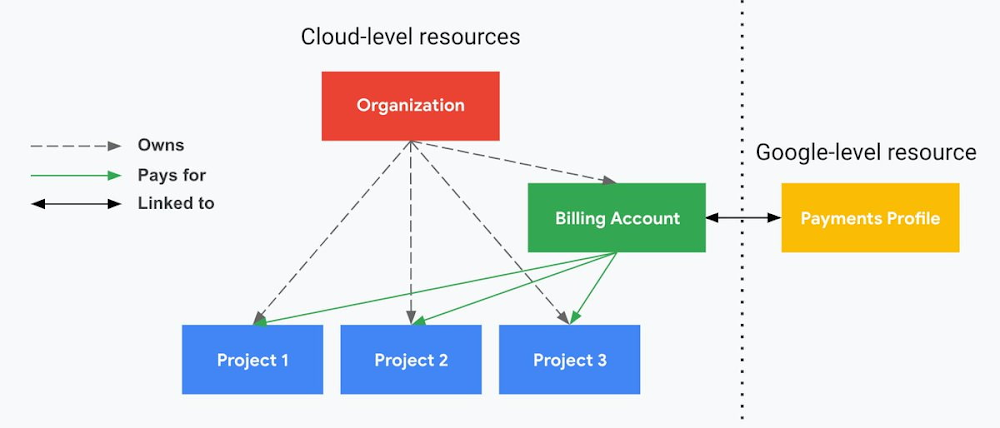
I’ve been at Google Cloud just a few weeks, following years of experience as an AWS Hero and building on other clouds. So last week’s Google Cloud Next–my first!—was a bit of a culture shock. On the GCP podcast, I used the word “intentionality” to describe what I’m seeing: a thoughtful, holistic approach that informs so much of how Google Cloud is put together. Not just in the headline-grabbing new announcements like Google Distributed Cloud, but in the everyday things too. Things like IAM and project setup. Step 1 of any cloud project is to provision access to an environment, and that’s why I always found it so frustrating in my past life when I had to deal with outdated or clunky stuff like:Homebrewed, sketchy SSO tooling and config filesNo centralized identity—I was a different person in every cloud accountMysterious logouts, redirects, and missing project context within the cloud consoleAccount organization features that were “bolted-on” rather than designed the right way from the beginningIn contrast, I recently shared a Twitter thread about how shockingly right Google Cloud gets identity and environments. It’s probably my favorite thing about Google Cloud so far, and so in this post I want to expand on what I’ve learned. If you’re searching for a better way to access and organize your cloud, let me make you one of today’s lucky 10,000.Nine things to love about Google Cloud identity and environments1. You are YOU!Every user is just a Google account (personal or corporate) that works across projects. For beginners, this lowers the barrier to entry and makes cloud feel like an extension of things you already know. For experts, it reduces the friction of having to juggle a bunch of unrelated identities. I love that you can permit any Google account into a cloud project as a collaborator—even a contributor from outside your organization! 2. No non-IAM root accountsGoogle Cloud has been designed from the ground up to avoid the chicken/egg problem of requiring a manually configured superuser that sits outside the rest of the identity management infrastructure. In the Google world, humans use Google accounts, and services use IAM-based service accounts —it’s as straightforward as that. (Even non-Google services can be IAM—yay, workload identity federation!)  3. Project discovery for humansProject, folder, and organization discovery are baked into the console, like browsing a file system scoped to your access level. This hardly even feels like a feature, it’s so subtle and yet absolutely fundamental. But once you see it, you can’t imagine going back to a world where environments exist in a vacuum with no contextual awareness of each other. The hierarchical organization model also means that project-per-application-per-environment best practices are the path of least resistance; if anything, I’ve erred on the side of setting up *too many* logical groupings. It’s just too much fun to play with projects and folders!4. Billing that protects you from yourselfThe project context gives you a logical container for the cost of the resources contained within it. My favorite part of this is that your billing entity is managed separately from the project itself. So you can delete a project and feel sure that all associated resources are gone and no longer racking up charges … without also trashing your ability to pay for future projects you might spin up. (Related: the free tier does not charge you money unless you click a big button that basically says “YES, IT’S OK TO CHARGE ME MONEY.” This guarantee, combined with the familiarity of Google Accounts for access, are the main reasons I now recommend Google Cloud to beginners in my network who are looking for a safe place to learn and explore cloud.)5. Organizational structure != billing structureFor organizations, billing is decoupled from the organization root. So permissions inheritance is a separate design decision from chargeback, as it should be. This keeps your Google Cloud footprint from converging toward Conway’s Law.6. SSO that just worksWant to use the CLI? You get SSO out of the box with your Google Account—no corporate organization required, and no manual shuffling with config files and access keys. Or, better yet, you can use Cloud Shell to run gcloud commands right in your browser, even (especially?) on the docs pages. (Random trivia: I think Cloud Shell is the only native cloud service that has the same name across AWS, Azure, and Google Cloud–but Google’s version has been around the longest and as far as I can tell is the most fully-featured.) 7. One group to rule them allRemember how user entities are just Google accounts? Guess what: you can use Google Groups to manage group access to IAM roles! That’s right: one set of users with permissions across docs, email, and cloud. It’s one reason why Google Workspace makes sense as a core piece of Google Cloud; it really does function like just another cloud service from an identity standpoint. 8. Never lose your placeIn other clouds, I’ve experienced a problem I call the Timeout of Doom: when your console session expires, you’re left on a generic error screen and it’s up to you to figure out how to rebuild your context from scratch–starting with remembering what account you used in the first place. Imagine my delight to realize that reaching your Google Cloud console is as easy as bookmarking a single URL.console.cloud.google.com works and remembers who you are (or, at least, suggests the set of people you might be)—no mystery logouts or redirects.9. Progressive complexity FTWIn my experience it’s been common for cloud providers to design most of their account features for organizations: if you’re an independent developer, you get more exposure to dangerous bills, less access to helpful SSO features, and generally must fend for yourself in a world that wasn’t really created with you in mind.I love that Google Cloud has found a way to work with enterprises while still maintaining their roots as a cloud that developers love to use. Sign in with your personal Google account, attach it to an organization when-and-if you’re ready, and in the meantime you get the same thoughtfulness around SSO and billing as the giant shop down the street. I’m not going to tell you my experience has been seamless; there are footguns here (every Google Workspace integration creates a new project?), and I’m still learning. But it’s that “intentionality” thing again. The Google Cloud identity and environment experience feels like it was designed, not just accreted; there’s an elegant simplicity to it that makes cloud feel fresh and exciting to me all over again. I can’t wait to see what’s next.In the meantime, I highly encourage you to do what I did and spin up a free trial to try things out for yourself. Then hit me up on Twitter with your favorite Google Cloud identity or environment feature!Related Article13 best practices for user account, authentication, and password management, 2021 editionGoogle Cloud offers our best practices to ensure you have a safe, scalable, usable account authentication system.Read Article
Quelle: Google Cloud Platform

A closer look at locations in Eventarc

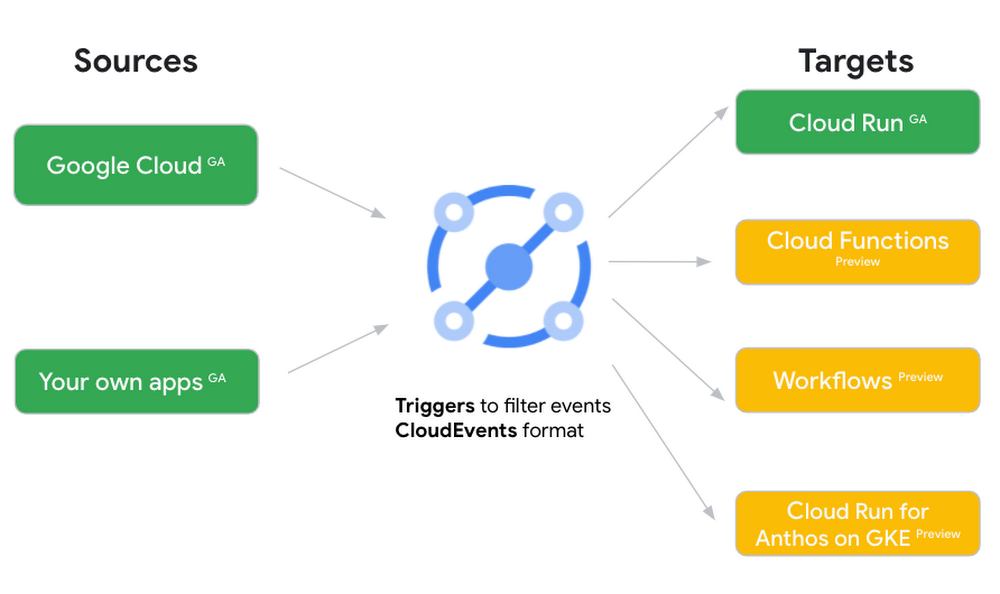
New locations in EventarcBack in August, we announced more Eventarc locations (17 new regions, as well as 6 new dual-region and multi-region locations to be precise). This takes the total number of locations in Eventarc to more than 30. You can see the full list in the Eventarc locations page or by running gcloud eventarc locations list . What does location mean in Eventarc?An Eventarc location usually refers to the single region that the Eventarc trigger gets created in. However, depending on the trigger type, the location can be more than a single region:Pub/Sub triggers only support single-region locations.Cloud Storage triggers support single-region, dual-region, and multi-region locations.Cloud Audit Logs triggers support single-region locations and the special global region.Before looking into trigger location in more detail, let’s look at other locations relevant in Eventarc.What other locations are relevant in Eventarc?Triggers connect event sources to event targets:Each event source, event target, and trigger has its own location. Sometimes, these locations have to match and sometimes they can be different.  Here’s an example of a trigger connecting Cloud Storage events from a bucket in the europe-west1 region to a Cloud Run service in the us-central1 region with a trigger located in the europe-west1 region:In many cases, you don’t have control over the location of the event source. In the example above, the Cloud Storage bucket is in theeurope-west1 region. That’s the location that you need to work with and it has implications for the trigger location (which I’ll get to later). The location of the event target is the region of the service where you want the events to go. You get to choose this from one of the supported regions when you deploy your Cloud Run service. You typically want this to be in the same region as your event source for latency and data locality reasons (but this is not strictly a requirement). In the example above, the event source (bucket) is in europe-west1 but the event target (Cloud Run service) is in  us-central1as specified by the –destination-run-region flag. The location of the trigger is dictated by the event source location, but the trigger type also comes into play. It is specified by the –location flag. Let’s take a look at the trigger location for each trigger type in more detail.Location in Pub/Sub triggersIn a Pub/Sub trigger, you connect a Pub/Sub topic to an event target. Pub/Sub topics are global and not tied to a single region. However, when you create a Pub/Sub trigger, you need to specify a region for it (because Eventarc triggers need to live in a region) with the –location flag as follows:By specifying a location, Eventarc automatically configures the geofencing feature in Pub/Sub such that events only persist in the specified location. As I noted above, you typically want to (but are not required to) choose the same region for the trigger and the Cloud Run service for lower latency and data locality. You can also use regional Pub/Sub service endpoints to publish to the topic to ensure that all of the data stays in a single region. Location in Cloud Storage triggersIn a Cloud Storage trigger, you connect a Cloud Storage bucket to an event target. A Cloud Storage bucket can be in a single-region (e.g. europe-west1), dual-region (e.g. eur4), or multi-region (e.g. eu) location. The location of the bucket dictates the location of the trigger and they have to match. The earlier trigger example was for a bucket in the  europe-west1 single-region location. Here’s another trigger connecting Cloud Storage events from a bucket in the eu multi-region location. Notice how the location flag matches the bucket region:If the bucket region and the trigger region do not match, you’ll see an error:Location in Cloud Audit Logs triggersIn a Cloud Audit Logs trigger, you connect any event source that emits Audit Logs to an event target. The location of the event source will dictate the trigger location. This is typically a single region but there is a special global region that’s necessary in some cases. For example, if you want to read Cloud Storage events from a bucket in the europe-west1 region with an Audit Logs trigger, you will create the trigger with the same location. Note that this will match all buckets in the europe-west1 region as there’s no filter by bucket in Audit Logs:On the other hand, if you want to match a dual-region or a multi-region bucket such as eu, you will create the trigger with the global location as Audit Logs triggers only support a single or global region. Note that this will match all buckets in all regions globally:As you can see from this example, if you want to read Cloud Storage events, the native Cloud Storage trigger is a much better option, but this example illustrates a typical case in which a global Audit Log trigger is necessary. That wraps up this closer look at locations in Eventarc. Feel free to reach out to me on Twitter @meteatamel for any questions or feedback.Related ArticleIntroducing the new Cloud Storage trigger in EventarcLearn how to use the new Cloud Storage trigger of EventarcRead Article
Quelle: Google Cloud Platform

Faster distributed GPU training with Reduction Server on Vertex AI

Neural networks are computationally intensive and often take hours or days to train. Data parallelism is a method to scale the training speed with the number of workers (e.g. GPUs). At each step, the training data is split in mini-batches to be distributed across workers, and each worker computes its own set of gradient updates, which are applied to all replicas. All-reduce is the default cross-device communication operation in TensorFlow, PyTorch, and Horovod to gather gradients in each iteration and sum over multiple workers. The communication in each training iteration utilizes significant network bandwidth. To improve the speed of data parallel training on GPU clusters, Vertex AI launches Reduction Server, a faster gradient aggregation algorithm developed at Google to double the algorithm bandwidth of all-reduce operations. Reduction Server enables distributed ML training jobs to run with efficient bandwidth utilization (up to 2x more throughput) and completes the training job faster. This benefit in reduced training time could lead to reduced total cost of operation. In addition, a user can implement Reduction Server on Vertex AI without changing any of the underlying training code.This blog post introduces the concept of Reduction Server and demonstrates how Google Cloud customers can leverage this feature on Vertex AI to improve their training time. In the next section, we will dive into the technical details and examine all-reduce, a key operation for distributed data-parallel training.All-reduce All-reduce is a collective operation to reduce (an operation such as sum, multiply, max, or min) target arrays in all workers to a single array and return the result to all workers. It has been successfully used in the distributed neural network training scenario where gradients from multiple workers need to be summed and delivered to all workers. Figure 1 illustrates the semantics of all-reduce.There are numerous approaches to implement all-reduce efficiently. In traditional all-reduce algorithms, workers communicate and exchange gradients with each other over a topology of communication links (e.g. a ring or a tree). Ring all-reduce is a bandwidth-optimal all-reduce algorithm, in which workers form a logical ring and communicate with their immediate neighbors only. However, even the bandwidth-optimal all-reduce algorithms still need to transfer input data twice1 over the network.Reduction ServerReduction Server is a faster GPU all-reduce algorithm developed at Google. There are two types of nodes: workers and reducers. Workers run model replicas, compute gradients, and apply optimization steps. Reducers are lightweight CPU VM instances (significantly cheaper than GPU VMs), dedicated to aggregating gradients from workers. Figure 2 illustrates the overall architecture with 4 workers and a sharded collection of reducers.Each worker only needs to transfer one copy of the input data over the network. Therefore, Reduction Server effectively halves the amount of data to be transferred. Another advantage of Reduction Server is that its latency does not depend on the number of workers. Reduction Server is also stateless and only reduces the gradients and shares back with the workers.The table below summarizes the amount of data transfer and latency per worker of Reduction Server compared to ring and tree based all-reduce algorithms with n workers.Reduction Server provides transparent support to many frameworks that use NCCL for distributed GPU training (e.g. TensorFlow and PyTorch) and is available on Vertex AI. This allows ML practitioners to use Reduction Server without having to change the training code.Performance winsFigure 3 shows the performance gains from using Reduction Server on fine tuning a BERT model from the TensorFlow Model Garden on the MNLI dataset using 8 GPU worker nodes each equipped with 8 NVIDIA A100 GPUs. In this experiment, with 20 reducer nodes the training throughput increased by 75%. Other large models benefit from Reduction Server with increased throughput and reduced training time as well.ConclusionIn this blog, we introduced how Reduction Server available on Vertex AI can provide significant improvements in distributed data-parallel GPU training and make transparent transition from traditional all-reduce to Reduction Server for ML practitioners.  To learn more, visit our documentation for in-depth information to help you get some hands-on experience with Reduction Server on Vertex AI.1. If the target array size has n elements, each worker needs to send and receive 2(n-1) elements over the network during an all-reduce operation.Related ArticleOptimize training performance with Reduction Server on Vertex AILearn how to configure Vertex Training jobs that utilize Reduction Server to optimize bandwidth and latency of distributed training for s…Read Article
Quelle: Google Cloud Platform





