PostgreSQL extension turned Cloud microservice

One challenge to migrating databases is lining up your environment so that you don’t end up with compatibility issues. So what happens, when you want to move to a managed service in the Cloud, like Cloud SQL, and you discover that your favorite extension isn’t supported? Of course we want to support all the things, but supporting each individual plugin takes time to be sure it gets integrated into Cloud SQL without destabilizing anything.Specifically, let’s chat about pg_cron. The PostgreSQL plugin which gives you a crontab inside your database. Handy for all kinds of things from pruning old unused data with vacuum, truncating data from tables that’s no longer needed, and a slew of other periodic tasks. Super handy plugin.For now, pg_cron isn’t supported, but wait, don’t go! It doesn’t have to be a heavy lift to reimplement the functionality depending on what you want to be doing. It may even make sense to break things out into their own services even when we do support pg_cron down the road to isolate business logic from your data source. Today I’m talking about pg_cron, but thinking about moving business logic out of database extensions into separate services gives you the flexibility to shift your data wherever it needs to be without worrying about data specific solutions.Let’s walk through one way to break out pg_cron tasks.The toolsThe primary product we’ll be using to produce cron tasks is Cloud Scheduler. Long story short, it’s a crontab (mostly) for GCP products. Going to create a new job in the console starts you off with the familiar cron interface for defining when you’d like your job to trigger, and you can define what timezone you want it to be in.Next comes the different piece. Unlike normal cron, where you define the path to what you’d like to execute, in the case of Scheduler you need to define a trigger target. You can hit an arbitrary HTTP URL, send a message to a predefined Pub/Sub Topic, or send an HTTP message to an App Engine instance you’ve created. Naturally which method you want to use depends entirely on what the existing tasks you’re wanting to port over. For example, if you have one job that needs to trigger multiple actions that aren’t necessarily related? Probably makes the most sense to send a message to Pub/Sub and have other services subscribed to the topic where the message will go. This would mirror a delegator pattern. Alternatively, if the job needs to trigger a set of related tasks, building an App Engine application as an endpoint which can then handle the related tasks in a bundle may make the most sense. Lastly, and what I’m going to show here, is if the job is a one-off and just needs to accomplish a small task, it may make sense to build a Cloud Function, or set up a container to run in Cloud Run to handle these one-off tasks as these serverless offerings scale to zero, so won’t cost you anything while they aren’t being run.Let’s take a look at a simple example just to walk through one way to do this.The walkthroughSay for the sake of argument, you’ve got a pg_cron job that runs every night at 1 o’clock in the morning after your backup has finished which prunes older data from one of your tables to keep operational data at a 30-day window.Step one is getting that functionality of our SQL query to remove our old data somewhere else. There’s a multitude of ways to do this in GCP as I mentioned. For this, I’m going to stick to Google Cloud Functions. They’re incredibly simple to stand up and this sort of one-off function is a perfect use-case.There’s a very well written Codelab that walks through creating a Cloud Function which talks to a Cloud SQL instance. Couple things need changing from the Codelab. First is the stmt variable from the insert call that’s in the code sample to the delete call from our pg_cron function. Second we want to not listen when the Codelab tells us to allow unauthenticated invocations of our Cloud Function. Nothing catastrophic would happen if you do allow unauthenticated requests, because we’re only deleting older data that we want gone anyway, but if someone happens to get ahold of the URL, then they can spam it, which could impact performance on the database, as well as costing you some extra money on the Cloud Function invocations. One other thing to note about this setup is that the Cloud SQL instance gets created with a public IP address. For the sake of this post staying focused on converting an extension into a microservice I’m not going to go into too much detail, but know that connectivity can become a bit sticky depending on your requirements for the Cloud SQL instance. In an upcoming post I’m going to cover connectivity around our serverless offerings to Cloud SQL in a bit more depth.Okay, if you’re doing this inline while reading the post, go and do the Codelab with the changes I mentioned, then come back. I’ll wait.All set? Awesome, back to our story.So now we have a function set up, and when I tested/ran it, it correctly deleted entries older than a month from our database. Next up we’ve got to set up our Cloud Scheduler task to call our function.Revisiting the creation page from earlier, now let’s dig in and get things rolling.As it says in the UI, Frequency is standard cron formatting, so we want our cleanup script to fire every day at 1:00 AM so set our frequency field to: 0 1 * * *I created my Cloud SQL instance in us-west2, so I’ll set my timezone to Pacific Daylight Time (PDT).Since we set up our Cloud Function to be triggered by HTTP, we set our Scheduler task to hit an HTTP endpoint. You can get the URL from the details of your Cloud Function you created.Now, if you’ve set your Cloud Function to accept unauthorized connections just to play around with it (please don’t do that in production) then you’re pretty much all set. You can hit Create at the bottom and poof done, it’ll just start working. If however, you disabled that, then you’ll need to send along an Auth header with your request. Your two options are an OAuth token, or an OIDC token. Broadly speaking, at least as far as GCP targets are concerned, if you’re hitting an API that lives on *.googleapis.com then you’ll want an OAuth token, otherwise an OIDC token is preferred. So in our case, Cloud Functions can use an OIDC token. The service account you want to specify can be the same one you used from the Cloud Function service account if you want. Either way, the role you’ll need to add to the service account to successfully call the Cloud Function is the Cloud Functions Invoker role. Either create a new one with that role, or add that role to your existing service account, and then specify the service account’s full email in the Scheduler field. The audience field is optional and you can ignore it for this service.That should be it! Hit the create button and your Scheduler task will be created and will run at the specified schedule! When I test this, I set my frequency to 5 * * * * and have my Cloud Function just output something to console. That way I can just check Logging to see if it’s firing. Once you click into the Cloud Function you created’s details, there’s a navigation tab in there for LOGS. Clicking that will show you a filtered view of your project’s logs for that function.I would suggest testing, to be sure you’re not going to spam your database, by creating a simple Hello World! Cloud Function first and trigger that with your scheduler.That’s it then! Replacing a PostgreSQL extension with a microservice. While I showed you here how to do it for pg_cron and Cloud Scheduler, hopefully this sparks some thought around splitting some of that business logic away from the database and into services. This is a simple case of course, but this can help alleviate some load on your primary database.Thanks for reading! If you have any questions or comments, please reach out to me on Twitter, my DMs are open.Related ArticleNew PostgreSQL Interface makes Cloud Spanner’s scalability and availability more open and accessibleCustomers in financial services, gaming, retail, and many other industries rely on Cloud Spanner today to power their most demanding rela…Read Article
Quelle: Google Cloud Platform

How Veolia protects its cloud environment across 31 countries with Security Command Center

The world’s resources are increasingly scarce and yet too often they are wasted. At Veolia, we use waste to produce new resources, helping to build a circular economy that redefines growth with a focus on sustainability.Our sustainability mission transcends borders, and nearly 179,000 employees work in dozens of profit centers worldwide to bring it to life. It’s a massive operation that requires an IT architecture to match, which is why we’ve streamlined critical IT work across our global operations with Google Cloud. As Technical Lead and Product Manager for Veolia’s Google Cloud, it’s my team’s responsibility to standardize processes around security, governance, and compliance, and make sure our employees have all the right tools to do their best work, securely. Google Cloud’s Security Command Center (SCC) Premium is the core product that we use to protect our technology environment. We use it across 39 business units, spanning 31 countries worldwide.Fueling autonomy and keeping secure with Security Command Center In line with our sustainability motto “create once, then copy and adapt to reuse many times,” we encourage local teams to work autonomously. That includes their use of Google Cloud solutions. We use many Google Cloud products including BigQuery, Compute Engine, GKE, Cloud Functions, and Cloud Storage. Across the board, we’re working with Google Cloud in an agile and collaborative way to deliver smart water, waste, and energy solutions to communities globally.But there’s no agility without security, and it’s my team’s responsibility to make sure our environment is secure at all times. Because our Google Cloud environment is extensive, and we give individual business units autonomy over their use of cloud solutions, we also set the parameters and policies for them to operate with all compliance and security controls in place in an organized way. SCC Premium is the common tool that all our business units use to keep their individual projects and assets secure. It helps us to gain visibility over our entire Google Cloud environment and identify threats, vulnerabilities, and misconfigurations with real-time insights. Gaining visibility to drive resultsHere’s that visibility in numbers: we use SCC Premium to monitor 2,800 projects with hundreds of thousands of assets. We continually observe our Google Cloud environment using SCC to quickly discover misconfigurations and respond to threats based on our latest findings. If an anomaly is revealed, we remediate incidents ourselves or alert respective business units. We’ve also started to consolidate our SCC findings in a global dashboard to give business units an overview of their security position, enabling them to take swift action.Streamlining remediation to curb threats and wasted resourcesAs our risk management platform for Google Cloud, SCC enables us to streamline the process of security management. It provides findings in near real-time and with all its insights, we can decide on the next steps and alert relevant parties to remediate misconfigurations. I really like the context and recommended actions that SCC provides for each of the findings. These recommendations help us to remediate incidents ourselves or alert project owners. This new visibility has already helped us remediate misconfigurations that could adversely affect our cloud services. SCC, for example, enabled us to identify firewall misconfigurations and it saved us around 500 hours when compared to pre-SCC times.Another benefit of the visibility we’ve gained with SCC is our ability to prioritize our security tasks and use our time more efficiently. As one of France’s biggest users of public cloud services, we have a lot of Google Cloud projects running, and a lot of ground to cover — from misconfigurations to imminent threats. Without SCC, it was difficult to identify patterns and adapt our priorities accordingly. Deleting unused service account keys, for example, used to be difficult, because we had to check service accounts for each project separately. With SCC, we identified unused keys and marked them for deletion. This has cut the time it takes us to delete unused service account keys by 1,000 hours. In addition, we use SCC to identify any misconfigurations like overly permissive roles associated with the service account and threats like service account self-investigation. Using SCC’s container threat detection, we can proactively identify threats like remote shell execution in our containers. For example, we were alerted to 1800 findings when a container with a remote shell inside had been duplicated. Thanks to SCC, we managed to identify the root cause and remediate these containers quickly. Stronger compliance, more easily achievedSCC also helps us to strengthen our compliance standards. Our Google Cloud environment needs to align with the CIS Google Cloud Computing Foundations Benchmark v1.1, which helps our organization to improve our overall security posture. Often, a lack of compliance simply means a lack of training. With our SCC findings, we don’t only evaluate where we stand, we are also able to educate our workforce to address issues proactively that help make us more compliant.Securing a sustainable future with Security Command CenterWe’ve already achieved a lot with SCC, and we are excited about the new capabilities we’re yet to explore. Currently, we’re working to implement auto-remediation to help us act on alerts immediately, whenever they occur. By connecting SCC with Pub/Sub, we’ll be able to trigger workflows that fix potential breaches automatically within minutes, by disabling accounts, for example. We also plan to use synergies with Google Workspace to send SCC findings directly to the project owners in real-time via Google Chat, ensuring that relevant employees are made aware of potential vulnerabilities right away.Like all our cloud solutions, we want to use SCC to empower our individual business units with the autonomy they need to pursue their own goals as part of our larger organization. It’s a great tool at their fingertips, helping us to reduce risk and cut down waste across our cloud environment as we work to resource the world more sustainably.
Quelle: Google Cloud Platform

At Northwell Health, data interoperability and AI saves time and lives

Lung cancer is the leading cause of cancer death in the United States and like any cancer, early detection is crucial to survival. Screening at-risk populations is an important part of reducing mortality, and if concerning nodules are found on imaging, further testing may be required. Today, we’ll share how Northwell Health uses Google Cloud products such as Cloud Healthcare APIs and BigQuery to increase caregiver productivity and deliver better care for patients with findings that indicate potential development of lung cancer.Northwell is New York’s largest healthcare providerNorthwell Health is New York’s largest healthcare provider with 23 hospitals and nearly 800 outpatient facilities. Northwell’s nearly 4,000 doctors care for millions of patients each year, and at this scale, there is an immense amount of healthcare data to manage. To better manage and leverage this data, Northwell Health partnered with Google Cloud starting in 2018.Enabling caregivers to spend more time with patientsNic Lorenzen, the lead developer of Northwell Emerging Technology and Innovation team, has a mission to put together data for caregivers in a way that makes sense. It is no secret that inefficient electronic health records systems have a negative impact on a physician’s ability to deliver quality care. Traditional EHRs have information distributed across many tabs, which forces caregivers to spend considerable time at the computer trying to find information. Moreover, speed of care matters. If care is delayed, patients may have to spend more time in the hospital and may suffer worse health outcomes.To solve this problem, Nic’s team focused on giving caregivers the most relevant pieces of data at the right time by developing an intelligent clinician rounding app. The data needed to derive these insights can depend on the caregiver’s role–a nurse cares about different things than a cardiologist. This system aggregates multiple data sources, and provides patient-specific insights to caregivers.This system would not have been possible before with traditional EHRs and data warehouses that have proprietary data models and rarely sync data in real time. Now with data easily accessible through Google Cloud’s Healthcare solutions, Nic’s team can deliver the right clinical information to the right people instantly. These days, Nic says, “instead of spending 75% of our time dealing with architecting the underlying platforms, we spend 75% of our time focused on  higher value use cases for clinicians and patients. Google Cloud’s Healthcare solutions have greatly improved our developer productivity and time to value.”Caregivers have found this new system to be a game changer.Before the implementation of this system, caregivers would spend, on average, seven to nine minutes finding the data needed to make medical decisions for one patient. Now, that aggregated information is delivered to a caregiver’s mobile device in less than a second.Ensuring patients get the right care with the power of AIThere are a number of reasons why patients might not get the care that they need. For example, patients today can go to multiple hospitals and clinics settings, and coordinating care across multiple facilities is complex. Regional hospitals and clinics have their own siloed view of their data, so pertinent information gathered by one clinic might not be seen by another. These gaps in clinical data lead to gaps in patient care.When a patient gets radiologic imaging, they may have findings unrelated to the reason they initially got the imaging. For example, a chest CT for a car accident might reveal an incidental lung nodule that could be cancerous. Unfortunately, research shows that a large portion of patients do not get follow up for these incidental findings because it isn’t the primary reason why the patient is seeing a doctor. Moreover, social determinants of health are a factor that affects which patients receive follow-up care. Identifying these patients and providing the necessary follow up care prevents adverse events related to delayed detection of cancer.Source: https://commons.wikimedia.org/wiki/File:LungMets2008.jpgWith Cloud Healthcare solutions, Northwell built an AI model to identify these patients so that oncologists can appropriately follow up with patients who have findings suspicious for lung cancer. The AI model detects incidental pulmonary nodules in radiology reports so that doctors can then contact the patients that need follow-up care. Nic says his team was able to build this system in a week: “Google Cloud did a lot of heavy-lifting for us and allowed us to get to the AI applications much faster. It allowed us to build a platform that just works.” Healthcare systems can now rapidly generate healthcare insights with one end-to-end solution, Google Cloud Healthcare Data Engine. It builds on and extends the core capabilities of the Google Cloud Healthcare APIto make healthcare data more immediately useful by enabling an interoperable, longitudinal record of patient data. Northwell Health uses Google Cloud as the core of their platform, enabling their developers to create solutions to the most pressing healthcare problems.Special thanks to Kalyan Pamarthy, Product Management Lead on Cloud Healthcare and Natural Language APIs for contributing to this blog post.Related ArticleRead Article
Quelle: Google Cloud Platform

Forrester names Google AppSheet a Leader in low-code platforms for business developers!

We’re excited to share the news that leading global research and advisory firm Forrester Research has named Google AppSheet a Leader in the recently released report The Forrester Wave™: Low-code Platforms for Business Developers, Q4 2021. It’s our treasured community of business developers—those closest to the challenges that line-of-business apps can solve—who deserve credit for not only the millions of apps created with AppSheet, but also the collaborative approach to no-code development that has helped further our mission of empowering everyone to build custom solutions to reclaim their time and talent. AppSheet received the highest marks possible in the product vision and planned enhancements criteria, with Forrester noting in the report that “AppSheet’s vision for AI-infused-and-supported citizen development is unique and particularly well suited to Google. The tech giant’s deep pockets and ecosystem give AppSheet an advantage in its path to market, market visibility, and product roadmap.”“Features for process automation and AI are leading,” remarking that, “The platform provides a clean, intuitive modeling environment suitable for both long-running processes and triggered automations, as well as a useful range of pragmatic AI services such as document ingestion.”Many enterprise customers including Carrefour Property – Carmila, Globe Telecom, American Electric Power, and Singapore Press Holdings (SPH) choose AppSheet as their business developer partner, along with thousands of other organizations in every industry. We are honored to serve these customers and to be a Leader in the Forrester Wave™: Low-code Platforms for Business Developers. We look forward to continuing to innovate and to helping customers on their digital transformation journey. To download the full report, visit here and enter your email address. To learn more about AppSheet, visit our website.
Quelle: Google Cloud Platform

Cloud CISO Perspectives: October 2021

October has been a busy month for Google Cloud. We just held our annual conference, Google Cloud Next ‘21, where we made significant security announcements for our customers of all sizes and geographies. It’s also National Cybersecurity Awareness Month where our security teams across Google delivered important research on new threat campaigns and product updates to provide the highest levels of account security for all users. In this month’s post, I’ll recap all of the security “Action” from Next ‘21, including product updates that deliver “secure products” not just “security products” and important industry momentum for tackling open source software security and ransomware. Google Cloud Next ‘21 Recap Google Cybersecurity Action Team: While having access to the latest, most advanced security technology is important, the knowledge of what and how best to transform security to become resilient in today’s risk and threat environment is foundational. This is the reason we announced the formation of the Google Cybersecurity Action Team to support the security and digital transformation of governments, critical infrastructure, enterprises and small businesses around the world. We’re already doing a lot of this work every single day with our public and private sector customers. The Cybersecurity Action Team builds on these efforts with services and guidance across the full spectrum of what our customers need to strengthen security from strategy to execution. Under this team, we will guide customers through the cycle of security transformation – from their first cloud adoption roadmap and implementation, through increasing their cyber-resilience preparedness for potential events and incidents, and engineering new solutions as requirements change.  We describe the team vision in more depth in this podcast episode. If you are interested in learning more about the Google Cybersecurity Action Team, reach out to your  Google Cloud Account Team(s) to arrange a security briefing.A Safer Way to Work: The way we work has fundamentally changed. Users and organizations are creating more sensitive data and information than ever before, creating a culture of collaboration across organizations. This modern way of working has many benefits but also creates new security challenges that legacy collaboration tools aren’t equipped to handle. During Next, we announced a new program called Work Safer to provide businesses and public sector organizations of all sizes with a hybrid work package that is cloud-first, built on a proven Zero Trust security model and delivers up-to-date protection against phishing, malware, ransomware, and other cyberattacks. Work Safer includes best-in-class Google security products like Google Workspace, BeyondCorp Enterprise, Titan Security Keys and powerful services from our cybersecurity partners CrowdStrike and Palo Alto Networks. A Secure and Sustainable Cloud: Seeing security and sustainability come together in one announcement is uncommon, and our Unattended Project Recommender is a great example of how at Google Cloud we’re helping customers combat two pressing issues: climate change and cybersecurity.  At Next we announced that Active Assist Recommender will now include a new sustainability impact category, extending its original core pillars of cost, performance, security, and manageability. Starting with the Unattended Project Recommender, you’ll soon be able to estimate the gross carbon emissions you’ll save by removing your idle resources. Workspace Security Updates: To further strengthen security and privacy across the Google Workspace platform, we announced four new capabilities: In June, we announced that Client-side encryption (CSE) was available in beta for Drive, Docs, Sheets, and Slides. Now we’re bringing CSE to Google Meet, giving customers complete control over encryption keys while helping them meet data sovereignty and compliance requirements. Data Loss Prevention (DLP) for Chat is continuation of our ongoing commitment to help organizations protect their sensitive data and information from getting into the wrong hands, without impacting the end-user experience. Drive labels are now generally available to help organizations classify files stored in Drive based on their sensitivity level. Additional protections to safeguard against abusive content and behavior. If a user opens a file that we think is suspicious or dangerous, we’ll display a warning to the user to help protect them and their organization from malware, phishing, and ransomware. Distributed Cloud: From conversations with customers, we understand there are various factors why an organization may resist putting certain workloads in the cloud. Data residency and some other compliance issues can be a driver. Google Distributed Cloud Hosted – one of the first products in the Distributed Cloud Portfolio – builds on the digital sovereignty vision we outlined last year, supporting public-sector customers and commercial entities that have strict data residency requirements. It provides a safe and secure way to modernize an on-premises deployment.New Invisible Security Capabilities: Over the past year, Google Cloud has been delivering on our vision of Invisible Security for our customers, where capabilities are continuously engineered into both our trusted cloud platform and market-leading products to bring the best of Google’s security to wherever your IT assets are. At Next we announced new capabilities, here are just a few, we’ll be talking more about these next month: The new BeyondCorp Enterprise client connector enables identity and context-aware access to non-web applications running in Google Cloud and non-Google Cloud environments. We are also making it easier for admins to diagnose access failure, triage events, and unblock users with the new Policy Troubleshooter feature.Automatic DLP is a prime example of how we are making Invisible Security a reality. It’s a game-changing capability that discovers and classifies sensitive data for all the BigQuery projects across your entire organization without you needing to do a single thing.Ubiquitous Data Encryption is a new solution which combines our Confidential Computing, External Key Management, and Cloud Storage products to seamlessly encrypt data as it’s sent to the cloud. Using our External Key Management solution, data can now only be decrypted and run in a confidential VM environment, greatly limiting potential exposure. This is a groundbreaking example how Confidential Computing and cryptography can be used for building solutions that many industries and regions with sovereignty requirements demand as they move to the cloud. Thoughts from around the industryOpenSSF: It’s great to see the Open Source Security Foundation announce additional funding to help the industry curb the rise in software supply chain attacks and address critical efforts like the Biden Administration’s Executive Order. Google is proud to support this new funding with others in the industry. The OpenSSF helps drive important work to improve security for all with projects like the security scorecards and Allstar. I encourage every executive that wants to see meaningful improvements in their own software supply chain to getinvolved.  Trusted Cloud Principles: Last month, we joined the Trusted Cloud Principles initiative with many other cloud providers and technology companies. This is a great development to keep the cloud industry committed to basic human rights and rule of law as we expand infrastructure and services around the world — all while ensuring the free flow of data, to promote public safety, and to protect privacy and data security in the cloud.White House Ransomware Summit: Ransomware continues to be top of mind for businesses and governments of all sizes. This month we saw the White House gather representatives from 30 countries to continue combatting this growing threat through technology, finance, law enforcement, and diplomacy.  In order to be helpful and provide insights into this form of malware, we recently released the VirusTotal Ransomware Report, analyzing 80 million ransomware samples.Google Cloud Security Highlights Every day we’re building enhanced security, controls, resiliency and more into our cloud products and services. This is what we mean by our guiding principle that can best serve our customers and the industry with secure products, not just security products.  Here’s a snapshot of the latest updates and new capabilities across Google Cloud products and services since our last post. SecurityCloud customers running high-intensity workloads (such as analytics on Hadoop) and managing their own encryption keys on top of those provided by Cloud will see better support. Keeping track of cryptographic keys is essential to managing complex systems. New Cloud features make that arduous task much simpler with the Key Inventory Dashboard. Also great to see Cloud KMS PKCS #11 Library as well as capabilities for automating Variable Key Destruction and Fast Key Deletion.Firewalls remain an important part of security architecture, especially during migration, so we created a module within our Firewall Insights tool to help tame overly permissive firewall rules. This is a great benefit of a software defined infrastructure. ResilienceThe network security portfolio secures applications from fraudulent activity, malware, and attacks. Updates to Cloud Armor, our DDoS protection and WAF service, bring four new features to our partners: Integration with the Google Cloud reCAPTCHA Enterprise bot and fraud management; per-client rate limiting; Edge security policies; and Adaptive Protection, our ML-based, application-layer DDoS detection and WAF protection mechanism.SovereigntyOur EU Data Residency allows European customers to specify one of five Google Cloud Regions in the EU where their data will be stored and where it will remain. Customers retain cryptographic control of their data and can even block Google administrator access thanks to the new Key Access Justifications feature.ControlsThe Policy Controller within Anthos Config Management enables the enforcement of fully programmable policies for clusters. These policies can audit and prevent changes to the configuration of your clusters to enforce security, operational, or compliance controls. The folks at USAA tell us how they use Google Cloud and security best practices to automatically onboard new hires. We covered a lot today and are excited to bring you more exciting updates for cybersecurity throughout the end of the year. If you’d like to have this Cloud CISO Perspectives post delivered every month to your inbox, click here to sign-up. If you missed our security sessions and spotlights at Google Cloud Next ‘21, sign up at the link to watch on-demand.Related ArticleCloud CISO Perspectives: September 2021Google Cloud CISO Phil Venables shares his thoughts on what to expect for security at Google Cloud Next ‘21, digital sovereignty, global …Read Article
Quelle: Google Cloud Platform

Video walkthrough: Set up a multiplayer game server with Google Cloud

Imagine that you’re playing a video game with a friend, hosting the game on your own machine. You’re both having a great time—until you need to shut down your computer and the game world ceases to exist for everyone until you’re back online. With a multiplayer server in the cloud, you can solve this problem and create persistent, shared access that doesn’t depend on your online status. To show you how to do this, we’ve created a video that takes you through the steps to set up a private virtual, multiplayer game server with Google Cloud, with no prior experience required.In this video, we walk through the real-world situation described above, in which one of our team members wants to create a persistent shared gaming experience with a friend. One of our training experts shows his colleague step-by-step how to use Compute Engine to host a multiplayer instance of Valheim from Iron Gate Studio and Coffee Stain Studios.This tutorial doesn’t assume that you’ve done this before. Along with our in-house novice, you’ll be guided through the process to create a virtual machine on Google Cloud Platform and configure it to connect to remote computers. Then, using Valheim as an example, we’ll show you how to set up a dedicated game server. The video also takes you through decisions about user settings and permissions, such as whether you want to allow multiple parties to manage the cloud host, and security considerations to keep in mind. We’ll talk about resource requirements and possibilities for scaling up, and break down some of the factors that will influence the cost, including a detailed explanation of the specifications we used in our walkthrough scenario. Ready to play? Check out the Create Valheim Game Server with Google Cloud walkthrough video:Related ArticleNew to Google Cloud? Here are a few free trainings to help you get startedFree resources like hands-on events, on-demand training, and skills challenges can help you develop the fundamentals of Google Cloud so y…Read Article
Quelle: Google Cloud Platform

Django ORM support for Cloud Spanner is now Generally Available

Today we’re happy to announce GA support for Google Cloud Spanner in the Django ORM. The django-google-spanner package is a third-party database backend for Cloud Spanner, powered by the Cloud Spanner Python client library. The Django ORM is a powerful standalone component of the Django web framework that maps Python objects to relational data. It provides a nice Pythonic interface to the underlying database, and includes tools for automatically generating schema changes and managing schema version history. With this integration, Django applications can now take advantage of Cloud Spanner’s high availability and consistency at scale.We’ll follow the Django tutorial below to create a new project and start writing data to Cloud Spanner. This is a follow up to the “Introducing Django ORM support for Cloud Spanner” blog post, which we published during the Beta launch. We have updated the tutorial to work with the Django 3.2 library.If you’re already using Django with another database backend you can skip down to “Migrating an existing Django project to Cloud Spanner” for instructions on switching to Cloud Spanner. You can also read the documentation here, and follow the repository here. Changes since the Beta releaseThe library supports Django version 2.2.x, and 3.2.x. Both versions are long-term support (LTS) releases for the Django project. The minimum required Python version is 3.6.NUMERIC data type support is now available. We have also added support for JSON object storage and retrieval with Django 3.2.x support, but querying inside the JSONfield is not supported in the current django-google-spanner release. This feature is being worked on and can be tracked here. Support for PositiveBigIntegerField, PositiveIntegerField and PositiveSmallIntegerField were added along with relevant check constraints.InstallationTo use django-google-spanner, you’ll need a working Python installation and Django project. The library requires Django~=2.2 or Django~=3.2 and Python>=3.6. If you’re new to Django, see the Django getting started guide specific to the Django version you are using. For the tutorial below we will be using Django~=3.2 but the process is similar for Django~=2.2 as well.You’ll also need an active Google Cloud project with the Cloud Spanner API enabled. For more details on getting started with Cloud Spanner see the Cloud Spanner getting started guide.Django applications are typically configured to use a single database. If you’re an existing Cloud Spanner customer, you should already have a database suitable for use with your Django application. If you don’t already have a Cloud Spanner database, or want to start from scratch for a new Django application, you can create a new instance and database using the Google Cloud SDK:To install the Cloud Spanner database backend package:Next, start a new Django project:django-google-spanner provides a Django application named django_spanner. To use the Cloud Spanner database backend, this application needs to be the first entry in INSTALLED_APPS in your application’s settings.py file:The django_spanner application changes the default behavior of Django’s AutoField so that it generates random (instead of automatically incrementing sequential) values. We do this to avoid a common anti-pattern in Cloud Spanner usage.Configure the database engine by setting the project, instance, and database name:To run your code locally during development and testing, you’ll need to authenticate with Application Default Credentials, or set the GOOGLE_APPLICATION_CREDENTIALS environment variable to authenticate using a service account. This library delegates authentication to the Cloud Spanner Python client library. If you’re already using this or another client library successfully, you shouldn’t have to do anything new to authenticate from your Django application. For more information, see the client libraries documentation on setting up authentication. Working with django-google-spannerUnder the hood, django-google-spanner uses the Cloud Spanner Python client library, which communicates with Cloud Spanner via its gRPC API. The client library also manages Cloud Spanner session lifetimes, and provides sane request timeout and retry defaults.To support the Django ORM, we added an implementation of the Python Database API Specification (or DB-API) to the client library in the google.cloud.spanner_dbapi package. This package handles Cloud Spanner database connections, provides a standard cursor for iterating over streaming results, and seamlessly retries queries and DML statements in aborted transactions. In the future we hope to use this package to support other libraries and ORMs that are compatible with the DB-API, including SQLAlchemy.Django ships with a powerful schema version control system known as migrations. Each migration describes a change to a Django model that results in a schema change. Django tracks migrations in an internal django_migrations table, and includes tools for migrating data between schema versions and generating migrations automatically from an app’s models. django-google-spanner provides backend support for Cloud Spanner by converting Django migrations into DDL statements – namely CREATE TABLE and ALTER TABLE – to be run at migration time.Following the Django tutorial, let’s see how the client library interacts with the Cloud Spanner API. The example that follows starts from the “Database setup” step of Tutorial 2, and assumes you’ve already created the mysite and polls apps from the first part of the tutorial.After configuring database backend as described above, we can run the initial migrations for the project:After running the migrations, we can see the tables and indexes Django created in the GCP Cloud Console:Alternatively, we can inspect information_schema.tables to display the tables Django created using the Google Cloud SDK:Note that this will display Spanner-internal tables too, including SPANNER_SYS and INFORMATION_SCHEMA tables. These are omitted in the example above.Check the table schema of any table in GCP cloud console by clicking the SHOW EQUIVALENT DDL link on the table detail page in the Cloud Console:Now, following the Playing with the API section of the tutorial, let’s create and modify some objects in the polls app and see how the changes are persisted in Cloud Spanner. In the example below, each code segment from the tutorial is followed by any SQL statements executed by Django, and a partial list of resulting Cloud Spanner API requests, including their arguments.To see the generated SQL statements yourself, you can enable the django.db.backends logger.Query the empty Questions tableThis code results in the SQL statement:We have skipped the internal Cloud Spanner API calls that are made, those details can be found in our earlier blog post.Create and save a new Question objectThis code results in the SQL statement:Modify an existing QuestionThis code results in the SQL statement:Migrating an existing Django project to Cloud SpannerTo migrate a Django project from another database to Cloud Spanner, we can use Django’s built-in support for multiple database connections. This feature allows us to connect to two databases at once; to read from one and write to another.Suppose you want to move your application’s data from SQLite to Cloud Spanner. Assuming the existing database connection is already configured as “default”, we can add a second database connection to Cloud Spanner. We’ll call this connection “spanner”:As in the tutorial, running python manage.py migrate will create tables and indexes for all models in the project. By default, migrate will run on all configured database connections, and generate DDL specific to each database backend. After running migrate, both databases should have equivalent schemas, but the new Cloud Spanner database will still be empty.Since Django automatically generates the schema from the project’s models, it’s a good idea to check that the generated DDL follows Cloud Spanner best practices. You can adjust the project’s models accordingly in a separate migration after copying data into Cloud Spanner.There are several options for copying data into Cloud Spanner, including using HarbourBridge to import data from a PostgreSQL or MySQL database or Dataflow to import Avro files. Any option will work as long as the imported data matches the new schema, but the easiest (if not the fastest) way to copy data between databases is by using Django itself.Consider the models we created in the tutorial. In this code snippet, we read all Questions and Choices from the SQLite database and then write them to Cloud Spanner:For each row in each table in the existing database, we:Read the row and store it in memory as a Django model objectUnset the primary key, andWrite it back to the new database, at which point it gets assigned a new primary key.Note that we need to update foreign keys to use the newly-generated primary keys too. Also note that we call question.choice_set.all() before we change question’s primary key – otherwise the QuerySet would be evaluated lazily using the wrong key!This is a naive example; meant to be easy to understand, but not necessarily fast. It makes a separate “SELECT … FROM polls_choice” query for each Question. Since we know ahead of time that we’re going to read all Choices in the database, we can reduce this to a single query with Choice.objects.all().select_related(‘question’). In general, it should be possible to write your migration logic in a way that takes advantage of your project’s schema, e.g. by using bulk_update instead of a separate request to write each row. This logic can take the form of a code snippet to be run in the Django shell (as above), a separate script, or a Django data migration.After migrating from the old database to Cloud Spanner, you can remove the configuration for the old database connection and rename the Cloud Spanner connection to “default”:LimitationsNote that some Django database features are disabled because they’re not compatible with the Cloud Spanner API. As Django ships with a comprehensive test suite, you can look at the list of Django tests that we skip for a detailed list of Django features that aren’t yet supported by python-spanner-django.Customers using the Cloud Spanner Emulator may see different behavior than the Cloud Spanner service, for instance because the emulator doesn’t support concurrent transactions. See the Cloud Spanner Emulator documentation for a list of limitations and differences from the Cloud Spanner service.We recommend that you go through the list of additional limitations of Spanner and django-google-spanner both before deploying any projects using this library. These limitations are documented here. Getting involvedWe’d love to hear from you, especially if you’re using the Cloud Spanner Python client library with a Django application now, or if you’re an existing Cloud Spanner customer who is considering using Django for new projects. The project is open source, and you can comment, report bugs, and open pull requests on Github.See alsoDjango Cloud Spanner Python client library documentationCloud Spanner Python client library documentationCloud Spanner product documentationDjango 3.2 documentationDjango 3.2 tutorialRelated ArticleCloud Spanner connectivity using JetBrains IDEsYou can now browse the database schema and query data stored in Cloud Spanner directly from your JetBrains IDE. In this post, I will show…Read Article
Quelle: Google Cloud Platform
Run your fault-tolerant workloads cost-effectively with Google Cloud Spot VMs

Modern applications such as microservices, containerized workloads and horizontal scalable applications are engineered to persist even when the underlying machine does not. This architecture allows customers to leverage Spot VMs to access Google’s idle capacity and run your application at the lowest price possible. Customers will save 60 – 91% off the price of our on-demand VMs with Spot VMs. Maximize cost optimization by integrating with Google Kubernetes Engine (GKE) Standard and your scalable applications will seamlessly switch to using on-demand resources when Google needs the Spot VM capacity back.Available in Preview today, customers can begin deploying Spot VMs in their Google Cloud projects for:Improved TCO: With a maximum discount of 91% over on-demand VMs, applications that can take advantage of Spot VMs will quickly see these savings add up. When combining Spot VM with our Custom Machine Types and adding on discounted Spot GPU and Spot local SSD, customers can maximize their TCO without sacrificing performance.Better automation: Let GKE handle your deployments to seamlessly mix in Spot VMs with your current infrastructure. Automatically scale up when Spot VMs are available and then gracefully terminate when a preemption occurs, ensuring that work gets done with minimal interruptions. Ease of use and integration: Spot VMs are available globally and are a simple, one-line change to start using. The resources are yours until they need to be reclaimed with no specific duration limits. Take advantage of the new Termination Action property to delete on preemption and clean up after use.Spot VMs are available in every region and most Compute Engine VM families with the same performance characteristics as on-demand VMs. The only difference is that Spot VMs offer a 60-91% discount since the resources may be reclaimed at any time with 30-second notice.Spot VMs are a great fit for a variety of workloads in a broad spectrum of industries including financial modeling, visual effects, genomics, forecasting, and simulations. Any workload that is fault tolerant or stateless, should consider trying Spot VMs as a way to save up to 91% on VM costs! Getting started is as simple as adding –provisioning_model=Spot to your instance request and savings will begin immediately. New dynamic pricing model for Spot VMsTo maximize savings to customers, Google is introducing a new dynamic pricing model that offers discounts from 60% to 91% off of our on-demand VMs. This new pricing model ensures that everyone is getting the best preemptible experience possible by applying a discount to each region based on rolling historical usage for the region. This discount amount may change up to once a month. The discount will always be at least 60% but has the opportunity to move up and down between 60 and 91% off of our on-demand VMs. Customers will also be able to preview the pricing forecast to have visibility to the next pricing change before the new pricing goes live. Starting today, we are announcing price drops for these VM families and locations and dynamic prices will begin in 2022.Preemptible VM instances created through –preemptible will continue to be supported. Preemptible VM customers will not need to make any changes to begin receiving the new pricing. However, preemptible VMs will continue to have a 24h limit. Customers who wish to have no max duration, should switch to Spot VMs to avoid any limits. In order to keep pricing as simple as possible, Preemptibles will follow the same pricing as Spot VMs.Building on our ecosystem, Google Kubernetes Engine (GKE), the leading platform for organizations looking for advanced container orchestration, will also leverage Spot VMs. GKE nodes using Spot VMs are a popular way for users to get the most out of their containerized workloads in a cost effective way. In GKE, Spot nodes can be created by using –spot; preemptible nodes created using –preemptible will continue to be supported. Moreover, starting in GKE v1.21, enable_graceful_node_shutdown is enabled by default to ensure a smooth experience with Spot on GKE. When combined with custom machine types and GKE cost optimization best practices, customers using GKE Spot nodes can achieve even greater savings.NetApp partnership As part of our on-going investment into Spot, we are also strengthening how the GCP ecosystem supports and builds on top of Spot VMs. We are pleased to announce our partnership with Spot.IO to ensure that our joint customers can take advantage of our best pricing ever. “Spot.IO is excited about the market-leading combination of savings and predictability of Google Cloud’s new Spot VMs. Google’s Spot VMs will offer our joint customers more flexibility and versatility in automating cloud infrastructure workloads and create more opportunities to optimize cloud spend while accelerating cloud adoption across micro services, containers, and VM-based stateless and stateful applications.” —Amiram Shachar VP and GM, Spot.IOGet startedSpot VMs are available in Preview now. To get started, check out ourSpot VM documentation for a deeper overview and how to create Spot VMs in your project.
Quelle: Google Cloud Platform

Open data lakehouse on Google Cloud

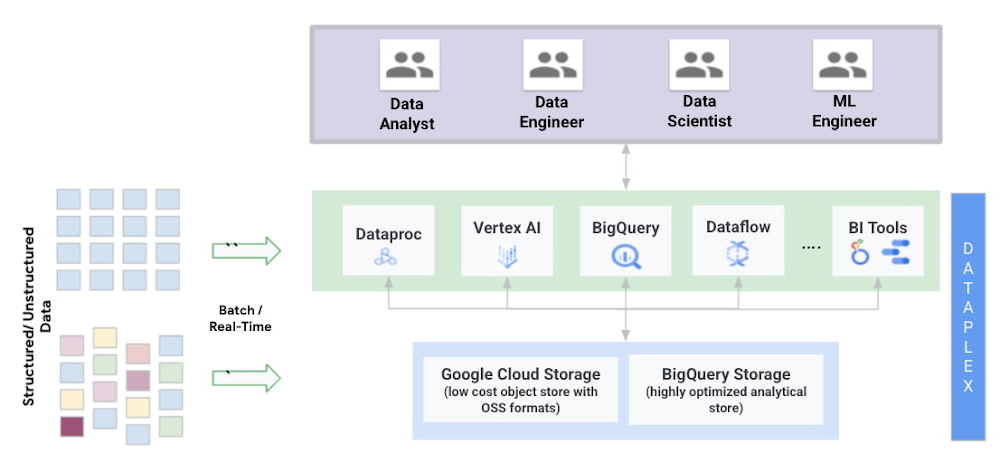
For more than a decade the technology industry has been searching for optimal ways to store and analyze vast amounts of data that can handle the variety, volume, latency, resilience, and varying data access requirements demanded by organizations.Historically, organizations have implemented siloed and separate architectures, data warehouses used to store structured aggregate data primarily used for BI and reporting whereas data lakes, used to store unstructured and semi-structured data, in large volumes, primarily used for ML workloads. This approach often resulted in extensive data movement, processing, and duplication requiring complex ETL pipelines. Operationalizing and governing this architecture was challenging, costly and reduced agility. As organizations are moving to the cloud they want to break these silos. To address some of these issues,a new architecture choice has emerged: the data lakehouse, which combines key benefits of data lakes and data warehouses. This architecture offers low-cost storage in an open format accessible by a variety of processing engines like Spark while also providing powerful management and optimization features. At Google cloud we believe in providing choice to our customers. Organizations that want to build their data lakehouse using open source technologies only can easily do so by using low cost object storage provided by Google Cloud Storage, storing data in open formats like Parquet, with processing engines like Spark and use frameworks like Delta, Iceberg or Hudi through Dataproc to enable transactions. This open source based solution is still evolving and requires a lot of effort in configuration, tuning and scaling. At Google Cloud, we provide a cloud native, highly scalable and secure, data lakehouse solution that delivers choice and interoperability to customers. Our cloud native architecture reduces cost and improves efficiency for organizations.  Our solution is based on:Storage: Providing choice of storage across low cost object storage in Google Cloud Storage or highly optimized analytical storage in BigQueryCompute: Serverless compute that provide different engines for different workloadsBigQuery, our serverless cloud data warehouse provides ANSI SQL compatible engine that can enable analytics on petabytes of data.Dataproc, our managed Hadoop and Spark service enables using various open source frameworksServerless Spark, allows customers to submit their workloads to a managed service and take care of the job execution. Vertex AI, our unified MLOps platform enables building large scale ML models with very limited codingAdditionally you can use many of our partner products like Databricks, Starburst or Elastic for various workloads.Management: Dataplex enables a metadata-led data management fabric across data in Google Cloud Storage (object storage) and BigQuery (highly optimized analytical storage). Organizations can create, manage, secure, organize and analyze data in the lakehouse using Dataplex.Let’s take a closer look at some key characteristics of a data lakehouse architecture and how customers have been building this on GCP at scale. Storage OptionalityAt Google Cloud our core principle is delivering an open platform. We want to provide customers with a choice of storing their data in low cost object storage in Google Cloud Storage or highly optimized analytical storage or other storage options available on GCP. We recommend organizations store their structured data in BigQuery Storage. BigQuery Storage also provides a streaming API that enables organizations to ingest large amounts of data in real-time and analyze it. We recommend unstructured data to be stored in Google Cloud storage. In some cases where organizations need to access their structured data in OSS formats like Parquet or ORC they can store them on Google Cloud Storage. At Google Cloud we have invested in building Data Lake Storage API also known as BigQuery Storage API to provide consistent capabilities for structured data across both BigQuery and GCS storage tiers. This API enables users to access BigQuery Storage and GCS through any open source engine like Spark, Flink etc. Storage API enables users to apply fine grained access control on data in BigQuery and GCS storage (coming soon).Serverless ComputeThe data lakehouse enables organizations to break data silos and centralize data, which facilitates various different types of use cases across organizations. To get maximum value from data, Google Cloud allows organizations to use different execution engines, optimized for different workloads and personas to run on top the same data tiers. This is made possible because of complete separation of compute and storage on Google Cloud.  Meeting users at their level of data access including SQL, Python, or more GUI-based methods mean that technological skills do not limit their ability to use data for any job. Data scientists may be working outside traditional SQL-based or BI types of tools. Because BigQuery has the storage API, tools such as AI notebooks, Spark running on Dataproc, or Spark Serverless can easily be integrated into the workflow. The paradigm shift here is that the data lakehouse architecture supports bringing the compute to the data rather than moving the data around. With serverless Spark and BigQuery, data engineers can spend all their time on the code and logic. They do not need to manage clusters or tune infrastructure. They submit SQL or PySpark jobs from their interface of choice, and processing is auto-scaled to match the needs of the job.BigQuery leverages serverless architecture to enable organizations to run large scale analytics using a familiar SQL interface. Organizations can leverage BigQuery SQL to run analytics on petabyte scale data sets. In addition, BigQuery ML democratizes machine learning by letting SQL practitioners build models using existing SQL tools and skills. BigQuery ML is another example of how customers’ development speed can be increased by using familiar dialects and the need to move data.  Dataproc, Google Cloud’s managed Hadoop, can read the data directly from lakehouse storage; BigQuery or GCS and run its computations, and write it back. In effect, users are given freedom to choose where and how to store the data and how to process it depending on their needs and skills. Dataproc enables organizations to leverage all major OSS engines like Spark, Flink, Presto, Hive etc.  Vertex AI is a managed machine learning (ML) platform that allows companies to accelerate the deployment and maintenance of artificial intelligence (AI) models. Vertex AI natively integrates with BigQuery Storage and GCS to process both structured and unstructured data. It enables data scientists and ML engineers across all levels of expertise to implement Machine Learning Operations (MLOps) and thus efficiently build and manage ML projects throughout the entire development lifecycle. Intelligent data management and governanceThe data lakehouse works to store the data in a single-source-of-truth, making minimal copies of the data. Consistent security and governance is key to any lakehouse. Dataplex, our intelligent data fabric service, provides data governance and security capabilities across various lakehouse storage tiers built on GCS and BigQuery. Dataplex uses metadata associated with the underlying data to enable organizations to logically organize their data assets into lakes and data zones. This logical organization can span across data stored in BigQuery and GCS. Dataplex sits on top of the entire data stack to unify governance and data management. It provides a unified data fabric that enables enterprises to intelligently  curate,secure and govern data, at scale, with an integrated analytics experience. It provides automatic data discovery and schema inference across different systems and complements this with automatic registration of metadata as tables and filesets into metastores. With built-in data classification and data quality checks in Dataplex, customers have access to data they can trust.Data sharing: is one of the key promises of evolved data lakes is that different teams and different personas can share the data across the organization in a  timely manner. To make this a reality and break organizational barriers, Google offers a layer on top of BigQuery called Analytics Hub. Analytics Hub provides the ability to create private data exchanges, in which exchange administrators (a.k.a. data curators) give permissions to publish and subscribe to data in the exchange to specific individuals or groups both inside the company and externally to business partners or buyers. (within or outside of their organization). Open and flexibleIn the ever evolving world of data architectures and ecosystems, there are a growing suite of tools being offered to enable data management, governance, scalability, and even machine learning. With promises of digital transformation and evolution, organizations often find themselves with sophisticated solutions that have a significant amount of bolted-on functionality. However, the ultimate goal should be to simplify the underlying infrastructure,and enable teams to focus on their core responsibilities: data engineers make raw data more useful to the organization, data scientists explore the data and produce predictive models so business users can make the right decision for their domains.Google Cloud has taken an approach anchored on openness, choice and simplicity and offers a planet-scale analytics platform that brings together two of the core tenants of enterprise data operations, data lakes and data warehouses into a unified data ecosystem.  The data lakehouse is a culmination of this architectural effort and we look forward to working with you to enable it at your organization. For more interesting insights on lakehouse, you can read the full whitepaper here.Related ArticleRead Article
Quelle: Google Cloud Platform
Google Cloud Networking overview

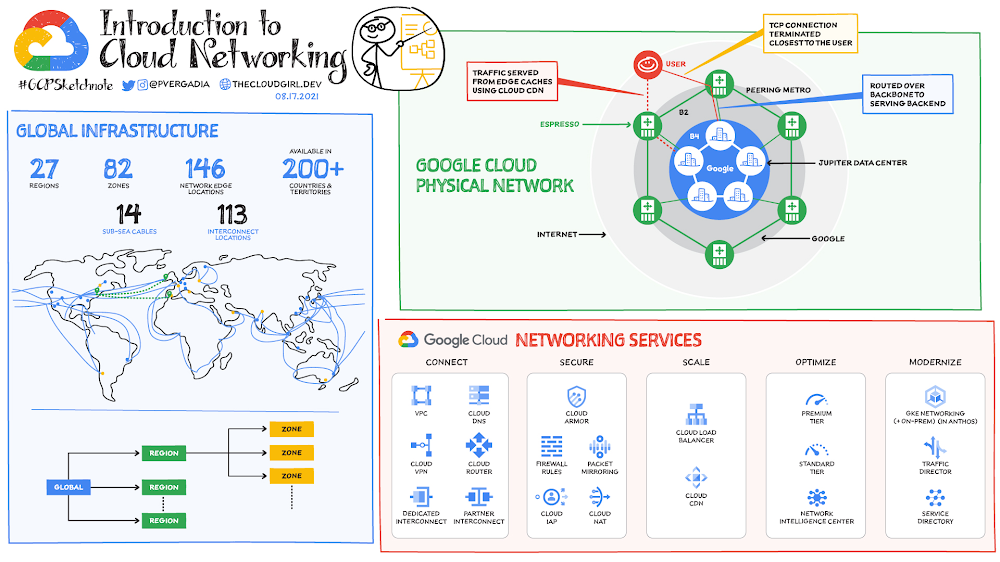
How is the Google Cloud physical network organized? Google Cloud is divided into regions, which are further subdivided into zones. A region is a geographic area where the round trip time (RTT) from one VM to another is typically under 1 ms. A zone is a deployment area within a region that has its own fully isolated and independent failure domain. This means that no two machines in different zones or in different regions share the same fate in the event of a single failure. At the time of this writing, Google has more than 27 regions and more than 82 zones across 200+ countries. This includes 146 network edge locations and CDN to deliver the content. This is the same network that also powers Google Search, Maps, Gmail, and YouTube. Click to enlargeGoogle network infrastructureGoogle network infrastructure consists of three main types of networks: Data center network, which connects all the machines in the network together. This includes 100s of 1000s of miles of fiber optic cables including  more than a dozen subsea cables. Software-based private network WAN connects all data centers together Software defined public WAN for user-facing traffic entering the Google network A machine gets connected from the internet via the public WAN and gets connected to other machines on the network via the private WAN. For example, when you send a packet from your virtual machine running in the cloud in one region to a GCS bucket in another, the packet does not leave the Google network backbone. In addition, network load balancers and layer 7 reverse proxies are deployed at the network edge, which terminates the TCP/SSL connection at a location closest to the user — eliminating the two network round trips needed to establish an HTTPS connection.Cloud networking servicesGoogle’s physical network infrastructure powers the global virtual network that you need to run your applications in the cloud. It offers virtual networking and tools needed to lift-and-shift, expand, and/or modernize your applications:Click to enlargeConnectThe first thing you need is to provision the virtual network, connect to it from other clouds or on-premises, and isolate your resources so other projects and resources cannot inadvertently access the network.Hybrid Connectivity: Consider company X, which has an on-premises environment with a prod and dev network. They would like to connect their on-premises environment with Google Cloud so the resources and services can easily connect between the two environments. They can either use Cloud Interconnect for dedicated connection or Cloud VPN for connection via an IPSec secure tunnel. Both work, but the choice would depend on how much bandwidth they need; for higher bandwidth and more data dedicated interconnect is recommended. Cloud Router would help enable the dynamic routes between the on-premises environment and Google Cloud VPC. If they have multiple networks/locations, they could also use Network Connectivity Center to connect their different enterprise sites outside of Google Cloud by using the Google network as a wide area network (WAN). Virtual Private Cloud (VPC): They deploy all their resources in VPC but one of the requirements is to keep the Prod and Dev environments separate. For this the team needs to use Shared VPC, which allows them to connect resources from multiple projects to a common Virtual Private Cloud (VPC) network, so that they can communicate with each other securely and efficiently using internal IPs from that network. Cloud DNS: They use Cloud DNS to manage:Public and private DNS zonesPublic/private IPs within the VPC and over the internetDNS peering ForwardingSplit horizonsDNSSEC for DNS security ScaleScaling includes not only quickly scaling applications, but also enabling real-time distribution of load across resources in single or multiple regions, and accelerating content delivery to optimize last-mile performance.Cloud Load Balancing: Quickly scale applications on Compute Engine—no pre-warming needed. Distribute load-balanced compute resources in single or multiple regions (and near users) while meeting high-availability requirements. Cloud Load Balancing can put resources behind a single anycast IP, scale up or down with intelligent autoscaling, and integrate with Cloud CDN.Cloud CDN: Accelerate content delivery for websites and applications served out of Compute Engine with Google’s globally distributed edge caches. Cloud CDN lowers network latency, offloads origin traffic, and reduces serving costs. Once you’ve set up HTTP(S) load balancing, you can enable Cloud CDN with a single checkbox.SecureNetworking security tools for defense against infrastructure DDoS attacks, mitigating data exfiltration risks when connecting with services within Google Cloud, and network address translation to enable controlled internet access for resources without public IP addresses.Firewall Rules: Lets you allow or deny connections to or from your virtual machine (VM) instances based on a configuration that you specify. Every VPC network functions as a distributed firewall. While firewall rules are defined at the network level, connections are allowed or denied on a per-instance basis. You can think of the VPC firewall rules as existing not only between your instances and other networks, but also between individual instances within the same network.Cloud Armor: It works alongside an HTTP(S) load balancer to provide built-in defenses against infrastructure DDoS attacks. IP-based and geo-based access control, support for hybrid and multi-cloud deployments, preconfigured WAF rules, and Named IP ListsPacket Mirroring: Packet Mirroring is useful when you need to monitor and analyze your security status. VPC Packet Mirroring clones the traffic of specific instances in your Virtual Private Cloud (VPC) network and forwards it for examination. It captures all traffic (ingress and egress) and packet data, including payloads and headers.The mirroring happens on the virtual machine (VM) instances, not on the network, which means it consumes additional bandwidth only on the VMs.Cloud NAT:  Lets certain resources without external IP addresses create outbound connections to the internet.Cloud IAP: Helps work from untrusted networks without the use of a VPN. Verifies user identity and uses context to determine if a user should be granted access. Uses identity and context to guard access to your on-premises and cloud-based applications. Optimize It’s important to keep a watchful eye on network performance to make sure the infrastructure is meeting your performance needs.This includes visualizing and monitoring network topology, performing diagnostic tests, and assessing real-time performance metrics.  Network Service Tiers – Premium Tier delivers traffic from external systems to Google Cloud resources by using Google’s low-latency, highly reliable global network while Standard Tier is for routing traffic over the internet. Choose Premium Tier for performance and Standard Tier as a low-cost alternative.Network Intelligence Center – provides a single console for Google Cloud network observability, monitoring, and troubleshootingModernize As you modernize your infrastructure, adopt microservices-based architectures, and expand your use of containerization you will need access to tools that can help manage the inventory of your heterogeneous services and route traffic amongst them. GKE Networking (+ on-prem in Anthos) – When you use GKE, Kubernetes and Google Cloud dynamically configure IP filtering rules, routing tables, and firewall rules on each node, depending on the declarative model of your Kubernetes deployments and your cluster configuration on Google Cloud.Traffic Director – Helps you run microservices in a global service mesh (outside of your cluster). This separation of application logic from networking logic helps you improve your development velocity, increase service availability, and introduce modern DevOps practices in your organization. Service Directory – Platform for discovering, publishing, and connecting services, regardless of the environment. It provides real-time information about all your services in a single place, enabling you to perform service inventory management at scale, whether you have a few service endpoints or thousands. For a more in-depth look into Google Cloud Networking products check out this.  For more #GCPSketchnote, follow the GitHub repo. For similar cloud content follow me on Twitter @pvergadia and keep an eye out on thecloudgirl.dev Related ArticleTraffic Director explained!If your application is deployed in a microservices architecture then you are likely familiar with the networking challenges that come wit…Read Article
Quelle: Google Cloud Platform






