Google Cloud billing tutorials: Because surprises are for home makeover shows, not your wallet

Let’s face it: billing is probably not the most fun or glamorous part of building an app or service, but it’s definitely one of the most important parts. And since billing isn’t particularly exciting, let’s start with a surprise!Just kidding! No surprises here. The truth is, I’m a routine-oriented person who doesn’t like surprises. I happily eat the same breakfast at the same time every morning. I have a white board calendar on which I tend to write the same weekly activities that I will complete. When I find a dish I like at a restaurant, then you can bet that’s what I’m going to order every time. When my family asks me what I want to do for my birthday, I say that I want the same things I do every day because I’m lucky enough to always do the things I love. A surprise party wouldn’t make me happy. Call me boring, but that’s just me and I’m glad I get to live the way that makes me happy! And since I’m all for knowing what to expect, I’m the perfect person to laud the merits of knowing what to expect from your Cloud bill.Billing should be boring!Perhaps you’re more into spontaneity than I, but even people who like surprises don’t enjoy a surprise bill. Bills are best when they’re boring–that is, you know exactly how much you’re going to pay. Fortunately, Google Cloud can help you prevent surprises using documentation on billing, including how-to guides, concepts, and of course, support. These resources show you how to calculate costs, develop a budget, and understand the components of your bills. Since you view your budget in the Google Cloud Console, wouldn’t it be nice if you could easily apply how-to steps in the Google Cloud Console? Well now you can! Thanks to walkthroughs right in the Google Cloud Console, you can complete billing tasks while getting step by step guidance in the same window.There tutorials are great because:The tutorials include links and highlights, making it easy to find the screens and buttons you’re looking forYou can view the instructions and the console at the same time. No more playing the tab game!You can run code from Cloud Shell, so you don’t need a separate window for an IDEYou can use the demo data provided to try things out, or you can apply the steps to your existing projects using data that suits your app’s needsLet’s take a look at some billing-related walkthroughs.Billing tutorialsHere are some tutorials on billing you can try out:Understanding and Analyzing your Cost with GoogleFamiliarize yourself with some of the built-in reports and learn how to customize them to answer questions such as:How much am I spending?What are my cost trends?What are my cost drivers?What is the breakdown of my spend by product?Billing TourWalk through the basics of how to understand and manage your costs using the Google Cloud Console.Analyze your Cloud Billing Data with BigQueryCreate a “Billing Administration” project to hold all exported billing data.Create a BigQuery dataset to hold all exported billing data from all projects linked to the same Cloud Billing account.In Cloud Billing, enable billing data to export to that BigQuery dataset.Run some sample queries through the BigQuery web interface to examine billing data.Manage Payment Methods and SettingsWalk through the basics of Google payments, including the payment methods for your Google Cloud account and how to manage and update your payments profile.Tour of Google Cloud BudgetsNavigate to a billing account.Set up a budget on the billing account.Define some thresholds for the budget.Set the default email recipients for the budget alert emails that are triggered by the thresholds.Expect more to comeI’ve been creating lots of in-console walkthroughs since discovering the format because I think they provide a brilliant format for learning new concepts and trying out products. You can see some Firestore tutorials I’ve put together. Stay tuned to the blog to see what other topics I’m making tutorials on. I guess this means it’ll be a surprise. Maybe surprises are actually good sometimes!Chime inIs there a particular action or concept in Billing that you’d like to see a tutorial for? Is there another Google Cloud product that you want to learn more about? Tweet @ThatJenPerson and you may just see your suggestion come to life in the Google Cloud Console!Related ArticleTry a tutorial in the Google Cloud ConsoleYou can follow tutorials and walkthroughs in the Google Cloud Console, allowing you to view the instructions and the console at the same …Read Article
Quelle: Google Cloud Platform
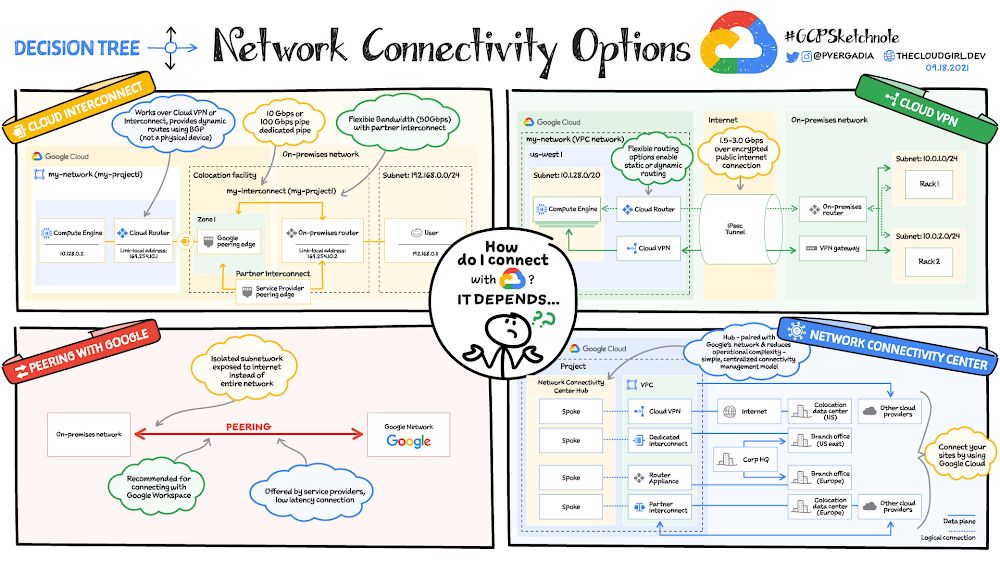
Choosing a network connectivity option in Google Cloud

The cloud is an incredible resource, but you can’t get the most out of it if you can’t interact with it efficiently. And because network connectivity is not a one-size-fits-all situation, you need options for connecting your on-premises network or another cloud provider to Google’s network.When you need to connect to Google’s network you have the following options:Connecting to Google Cloud: Cloud Interconnect and Cloud VPNConnecting two or more on-premises sites through Google Cloud: Network Connectivity CenterConnecting to Google Workspace and Google APIs: PeeringConnecting to CDN providers: CDN Interconnect  Click to enlargeConnecting to Google Cloud: Cloud Interconnect and Cloud VPNIf you need to encrypt traffic to Google Cloud,you need a lower throughput solution, or you are experimenting with migrating your workloads to Google Cloud, you can choose Cloud VPN. If you need an enterprise-grade connection to Google Cloud that has higher throughput, you can choose Dedicated Interconnect or Partner Interconnect.Cloud InterconnectCloud Interconnect provides two options: you can create a dedicated connection (Dedicated Interconnect) or use a service provider (Partner Interconnect) to connect to Virtual Private Cloud (VPC) networks. If your bandwidth needs are high (10Gpbs to 100Gbps) and you can reach Google’s network in  a colocation facility then Dedicated Interconnect is a cost-effective option. If you don’t require as much bandwidth (50Mbps to 50Gbps) or can’t physically meet Google’s network in a colocation facility to reach your VPC networks, you can use Partner Interconnect to connect to service providers that connect directly to Google. Cloud VPNCloud VPN lets you securely connect your on-premises network to your VPC network through an IPsecVPN connection in a single region. Traffic traveling between the two networks is encrypted by one VPN gateway and then decrypted by the other VPN gateway. This action protects your data as it travels over the internet. You can also connect two instances of Cloud VPN to each other. HA VPNprovides an SLA of 99.99% service availability.Connecting to Google Cloud: Network Connectivity CenterNetwork Connectivity Center (in preview) supports connecting different enterprise sites outside of Google Cloud by using Google’s network as a wide area network (WAN). On-premises networks can consist of on-premises data centers and branch or remote offices.Network Connectivity Center is a hub-and-spoke model for network connectivity management in Google Cloud. The hub resource reduces operational complexity through a simple, centralized connectivity management model. Your on-premises networks connect to the hub via one of the following spoke types: HA VPN tunnels, VLAN attachments, or router appliance instances that you or select partners deploy within Google Cloud.Connecting to Google Workspace and Google APIs: PeeringIf you need access to only Google Workspace or supported Google APIs, you have two options: Direct Peering to directly connect (peer) with Google Cloud at a Google edge locationCarrier Peering to peer with Google by connecting through an ISP (support provider), which in turn peers with Google.Direct Peering exists outside of Google Cloud. Unless you need to access Google Workspace applications, the recommended methods of access to Google Cloud are Dedicated Interconnect, Partner Interconnect, or Cloud VPN.Connecting to CDN providers: CDN Interconnect  CDN Interconnect (not shown in the image) enables select third-party Content Delivery Network (CDN) providers to establish direct peering links with Google’s edge network at various locations, which enables you to direct your traffic from your VPC networks to a provider’s network. Your network traffic egressing from Google Cloud through one of these links benefits from the direct connectivity to supported CDN providers and is billed automatically with reduced pricing. This option is recommended for high volume egress and frequent content updates in the CDN.For a more in-depth look into service check out the documentation.Related ArticleGoogle Cloud Networking overviewAn overview of Google Cloud Networking.Read Article
Quelle: Google Cloud Platform
SenSen uses Google Cloud to power massively scalable Sensor AI platform

Editor’s note: In this guest blog we look at how a Sensor AI solution provider uses Google Cloud to deliver highly scalable and reliable SaaS solutions across the globe.SenSen has become the world leader in Sensor AI technology-based solutions thanks in large part to Google Cloud.Sensor AI is the branch of AI that deals with the analysis and fusion of data from multiple sources including cameras, GPS, Radar, Lidar, IoT devices, GIS databases and transactional data to solve problems that defy traditional methods.SenSen’s AI platform SenDISA uses Google Cloud for machine learning training and inferencing at scale for the benefit of municipalities, transport authorities, retailers, casino operators, and others to automate monotonous, laborious activities within their operations and gain insights that are impossible to obtain from one data source alone.SenDISA is a distributed platform designed to deliver solutions at scale for public and private enterprises. The platform components are distributed between on-premise edge computers and those that are cloud-powered by Google AI Cloud services.Google Cloud supports global growthThe success of SenSen’s solutions has taken the company to all corners of the world. The company now supplies highly reliable, scalable, and differentiated solutions across four continents. When clients need insights fast, SenSen often has to initiate pilot programs and roll out full-scale production deployments rapidly and at short notice. That means being nimble and responsive. And at the same time, the company has to ensure it maximizes its technology investments. SenSen has been usingGoogle Cloud for more than a decade to deliver AI solutions at scale worldwide —quickly, simply, and cost-effectively. Today, it relies on a variety of Google Cloud solutions including Compute Engine, Cloud TPU, Cloud SQL, and operations suite to power its growing business.Compute Engine andCloud TPU are the foundation for all cloud processing and analytics functions. Compute Engine allows the creation and running of virtual machines (VMs) to support a wide range of applications.SenSen relies on Cloud TPU to run its machine learning models. This ensures high performance for all compute-intensive analytics. And it uses Google Cloud’soperations suite to closely monitor all of its Google Cloud services for full visibility into the health and status of its platform infrastructure.With Compute Engine and Cloud TPU, SenSen can spin up VMs and configure TPU clusters on-demand with minimal effort. And expanding capacity or extending functionality is fast and easy, including managing storage requirements inCloud SQL.With Google Cloud environment, SenSen gets to minimize upfront investments, tightly align recurring expenses with evolving business demands, and free up development resources to focus on intellectual property rather than underlying infrastructure.Google Cloud also makes it easy to ensure high availability for safety-critical applications like surveillance deployments where system downtime could lead to illegal activity, accidents, or even loss of life. Delivering predictable and dependable services greatly helps SenSen increase customer retention, grow ARR, and improve business results. Selecting the right partnerSenSen chose Google Cloud based on its pioneering status as an early and leading provider of AI technology and cloud services.With most of SenSen’s products using Tensorflow framework and relying heavily on GPIs, Google has the most robust and leasing AI framework offering:Cloud TPU training that is extremely powerful and easy to useSeamless integration of GCS buckets and the AI platformSeamless integration of Tensorflow frameworkWide range of GPU architectures to choose fromFast and efficient creation on VMsCapable on launching model training on the fly, and also TPU clustersGIS services at the heart of positioning and context settingSenSen was an early adopter of Google’s geocoding services – Google maps and other GIS services – for address lookup with GPS used for enforcement purposes. Google Maps helps SenSen locate on-road enforcement devices as well as offending vehicles that have overstayed parking limits or parked illegally.When patrolling urban areas, Google’s location API is used in web dashboards for easy searching of enforcement zones loaded into the system. This work is made easier by Google’s polygon drawing API which helps draw enforcement polygons that capture all the zones in a modern urban area including No Parking, No Stopping, Clearways, Bus Lanes, Transit Lanes, Cycling Lanes and all types of parking time limits.Throughout SenSen’s evolution, Google’s GIS-based services have been unique, comprehensive and easy to use in delivering a great experience to end customers.Transforming diverse sensor data into previously unachievable business insightsSenSen’s mission is to positively transform people’s lives with Sensor AI. Unlike other analytics solutions that narrowly focus on a single type of sensor data, SenSen’s SenDISA platform intelligently analyzes and fuses data from a wide array of sources including cameras, GPS, Lidar, Radar and other location sensors, motion sensors, and temperature sensors, and other IoT devices to deliver insights that are otherwise impossible to obtain. Using fused data, the company is able to solve a variety of use cases across multiple industries.Example applications include:Road safety – help cities save lives through detection and enforcement of dangerous driving practices including speeding and distracted driver behavior.Congestion – in urban areas SenSen reduces congestion and improves the citizen parking experiencesTheft reduction – the company help fuel retailers reduce fuel theft and improve safety for their employees and customersCasinos – helps casino operators improve compliance and customer experiences.Surveillance – helps surveillance operators be productive and efficient in detecting, tracking and managing incidents.If you want to learn more about how Google Cloud can help your startup, visit our pagehere to get more information about our program, andsign up for our communications to get a look at our community activities, digital events, special offers, and more.
Quelle: Google Cloud Platform

Research: Search abandonment has a lasting impact on brand loyalty

Search abandonment—when a consumer searches for a product on a retailer’s website but does not find what they are looking for—costs retailers more than $300 billion annually in the United States alone. Today, we’re releasing more data about the costs of search abandonment, including its ongoing impact to brand loyalty, as found by a Google Cloud-commissioned Harris Poll survey of more than 10,000 consumers globally and 200 website managers in the United States. Search abandonment is even more pertinent these days, as the pandemic has supercharged retailers’ shifts to meet rising consumer expectations through new personalized ecommerce and omnichannel experiences. According to McKinsey & Company, 75% of consumers have recently tried a new shopping behavior due to economic pressure, store closings, and changing priorities. Google data has also indicated that these sorts of omnichannel consumer behaviors persist, and in many ways are intensifying—as Google searches for the term “in stock” are up 800% year-over-year. Simply put, shoppers expect to find what they are looking for with ease, with many of their searches starting on retailers’ websites even if they ultimately visit a physical store.Search abandonment is high-risk and high-rewardBad search experiences are costly, while good search experiences often result in higher purchase conversion, larger order sizes, and ongoing brand loyalty. According to Harris Poll research, three out of four U.S. consumers (76%) report that an unsuccessful search resulted in a lost sale for the retail website, with 48% purchasing the item elsewhere. In fact, more than half (52%) say they typically abandon their entire cart and go elsewhere if there’s at least one item they can’t find. On the other hand, 69% of consumers say that after a successful search experience, they purchase additional items, and almost all consumers (99%) agree that they are at least somewhat likely to return to a retail website if it has a good search function. Retailers who make it easy for customers to find what they’re looking for see results. Macy’s saw a 2% increase in conversion and a 1.3% increase in revenue per visit in recent tests using Google Cloud Retail Search, which helps convert purchase intent across retailers’ own websites and mobile apps by understanding consumer intent and mapping it to product inventory. Search is vital for a positive shopping experience; search abandonment costs brand loyaltyThe search function is the most commonly used feature on retail websites, impacting outcomes beyond the initial purchase, the research results found. Nine in 10 consumers say a good search function is “very important” or “absolutely essential,” with 97% agreeing that their favorite retail websites are ones where they can quickly find what they are looking for. On the other hand, 77% of U.S. consumers avoid websites where they’ve experienced search difficulties; 77% of U.S. consumers view a brand differently after an unsuccessful search on their websites; and 75% say they are less loyal to a brand when it’s hard to find what they want on a website. Seventy-four percent agree that if a company won’t invest in improving its website, then they don’t want to give them their money.Outside of the United States, consumers are even more likely to say they view brands differently following an unsuccessful search, particularly in Brazil (92%), India (91%), Mexico (89%), Australia (87%), and the UK (86%).Search abandonment is pervasiveConsumers and website managers agree that search abandonment is pervasive. Ninety-four percent of consumers globally report receiving irrelevant results while searching on a retailer’s website, and 88% of U.S.-based retail website managers say abandoned searches are a problem at their company, with 84% believing that consumers are less loyal to brands when they’ve had unsuccessful searches. With billions on the line and clear indication from consumers that online shopping and omnichannel services are here to stay, combatting search abandonment is essential to keep customers coming back. Doing so doesn’t have to be daunting. For example, retailers can leverage Google Cloud’s recently announced Retail Search on their own web properties, as well as our full suite of Product Discovery Solutions for Retail which provides additional ways for retailers to enhance their ecommerce capabilities and deliver personalized consumer experiences.Download our ebook to see the full survey results, and visit our website to learn more about Google Cloud’s solutions for retailers to improve customer experiences and combat search abandonment.
Quelle: Google Cloud Platform

Google Cloud achieves new public sector authorizations: Google Workspace earns FedRAMP High, key Google Cloud Platform services receive DoD IL4

Governments across the globe want to make life easier for their citizens—they want to enable businesses to thrive, increase public safety, and tackle society’s most pressing challenges. Modernizing legacy public sector IT infrastructure is foundational to achieving this, and the right security is a prerequisite for digital transformation. With so much at stake, governments often take direct ownership of defining security requirements and programs to ensure their data is protected in the cloud. In the United States, the FedRAMP and NIST frameworks set the bar for the security of society’s most vital systems—from general administration, to emergency services, to healthcare systems—protecting every citizen and society at large. The weight of this responsibility is reflected in the high bar that must be met to receive FedRAMP High authorization. Google Workspace now is authorized at FedRAMP HighToday, we’re proud to announce that Google Workspace has achieved FedRAMP High authorization. This is a major milestone in our longstanding commitment to serving the needs of the public sector, and to making the world a safer place for everyone. The U.S. federal government has made its ambition for multi-cloud solutions clear, but in many cases has remained strapped to legacy offerings. Having this new choice of a full suite, cloud-first productivity vendor isn’t just a great thing for procurement and security; it also benefits our civil servants, empowering them with access to modern tools and technologies that help them seamlessly connect, create, and collaborate. And with this authorization, our federal customers can access the latest and greatest collaboration and security capabilities that Google Workspace offers without delay. Security is at the forefront of everything we do; it’s infused in every layer of our product design to provide customers with always up-to-date protections against phishing, malware, ransomware, and other cyberattacks. With FedRAMP High authorization across Workspace’s public cloud offering, any customer can rest assured that they are collaborating at this high level of security, without having to purchase and deploy a separate “gov cloud” instance. It also means they can operate seamlessly with relevant government agencies without additional overhead. Additional FedRAMP High authorized products bring Google Cloud capabilities to more public sector agenciesGoogle Cloud continues the steady growth of our catalog of FedRAMP High authorized services, including seven cloud regions. Recently, an additional four new products have also received FedRAMP High authorization, expanding on the authorizations we announced in April:Admin Console is central to building, deploying and scaling applications, along with websites and services—and includes access to Google Cloud’s cloud-native security, plus advanced features in services architecture and data analytics at scale.Cloud Identity is a services-oriented solution to centrally manage both individual users and groups. It enables administrators to manage access and compliance, while ensuring the broadest possible freedom for individuals to work and collaborate, including federated management between Google and other identity providers.Identity and Access Management provides a unified identity, access, app and endpoint management platform for any cloud project. Users gain better and faster access through single sign-on, while multi-factor authentication and endpoint management enables policy enforcement across all devices. Virtual Private Cloud provides managed networking across Google Cloud resources, allowing both the flexibility to scale and assured control of workload connectivity, regionally and globally—without repetitive connectivity and administrative hassles.Google Cloud earns Department of Defense Impact Level 4 Provisional AuthorizationAnother key security standard at the federal level is the Impact Level 4 (IL4) designation, which applies to controlled unclassified information (CUI). Today, we’re proud to announce that Google has earned IL4 authorization from the Defense Information Systems Agency (DISA), allowing CUI to be stored and processed across key Google Cloud services, including our compute, storage and networking offerings, data analytics, virtual private cloud, and identity and access management technologies, when used with Assured Workloads. Unlike other providers, who offer limited authorized services on a small number of isolated “government cloud” regions, Google Cloud has obtained this authorization for our US public cloud regions, ensuring that customers always have access to and seamless compatibility with our latest, most innovative cloud services.The result of substantial engineering work, this authorization will allow organizations who require an IL4 designation, including those in other industries like financial services and healthcare, to be compliant, while taking advantage of Google’s modern cloud technology. The configuration is supported in all seven U.S. regions, and ensures IL4 workloads are supported by U.S. personnel while being stored and processed in the United States. Our new IL4 and FedRAMP authorizations join other Google Cloud data privacy and security features that allow customers to comply with the FBI’s Criminal Justice Information Services (CJIS) standard and the IRS’ Publication 1075 (IRS 1075).Supporting government customers through evolving regulationsExpanding our list of compliance certifications and adding security and compliance resources is a critical part of Google Cloud’s mission to deliver agile, open architectures, unified data and analytics, and leading security solutions—along with productivity tools that support an increasingly hybrid workforce. While these are exciting developments for us, we are most excited about what it means for our public sector customers, who are working hard to achieve their missions and can now use cloud-first solutions to deliver on their mandates.For the latest information on our ongoing compliance efforts across the globe, visit our Compliance Resource Center.
Quelle: Google Cloud Platform

Google’s new RAD Lab solution helps spin up cloud projects quickly and compliantly

In the public sector, developing new technology requires careful planning—from budgeting, to procurement, to anticipating future software and hardware resources. But even with the best foresight, migrations can be difficult to manage without prior experience working with cloud environments. After all, how can you tell a year in advance what tools your teams will need to address constituent needs? And what if you’re not an expert on cloud systems? In academic research labs, scientists are often asked to spin up research modules in the cloud to create more flexibility and collaboration opportunities for their projects. However, lacking the necessary cloud skills, many projects never get off the ground.  Meet RAD Lab, a secure sandbox for innovationThat’s why today we’re introducing RAD Lab, a Google Cloud-based sandbox environment to help technology and research teams advance quickly from research and development to production. RAD Lab is a cloud-native research, development, and prototyping solution designed to accelerate the stand-up of cloud environments by encouraging experimentation with no risk to existing infrastructure. It’s also designed to meet public sector and academic organizations’ specific technology and scalability requirements with a predictable subscription model to simplify budgeting and procurement. With RAD Lab, government agencies, laboratories and university IT departments can quickly create cloud environments for inexperienced and experienced users alike. Teams no longer need to sacrifice simplicity and ease of use for access to the latest, most powerful technologies. With simplified processes and straightforward tools, RAD Lab users can easily spin up projects in just hours. Google Cloud also offers optional workshops to train employees on technology solutions that may be of use in the future. RAD Lab delivers a flexible environment to collect data for analysis, giving teams the liberty to experiment and innovate at their own pace, without the risk of cost overruns. Key features include:Open-source environment that runs on the cloud for faster deployment—with no hardware investment or vendor lock-in.Built on Google Cloud tools that are compliant with regulatory requirements like FedRAMP, HIPAA, and GDPR security policies.Common IT governance, logging, and access controls across all projects.Integration with analytics tools like BigQuery, Vertex AI, and pre-built notebook templates.Best-practice operations guidance, including documentation and code examples, that accelerate training, testing, and building cloud-based environments.Optional onboarding workshops for users, conducted by Google Cloud specialists. RAD Lab is accelerating cloud development for our customers and partnersAs “America’s Innovation Agency,” the U.S. Patent and Trademark Office (USPTO) uses RAD Lab to enable new internal research and development in artificial intelligence/machine learning, data science, enterprise architecture, and more. The agency’s technical specialists and business experts leverage RAD Lab’s sandbox environment to vet ideas and to develop prototypes that can scale.CIO Jamie Holcombe explains, “At the USPTO, we have the privilege to serve American inventors and entrepreneurs—whether they work out of their garages, at Silicon Valley start-ups, or in multinational corporations and research-and-development laboratories. Cloud computing is part of our drive to modernize and transform our agency’s technology to serve that mission. RAD Lab allows our staff—from technical specialists to economists and business experts—to build, test, and validate new cloud solutions to meet critical agency needs.”RAD Lab also provides Google Cloud partners a foundation to deploy tools easier and faster as they deliver cloud-based environments designed for iteration, experimentation, and prototyping to their customers. Jim Coyne, cloud specialist for Health and Life Sciences atOnix, says, “Our customers are looking for a flexible, scalable sandbox environment to trial different solutions and applications, and see what works best for them. RAD Lab gives us the flexibility to work with our customers to innovate with Google Cloud in entirely new ways.” Girish Reddy, CTO of SpringML, says, “We are excited to use RAD Lab to deliver Google Cloud tools to our customers in an accessible, open-source environment. It’s an invaluable tool in helping customers adopt AI/ML solutions and show them the power of their own data.” Start experimenting now to make more progress fasterWith the rapid deployment of RAD Lab, your teams can be up-and-running and prototyping cloud deployments in hours, rather than weeks or months. In the public sector and other regulated industries, we can help you determine the best cloud capabilities to include in your RAD Lab deployment, ensuring your teams have access to the technology they need when they need it. Contact your Google Cloud team to scope your own RAD Lab projects, or apply now for free research credits in select countries. 
Quelle: Google Cloud Platform

Air Force Research Lab fosters collaboration, security, and productivity with Google Workspace

The Air Force Research Laboratory (AFRL) is a global research enterprise supporting two services, the U.S. Air Force and the U.S. Space Force. From laser-guided optics enabling telescopes to see deeper into the universe to fundamental science that has spawned innovations in quantum computing and artificial intelligence, AFRL rapidly scales discovery to deliver leading-edge technologies for the military.  As an integral part of the nation’s defense, AFRL engages with world-leading scientists, small businesses, large industry, and other government agencies to build communities that drive innovation. And given the sensitive nature of its work, AFRL needs to maintain high levels of security, even with remote employees. To tackle these challenges, AFRL is deploying Google Workspace among a segment of its workforce of scientists and engineers. A single, secure platform for collaboration and innovationAs a leader in developing cutting-edge technology, AFRL needs flexibility, but also must meet rigorous security standards—while maintaining the agility to onboard new researchers quickly. AFRL teams are using Google Workspace solutions like Google Smart Canvas to simultaneously share, collaborate, and discuss research—eliminating the toil of email chains and hours-long data file exchanges. Through video conferencing service, Google Meet, some AFRL research teams are hosting flexible, virtual meetings to exchange ideas anywhere, anytime. The recent announcements of Workspace Client-Side Encryption, combined with Google’s Zero Trust security approach, provides AFRL additional safeguards, while keeping security measures invisible to end-users. Ultimately, the goal is to accelerate collaboration and innovation amongst AFRL scientists, while meeting the standards defined by the U.S. Defense Information Systems Agency (DISA).“Covid-19 significantly limited the physical presence of researchers in the lab,” said Dr. Joshua Kennedy, research physicist, Materials and Manufacturing Directorate at AFRL. “Google Workspace eliminated what would have otherwise been almost a total work stoppage. In fact, new insights into 2D nanomaterials, critical to future Department of the Air Force capabilities, were discovered using Workspace that would have otherwise been impossible.” Dr. Kennedy is just one of many researchers at AFRL who have reported a positive, tangible impact on their work as a result of using Google Workspace. For example, a recent survey of hundreds of researchers involved in the Google Workspace preliminary deployment revealed an average time savings of three hours per week. For AFRL’s highly trained workforce of PhDs, that means more time to dedicate to the mission.Secure collaboration for a global missionAFRL’s global workforce fuels the organization’s innovations, but its worldwide footprint is the source of one of its biggest challenges: How do you create a collaborative, secure, and adaptive environment for an advanced research organization without hampering its ability to innovate?In early fiscal year 2021, Air Force Research Laboratory commander Maj. Gen. Heather Pringle directed AFRL to prioritize ongoing efforts of digitally transforming AFRL and issued a charter establishing the AFRL Digital Transformation Team. The team’s charter outlines the vision of “One AFRL”—a flexible, synergistic enterprise “that capitalizes on the seamless integration of data and information through the use of modern methods, digital processes and tools and IT infrastructure.”“Our mantra is ‘collaborate to innovate,’” Pringle said. “We want our alpha nerds to be very connected, and we really want to up their proficiency as a digital workforce where data becomes a third language. We’re incorporating digital engineering into everything we do in science and technology and have a data-informed human capital strategy. We started experimenting with Google Workspace to supplement existing capabilities, and it has revolutionized our ability to collaborate with our external partners and build the best teams.”Learn more about how Google Cloud has worked with the U.S. Air Force to solve its toughest sustainment challenges and how Google Cloud is helping the Air Force transform future pilot training.
Quelle: Google Cloud Platform

Introducing GKE image streaming for fast application startup and autoscaling

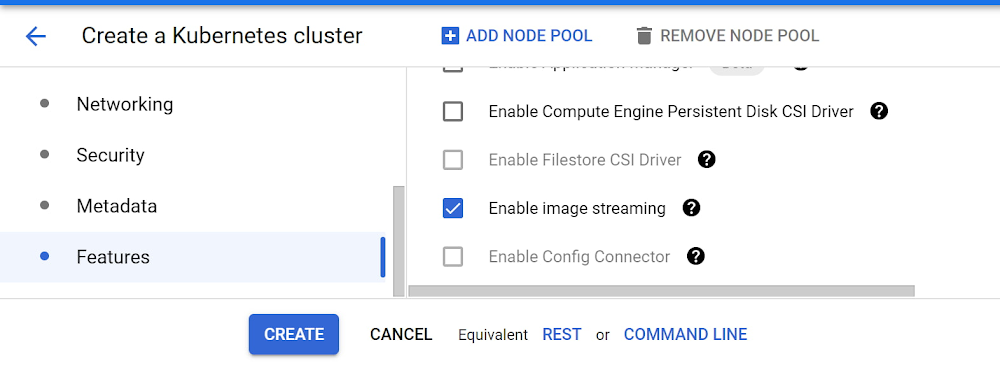
We’re excited to announce the general availability of a new feature in Google Kubernetes Engine (GKE): image streaming. This revolutionary GKE feature has the potential to drastically improve your application scale-up time, allowing you to respond to increased user demand more rapidly, and save money by provisioning less spare capacity. We achieve this by reducing the image pull-time for your container from several minutes (in the case of large images) to a couple of seconds (irrespective of container size), and allowing your application to start booting immediately while GKE streams the container data in parallel.The way Kubernetes traditionally works when scaling up your application is that the entire container image must be downloaded onto the node before the application can boot. The bigger your container image, the longer this takes, despite the fact that most applications don’t actually need every byte of data in the container image to start booting (and some data in the container may even never be used). For example, your application may spend a bunch of time connecting to external databases, which barely requires any data from the container image. With image streaming, we asked ourselves, what if we could deliver to your application just the data it needs, when it needs it, rather than waiting for all that extra data to be downloaded first?Image streaming works by mounting the container data layer in containerd using a sophisticated network mount, and backing it with multiple caching layers on the network, in-memory and on-disk. Your container transitions from the ImagePulling status to Running in a couple of seconds (regardless of container size) once we prepare the image streaming mount; this effectively parallelizes the application boot with the data transfer of required data in the container image. As a result, you can expect to see much faster container boot times and snappier autoscaling. Image streaming performance varies, as it is highly dependent on your application profile. In general, though, the bigger your images, the greater the benefit you’ll see. Google Cloud partner Databricks saw an impressive reduction in overall application cold-startup times, which includes node boot-time.“With image streaming on GKE, we saw a 3X improvement in application startup time, which translates into faster execution of customer workloads, and lower costs for our customers by reducing standby capacity.” – Ihor Leshko, Senior Engineering Manager, DatabricksIn addition to parallelizing data delivery, GKE image streaming employs a multi-level caching system: It starts with an in-memory and on-disk cache on the node, and moves up to regionally replicated Artifact Registry caches designed specifically for image streaming which leverage the same technology as Cloud Spanner under the hood.Image streaming is completely transparent as far as your containerized application is concerned. Since the data your container reads is initially streamed over the network, rather than from the disk, raw read performance is slightly slower with image streaming than when the whole image is available on the disk. This effect is more than offset during container boot by the parallel nature of the design, as your container got a lengthy head start by skipping the whole image pull process. However, to achieve equal read performance once the application is running, GKE still downloads the complete container image in parallel, just like before. In other words, while GKE is downloading the container image, you get the parallelism benefits of image streaming; then, once it’s downloaded, you get the same on-disk read performance as before—for the best of both worlds.Getting started with GKE image streamingImage streaming is available today at no additional cost to users of GKE’s Standard mode of operation, when used with images from Artifact Registry, Google Cloud’s advanced registry for container images and other artifacts. Images in Container Registry, or external container registries, are not supported for image streaming optimization (they will continue to work, just without benefiting from image streaming), so now is a great time to migrate them to Artifact Registry if you haven’t already.You can use image streaming on both new and existing GKE clusters. Be sure to enable the Container Filesystem API, use the COS containerd node image variant, and reference container images that are hosted in Artifact Registry. In the UI, simply check the “enable image streaming” checkbox on the cluster creation page.Alternately, from the CLI, here’s how to create an image streaming cluster:You can also upgrade your existing clusters to enable image streaming through the UI, or by running:and then deploy your workload referencing an image from Artifact Registry. If everything worked as expected, you should notice your container entering the “Running” status about a second after the “ContainerCreating” status.To verify that image streaming was engaged as expected, runThe ImageStreaming event as seen in the example output above indicates that image streaming was engaged for this image pull.Since image streaming is only used until the image is fully downloaded to disk, you’ll need to test this on a fresh node to see the full effect. And remember, to get image streaming, you need to enable the API, turn on image streaming in your cluster, use the COS containerd image, and reference images from Artifact Registry. Image streaming does introduce an additional memory reservation on the node in order to provide the caching system, which reduces the memory available for your workloads on those nodes. For all the details, including further information on testing and debugging, check out the image streaming documentation. For more such capabilities register to join us live on Nov 18th for Kubernetes Tips and Tricks to Build and Run Cloud Native Apps.
Quelle: Google Cloud Platform

Service Directory cheat sheet

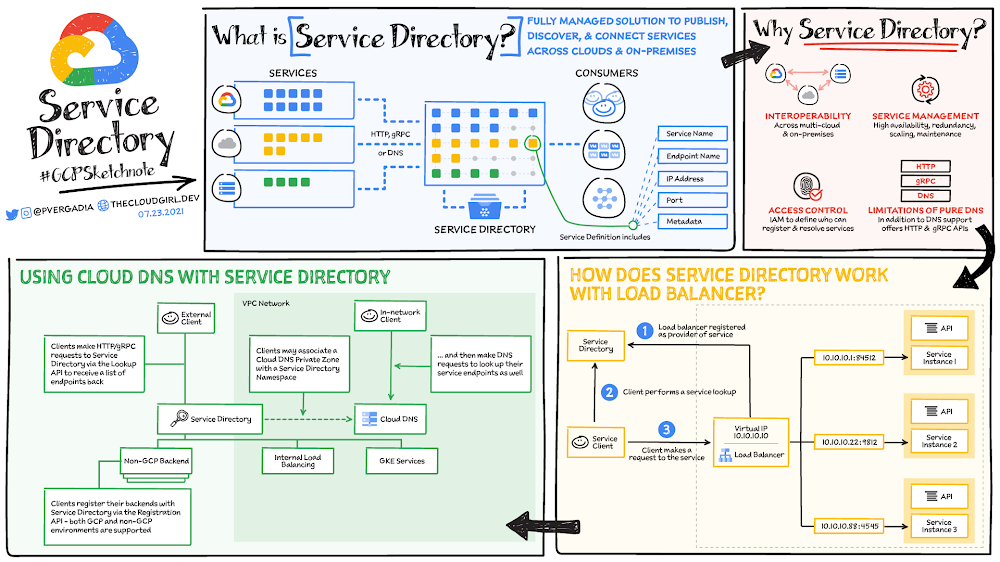
Most enterprises have a large number of heterogeneous services deployed across different clouds and on-premises environments. It is complex to look up, publish, and connect these services, but it is necessary to do so for deployment velocity, security, and scalability. That’s where Service Directory comes in! Service Directory is a fully managed platform for discovering, publishing, and connecting services, regardless of the environment. It provides real-time information about all your services in a single place, enabling you to perform service inventory management at scale, whether you have a few service endpoints or thousands. Click to enlargeWhy Service Directory?Imagine that you are building a simple API and that your code needs to call some other application. When endpoint information remains static, you can hard-code these locations into your code or store them in a small configuration file. However, with microservices and multi-cloud, this problem becomes much harder to handle as instances, services, and environments can all change.Service Directory solves this! Each service instance is registered with Service Directory, where it is immediately reflected in Domain Name System (DNS) and can be queried by using HTTP/gRPC regardless of its implementation and environment. You can create a universal service name that works across environments, make services available over DNS, and apply access controls to services based on network, project, and IAM roles of service accounts.Service Directory solves the following problems:Interoperability: Service Directory is a universal naming service that works across Google Cloud, multi-cloud, and on-premises. You can migrate services between these environments and still use the same service name to register and resolve endpoints.Service management: Service Directory is a managed service. Your organization does not have to worry about the high availability, redundancy, scaling, or maintenance concerns of maintaining your own service registry.Access control: With Service Directory, you can control who can register and resolve your services using IAM. Assign Service Directory roles to teams, service accounts, and organizations.Limitations of pure DNS: DNS resolvers can be unreliable in terms of respecting TTLs and caching, cannot handle larger record sizes, and do not offer an easy way to serve metadata to users. In addition to DNS support, Service Directory offers HTTP and gRPC APIs to query and resolve services.How Service Directory works with Load BalancerHere’s how Service Directory works with Load Balancer:In Service Directory, Load Balancer is registered as a provider of each serviceThe client performs a service lookup via Service DirectoryService Directory returns the Load Balancer addressThe client makes a call to the service via Load Balancer.Using Cloud DNS with Service DirectoryCloud DNS is a fast, scalable, and reliable DNS service running on Google’s infrastructure. In addition to public DNS zones, Cloud DNS also provides a managed internal DNS solution for private networks on Google Cloud. Private DNS zones enable you to internally name your virtual machine (VM) instances, load balancers, or other resources. DNS queries for those private DNS zones are restricted to your private networks. Here is how you can use Service Directory zones to make service names available using DNS lookups.The endpoints are registered directly with Service Directory using the Service Directory API. This can be done for both Google Cloud and non-Google Cloud services.Both external and internal clients can look up those services at: https://servicedirectory.googleapis.comTo enable DNS requests, create a Service Directory zone in Cloud DNS that is associated with a Service Directory namespace.Internal clients can resolve this service via DNS, HTTP, or gRPC. External clients (clients not on the private network) must use HTTP or gRPC to resolve service names.For a more in-depth look into Service Directory check out this documentation.  For more #GCPSketchnote, follow the GitHub repo. For similar cloud content follow me on Twitter @pvergadia and keep an eye out on thecloudgirl.dev Related ArticleIntegrating Service Directory with GKE: one registry for all your servicesYou can now register Google Kubernetes Engine (GKE) services in Service Directory, Google Cloud’s managed service registry.Read Article
Quelle: Google Cloud Platform
Zero trust workload security with GKE, Traffic Director, and CA Service

At the core of a zero trust approach to security is the idea that trust needs to be established via multiple mechanisms and continuously verified. Internally, Google has applied this thinking to the end-to-end process of running production systems and protecting workloads on cloud-native infrastructure, an approach we call BeyondProd. Establishing and verifying trust in such a system requires: 1) that each workload has a unique workload identity and credentials for authentication, and 2) an authorization layer that determines which components of the system can communicate with other components.Consider a cloud-native architecture where apps are broken into microservices. In-process procedure calls and data-transfers become remote procedure calls (RPCs) over the network between microservices. In this scenario, a service mesh manages communications between microservices, and is a natural place to embed key controls that implement a zero trust approach. Securing RPCs is extremely important: each microservice needs to ensure that it receives RPCs only from authenticated and authorized senders, is sending RPCs only to intended recipients, and has guarantees that RPCs are not modified in transit. Therefore, the service mesh needs to provide service identities, peer authentication based on those service identities, encryption of communication between authenticated peer identities, and authorization of service-to-service communication based on the service identities (and possibly other attributes).To provide managed service mesh security that meets these requirements, we are happy to announce the general availability of new security capabilities for Traffic Director which provide fully-managed workload credentials for Google Kubernetes Engine (GKE) via CA Service, and policy enforcement to govern workload communications. The fully-managed credential  provides the foundation for expressing workload identities and securing  connections between workloads leveraging mutual TLS (mTLS), while following zero trust principles.As it stands today, the use of mTLS for service-to-service security involves considerable toil and overhead for developers, SREs, and deployment teams. Developers have to write code to load certificates and keys from pre-configured locations and use them in their service-to-service connections. They typically also have to perform additional framework or application-based security checks on those connections. Adding complexity, SREs and deployment teams have to deploy keys and certificates on all the nodes where they will be needed and track their expiry. The replacement or rotation of these certificates involves creating CSRs (certificate signing requests), getting them signed by the issuing CA, installing the signed certificates, and installing the appropriate root certificates at peer locations. The process of rotation is critical, as letting an identity or root certificate expire means an outage that can take services offline for an extended amount of time. This security logic cannot be hardcoded because the routing of RPCs is orchestrated by the traffic control plane and, as microservices are scaled to span multiple deployment infrastructures, it is difficult for the application code to verify identities and perform authorization decisions based on them. Our solution addresses these issues by creating seamless integrations between the Certificate Authorities’ infrastructure, the compute/deployment infrastructure, and the service mesh infrastructure. In our implementation, Certificate Authority Service (CAS) provides certificates for the service mesh, the GKE infrastructure integrates with CAS, and the Traffic Director control plane integrates with GKE to instruct data plane entities to use these certificates (and keys) for creating mTLS connections with their peers.The GKE cluster’s mesh certificate component continuously talks to the CA pools to mint service identity certificates and make these certificates available to intended workloads running in GKE pods. Issuing Certificate Authorities are automatically renewed and the new roots pushed to clients before expiry. Traffic Director is the service mesh control plane which provides policy, configuration, and intelligence to data plane entities, and supplies configurations to the client and server applications. These configurations contain the necessary transport and application-level security information to enable the consuming services to create mTLS connections and apply the appropriate authorization policies to the RPCs that flow through those connections. Finally, workloads consume the security configuration to create the appropriate mTLS connections and apply the provided security policies. To learn more, check out the Traffic Director user guide and see how to setup Traffic Director and the accompanying services in your environment to take a zero trust approach to securing your GKE workloads.Related ArticleIntroducing security configuration for gRPC apps with Traffic DirectorgRPC-based services can now be configured via the Traffic Director control plane to use TLS and mutual TLS to establish secure communicat…Read Article
Quelle: Google Cloud Platform






