Scale your data science workflows with the Vertex AI Workbench notebook executor

When solving a new ML problem, it’s common to start by experimenting with a subset of your data in a notebook environment. But if you want to execute a long-running job, add accelerators, or run multiple training trials with different input parameters, you’ll likely find yourself copying code over to a Python file to do the actual computation. That’s why we’re excited to announce the launch of the notebook executor, a new feature of Vertex AI Workbench that allows you to schedule notebooks ad hoc, or on a recurring basis. With the executor, your notebook is run cell by cell on Vertex AI Training. You can seamlessly scale your notebook workflows by configuring different hardware options, passing in parameters you’d like to experiment with, and setting an execution schedule, all via the Console UI or the notebooks API. Built to ScaleImagine you’re tasked with building a new image classifier. You start by loading a portion of the dataset into your notebook environment and running some analysis and experiments on a small machine. After a few trials, your model looks promising, so you want to train on the full image dataset. With the notebook executor, you can easily scale up model training by configuring a cluster with machine types and accelerators, such as NVIDIA GPUs, that are much more powerful than the current instance where your notebook is running.Your model training gets a huge performance boost from adding a GPU, and you now want to run a few extra experiments with different model architectures from TensorFlow Hub. For example, you can train a new model using feature vectors from various architectures, such as Inception, ResNet, or MobileNet, all pretrained on the ImageNet dataset. Using these feature vectors with the Keras Sequential API is simple; all you need to do is pass the TF Hub URL for the particular model to hub.KerasLayer.Instead of running these trials one by one in the notebook, or making multiples copies of your notebook (inceptionv3.ipynb, resnet50.ipynb, etc) for each of the different TF Hub URLs, you can experiment with different architectures by using a parameter tag. To use this feature, first select the cell you want to parameterize. Then click on the gear icon in the top right corner of your notebook.Type “parameters” in the Add Tag box and hit Enter. Later when configuring your execution, you’ll pass in the different values you want to test.In this example, we create a parameter called feature_extractor_model, and we’ll pass in the name of the TF hub model we want to use when launching the execution. That model name will be substituted into the tf_hub_uri variable, which is then passed to the hub.KerasLayer, as shown in the screenshot above.  After you’ve discovered the optimal model architecture for your use case, you’ll want to track the performance of your model in production. You can create a notebook that pulls the most recent batch of serving data that you have labels for, gets predictions, and computes the relevant metrics. By scheduling these jobs to execute on a recurring basis, you’ve created a lightweight monitoring system that tracks the quality of your model predictions over time. The executor supports your end-to-end ML workflow, making it easy to scale up or scale out notebook experiments written with Vertex AI Workbench.Configuring ExecutionsExecutions can be configured through the Cloud Console UI or the Notebooks API.In your notebook, click on the Executor icon.In the side panel on the right specify the configuration for your job, such as the machine type and the environment. You can select an existing image, or provide your own custom docker container image.If you’ve added parameter tags to any of your notebook cells, you can pass in your parameter values to the executor.Finally, you can choose to run your notebook as a one time execution, or schedule recurring executions.Then click SUBMIT to launch your job.In the EXECUTIONS tab, you’ll be able to track the status of your notebook execution.When your execution completes, you’ll be able to see the output of your notebook by clicking VIEW RESULT.You can see that an additional cell was added with the comment # Parameters, that overrides the default value for feature_extractor_model, with the value we passed in at execution time. As a result, the feature vectors used for this execution came from a ResNet50 model instead of an Inception model.What’s Next?You now know the basics of how to use the notebook executor to train with a more performant hardware profile, test out different parameters, and track model performance over time. If you’d like to try out an end-to-end example, check out this tutorial. It’s time to run some experiments of your own!
Quelle: Google Cloud Platform

Announcing Vertex Pipelines general availability

Today, we’re incredibly excited to announce the general availability of Vertex Pipelines.One of the best ways to scale your machine learning (ML) workflows is to run them as a pipeline, where each pipeline step is a distinct piece of your ML process. Pipelines are a great tool for productionizing, sharing, and reliably reproducing ML workflows across your organization. They are also the key to MLOps – with Pipelines you can build systems to automatically retrain and deploy models. In this post, we’ll show what you can do with Vertex Pipelines, and we’ll end by sharing a sample pipeline to help you get started.Vertex Pipelines in a nutshellLet’s briefly discuss what an ML pipeline does. A machine learning pipeline is an ML workflow encapsulated as a series of steps, also called components. Each step in a pipeline is a container, and the output of each step can be an input to the next step. This presents two challenges:For this to work, you need a way to convert individual pipeline steps to containersThis will require setting up infrastructure to run your pipeline at scaleTo address the first challenge, there are some great open source libraries that handle converting pipeline steps to containers and managing the flow of input and output artifacts throughout your pipeline, allowing you to focus on building out the functionality of each pipeline step. Vertex Pipelines supports two popular open source libraries – Kubeflow Pipelines (KFP) and TensorFlow Extended (TFX). This means you can define your pipeline using one of these libraries and run it on Vertex Pipelines.Second, Vertex Pipelines is entirely serverless. When you upload and run your KFP or TFX pipelines, Vertex AI will handle provisioning and scaling the infrastructure to run your pipeline. This means you’ll only pay for the resources used while your pipeline runs; and your data scientists get to focus on ML without worrying about infrastructure. Vertex Pipelines integrates with other tools in Vertex AI and Google Cloud: you can import data from BigQuery, train models with Vertex AI, store pipeline artifacts in Cloud Storage, get model evaluation metrics, and deploy models to Vertex AI endpoints, all within your Vertex Pipeline steps. To make this easy, we’ve created a library of pre-built components for Vertex Pipelines. These pre-built components help simplify the process of using other parts of Vertex AI in your pipeline steps, like creating a dataset or training an AutoML model. To use them, import the pre-built component library and use components from the library directly in your pipeline definition. As an example, below is a pipeline that creates a Vertex AI dataset pointing to data in BigQuery, trains an AutoML model, and deploys the trained model to an endpoint if its accuracy is above a certain threshold:ML Metadata & Vertex PipelinesWith output generated from each step of a pipeline execution, it’s important to have a mechanism for tracking the artifacts and metrics created across pipeline runs. This becomes especially useful when you have multiple people on your team involved in developing and running a pipeline, or are managing multiple pipelines for different ML tasks. To help with this, Vertex Pipelines integrates directly with Vertex ML Metadata for automatic artifact, lineage, and metric tracking.You can inspect pipeline metadata in the Vertex AI console, and through the Vertex AI SDK. To see metadata and artifacts in the console, start by clicking on the “Expand artifacts” slider when looking at your pipeline graph. You can then click on individual artifacts to view details and see where each artifact is stored:When looking at output artifacts, it’s also helpful to understand an individual artifact in the larger context of your pipeline. To do this, Vertex Pipelines offers lineage tracking. When looking at an artifact in the console, click on the “View lineage” button. As an example, for the endpoint below, we can see the model that is deployed to the endpoint, and the dataset used to train that model. We can also see the pipeline steps that generated each artifact in this graph:There are several ways to interact with pipeline metadata programmatically. Using the Vertex ML Metadata API, you can query for any artifacts or executions in your metadata store by their properties or lineage. You can also use the get_pipeline_df method from the Vertex AI SDK to create a Pandas DataFrame with metrics from each of your pipeline runs. There are also SDK methods for getting artifact lineage and filtering artifacts, which you can use to create custom dashboards to track your pipelines.Building a sample pipelineTo see Vertex Pipelines in action, let’s look at an example built with the Kubeflow Pipelines SDK. You can find the full pipeline code for this example in this codelab, and here we’ll show a few highlights. Our sample pipeline will make use of Google Cloud’s pre-built components, and will do the following:Create a dataset in Vertex AITrain a custom model on that datasetRun a batch prediction on the trained modelTo build and run this pipeline, we’ll first import a few Python packages:We’re using three libraries to build and run this pipeline on Vertex AI:The Kubeflow Pipelines SDK to build our components and connect them together into a pipelineThe Vertex AI SDK to run our pipeline on Vertex PipelinesThe Google Cloud components library to make use of pre-built components for interacting with various Google Cloud servicesBecause we’re making use of first party pre-built components, we don’t need to write boilerplate code to perform each of these tasks. Instead, we can pass configuration variables to the components directly in our pipeline definition. You can see the full definition in the codelab, and we’ve shown some highlights below:This pipeline first creates a dataset in Vertex AI using the TabularDatasetCreateOp component, passing in the BigQuery source table of the dataset. The dataset created will then be passed to our CustomContainerTrainingJobRunOp component and used in our scikit-learn model training job. We’ve passed configuration parameters that point to a container in Container Registry where we’ve deployed our scikit-learn training code. The output of this component is a model in Vertex AI. In the last component of this pipeline, we run a batch prediction job on this model by providing a CSV file with examples we’d like to get predictions on.When we compile and run this pipeline on Vertex AI, we can inspect the pipeline graph in the console as it runs:Start building with Vertex PipelinesReady to run your own scalable ML pipelines on Vertex AI? Check out the following resources to get started:Vertex Pipelines documentationOfficial sample pipelines on GitHubCheck out this codelab for an introduction to Vertex Pipelines, and this one to understand how Vertex Pipelines works with Vertex ML Metadata.Related ArticleUse Vertex Pipelines to build an AutoML classification end-to-end workflowHow you can use Vertex Pipelines to build an end-to-end ML workflow for training a custom model using AutoMLRead Article
Quelle: Google Cloud Platform

Using Firestore and Apache Beam for data processing

Large scale data processing workloads can be challenging to operationalize and orchestrate. Google Cloud announced the release of a Firestore in Native Mode connector for Apache Beam that makes data processing easier than ever for Firestore users. Apache Beam is a popular open source project that supports large scale data processing with a unified batch and streaming processing model.  It’s portable, works with many different backend runners, and allows for flexible deployment. The Firestore Beam I/O Connector joins BigQuery, Bigtable, and Datastore as Google databases with Apache Beam connectors and is automatically included with theGoogle Cloud Platform IO module of the Apache Beam Java SDK.  The Firestore connector can be used with a variety of Apache Beam backends, including Google Cloud Dataflow. Dataflow, an Apache Beam backend runner, provides a structure for developers to solve “embarrassingly parallel” problems. Mutating every record of your database is an example of such a problem. Using Beam pipelines removes much of the work of orchestrating the parallelization and allows developers to instead focus on the transforms on the data.A practical application of a Firestore Connector for BeamTo better understand the use case for a Beam + Firestore Pipeline, let’s look at an example that illustrates the value of using Google Cloud Dataflow to do bulk operations on a Firestore database. Imagine you have a Firestore database and have a collection group you want to do a high number of operations on; for instance, deleting all documents within a collection group. Doing this on one worker could take a while. What if instead we could use the power of Beam to do it in parallel?This pipeline starts by creating a request for a partition query on a given collectionGroupId. We specify withNameOnlyQuery as it will save on network bandwidth; we only need the name to delete a document. From there, we use a few custom functions. We read the query response to a document object, get the document’s name, and delete a document by that name.Beam utilizes a watermark to ensure exactly-once processing.  As a result, the Shuffle operation stops backtracking over work that is complete already, providing both speed and correctness.While the code to create a partition query is a bit long, it consists of constructing the protobuf request to be sent to Firestore using the generated protobuf builder.Creating  a Partition Query:There are many possible applications for this connector for Google Cloud users. Joining disparate data in a Firestore in Native Mode database, relating data across multiple databases, deleting a large number of entities, writing Firestore data to BigQuery, and more. We’re excited to have contributed this connector to the Apache Beam ecosystem and can’t wait to see how you use the Firestore connector to build the next great thing.Related ArticleAnnouncing a Firestore Connector for Apache Beam and Cloud DataflowGoogle Cloud announces a Firestore connector for Apache Beam, making data processing easier than ever for Firestore users.Read Article
Quelle: Google Cloud Platform

JOIN 2021: Sharing our product vision with the Looker community

Welcome to JOIN 2021! We’re so excited to kick off Looker’s annual user conference. It’s an event we look forward to each year as it’s a terrific opportunity to connect with the Looker community,  interact with our partners and customers, showcase our product capabilities, and share our product vision and strategy for the year ahead. This is the second year in a row that we’re hosting our conference virtually. Even though we were hoping to see you all in person this year, we’re delighted to connect with the Looker community in a virtual setting. This year we have some great content prepared that we hope you will find insightful and educational. JOIN 2021 brings you 3 days of content that includes 5 keynotes, 33 breakouts, 12 How-tos, 27 Data Circles of Success (live!), and our popular Hackathon. One of the most exciting parts of this event is the highly anticipated product keynote session, where you’ll learn about our product vision, key investments, new product features, and the roadmap ahead. It’s also our opportunity to share with you all the cool and exciting projects the team has been working on. Here is a sneak preview of some of the things you will hear in the product keynote:Composable AnalyticsThe idea that different people in different roles need to work with data in different ways is a conviction that guides Looker’s product direction. Composable analytics is about enabling organizations to deliver these bespoke data experiences tailored to the different ways people work, in a way that transcends conventional business intelligence (BI). We at Looker see a world where people can assemble different data experiences, quickly and easily, with reusable components with low code deployment options, without requiring any specialized technical skills. Looker’s investment in the Extension Framework and Looker Components lays the foundation for our developers building composable analytics applications. Looker’s Extension Framework is an accelerator and makes it significantly easier and faster for developers to build a variety of experiences on Looker without having to worry about things like hosting, authentication, authorization, and local API access. “It took one developer one day to stand up an application using the Extension Framework! I’ve seen a lot of great Looker features built over the years. This has the potential to be the most ground-breaking.” —Jawad Laraqui, CEO, Data Driven (Don’t miss Jawad’s session “Building and Monetizing Custom Data Experiences with Looker”)Looker Components lower the barrier to developing beautiful data experiences that utilize native Looker functionality through extension templates, componentized Looker functionality, a library of foundational components, and theming. In July we released Filter components, which allow developers to bring the filters they declare on any Looker dashboard into any embedded application or extension. Today, we announce Visualization components (screenshot below), which is an open-source toolkit that makes it easy to connect your visualization to Looker, customize its presentation, and easily add it to your external application.In addition, we are also announcing the new Looker public marketplace, where developers can explore Beyond BI content like applications, blocks, and plug-ins.Augmented AnalyticsAugmented analytics is fundamentally changing the way that people interact with data. We see tremendous opportunity to help organizations take advantage of artificial intelligence and machine learning capabilities to deliver a better and more intuitive experience with Looker. We are delivering augmented analytics capabilities via two Solutions – Contact Center AI (CCAI) and Healthcare NLP.Looker’s Solution for Contact Center AI (CCAI), helps businesses gain a deeper understanding and appreciation of their customers’ full journey by unlocking insights from all their company’s first-party data. We’ve partnered with the product teams at CCAI to build Looker’s Block for CCAI Insights, which sets you on the path to integrating the advanced insights into your first-party data in Looker, overlaying business data with the customer experience. Looker’s Block for Healthcare NLP API serves as a critical bridge between existing care systems and applications hosted on Google Cloud providing a managed solution for storing and accessing healthcare data in Google Cloud. Healthcare providers, payers, and pharma companies can quickly understand the context and relationships of medical concepts within the text, such as medications, procedures, conditions, clinical history, and begin to link this to other clinical data sources for downstream AI/ML.We are also investing in the way you can interact with data in Looker. With Ask Looker, you can explore and visualize data using natural language queries. By combining Google’s expertise in AI with Looker’s modern semantic layer, Ask Looker will deliver a uniquely valuable experience to our users that dramatically lowers the barrier to interacting with data (this feature is currently available in preview and we expect to roll it out more broadly in 2022).For more information on the newest Looker solutions, click here. Universal Semantic ModelA core differentiator since the beginning has been Looker’s semantic model. Our LookML modeling language enables developers to describe their organization’s business rules and calculations using centralized and reusable semantic definitions. This means everyone across the organization can trust that they’re working with consistent and reliable interpretations of the data, allowing them to make more confident business decisions. Soon, different front-end applications like Tableau, Google Sheets, Google Slides, and more will be able to connect to Looker’s semantic model.With Looker’s universal semantic model, organizations can deliver trusted and governed data to every user across heterogeneous tools. This eliminates the risk of people relying on stale and unsecured data that increases the risk of data exfiltration. The universal semantic model gives companies a way to tie disparate data sets together in a central repository that provides a complete understanding of their business.Data Studio is now part of LookerWe are also excited to announce that Data Studio is now a part of the Looker team. Data Studio has built a strong product enabling reporting and ad-hoc analysis on top of Google Ads and other data sources. This is a distinct and complementary use case to Looker’s enterprise BI and analytics platform. Bringing Data Studio and Looker together opens up exciting opportunities to combine the strengths of both products to reimagine the way organizations work with data. As we reach the end of 2021, we feel proud of the product capabilities we shipped this year and we’re excited about the investments we’ll make in 2022. We’re grateful for the continued support of our customers and partners, and our work is inspired every day by the innovative applications you build and use cases you support . We hope you enjoy JOIN 2021 and all the amazing content we have available for you in this digital format. Make sure to register to access all the event sessions. We hope to see you all in person in 2022.
Quelle: Google Cloud Platform

Announcing Spot Pods for GKE Autopilot—save on fault tolerant workloads

We launched GKE Autopilot back in February and since then, we’ve been hard at work adding functionality to deliver a fully featured, fully managed Kubernetes platform. Today, we’re excited to introduce Spot Pods. (Not familiar with GKE Autopilot yet? Check out the Autopilot breakout session at Google Cloud Next ‘21, which gives a rundown of everything this new Kubernetes platform can do. Customers like the Japanese healthcare startup Ubie are already realizing simpler operations thanks to Autopilot, allowing them to spend less time worrying about infrastructure, and more time building their core business.)Back to Spot Pods… Autopilot is great for running stable, production-grade workloads thanks to its Pod-level SLA, a first for GKE. You might however have other types of workloads that don’t need this high level of reliability, for example fault-tolerant batch workloads, or dev/test clusters that can handle some disruption. Spot Pods give you a convenient and cost-effective way to run these kinds of workloads on GKE Autopilot. (GKE standard users can also take advantage of spot pricing by running their GKE clusters and node pools on Spot VMs.)When you run your workloads with Spot Pods, you will receive a discount of between 60 to 91% off our regularly priced pods (see our pricing page for the current price). There is no hard limit to how long a Spot Pod can run, but they may be preempted and evicted at any time if the resources need to be reclaimed by the platform during times of high resource demand. How Spot Pods workSpot Pods run on spare compute capacity in Google Cloud, which allows you to use them at a lower price compared to regular Autopilot pods, for as long as compute resources are available. If Google Cloud needs the resources for other tasks, GKE evicts your Spot Pods with a grace period of 25s. By using a Kubernetes workload API like Deployment or Job, you can automatically redeploy your Spot Pods as soon as there’s available capacity, and they pick up right where they left off.Spot Pods are available starting in GKE 1.21.4. To enable Spot Pods on your deployment, just add a node selector for cloud.google.com/gke-spot: “true”. Here’s an example Deployment that uses this node selector to enable Spot Pods:When you ask for Spot Pods in this way, Autopilot automatically provisions nodes for them. Autopilot adds Kubernetes taints and tolerations so that your regular, critical Pods stay separated and don’t land on the same nodes as Spot Pods. All you need to do is request Spot Pods in your manifest — GKE handles the rest.When GKE evicts a Spot Pod to reclaim capacity, your containers get a SIGTERM signal and get up to 25s to wrap up their work. Make the most of this by adding terminationGracePeriodSeconds to your PodSpec, and gracefully shut your container down when it receives the SIGTERM signal.Use Spot Pods to maximize your savings when you run fault-tolerant workloads on Autopilot clusters. For your regular Pods, you can also take advantage of Autopilot committed use discounts (CUDs), which launched earlier this year, and offer discounts of up to 45%. CUDs don’t apply to Spot Pods, which are already heavily discounted, but they do offer a convenient way to save money on pods that require a more stable environment. Regardless of your workload, GKE gives you a way to save.Spot Pods are in Preview, and available starting with GKE version 1.21.4. To get started with Spot Pods for GKE Autopilot, read the documentation for Spot Pods, and create an Autopilot cluster in the Rapid release channel. For more such capabilities register to join us live on Nov 18th for Kubernetes Tips and Tricks to Build and Run Cloud Native Apps.
Quelle: Google Cloud Platform

Google Cloud Network Service Tiers: An overview

With Network Service Tiers, Google Cloud is the first major public cloud to offer a tiered cloud network. Two tiers are available: Premium Tier and Standard Tier.Click to enlargePremium TierPremium Tier delivers traffic from external systems to Google Cloud resources by using Google’s highly reliable, low-latency global network. This network consists of an extensive private fiber network with over 100 points of presence (PoPs) around the globe. This network is designed to tolerate multiple failures and disruptions while still delivering traffic.Premium Tier supports both regional external IP addresses and global external IP addresses for VM instances and load balancers. All global external IP addresses must use Premium Tier. Applications that require high performance and availability, such as those that use HTTP(S), TCP proxy, or SSL proxy load balancers with backends in more than one region, require Premium Tier. Premium Tier is ideal for customers with users in multiple locations worldwide who need the best network performance and reliability.With Premium Tier, incoming traffic from the internet enters Google’s high-performance network at the PoP closest to the sending system. Within the Google network, traffic is routed from that PoP to the VM in your Virtual Private Cloud (VPC) network or closest Cloud Storage bucket. Outbound traffic is sent through the network, exiting at the PoP closest to its destination. This routing method minimizes congestion and maximizes performance by reducing the number of hops between end users and the PoPs closest to them.Standard TierStandard Tier delivers traffic from external systems to Google Cloud resources by routing it over the internet. It leverages the double redundancy of Google’s network only up to the point where a Google data center connects to a peering PoP. Packets that leave the Google network are delivered using the public internet and are subject to the reliability of intervening transit providers and ISPs. Standard Tier provides network quality and reliability comparable to that of other cloud providers.Regional external IP addresses can use either Premium Tier or Standard Tier. Standard Tier is priced lower than Premium Tier because traffic from systems on the internet is routed over transit (ISP) networks before being sent to VMs in your VPC network or regional Cloud Storage buckets. Standard Tier outbound traffic normally exits Google’s network from the same region used by the sending VM or Cloud Storage bucket, regardless of its destination. In rare cases, such as during a network event, traffic might not be able to travel out the closest exit and might be sent out another exit, perhaps in another region.Standard Tier offers a lower-cost alternative for applications that are not latency or performance sensitive. It is also good for use cases where deploying VM instances or using Cloud Storage in a single region can work. Choosing a tierIt is important to choose the tier that best meets your needs. The decision tree can help you decide if Standard Tier or Premium Tier is right for your use case. Because you choose a tier at the resource level—such as the external IP address for a load balancer or VM—you can use Standard Tier for some resources and Premium Tier for others. If you are not sure which tier to use, choose the default Premium Tier and then consider a switch to Standard Tier if you later determine that it’s a better fit for your use case.For a more in-depth look into Network Service Tiers check out the documentation.  For more #GCPSketchnote, follow the GitHub repo. For similar cloud content follow me on Twitter @pvergadia and keep an eye out on thecloudgirl.dev.Related ArticleGoogle Cloud Networking overviewAn overview of Google Cloud Networking.Read Article
Quelle: Google Cloud Platform

Bring governance and trust to everyone with Looker’s universal semantic model

As digital transformation accelerates, the data available to organizations about their products, customers, and markets is growing exponentially.  Turning this data into insights will be critical to innovating and growing.  Furthermore, the capacity to make data-driven decisions must be pervasive in organizations, accessible to a broad range of employees, and simple enough to apply to day-to-day decisions as well as the most strategic.  However, a major barrier to achieving this vision is a gap in access to the tools for analysis and building broad-based usage.Looker’s semantic model enables complex data to be simplified for end users with a curated catalog, pre-defined business metrics, and built-in transformation.  We’ve always been platform first, and this is an expansion of that strategy. We are extending our investment here to power more data rich experiences and aim to provide access to the Looker model more directly in other tools. By bringing governed data directly to end users in tools they are already familiar with, this will democratize access to trusted data across organizations.Google Workspace is everything you need to get anything done, all in one place. Google Workspace includes all of the productivity apps you know and love—Gmail, Calendar, Drive, Docs, Sheets, Slides, Meet, and many more. Whether you’re returning to the office, working from home, on the frontlines with your mobile device, or connecting with customers, Google Workspace is the best way to create, communicate, and collaborate.Now, with the Connected Sheets integration with Looker, users can interactively explore data from Looker in a familiar, spreadsheet interface.  The integration creates a live connection between Looker and Sheets, meaning that data is always up to date and access is secured based on the user exploring the data.  Common tools like formulas, formatting, and charts make it easy to perform ad-hoc analysis.  This integration will be available in preview by December 2021, with GA next year.  You can sign up to hear when the Connected Sheets and Looker integration is available.And that’s not all. Looker dashboards are critical to keep teams focused on the metrics that matter.  We will be releasing a Google Workspace Add-on that enables visuals from those dashboards to be embedded in Google Slides.  Embedded visuals in Slides can be refreshed so that people are always seeing the latest data.Self-service business intelligence (BI) tools have also gained widespread adoption among business users, with a drag-and-drop, graphical user interface that makes exploring data easy.  This flexibility is critical in democratizing analytics, but it also introduces risk that for the most important data may be duplicated or inconsistent definitions are introduced.  With Looker’s upcoming Governed BI Connectors, we will give organizations the flexibility of self-service, while allowing users to leverage their governed, trusted data in those tools too.  Users will be able to live connect from BI tools to Looker’s semantic model.  From there, they can use the familiar self-service tool they are used to for analytics, even mashing up governed data with their own data.  Connectors will be available for Google Data Studio, Tableau, and more.   These connectors will be made available as they are ready in the coming year, with the full set being available in preview  by the end of 2022.  You can register to stay up to date on preview availability for Governed BI Connectors.With these new capabilities, everyone in an organization can be empowered to make more data-driven decisions, in whatever tool they are familiar with, all powered by consistent, trusted data. To learn more about Looker’s semantic model as well as these new capabilities, tune into our JOIN session discussing ‘What’s New for Data Modelers’.
Quelle: Google Cloud Platform

Solving business problems with data

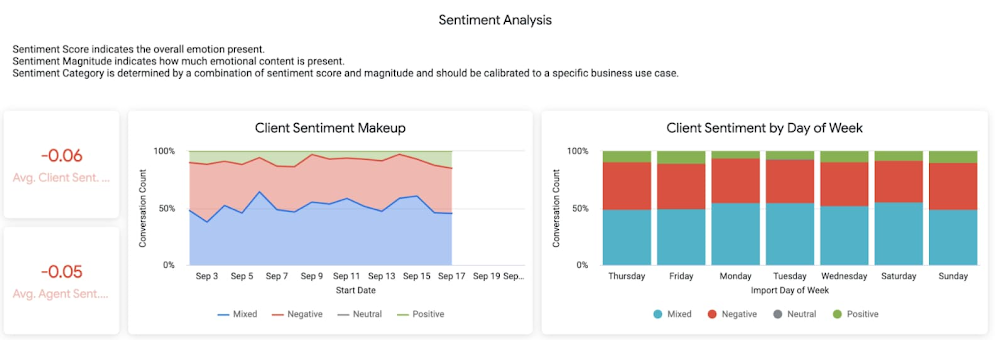
Data science can be applied to business problems to improve practices and help to strengthen customer satisfaction. In this blog, we address how the addition of Looker extends the value of your Google Cloud investments to help you understand your customer journey, unlock value from first-party data, and optimize existing cloud infrastructure.    Data is a powerful tool While everyone doesn’t need to understand the nuts and bolts of data technologies, most people do care about the value data can create for them — how it can help them do their jobs better. Within the data space, we are seeing a trend of ongoing failure to make data accessible to “humans” –   the industry still hasn’t figured out how to put data into the hands of people when and where they need it, how they need it. What if everyone in your organization could analyze data at scale, and make more-informed, fact-based decisions?   Data and insights derived from data are valuable but only if your users see it.  We think Looker helps solve that. Solutions tell a larger story of how it all fits together Across all verticals and industries,  businesses benefit from knowing and understanding their customers better. Many business goals are to increase revenue by improving product recommendations and pricing optimization, improving the user experience through targeted marketing and personalization, and reducing churn while improving retention rates.  To help reach  these goals, key strategies should focus on understanding customer needs, their motivations, likes and dislikes, and using all available data – in other words, put yourself in the shoes of your customer.    Our goal with Looker solutions is to offer the right level of out-of-box support that allows customers to get to value quickly, while maintaining the necessary flexibility. We aim to offer a library of data-driven solutions that accelerate data projects. Many solutions include Looker Blocks (pre-built pieces of code that accelerate data exploration environments) and Actions (custom integrations) that get customers up and running quickly and lets you build business-friendly access points for Google Cloud functionality like BQML, App Engine and Cloud Functions.  Below, you’ll find a sampling of the newest Looker solutions. Listening to customers by looking at the dataLooker’s solution for Contact Center AI (CCAI), helps businesses gain a deeper understanding and appreciation of their customers’ full journey by unlocking insights from all their company’s first-party data. Call centers can converse naturally with customers and deliver outstanding experiences by leveraging artificial intelligence. CCAI‘s newest product —CCAI Insights — reviews conversations support agents are having, finding and annotating the data with the important information, and identifying the calls that need review. We’ve partnered with the product teams at CCAI to build Looker’s Block for CCAI Insights, which sets you on the path to integrating the advanced insights into your first-party data in Looker, overlaying business data with the customer experience.Sentiment Analysis Dashboard: identifies how customers feel about their interactionsBusinesses can better understand contact center experiences and take immediate action when necessary to make sure the most valuable customers receive the best service. Realizing full business value of First-Party dataLooker for Google Marketing Platform (GMP) provides marketers the power to unlock the value of their company’s first-party data to more effectively target audiences.  The Looker Blocks and Actions for GMP offer interactive data exploration, slices of data with built-in ML predictions and activation paths back to the GMP.  This strategic solution continues to evolve with the Looker Action for Google Ads (Customer Match), the Looker Action for Google Analytics (Data Import) and the Looker Block for Google Analytics 4 (GA4).The Looker Action for Customer Match allows marketers to send segments and audiences based on first-party data directly into Google Ads. Reach users cross-device and across the web’s most powerful channels such as Display, Video, YouTube, and Gmail.  The entire process is performed within a single screen in Looker, and is able to be completed in a few minutes by a non-technical user. The Looker Action for Data Import can be used to enhance user segmentation and remarketing audiences in Google Analytics by taking advantage of user information accessible in Looker, such as in CRM systems or transactional data warehouses.The Looker Block for Google Analytics 4(GA4) expands the solution’s support with out-of-the-box dashboards and pre-baked BigQuery ML models for the newest version of Google Analytics.The Looker Block offers up reports with flexible configuration capabilities to unlock custom insights beyond the standard GA reporting. Customize audience segments, define custom goals to track and share these reports with teams who do not have access to the GA console.From clinical notes to patient insights at scaleTaking a look at the Healthcare vertical, theLooker Healthcare NLP API Block serves as a critical bridge between existing care systems and applications hosted on Google Cloud providing a managed solution for storing and accessing healthcare data in Google Cloud. The Healthcare NLP API uses natural language models to extract healthcare information from medical text,  rapidly unlocking insights from unstructured medical text and providing medical providers with simplified access to intelligent insights.  Healthcare providers, payers, and pharma companies can quickly understand the context and relationships of medical concepts within the text, such as medications, procedures, conditions, clinical history, and begin to link this to other clinical data sources for downstream AI/ML.   Specifically, the natural language processing (NLP) Patient View (pictured below) allows you to review a single selected patient of interest, surfacing their clinical notes history over time. It informs clinical diagnosis with family history insights, which is not currently captured in claims, and captures additional procedure coding for revenue cycle purposes.NLP Patient View Dashboard: details on specific patients’The dashboard below shows the NLP Term View which allows users to focus on chosen medical terms across the entire patient population in the dataset so they can start to view trends and patterns across groups of patients. NLP Term View Dashboard: relate medical terms across your datasetThis data can be used to: Enhance patient matching for clinical trials Identify re-purposed medicationsDrive advancements for research in cancer and rare diseasesIdentify how social determinants of health impact access to careManaging Costs Across CloudsEffective cloud cost management is important for reasons beyond cost control — it provides you the ability to reduce waste and predictably forecast both costs and resource needs. Looker’s solution for Cloud Cost Management offers quick access to necessary reporting and clear insights into cloud expenditures and utilization. This solution brings together billing data from different cloud providers in a phased approach: get up and running quickly with Blocks optimized for where the data is today (Google Cloud, AWS or Azure) as you work towards more sophisticated analysis for cross-platform planning and even cloud spend optimization with the mapping of tags, labels and cost centers across clouds.Multi-cloud Summary Dashboard: a single view into spend across AWS, Azure and GCPThe Looker Cloud Cost Management solution provides operational teams struggling to monitor, understand, and manage the costs and needs associated with their cloud technology with a comprehensive view into what, where and why they are spending money.Making better decisions with Looker-powered dataLeading companies are discovering ways to get value from all of that data beyond displaying it in a report or a dashboard. They want to enable everyone to make better decisions but that’s only going to happen if everyone can ask questions of the data, and get reliable, correct answers without using outdated or incomplete data and without waiting for it. People and systems need to have data available to them in the way that makes the most sense for them at that moment.  It’s clear that successful data-driven organizations will lead their respective segments not because they use data to create reports, but because they use it to power data experiences tailored to every part of the business, including employees, customers, operational workflows, products and services.   As people’s way of experiencing data has evolved, more than ever before, dashboards alone are not enough. You can use data as fuel for data-driven business workflows, and to power digital experiences that improve customer engagement, conversions, and advocacy. From Nov. 9 – 11th, Looker is hosting its annual conference JOIN, where we’ll be showing new features, including how we help to:Build data experiences at the speed of businessAccelerate the business value with packaged experiences Unleash more insights for more people in the right way – Deliver data experiences at scaleThere is no cost to attend JOIN.  Register hereand learn how Looker helps organizations build and deliver custom data-driven experiences that goes beyond just reports and dashboards, scales and grows with your business, allows developers to build innovative data products faster, and ensures data reaches everyone.
Quelle: Google Cloud Platform

Going beyond BI with the Looker Marketplace

For many businesses, business intelligence (BI) consists of data visualizations and dashboards.  The problem is that dashboards are not the answer to every data need. Many users today are looking for rich data-experiences that are immediately accessible and seamlessly part of their day to day work. Surfacing insights in collaboration apps like Google Chat and Slack, infusing data into productivity apps like Google Docs or Slides, or triggering auto generated business processes such as updating paid media bids or using AI-powered bots are just a few of the ways information can be provided, integrated and operationalized.For these reasons, businesses need to think about delivering data and analytics to workers in a way that makes it meaningful and immediately productive. We call this moving beyond BI. Reflecting everyday data experiencesOn a daily basis, in almost everything we do, we use data analytics without being aware of it. When we sit down to watch our favorite streaming service, navigate traffic, shop online, work out using a smart watch, we rely on integrated data insights in our day-to-day activities.These experiences have influenced what we expect from data systems at work, and why businesses need a new approach for delivering data and analytics on the job.The Looker MarketplaceThe Looker platform helps businesses realize this new approach and move beyond BI by providing tailored off-the-shelf products or Looker Blocks™ which are ready for deployment. These data-driven experiences are focused  on the needs of the business or department. These accelerators support:Modern BI & analytics: Democratize easy access to timely and trustworthy data enabling people to make better, faster, more confident data-driven decisions every day. Integrated insights: Infuse relevant information into the tools and products people already use, enhancing the experience of those tools and making teams more effective. Without even thinking about it, everyone at the company is making data-informed decisions.Data-driven workflows: Super-charge operational workflows with complete, near-real time data to optimize business processes. This allows companies to save time and money by putting their data to work in every part of their business.Custom applications: Create purpose-built tools to deliver data in an experience tailored to the job. By building the exact experiences people need, you can make your employees, customers and partners more effective and more efficient.The Looker Marketplace helps you find content to either deploy data-experiences into your Looker instance or to build new data experiences faster by taking building blocks from the marketplace and extending them in a reusable fashion.Moving Beyond BI with SolutionsAn example of such a solution is the  Contact Center AI (CCAI) Insights, that you can explore in the Looker Marketplace.With CCAI Insights, Looker can leverage the power of AI to converse naturally with customers and resolve basic issues quickly, as well as improve future experiences and drive long-term customer satisfaction by measuring and analyzing customer interactions while improving overall efficiency. Using Google’s machine learning capabilities and Looker Blocks, you can easily identify resolutions that have worked well, and use data actions to automate contact center operations based on new insights.Another example is the Google Cloud Cost Management solution.  Effective cloud cost management is important for reasons beyond cost control. A good cloud cost management solution provides you the ability to reduce waste and predictably forecast both costs and resource needs.Leveraging the Cloud Cost Management Block is a simple way to understand your cloud spend without data movement — your existing billing and platform utilization data remains in existing siloed cloud data warehouse platforms. Looker connects directly to the billing data in each respective cloud data warehouse, providing a consolidated reporting view of cloud spend across Google Cloud, AWS and Azure. You can see all your spend information in a single dashboard that can contain mutual filters such as date, skill teams, application name(s), and more. You can activate alerting notifications and schedule reports to be sent automatically via email, a messaging service, and to other destinations. This means that on day one, you’ll have real-time, accurate multi-cloud cost reporting.Build new data experiences and upload to the Looker MarketplaceDevelopers and Looker partners can create new content and publish it in the Looker Marketplace.  The easiest way for you to get started is to visit the Looker Developer Portal and discover all the types of content you can build with our platform capabilities.From Nov. 9 – 11th, Looker is hosting its annual conference JOIN, where we’ll be showing how to:Build data experiences at the speed of businessAccelerate the business value with marketplace contentGrow your business with reusable analytics componentsThere is no cost to attend JOIN.  Register here and learn how Looker helps organizations build and deliver custom data-driven experiences that goes beyond just reports and dashboards, scales and grows with your business, allows developers to build innovative data products faster, and ensures data reaches everyone.
Quelle: Google Cloud Platform

Going beyond the dashboard paradigm with Looker Components

These days, it’s no secret that traditional business intelligence (BI) is evolving. With the rise of embedded analytics, enterprises everywhere are beginning to seek out opportunities to augment their day-to-day workflows with real-time insights. These data-augmented workflows are what Looker calls “data experiences”. Some of these experiences are easy to identify and implement: maybe it’s as simple as embedding an analytics dashboard within an existing SaaS application, like Salesforce or Zendesk. Or a company may decide to monetize their analytics by embedding a Looker dashboard inside their own product, enhancing the value of the product for users.But some of these opportunities may come from embedding data even deeper into applications, so that insights are available the moment a knowledge worker needs to make a decision. These deeper types of experiences are where we think Looker truly shines as a platform.Looker’s approach to embedded analytics is to make it easier for our customers to continue to build, adapt, and extend their own data experiences by integrating data even deeper into their operational workflows. We also want to make it possible for more of our customers to build these custom data experiences by creating sensible but flexible abstractions for developers.Analytics as Reusable ComponentsLooker dashboards are integral to the product, providing a powerful interface to view, interact with, and dive deeper into your data. But data consumption via dashboards is really just one use case for data. There are other data experiences available on the Looker platform, such as exploration, navigation, data curation, and even taking action on your data that we can make easier for our customers to build.Historically, building these experiences had been challenging, primarily because most of these experiences required a fully custom font-end to be built from the ground up. And sometimes, the amount of time and resources a custom front-end on our API is prohibitive.With Looker Components, we hope to introduce a third way to embed data that’s easier to build than a fully-custom front-end on Looker’s API, but offers more flexibility than a monolithic iframe embedded dashboard. And the way we plan to do this is by identifying and exposing reusable patterns in our dashboards themselves. Dashboards as a CompositionWhat if we looked at dashboards not as a monolithic feature, but as a composition of different components and patterns, all of which work together to create a unified experience?Looker’s dashboards are primarily a composition of three components:Visualizations, which display queries from the database in a form that can be consumed by the userFilters, which provide an interface to interact with and manipulate the existing queries on the dashboardLayout, which enables a user to manipulate the size of the visualizations on the dashboardWhat if we made it possible for a developer to pull these powerful patterns out of their Looker dashboards and use them in their own applications?Introducing: Visualization ComponentsToday, we are proud to announce Looker visualization components – a new way to surface data from Looker in your application.Looker visualization components are an open source package that provides three high-level components to make it easy to build data experiences in any React application:Query: handles the data fetching and loads the response into contextVisualization: accepts the data returned by Query and utilizes configuration adapters to render the appropriately customized chart on a page.QueryFormatter: performs light data cleanup and normalization for the purpose of passing query data to a custom visualization.Using Looker’s SDK, our standard library of charts can be rendered through the use of the Query and Visualization components to request query data and parse the response through our visualization adapters. To build custom visualization that extends our out-of-the-box functionality, developers can use the QueryFormatter component to clean up Looker’s query response before sending the formatted data to a custom visualization that they would build.Unlike other methods of embedding that Looker offers, visualization components do not require an iframe to present, rendering instead on the client-side of an application. Developers interested in building custom front-end experiences with Looker no longer need to worry about choosing a vis library or worry about learning a new vis framework.Starting today our package will provide a small selection of visualizations for our customers to begin using. Our initial offering includes Scatter, Line, Area, Sparkline, and Table. These visualizations are an entirely separate visualization layer than the one that’s available within the core Looker product, so while they are compatible with many of the options in Looker’s visualization menu, we don’t have full parity with Looker’s native visualizations yet. These components have been a labor of love for our team for quite some time. We can’t wait to see how you decide to use visualization components in your applications on Looker.Introducing: Filter ComponentsAlong with meaningful improvements to make it possible for developers to declare individual visualizations outside of Looker, we’ve also made it possible to embed and use Looker dashboard filters in any application or extension on Looker. A large part of what makes Looker’s dashboard experience so powerful is the ability to filter data using our 12 different types of filters. Using our filter experience, dashboard users have the ability to build complex queries with Looker in a straightforward and streamlined way.Currently, the best way to use our Filter Components is within an embedded Looker Dashboard, but in the near future, we plan to introduce patterns that make it easy to combine Filter Components with our Vis Components. Using Filter Components with Embedded DashboardsUsing Looker’s embed SDK, developers can declare a filter component in their application and pass in a relevant dashboard ID to the component. The component will then render the fields displayed from the dashboard. One of the uniquely defining features of Looker’s filter components is that they are synced to a live Looker dashboard. That means, when you declare filter components in your application and link them to a Looker dashboard, any changes made to the filters on the Looker dashboard are automatically reflected in the filter components in your custom application. This is great for application developers because they get to declare filters in their embedded application and then offload the management to their SMEs, the analysts. They don’t have to spend their time making manual updates or changes to the filter experience.Looker’s filter components are also great for analysts because we get to bring them closer to product development. Rather than waiting for a developer to implement a change to a filter, an analyst can implement that change in a Looker dashboard and watch that be reflected in their custom application. This is part of our initiative to give analysts, the SMEs, more control over embedded applications created with Looker. Now, every data experience built on Looker can benefit from the powerful, flexible, and beautiful user experience that’s a defining feature of Looker’s dashboards. When we unlock the filtering experience for our embedded customers, we ultimately enhance the interaction with the data for all users of embedded applications on Looker.Building Compositions with ComponentsOur filter and visualization components are an exciting next step for the Looker platform, and make it possible to embed Looker data into a number of existing data experiences. We’re also excited by the possibility of our developer community choosing to build wholly bespoke experiences with our 150+ UI componentson Looker’s extension framework or within their own custom applications.The creativity that we can unlock by building entirely new compositions with Looker components is truly a next step in unlocking the value of composable analytics for the enterprise. To learn more about how using components can help your business grow through data experiences, watch this JOIN 2021 session.Related ArticleLooker lets you choose what works best for your dataEmbrace platform freedom with Looker. Learn about how we are expanding our features as a cloud platform to meet the unique needs of every…Read Article
Quelle: Google Cloud Platform