Get to know the Google Cloud certifications in 1 minute

You might have noticed a series of short videos introducing various Google Cloud certifications being published over the last few months. We created a dedicated Cloud Certifications Playlist to organize this new content to give you an easy way to scan all the Google Cloud Certifications, what they are and where to get started. In this blog we would like to offer the series wrap up and share all the videos with you.This is our attempt to introduce the job role, exam as well as relevant resources in less than a minute. Challenge accepted!#1 Professional Cloud DeveloperBuild scalable and highly available applications using Google-recommended practices and tools. A Cloud Developer has experience with cloud-native applications, developer tools, managed services, and next-generation databases. This individual is also proficient with at least one general-purpose programming language and is skilled at producing meaningful metrics and logs to debug and trace code.#2 Professional Cloud ArchitectEnable organizations to leverage Google Cloud technologies. With a thorough understanding of cloud architecture and Google Cloud, they design, develop, and manage robust, secure, scalable, highly available, and dynamic solutions to drive business objectives.#3 Professional DevOps EngineerResponsible for efficient development operations that can balance service reliability and delivery speed. They are skilled at using Google Cloud to build software delivery pipelines, deploy and monitor services, and manage and learn from incidents.#4 Associate Cloud EngineerDeploy applications, monitor operations, and manage enterprise solutions. They use Google Cloud Console and the command-line interface to perform common platform-based tasks to maintain one or more deployed solutions that leverage Google-managed or self-managed services on Google Cloud.#5 Professional Data EngineerEnable data-driven decision making by collecting, transforming, and publishing data. A Data Engineer should be able to design, build, operationalize, secure, and monitor data processing systems with a particular emphasis on security and compliance; scalability and efficiency; reliability and fidelity; and flexibility and portability. A Data Engineer should also be able to leverage, deploy, and continuously train pre-existing machine learning models.#6 Professional ML EngineerDesigns, builds, and productionizes ML models to solve business challenges using Google Cloud technologies and knowledge of proven ML models and techniques. The ML Engineer considers responsible AI throughout the ML development process, and collaborates closely with other job roles to ensure long-term success of models. The ML Engineer should be proficient in all aspects of model architecture, data pipeline interaction, and metrics interpretation. The ML Engineer needs familiarity with foundational concepts of application development, infrastructure management, data engineering, and data governance. Through an understanding of training, retraining, deploying, scheduling, monitoring, and improving models, the ML Engineer designs and creates scalable solutions for optimal performance.#7 Professional Cloud Security EngineerEnables organizations to design and implement secure workloads and infrastructure on Google Cloud. Through an understanding of security best practices and industry security requirements, this individual designs, develops, and manages a secure infrastructure by leveraging Google security technologies. The Cloud Security Engineer should be proficient in all aspects of cloud Security including identity and access management, defining organizational structure and policies, using Google technologies to provide data protection, configuring network security defenses, collecting and analyzing Google Cloud logs, managing incident responses, and demonstrating an understanding of the application of dynamic regulatory considerations.#8 Professional Cloud Network EngineerImplements and manages network architectures in Google Cloud. This individual may work on networking or cloud teams with architects who design cloud infrastructure. The Cloud Network Engineer uses the Google Cloud Console and/or command line interface, and leverages experience with network services, application and container networking, hybrid and multi-cloud connectivity, implementing VPCs, and security for established network architectures to ensure successful cloud implementations#9 Professional Collaboration EngineerA Professional Collaboration Engineer transforms business objectives into tangible configurations, policies, and security practices as they relate to users, content, and integrations. Through their understanding of their organization’s infrastructure, Collaboration Engineers enable people to work together, communicate and access data in a secure and efficient manner. Operating with an engineering and solutions mindset, they use tools, programming languages, and APIs to automate workflows. They look for opportunities to educate end users and increase operational efficiency while advocating for Google Workspace and the Google toolset.New year is around the corner which means all of us are looking forward to the new beginnings. Cloud skills are in great demand and setting a goal of achieving a certification can bring you closer to exciting career opportunities. You can check out the entire playlist here and ask us questions on LinkedIn @pvergadia andMagda Jary. For additional cloud training, register for our interactive digital event Cloud Learn, happening from Dec. 8-9. The event will have live technical demos, Q&As, career development workshops, and more covering everything from Google Cloud fundamentals to certification prep.Related ArticleA learning journey for members transitioning out of the militaryThis August, Google Cloud sponsored 50 service members on a journey toward achieving the Associate Cloud Engineer certification.Read Article
Quelle: Google Cloud Platform
Edge computing—challenges and opportunities for enterprise cloud architects

As we explored in part one of this series, today’s edge computing environments represent an enormous opportunity for enterprises — both in terms of the new use cases they enable, as well as opportunities to reduce costs. But edge computing is also a sea change in terms of how to architect applications. When thinking about building a new edge application, there are a few challenges to keep in mind. 1. Intermittent connectivityMore often than not, an edge device is disconnected from the data center. Whether it’s a sensor on a factory floor, or a connected vehicle, cloud architects cannot always assume reliable, fast network connectivity for their edge devices.This leads to some important design considerations. For one, you should be able to isolate connectivity within the remote location. Practically speaking, all the edge devices on that network may only have a single route to the local private services cluster, and the link from the private services cluster to the mothership (cloud or corporate data center aggregation hop) may be down. That means that the remote edge system should be designed to be fault tolerant; it should work independently of its connection to the core. 2. Disconnectedness and data captureWhen site network outages at the edge happen, they can have downstream impacts.For example, imagine local video cameras that connect and save captures to an autoscaling containerized service deployment locally before transmitting back to the cloud. When many cameras are active, pod receivers spin up and write to disk. But the local cluster that prepares data for transport may only be able to send data back to the main corporate data center or cloud at specific planned times or after considerable local filtering workloads is applied. There needs to be a strategy in place to ensure that edge disks do not fill up capturing video in the event of a long gap between syncing data. In this way, the edge location shows similar patterns to a cache — to avoid a system failure, there needs to be a time to live (TTL) on capture data in the event of a long period of isolation to avoid a system failure. This is particularly important because most edge installations aren’t monitored in real time, and so must be able to function in a distressed state. The broader system also needs to tolerate gaps in data capture to support unexpectedly long periods of disconnectedness.Tertiary knock-on effects can bring unanticipated failures at edge sites. So in addition to planning for failure, architects also need to plan during the discovery phase for how to deploy to and configure remote systems when they are back online.3. Hardware failure and serviceabilityHardware and upgrade failures happen: An upgrade to edge devices or services can fail, leaving clusters or devices in a failed state. Disks can experience hard bad sectors. NICs can fail. Power supplies burn out. All of these can lead to the need for physical servicing. While you can design your application to limit the blast radius of a failure, you also need service schedules and action plans for your edge environments; you cannot expect a store manager to be trained on maintaining failed edge hardware. Edge cluster pairs and blue-green style deployments across fleets should be considered; and the expectation should be set that remote site visits need to be part of an edge program.  4. Complex fleet management and configurationWith edge architecture evolving and maturing so quickly, tools to facilitate configuration management are the key to success — particularly ones that deal gracefully with instability and intermittent connectivity. This is critical for tasks like pushing out system configuration, software or security updates, instructions to pull new software, and to deploy new/refreshed models or algorithm updates when performing processing work. To manage a remote fleet, there also needs to be a minimum guarantee that it will be able to connect at some point. Remote locations that never reconnect are no longer edges, and must be physically managed, typIcally by a third-party. The enterprise advantageThere are a whole lot of challenges for enterprise architects to create effective edge applications – but there are some things that make enterprises particularly suited to using edge computing too. For one thing, in most enterprise scenarios, we are usually talking about private services at the edge. Why? Well, the services enterprises expose to the public are usually in core data centers or the cloud, complete with load balancers, redundancy and autoscaling. Those public services frequently require four nines of uptime or better. However, most edge services don’t require those service level objectives. Edge applications are more likely private, used to capture local telemetry or distribute processing power to remote locations, and the enterprise will continue to function perfectly if an edge service is down. For example, you might use the edge to collect and filter data, send it back to a central ML engine to build models at a cloud provider, and then receive and serve those models remotely. There’s rarely a need for public IPs or bare metal load balancers, and the endpoints for modern edge services have minimal internet bandwidth requirements. In fact, they may only need to be connected periodically! (As a corollary, public services are generally not a good use case for edge services.) Relatedly, with edge, you can run micro clusters or even single nodes using commodity hardware. Architects tend to design data center environments for three or four nines of uptime, complete with fat network pipes and full monitoring. Not so for edge locations, particularly if there is a large number of them. Edge architecture plans for intermittent failure — we accept and design for a greater frequency of hardware failure at the edge than would be tolerated in a core data center or cloud provider. And once that kind of fault-tolerant design is in place, it stands to reason that the hardware itself can afford to be a little bit more failure-prone.   Edge challenges = business opportunitiesWhen it comes to a certain class of enterprise applications, the edge’s weaknesses can be its strengths. If you have an application that is not interdependent on other apps, and that can function for extended periods of time disconnected from core data center system functions, then implementing an edge architecture with remote services can be an important lever for driving digital transformation down into heretofore undigitized parts of the organization. In our next post, we’ll show you some of the Google Cloud tools and techniques you can use as part of this architecture.Related ArticleEdge computing—a paradigm shift that goes beyond hybrid cloudEdge platforms are evolving at an incredible speed, opening up opportunities for enterprises. Google tools like Kubernetes, GKE and Antho…Read Article
Quelle: Google Cloud Platform
Edge computing—a paradigm shift that goes beyond hybrid cloud

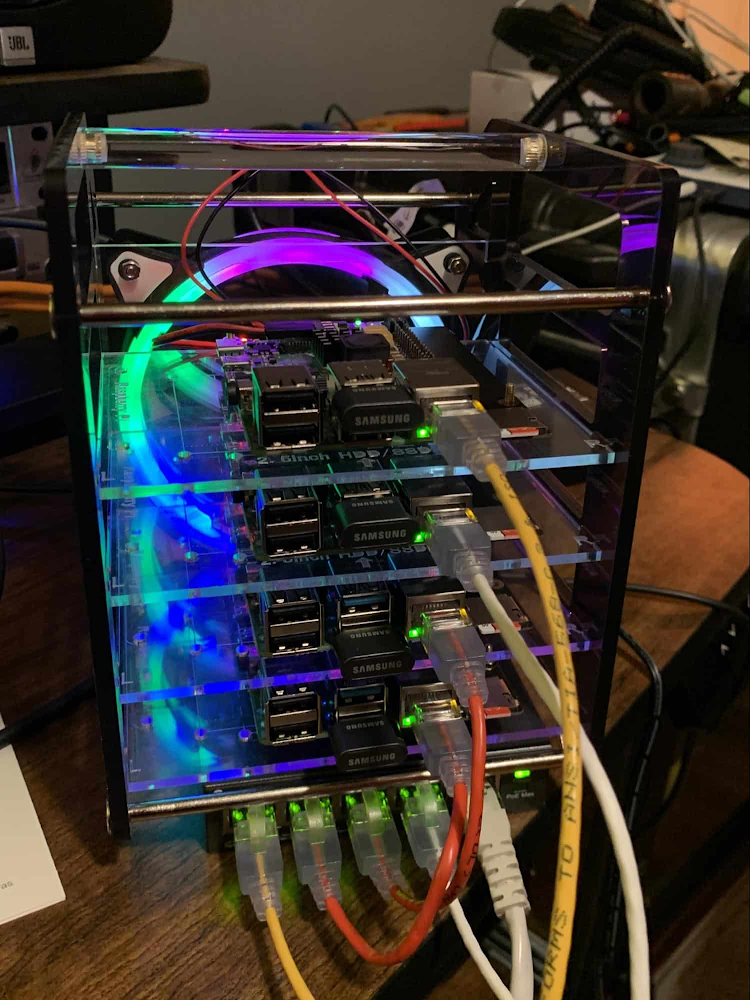
Whether with the cloud or within their own data centers, enterprises have undergone a period of remarkable consolidation and centralization of their compute resources. But with the rise of ever more powerful mobile devices, and increasingly capable cellular networks, application architects are starting to think beyond the confines of the data center, and looking out to the edge. What exactly do we mean by edge? Think of the edge as distributed compute happening on a wide variety of non-traditional devices — mobile phones of course, but also equipment sensors in factories, industrial equipment, or even temperature and reaction monitoring in a remote lab. Edge devices are also connected devices, and can communicate back to the mothership over wireless or cellular networks. Equipped with increasingly powerful processors, these edge devices are being called upon to perform tasks that have thus far been outside the scope of traditional IT. For enterprises, this could mean pre-processing incoming telemetry in a vehicle, collecting video in kiosks at a mall, gathering quality control data with cameras in a warehouse, or delivering interactive media to retail stores. Enterprises are also relying on edge to ingest data from outposts or devices that have even more intermittent connectivity, e.g., oil rigs or farm equipment, filtering that data to improve quality, reducing it to right-size information load, and processing it in the cloud. New data and models are then pushed back to the edge; in addition, we can also push configuration, software, and media updates and decentralize processing workload.Edge isn’t all about enabling new use cases – it’s also about right-sizing environments and improving resource utilization. For example, adopting an edge model can also relieve load on existing data centers. But while edge computing is full of promise for enterprises, there are many pieces that are still works in progress. Further, developing edge workloads is very different from developing traditional applications, which enjoy the benefits of persistent data connections and run on well-resourced hardware platforms. As such, cloud architects are still in the early days of figuring out how to use and implement edge for their organizations. Fortunately, there are tools you can use to help ease the transition to edge computing — and that likely fit into your organization’s existing computing systems. Kubernetes, of course, but also higher level management tools like Anthos, which provides a consistent control plane across cloud, private data center and edge locations. Other parts of the Anthos family – Anthos Config Management and Anthos Service Mesh — go one step further and provide consistent, centralized management to your edge and cloud deployments. And there’s more to come.For the remainder of this blog post, we’ll dive deeper into the past and current state of edge computing, and the benefits that architects and developers can expect to see from edge computing. In a next post, we’ll take a deeper look at some of the challenges that designing for edge introduces, and some of the advantages the average enterprise has in adopting the edge model. Finally, we’ll look at the Google Cloud tools that are available today to help you build out your edge environment, and look at some early customer examples that highlight what’s possible today — and that will spark your imagination for what to do tomorrow. The evolution of edge computing The edge is not a new concept. In fact, it’s been around for the last two decades, spanning many use cases that are prevalent today. One of the first applications for edge was to use content delivery networks (CDN) to cache and serve daily static website pages near clients, for example, web servers in California data centers serving financial data to European customers. As connectivity has improved and software evolved, the edge has evolved too, and the focus has shifted towards using edge to distribute services. First, simple services expanded from static HTML to javascript libraries or image repositories. Common functions like image transformation, credit and address validation support services followed. Soon, organizations were deploying more complex cloudlet and clustered microservices installations, as well as distributed and replicated datasets. The term “endpoint” became ubiquitous, and APIs profilerated. In parallel, there’s been an explosion of creativity in hardware, microcontrollers and dedicated edge devices. Fit-for-purpose products were deployed globally. Services like Google Cloud IoT Core extended our ability to manage and securely connect these dispersed devices, allowing platform managers to register tools and leverage managed services like Pub/Sub and Dataflow for data ingestion. And with Kubernetes, large remote clusters — mini private clouds in and of themselves — operate as self-healing, autoscaling services across the broader internet, opening the door to new models for applications and architectural patterns. In short, both distributed asynchronous systems and economies have blossomed.What does this mean for enterprises? For the purposes of this series, edge means you can now go beyond the corporate network, beyond cloud VPCs, and beyond hybrid. The modern edge is not sitting at a major remote data center, nor is it a CDN, cloud provider, or in a corporate data center rack — it’s just as likely to look like 100 of these attached to a thousand sensors.Raspi K8s ClusterEdge, in short, is about having hardware and devices installed at remote locations that can process and communicate back the information they collect and generate. The edge management challenge, meanwhile, is being able to push configuration and software/model/media updates to these remote locations when they are connected.Enable new use casesToday, we have reached a new threshold for edge computing — one where micro-data-processing centers are deployed as the edge of a fractal arm, as it were. Together, they form a broad, geographically distributed, always-on framework for streaming, collecting, processing and serving asynchronous data. This big, loosely coupled application system lives, breathes and grows. Always changing, always learning from the data it collects — and always pushing out updated models when the tendrils are connected. Right now, the rise of 5G is pushing the limits of edge even further. Devices enabled with 5G can transmit using a mobile network — no ISP required — enabling connectivity anywhere within reach of a cell tower. Granted, these networks have lower bandwidth, but they are often more than adequate for certain types of data, for example fire sensors in forests bordering remote towns that emit temperature or carbon monoxide data periodically. Recently, Google Cloud partnered with AT&T to enhance business use of 5G edge technology but there is so much more that can be done. Reduce data center investmentsIn addition to enabling the digitization of a broad range of new use cases, adopting edge can also benefit your existing data center.Let’s face it: data centers are expensive to maintain. Moving some data center load to edge locations can reduce your data center infrastructure investment, as well as compute time spent there. Edge services tend to have much lower service level objectives (SLOs) than data center services, driving lower levels of hardware investment. Edge installations also tend to tolerate disconnectedness, and thus function perfectly well with lower SLOs — and lower costs. Let’s look at an example of where edge can really reduce costs: big data. Back in the day, we used to build monolithic serial processors — state machines — that had to keep track of where they were in processing in case of failure. But time and again, we’ve seen that smaller, more distributed processing can break down big, expensive problems into smaller, more cost-effective chunks. Starting with the explosion of MapReduce almost 20 years ago, big-data workloads were parallelized across clusters on a network, and state management was simplified with intermediate output to share, wait for, or restart processing from checkpoints. Those monolithic systems were replaced by cheaper, smarter, networked clusters and data repositories where parallel work could be executed and rendered into workable datasets. Flash forward to today, and we are seeing those same concepts applied and distributed to edge data-collection points. In this evolution of big data processing, we are scaling up and out to the point where observation data is so massive that it must first be prefiltered, and then preprocessed down to a manageable size and still be actionable. Only then should it be written back to the main data repositories for more resource-intensive processing and model building.In short, data collection, cleanup, and potentially initial aggregation happens at the edge location, which reduces the amount of junk data sitting in costly data stores. This increases performance of the core data warehouse, and reduces the size and cost of network transfers and storage! The edge is a huge opportunity for today’s enterprises. But designing environments that can make effective use of the edge isn’t without its challenges. Stick around for part two of this series, where we look at some of the architectural challenges typically encountered while designing for the edge and how we begin to address them.Related ArticleIntroducing Google Distributed Cloud—in your data center, at the edge, and in the cloudGoogle Distributed Cloud runs Anthos on dedicated hardware at the edge or hosted in your data center, enabling a new class of low-latency…Read Article
Quelle: Google Cloud Platform

Foundations of a scalable website on GCP

Starting a website can be hard, we get it. There are many vendors you have to work with and steps to tie together. What DNS records do I need to add? How do I enable DNSSEC? Is my website secure and safe from cyber attacks? These types of questions plague millions of website operators globally. We are excited to share that it is possible to manage all of these steps in one location using Google Cloud.Google Cloud offers you the ability to manage the entire lifecycle of a website from start to finish. You no longer have to worry about managing different subscriptions and understanding the integration between vendors. Leveraging the Google Cloud offering will allow for you to have a scalable, reliable, and safe deployment. Additionally, there are extra benefits that you can take advantage of, like getting Google Managed SSL certificates for free and taking advantage of best in class DDoS protection with our Cloud Armor solution.Architecture diagramThe following architecture diagram illustrates all of the components of the solution.Key components of the solution:Cloud DomainsCloud DNSCompute and StorageGlobal HTTPs Load BalancerCloud ArmorCloud CDNBuying a Domain on Google CloudPurchasing and verifying a domain can be a tricky process with many steps. Cloud Domains makes this easy and straightforward to manage. Cloud Domains integrates seamlessly with Cloud DNS making the management even easier. There is full API support which allows for programmatic management if you are managing a larger portfolio. Managing DNS with Google CloudOur Cloud DNS solution is a managed DNS infrastructure which is scalable and highly available. Easy management of private and public DNS zones makes this a one stop shop for DNS management. Public DNS records are anycasted globally using Google’s distributed network. It is easy and straightforward to enable DNSSEC which will help protect your end users from malicious actors.  Initializing Compute and setting up static object storageRunning your backends on Google Cloud compute has numerous advantages. You can use a managed instance group to run your websites. Managed instance groups allow for a highly scalable and efficient deployment. When demand goes up the number of instances will scale seamlessly, and likewise if demand falls the active compute can scale down. This allows for you to only be running what you need at a given moment. You can easily create multi-zone deployments which increases reliability and performance. With full API support, automation and management is easy and fast. Using a managed instance group allows for you to automatically and safely deploy updates with a variety of customizations available.For static objects you can store them in our Cloud Storage solution. This is perfect for content like images and videos which are not constantly changing. You can store large quantities of data which is available worldwide. It is easy to transfer content into Cloud Storage with multiple tools available.Setting up an external https load balancerThe external https load balancer is a global proxy-based layer 7 solution that serves as the entry point for all of your traffic onto Google’s network. Our advanced load balancing solution allows for integrated traffic management and is highly customizable to fit your needs. You can leverage a Google managed SSL certificate for easy deployment and ongoing management.Securing your traffic with Cloud ArmorCloud Armor is Google’s best in class DDoS defense solution and Web Application Firewall (WAF). You can rest easier knowing that Google’s network has your back. We have a long history of mitigating some of the most complicated and largest DDoS attacks on record ( blog link). With Cloud Armor you can additionally take advantage of preconfigured WAF rules (Mod Security Rule Set 3.02), adaptive protection, and recently rate limiting. All of this ensures that your website stays online and is protected from attacks.Caching static content with Cloud CDNFor content that is cacheable like images or short videos, you can use Cloud CDN to enable fast and cost efficient delivery. Google has Cloud CDN pops all over the world which will help ensure that users from the regions that matter to you have a seamless and fast experience. Cloud CDN is easy to enable and get started with. Youtube videoIf you would like to see a further overview of the architecture and components of this solution as well as a detailed configuration walkthrough please check out this video.For more information on any of these solutions please check out their respective documentation hubs:Cloud DomainsCloud DNSManaged Instance GroupCloud StorageExternal HTTPs Load BalancerCloud ArmorCloud CDNRelated ArticleCloud Domains, now GA, makes it easy to register and manage custom domainsCloud Domains, now generally available, makes performing domain-related tasks in Google Cloud simple.Read Article
Quelle: Google Cloud Platform

Resolving 3 financial services challenges with Neo4j Aura on Google Cloud

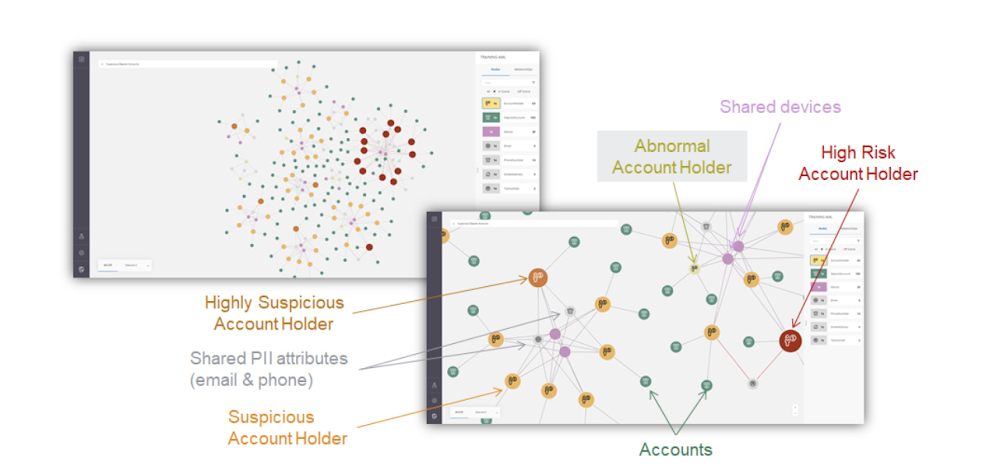
Over the last decade, financial service organizations have been adopting a cloud-first mindset. According to InformationWeek, lower costs and enhanced scalability were the biggest drivers for cloud adoption in financial services, and cloud-native applications allow access to the latest technology and talent, enabling adopters to rebuild transaction processing systems capable of supporting very high volumes and low latency.Both Neo4j and Google Cloud have been using relationship-based data representations since the beginning, and we’re dedicated to using this technology to help financial services customers drive business transformation. We are excited about the prospects of financial services (FinServ) cloud systems and believe that graph data in the cloud can help solve significant challenges in the industry.Data Challenge #1: Risk Management and ComplianceFirst among the top concerns for any CIO moving to the cloud is risk management and compliance. Disconnected, uncontextualized, or stale data create opportunities for fraud and financial crimes to occur. The fact is when it comes to FinServ, the question is not “if” but rather how often an attack will occur.  Unfortunately, incidents have been trending upward over the last decade, and COVID has only exacerbated this reality. Financial crimes affect the bottom line both in the remediation of these crimes and in intangibles like brand value.  Add to this the complexity of international banking, which makes “compliance” a moving target. Penalties due to noncompliance are a constant concern to any FinServ organization.The tabular representation of information with a fixed number of columns that never change prevents a description of an ever changing world with changing characteristics. Relational databases are great if the world you describe does not move fast but have limitations when data structures are highly interlinked and not homogeneous.Neo4j Aura on Google Cloud provides a foundation for creating dynamic, futureproof, scalable applications that adhere to the security standards and protocols today’s financial services organizations require to meet the challenges of finding and preventing bad actors. This also includes enterprise scalability; reaching over 1 Billion nodes and relationships to streamline queries and provide solutions that meet regulatory and privacy compliance across geographies. Neo4j has helped some organizations save billions of USD in fraud in the first year of deployment alone.  What makes graph technology the best choice for fraud detection use cases is that the relationships between the data-points are as important as the data-points themselves. Let’s take as an example, one John Smith approaches a multi-national banking institution to manage the primary account for his new holding corporation.  While no one has any record of John R Smith Holdings LLC, the bank’s application built on graph technology understands that there are several well-known entities owned by John Smith Holdings. The application also identifies several well-known board members who bank with this institution. Due to this relationship-driven approach, the bank now understands John R Smith is not “John Smith,” who previously attempted to open an account for his holding corporation, which had no information associated with it prior to two months ago.Data Challenge #2 Manual Processes and Inefficiencies The ubiquity of the cloud offers an opportunity to deploy automation at unprecedented levels to tackle the errors and inefficiencies that manual processing allows to creep into processes. When data comes from disparate, perhaps legacy systems – which may have become siloed and “untouchable” over the years – further complexity arises. As an example, if someone in sales types “John Smith” into a CRM system not knowing that John R Smith is the spelling in the customer data master, it may result in two separate and potentially conflicting records. Being able to join those records together in a mastered view helps to solve this problem. In addition, low data quality equates to an increase in risk, costs, and implementation times for new systems. Neo4j Aura on Google Cloud provides automation and artificial intelligence (AI) that reduces manual processes and the errors that accompany them. In this graph architecture each node, which can represent a person, will have labels, relationships, and properties associated with it. This allows for the use of AI which can easily understand that John Smith in the CRM is the same John R Smith in the customer master. The information contained in Neo4j can be connected bi-directionally to ensure consistency across applications and data sources. One of the benefits of this approach is that linking information allows organizations to keep the full value of the data, rather than forcing the data into predetermined tabular representations, with the risk of losing valuable information and insights.Data Challenge #3: Customer Engagement and InsightAnother significant concern is the high expectations today’s customers have for every interaction. End users are accustomed to predictable experiences on their digital devices, and FinServ apps are no exception. Added to this, the “Covid economy” has driven digital adoption significantly across demographics; even among customers who might traditionally have used in-person services. This also equates to increased expectations for personalized, predictable experiences with every digital interaction. We know that latency has always been a key consideration for financial trading, but a recent ComputerWeekly study showed that every financial organization should ensure their visible latency is at 10 milliseconds or less. Customers no longer accept their broadband is at fault.Finally, blind spots in the customer journey often result in dissatisfaction, which ultimately leads to increased churn. Without gaining actionable insights from your customers, there is no room to innovate and iterate on what they are looking for in your products and services. And this translates to losing market share and competitive advantage.The NoSQL architecture, specifically the dynamic schema and structure of Neo4j Aura gives you the ability to take charge of your data and make changes according to your development cycles or newer data models. This equates to faster builds, more comprehensive releases and a wider, richer data-set that can be contextualized and understood instantly. Graph technology is the logical choice for building a Customer 360 application. Under this approach organizations not only get valuable insight into the individual client’s behavior and patterns, but also those of their family, friends and colleagues. This allows for stronger personalization, targeted campaigns and successful execution, resulting in increased customer satisfaction and retention levels.Graph Technology on Google CloudNeo4j can help analysts visualize which accounts have shared attributes, making it more likely that they have the same high risk owners.Neo4j is a recognized leader in graph database technology and the only fully integrated graph solution on Google Cloud, helping to fill a common need for Google Cloud customers. Both Neo4j and Google Cloud are invested in continuing to grow our partnership and mutual product direction.  You can find and deploy the Neo4j graph database straight from the Google Cloud marketplace, whether you want to download the software for an on-premises deployment, use the virtual machine image, or use the hosted solution, Aura on Google Cloud, the graph database-as-a-service. In any deployment, you get the same enterprise-grade scalability, reliability, and connectivity along with successful, repeatable use cases you can rely on to resolve your particular challenges and integrated billing. For a real-world example of how graph technology can optimize financial services, you can read our Case Study with fintech Current. Current, a leading U.S. financial technology platform with over three million members, used Neo4j Aura on Google Cloud to create a personalization engine based on client relationships. To learn more about Neo4j Aura on Google Cloud for FinServ organizations, register for our webinar on Thursday, December 16 with Jim Webber, Chief Scientist, CTO Field Ops at Neo4j and Antoine Larmanjat, Technical Director, Office of the CTO, Google Cloud. Click here to RegisterRelated ArticleGoogle Cloud showcases new integrations and solutions with Ecosystem Partners at Next ‘21This week at Google Cloud Next, we’re excited to highlight new partner integrations, services, and solutions that play a critical role in…Read Article
Quelle: Google Cloud Platform

How to develop Global Multiplayer Games using Cloud Spanner

Most modern video games require years of investment to produce, both in terms of development time and capital. The length of development is influenced by a number of factors, such as scale, development platform, scope, and type of game. Gamers often expect global multiplayer experiences on Day 1, which means that the success of a game can depend on how well it can scale to a community of millions of players in the first few weeks of its life. High availability and stability must be built into the design of a game to handle this demand for scale. Issues that take place during the opening days of the game’s life can be fatal, as players are slow to return after a bad experience, and the hype of anticipation quickly fades. In other words, momentum is everything.How does Cloud Spanner address architectural complexity?All types of online games require storing immense amounts of data, such as player achievements and stats, leaderboards, game data, and much more, and must do so at scale. The amount of data can grow both linearly or exponentially as more players join the game; thus the most important requirement for a game’s database is the ability to scale while providing high availability. Gaming workloads typically require NoSQL and relational databases to attain scalability while maintaining strict consistency on gaming data selectively. On Google Cloud, Firestore and Bigtable options can be considered for NoSQL depending on the unique requirements of the game such as mobile first or cross platform support requirements. When it comes to relational databases, nothing matches Spanner in terms of offering both scalability and global consistency via the interface that we’re all familiar with, SQL.Spanner is our distributed, globally scalable SQL database service that decouples compute from storage, which makes it possible to scale processing resources separately from storage. This means that horizontal upscaling is possible with no downtime for achieving higher performance on dimensions such as operations per second for both reads and writes. The distributed scaling nature of Spanner’s architecture makes it an ideal solution for unpredictable workloads such as online games.Unplanned game downtimes are the single most dangerous threat to the longevity of game titles. That’s why game companies seek highly available backend databases to minimize game service interruption in case of unplanned failures. Spanner delivers industry-leading 99.999% availability for multi-regional instances, and provides transparent, synchronous replication across both regional and multi-region configurations. Globally distributed replica shards can provide an additional benefit of shortening latency by serving from a local copy.Spanner supports relational semantics like ANSI SQL and schema with no need to denormalize, and enables easy updates to your game service databases online. ANSI SQL can shorten the learning curve for developers and Database Administrators (DBAs). In addition, object–relational mapping (ORM) support can also reduce development time.Spanner has compliance certifications which can make abiding by compliance requirements easier for gaming companies, like PCI, SoC compliance, and FedRAMP. In addition, Spanner has VPC-SC support, Audit Logging which includes not only admin jobs but also user activities (DML, DDL, even Query).Recommended Spanner Adoption ProcessSpanner adoption has a very well-defined process, and following along these major milestones above can make it easy. Because Spanner is a distributed database supporting relational semantics, it’s important to understand the differences compared to traditional relational databases. We recommend your development team and DBA start evaluating Spanner at the earliest stages of the game development lifecycle to minimize trial and error, as well as, future optimizations.After getting acquainted with Spanner, the ANSI SQL and Schema support of Spanner allows you to easily convert existing relational database schemas and relevant queries with just a few changes. Several gaming customers completed this conversion in as little as 2-3 weeks. Various tools like Harbourbridge, an evaluation and migration open source tool, can make heterogeneous migrations to Spanner reliable and easy. Spanner, like other databases, needs performance optimization with load testing to meet target performance requirements such as throughput and latency. That’s why Spanner provides introspection tools to deliver insights for optimization. In addition, intuitive and visualized query execution plans enable developers who lack deep database knowledge to optimize long-running queries. Pre-warming the database before the game launch day to make Spanner well distributed and embrace enough throughput.Niantic Labs built a globally scalable game for millions of users on Google Cloud. They shared their experience scaling with Google Kubernetes Engine (GKE) and Spanner, and described how their data science team works with BigQuery, Dataflow, and Pub/Sub for their data analytics.Vimeo is the leading player in the growing video SaaS market, serving over 200 million users across more than 190 countries. In this video, they share how Cloud Spanner powers Vimeo’s platform, and why Vimeo decided to use Google Cloud.To learn more about this globally scalable game backend on Google Cloud, Spanner’s advantages and the differences over traditional relational databases, read our Develop Global Multiplayer Games using Cloud Spanner whitepaper.
Quelle: Google Cloud Platform

Avoiding GCF anti-patterns part 5: How to run background processes correctly in Python

Editor’s note: Over the past several weeks, we’ve posted a series of blog posts focusing on best practices for writing Google Cloud Functions based on common questions or misconceptions as seen by the Support team.  We refer to these as “anti-patterns” and offer you ways to avoid them.  This article is the fifth post in the series.ScenarioYou see finished with status: ‘timeout’ in the logs before a background process has completed in your Python Function. Most common root issueAlthough this timeout error can happen for Functions using any runtime, we most often see this issue occur when Python developers try to use os.fork() or  multiprocessing.Process()in their Cloud Function.Why you should try to avoid async work in a Function:A background task started by a Cloud Function is not guaranteed to complete. As soon as the Functions completes, e.g. the Function returns or a timeout error occurs, the Function instance can be terminated at any time. You can read more about the Function execution timeline in the documentation.We often see customers test their functions locally where these execution timeouts do not exist. Additionally, customers’ local machines may be more powerful than what they have provisioned for their Cloud Functions. Customers may see these multiprocessing scenarios working locally and therefore assume their code will work in the same way in the Cloud Function instance.  For Python developers who require such async operations, we suggest using Cloud Tasks Service instead to schedule the background operation. See example below.Using Cloud Tasks in a Python Cloud FunctionThe following Function demonstrates how you can use Cloud Tasks to schedule an async operation. This example shows a Cloud Function (named “create_task”) that creates a Cloud Task to invoke another Cloud Function that will run the background task. You can learn more about creating HTTP target tasks.Other helpful tipsAlthough this tutorial is written for Node.js, it walks you through creating a Cloud Task queue and setting up a service account that will invoke the Function from Cloud Task. By specifying a service account for the Task, you can use an authenticated Function.If you’re using a different service account to invoke the Function (rather than your Function’s identity), you need to verify that the service account has the Cloud Functions Invoker role `roles/cloudfunctions.invoker`. If you’re using a different service account for your “create_task” Function’s identity than the default, you need to verify that the service account has permissions to create Tasks. It will need the Cloud Tasks Enqueuer role `roles/cloudtasks.enqueuer`.You can also read more about Cloud Tasks in our third blog post in this series on making outbound connections.Related ArticleAvoiding GCF anti-patterns part 4: How to handle Promises correctly in your Node.js Cloud FunctionFourth post in a series on how to avoid anti-patterns in Google Cloud Functions as seen by the Support team. This post explores how to ve…Read Article
Quelle: Google Cloud Platform

Export Google Cloud data into Elastic Stack with Dataflow templates

At Google Cloud, we’re focused on solving customer problems while supporting a thriving partner ecosystem. Many of you use third-party monitoring solutions to keep a tab on your multi-cloud or hybrid cloud environments, be it for IT operations, security operations, application performance monitoring, or cost analysis. At the same time, you’re looking for a cloud-native way to reliably export your Google Cloud logs, events, and alerts at scale.As part of our efforts to expand the set of purpose-built Dataflow templates for these common data movement operations, we launched three Dataflow templates to export Google Cloud data into your Elastic Cloud or your self-managed Elasticsearch deployment: Pub/Sub to Elasticsearch (streaming), Cloud Storage to Elasticsearch (batch) and BigQuery to Elasticsearch (batch).In this blog post, we’ll show you how to set up a streaming pipeline to export your Google Cloud logs to Elastic Cloud using the Pub/Sub to Elasticsearch Dataflow template. Using this Dataflow template, you can forward to Elasticsearch any message that can be delivered to a Pub/Sub topic, including logs from Cloud Logging or events such as security findings from Cloud Security Command Center. The step-by-step walkthrough covers the entire setup, from configuring the originating log sinks in Cloud Logging, to setting up Elastic integration with GCP in Kibana UI, to visualizing GCP audit logs in a Kibana dashboard.Push vs. PullTraditionally, Elasticsearch users have the option to pull logs from Pub/Sub topics into Elasticsearch via Logstash or Beats as a data collector. This documented solution works well, but it does include tradeoffs that need to be taken into account:Requires managing one or more data collectors with added operational complexity for high availability and scale-out with increased log volumeRequires external resource access to Google Cloud by giving permissions to aforementioned data collectors to establish subscription and pull data from one or more Pub/Sub topics.We’ve heard from you that you need a more cloud-native approach that streams logs directly into your Elasticsearch deployment without the need to manage an intermediary fleet of data collectors. This is where the managed Cloud Dataflow service comes into play: A Dataflow job can automatically pull logs from a Pub/Sub topic, parse payloads and extract fields, apply an optional JavaScript user-defined function (UDF) to transform or redact the logs, then finally forward to the Elasticsearch cluster.Set up logging export to ElasticsearchThis is how the end-to-end logging export looks:Below are the steps that we’ll walk through:Set up Pub/Sub topics and subscriptionsSet up a log sinkSet IAM policy for Pub/Sub topicInstall Elastic GCP integrationCreate API key for ElasticsearchDeploy Pub/Sub to the Elastic Dataflow templateView and analyze GCP logs in KibanaSet up Pub/Sub topics and subscriptionsFirst, set up a Pub/Sub topic that will receive your exported logs, and a Pub/Sub subscription that the Dataflow job can later pull logs from. You can do so via the Cloud Console or via CLI using gcloud. For example, using gcloud looks like this:Note: It is important to create the subscription before setting up the Cloud Logging sink to avoid losing any data added to the topic prior to the subscription getting created.Repeat the same steps for the Pub/Sub deadletter topic that holds any undeliverable message, due to pipeline misconfigurations (e.g. wrong API key) or inability to connect to Elasticsearch cluster:Set up a Cloud Logging sinkCreate a log sink with the previously created Pub/Sub topic as destination. Again, you can do so via the Logs Viewer, or via CLI using gcloud logging. For example, to capture all logs in your current Google Cloud project (replace [MY_PROJECT]), use this code:Note: To export logs from all projects or folders in your Google Cloud organization, refer to aggregated exports for examples of “gcloud logging sink” commands. For example, provided you have the right permissions, you may choose to export Cloud Audit Logs from all projects into one Pub/Sub topic to be later forwarded to Elasticsearch.The output of this last command is similar to this:Take note of the service account [LOG_SINK_SERVICE_ACCOUNT] returned. It typically ends with @gcp-sa-logging.iam.gserviceaccount.com.Set IAM policy for Pub/Sub topicFor the sink export to work, you need to grant the returned sink service account a Cloud IAM role so it has permission to publish logs to the Pub/Sub topic:If you created the log sink using the Cloud Console, it will automatically grant the new service account permission to write to its export destinations, provided you own the destination. In this case, it’s Pub/Sub topic my-logs.Install Elastic GCP integrationFrom Kibana web UI, navigate to ‘Integrations’ and search for GCP. Select ‘Google Cloud Platform (GCP)’ integration, then click on ‘Add Google Cloud Platform (GCP)’.In the following screen, make sure to uncheck ‘Collect Google Cloud Platform (GCP) … (input: gcp-pubsub)’ since we will not rely on pollers to pull data from Pub/Sub topic, and rather on Dataflow pipeline to stream that data in.Create API key for ElasticsearchIf you don’t already have an API key for Elasticsearch, navigate to ‘Stack Management’ > ‘API keys’ to create an API key from Kibana web UI. Refer to Elastic docs for more details on Elasticsearch API keys. Take note of the base64-encoded API key which will be used later by your Dataflow pipeline to authenticate with Elasticsearch.Before proceeding, take also note of your Cloud ID which can be found from Elastic Cloud UI under ‘Cloud’ > ‘ Deployments’.Deploy Pub/Sub to Elastic Dataflow pipelineThe Pub/Sub to Elastic pipeline can be executed either from the Console, gcloud CLI, or via a REST API call (more detail here). Using the Console as example, navigate to the Dataflow Jobs page, click ‘Create Job from Template’ then select “Cloud Pub/Sub to Elasticsearch” template from the dropdown menu. After filling out all required parameters, the form should look similar to this:Click on ‘Show Optional Parameters’ to expand the list of optional parameters.Enter ‘audit’ for ‘The type of logs…’ parameter to specify the type of dataset we’re sending in order to populate the corresponding GCP audit dashboard available in the GCP integration you enabled previously in Kibana:Once you click “Run job”, the pipeline will start streaming events to Elastic Cloud after a few minutes. You can visually check correct operation by clicking on the Dataflow job and selecting the “Job Graph” tab, which should look as below. In our test project, the Dataflow step WriteToElasticsearch is sending a little over 2,800 elements per second at that point in time:Now head over to Kibana UI, and navigate under ‘Observability’ > ‘Overview’  to quickly inspect that your GCP audit logs are being ingested in Elasticsearch:Visualize GCP Audit logs in KibanaYou can now view Google Cloud audit logs from your Kibana UI search interface. Navigate to either ‘Observability’ > ‘Logs’ > ‘Stream’ or ‘Analytics’ > ‘ Discover’, and type the following simple query in KQL to filter for GCP audit logs only:data_stream.dataset:”gcp.audit”The above table was produced after selecting the following fields as columns in order to highlight who did what to which resource:protoPayload.authenticationInfo.principalEmail – WhoprotoPayload.methodName – WhatprotoPayload.serviceName – Which (service)protoPayload.resourceName – Which (resource)Open GCP Audit dashboard in KibanaNavigate to ‘Analytics’ > ‘Dashboards’, and search for ‘GCP’. Select ‘[Logs GCP] Audit’ dashboard to visualize your GCP audit logs. Among other things, this dashboard displays a map view of where your cloud activity is coming from, a timechart of activity volume, and a breakdown of top actions and resources acted on.But wait, there’s more!Pub/Sub to Elasticsearch Dataflow template is meant to abstract away the heavy-lifting when it comes to reliably collecting voluminous logs in near real-time. At the same time, it offers advanced customizations to tune the pipeline to your own requirements with optional parameters such as delivery batch size (in number of messages or bytes) for throughput, retry settings (in number of attempts or duration) for fault tolerance, and a custom user-defined function (UDF) to transform the output messages before delivery to Elasticsearch. To learn more about Dataflow UDFs along with specific examples, see Extend your Dataflow templates with UDFs.In addition to Pub/Sub to Elasticsearch Dataflow template, there are two new Dataflow templates to export to Elasticsearch depending on your use case: Cloud Storage to Elasticsearch: Use this Dataflow template to export rows from CSV files in Cloud Storage into Elasticsearch as JSON documents.BigQuery to Elasticsearch: Use this Dataflow template to export rows from a BigQuery table (or results from a SQL query) into Elasticsearch. This is particularly handy to forward billing data by Cloud Billing or assets metadata snapshots by Cloud Asset Inventory, both of which can be natively exported to BigQuery. What’s next?Refer to our user docs for the latest reference material on all Google-provided Dataflow templates including the Elastic Dataflow ones described above. We’d like to hear your feedback and feature requests. You can create an issue directly in the corresponding GitHub repo, or create a support case directly from your Cloud Console, or ask questions in our Stack Overflow forum.To get started with Elastic Cloud on Google Cloud, you can subscribe via Google Cloud Marketplace and start creating your own Elasticsearch cluster on Google Cloud within minutes. Refer to Elastic getting started guide for step by step instructions.AcknowledgementsWe’d like to thank several contributors within and outside Google for making these Elastic Dataflow templates available for our joint customers:Prathap Kumar Parvathareddy, Strategic Cloud Engineer, GoogleAdam Quan, Solutions Architect, ElasticMichael Yang, Product Manager, ElasticSuyog Rao, Engineering Manager, ElasticRelated ArticleExtend your Dataflow template with UDFsLearn how to easily extend a Cloud Dataflow template with user-defined functions (UDFs) to transform messages in-flight, without modifyi…Read Article
Quelle: Google Cloud Platform

Bare Metal Solution launches its second Sydney location

We’re excited to announce the launch of a second zone in Sydney for Bare Metal Solution (BMS) in order to bring BMS to our customers around the world. With state of the art hardware certified for enterprise applications, BMS is the best place to run your Oracle workloads with ultra-low latency to Google Cloud. When customers migrate their workloads to BMS, they are delighted by its simplicity, its similarities to a typical on-prem environment, and its ability to run standard Oracle technologies like Oracle RAC, Data Guard, and Recovery Manager (RMAN). Whether BMS is your long-term Oracle solution, or you consider BMS as a stepping stone to exit Oracle and modernize to a managed database, e.g. Cloud Spanner or Cloud SQL, we’re continuing to invest in BMS to meet you where you are today. Just in 2021, we’ve launched BMS in Iowa, Seoul, and Zurich, bringing our total global presence to 13 regions. In addition to new BMS regions, we also announced El Carro, our newly open-sourced Kubernetes operator to automate your Oracle deployments and ongoing management. We open-sourced El Carro to share our Kubernetes best-practices with the industry for wherever you’re running Oracle: on BMS, on-prem, or even in another cloud. We’re excited to continue contributing to the open source community and developing El Carro to make managing Oracle databases a breeze. In addition to adding a second zone in Sydney for BMS, Google Cloud also recently launched our second Australian cloud region in Melbourne. Here’s how Lendlease plans to leverage both the new cloud region in Melbourne and our new Sydney location for BMS: “The new cloud region in Melbourne helps us to achieve our objectives around operating at a global scale, including BMS for mission-critical services. It will also provide benefits around business continuity acting as DR for our portfolio.” – Harvey Worton, Co-Group CIO, LendleaseIf BMS is your stepping stone to modernize from Oracle to a managed database service, then we hope you watched Google Cloud Next (you still can). During Next ‘21, we detailed how Google is making major investments and breakthroughs with our Cloud Databases. For example, our recent launch of a Spanner PostgreSQL interface has generated tremendous interest with our customers. This interface, along with recent granular instance sizing, has democratized Spanner, making it more accessible and cementing it as an unparalleled industry offering with 99.999% availability, starting at $65 per month, with a new PostgreSQL interface. Our other most popular Oracle BMS migration target, Cloud SQL, is blazing new trails with industry-leading observability for developers with Cloud SQL Insights. Cloud SQL Insights is available at no additional cost and provides a single interface with powerful tools for database monitoring through the lens of the application. In whichever way you want to use BMS, whether as a long term home for Oracle or as a means to modernize your applications at your own pace, Google Cloud is here  to help you on your journey so you can focus on your core business and take advantage of all that Cloud has to offer, rather than running hardware or managing a data center.To learn more about BMS and how Google can help you in your journey to the cloud, please check out our 2021 Next session “Accelerating your move to the cloud with managed databases” (video, slides, whitepaper) or our BMS product page where you can contact sales.Related ArticleBare Metal Solution: new regions, new servers, and new certificationsCheck out new regions and a smaller 8-core server, plus HIPAA and PCI-DSS compliance, for Bare Metal Solution to move your Oracle workloa…Read Article
Quelle: Google Cloud Platform

What is Cloud CDN and how does it work?

No matter what your app or website does, chances are that your users are distributed across various locations and are not necessarily close to your servers. This means the requests travel long distances across the public internet , leading to inconsistent and sometimes frustrating user experiences. That’s where Cloud CDN comes in!Click to enlargeWhat is Cloud CDN?Cloud CDN is a content delivery network that accelerates your web and video content delivery by using Google’s global edge network to bring content as close to your users as possible. As a result latency, cost, and load on your backend servers is reduced, making it easier to scale to millions of users. Global anycast IP provides a single IP for global reach. It enables Google Cloud to route users to the nearest edge cache automatically and avoid DNS propagation delays that can impact availability. It supports HTTP/2 end-to-end and the QUIC protocol from client to cache. QUIC is a multiplexed stream transport over UDP, which reduces latency and makes it ideal for lossy mobile networks.How does Cloud CDN work?Let’s consider an example to understand how Cloud CDN works:When a user makes a request to your website or app, the request is routed to the closest Google edge node (we have over 120 of these!) for fast and reliable traffic flow. From there the request gets routed to the global HTTPS Load Balancer to the backend or origin.With Cloud CDN enabled, the content gets directly served from the cache — a group of servers that store and manage cacheable content so that future requests for that content can be served faster.The cached content is a copy of cacheable web assets (JavaScript, CSS), images, video, and other content that is stored on your origin servers.Cloud CDN automatically caches this content when you use the recommended “cache mode” to cache all static content. If you need more control, you can direct Cloud CDN by setting HTTP headers on your responses. You can also force all content to be cached; just know that this ignores  the “private”, “no-store”, or “no-cache” directives in Cache-Control response headers.When the request is received by Cloud CDN it looks for the cached content using a cache key. This is typically the URI, but you can customize the cache key to remove protocol, hosts,or query strings.If a cached response is found in the Cloud CDN cache, the response is retrieved from the cache and sent to the user. This is called a cache hit. When a cache hit occurs, Cloud CDN looks up the content by its cache key and responds directly to the user, shortening the round-trip time and reducing the load on the origin server.The first time that a piece of content is requested, Cloud CDN can’t fulfill the request from the cache because it does not have it in cache. This is called a cache miss. When a cache miss occurs, Cloud CDN might attempt to get the content from a nearby cache. If the nearby cache has the content, it sends it to the first cache by using cache-to-cache fill. Otherwise, it just sends the request to the origin server. The maximum lifetime of the object in a cache is defined by the TTLs, or time to live values, set by the cache directives for each HTTP response or cache mode. When the TTL expires, the content is evicted from cache.How to use Cloud CDN You can set up Cloud CDN through gCloud CLI, Cloud Console, or the APIs. Since Cloud CDN uses Cloud Load Balancing to provide routing, health checking, and anycast IP support, it can be enabled by easily selecting a checkbox while setting up your backends or origins. Cloud CDN makes it easy to serve web and media content using Google Cloud Storage. You just upload your content to a Cloud Storage bucket, set up your load balancer, and enable caching. To enable hybrid architectures spanning across clouds and on-premises, Cloud CDN and HTTP(S) Load Balancing also support external backends.SecurityData is encrypted at rest and in transit from Cloud Load Balancing to the backend for end-to-end encryption.You can programmatically sign URLs and cookies to limit video segment access to authorized users only. The signature is validated at the CDN edge and unauthorized requests are blocked right there! On a broader level, you can enable SSL for free using Google managed certs! For a more in-depth look into Cloud CDN check out the documentation. For more #GCPSketchnote, follow the GitHub repo. For similar cloud content follow me on Twitter @pvergadia and keep an eye out on thecloudgirl.dev.Related ArticleTraffic Director explained!If your application is deployed in a microservices architecture then you are likely familiar with the networking challenges that come wit…Read Article
Quelle: Google Cloud Platform



