Google Cloud enables the National Cancer Institute's Institute for Systems Biology-Cancer Gateway in the Cloud to support breast cancer research with fast and secure data sharing

Research organizations today recognize the challenge of sifting through siloed data sets, and analyzing and sharing this data with the global research community—all while staying secure and compliant within a range of national and international standards. It is precisely these constraints that led the U.S. National Cancer Institute (NCI) to create Cloud Resources, which are components of the NCI Cancer Research Data Commons that allow scientists to analyze cancer datasets in a cloud environment (vs. having to download data and use custom hardware). Included in these resources is the Institute for Systems Biology-Cancer Gateway in the Cloud (ISB-CGC). ISB-CGC relies on Google Cloud to securely host terabytes of genomic and proteomic data, and provide flexible and scalable analytics tools that can be integrated into research models. Complex computations that traditionally required days to complete are now executed in just minutes or hours. And ISB-CGC can now deliver open data, compute, and analytics resources to the global research community.Enabling faster time-to-discoverySpeed and scale can make all the difference when it comes to potentially life-saving research. Take breast cancer for example. It’s the world’s most prevalent cancer and according to the World Health Organization, more than two million women were diagnosed with it in 2020 alone. With such a large number of impacted women, each with unique biological features and personal paths through the disease, breast cancer research is particularly data intensive. And processing this on-premises is too slow, expensive, and burdensome to patients.By working with Google, NCI’s ISB has not only made data more useful to cancer researchers around the world, but also has fundamentally changed how cancer investigators conduct research. BigQuery, Google Cloud’s highly scalable mulitcloud data warehouse, underpins the cloud-based platform that connects researchers to a wide collection of cancer datasets, as well as the analytical and computational infrastructure to analyze that data quickly. “We are spreading the message of the cost-effectiveness of the cloud,” said Dr. Kawther Abdilleh, lead bioinformatics scientist at General Dynamics Information Technology, a partner of ISB. “With Google Cloud’s BigQuery, we’ve successfully demonstrated that researchers can inexpensively analyze large amounts of data, and do so faster than ever before.”Integrating diverse tools and datasetsTraditionally, researchers have downloaded source data and performed analysis locally on their personal machines using programming languages like R and Python. As the volume and complexity of cancer data has grown, this approach has become unsustainable. Through the use of Google Cloud services, like Notebooks and BigQuery application programming interfaces (APIs), researchers can now use their desired methods to analyze data on the ISB-CGC platform, directly in the cloud—without the need to download data. For example, in their September 2020 paper on data integration and analysis in the cloud, Dr. Abdilleh and Dr. Boris Aguilar, senior research scientists at ISB, demonstrated how cloud-based data analysis can be used to identify novel biological associations between clinical and molecular features of breast cancer. “Google’s AI platform, for example, allows us to easily create notebooks to use R or Python in combination with BigQuery or machine learning to perform large-scale statistical analysis of genomic data, all in the cloud,” Aguilar wrote. “This type of analysis is particularly effective when the data is large and heterogenous, which is the case for cancer-related data.” Drs. Abdilleh and Aguilar developed a set of BigQuery user-defined functions (UDFs) to perform statistical tests and gain a more holistic picture of breast cancer. Performing these statistical functions directly on the massive data stored in BigQuery vs. in an on-premises computer program later in the analysis workflow saved a significant amount of time. In fact, by using UDFs with BigQuery, analysis that typically required supercomputers and days of computation was complete in minutes. Drs. Abdilleh and Aguilar have now made their UDFs available for use by the broader research community via BigQuery, opening doors for fellow breast cancer researchers to build on this progress and make strides in their life-saving work.  Global access to critical cancer dataWith so many lives and families impacted by cancer—and researchers worldwide diligently seeking answers—the need to accelerate and improve the means by which cancer research is conducted is critical. ISB-CGC’s success using Google Cloud as the foundation of its infrastructure and data cloud strategy has opened the door for the cancer research community to gain real-time, secure access to data that plays a significant role in the early detection of cancer. Read the case study for more detail on how Google Cloud is supporting breast cancer research.
Quelle: Google Cloud Platform

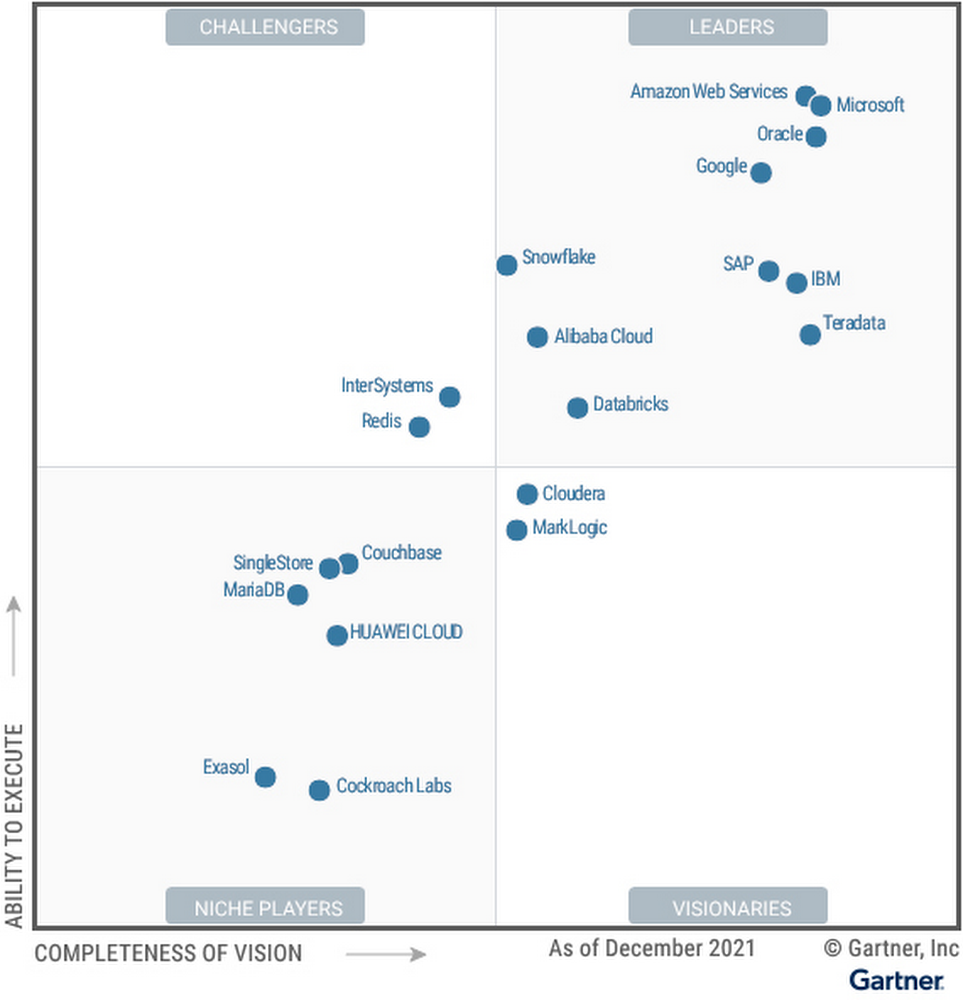
2021 Gartner® Magic Quadrant™ for Cloud Database Management Systems recognizes Google as a Leader

We are thrilled that Gartner has positioned Google as a Leader for the second year in a row in the 2021 Gartner® Magic Quadrant™ for Cloud Database Management Systems (DBMS).We believe the report evaluated Google’s unified capabilities across both transactional and analytical use cases, and showcases innovation progress in areas like data management consistency, high speed processing and ingestion, security, elasticity, advanced analytics, and more. With the recent announcement of Dataplex, organizations can centrally manage, monitor, and govern their data across data lakes, data warehouses, and data marts with consistent controls.  Solutions like BigQuery ML provide a “built-in” approach for advanced analytics capabilities and Analytics Hub offer the infrastructure customers need to share data analytics solutions securely and at scale in ways never before achieved. For example, over a seven-day period in April, more than 3,000 different organizations shared over 200 petabytes of data using BigQuery. Research shows 90% of organizations have a multicloud strategy, which is why we have invested in a cross-cloud data analytics solution for Google Cloud, AWS, and Azure with BigQuery Omni. Additionally, our progress with Anthos and our Distributed Cloud this past year further advance our ability to support multi and hybrid cloud scenarios. To gain a competitive advantage using data, organizations need a data platform that transcends transactional and analytical workloads and can be run with the highest level of reliability, availability and security. Cloud Spanner, our globally distributed relational database has redefined the scale, global consistency, and availability of Online Transaction Processing (OLTP) systems. Spanner processes over 1 billion requests per second at peak, and has been battle-tested with some of the most-demanding applications, including Google services such as Search, YouTube, Gmail, Maps, and Payments. And what’s unique about our core services Spanner and BigQuery, is that they leverage common infrastructure such as our highly durable distributed file system (Colossus), our large-scale cluster management system (Borg), and Jupiter, our high-performance networking infrastructure, enabling features such as federation between Spanner and BigQuery.We remain focused on the integration of Google Trends, Maps, Search, Ads, and have increased industry domain expertise in areas such as retail, financial services, healthcare, and gaming. We’re continuing to develop industry white papers such as this one – How to develop Global Multiplayer Games using Cloud Spanner – and we’re proud of the work the team has done to create and share industry and horizontal architecture patterns built from industry leaders to serve as solution accelerators for customer use cases. Innovation momentum continues with a unified and open data cloudWe continue to innovate across our data cloud portfolio, especially with the innovations we announced at Google Cloud NEXT’21. BigQuery Omni is now available for AWS and Azure, supporting cross-cloud analytics for customers. We’ve added additional capabilities for enterprise data management and governance with Dataplex, which recently went GA. We’ve made migrations to Cloud SQL easier and faster with the Database Migration Service. More than 85% of all migrations are underway in under an hour, with the majority of customers migrating their databases from other clouds. We are embracing openness with Spanner by adding a PostgreSQL interface, allowing enterprises to take advantage of Spanner’s unmatched global scale, 99.999% availability, and strong consistency using skills and tools from the popular PostgreSQL ecosystem. We are also automating data processing with Spark on Google Cloud, which enables developers to spend less time on infrastructure management and more time on data science, modeling, and delivering business value. Finally, we announced Google Earth Engine on Google Cloud, allowing customers to integrate Earth Engine with BigQuery, Google Cloud’s ML technologies, and the Google Maps Platform. With these innovations, enterprises like PayPal, Deutsche Bank, and Equifax use Google Cloud to solve for their end-to-end data lifecycle use cases. Organizations like Telefonicause Google Cloud to deliver new customer experiences. Telefónica has transformed every aspect of how they store, share, and analyze data while doubling processing power and lowering costs.We continue to support an open ecosystem of data partners including Informatica, Tableau, MongoDB, Neo4j, C3.ai, and Databricks, giving customers the flexibility of choice to build their data clouds without being locked into a single approach. We are honored to be a Leader in the 2021 Gartner Magic Quadrant for Cloud Database Management Systems (DBMS), and look forward to continuing to innovate and partner with you on your digital transformation journey. Download the complimentary 2021 Gartner Magic Quadrant for Cloud Database Management Systems report. Learn more about how organizations are building their data clouds with Google Cloud solutions. Gartner, Magic Quadrant for Cloud Database Management Systems, Henry Cook, Merv Adrian, Rick Greenwald, Adam Ronthal, Philip Russom, 14 December 2021.Gartner and Magic Quadrant are registered trademarks of Gartner, Inc. and/or its affiliates in the U.S. and internationally and are used herein with permission. All rights reserved.Gartner does not endorse any vendor, product or service depicted in its research publications and does not advise technology users to select only those vendors with the highest ratings or other designation. Gartner research publications consist of the opinions of Gartner’s Research & Advisory organization and should not be construed as statements of fact. Gartner disclaims all warranties, expressed or implied, with respect to this research, including any warranties of merchantability or fitness for a particular purpose.This graphic was published by Gartner, Inc. as part of a larger research document and should be evaluated in the context of the entire document. The Gartner document is available upon request from Google Cloud.Related ArticleIntroducing Google Distributed Cloud—in your data center, at the edge, and in the cloudGoogle Distributed Cloud runs Anthos on dedicated hardware at the edge or hosted in your data center, enabling a new class of low-latency…Read Article
Quelle: Google Cloud Platform

Optimize your system design using Architecture Framework Principles

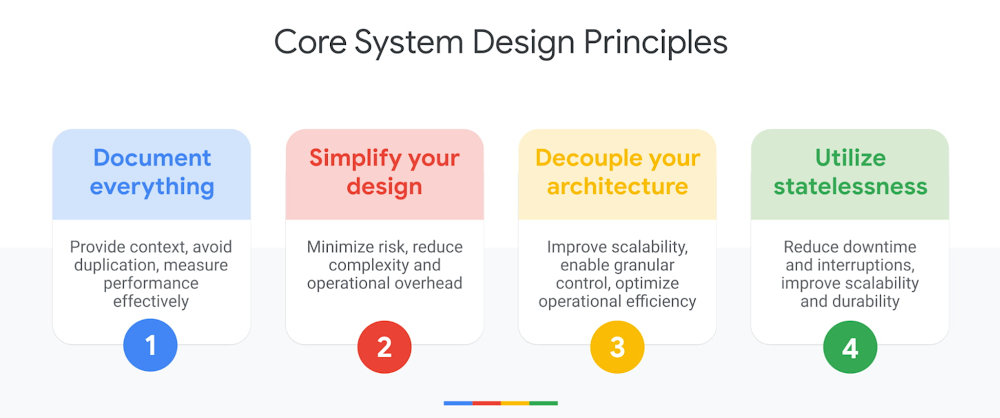
To help our customers on their path to success with Google Cloud, we published the Google Cloud Architecture Framework – a set of canonical best practices for building and operating workloads that are secure, efficient, resilient, high performing, and cost effective. Today, we’re diving deeper into the Architecture Framework System Design pillar, including the four key principles of system design and recent improvements to our documentation. We’ll also expand on the new space of the Google Cloud Community dedicated to the Architecture Framework, which was created to help you achieve your goals with a global community of supportive and knowledgeable peers, Googlers, and product experts.What is system design? The System Design Pillar is the foundational pillar of the Architecture Framework, which includes Google Cloud products, features, and design principles to help you define the architecture, components, and data you need to satisfy your business and system requirements. The System Design concepts and recommendations can be further applied across the other five pillars of the Architecture Framework: Operational Excellence, Security, Privacy, and Compliance, Reliability, Cost Optimization, and Performance Optimization. You can evaluate the current state of your architecture against the guidance provided in the System Design Pillar to identify potential gaps or areas for improvement.System design core principlesA robust system design is secure, reliable, scalable, and independent, enabling you to apply changes atomically, minimize potential risks, and improve operational efficiency. To achieve a robust system design, we recommend you follow four core principles:Document everythingWhen customers are either looking to move to the cloud or starting to build their applications, one of the major success blockers we see is the lack of documentation. This is especially true when it comes to correctly visualizing current architecture deployments. A properly documented cloud architecture helps establish a common language and standards, enabling your cross-functional teams to communicate and collaborate effectively. It also provides the information needed to identify and guide future design decisions that power your use cases. Over time, your design decisions will grow and change, and the change history provides the context your teams need to align initiatives, avoid duplication, and measure performance changes effectively over time. Change logs are particularly invaluable when you’re onboarding a new cloud architect, who is not yet familiar with your current system design, strategy, or history. Simplify your design (use fully managed services) When it comes to system design, simplicity is key. If your architecture is too complex to understand, your developers and operations teams can face complications during implementation or ongoing management. Wherever possible, we highly recommend using fully managed services to minimize the risk of managing and maintaining baseline systems, as well as the time and effort required by your teams.  If you’re already running your workloads in production, testing managed service offerings can help simplify operational complexities. If you’re starting new, start simple, establish an MVP, and resist the urge to over-engineer. You can identify corner use cases, iterate, and improve your systems incrementally over time.Decouple your architectureDecoupling is a technique used to separate your applications and service components – such as a monolithic application stack – into smaller components that can operate independently. A decoupled architecture therefore, can run its function(s) independently, irrespective of its various dependencies.   With a decoupled architecture,  you have increased flexibility to apply independent upgrades, enforce specific security controls, establish reliability goals, monitor health, and control granular performance and cost parameters. You can start decoupling early in your design phase or incorporate it as part of your system upgrades as you scale.  Utilize statelessnessIn order to perform a task, stateful applications rely on various dependencies, such as locally-cached data, and often require additional mechanisms to capture progress and sustain restarts. On the other hand, stateless applications can perform tasks without significant local dependencies by utilizing shared storage or cached services. This enables your applications to quickly scale up with minimum boot dependencies, thereby withstanding hard restarts, reducing downtime, and maximizing service performance for end users. The System Design Pillar describes recommendations to make your applications stateless or to utilize cloud-native features to improve capturing machine state for your stateful applications. System design principles applied across other pillarsThe core System Design principles can be applied across the other five pillars of the Architecture Framework, including Operational Excellence, Security, Reliability, Cost, and Performance Optimization. Here are a few examples of how this looks in practice.Use fully managed and highly-available operational tools to deploy and monitor your workloads, so you can minimize the operational overhead of maintaining and optimizing them. Apply security controls at the component level. By decoupling and isolating components, you can apply fine-grained governance controls to effectively manage compliance and minimize the blast radius of potential security vulnerabilities.Design for high availability and scalability. A decoupled architecture enables you to define and control granular reliability goals, so you can maximize the durability, scalability, and availability of your critical services, while optimizing non-critical components on-the-go.    Define budgets and design for cost efficiency. Cost usually becomes a significant factor as you define reliability goals, so it’s important to consider various cost metrics early on when you’re designing your applications. A decoupled architecture will help you enforce granular cost budgets and controls, thereby improving operational efficiency and cost optimization. Optimize your design for speed and performance. As you design your service availability within your cost budget, ensure you also consider performance metrics. Various operational tools will provide insights to view performance bottlenecks and highlight opportunities to improve performance efficiency. These are just a few examples, but you can see how the System Design principles can be expanded into various other use cases across the other five pillars of the Architecture Framework.The Architecture Framework is now part of The Google Cloud CommunityThe Google Cloud Community is an innovative, trusted, and vibrant hub for Google Cloud users to ask questions and find answers, engage and build meaningful connections, share ideas and have an impact on product roadmaps, as well as learn new skills and develop expertise.Today, we’re announcing the launch of a new space in the Google Cloud Community dedicated to the Architecture Framework. In this space, you can: Access canonical articles that provide practical guidance and address specific questions and challenges related to the System Design pillar. We’ll be releasing articles focused on the remaining five pillars in the coming months.Engage in open discussion forums where members can ask questions and receive answers.Participate in Community events, such as our “Ask Me Anything” series, where we’ll host a virtual webinar on a specific topic of the Architecture Framework and open it up for questions from the audience. Together, the Google Cloud Community and Architecture Framework provide a trusted space for you to achieve your goals alongside a global community of supportive and knowledgeable peers, Googlers, and product experts.Explore the new space of the Community today and if you haven’t already, sign up to become a member so you can take full advantage of all the opportunities available.What’s new for System Design 2.0?Earlier this year, we released an updated version (2.0) of the Architecture Framework, and we’ve been continuing to enhance our catalog of best practices based on feedback from our global partner and customer base, as well as our team of Google product experts. Here’s what’s new in the System Design Pillar:Resource labels and tags best practices were added to simplify resource management.The compute section is now reorganized to focus on choosing, designing, operating, and scaling compute workloads. The database section is reorganized into topics like selection, migration, and operating database workloads, and highlights best practices around workflow management.The data analytics section now includes sections on data lifecycle, data processing, and transformation. A new section on artificial intelligence (AI) and machine learning (ML) that covers best practices for deploying and managing ML workloads. As always, we welcome your feedback so we can continue to improve and support you on your path to success with Google Cloud. Special note and thank you to Andrew Biernat, Willie Turney, Lauren van der Vaart, Michelle Lynn, and Shylaja Nukala, for helping host the Architecture Framework on the Google Cloud Community site. And Minh “MC” Chung, Rachel Tsao, Sam Moss, Nitin Vashishtha, Pritesh Jani, Ravi Bhatt, Olivia Zhang, Zach Seils, Hamsa Buvaraghan, Maridi Makaraju, Gargi Singh, and Nahuel Lofeudo for helping make System Design content a success!Related ArticleSupercharge your Google Cloud workloads with up-to-date best practices from Architecture FrameworkGoogle Cloud best practices have been updated to version 2.0, enabling better security, compliance, reliability, operations, and cost- an…Read Article
Quelle: Google Cloud Platform

Google Cloud managed compute platforms: Top 10 blog posts of 2021

Sure, Google Cloud offers world-class infrastructure, but one of the main reasons that customers choose our platform is to run their applications on one of our managed container platforms: Google Kubernetes Engine (GKE), the most scalable and easy to use service from the company that invented Kubernetes; Anthos for managing containers in hybrid and multicloud scenarios; and Cloud Run, our serverless platform for containerized workloads. We made a lot of updates to these services in 2021 — here are the ones that resonated the most with you, our readers, in order of pageviews. 1. Introducing GKE Autopilot: a revolution in managed Kubernetes Kubernetes users want the flexibility to customize their containerized workloads, without the need to manage a plethora of configurations. Enter GKE Autopilot, a new mode of operation for GKE that provides a managed control and data plane, an optimized configuration out-of-the-box, automated scalability, health checks and repairs, and pay-for-use pricing. Introduced in February 2021, this was by far our most read blog in this category. Read the full post.  2. Introducing Google Distributed Cloud—in your data center, at the edge, and in the cloud Want the goodness of an industry-leading managed Kubernetes platform, but want to run it on managed hardware outside of the cloud? With Google Distributed Cloud, we’ve got you covered, with a combination of hardware and software that extends our infrastructure to the edge and into your data centers. Designed to support telecommunications applications as well as applications with strict data security and privacy requirements, the Google Distributed Cloud announcement was the most-read product blog coming from Google Cloud Next in October. Read the full post.3. Introducing WebSockets, HTTP/2 and gRPC bidirectional streams for Cloud Run A major area of focus for the Cloud Run team this year was to expand the kinds of applications that you can run on the platform. We started the year out with a bang, adding support for applications like social feeds, collaborative editing, and multiplayer games that rely on full bidirectional streaming capabilities. (This news came on the heels of another big Cloud Run feature announcement: support for minimum instances, to help minimize cold starts for latency-sensitive apps.)  Read the full post.4. Introducing GKE image streaming for fast application startup and autoscalingWhy do we say that GKE is the best managed Kubernetes service? Improvements like this. Image streaming is no incremental feature — the performance improvements it brings to application scale-up time is unique in the industry, and just might change how you think about what you can do with GKE.  Read the full post.5. The past, present, and future of Kubernetes with Eric BrewerA recent addition to Kubernetes blog canon, this blog recaps a series of conversations between Google Cloud Developer Advocate, Stephanie Wong, and Google Fellow, Eric Brewer about the history of Kubernetes and Brewer’s role in the creation thereof. In addition to the Kubernetes origin story, Brewer talks about the need for securing the software supply chain, offers advice to platform operators, and where he sees Kubernetes going next. Read the full post.  6. Discover and invoke services across clusters with GKE multi-cluster servicesSpeaking of game-changing features, the release of GKE multi-cluster services established GKE as the service to use if you’re building applications that need to be deployed across cluster boundaries. Read the full post. 7. Run more workloads on Cloud Run with new CPU allocation controlsRemember how we talked about expanding the scope for Cloud Run? This powerful feature allows you to deploy more types of applications to Cloud Run by allocating CPU for the entire lifetime of container instances at a lower price — important for applications that need to do background processing outside of request processing. Read the full post. 8. 4 new features to secure your Cloud Run services Of course, security is a must-have for any platform on which you run mission-critical applications, and Cloud Run is no exception. In this blog post, readers learned about features to help integrate your Cloud Run deployment into existing security processes, and to ensure the build provenance of their code. Read the full post.  9. Introducing Anthos for VMs and tools to simplify the developer experience Containers are the future, but virtual machines are still a very important part of the present. Wouldn’t it be great if you could manage your VMs and containers the same modern way? We announced the upcoming Anthos for VMs product that does just that. This is a huge accelerator for those embracing cloud native ops! Read the full post. 10. The evolution of Kubernetes networking with the GKE Gateway controllerKubernetes networking is a work in progress — an effort that Google is actively involved in. In 2020, Google and other community members open-sourced the Kubernetes Gateway API as an evolution of Ingress and service mesh APIs, and in 2021, we released our implementation of Gateway, which provides global, multi-cluster, multi-tenant load balancing for GKE. Read the full post. Of course, these 10 posts represent just a small sliver of the work we did to improve our managed compute services in 2021. And stay tuned for 2022, when we’ll have lots more to share about how you can use Google Cloud compute services to transform how you run your applications.
Quelle: Google Cloud Platform

Top Google Cloud infrastructure blogs of 2021

You sometimes hear people say that cloud infrastructure is commoditized, not differentiated. At Google Cloud, we like to think it’s differentiated, just like the content our blog visitors like to read about. Year after year, blogs about compute, storage, and networking — as well as physical infrastructure like data centers and cables — are consistently among the most-read content of the year. Here are the top Google Cloud infrastructure stories of 2021, by readership. Read on to relive your favorites, or to catch up on any stories you may have missed.1. The Dunant subsea cable, connecting the US and mainland Europe, is ready for serviceNews about our subsea cables is a perennial reader favorite, and the Dunant ready-for-service announcement was no exception. Originally announced in 2018, the Dunant cable will transmit 250 Terabits of data per second between the U.S. and France. Details here.2. New Tau VMs deliver leading price-performance for scale-out workloadsWe welcomed a new addition to our Compute Engine family this year! Based on 3rd Gen AMD EPYC processors, the T2D (the first instance type in the Tau VM family), offers 56% higher absolute performance and 42% higher price-performance compared to general-purpose VMs from any of the leading public cloud vendors — all without having to reengineer your workloads for another microprocessor architecture. Read the blog here. 3. Colossus under the hood: a peek into Google’s scalable storage systemIt’s no secret that a lot of the technologies that underlie Google Cloud were originally designed to power Google as a whole, and the Colossus file system is just one example. In this post, Google storage leads take you on a behind-the-scenes look into the Colossus architecture and how it delivers its impressive scalability. More here. 4. Expanding our global footprint with new cloud regionsYear in, year out, the number of geographies where you can find a Google Cloud region continues to grow. A year ago, we announced new regions in Chile, Germany and Saudi Arabia. More recently, we announced we would open a second region in Germany, and new U.S. regions in Columbus, Ohio, and Dallas, Texas.5. Hola, South America! Announcing the Firmina subsea cableAlong with a new GCP region in Chile, we also announced that we’re building a subsea cable to South America that goes from the East coast of the United States all the way to Argentina. Firmina joins the Curie subsea cable, which takes a Pacific route from the U.S. to South America. Read about Firmina here.  6. Announcing Backup for GKE: the easiest way to protect GKE workloadsAnyone that runs mission-critical workloads in the cloud needs an easy way to back them up. Backup for GKE, a first-party backup solution that makes it easy to protect stateful data from applications running in GKE, was one of our most popular storage launches of 2021. Read all about it here. 7. Introducing Network Connectivity Center: A revolution in simplifying on-prem and cloud networkingMeanwhile, over in Google Cloud networking land, readers grooved on news of our new Network Connectivity Center, a network management solution that works across on-prem and cloud-based networks. Get the details. 8. What’s in a name? Understanding the Google Cloud network “edge”People throw around the word ‘edge’ all the time, but what exactly does it mean — especially in the context of Google Cloud? In this popular blog post, learn about the difference between Google Cloud regions and zones, edge POPs, Cloud CDN, Cloud Interconnect POPs, edge nodes, and region extensions. Read all about it. 9. How Cloud Storage delivers 11 nines of durability—and how you can helpBesides new product launches, the content that resonates most reliably with readers tends to be explainers. In this top storage piece, learn what we even mean by 11 nines, and the techniques Cloud Storage uses to achieve it. Check it out. 10. Google named a Leader in 2021 Gartner Magic Quadrant for Cloud Infrastructure and Platform Services againWith all this great technology, it’s fitting that Google Cloud was named a leader in the 2021 Gartner Magic Quadrant for Cloud Infrastructure and Platform Services. Again. Check out the blog and register to read the full report here. Hopefully this list gives you a taste of what the fuss over Google Cloud infrastructure is all about. Thanks for reading, and stay tuned for 2022!Related Article10 ways Google Cloud IaaS stands outAcross compute, networking and storage, Google Cloud has a multitude of features that make it the best choice.Read Article
Quelle: Google Cloud Platform

Policy Troubleshooter for BeyondCorp Enterprise is now GA!

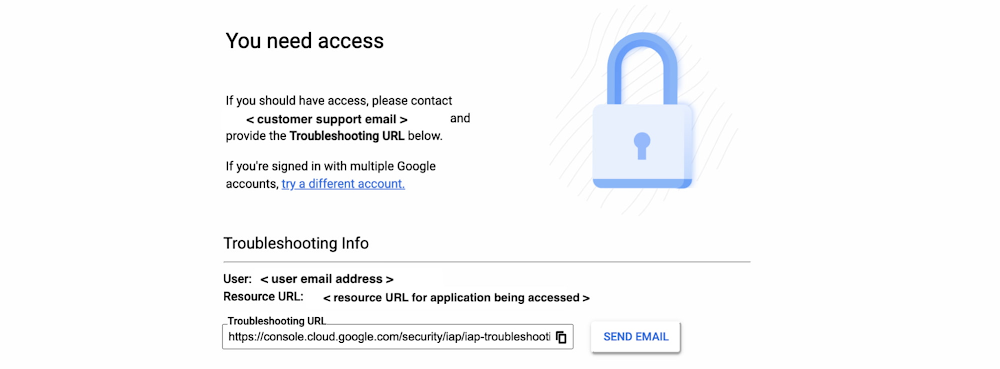
Having the ability to access corporate resources and information remotely and securely has been crucial for countless organizations during the course of the COVID-19 pandemic. Yet, many employees may agree that this process is not always seamless, especially if they were blocked from getting to an app or a resource they should be able to access. Adding to this frustration is the challenge of getting in touch with IT support to figure out what was happening and why, which can be even more difficult in a remote environment.Our aim with BeyondCorp Enterprise, Google Cloud’s zero trust access solution, is to provide a frictionless experience for users and admins, and today, we are happy to announce that Policy Troubleshooter for BeyondCorp Enterprise is now generally available, providing support for administrators to triage blocked access events and easily unblock users. BeyondCorp Enterprise provides users with simple and secure access to applications across clouds and across devices. Administrators are able to configure and apply granular rules to manage access to sensitive corporate resources. While these policies define how trust is established and maintained as part of the zero trust model, sometimes the layering of rules can make it difficult for end-users to understand why access to an application or resource may fail.Administrators can enable this feature to generate a troubleshooting URL per Identity-Aware Proxy (IAP) resource in real-time for denied events. End-users who find themselves blocked will see a “Troubleshooter URL”  which can be copied and sent to the administrator via email, who can quickly use the information to diagnose the error and identify why access requests fail.Troubleshooting information presented to BeyondCorp Enterprise users when access is deniedPolicy Troubleshooter gives admins essential visibility of access events across their environment. Once arriving on the BeyondCorp Enterprise Troubleshooter analysis page, the administrator can see different views. The Summary View shows an aggregate view of all the relevant policy and membership findings.Administrators presented with a Summary View of the troubleshooting findingsIn addition, the Identity and Access Management (IAM) policy view shows a list of effective IAM bindings evaluation results, granted or not, together with a high-level view on where the failures occurred. Admins can also see a table displaying the user’s and device context.Administrators can also toggle to the IAM Policy View to see Binding DetailsAdministrators can investigate further in the Binding details to identify where the failures occurredWith this information, admins can give end-users more detailed information about why access failed, including things like group membership status, time or location constraints, or device rules such as attempting access from a disallowed device. Policy Troubleshooter also enables admins to update policies to allow access if warranted.Detailed troubleshooting of access levels and conditionsAdmins can also use Policy Troubleshooter to test hypothetical events and scenarios, gaining insight and visibility into the potential impact of new security policies. By proactively troubleshooting hypothetical requests, they can verify that users have the right permissions to access resources and prevent future access interruptions and interactions with IT support staff.Administrators can navigate to the Policy Troubleshooter for BeyondCorp Enterprise landing page to proactively troubleshoot hypothetical requestsPolicy Troubleshooter for BeyondCorp Enterprise is a valuable tool for organizations that need to apply multiple rules to multiple resources for different groups of users. Regardless of whether the workforce is remote, providing the ability for admins to triage access failure events and unblock users in a timely way is absolutely critical for an organization’s productivity. If you are interested in learning more, please reference our documentation to get started. This new feature will also be showcased during Google Cloud Security Talks on December 15. To see a demo, register for this free event and join us live or on-demand to learn about all of the work Google is doing to support customers’ implementations of zero trust!Related ArticleJoin us for Google Cloud Security Talks: Zero Trust editionJoin us for Google Cloud Security Talks with sessions focused on zero trust. Learn how you can protect your users and critical information.Read Article
Quelle: Google Cloud Platform

Use your favorite DevOps and security solutions with GKE Autopilot out of the box

Organizations that are modernizing with the cloud are increasingly looking for ways to simplify and automate container orchestration with high levels of security, reliability and scalability. GKE Autopilot, which became generally available earlier this year, is a revolutionary mode of operations for managed Kubernetes that makes this possible, reducing the need for hands-on cluster management while delivering a strong security posture and improved resource utilization. (Not familiar with GKE Autopilot yet? Check out the Autopilot breakout session at Google Cloud Next ‘21, which gives a rundown of everything this new Kubernetes platform can do.)One of the great advantages of GKE Autopilot is that despite being a fully managed Kubernetes platform that provides you with a hands-off approach to nodes, it still supports the ability to run node agents using DaemonSets. This allows you to do actions like collect node-level metrics without needing to run a sidecar in every Pod. While some administrative-level functionality like privileged pods is restricted in Autopilot for regular user pods, we have worked with our partners to bring some of the most popular solutions to Autopilot, granting additional privileges when needed. This lets you run these popular products on Autopilot without modification, and still take full advantage of our fully managed platform.Building on partnerships with leading ISVs in observability, security, CI/CD, and configuration management, this represents a differentiated approach to running partner tooling. Compared with other clouds and competitive platforms, GKE Autopilot does not require intensive reconfiguration (such as the use of sidecar containers) for many partner solutions. As such, today we are pleased to share the following partner solutions that are compatible with GKE Autopilot, and operate in a uniform manner across GKE:Aqua supports securing and ensuring compliance for the full lifecycle of workloads on GKE Autopilot, and specifically the Kubernetes pods, which run multiple containers with shared sets of storage and networking resources. More here.CircleCI allows teams to release code rapidly by automating the build test and delivery process. CircleCI’s ‘orbs’ bundle configuration elements such as jobs, commands and executors into reusable packages and support deployment to GKE Autopilot. More here.Codefresh’s Gitops controller is an agent installed in a cluster that monitors the cluster and any defined Git repositories for changes. It allows you to deploy any kind of application to your GKE Autopilot cluster using Gitops. More here.Chronosphere’s collector and GKE Autopilot work together to make engineers more productive by giving them faster and more actionable alerts that they can triage rapidly, allowing them to spend less time on monitoring instrumentation, meanwhile knowing that their clusters are running in a secure, highly available, and optimized manner. More here.Datadog provides comprehensive visibility into all your containerized apps running on GKE Autopilot by collecting metrics, logs and traces, which help to surface performance issues and provide context to troubleshoot them. More here.Dynatrace uses its software intelligence platform to track the availability, health and utilization of applications running on GKE Autopilot and to prioritize anomalies or automatically determine their root causes. More here.GitLab can be installed on GKE Autopilot easily out of the box using the official Helm Charts and can be configured to match a customer use case, including access to other Google Cloud resources such as storage and databases. More here.Hashicorp Terraform can be used to provision a GKE Autopilot cluster distributed across multiple zones for high availability with a unified workflow and full lifecycle management. Hahsicorp Vault runs on GKE Autopilot and provides secure storage and management of secrets. Read more about Terraform and Vault.Palo Alto Networks’ Prisma Cloud Daemonset Defenders enforce the policies you want for your environment, while Prisma Cloud Radar displays a comprehensive visualization of your GKE Autopilot nodes and clusters so you can identify risks and investigate incidents. More here.Snyk’s developer security platform helps developers build software securely across the cloud-native application stack, including code, open source, containers, Kubernetes and infrastructure as code, and works seamlessly with GKE Autopilot. More here.Splunk Observability Cloud provides developers and operators with deep visibility into the composition, state, and ongoing issues within a cluster, while GKE Autopilot automatically manages the cluster’s resources to maximum efficiency. More here.Sysdig’s Secure Devops Platform allows you to follow container security best practices on your GKE Autopilot clusters, including monitoring and securing your workloads using the Sysdig Agent. More here.If you are using any of the above partner solutions in your existing enterprise workflows, you should be able to use them seamlessly with GKE Autopilot. Over time, we will continue to expand the scope of our partnerships and supported solutions, and we hope you use GKE Autopilot to kickstart your modernization journey with containers in the cloud. Get started today with the free tier.Related ArticleIntroducing GKE Autopilot: a revolution in managed KubernetesGKE Autopilot gives you a fully managed, hardened Kubernetes cluster out of the box, for true hands-free operations.Read Article
Quelle: Google Cloud Platform

Google Cloud recommendations for investigating and responding to the Apache “Log4j 2” vulnerability (CVE-2021-44228)

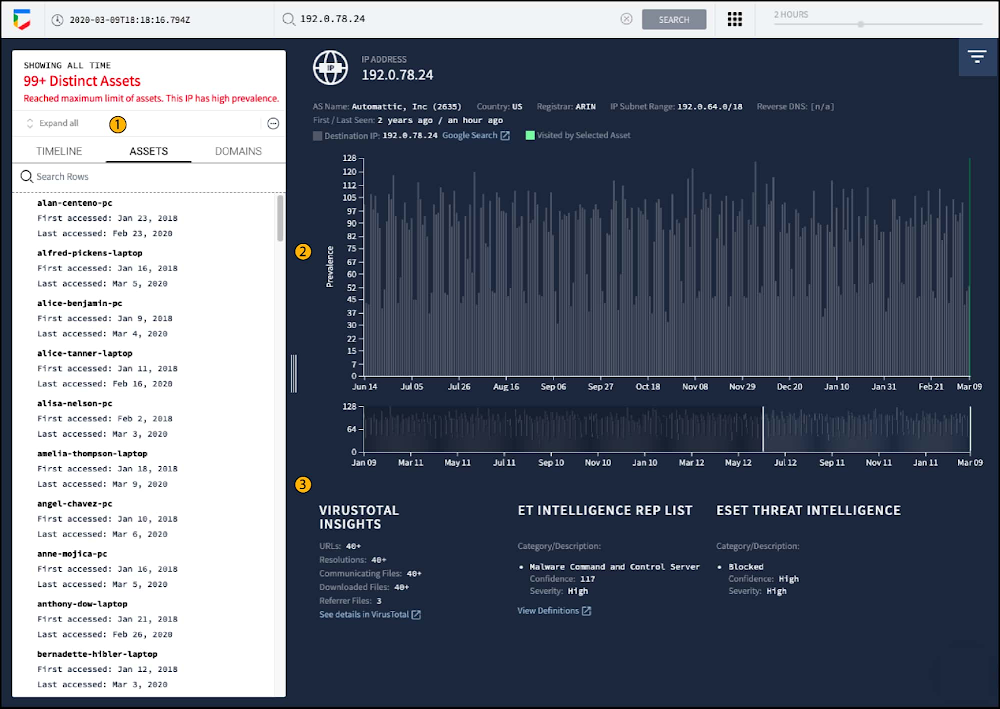
In this post, we’ll provide recommendations from the Google Cybersecurity Action Team and discuss solutions available to Google Cloud customers and security teams to manage the risk of the Apache “Log4j 2” vulnerability (CVE-2021-44228).Please visit Google Cloud’s advisory page for the latest updates on our assessment of CVE-2021-44228, and the potential impact of the vulnerability for Google Cloud products and services.Background The Apache Log4j 2 utility is an open source Apache framework that is a commonly used component for logging requests. On December 9, 2021, a vulnerability was reported that could allow a system running Apache Log4j version 2.14.1 or below to be compromised and allow an attacker to execute arbitrary code on the vulnerable server. On December 10th, 2021, NIST published a critical CVE in the National Vulnerability Database identifying this as CVE-2021-44228. The official CVSS base severity score has been determined as a severity of 10. We strongly encourage customers who manage environments containing Log4j to update to the v2.15.0 or take the mitigation actions outlined in this post. The Cybersecurity and Infrastructure Security Agency (CISA) released additional recommendations for immediate steps regarding this vulnerability.Technical DetailsThe “Log4j 2 vulnerability” can be exploited by sending specially crafted log messages into Log4j 2. The attacker does this by leveraging the Java Naming and Directory Interface (JNDI) – which is a Java abstraction layer included by default in the Java SE Platform that allows a Java application to retrieve data from directory services (such as LDAP). JNDI uses HTTP URIs to resolve to a specific directory service  – and the URI can be adjusted as needed to resolve to the right directory location. Using Log4j 2, an attacker sending a log message with a specially crafted URI can cause the application to execute arbitrary code (such as by providing a Base64 encoded script in the path). This is due to specific behavior in Log4j 2 that allows for the input of variable data into the log (called Lookups). In a Lookup, the reference is queried and evaluated for input into the log. By using this feature during an exploit, the attacker uses the URI input to instruct Log4j 2 to resolve an object they input (such as an encoded script). This issue has been resolved in Log4j 2.15.0. Updates and Recommendations to Identify, Detect & ProtectCustomers should look to upgrade to v2.15.0 of Log4j as soon as possible. If they cannot upgrade to the updated version quickly, customers should look to mitigate by setting the “No Lookups property (log4j2.formatMsgNoLookups)” to true. Taking these actions (and following additional advice from the Apache foundation) is your best immediate action. In addition to updating Log4j 2, some Google Cloud Security products can help detect and temporarily mitigate exploitation until the patch can be applied. Additionally, if you have third party WAF, IDS/IPS, and/or NDR solutions deployed in Google Cloud, please consult with your vendors for more guidance related to this vulnerability.To identify potentially impacted systems we recommend the use of a vulnerability scanner (e.g., Tenable, Qualys or scanners of a similar capability class). These tools have reported identifying the vulnerability referenced in National Vulnerability Database (NVD) and will help to locate impacted systems. Where possible, we recommend implementing all of the below for a layered defense in depth strategy.Cloud Armor WAF Log4j 2 Detection and Blocking RulesRelative to Log4j 2, Cloud Armor helps mitigate threats for applications or services behind external HTTP(S) load balancers. You can enable Cloud Armor through Cloud Console > Network Security, or via API. Cloud Armor’s WAF rules can be configured to detect, or detect and block requests. Cloud Armor customers can now deploy a new preconfigured WAF rule that will help detect and, optionally, block commonly attempted exploits of CVE-2021-44228 while you are patching your systems. To learn more about addressing the Apache Log4j 2 vulnerability with Cloud Armor, please read this blog article.ChronicleThreat Hunting and investigation tools can be used to look at historical data and determine if exploitation was attempted – or can be used as vehicles for monitoring active exploitation.  Chronicle is Google’s threat hunting tool that provides extended event collection across cloud and on-prem (such as EDR logs, firewall logs, etc). If you are using Chronicle for log ingestion/SIEM and have historical event data stored (Chronicle retains 12 months of data by default) you can search for historical exploit attempts. Customers should search for events that contain “jndi” and a combination of strings that follow including “ldap”, “rmil”, “ldaps”, or “dns”, generated from HTTP requests, which correspond to possible Log4j 2 exploitation patterns. For example – this syntax could be used in a Yara-L rule:Chronicle customers can also look at external communication events for low-prevalence destinations that could be an indication of impacted systems reaching out for remote code execution. More information can be found in Chronicle documentation here.IP Address Investigation in ChronicleCloud IDS Network-based Threat DetectionCloud IDS has been updated to help detect common types of Log4j 2 exploit attempts. These new detections are on by default for any existing or newly added deployments of Cloud IDS. Positive detections will appear in Cloud IDS alert logs, visible in terse mode in the Cloud IDS UI of Cloud Console, and in verbose mode in Cloud Logging, or by API. Cloud IDS is enabled and configured through Cloud Console > Network Security, or via API. Please see this blog for more information. Cloud LoggingYou can use the Logs Explorer to help detect  potential attacks on your service exploiting the Log4j 2 vulnerability. If you are using Cloud Logging to log requests to your service, you can check httpRequest fields with user generated content for potential exploits that have string tokens like ${jndi:ldap://.  There are multiple variations on how this vulnerability is being exploited, and there are many ways to use unicode or escapes to avoid detection. This is an introduction to using a regex query to help detect some of the common exploits:The above query matches many of the obfuscated variations of the string “${jndi:” in HTTP Load Balancer request logs. You can use similar regular expressions to scan request logs in other services by changing the resource.type. The query may take a long time to complete if you are scanning a large volume of logs. To make your queries run faster, you can make use of indexed fields like resource.type, resource.labels, or logName to narrow your query to a set of specific services or log streams.Detecting matching log entries does not indicate that there has been a successful compromise. It may indicate that someone is probing to exploit the vulnerability within your project or workload. There could also be false positives if your application uses patterns like “${jndi:” in the http request fields. Cloud Logging query results only include logs that have already been ingested into Cloud Logging and are also within the user specified retention limits. While most Google Cloud services have logs enabled by default, logs that were disabled or excluded will not be included in this search. If you are using an HTTP(S) Load Balancer, logging needs to be enabled for the request logs to be available in Cloud Logging. Similarly, if you have web servers like Apache or NGINX running on a VM, but have not installed the logging agent, those logs will not be accessible within Cloud Logging.We will continue to actively monitor this event and will provide updates to this blog post on relevant mitigation steps and detection mechanisms. Please visit our security advisory page for updates on our Google Cloud security assessment. Related ArticleRead Article
Quelle: Google Cloud Platform

Find anything blazingly fast with Google's vector search technology

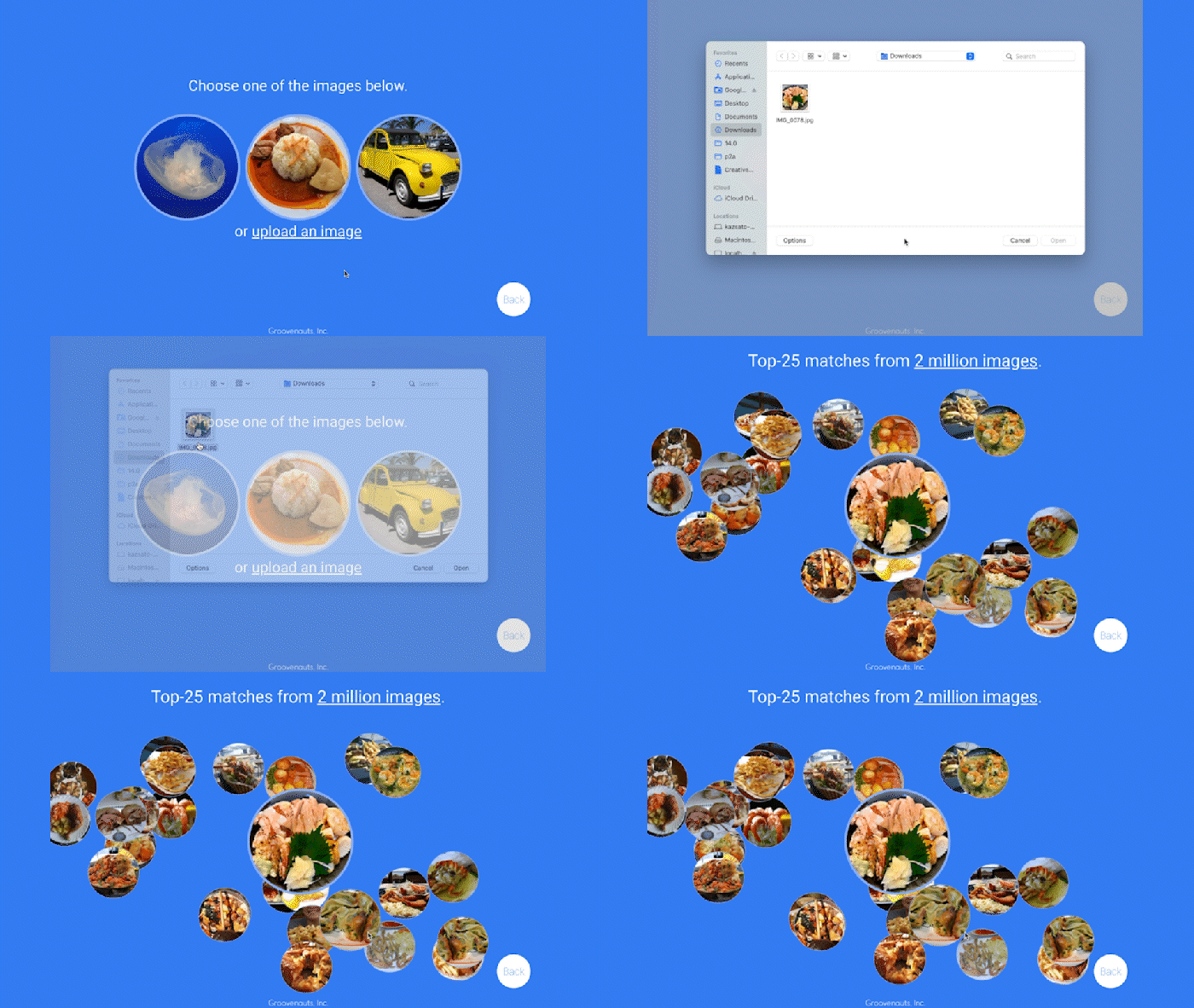
Recently, Google Cloud partner Groovenauts, Inc. published a live demo of MatchIt Fast. As the demo shows, you can find images and text similar to a selected sample from a collection of millions in a matter of milliseconds:Image similarity search with MatchIt FastGive it a try — and either select a preset image or upload one of your own. Once you make your choice, you will get the top 25 similar images from two million images on Wikimedia images in an instant, as you can see in the video above. No caching involved.The demo also lets you perform the similarity search with news articles. Just copy and paste some paragraphs from any news article, and get similar articles from 2.7 million articles on the GDELT project within a second.Text similarity search with MatchIt FastVector Search: the technology behind Google Search, YouTube, Play, and moreHow can it find matches that fast? The trick is that the MatchIt Fast demo uses the vector similarity search (or nearest neighbor search or simply vector search) capabilities of the Vertex AI Matching Engine, which shares the same backend as Google Image Search, YouTube, Google Play, and more, for billions of recommendations and information retrievals for Google users worldwide. The technology is one of the most important components of Google’s core services, and not just for Google: it is becoming a vital component of many popular web services that rely on content search and information retrieval accelerated by the power of deep neural networks.So what’s the difference between traditional keyword-based search and vector similarity search? For many years, relational databases and full-text search engines have been the foundation of information retrieval in modern IT systems. For example, you would add tags or category keywords such as “movie”, “music”, or “actor” to each piece of content (image or text) or each entity (a product, user, IoT device, or anything really). You’d then add those records to a database, so you could perform searches with those tags or keywords.In contrast, vector search uses vectors (where each vector is a list of numbers) for representing and searching content. The combination of the numbers defines similarity to specific topics. For example, if an image (or any content) includes 10% of “movie”, 2% of “music”, and 30% of “actor”-related content, then you could define a vector [0.1, 0.02, 0.3] to represent it. (Note: this is an overly simplified explanation of the concept; the actual vectors have much more complex vector spaces). You can find similar content by comparing the distances and similarities between vectors. This is how Google services find valuable content for a wide variety of users worldwide in milliseconds.With keyword search, you can only specify a binary choice as an attribute of each piece of content; it’s either about a movie or not, either music or not, and so on. Also, you cannot express the actual “meaning” of the content to search. If you specify a keyword “films”, for example, you would not see any content related to “movies” unless there was a synonyms dictionary that explicitly linked these two terms in the database or search engine. Vector search provides a much more refined way to find content, with subtle nuances and meanings. Vectors can represent a subset of content that contains “much about actors, some about movies, and a little about music”. Vectors can represent the meaning of content where “films”, “movies”, and “cinema” are all collected together. Also, vectors have the flexibility to represent categories  previously unknown to or undefined by service providers. For example, emerging categories of content primarily attractive to kids, such as ASMR or slime, are really hard for adults or marketing professionals to predict beforehand, and going back through vast databases to manually update content with these new labels would be all but impossible to do quickly. But vectors can capture and represent never-before-seen categories instantly.Vector search changes businessVector search is not only applicable to image and text content. It can also be used for information retrieval for anything you have in your business when you can define a vector to represent each thing. Here are a few examples:Finding similar users: If you define a vector to represent each user in your business by combining the user’s activities, past purchase history, and other user attributes, then you can find all users similar to a specified user.  You can then see, for example, users who are purchasing similar products, users that are likely bots, or users who are potential premium customers and who should be targeted with digital marketing.Finding similar products or items: With a vector generated from product features such as description, price, sales location, and so on, you can find similar products to answer any number of questions; for example, “What other products do we have that are similar to this one and may work for the same use case?” or “What products sold in the last 24 hours in this area?” (based on time and proximity)Finding defective IoT devices: With a vector that captures the features of defective devices from their signals, vector search enables you to instantly find potentially defective devices for proactive maintenance.Finding ads: Well-defined vectors let you find the most relevant or appropriate ads for viewers in milliseconds at high throughput.Finding security threats: You can identify security threats by vectorizing the signatures of computer virus binaries or malicious attack behaviors against web services or network equipment. …and many more: Thousands of different applications of vector search in all industries will likely emerge in the next few years, making the technology as important as relational databases.OK, vector search sounds cool. But what are the major challenges to applying the technology to real business use cases? Actually there are two:Creating vectors that are meaningful for business use casesBuilding a fast and scalable vector search serviceEmbeddings: meaningful vectors for business use casesThe first challenge is creating vectors for representing various entities that are meaningful and useful for business use cases. This is where deep learning technology can really shine. In the case of the MatchIt Fast demo, the application simply uses a pre-trained MobileNet v2 model for extracting vectors from images, and the Universal Sentence Encoder (USE) for text. By applying such models to raw data, you can extract “embeddings” – vectors that map each row of data in a space of their “meanings”. MobileNet puts images that have similar patterns and textures closer to one another in the embedding space, and USE puts texts that have similar topics closer.For example, a carefully designed and trained machine learning model could map movies into an embedding space like the following:An example of a 2D embedding space for movie recommendation(from Recommendation Systems, Google MLCC)With the embedding space shown here, users could find recommended movies based on the two dimensions: is the movie for children or adults, and is it a blockbuster or arthouse movie? This is a very simple example, of course, but with an embedding space like this that fits your business requirements, you can deliver a better user experience on recommendation and information retrieval services with insights extracted from the model. For more about creating embeddings, the Machine Learning Crash Course on Recommendation Systems is a great way to get started. We will also discuss how to extract better embeddings from business data later in this post.Building a fast and scalable vector search serviceSuppose that you have successfully extracted useful vectors (embeddings) from your business data. Now the only thing you have to do is search for similar vectors. That sounds simple, but in practice it is not. Let’s see how the vector search works when you implement it with BigQuery in a naive way:It takes about 20 seconds to find similar items (fish images in this case) from a pool of one million items. That level of performance is not so impressive, especially when compared to the MatchIt Fast demo. BigQuery is one of the fastest data warehouse services in the industry, so why does the vector search take so long?This illustrates the second challenge: building a fast and scalable vector search engine isn’t an easy task. The most widely used metrics for calculating the similarity between vectors are L2 distance (Euclidean distance), cosine similarity, and inner product (dot product).Calculating vector similarityBut all require calculations proportional to the number of vectors multiplied by the number of dimensions if you implement them in a naive way. For example, if you compare a vector with 1024 elements to 1M vectors, the number of calculations will be proportional to 1024 x 1M = 1.02B. This is the computation required to look through all the entities for a single search, and the reason why the BigQuery demo above takes so long.Instead of comparing vectors one by one, you could use the approximate nearest neighbor (ANN) approach to improve search times. Many ANN algorithms use vector quantization (VQ), in which you split the vector space into multiple groups, define “codewords” to represent each group, and search only for those codewords. This VQ technique dramatically enhances query speeds and is the essential part of many ANN algorithms, just like indexing is the essential part of relational databases and full-text search engines.An example of vector quantization (from: Mohamed Qasem)As you may be able to conclude from the diagram above, as the number of groups in the space increases the speed of the search decreases and the accuracy increases.  Managing this trade-off — getting higher accuracy at shorter latency — has been a key challenge with ANN algorithms. Last year, Google Research announced ScaNN, a new solution that provides state-of-the-art results for this challenge. With ScaNN, they introduced a new VQ algorithm called anisotropic vector quantization:Anisotropic vector quantization uses a new loss function to train a model for VQ for an optimal grouping to capture farther data points (i.e. higher inner product) in a single group. With this idea, the new algorithm gives you higher accuracy at lower latency, as you can see in the benchmark result below (the violet line): ScaNN consistently outperforms other ANN algorithms in speed and accuracy benchmark testsThis is the magic ingredient in the user experience you feel when you are using Google Image Search, YouTube, Google Play, and many other services that rely on recommendations and search. In short, Google’s ANN technology enables users to find valuable information in milliseconds, in the vast sea of web content.How to use Vertex AI Matching EngineNow you can use the same search technology that powers Google services with your own business data. Vertex AI Matching Engine is the product that shares the same ScaNN based backend with Google services for fast and scalable vector search, and recently it became GA and ready for production use. In addition to ScaNN, Matching Engine gives you additional features as a commercial product, including:Scalability and availability: The open source version of ScaNN is a good choice for evaluation purposes, but as with most new and advanced technologies, you can expect challenges when putting it into production on your own. For example, how do you operate it on multiple nodes with high scalability, availability, and maintainability? Matching Engine uses Google’s production backend for ScaNN, which provides auto-scaling and auto-failover with a large worker pool. It is capable of handling tens of thousands of requests per second, and returns search results in less than 10 ms for the 90th percentile with a recall rate of 95 – 98%.Fully managed: You don’t have to worry about building and maintaining the search service. Just create or update an index with your vectors, and you will have a production-ready ANN service deployed. No need to think about rebuilding and optimizing indexes, or other maintenance tasks.Filtering: Matching Engine provides filtering functionality that enables you to filter search results based on tags you specify on each vector. For example, you can assign “country” and “stocked” tags to each fashion item vector, and specify filters like “(US OR Canada) AND stocked”  or “not Japan AND stocked” on your searches.Let’s see how to use Matching Engine with code examples from the MatchIt Fast demo.Generating embeddingsBefore starting the search, you need to generate embeddings for each item like this one:This is an embedding with 1280 dimensions for a single image, generated with a MobileNet v2 model. The MatchIt Fast demo generates embeddings for two million images with the following code:After you generate the embeddings, you store them in a Google Cloud Storage bucket. Configuring an indexThen, define aJSON file for the index configuration:You can find a detailed description for each field in the documentation, but here are some important fields:contentsDeltaUri: the place where you have stored the embeddingsdimensions: how many dimensions in the embeddingsapproximateNeighborsCount: the default number of neighbors to find via approximate search distanceMeasureType: how the similarity between embeddings should be measured, either L1, L2, cosine or dot product (this page explains which one to choose for different embeddings)To create an index on the Matching Engine, run the following gcloud command where the metadata-file option takes the JSON file name defined above.Run the searchNow the Matching Engine is ready to run. The demo processes each search request in the following order:The life of a query in the MatchIt Fast demoFirst, the web UI takes an image (the one chosen or uploaded by the user) and encodes it into an embedding using the TensorFlow.js MobileNet v2 model running inside the browser. Note: this “client-side encoding” is an interesting option for reducing network traffic when you can run the encoding at the client. In many other cases, you would encode contents to embeddings with a server-side prediction service such as Vertex AI Prediction, or just retrieve pre-generated embeddings from a repository like Vertex AI Feature Store.The App Engine frontend receives the embedding and submits a query to the Matching Engine. Note that you can also use any other compute services in Google Cloud for submitting queries to Matching Engine, such as Cloud Run, Compute Engine, or Kubernetes Engine, or whatever is most suitable for your applications.Matching Engine executes its search. The connection between App Engine and Matching Engine is provided via a VPC private network for optimal latency.Matching Engine returns the IDs of similar vectors in its index.Step 3 is implemented with the following code:The request to the Matching Engine is sent via gRPC as you can see in the code above. After it gets the request object, it specifies the index id, appends elements of the embedding, specifies the number of neighbors (similar embeddings) to retrieve, and calls the Match function to send the request. The response is received within milliseconds.Next steps: Making changes for various use cases and better search qualityAs we noted earlier, the major challenges in applying vector search on production use cases are:Creating vectors that are meaningful for business use casesBuilding a fast and scalable vector search serviceFrom the example above, you can see that Vertex AI Matching Engine solves the second challenge. What about the first one? Matching Engine is a vector search service; it doesn’t include the creating vectors part.The MatchIt Fast demo uses a simple way of extracting embeddings from images and contents; specifically it uses an existing pre-trained model (either MobileNet v2 or Universal Sentence Encoder). While those are easy to get started with, you may want to explore other options to generate embeddings for other use cases and better search quality, based on your business and user experience requirements.For example, how do you generate embeddings for product recommendations?  The Recommendation Systems section of the Machine Learning Crash Course is a great resource for learning how to use collaborative filtering and DNN models (the two-tower model) to generate embeddings for recommendation. Also, TensorFlow Recommenders provides useful guides and tutorials for the topic, especially on the two-tower model and advanced topics. For integration with Matching Engine, you may also want to check out the Train embeddings by using the two-tower built-in algorithm page.Another interesting solution is the Swivel model. Swivel is a method for generating item embeddings from an item co-occurrence matrix. For structured data, such as purchase orders, the co-occurrence matrix of items can be computed by counting the number of purchase orders that contain both product A and product B, for all products you want to generate embeddings for. To learn more, take a look at this tutorial on how to use the model with Matching Engine.If you are looking for more ways to achieve better search quality, consider metric learning, which enables you to train a model for discrimination between entities in the embedding space, not only classification:Metric learning trains models for discrimination with a distance metricPopular pre-trained models such as the MobileNet v2 can classify each object in an image, but they are not explicitly trained to discriminate the objects from each other with a defined distance metric. With metric learning, you can expect better search quality by designing the embedding space optimized for various business use cases. TensorFlow Similarity could be an option for integrating metric learning with Matching Engine.Oxford-IIIT Pet dataset visualization using the Tensorflow Similarity projectorInterested? Today, we’re just beginning the migration from traditional search technology to new vector search. Over the next 5 to 10 years, many more best practices and tools will be developed in the industry and community. These tools and best practices will help answer many questions, like… How do you design your own embedding space for a specific business use case? How do you measure search quality? How do you debug and troubleshoot the vector search? How do you build a hybrid setup with existing search engines for meeting sophisticated requirements? There are many new challenges and opportunities ahead for introducing the technology to production. Now’s the time to get started delivering better user experiences and seizing new business opportunities with Matching Engine powered by vector search.AcknowledgementsWe would like to thank Anand Iyer, Phillip Sun, and Jeremy Wortz for their invaluable feedback to this post.Related ArticleVertex Matching Engine: Blazing fast and massively scalable nearest neighbor searchSome of the handiest tools in an ML engineer’s toolbelt are vector embeddings, a way of representing data in a dense vector space. An ear…Read Article
Quelle: Google Cloud Platform
Forrester names Google Cloud a leader in AI Infrastructure

Forrester Research has named Google Cloud a Leader in The Forrester Wave™: AI Infrastructure, Q4 2021 report authored by Mike Gualtieri and Tracy Woo. In the report, Forrester evaluated dimensions of AI architecture, training, inference and management against a set of pre-defined criteria. Forrester’s analysis and recognition gives customers the confidence they need to make important platform choices that will have lasting business impact. Google received the highest possible score in 16 Forrester Wave evaluation criteria: architecture design, architecture components, training software, training data, training throughput, training latency, inferencing throughput, inferencing latency, management operations, management external, deployment efficiency, execution roadmap, innovation roadmap, partner ecosystem, commercial model, and number of customers.We believe that Google’s vision to be a unified data and AI solution provider for the end-to-end data science experience is recognized by Forrester, through high scores in the areas of architecture and innovation. We are focused on building the most robust yet cohesive experience to enable our customers to leverage the best of Google every step of the way. Here are four key areas where Google excels, among the many highlighted in this report. AI Infrastructure: Leverage the building blocks of innovationWhen an organization chooses to run its business on Google Cloud, it benefits from innovative infrastructure available globally. Google offers users a rich set of building blocks such as Deep Learning VMs and containers, the latest GPUs/TPUs and a marketplace of curated ISV offerings to help architect your own custom software stack on VMs and/or Google Kubernetes Engine (GKE). Google provides a range of GPU & TPU accelerators for various use cases, including high performance training, low cost inferencing and large-scale accelerated data processing. Google is the only public cloud provider to offer up to 16 NVIDIA A100 GPUs in a single VM, making it possible to train very large AI models on a single node. Users can start with one NVIDIA A100 GPU and scale to 16 GPUs without configuring multiple VMs for single-node ML training.  Google also provides TPU pods for large-scale AI research with PyTorch, TensorFlow, and JAX.  The new fourth generation TPU pods deliver exaflop-scale peak performance with leading results in recent MLPerf benchmarks which included a 480 billion parameter language model.   Google Kubernetes Engine provides the most advanced Kubernetes services with unique capabilities like Autopilot, highly automated cluster version upgrades, and cluster backup/restore. GKE is a good choice for a scalable multi-node bespoke platform for training, inference and Kubeflow pipelines, given its support for 15,000 nodes per cluster, auto-provisioning,  auto-scaling and various machine types (e.g. CPU, GPU, TPU and on-demand, spot). ML workloads also benefit from GKE’s support for dynamic scheduling, orchestrated maintenance, high availability, job API, customizability, fault tolerance and ML frameworks.  When a company’s footprint grows to a fleet of GKE clusters, its data teams can leverage Anthos Config Management to enforce consistent configurations and security policy compliance. Comprehensive MLOps: Build models faster and more easily without skimping on governance Google’s fully managed Vertex AI platform provides services for ML lifecycle management, from data ingestion and preparation all the way up to model deployment, monitoring, and management. Vertex AI requires nearly 80% fewer lines of code to train a model versus competitive platforms1, enabling data scientists and ML engineers across all levels of expertise to implement Machine Learning Operations (MLOps) so they can efficiently build and manage ML projects throughout the entire development lifecycle. Vertex AI Workbench provides data scientists with a single environment for the entire data-to-ML workflow, enabling data scientists to build and train models 5x faster than traditional notebooks. This is enabled by integrations across data services (like Dataproc, BigQuery, Dataplex, and Looker), which significantly reduce context switching.  Users are also able to access NVIDIA GPUs, modify hardware on the fly, and set up idle shutdown to optimize infrastructure costs. Organizations can then build and deploy models built on any framework (including TensorFlow, PyTorch, Scikit learn or XGBoost) with Vertex AI, with built-in tooling to track a model’s performance.  Vertex Training also provides various approaches for developing large models including Reduction Server to optimize bandwidth and latency of multi-node distributed training on NVIDIA GPUs for synchronous data parallel algorithms.  Vertex AI Prediction is serverless, and performs automatic provisioning and deprovisioning of nodes behind the scenes to provide low latency online predictions. It also provides the capability to split traffic between multiple models behind an endpoint. Models trained in Vertex AI can also be exported to be deployed in private or other public clouds.Google’s strengths in its current offering are in architecture, training, data throughput, and latency. Its sweet spot is in its product offering, Vertex AI, which has core AI compute capabilities and MLOps services for end-to-end AI lifecycle management. The Forrester Wave:™ AI Infrastructure, Q4 2021In addition to building models, it is important to deploy tools for governance, security, and auditability. These tools are crucial for compliance in regulated industries, and they help teams to protect data, understand why given models fail, and determine how models can be improved. For orchestration and auditability, Vertex Pipelines and  Vertex ML Metadata tracks the inputs and outputs of an ML pipeline and the lineage of artifacts. Once models are in production, Vertex AI Model Monitoring supports feature skew and drift detection, alerting data scientists. These capabilities speed up debugging and create the visibility required for regulatory compliance and good data hygiene in general.For explainability, Vertex Explainable AI helps teams understand their model’s outputs for classification and regression tasks. Vertex AI tells how much each feature in the data contributed to the predicted result. Data teams can then use this information to verify that the model is behaving as expected, recognize bias in the model, and get ideas for ways to improve the model and training data.These services together aim to simplify MLOps for data scientists and ML engineers, so that businesses can accelerate time to value for ML initiatives.Security: Protect data while keeping ML pipelines flowing  The Google stack builds security through progressive layers that deliver defense in depth. To accomplish data protection, authentication, authorization and non-repudiation, we have measures such as boot-level signature and chain-of-trust validation. Ubiquitous data encryption delivers unified control over data at-rest, in-use, and in-transit, with keys that are held by customers themselves. We offer options to run in fully encrypted confidential environments utilizing managed Hadoop or Spark with Confidential Dataproc or Confidential VMs.  Partner Ecosystem: Work with world-class AI specialists Google works with certified partners globally to help our customers design, implement and manage complex AI systems. We have a growinglist of partners with Machine Learning specializations on Google who have demonstrated customer success across industries, including deep partnerships with the largest Global System Integrators. The Google Cloud  Marketplace also provides a list of technology partners who allow enterprises to deploy machine learning applications on Google’s AI infrastructure.Our dedication to being your partner of choice for ML Needs  Leading organizations like OTOY, Allen Institute for AI and DeepMind (an Alphabet subsidiary) choose Google for ML, and enterprises like Twitter, Wayfair and The Home Depot shared more about their partnership with Google in their recent sessions at Google Next 2021.Establishing well-tuned and appropriately managed ML systems has historically been challenging, even for highly skilled data scientists with sophisticated systems. With the key pillars of Google’s investments above, organizations can build, deploy, and scale ML models faster, with pre-trained and custom tooling, within a unified AI platform. We look forward to continuing to innovate and to helping customers on their digital transformation journey. To download the full report, click here. Get started on Vertex AI, learn what’s upcoming with infrastructure for AI and ML at Google here, and talk with our sales team.Related ArticleGoogle Cloud unveils Vertex AI, one platform, every ML tool you needGoogle Cloud launches Vertex AI, a managed platform for experimentation, versioning and deploying ML models into production.Read Article
Quelle: Google Cloud Platform